Problems Making ESP32 Hold GPIO While Asleep

I had several motivations for using an ESP32 for my next exercise. In addition to those outlined earlier, I also wanted to explore using these microcontrollers to control things. Not just report a measurement. In other words, I wanted to see if they can be output nodes as well as data input nodes. This should be a straightforward use of GPIO pins, except for another twist: I also want the ESP32 to be asleep most of the time to save power.

The ESP32 has several sleep modes available, and I decided to go straight for the most power-saving deep sleep as my first experiment. It was straightforward to call esp_deep_sleep() at the end of my program, and this was the easiest sleep mode because I don’t have to do much configuration or handling different cases of things that might happen during sleep. When an ESP32 wakes up from deep sleep, my program starts from the beginning as if it had just been powered up. This gives me a clean slate. I don’t have to worry about testing to see if a connection is still good and maybe reconnecting if not: I always have to start from scratch.

So what are the states of GPIO pins while an ESP32 is asleep? Reading the documentation, I thought I could command digital output pins to be held either high or low while the ESP32 was in deep sleep. However, my program calling gpio_deep_sleep_hold_en() didn’t actually hold output state like I thought it would. I think my program is missing a critical step somewhere along the line.

Some research later, I haven’t figured out what I am missing, but I have learned I’m not alone in getting confused. I found ESP-IDF issue #3370, which was resolved as a duplicate of ESP32 Arduino Core issue #2712. Even though it was marked as resolved, it is still getting traffic from people confused about why GPIO states aren’t held during sleep.

As a workaround, I can use an IO expander chip like the PCF8574. Letting that hold output pin state high or low while the ESP32 is asleep. As a relatively simple chip, I expect the PCF8574 wouldn’t use a lot of power to do what it does. But it would still be an extra chip adding extra power draw. I intend to figure out ESP32 sleep mode GPIO at some point, but for now the project is both moving on. Well, at least in software, the hardware side is taking a step back to ESP8266.


[Source code for this project (flaws and all) is publicly available on GitHub]

Switching to ESP32 For Next Exercise

After deciding to move data processing off of the microcontroller, it would make sense to repeat my exercise with an even cheaper microcontroller. But there aren’t a lot of WiFi-capable microcontrollers cheaper than an ESP8266. So I looked at the associated decision to communicate via MQTT instead, because removing requirement for an InfluxDB client library meant opening up potential for other development platforms.

I thought it’d be interesting to step up to ESP8266’s big brother, the ESP32. I could still develop with the Arduino platform with an ESP32 but for the sake of practice I’m switching to Espressif’s ESP-IDF platform. There isn’t an InfluxDB client library for ESP-IDF, but it does have a MQTT library.

ESP32 has more than one ADC channel, and they are more flexible than the single channel on board the ESP8266. However, that is not a motivate at the moment as I don’t have an immediate use for that advantage. I thought it might be interesting to measure current as well as voltage. Unfortunately given how noisy my amateur circuits have proven to be, I doubt I could build a circuit that can pick up the tiny voltage drop across a shunt resistor. Best to delegate that to a dedicated module designed by people who know what they are doing.

One reason I wanted to use an ESP32 is actually the development board. My Wemos D1 Mini clone board used a voltage regulator I could not identify, so I powered it with a separate MP1584EN buck converter module. In contrast, the ESP32 board I have on hand has a regulator clearly marked as an AMS1117. The datasheet for AMS1117 indicated a maximum input voltage of 15V. Since I’m powering my voltage monitor with a lead-acid battery array that has a maximum voltage of 14.4V, in theory I could connect it directly to the voltage input pin on this module.

In practice, connecting ~13V to this dev board gave me an audible pop, a visible spark, and a little cloud of smoke. Uh-oh. I disconnected power and took a closer look. The regulator now has a small crack in its case, surrounded by shiny plastic that had briefly turned liquid and re-solidified. I guess this particular regulator is not genuine AMS1117. It probably works fine converting 5V to 3.3V, but it definitely did not handle a maximum of 15V like real AMS1117 chips are expected to do.

Fortunately, ESP32 development boards are cheap, counterfeit regulators and all. So I chalked this up to lesson learned and pulled another board out of my stockpile. This time voltage regulation is handled by an external MP1584EN buck converter. I still want to play with an ESP32 for its digital output pins.

Move Calculation Off Microcontroller to Node-RED

After I added MQTT for distributing data, I wanted to change how calculations were done. Using a microcontroller to read a voltage requires doing math somewhere along the line. The ADC (analog-to-digital) peripheral on a microcontroller will return an integer value suitable for hardware registers, and we have to convert that to a floating-point voltage value that makes sense to me. In my first draft ESP8266 voltage measurement node, getting this conversion right was an iterative process:

  • Take an ADC reading and convert to voltage using a conversion multiplier.
  • Comparing against voltage reading from my multimeter.
  • Calculate a better conversion factor.
  • Reflash ESP8266 with Arduino sketch that includes the new conversion factor.
  • Repeat.

The ESP8266 ADC is pretty noisy, with probable contributions from other things like temperature variations. So there was no single right conversion factor value, it varies through time. The best I can hope for is a pretty-close average tradeoff. While looking for that value, the loop of recalculating and uploading got to be pretty repetitious. I want to move that conversion work off of the Arduino so it can be more easily refined and updated.

One option is to move that work to the data consumption side. This means logging raw ADC values into InfluxDB and whoever queries that data is responsible for conversion. This preserves original unmodified measurement data allowing the consumers to be smart about dealing with jitter and such. I like that idea but not ready to dive into that sort of data analysis just yet.

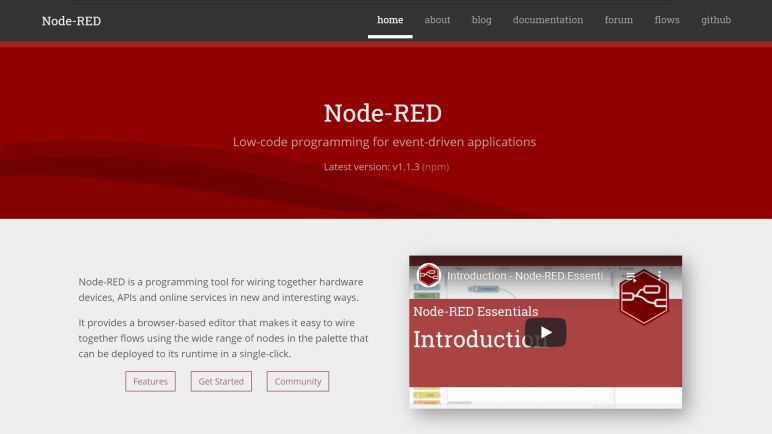
To address both of these points, I pulled Node-RED into the mix. I’ve played with this flow computing tool earlier and I think my current project aligns well with the strengths of Node-RED. The voltage conversion process, specifically, is a type of data transformation people do so often in Node-RED that there is a standard node Range for this purpose. Performing voltage conversion in a Range node means I could fine-tune the conversion and update by clicking “Deploy” which is much less cumbersome than recompiling and uploading an Arduino sketch.

Node-RED also allows me to carry both the original and converted data through the flow. I use a Change node to save original ADC value to another property before using Range to convert ADC value to voltage. Now I have a Node-RED message with both original and converted data. Now I need to put that into the database, and I searched the public Node-RED library for “InfluxDB” and I decided to try node-red-contrib-stackhero-influxdb-v2 first since it explicitly supported version 2 of InfluxDB. I’m storing the raw ADC values now even though I’m not doing anything with it yet. The idea is to keep track so in the future I can explore voltage conversion on the data consumption side.

To test this new infrastructure design using MQTT and Node-RED, I’ll pull an ESP32 development board out of my pile of parts.


Here is my Node-RED function to package data in the format expected by node-red-contrib-stackhero-influxdb-v2 InfluxDB write node. Input data: msg.raw_ADC is the original ADC value, and msg.payload the voltage value converted by Range node:

var fields = {V: msg.payload, ADC: msg.raw_ADC};
var tags = {source: 'batt_monitor_02',location: 'lead_acid'};
var point = {measurement: 'voltage',
      tags: tags,
      fields: fields};
var root = {data: [point]};
msg.payload = root;
return msg;

My simple docker-compose.yml for running Node-RED:

version: "3.8"

services:
  nodered:
    image: nodered/node-red:latest
    restart: unless-stopped
    ports:
      - 1880:1880
    volumes:
      - ./data:/data

Routing Data Reports Through MQTT

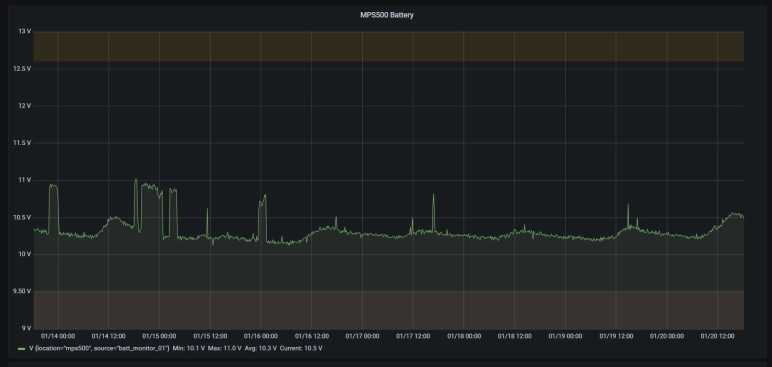
Once a read-only Grafana dashboard was up and running, I had end-to-end data flow from voltage measurement to a graph of those measurements over time. This was a good first draft, from here I can pick and choose where to start refining the system. First thought: it was cool that an ESP8266 Arduino could log data straight to an InfluxDB2 server, but I don’t think that is the best way to go.

InfluxDB is a great database to track historical data, but sometimes I want just the most recent measurement. I don’t want to have to spin up a full InfluxDB client library and perform a query just to retrieve a single data point. That would be a ton of unnecessary overhead! Even worse, due to the overhead, not everything has an InfluxDB client library and I don’t want to be limited to the subset that does. And finally, tracking historical data is only one aspect of the system, at some point I want to take action based on data and measurements. InfluxDB doesn’t help at all for that.

To improve these fronts, I’m going to add a MQTT broker to my home network in the form of a docker container running Eclipse Mosquitto. MQTT is a simple publish/scribe system. The voltage measuring node I’ve built out of an ESP8266 is a publisher, and InfluxDB is a subscriber for that data. If I want the most recent measurement, I can subscribe to the same data source and see it at the same time InfluxDB does.

I’ve read the Hackaday MQTT primer, and I understand it is a popular tool for these types of projects. It’s been on my to-do list ever since and this is the test project for playing with it. Putting MQTT into this system lets me start small with a single publisher and a single subscriber. If I expand on this system, it is easy to add more to my home MQTT network.

As a popular and lightweight protocol, MQTT enjoys a large support ecosystem. While not everything has an InfluxDB client library, almost everything has a MQTT client library. Including ESP8266 Arduino, and InfluxDB in the form of a Telegraf plugin. But after looking over that page, I understand it is designed for direct consumption and has little (no?) options for data transformation. This is where Node-RED enters the discussion.


My simple docker-compose.yml for running Mosquitto:

version: "3.8"

services:
  mqtt-broker:
    image: eclipse-mosquitto:latest
    restart: unless-stopped
    ports:
      - 1883:1883
      - 9001:9001
    volumes:
      - ./config:/mosquitto/config
      - ./data:/mosquitto/data
      - ./log:/mosquitto/log

Using Grafana Despite Chronograf Integration

I’ve learned some valuable lessons making an ESP8266 Arduino log data into InfluxDB, giving me ideas on things to try for future iterations. But for the moment I’m getting data and I want to start playing with it. This means diving into Chronograf, the visualization charting component of InfluxDB.

In order to get data around the clock, I’ve changed my plans for monitoring solar panel voltage and connected the datalogging ESP8266 to the lead-acid battery array instead. This allows me to continue refining and experimenting with data at night when the solar panel generates no power. It also means the unnecessarily high power consumption also means the battery is being unnecessarily drained, but an ESP8266 on full power is still consuming only a small percentage of what my lead-acid battery array can deliver so I’m postponing that problem.

Chronograf was pretty easy to get up and running. Querying on the tags of my voltage measurement/table, plotting logged voltage values over time. This is without getting distracted by all the nifty toys Chronograf has to offer. Getting a basic graph allows me to explore how to present this data in some sort of dashboard, and here I ran into a problem. There doesn’t seem to be a way within Influx to present a Chronograf chart in a read-only manner. I found no access control on the data visualization dashboard, nor could I find access restriction options at an Influx users level. Not that I could create new users from the UI

Additional users cannot be created in the InfluxDB UI.

A search for more information online directed me to the Chronograf GitHub repository, where there is a reference to a Chronograf “Viewer” role. Unfortunately, that issue is several years old, and I think this feature got renamed sometime in the past few years. Today a search for “viewer role” on InfluxDB Chronograf documentation comes up empty.

The only access control I’ve found in InfluxDB is via API tokens, and I don’t know how that helps me when logged in to use Chronograf. The only way I know to utilize API tokens is from outside the system, which means firing up a separate Docker container running another visualization charting software package: Grafana. Then I could add InfluxDB as a data source with a read-only API token so a Grafana dashboard has no way to modify InfluxDB data. This feels very clumsy and I’m probably making a beginner’s mistake somewhere, but it gives me peace of mind to leave Grafana displaying on a screen without worry about my InfluxDB data integrity. This lets me see the data so I know the system is working end-to-end as I go back and rework how data is communicated.

For reference here is my very simple docker-compose.yml for my Grafana instance.

version: "3.8"

services:
  server:
    image: grafana/grafana:latest
    restart: unless-stopped
    ports:
      - 3000:3000
    volumes:
      - ./data:/var/lib/grafana

Initial Lessons on ESP8266 Arduino Sketch for InfluxDB

Dipping my toes in building a data monitoring system, I have an ESP8266 Arduino sketch that reads its analog input pin, converts it to original input voltage, and log that information to InfluxDB. Despite the simplicity of the sketch, I’ve already learned some very valuable lessons.

The Good

The Arduino libraries do a very good job of recovering from problems on their own, taking care of it so my Arduino sketch does not. The ESP8266 Arduino WiFi library can reconnect lost WiFi as long as I call WiFiMulti.run() periodically. And the InfluxDB library doesn’t need me to do anything special at all. I call InfluxDbClient.writePoint() whenever I want to write data. If the connection was lost since initial connection, it will be re-established and the data point written with no extra work on my part. I’ve had this sketch up and running as I’ve taken the InfluxDB docker container offline to upgrade to newer versions, or performed firmware updates WiFI access point which takes wireless offline for a few minutes. This sketch recovered and resume logging data, no sweat.

The Bad

ESP8266 ADC (analog-to-digital converter) is pretty darned noisy when asked to measure within a narrow range of its full range of voltages as I am. The full range is 0-22V, and I’m typically only within a narrow band between 12-14V. I tried taking multiple measurements and averaging them, but that didn’t seem to help very much.

This noisiness also made it hard to calibrate readings against voltage values as measured by my multi-meter. It’s not difficult to take a meter reading and calculation a conversion factor for an ADC reading taken at the same time. But if the ADC value can drift even as the actual voltage is held steady, the conversion factor is unreliable. Even worse, since the conversion is done in my Arduino sketch, every time I want to refine this value, I had to hook up a computer and re-upload my Arduino sketch.

Since I expect to add more data sources to this system, I also expected to query by source to see data returned by each. For this first iteration, I tagged points with the MAC address of my ESP8266. This is a pretty good guarantee of uniqueness, but it is not very human-friendly. Or at least not to me, as I’m not in the habit of memorizing MAC addresses of my devices.

The Ugly

As typical of Arduino sketches, this sketch is running loop() as fast as it could. Functionally speaking, this is fine. But it means the ESP8266 is always in a state of high power draw, with the WiFi stack always active and the CPU running as fast as it could. When the objective is merely to record measurements every minute or so, I could be far more energy efficient here.

Addressing these issues (and much more I’m sure) will be topic of future iterations. In the meantime, I have some data points and I want to graph them.


[Source code for this project is publicly accessible on GitHub]

Setting Up ESP8266 Arduino Sketch for InfluxDB

I think I’ve got the hardware side sorted out for building an ESP8266 that monitors voltage output of a solar panel, so it’s time to dive into the software side. I want to log this data into InfluxDB as a learning exercise, and the list of client libraries included a pointer to a GitHub repository for an InfluxDB client library for ESP8266 and ESP32 running on their Arduino core.

Arduino is not exactly the most fully featured development environment, so I’ve been doing my Arduino development using PlatformIO plugin of Visual Studio Code. However, this is the first time I’ve had to manually add a third-party library and it’s not the same as Arduino’s Library Manager so I had to go online for a little help like this forum thread. I learned I should go to https://registry.platformio.org/ and search for the desired library. Searching on “InfluxDB” resulted in several results, one of which is the same client library I found earlier but now with instructions on how to install into PlatformIO.

After compiling a simple test sketch, my serial output monitor returned gibberish. The key here is that baud rate must match between my platformio.ini configuration file:

monitor_speed = 115200

And my serial output initialization code in setup() function of my sketch:

  Serial.begin(115200);

Another configuration issue concern information necessary to connect to my home WiFi and my InfluxDB server. This little sketch needs that information to run, but I don’t want to include them in my source code since I intended to upload this to GitHub in a publicly accessible repository. I found a solution on StackOverflow: put my secret information in a separate secrets.h file. After I committed a basic version without any actual information, use the command git update-index --skip-worktree secrets.h to remove it from further Git activity. After that point, I could edit secrets.h and Git would not care to upload that information leaving my local secrets local, which is what I want.

Once all of these setup details were taken care of, I could dive into code and learn some valuable lessons out of the experience.


[Source code for this project is publicly accessible on GitHub]

Making a USB Data-Only Cable

My current microcontroller project uses a development board that has built-in hardware to take both power and programming/debugging data over USB. But I want to connect it to another power source, which means I need to disconnect USB power in order to avoid potential problems from dueling voltage regulators on the same voltage plane. My first attempt used a small jumper on the circuit board, but it looks pretty accident-prone, so I went with the backup plan: a USB data-only cable.

I hate having to resort to this solution, as I hate having USB cables that don’t do what I thought they did. This hatred was bred by USB power-only cables. They are frequently bundled with small electronics that charge their batteries via USB power and have no need for USB data communication. The problem is that these cables look identical to normal USB cables and it’s too easy to use them elsewhere not realizing they are power-only. I have spent far too much time debugging device communication issues only to realize my problem was a USB power-only cable in the mix.

A data-only cable is the same kind of cursed, but in reverse. Unfortunately, it is what I need now if I wish to debug a development board that already has its own power source. USB data communication is a differential signal protocol, so we really need only the two data lines. They are usually labeled D+ and D- on a diagram. When we cut open a wire, the convention is to have D+ on the green wire and D- on the white wire.

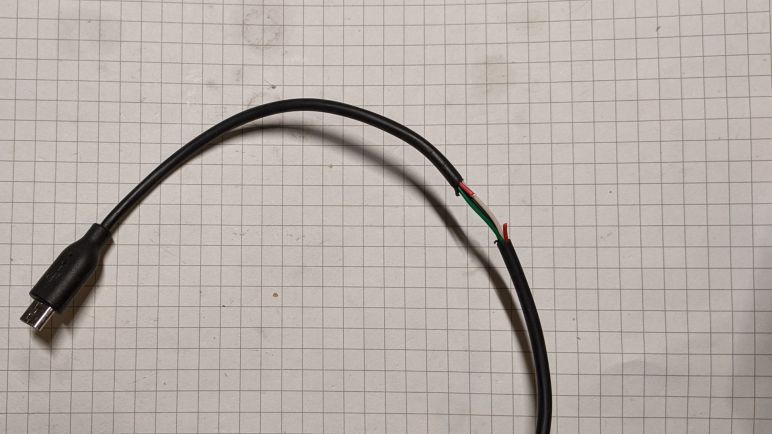
Black is ground by convention, and red wire for +5V USB power. I took one of my micro-USB cables and cut it open to expose these wires, then I cut the red wire. The nature of differential signals means their voltage difference relative to ground isn’t as critical, but I need to leave ground wire intact to make sure the ground planes on either end don’t drift too far apart. With the +5V line cut, there shouldn’t be much electrical current flowing through the ground line.

This serves my purpose but it isn’t great. For one thing, it confuses my computer. Apparently having three out of four wires alive triggers USB device insertion alert. When the cable is connected to the development board with its own power, everything works as expected. But when it’s just the cable without the board, Windows throws up an “Windows doesn’t recognize the last USB device you plugged in” alert. This tells me it is doing other weirdness behind the scenes. I hope it doesn’t damage the computer, and I’ll try to make sure I don’t plug the cable in by itself.

On the upside, the damaged insulation makes it pretty obvious I’ve hacked on this USB cable. I doubt I would ever unknowingly use this cable so I should never expect USB power from this data-only cable.

I hated having to do this, but this hacked-up cable will serve until I have a better idea. In the meantime, work can continue on my ESP8266 solar panel voltage monitor project.