Philips Sonicare (HX6530) Circuit Board and Charging Coil

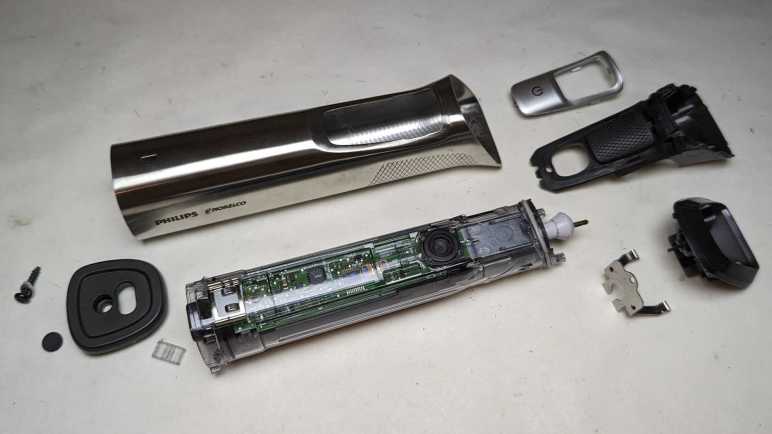
After disassembling my retired Philips Sonicare (HX6530) enough to access its internal circuitry, I paused to take a look at it under my oscilloscope. After completing that detour, the oscilloscope probes were put away, and the mechanical tools came back out to resume disassembly.

First to be freed was the circuit board. In addition to a few plastic clips (and one melted plastic rivet) it was held with six soldered connections: Two wires for the actuator coil, two for the battery, and two for the charging coil.

From left to the right, here are the components I recognized on the board:

  • A single green surface-mount LED, the only user visual feedback on this device
  • A single button, the only user input.
  • Six large pads. There’s solder on Rx and Tx because I wanted to see if it was transmitting serial data. (It did not.) Two of the pads are labeled Gnd and they both electrically connected to ground. The remaining two pads are labeled Vdd and Vpp, and I don’t understand how they differ. They both seem to show the current battery voltage.
  • Two resistors R1 and R3, then the two Alpha & Omega field effect transistors Q1 and Q2.
  • Two more resistors R5 and R4, than the two pads leading to actuator coil.
  • A through-hole for the battery positive terminal, leading to F1 and an unoccupied pair of pads. The component sitting at F1 has a small “P” printed on it and it doesn’t look like a resistor. Thinking of electronic things that start with “F” and would make sense at the battery terminal, I think this is a safety fuse. The unoccupied pair of pads has a thin trace connecting them. I guess this is a provision to put something in line with battery power: we can cut that trace then solder something on those pads.
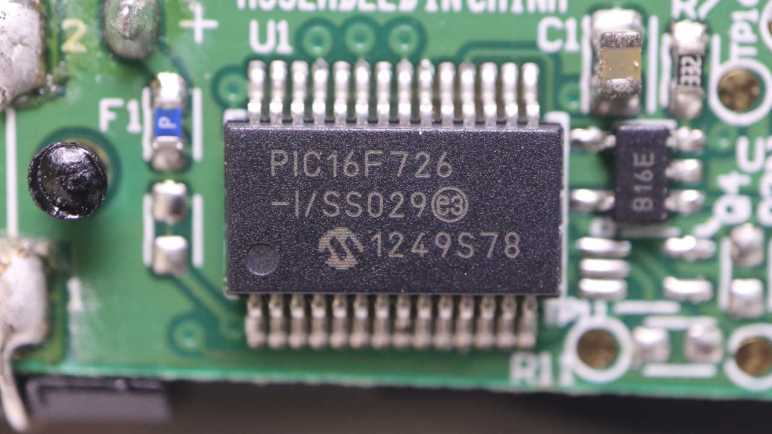
  • U1 is the Microchip PIC16F726 microcontroller.

I got lost after this point. There are many unpopulated pads, I presume features for higher end models. SW2 would be for another switch, but what might sit at BZ1? Some of these components would deal with power coming in from the charging coil (connected at the holes on either side of the CR6 lettering) and maybe for battery management. The positive battery terminal connection point was mentioned earlier, the negative terminal connects to the upper-right hole adjacent to lettering JP1.

Speaking of the battery, unsoldering its connection to the circuit board freed it from the chassis. Now we can read the lettering on its side telling us it is a 14500 form factor (14mm diameter, 50.0mm length) cylindrical cell with a capacity of 680mAh (milli-Amp hours).

The charging coil stayed on the black rigid plastic chassis, but now that it is freed from the circuit board I hooked it up to the oscilloscope again for another look.

Left plot was taken while the charging coil was connected to the circuit board, right plot is the coil by itself. Note the vertical scale has changed between these two plots: 1V/div on the left and 5V/div on the right. The most obvious difference is the shape: it is now a sine wave instead of a square wave. The amplitude is much larger at about 30V peak-to-peak or 15V above and below the center point. This is roughly triple the rectified 5V I saw earlier. I don’t know enough about analog electronics to know what would accomplish this on the now-removed circuit board, maybe in the future.

With the electronics disassembled, my attention returned to the electromechanical actuator assembly.

Philips Sonicare (HX6530) Under Oscilloscope

I’m partway through disassembling a retired Sonicare electric toothbrush, far enough to see all the internal components. The likelihood of irreversible damage rises sharply from this point. Before I do anything destructive, I wanted to check out some electrical characteristics under my oscilloscope.

The biggest chip on this circuit board is a Microchip PIC16F726 microcontroller.

Next largest are a pair of chips with the logo of Alpha & Omega Semiconductor. A brand I’ve encountered in a few previous teardowns as a provider of field-effect transistors. Their 8801 is a pair of P-channel FET and the 8808 is a pair of N-channel FET, sitting close to the actuator coil wires.

I didn’t see any other significant-looking chips on this board. I thought there might be a lithium-ion battery management chip like a 4056, but I found no likely candidates. Perhaps such tasks are handled in software running on that PIC16F726.

First target: big test pads labeled “Tx” and “Rx”. These names usually denotes serial communication and I was curious if there’d be any sort of diagnostic messages during runtime. I don’t know any of its parameters (voltage, baud rate, etc) so the first pass is to look at them under the oscilloscope. As a user, there were only a few events I can trigger: start/stop brushing, and start/stop charging. I was disappointed but not surprised to see no electrical activity on these pads. The chip is staying quiet until it sees the right access code, which I don’t have.

Second target: the inductive charging coil. Channels 3 and 4 were connected to either end of the coil and plotted relative to battery negative as ground. The plot on the left has both channels 3 and 4, the plot on the right has only channel 3.

I had expected to see a 60Hz sine wave on this coil when sitting on the charging base, which runs on household power ~120V AC @ 60Hz. What I saw had a period of around 11us, which translates to about 90 kilohertz. That was a surprise, as well as the amplitude. I had expected it to be symmetric about the ground plane but it’s actually going from about 0V to 5V. And finally, it is a square wave and not a sine wave. In short, I expected none of this and I don’t understand what I’m looking at.

I left the toothbrush on the charging base connected to the oscilloscope until the status LED went from blinking (“charging”) to steady on (“charge complete”). I measured the battery voltage at 4.1V at this point. I thought perhaps the inductive charging coil would look different when it’s not actively charging, but it looks pretty much the same.

Third target: the brush actuator coil driven by those Alpha & Omega FETs. Again channels 3 and 4 were connected to either end of the coil and plotted relative to battery negative. The plot on the left has both channels 3 and 4, the one on the right only has channel 3.

When actively brushing, the coil is activated in one direction (~5V on channel 3, 0V on channel 4.) for roughly 1.25ms. Then both ends are grounded for roughly 0.7ms. Then the coil is energized the other way (0V on channel 3, ~5V on channel 4) for roughly the same duration.

Every 30 seconds the brushing pauses and the toothbrush issues a “beep’ to remind us to switch to a different set of teeth. I had been curious if this was implemented as reduced voltage level or reduced coil energizing cycle. The answer is the latter: all of the time periods described above shortens by roughly 25%, that was enough to stop the coil from brushing but enough to cause an audible beep.

After watching the brush actuator waveform for a few cycles, the toothbrush fell silent and the waveform collapsed to a single phase. Oh no, what happened?

One of the coil wires had broken. It was designed to handle stress of brush vibration, but not with the additional weight of an oscilloscope probe. That was too much and metal fatigue took care of the rest. Well, I’ve seen what I wanted to see so this is a good place to stop my oscilloscope examination and resume mechanical disassembly.

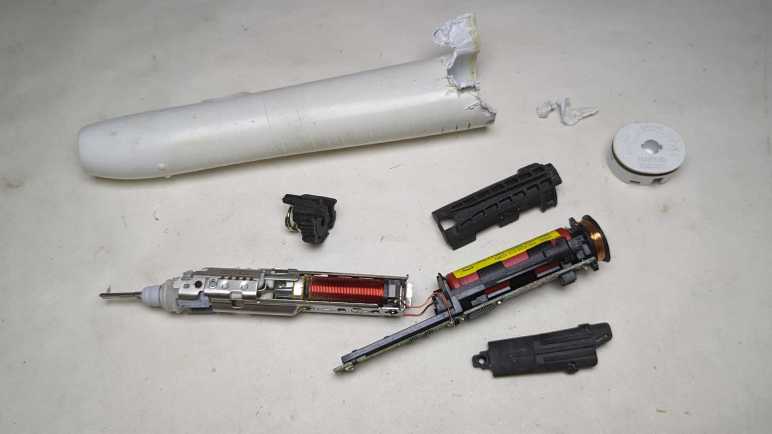
Philips Sonicare (HX6530)

After wrapping up a teardown (and unexpected repair) of a Philips product, I decided that was a good teardown theme and proceeded to another retired product from a different Philips subsidiary: Sonicare.

This Sonicare HX6530 could still vibrate the toothbrush head, but it could no longer clean effectively. Its degradation was long and gradual enough I didn’t notice until my dental hygienist commented on my worsening dental buildup. I tried a new Sonicare and realized I should have retired this HX6530 long ago.

Some of the newer Sonicare have been designed to be easily opened for battery recycling, we just have to push on the metal toothbrush stem. This older model is locked up tight and not so easily opened. I thought maybe clamping the plastic will flex and break some glue joints, but nothing interesting happened.

Using my also-much-degraded Wondercutter (a topic for another post) I cut an entry slot and started prying away with pliers. I quickly got far enough to confirm there’s a black rubber O-ring as water barrier.

More prying later, I reached a piece of black plastic that looked like a latch. Once all its surrounding plastic has been pried awayI tried pushing on the metal stem again.

Cutting one latch away weakened the holding power of the remaining latch, so this time a firm push on the metal stem was enough to push everything out of the enclosure.

There are definite signs of water intrusion inside, such as these dried deposits near the tip.

There was also rust near the interface between the coil and the armature. Unlike hair trimmers, reciprocating motion is not created here with a spinning motor shaft turning a crank. Instead it appears to be using a pair of coils facing a magnet.

I didn’t see an obvious candidate to explain why this toothbrush degraded. The signs of water intrusion didn’t seem sufficient to damage the electromechanical assembly, and all components appear intact on the circuit board. The battery voltage measured 3.8V DC, within nominal range.

I had expected the battery to be a single lithium ion cell in the commodity 18650 form factor. It turned out to be a much smaller cylindrical cell made by Sanyo. Here it is next to a 18650 cell for size comparison. Also visible to the left is the coil for interacting with the charging base.

I could peel three large pieces off the core. They are all made of soft vibration-absorbing material, the midships piece incorporated a spring for even more vibration absorption. It makes sense that keeping vibration under control would be an important mechanical engineering consideration for this device. It’s not just for user comfort, they have to make sure it doesn’t shake itself apart!

I was encouraged by the few Philips-head screws I could see at the base of the electromechanical assembly, thinking I might be able to disassemble it non-destructively.

That hope was dashed when I saw the other end of these two metal pieces were welded together. Oh well! Going further will be a destructive act. Before I do that, though, I want to probe the electrical aspects of this device.
Philips Norelco Multigroom Revived (MG7790)

I retired my Philips MG7790 hair trimmer because it would stop in the middle of a haircut. Its red LED flashing an error, which usually means the battery has run out of juice. But it would do this within a few minutes after fully charged, very disappointing when it was advertised with up to six hours of runtime on a full battery. I decided the battery has degraded and maybe replacing its battery would get it back up and running. I disassembled its internals to get to the battery, a single lithium-ion cell in the commodity 18650 cylindrical form factor.

Measuring the battery’s voltage, I expected to see a low value somewhere below 3.5V. But it actually read 4.1V which is effectively full for a healthy single lithium-ion cell. Maybe its voltage would drop under a bit of load? I started the motor running, and the voltage barely budged. It stayed close to 4.1V as the motor spun freely for twenty minutes, longer than it’s done recently.

If the battery is fine, I have misdiagnosed the issue. I started thinking about possibilities:

  1. I originally thought it was premature death of a dodgy battery. But the cell was made by LG and generally speaking they know what they are doing in the field of battery manufacture. Especially a well-known commodity form factor like 18650 cylindrical cells.
  2. A battery would suffer accelerated wear if it was undersized for the task. But with up to six hours of runtime on a full charge, this battery is massively overprovisioned and shouldn’t have been stressed.
  3. Perhaps the stress came from premature death of a motor component. As a quick test, I spun the motor shaft by hand while the thing was turned off. It turned smoothly and without any squeaking noises, so it’s probably not due to premature bearing death. Besides, it was a genuine Mabuchi, they know motors.
  4. Perhaps this was a result of poor overall system design? But this isn’t a cheap no-name budget priced item. Philips/Norelco has been in this business for a long time, and they should know what they are doing.

What have I missed? This is a mechanically simple device and there aren’t too many other things for me to look at. I started thinking about my twenty-minute runtime test, which had the motor spinning without driving anything.

The red LED pulsed during this test. Since the voltage was high and the motor was still running, that red LED must be complaining about some problem other than low battery.

During the teardown I unsoldered the battery from the circuit board, the first time they’ve been separated since factory assembly and the first time this circuit board has been completely without power. Maybe the pulsing red LED is complaining about some sort of cold startup condition? I plugged in the AC adapter to let it charge up to full. After that, the red LED stayed dark if I started the motor. I guess it needed to do some sort of battery calibration/reference on external power.

But now there’s no error, what should I look at next? During these tests, the motor spun freely because everything was still disassembled, and it was not possible to attach a cutting element. Process of elimination says I should take a closer look at that cutting element.

For comparison, both Conair and Remington hair clippers had two prominent fasteners holding the static blade in place.

Once the static blade was removed, we could clean all around the reciprocating blade. As seen here on the Conair unit.

When we could remove to access the motor driven crank volume and clean hair out of there, too. As seen here on the Remington unit.

Back to this Philips, whose cutting element incorporated both static and reciprocating blades. It’s easy to pop them off as a single unit to access this hair chamber as per cleaning instructions. The manual doesn’t say anything about taking the cutting element apart, but I’m going to do it because I am running out of places to look.

The static blade is held by a pair of tiny little Torx screws, more annoying than those easy large fasteners of Conair and Remington hair clippers. Once the static blade was freed I could see the volume between static and reciprocating blades is fully packed with fragments pressed together into a nearly solid brick of hair. The cleaning instruction never mentioned cleaning this area. The tiny little self-tapping plastic screws won’t last many fasten/unfasten cycles implying this wasn’t intended to be a user-serviceable cleaning area.

Being packed with hair fragments meant the reciprocating blade would have required more motor effort to move, which in turn would have increased strain on the circuit and battery. Maybe this was why the battery drained quickly, or perhaps the red LED didn’t signify low battery at all. Perhaps the motor stalled, or perhaps the motor control circuit overheated. I have no idea what that red LED was trying to tell me, but I certainly didn’t get “you need to disassemble and clean the cutting element” from a dull red LED.

Once all of the packed-in hair was removed and the cutting element reassembled, the reciprocating blade was much easier to move by hand. I tested this repair by reassembling everything and trimmed my hair with it. This time, the motor didn’t stop partway through the process. Yay, success! Since I already had a newer unit in service, I will keep this older unit around as backup. It’s no longer waterproof, but it runs again. As a bonus, this episode also taught me valuable lessons on how to clean the newer unit to keep it healthy.

Philips Norelco Multigroom Internals (MG7790)

I’ve managed to disassemble the exterior components of a retired Philips Norelco Multigroom (MG7790) which made only a moderate mess with its hair fragments trapped within. In earlier hair clipper teardowns, that was enough for me to access all internal components. However, this unit is IPX7 waterproof which meant everything is inside a clear plastic watertight capsule.

The control circuitry is much more sophisticated than those in the two earlier hair clippers, though I’m not sure why. At the end of the day, this just needs to turn a motor on or off. Perhaps there’s battery management as well? The little of blue peeking through various gaps in this enclosure hints at a single lithium-ion battery in a commodity 18650 cylindrical cell form factor.

The motor is genuine Mabuchi! A pioneering giant for small DC motors, I usually encounter knockoffs of popular Mabuchi designs instead of a genuine Mabuchi. Either that, or it’s a counterfeiter brazen enough to print the Mabuchi logo on their wares. I’d like to think Philips/Norelco uses the real thing.

The bottom of the clear plastic capsule is sealed with a black plastic plug at the bottom, held in place with four beefy clips. I had hoped to release those clips peacefully, but I shattered some of the clear plastic. The cracks extended past the watertight O-rings, meaning I’ve managed to destroy its waterproof worthiness.

Not much to lose now! Feeling liberated because I don’t have to worry about preserving its watertight seals, I tore apart the retaining mechanism. This clear plastic was interesting: most of it is tough and ductile under stress like a polycarbonate, except infrequent times where it shatters like brittle acrylic. I wish I knew more plastic engineering to better understand this material’s behavior.

I thought the black plastic plug at the end was a separate piece of plastic from the structural chassis for all internal components. It turns out to be a single piece, so everything slid out together.

The chip that seems to be in charge is stamped with 10368A F15 H3G7A. A web search found a likely candidate in the Renesas RL78/G12 family of microcontrollers. The R5F10368 variation has 8KB of code flash, no onboard data flash, 768 bytes of RAM. It comes in a 20-pin TSSOP package which matches what’s on this board.

If I’ve correctly identified the controller, it means this is a very software-centric minimalist application because this MCU lacks onboard peripherals befitting the hardware. (Comparison: the MCU in this smoke detector is optimized to be a turnkey smoke detector solution.) There’s no obvious motor control peripheral like hardware PWM, though perhaps an offboard MOSFET would suffice as it only needs to turn the motor on/off. There’s no explicit lithium-ion battery management capability like a 4056 chip, but there is an A/D converter that would be suitable for monitoring battery voltage.

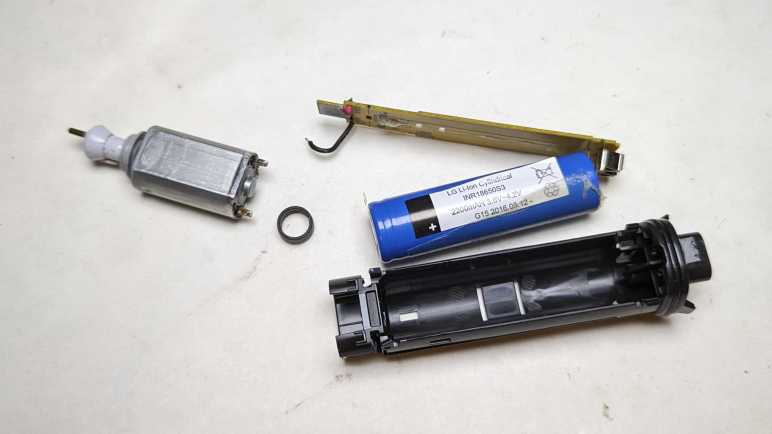
Speaking of the battery, separating the circuit board from the chassis exposed the battery. The label says:

LG Li-Ion Cylindrical
INR18650S3
2200mAH 3.6V~4.2V
G15 2016.08.12

I retired this trimmer because the motor would stop in the middle of a session, even when fully charged, so I decided the battery has degraded. I thought it might be fun to replace the battery cell and see if that gets it back up and running, hence the concern about trying to preserve the watertight barrier. But as it turned out, I had misdiagnosed the problem.

Philips Norelco Multigroom Enclosure (MG7790)

After my Remington hair clipper‘s batteries failed, I had to shop for a replacement. Costco had the Philips Norelco Multigroom (MG7790) on sale and I thought I’d give it a shot. Rather than a single wide fixed-size cutting blade, the Multigroom came with multiple cutting elements to serve different hair cutting/trimming purposes. The tradeoff for this versatility is that the widest flat cutting element is around 2/3 the width of the Remington hair clipper blade. Part of being a smaller and lighter weight device, which I learned to appreciate during its few years of use. I didn’t end up using the other cutting elements very much, and the narrower width wasn’t a significant detriment in my usage pattern.

After a few years of use, the motor would stop running in the middle of a session even if I fully charge the battery immediately beforehand. The manual claimed a fully charged battery can deliver up to six hours of use, but I couldn’t even get ten minutes! I bought a replacement and placed this unit in the teardown waiting list alongside the Conair and Remington hair clippers, where they waited until now.

The two old hair clippers both had a sticker telling us to properly recycle their nickel-cadmium batteries within. There was no such label here telling us of the type of rechargeable batteries used. The power adapter operates at 15V DC, far above the voltage range of any battery pack I would expect to see within. This implies a voltage buck converter in the charging circuit, a level of sophistication I associate with lithium chemistry battery management systems.

An important detail for teardown purposes is at the bottom of multigroom label: “IPX7” followed by a faucet icon. This device is waterproof enough to be rinsed clean under running water and can tolerate being briefly submerged in water if we accidentally drop it in the tub. Waterproofing makes teardowns difficult because the interior may be glued shut and/or buried under epoxy resin. Even if they weren’t, a teardown may irreversibly damage the water barrier.

The AC adapter uses this vaguely B-shaped plug that I haven’t seen anywhere else, possibly proprietary to Philips/Norelco. Next to the charging port at the base is a Torx-headed screw hidden under a rubber cover. That looks like a good place to start.

The base plate came free easily. Loose fit and no seals meant the waterproof barrier must be further within. Disappointingly, nothing else budged after this plate was removed, so I started looking at the other end.

Different cutting elements can be easily snapped on and off the top. When removed, we can see the motor-driven crank. The manually aptly referred to this as the hair chamber. It’s easy to dump out loose hair, but the many small corners meant it takes a lot of work to clear out every little piece. Going in with a cotton swab, I got enough of the corners cleared out to see three small fasteners (combination Torx and flat head) buried underneath.

Releasing those three small self-tapping plastic screws allowed hair chamber disassembly, releasing a lot of trapped hair along the way. Now the guts of the device can slide back and forth around 3-5mm, but not quite freed yet.

The last piece of the interlocking puzzle was the power button, which was held by multiple clips that also served as tabs holding multiple internal elements together. I damaged one clip removing it.

The internals slid out as a single piece enclosed in clear plastic. The motor pokes out the top, a rubber dome on the side pushes on the power switch, and a plug of dark gray plastic sealed the bottom. Numerous rubber O-rings made it clear this was the water barrier. Getting inside non-destructively proved to be a challenge.

Remington Hair Clipper (HC-920)

I used my Conair HC318R hair clipper for several years. Until its batteries couldn’t hold enough charge to last a single cutting session, at which point the blades were pretty worn as well. It was replaced by a Remington HC-920 which was itself retired after several years of service. Tearing down a retired hair clipper will scatter tiny bits of hair all over my workbench, so I’m working through my backlog of three retired clippers all at once.

Going into this second teardown, I expect to find minor execution detail differences between these two broadly similar devices. Previous compare-and-contrast teardowns included two inexpensive coffee makers (Black and Decker DCM600B vs. Mr. Coffee BVMC-SC05BL2-1) and two chop-type coffee grinders. (Hamilton Beach CM04 80344 vs Bodum 11160-3)

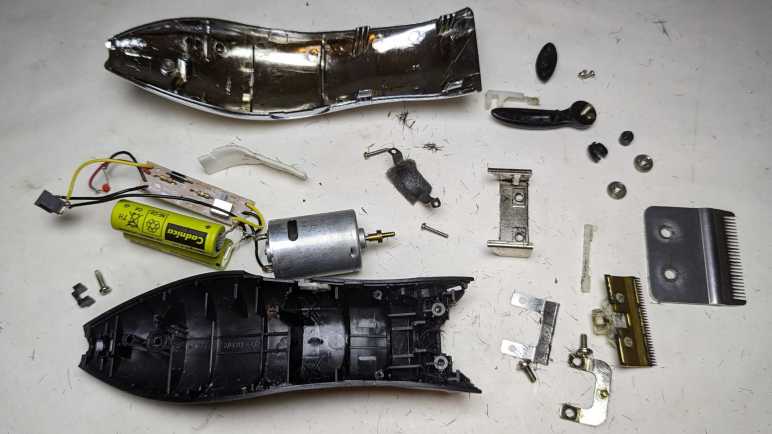
I picked up the first major difference from the product label: the Conair listed 4.5V but this Remington only lists its voltage at 3V. This implies two nickel-cadmium battery cells in series instead of three as in the Conair. Theoretically it meant the Remington was less powerful, but if so, the difference wasn’t enough for me to notice. This may be because I didn’t have a fair back-to-back comparison. I would have been comparing the Conair with worn-out blades and batteries against a new Remington.

Both clippers had two prominent Philips-head screws on the cutting head, allowing easy removal of the outer fixed blade less-easy removal of the inner moving blade. This allows us to clean out hair that may have accumulated between the two blades or against the motor-driven crank seen here. This Remington used machine screws threaded into a piece of metal, which should be more durable and longer-lasting than Conair’s approach of using screws that self-tap into plastic. In practice, the longevity was not a problem, though that may be more a commentary on my cleaning frequency (not very) than on mechanical design.

There were two less-prominent screws holding the thing together. One at the base of the handle, and one in the length-adjustment lever. They were recessed but otherwise exposed on the Conair, the Remington added cosmetic covers over them for better aesthetics. Once removed, a metal bracket at the front (what the cutting head machine screws held into) could be slid off, then we can open the enclosure.

Unlike the Conair, Remington has this additional metal strap to hold the motor in place. There’s a piece of foam between the strap and the motor to dampen vibration. The strap are held by a pair of Philips-head screws which had this orange material on top. It may just be a thread locking mechanism, but having orange stuff in the fastener head made things more difficult to remove.

As inferred by the 3V DC listed outside, there is a pair of Sanyo-made AA-sized nickel cadmium battery cells inside.

As I lifted the innards, I could see some external signs of failure on this battery cell. Not sure if this is corrosion from leaking chemicals or something else, all I know is I should avoid touching it.

The Remington circuit board is even simpler than Conair’s board, showing a slightly different evolution. Here R1 was deemed unnecessary and replaced with a solder bridge.

All disassembled components will meet fates similar to their Conair counterparts. Metal will be recycled, plastic will go into landfill. The battery will be added to a collection of nickel-cadmium batteries that will be turned in for responsible disposal. The charging barrel jack will stay with the AC adapter for potential reuse.

I started removing this shiny brass metal crank from the motor output shaft but changed my mind. First, unlike the Conair motor mount + crank, it didn’t trap much hair and could be cleaned up. Second, it was fastened very tightly and would be a lot of effort to remove. Third, I might want to build a reciprocating motion device at some point, and it’d be handy to have this motor already set up ready to go. Fourth, it looks really nice I wouldn’t know what else to do with it anyway.

And finally, there’s no rush. I already have a nearly identical motor salvaged from the Conair unit, with the plastic crank already removed. I’ll worry about removing that piece of brass onceI have an actual need to do so. Right now, I have a third hair clipper to take apart.

Conair Hair Clipper (HC318R)

I have a set of retired hair clippers on the teardown to-do list. My hair are like bristles in a stiff wire brush, and wears down cutting blades quickly, fresh clippers only keep their “oh wow, this cuts nice” feeling for the first half-dozen or so sessions. I use one for a few years until its rechargeable battery degrades. By that point, its blades are dulled enough to be tugging and pulling hair while cutting. Between the battery and the blade, it was time for a new one.

I’ve been avoiding these teardowns because I knew it would get messy, given the short fragments of hair clinging to every surface of these clippers via either lubrication oil or static electricity. I knew I will find small pieces of hair everywhere for weeks after each teardown. But the paper liner on my workbench is starting to get dirty enough for replacement, and I saw an opportunity: I can do these messy teardowns and throw away the liner, hopefully easing cleanup.

First up is the Conair HC318R. Information embossed on the back of the device was hard to photograph, but it says:

(C) CONAIR CORPORATION, EAST WINDSOR
NJ 08520 / GLENDALE, AZ 85307
MODEL HC318R 4.5V DC 1000mA
USE WITH ADAPTER CA12
MADE IN CHINA
HOTLINE 1-800-3-CONAIR

Next to this information is a small tag informing me the device contains nickel-cadmium battery and must be recycled or disposed of properly. I expect to find three cells wired in series given the 4.5V DC written on the device.

If somebody has the clipper but not the charger, here are the specifications on its label. The charging port looks to be a pretty standard barrel jack wired to be center-positive.

There were two very large and easily accessible Philips-head screws on the blade. Removing them frees the outer blade, allowing us to clean inside.

The inner blade lifts away to expose the motor-driven crank.

Opening the enclosure allows a look inside.

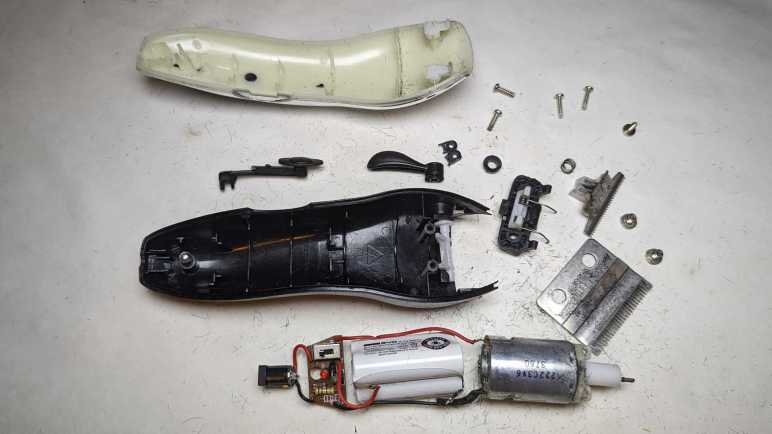
Behind the motor sat the expected three-cell nickel-cadmium battery pack, each cell is the size of an AA battery.

There were no further fasteners holding the working bits in place. Once the enclosure was opened, the electrical guts are easily lifted out.

The battery pack manufacturer is BYD, the battery company that grew into an automotive manufacturing conglomerate. I measured less than 2V across its terminals, so it’s either severely discharged or there’s a dead cell in the pack. Neither would be a surprise after years of use followed by more years of waiting for teardown.

Thanks to decades of manufacturing at scale, nickel-cadmium batteries are cheap. They are also hardy and tolerant of abuse, which cut costs further because they don’t need sophisticated battery management electronics like lithium-based batteries do. Here we have just a small single-layer circuit board housing the power switch, two resistors, two diodes, and one light-emitting diode. M+ (motor positive) is connected to one side of the switch opposite B+ (battery positive). M- location was unused: it had a short trace to diode D3 which was also absent. Motor negative was wired to battery negative off board then a single wire led to B- on this board, which was electrically connected to the other end of the absent diode D3. Apparently, they decided D3 was unnecessary! Finally, L+/L- lead to the AC adapter barrel jack for charging.

The motor is marked with 222C3V6 3760 but I didn’t find much from that information. The crank is a piece of friction-fit plastic and slid off unexpectedly easily. The motor mount was installed with two small Philips-head screws and easily removed.

The barrel jack will stay with the AC adapter for possible future reuse. The motor will join many other salvaged motors. The battery pack will go in the nickel-cadmium battery recycle bag. The circuit board will go into the electronic recycle box. Metal blade and fasteners will go into metal recycle bin. Remaining plastic enclosure bits will go into landfill along with many bits of hair. I didn’t put too much effort into cleaning the workbench, because I had more hair clippers for teardown.

FreeCAD Notes: Mirror

FreeCAD offers multiple ways to constrain a distance: strictly along vertical axis, strictly horizontal, or the shortest distance between those two points. This is more direct than Onshape’s way of heuristically guessing user intent, and I can see myself learning to like it. What I will miss, though, is Onshape’s sketch mirroring mechanism that can mirror along arbitrary lines and maintain relationship with the original. FreeCAD 0.20.2 doesn’t seem to do either.

Many of my mechanical designs have symmetric features. Just as one example, a commodity micro servo is mounted via two tabs, each held with a small screw. The mounting tab and screw hole is symmetric about the center. I prefer not to duplicate effort by drawing two tabs and two screw holes. In Onshape, i can draw just one side and a line on my sketch representing the center. I can then use the mirror function to generate the other side. If I need to refine my sketch later, I can fine tune dimensions on the side I drew and Onshape will automatically update the mirrored side to reflect my changes.

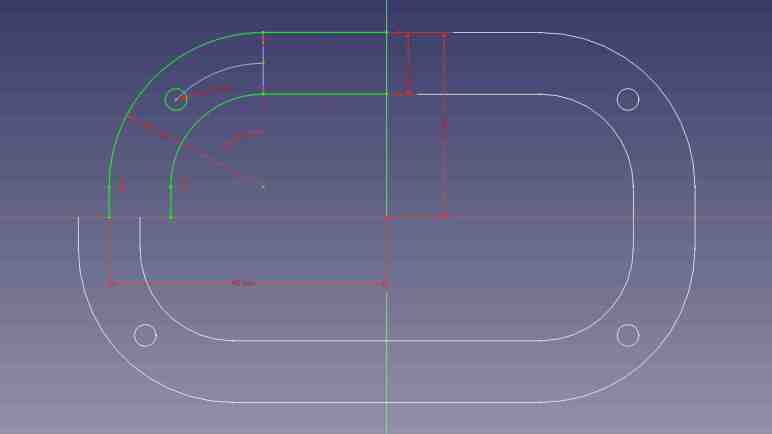
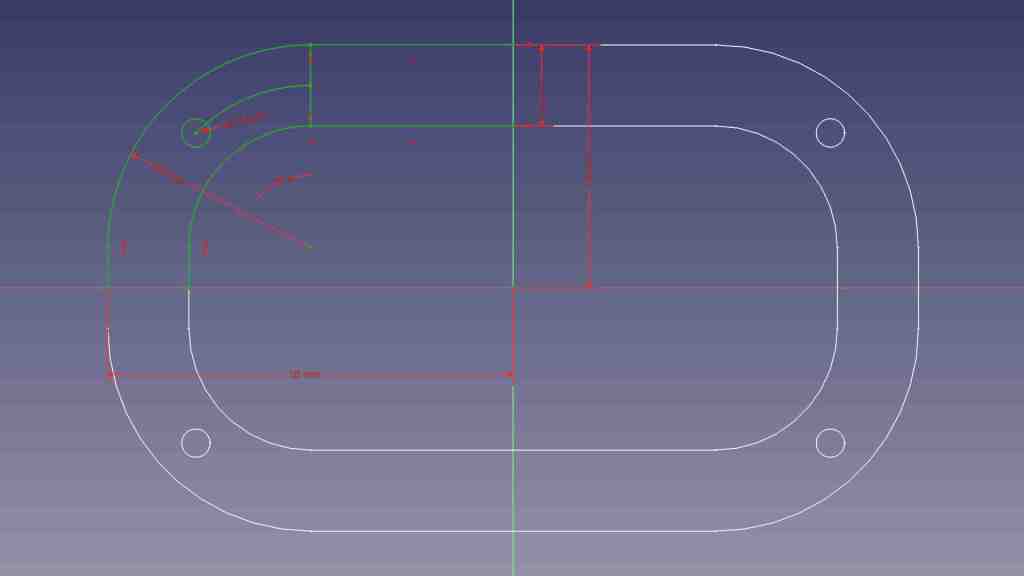
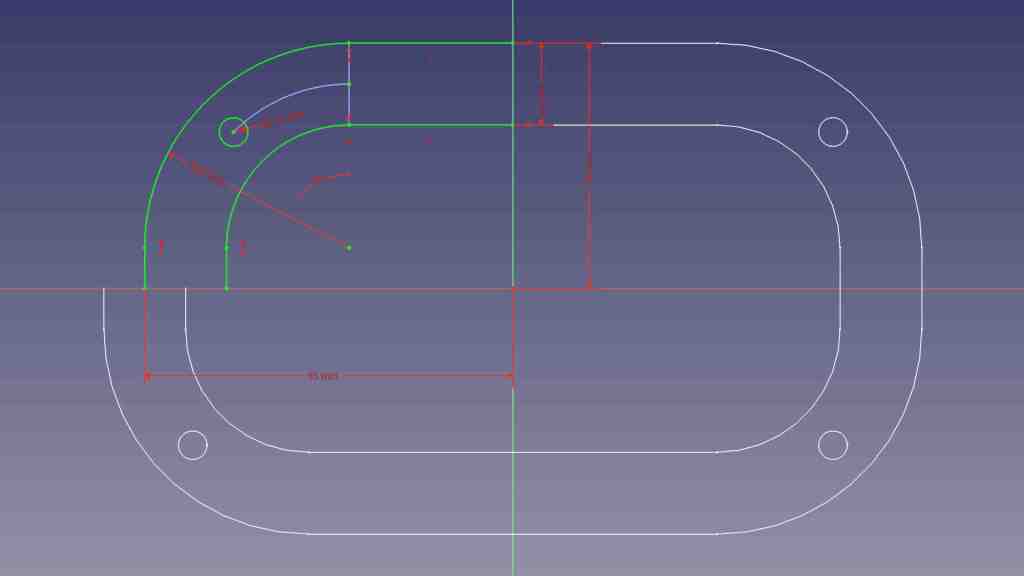
FreeCAD’s Sketcher workbench does have a “Mirror Sketch” feature, but it does not mirror about arbitrary lines in the sketch. It can only mirror about the X axis, the Y axis, or the Origin point which mirrors both X and Y. Here I’ve sketched out one quarter of a symmetric part (Displayed jn green) and mirrored it three times (about X, about Y, and about Origin. Displayed in white.) to create the entire perimeter of this test.

Furthermore, I didn’t get to select which feature to mirror. “Mirror Sketch” mirrors everything in the sketch and placed results in a new sketch, which seems to sever all association with the original sketch.

If I change a dimension in the original sketch, in this experiment the width, none of the mirrors were updated to reflect my change. There’s a “Merge sketches” feature to put everything back into the same sketch, but that doesn’t fix this problem.

There’s a good chance I can accomplish what I want with a different FreeCAD feature, much as how I wanted “Midpoint” and eventually found a solution via “Constrain symmetrical”. But as of this writing I haven’t found my desired functionality. Until I do, sketching symmetric features in FreeCAD will require duplicate effort sketching features that I could mirror in Onshape. I will then have to manually link duplicated features with “Constrain equal” so any future updates to critical dimensions will be properly propagated through symmetric features. This will not be a major dealbreaker against using FreeCAD, just mildly annoyed at the extra effort taking more time.

FreeCAD Notes: Distance

I’m on my FreeCAD learning journey and I’ve had to change some of my Onshape habits. For sketching, I was able to adapt from Onshape’s “Midpoint” constraint to FreeCAD’s “Constrain Symmetrical” once I figured out a workaround to avoid redundancy errors with FreeCAD’s implicit constraints.

I’m generally in favor of having one way to do something instead of offering multiple similar ways, so I’d be OK if it was a deliberate decision not to add a dedicated “Midpoint” constraint when “Constrain Symmetrical” is functionally equivalent. But I doubt it, because that’s not been the typical FreeCAD pattern. It already has two confusingly similar workbenches “Part” and “Part Design“, and multiple competing workbenches for assemblies. (It’s up to “Assembly3” and “Assembly4” now.) And right on the sketching constraints toolbar, where a “Midpoint” may have been deemed redundant, we have three separate tools to denote linear dimension: “Constrain horizontal distance”, “Constrain vertical distance”, and “Constrain distance.”

Each of these have valid use, because these distance constraints are driven by project requirements that may dictate we measure horizontally, measure vertically, or measure the direct line distance. Once I saw these three options listed side by side I immediately understood why they were there, but I was surprised because Onshape handled the problem differently.

In Onshape, there’s just a single dimension operation. In my experience it is usually a direct line measurement equivalent to FreeCAD’s “Constrain distance”. But sometimes I do need to constrain distance along a horizontal or vertical axis. In these cases, Onshape lets me drag the distance number away from the object. If I drag far enough away horizontally, it becomes a vertical distance constraint. The number is recalculated accordingly, and I can edit it afterwards as desired. A horizontal distance constraint is done similarly, by dragging the number away from the object either above or below vertically. This heuristic typically works well, but can be frustrating for features at a shallow angle: I would have to drag pretty far before Onshape understood I don’t want the shallow angle, I want horizontal/vertical.

With that experience in mind, I think I might come to prefer having three distinct and explicit methods to constrain a distance despite my typical preference to have a single way to do something. The only downsides with this approach are a bit of extra screen real estate taken up by the toolbar, and the fact I’ll eventually have to memorize three different keyboard shortcuts to become fluent at FreeCAD.

FreeCAD Notes: Midpoint

In between musing about VR projects and other random ideas, I’ve been returning to FreeCAD and learning my way bit by bit. After my initial introduction to Part Design workbench I’ve been gradually gaining proficiency with it. Learning FreeCAD required changing some patterns I’ve developed while working in Onshape. Such changes were expected for adopting a different software package, so this is not a surprise, but adjustment takes time. The first “that took longer than it should” switchover example was replacing Onshape’s midpoint constraint.

When sketching my design in Onshape, I frequently use the midpoint constraint to keep something in between two other things. Most commonly, I would place a point on a construction line and then select the midpoint constraint. FreeCAD doesn’t have a dedicated “Midpoint” constraint but, for putting a point in the midpoint of a line, I should be able to use the “Symmetrical” constraint to accomplish the same thing. But as soon as I impose the “Symmetrical” constraint on my point and line, everything turns orange indicating some kind of an error. I pressed “Undo” so I could figure out a different way that wouldn’t cause an error. But no matter what I tried, things would turn orange.

After several attempts all ending in orange lines, I thought “Self, go understand the error message!” It took me a minute to figure out where the error was shown in FreeCAD’s interface, but once I did, I saw the error was “Redundant constraints: (61)” This was confusing to me because the point I had placed on the line was definitely not the midpoint, so the “Symmetrical” constraint was definitely required. What was the redundant constraint? FreeCAD’s list of problematic constraint was a single number 61, which told me nothing. Fortunately, the (61) was a link I could click to take me to a “Constrain point onto object” linking the point and line.

How did this happen? When I clicked to place a point on the line, FreeCAD tried to be helpful and automatically added a “Constrain point onto object” between the two. Not knowing this had happened, I blissfully proceeded to add “Constrain symmetrical”. Doing so made “Constrain point onto object” redundant because a line’s midpoint is by definition always on that line.

In other words: FreeCAD implicitly added a constraint and, when I made my wish explicit, complained that my explicit specification collided with its implicit inference. That was annoying, I had nothing to do with that implicit constraint but now I have to deal with it. Or do I? Looking at FreeCAD’s user interface immediately below where “Redundant constraints (61)” was shown, I saw a checkbox for “Auto remove redundants”. Hey, that sounded promising!

Except it was not useful. I checked that option and tried again. When I clicked to add a point on the line, it still added “Constrain point onto object” as before. Then when I added “Constrain symmetrical”, FreeCAD looked at the two conflicting constraints and automatically removed the more recent one: “Constrain symmetrical”. Which is to say, FreeCAD deleted my explicit wish in favor of its own incorrect guess. Bah.

Once I understood what happened, I could devise a workaround. When adding the point, I have to be careful to click in the empty space near the line but not on the line. Doing this meant FreeCAD would not add “Constrain point onto object” so when I explicitly specify “Constrain symmetrical” afterwards there would be no redundancy to cause problems. This would be a minor change in my behavior, and I think I’ll get the hang of it quickly like FreeCAD’s distance constraint feature.

Idea: Unity LEGO Microgame in VR

A quick survey found no official LEGO-branded VR titles, but there were a few LEGO-adjacent brick building VR titles each catering to slightly different target demographic. And it’s quite possible that people would find none of them appealing, since VR is still a new area of development and has no shortage of novel ideas that might be worth a try. [Update: there is a LEGO MR title now.]

Unity 3D built its userbase on the sales pitch of realizing ideas quickly and go to market. While a competent software development team can write their own variation of all functionalities provided by Unity, it might not be cost/time effective to do so. Might it be true here? Here’s what I see after thinking over such a project idea:

Take LEGO Art Assets…

To prototype a LEGO VR idea in Unity, it wouldn’t be necessary to build LEGO art assets from scratch. There’s already a lot available in the Unity LEGO Microgame tutorial. Certainly not the full slate of LEGO pieces, but more than enough to try out ideas. If those ideas pan out, only then would the legal questions come into play. There were a lot of Terms & Conditions attached to the officially licensed LEGO assets made available for the Unity tutorial, preventing any commercial exploitation. As I understand it, we can’t even publish it for free except at the dedicated Unity tutorial sharing portal. Which is based on WebGL and runs within a browser, so it’s probably not a VR-friendly deployment.

Hobbyists toying with ideas are probably fine, anybody contemplating going beyond will need to hire lawyers.

Add Unity XR Interaction Toolkit…

The Unity LEGO Microgame tutorial plays from an over-the-sholuder third-person perspective using standard game movement. (Keyboard WASD, gamepad joystick, etc.) To port that into a VR environment, we can pull in Unity’s XR Interaction Toolkit which is advertised to handle all of the low-level VR/AR mechanics. Things shared by all VR titles like tying headset movement into camera movement. Interfacing with generic VR handheld controller capabilities, from buzzing motor tactile feedback to piping controller motion and position back into the game engine.

Then Things Get Complicated!

Once we have a simplified palette of LEGO art assets to work with, and low-level VR infrastructure taken care of, the challenge is designing the user experience for a fun game. This is the hard part. As an improvement over non-VR LEGO titles (Builder’s Journey, Bricktales, etc) I wanted to make camera viewpoint control intuitive by tying it to VR headset movement. Moving a LEGO brick around means somehow tying it to the 6DOF data coming in from a handheld controller. These would be the foundational aspects of building LEGO bricks in VR.

Things get more uncertain from there. What’s the best way to organize and manage the palette of available LEGO pieces in a VR environment? I don’t want to put up virtual shelves of boxes of LEGO pieces that a user has to go paw through, that would be an unnecessary and frustrating level of skeuomorphism. We’re in a digital world, we should be able to build what’s effectively a database query to narrow down the set of pieces we want. How would that work in a VR world? I feel there’s room for improvement (even without VR) over some existing search mechanisms for LEGO parts (examples from LDraw and Bricklink) but it’s only a vague feeling without any well thought out design proposals on my part.

Once we have a part in our virtual hand, we have an entirely different set of problems. We’d need what amounts to a physics engine that can solve constraints of LEGO pieces fitting together. For the classic LEGO build experience, it would need to understand how LEGO studs fit together. To support Technic-style studless construction, it would need to understand the pins and holes on the beams. If ambition gets as far as building and running Technic motors and gearboxes… I don’t even know where to start.

So, Probably Not

This is where my line of thought stopped. At this point it is already far more ambitious of a project than I can reasonably expect to carry to completion. I’ll shelve the project idea so not to bite off more than I can chew. I’m sure somebody (or multiple somebodies) will take a stab at the general idea. I wish them success and look forward to playing around with what they’ve built.

[UPDATE: After writing the above, search engines picked up on my interest and showed me links to BrickMasterVR, another brick-building VR title currently under development.]

Building with (Non-LEGO) Bricks in VR

I failed to find any LEGO VR titles, though that search did teach me there are ways to put existing non-VR games into VR headsets with a special video driver. Maybe there’ll be official LEGO licensed VR titles in the future [UPDATE: the future has arrived] but if that’s something I really want now, there are several LEGO-adjacent VR titles.

Minecraft VR

The most obvious is Minecraft, which has frequently been described as a digital-native counterpart to LEGO. Looks like there’s a way to explore and build Minecraft worlds with a VR client. Based on the screenshots I found, it doesn’t look like they changed the game very much for this VR adaptation. In other words, probably not much more than running a standard client under vorpX.

BricksVR

Minecraft may have transferred a lot of LEGO ethos to the digital world, but it doesn’t look much like actual LEGO pieces. BricksVR is much more LEGO-like in its bricks, and has a great deal focus on multiplayer online activities. Both in terms of sharing creations online and in terms of multiplayer interactions. Building together, exploring built creations together, and looks like they even have brick-based multiplayer mini games.

The SteamVR version of BricksVR has been discontinued, purportedly due to low player count. This is now exclusive to the Oculus ecosystem. The game is still under development (it was “Early Access” on Steam before taken offline, and is still in “App Lab” for Oculus) so maybe they just wanted to focus on one platform while they get things nailed down. Perhaps they’re trying to hook into Meta’s whole Metaverse thing? I don’t know. What I do know is that, unless I want to shell out a couple hundred bucks for an Oculus headset, BricksVR is out of my reach.

Brickbuilder VR

In contrast, Brickbuilder VR (also “Early Access” on Steam) looks much more interesting. It doesn’t seem to have the multiplayer capabilities of BricksVR, but it has something much more interesting to me: LEGO Technics style of hardware creations. Look at this screenshot from the Steam store page for Brickbuilder VR:

I see gears, I see axles, I see levers, I see linear motion rails. Even a virtual remote control for a motor, currently active on Channel 1. Promotional material for Brickbuilder VR also included footage of a clock, a model of a steam locomotive, and other “functional” machinery. This looks really cool! The Steam reviews, unfortunately, made it clear Brickbuilder VR still needs more bake time. Many reports of crashes and other undesirable behavior, and its VR interface is still under-developed. Ah well, I can keep an eye on it to see if it matures into something interesting.


What about “if you want it done, do it yourself”? I briefly toyed with the idea of building my own LEGO VR experiment. Many foundational pieces are already in place, but things get complicated quickly.

[UPDATE: After writing the above, search engines picked up on my interest and showed me links to BrickMasterVR, another brick-building VR title currently under development.]

Updating Ubuntu Battery Status (upower)

A laptop computer running Ubuntu has a battery icon in the upper-right corner depicting its battery’s status. Whether it is charging and if not, the state of charge. Fine for majority of normal use, but what if I want that information programmatically? Since it’s Linux, I knew not only was it possible, but there would also be multiple ways to do it. A web search brought me to UPower. Its official website is quite sparse, and the official documentation written for people who are already knowledgeable about Linux hardware management. For a more beginner-friendly introduction I needed the Wikipedia overview.

There is a command-line utility for querying upower information, and we can get started with upower --help.

Usage:
  upower [OPTION…] UPower tool

Help Options:
  -h, --help           Show help options

Application Options:
  -e, --enumerate      Enumerate objects paths for devices
  -d, --dump           Dump all parameters for all objects
  -w, --wakeups        Get the wakeup data
  -m, --monitor        Monitor activity from the power daemon
  --monitor-detail     Monitor with detail
  -i, --show-info      Show information about object path
  -v, --version        Print version of client and daemon

Seeing “Enumerate” as the top of the non-alphabetized list told me that should be where I start. Running upower --enumerate returned the following on my laptop. (Your hardware will differ.)

/org/freedesktop/UPower/devices/line_power_AC
/org/freedesktop/UPower/devices/battery_BAT0
/org/freedesktop/UPower/devices/DisplayDevice

One of these three items has “battery” in its name, so that’s where I could query for information with upower -i /org/freedesktop/UPower/devices/battery_BAT0.

  native-path:          BAT0
  vendor:               DP-SDI56
  model:                DELL YJNKK18
  serial:               1
  power supply:         yes
  updated:              Mon 04 Sep 2023 11:28:38 AM PDT (119 seconds ago)
  has history:          yes
  has statistics:       yes
  battery
    present:             yes
    rechargeable:        yes
    state:               pending-charge
    warning-level:       none
    energy:              50.949 Wh
    energy-empty:        0 Wh
    energy-full:         53.9238 Wh
    energy-full-design:  57.72 Wh
    energy-rate:         0.0111 W
    voltage:             9.871 V
    charge-cycles:       N/A
    percentage:          94%
    capacity:            93.4231%
    technology:          lithium-ion
    icon-name:          'battery-full-charging-symbolic'

That should be all the information I need to inform many different project ideas, but there are two problems:

  1. I still want the information from my code rather than running the command line. Yes, I can probably write code to run the command line and parse its output, but there is a more elegant method.
  2. The information is updated once every few minutes. This should be frequent enough most of the time, but sometimes we need more up-to-date information. For example, if I want to write a piece of code to watch for the rapid and precipitous voltage drop that happens when a battery is nearly empty. We may only have a few seconds to react before the machine shuts down, so I would want to dynamically increase the polling frequency when the time is near.

I didn’t see a upower command line option to refresh information, so I went searching further and found the answer to both problems in this thread “Get battery status to update more often or on AC power/wake” on AskUbuntu. I learned there is a way to request status refresh via a Linux system mechanism called D-Bus. Communicating via D-Bus is much more elegant (and potentially less of a security risk) than executing command-line tools. The forum thread answer is in the form of “run this code” but I wanted to follow along step-by-step in Python interactive prompt.

>>> import dbus
>>> bus = dbus.SystemBus()
>>> enum_proxy = bus.get_object('org.freedesktop.UPower','/org/freedesktop/UPower')
>>> enum_method = enum_proxy.get_dbus_method('EnumerateDevices','org.freedesktop.UPower')
>>> enum_method()
dbus.Array([dbus.ObjectPath('/org/freedesktop/UPower/devices/line_power_AC'), dbus.ObjectPath('/org/freedesktop/UPower/devices/battery_BAT0')], signature=dbus.Signature('o'))
>>> devices = enum_method()
>>> devices[0]
dbus.ObjectPath('/org/freedesktop/UPower/devices/line_power_AC')
>>> str(devices[0])
'/org/freedesktop/UPower/devices/line_power_AC'
>>> str(devices[1])
'/org/freedesktop/UPower/devices/battery_BAT0'
>>> batt_path = str(devices[1])
>>> batt_proxy = bus.get_object('org.freedesktop.UPower',batt_path)
>>> batt_method = batt_proxy.get_dbus_method('Refresh','org.freedesktop.UPower.Device')
>>> batt_method()

I understood those lines to perform the following tasks:

  1. Gain access to D-Bus from my Python code
  2. Get the object representing UPower globally.
  3. Enumerate devices under UPower control. EnumerateDevices is one of the methods listed on the corresponding UPower documentation page.
  4. One of the enumerated devices had a “battery” in its name.
  5. Convert that name to a string. I don’t understand why this was necessary, I would have expected the UPower D-Bus API should understand the objects it sent out itself.
  6. Get an UPower object again, but this time with the battery path so we’re retrieving an UPower object representing the battery specifically.
  7. From that object, get a handle to the “Refresh” method. Refresh is one of the methods listed on the corresponding UPower.Device documentation page.
  8. Calling that handle will trigger a refresh. The call itself wouldn’t return any data, but the next query for battery statistics (either via upower command line tool or via the GetStatistics D-Bus method) will return updated data.

Window Shopping vorpX

Thinking about LEGO in movies, TV shows, and videogames, I thought the natural next step in that progression was a LEGO VR title where we can build brick-by-brick in virtual reality. I didn’t find such a title [Update: found one] but searching for LEGO VR did lead me to an interesting piece of utility software. The top-line advertising pitch for vorpX is its capability to put non-VR titles in a VR headset.

It’s pretty easy to project 2D images into a VR headset’s 3D space. There are lots of VR media players that projects movies on a virtually big screen, and vorpX documentation says it can certainly do the same as the fallback solution. But that’s not the interesting part, vorpX claims to be able to project 3D data into a VR headset in 3D. This makes sense at some level: games engines are sending 3D data to our GPU to be rendered into a 2D image for display on screen. Theoretically, a video driver (which vorpX pretends to be) can intercept that 3D data and render it twice, once for each eye in our VR headset.

Practically speaking, though, things more complicated because every game also has 2D elements, from menu items to status displays, that are composited on top of that 3D data. And this is not necessarily a linear process, because that composited information may be put back into 3D space. Back-and-forth a few times, before it all comes out to a 2D screen. Software like vorpX would have to know what data to render and what to ignore, which explains why games need individual configuration profiles.

Which brings us to the video I found when I searched for LEGO VR: YouTube channel Paradise Decay published a video where they put together a configuration for playing LEGO Builder’s Journey in a Oculus Rift S VR headset via vorpX. Sadly, they couldn’t get vorpX working with the pretty ray-traced version, just the lower “classic” graphics mode. Still, apparently there’s enough 3D data working for a sense of depth on the playing field and feeling of immersion that they’re actually playing with a board of LEGO in front of them.

For first-person shooter type of games using mouse X/Y to look left-right/up-down, vorpX can map that to VR head tracking. When it’s not a first-person perspective, the controls are unchanged. VR controller buttons and joysticks can be mapped to a game controller by vorpX, but their motion data would be lost. 6DOF motion control is a critical component of how I’d like to play with LEGO brick building in VR, something vorpX can’t give me, so I think I’ll pass. It’ll be much more interesting to experiment with titles that were designed for VR, even if they aren’t official LEGO titles.

LEGO On Screen

I was annoyed by the fact LEGO frequently changed the electrical connectors used in motorized sets. Well, more frequently than they changed their mechanical standards (which was never) but I admit not compared to how fast some other things change. Like entertainment technology. LEGO realized their brand had appeal beyond physical bricks clicking together, and thus spawned entertainment properties with varying levels of fidelity about building LEGO. Here are some that I’ve come across:

The least interactive are movies and TV shows where we just passively watch characters onscreen. Sure, the people are shaped like LEGO figures inhabiting a world built of LEGO bricks, but the audience doesn’t affect that world in any way, nor could we explore it at our own direction.

For interactivity, we have to go to LEGO-themed videogames. My favorite in this category is the LEGO Speed Champions expansion for Forza Horizon 4. But that’s mostly because I enjoyed the driving game independent of the expansion’s LEGO theme. Still, it’s a lot of fun to experience the Forza Horizon driving game mechanics in LEGO cars in a LEGO world. While player actions in this world affect the in-game LEGO world, it’s not a brick-by-brick build because that’s not what we do in a driving game. Unlike a passive TV/movie show, though, I could explore the world by choosing where to stop and take a closer look at all the wonderful details of these digital LEGO constructions.

The next tier of games are mostly (exclusively?) by Traveller’s Tales development studio, set in various worlds where LEGO already have licensed merchandise. LEGO Star Wars, LEGO Harry Potter, etc. In these adventure games, the player can build LEGO creations, which puts it above purely aesthetic games like Forza Horizon. However, when I got to play it firsthand, I was disappointed to find that “building” consisted merely of walking our character to a pile of bouncing bricks and holding down a button. We see a scripted animation of LEGO construction, and out pops the completed product.

I found such one-button builds unsatisfying, so when I learned there existed LEGO games that depict individual brick manipulation construction, I was intrigued:

  • LEGO Builder’s Journey: I learned about this title from a SIGGRAPH 2021 presentation, where a member of the developer team talked about how they used Unity’s High Definition Rendering Pipeline to show digital LEGO pieces onscreen. They didn’t want to show digitally perfect bricks, they wanted to show bricks with all the subtle surface imperfections of real-world injection molded pieces of ABS plastic that’s seen some playtime. Their work paid off: the game looks gorgeous. From a game design perspective, they keep the player from being overwhelmed by limiting both the number of LEGO bricks in play at any given time and keeping the playing field small.
  • LEGO 2K Drive: Thanks to a free play weekend promotion, I learned this game was more cartoony and Mario Kart-y than Forza Horizon 4 LEGO expansion. While it does offer the ability to build our vehicles brick-by-brick (not possible in FH4+LEGO) unfortunately the game style just didn’t pull me in. I think it’ll be a lot of fun for the right audience, I’m just not in that group.
  • LEGO Bricktales: I’ve played the free demo where I can see it lacked the visual fidelity of Builder’s Journey but it does offer a wider scope. The playing fields are larger, and there are more pieces in play at any given time. To compensate for this, the game also has guardrails (usually figuratively but sometimes literal) to keep the player from getting too lost. The demo was fun enough for me to contemplate buying the full game.

The brick-by-brick construction interface are slightly different between these games, but they all had to solve the same basic challenge: manipulating virtual LEGO bricks in 3D space on a 2D screen. I’m sure I can get better with practice but as a beginner it can get frustrating to build under such restrictions. I don’t blame the game designers, they had to work with a pretty fundamental limitation. Following that train of thought, I’d like to see if a LEGO brick construction game would work well in virtual reality. It seemed like such a natural progression I was surprised I couldn’t find any LEGO VR titles on the market today. Perhaps in the future? [Update: Yes, in the future.] For today, if I really want to see LEGO in VR it can be done but in a limited fashion.

LEGO Electrical Connector Evolution

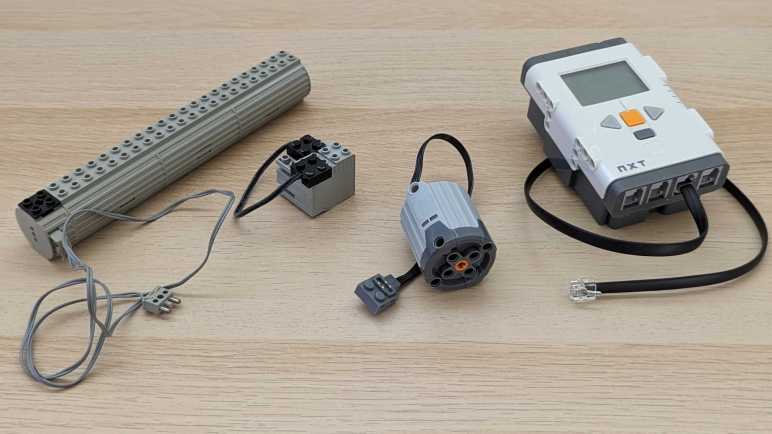
The most legendary aspect of LEGO bricks is the fact they’ve kept the dimensions compatible for decades. Maintaining such precision meant bricks made today can click into bricks I’ve had since I was little. Mechanically, the only deviation was their “studless” construction theme, which is a niche controversy I won’t get into right now. New pieces are constantly being introduced with novel desirable properties, but they all click together in some way. However, the same could not be said of various LEGO forays into motorizing creations. Just in the various on-and-off times I’ve played with LEGO, I’ve managed to collect four incompatible motor control systems. Here are representatives from each generation, sorted left-to-right in order of age.

At the far left is the battery tray and switch for the oldest system. The battery tray is sized for three “C” sized batteries, which hasn’t been in common household use for years. The switch toggles between two different ways to connect positive and negative power to wires, driving a motor either forward or back. It was possible to drive multiple motors simultaneously with multiple ports on the switch. Each plug can also accommodate another plug inserted on the side, but stacking connectors that way quickly becomes unwieldy.

To solve that problem, somebody had the idea that LEGO electrical connectors should conform to LEGO brick form factor. Such was the case for the gray cube which is a motor from the first-generation LEGO Mindstorm set. It was successful at letting us stack multiple motors in parallel, but there must have been some kind of problem motivating a change.

The gray cylinder represents the LEGO “Power Functions” line, which is very focused on studless construction except the connector, which is the same LEGO 2×2 size as Mindstorm RCX connector but with only two standard LEGO studs instead of four. The other half houses four electrical contacts.

Then I guess the person who felt LEGO electrical connectors should be LEGO bricks retired. Because that idea went out the door for Mindstorm NXT. Its style of electrical connector resembled landline telephone cables but was not compatible with them.

Today, fancy LEGO bricks use the “Powered Up” system, linked by yet another type of connector that remind me of SATA plugs for a computer’s data storage drive but not identical.

That’s at least five different ways LEGO has implemented electrical connections, and maybe there were more but I’m not enough of a LEGO historian to know. Why were these changes made? Some clue can be found in technical documentation written by people like Philippe “Philo” Hurbain who dissected and reverse-engineered their valuable LEGO components. Reading those pages, I understand the evolution as follows:

  1. The oldest system that used triple C cells only worried about powering a DC motor, so it’s just two pins for going forward or reverse at full speed.
  2. The first-generation Mindstorm system had to accommodate more than motors: it also had to support sensors, so more wires were added.
  3. The “Power Functions” system didn’t need to support sensors, but it did simultaneously provide raw battery positive/ground as well as PWM-controlled motor forward/reverse within a single connector.
  4. The NXT system also supplied power and ground. Instead of PWM-controlled forward/back, it had more sophisticated I2C data communication.
  5. The current generation “Powered Up” system supplies power and ground lines for simple accessories such as a simple LED. It has a pair of PWM-controlled lines to run simple motors forward/back at varying speeds. And finally, it has asynchronous serial data lines for sensors and other smart peripherals.

Seeing how it covers all the scenarios, would the “Powered Up” system be the final word in LEGO electrical connections? Or would it just be yet another standard that will soon go away? We will have to wait and see how things play out. In the meantime, we don’t have to pay hundreds of dollars for LEGO sets for a taste of the LEGO life, there are many depictions of LEGO on screen in movies, TV, and video games.

Implementing Novel LEGO Design Gets Expensive

Sometime after I bought my second LEGO Mindstorm NXT set, I conceded I had to give up on my idea of building a large enough LEGO collection to build whatever I can think up. I had thought it would be a matter of buying enough sets to have a sufficient base collection of important pieces. After all, how many of those can there be? The harsh answer: more than I can afford.

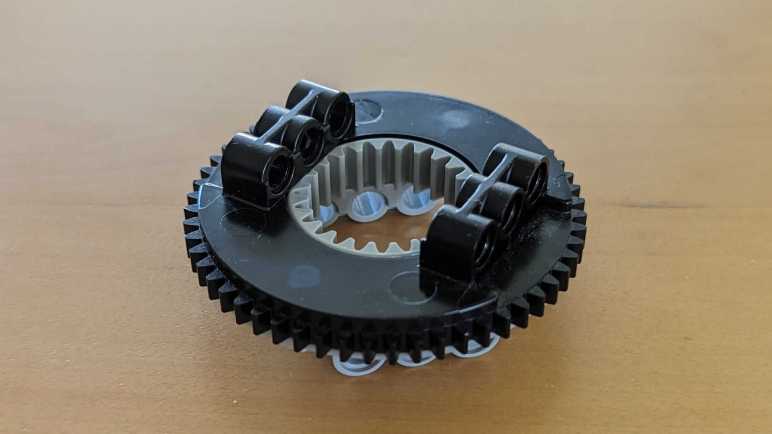
Exhibit A: This LEGO Technic turntable. It consisted of two pieces that snap into each other and can rotate. Geared teeth both inside and out allow building motorized mechanisms for one or the other (or both) pieces. This piece is critical for building any rotating mechanism that demands more strength than a single LEGO axle can support. It formed the base for a crane in both the Crane Truck and Unimog U400 sets, and also the pivoting point between the base and body of the Motorized Excavator.

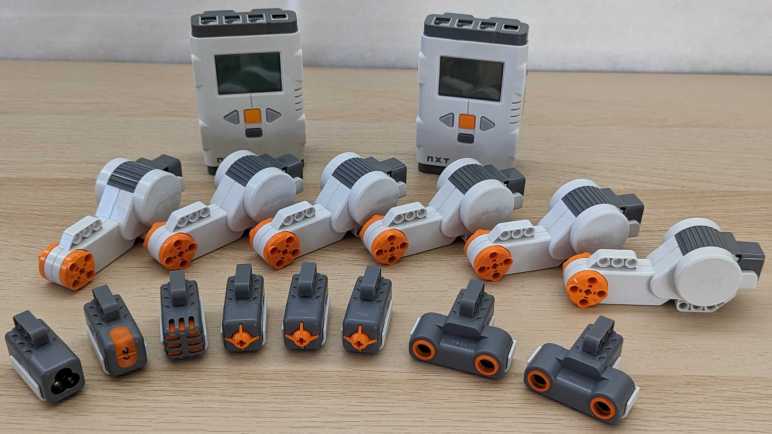
I had forgotten I was obsessed by this piece. The aforementioned three Technic sets were all interesting in their own right, but seeing this turntable reminded me my long-term goal was building a LEGO Mindstorm NXT robotic arm. A robot manipulator with just 3 degrees of freedom isn’t very interesting, and that’s why I bought a second NXT set to give me six NXT motors and six degrees of freedom. Structurally, the end manipulator might be something an NXT motor can handle directly. But as I worked out the design from finger to wrist to elbow to shoulder joint, I realized I need something beefier than just a LEGO axle in an NXT motor. Enter the LEGO Technic turntable: I would need several of them for a 6DOF robot arm.

But these turntables are rare. Only one in each of the Technic sets I bought, and none of those sets were exactly cheap. Furthermore, as I built those three sets, I would encounter and learn about even more interesting pieces I would want to incorporate into my own LEGO Technic creations. This was exciting until I stepped back and did some math. I realized buying enough sets to get me enough special pieces (not just turntables) will cost thousands of dollars. Furthermore, as I collect parts towards a long-term plan, there’s no guarantee LEGO wouldn’t switch up something important partway through this process forcing a costly redesign. As much as I’ve enjoyed LEGO, given all of these issues, I decided to stop spending my disposable income this way.

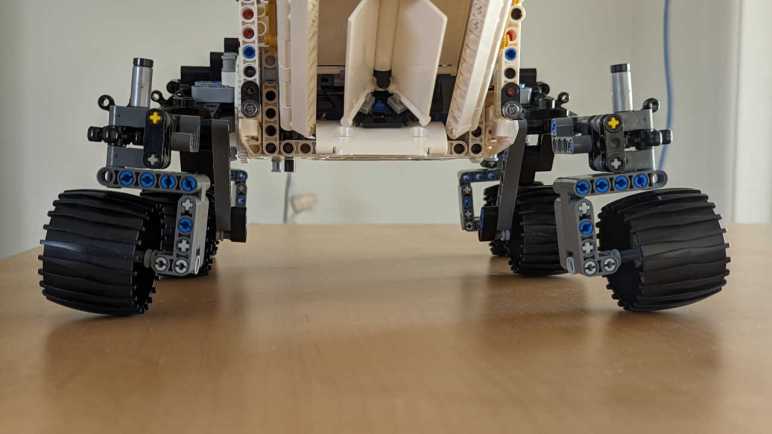
Until, that is, the Mars Rover Perseverance set that kicked off this LEGO nostalgia tour. And putting it together, I was very amused to see a familiar face: the turntable rendered in white+gray instead of black+gray in earlier sets. It was used for the stressful job of main rover suspension joint to either side of rover body. The geared teeth inside and out were unused in this case, but the axles to transmit corner steering forces did pass through its center. I didn’t know they were used in this set when I decided to buy it (just being a LEGO rover was enough) but the fact two turntables are used in this rover set meant I’ve accidentally stumbled into the most cost-effective way to acquire turntables years later. I had a good laugh at my own expense, but I’m not interested in reviving my old project idea of an NXT robot arm for multiple reasons. There’s the fact I’m far fonder of 3D printing now, that LEGO had discontinued the Mindstorm line, and even if I want to build it independent of now-discontinued Mindstorms, LEGO had changed their motor connectors again.

LEGO Mindstorm Struggles

I love building LEGO Technic sets according to their in-box instructions, it’s a great joy to see small mechanisms add up to impressive machinery. I’ve wanted to use those same parts to turn my ideas into reality, but I’ve struggled to do so. Some of my frustration were about the mechanical limits of LEGO pieces, but there was an electronic component as well: LEGO Mindstorms.

Before the era of cheap and plentiful Arduino IDE compatible microcontrollers from online marketplaces, hobby roboticists options were significantly more expensive. The only options I could realistically afford were Parallax BASIC Stamps. I remember filling out a paper order form and mailing it, along with a check worth a significant fraction of my checking account, to order my own. In this environment, the LEGO Mindstorm line held tremendous promise: a full soup-to-nuts package from software development environment to runtime hardware to mechanical construction via LEGO Technic bricks.

But the target market for LEGO Mindstorm is just a bit off from where I was. Intended to be easy for beginners, I chafed at the limitations imposed by multiple layers of abstraction. I didn’t want to deal with drag-and-drop graphical UI when I was familiar with lower-level programming languages like C. And I especially didn’t appreciate times when the drag-and-drop UI didn’t let me express something I could see clearly in C in my head. (Years later, I would learn about ways to run C code directly on Mindstorm NXT bricks, but by then I had already moved on.)

On the hardware side, the LEGO Mindstorm line managed to be simultaneously too much and not enough. One specific example is the tremendously capable LEGO Mindstorm NXT Motor. Not merely a plastic shell around an electric motor, there were also reduction gear to make the rotation motion easily usable plus rotary encoder for closed-loop feedback operation. This meant each motor can act as either a position-based servo or a rotation-based gearmotor depending on software. It’s fantastic but that complexity also meant it was expensive and rare. Each NXT base kit had only three of these capable motors, severely constraining the degrees of freedom our Mindstorm creations can make. Almost every nontrivial NXT project I’ve seen required buying multiple sets just to get enough motors.

The same story repeats for many aspects of NXT ecosystem: sensors, runtime hardware bricks, etc. A basic kit can get us started with a “Hello World” equivalent, a line-following robot or something. But building anything nontrivial requires using multiple sets working together. After constantly bumping walls with my first Mindstorm NXT set, I bought a second set when NXT 2.0 was released. Having two sets were helpful but not nearly as helpful as I thought it would be. This is quite a deep hole to throw money into. By the time Mindstorm EV3 was released, I decided I had better options elsewhere.

LEGO Technic Limits, Big and Small

I just finished rebuilding a motorized LEGO Technic excavator, the third in a trio of large Technic sets I bought about ten years ago. I then stopped buying Technic sets until the recently released LEGO Technic Perserverance rover kicked off this nostalgia tour. I had forgotten why I stopped, but now that I’ve been reminded, I thought it would be worth writing down: LEGO Technic is great fun and lets me try out certain ideas almost instantly, but LEGO creations are mechanically constrained within a range due to parts availability. It takes a great deal of effort to go beyond this range, when it is possible at all.

The well-defined regular spacing of LEGO pieces is key to its easy modularity, but it also places a hard floor on how small we can build with official LEGO pieces. There are fractions: halves, thirds, quarters, but nothing in between. If I want to build something that interacts with a non-LEGO piece, matching the exact size is impossible. Example: if I wanted to build a coin-operated LEGO machine, I couldn’t build a coin slot exactly the size of a real coin. There exist unofficial 3D-printed parts to circumvent such size restriction. But if I’m using 3D printing, I’m more inclined to just do the entire thing with 3D printing and ignore LEGO.

Likewise, the selection of available LEGO pieces imposes a practical upper limit on what we can build. LEGO beams have a maximum length and anything larger requires joining multiple beams. And everywhere there is a joint, there is a small tolerance that could move. It’ll never be as strong or rigid as a single longer or thicker piece. My 3D-printed Sawppy rover can incorporate aluminum extrusion beams for structural strength, but such options are not available for pure LEGO creations. The Crane Truck chassis is very long by LEGO creation standards and is composed of many joined beams. Yet despite its sturdy construction, every time I pick up the crane truck I can hear and feel the crinkling sound of LEGO pieces flexing and moving, and the chassis sagging under its own weight.

To be fair, this is actually representative of challenges building real life machinery as well. Everything bends and twists under load, including real truck chassis. When I revisited the Technic site, I see the largest production set right now is 42146, modeling a Liebherr LR 13000 mobile crane. At that scale, those Technic beams are sure to wobble and flex. But beam flex happens on the real thing and must be accounted for in planning and operating real world cranes. So, I guess it’s realistic. But is it fun?

Beyond size limits on the big and small ends, there’s also the problem of building up intricate mechanisms via multiple LEGO pieces. Again, every joint introduces another point of movement and flexibility, which compounds into a floppy structure that might not even be able to hold itself up together in the face of gravity. Such was the case for the LEGO Technic Mars rover suspension. It was also true for all three of my large Technic sets, each of which featured an articulating arm and they all flop about when moved.

Every engineer learns to work within the constraints of a problem, and some people relish overcoming these mechanical challenges of building with LEGO. I thought I might become one of these people, but my frustrations went beyond the mechanical. LEGO also had ambition to incorporate electronics into the Technic line, and the 2010s were in the middle of the rise and fall of LEGO Mindstorm.