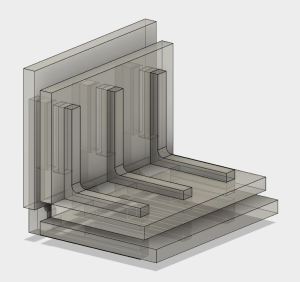
 The current goal is learning how to join pieces of acrylic without introducing tabs that weaken the acrylic pieces. I started simple: a simple corner join between two small pieces, and a fixture to help me do it.
Initially I thought that I should make the fixture out of something other than acrylic. This way, if the acrylic cement should seep into unfortunate locations, my fixture is not stuck to the work piece.
Then I realized if I wanted to make good looking joints, wayward glue would still be unacceptable in the result anyway. So for extra challenge I built the fixture out of spare scrap pieces of acrylic. It’s all part of the exercise: if it fails and I end up bonding my work piece to my fixture, learn what went wrong and incorporate into the next exercise.
Acrylic or not, the fixture needs to be designed so it stays clear from the features being joined. At least far enough that capillary action won’t wick the cement into places it shouldn’t go. I find this a pretty new and interesting constraint to designing geometry. Adding a lot of extra little slots and gaps to make sure no part of the fixture contacts the joint.
The fixture was successful at keeping the cement from wicking into places it shouldn’t be. The glue joint looked clear and beautiful, unmarred by wayward glue. But it had a pronounced lip. What went wrong?
I debugged my fixture’s flaw to the cutting laser’s kerf. The gap in my thinking is literally the gap cut by the width of the laser beam. This is something I neglected to account for when designing the geometry of the part, and it throws off the alignment of the work pieces in this particular fixture. Not by a whole lot – the caliper says less than 0.1mm – but enough to make the joint misalignment detectable by touch.
 Before diving into building FreeNAS box #2, I thought I’d take a pause and take a closer look at the acrylic construction results of experiment #1. This is purely about learning to build structures from acrylic – independent from the positive or negative aspects of the project as a computer enclosure.

 With the concept designed, it’s time to head over to Tux-Lab to build it!
 On the back side of the tilted-PSU, we see that the tilt has pressed the bottom of the PSU up against the wire bundle at the top of the motherboard. The tight quarters mean individual wires of the bundle tried to relieve the crowding by moving into the space for the PSU fan preventing it from turning. Since the PSU fan is the primary air-mover for this enclosure, a stopped fan is obviously not acceptable.
 New Screwdriver