
ROS Notes: Choosing Which Distribution

ROS-Lunar 400x400ROS gives creative names to each release, but the key part is that the names are in alphabetical order. When I looked into the ROS nodes to help control Dynamixel serial bus servos, I was confused as to their support of ROS distributions.

Both options supported the ‘K’ release (Kinetic Kame.) One of them seemed to have gotten stale, not getting maintenance or newer versions. The other one — officially built by Robotis — supported ‘K’ and ‘M’, skipping over ‘L’. There must be a reason, but why?

When I picked up learning ROS again this time around, I looked at the latest version M (“Melodic”) first. I saw it did not support Ubuntu 16.04. I needed to run Ubuntu 16.04 because of TensorFlow, so I went with the newest version that supported 16.04, which is how I ended up with Lunar Loggerhead. In hindsight, this was not the best choice. It appears every other distribution of ROS has a far shorter support life than its siblings, as seen on the list of ROS distributions. On this list, Kinetic Kame is marked as “(Recommended)” as of today.

It appears that “Kinetic” is the long-term support version, which is tied to Ubuntu’s 16.04 long term support version. “Melodic” is quite new, built on the recently released Ubuntu 18.04 LTS, so it makes sense that stabilization work is still ongoing. At some point in the near future, I’m sure “Melodic” will become the recommended version.

“Lunar” seems to be in an awkward middle spot where it is neither the latest release nor the stable long-term supported release. In fact, even though it is younger than “Kinetic”, the calendar says it will fall out of support sooner.

Even worse than that, its shorter lifespan meant people are less motivated to align their software packages to the release. Hence why packages like Robotis Dynamixel SDK has a Kinetic release and a Melodic release, skipping over Lunar. Looks like users like me should stick with the long-term support releases: not just for support from core ROS team, but also from third-parties like Robotis.

Given that I’m tied to Ubuntu 16.04, I should follow the recommendation and downgrade my installation of ROS to Kinetic Kame.
ROS Notes: Dynamixel Servos

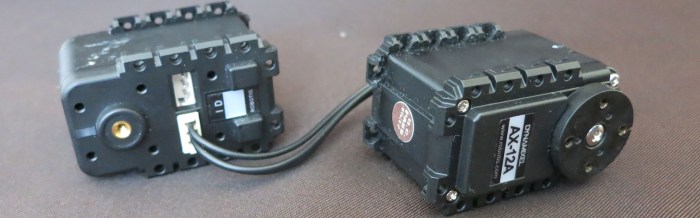
serialservo-dynamixelReading over the list of links on ROS wiki tutorials page, one item caught my attention: a link to Dynamixel Tutorials. The name Dynamixel wouldn’t have meant anything to me when I looked at ROS a year ago, but I recognize it now due to my research for components to build Sawppy the Rover. Robotis Dynamixel is a serial bus servo and as the industry veteran, it has the most software support which I knew included a factory SDK with support for ROS.

As I got into the tutorial, though, a few inconsistencies stood out as odd. Eventually I realized these tutorials were written by someone with no relation to Robotis, talking about a ROS control library with no relation to the Robotis Dynamixel SDK. According to the Github repository for the library, it was last updated eighteen months ago. It aligned with ROS ‘K’ release (Kinetic Kame) and hasn’t been updated for the two following releases ‘L’ (Lunar Loggerhead) or ‘M’ (Melodic Morenia)

This is pretty common in the world of open source… something is interesting so multiple parties each present their solution. The fact “anybody can do it” is both an upside and downside, depending on the situation. I should be more used to it by now but it still catches me off guard. This library also shows another downside: when the author loses interest for whatever reason, the code stops getting maintained.

Here’s its package information:

Package: ros-kinetic-dynamixel-controllers
Version: 0.4.1-0xenial-20180516-150315-0800
Priority: extra
Section: misc
Maintainer: Antons Rebguns <arebgun@gmail.com></arebgun@gmail.com>
Installed-Size: 760 kB
Depends: ros-kinetic-actionlib, ros-kinetic-control-msgs, ros-kinetic-diagnostic-msgs, ros-kinetic-dynamixel-driver, ros-kinetic-dynamixel-msgs, ros-kinetic-rospy, ros-kinetic-std-msgs, ros-kinetic-trajectory-msgs
Homepage: http://ros.org/wiki/dynamixel_controllers
Download-Size: 56.0 kB
APT-Sources: http://packages.ros.org/ros/ubuntu xenial/main amd64 Packages
Description: This package contains a configurable node, services and a spawner script to start, stop and restart one or more controller plugins.
Reusable controller types are defined for common Dynamixel motor joints. Both speed and torque can be set for each joint. This python package can be used by more specific robot controllers and all configurable parameters can be loaded via a yaml file.

In contrast to this “dynamixel-controllers”, we have “dynamixel-sdk” whose maintainer is listed with an @robotis.com e-mail address, so it looks pretty official. According to this post on ROS Answers forum, Robotis intends to continue supporting ROS with their factory SDK.

Package: ros-kinetic-dynamixel-sdk
Version: 3.5.4-0xenial-20180308-062313-0800
Priority: extra
Section: misc
Maintainer: Pyo <pyo@robotis.com>
Installed-Size: 293 kB
Depends: libc6 (>= 2.17), libgcc1 (>= 1:3.0), libstdc++6 (>= 4.1.1), ros-kinetic-roscpp
Homepage: http://wiki.ros.org/dynamixel_sdk
Download-Size: 38.5 kB
APT-Sources: http://packages.ros.org/ros/ubuntu xenial/main amd64 Packages
Description: This package is wrapping version of ROBOTIS Dynamxel SDK for ROS.
The ROBOTIS Dynamixel SDK, or SDK, is a software development library that provides Dynamixel control functions for packet communication. The API is designed for Dynamixel actuators and Dynamixel-based platforms.

Though Sawppy ended up not using Dynamixel servos, my research into the devices gave me enough familiarity with their control protocol that I think the Dynamixel SDK will be a good precedent to follow when I start looking into creating my own ROS controller nodes.

While I’m not ready to embark on that project just yet, I thought it might be good to take a quick look. This attempt failed but the failure became its own ROS learning adventure.

I had installed ROS ‘L’ distribution (Lunar Loggerhead) and the Robotis SDK supported ‘K’ and ‘M’, skipping over ‘L’. Why is that? My effort to understand is the story of the next blog.


ROS Notes: URDF vs. Gazebo SDF

SDFormatOne of the higher-level mysteries to this ROS beginner is why Gazebo, a sibling product, has a separate XML-based description format SDF instead of using the same URDF files of ROS. The answer came in this particular page in Gazebo’s collection of tutorials. “Tutorial: Using a URDF in Gazebo” explains why a different format was invented, but it also outlines Gazebo features to bridge the two worlds. By adding Gazebo-specific tags to URDF files, authors can specify all the information necessary for Gazebo to convert it to a SDF for internal use.

My understanding can be boiled down to this: URDF specifies a robot, but SDF also specifies a world for the robot to live in, which is a much larger set of things. Based on this premise, SDF is designed to represent a superset of everything that can be represented in URDF.

Which leads to the obvious next question: if SDF is a proper superset, why not standardize on SDF across the board? The best answer I could find is the idea being floated (and shot down?) as something to do for ROS2. I can understand the perspective that ROS really only cares about the robot and doesn’t need all the extra features of specifying a simulation world.

And while reading that discussion thread, I also learned Gazebo isn’t the only one unhappy with URDF. There’s also a SRDF file format for describing things not in a URDF, and I have even less of an idea how SRDF relates to SDF. Fortunately, there is an enlighening comment block in the generic example on that page:

This does not replace URDF, and is not an extension of URDF.

So whatever SRDF may be, it’s not yet another way to specify a robot, which is a relief.

Summary of my current understanding:

  • URDF is the established format for describing robot structure in ROS, and it is not going away anytime soon.
  • URDF could not specify information necessary for other robotics domains.
    • SDF was devised by Gazebo to meet simulation needs, but Gazebo can consume URDF when it is augmented by information within <gazebo> tags.
    • SRDF was devised to meet needs of MoveIt! Motion Planning Framework and does not replace URDF.

Given the above, as a beginner I should be safe to start with URDF when I start defining my own physical robots (like Sawppy) for ROS. But that’s a ways down the road, for now it’s back to tutorials.

ROS Notes: Robot Simulation with Gazebo

GazeboNumber one on the list of suggested “What Next” at the end of ROS tutorial is an invitation to run a virtual robot in a simulation environment. Two robots were linked – first the very capable and expensive Willows Garage PR2 research platform, and the second a much more accessible TurtleBot platform. Either way, the virtual world for these simulated robots is a product called Gazebo.

The big red notification at the top of the PR2 Gazebo tutorial tells us that particular page is out of date. It implied Gazebo used to be part of ROS but has been spun off as a standalone project. This is different from the story at the bottom of Gazebo’s own front page, which implied Gazebo has always been standalone and ROS just happens to interface with it. Either way, a little poking around found that Gazebo is a peer of ROS both under the umbrella of Open Source Robotics Foundation.

The good news is that Gazebo provides tutorials to help people learn Gazebo. The bad news is… well, there is A LOT of it. The tutorial section front page has about 35 links to other pages, which seemed fine until I realized each of the links under “Categorized” leads to a page with several tutorials in that category. This drastically increases the number of tutorial pages, many of which seemed to be aimed at people who might be new to that category of Gazebo but are familiar with Gazebo in general.

I’m definitely not yet familiar with Gazebo in general.

As far as this beginner can determine so far, Gazebo provides a virtual simulation environment for robotic software, but that software need not be written with ROS. Gazebo simulation behavior is controlled by assembling multiple plugins, each written to control some aspect of the simulation world. Plugins are assembled alongside other assets in a SDF file to be loaded into a Gazebo simulation.

I haven’t yet figured out how Gazebo plugins relate to ROS nodes, or how the SDF files relate to ROS URDF files. I know the advertising pitch is to write high level robot intelligence that can be easily swapped between running on physical hardware and running in Gazebo. As of right now, it is still a mystery where that physical/virtual swap layer lives.


ROS Notes: Picking Up Where I Left Off

rosorg-logo1About a year ago I went through the beginner level tutorial for ROS, the open-source Robot Operating System. The beginner’s track ends with a “Where next?” page with lots of options. At the time I did not have a specific robot or a specific project in mind, so there was no particular motivating factor to help me choose from the list of options. This has the unfortunate side effect of analysis paralysis and so that’s where I stopped on the last go-around. At the time, laser cutting an acrylic enclosure for a network attached storage server seemed more interesting, and I got distracted.

Things have changed in the past year. The most important change is that I have access to multiple robot platforms. We have the SGVHAK Rover, my Sawppy the Rover, and Emily’s Craglist acquisition Bart the robot. All of these hardware would benefit from a powerful and sophisticated software platform to elevate them from fancy remote control vehicles to something really interesting.

Another change was a realization as I got started thinking about deep neural networks and playing with AI. I started with the powerful laptop and got TensorFlow installed, but as I went through the tutorials I realized it’s all very interesting in the abstract but I can see myself getting distracted again. I need a goal to work towards as I apply my AI education and experimentation, and this circled me back to the robot platforms we have running around.

ROS is the software infrastructure where these two would meet – the hardware robot platforms and the TensorFlow neural networks. So before I get started on another big complicated software framework like TensorFlow, I should finish what I started with ROS.

As a refresher, I went through all the beginner tutorials again. It made a lot more sense this time around given the context of what I’ve learned in the past year. Ranging from Python programming, to Linux fundamentals, to getting a better feel of why ROS features are desirable viewed through the lens of building Sawppy.

The progress was a lot faster this time… and now I’m at the Where Next page once again.

Hello, old friend. This time, let’s keep the momentum moving.


ROS Tutorial: Logging and Diagnostics

rosorg-logo1One of the primary motivations behind the Robot Operating System is helping robot creators avoid reinvent the wheel for every project. From my history of hobbyist robots, where I did build the software stack from the ground up every time, I was very happy to see the logging and diagnostics tools built into ROS.

No robot ever does everything right the first time. When things go wrong, the builder needs to figure out why. When the software stack is written from scratch, it means all the debugging tools will need to be written as well. Which means constantly asking the question: Should we build the tool? Will building it tell us what we need? Will it help solve the problem at hand? In end, will the work be worth the time investment?

When the robot system components are integrated in a ROS graph, that question goes away because ROS has the tools already at hand. There is a visualization tool (rqt_graph) to see which components are talking to each other. There is a tool that can record the messages and play them back. (rosbag) So on and so forth. The robot builder won’t have to reinvent any of these wheels.

These tools certainly looks promising and sounds great on paper, but I won’t know for sure until I build a project and try using these tools to debug my problem. I have high hopes but I’m also no stranger to things looking better on paper than in reality.

Final amusing note: The general ROS configuration diagnostic app is named WTF. (roswtf) I’m sure there’s a G-rated name for this thing (“Where’s The Failure” tool?) but we know the truth…


ROS Tutorial: C++ vs. Python Comparison

rosorg-logo1When it came to walking through writing actual code to build nodes in a ROS (Robot Operating System) network, the tutorial offered the reader the option to write the nodes in either C++ or in Python. I went through it in Python the first time around, then for curiosity’s sake, I looked over the C++ version for comparison.

The first glance was horrifying: Where the Python ‘talker’ sample was a small code listing with 20 lines of code, the C++ counterpart was sprawled over 100 lines of code. But a second glance quickly dispelled the impression: most of the lines in the C++ sample are comments explaining what’s going on. Comments are good! When counting the actual executable lines of code, the two samples are roughly similar in size, which surprised me as I expected the C++ version to have a lot more overhead as typical of a lower-level language.

A little reading of the comments and the tutorial page found the explanation: a lot of the tedious book-keeping that raw C++ programs have to contend with have been taken care of by Boost code libraries. This is how the C++ version of the demo ended up almost as concise as the Python version.

I still intend to continue my ROS education in Python, because I still think that’s an interesting way for me to train my Python programming muscles. But it’s nice to know that if I should ever need to do ROS coding in C++, I can get help to keep the complexities under control.

Historically I’ve been skeptical of C++ libraries – they are really wonderful when things work as designed, but when things go wrong things the code quickly become very difficult to debug. This may or may not be true for C++ code using Boost libraries, I’ll find out if I go there.

One trivial detail: the Python ‘talker’ sent out the current time but the C++ version just sent out a counted integer. Looking at the documentation of the ROS libraries, it looks like the time utility used by the Python version has a straightforward counterpart in the C++ library. Why wasn’t it used in the C++ tutorial to match the Python tutorial? It may just be simple oversight, but I wonder if there’s a more interesting story behind the scenes.

Getting Started on ROS: C++ or Python?

rosorg-logo1One of the items on my longtime to-do list is to investigate at least one of the publicly available robotics frameworks. Every robot project I’ve participated in so far has been a ground-up affair, everything built from scratch. At my simple hobbyist level I haven’t experienced a whole lot of tedious repetition across robots, but I definitely got far enough to see it looming on the horizon. My last robot (many years ago) was built around a very compact PC laptop as its brain, which made the project very powerful but also very expensive for its day. Today, I can get that kind of power in an inexpensive Raspberry Pi. Which happens to be one of the platforms supported by the Robot Operating System. So this is where I’m going to start.

I’m barely into the beginner tutorials but I see enough to appreciate what they have, and also to start having questions. I like the fact modules communicate over commodity network transports (TCP or UDP) and the master negotiation procedures are built around XML-RPC. It does add overhead but it’s the kind of overhead that allows a great deal of flexibility. But it is also a vulnerable security exposure. I haven’t seen anything talking about best practices to deal with rogue nodes on a ROS network but I hope that is coming up soon.

When the tutorial starts talking about writing code to create ROS nodes, it offers an option for the reader: write in C++, or write in Python? The prudent thing for me to do is to stick to C++, a language I know, while I learn ROS. If I go with Python I’ll be learning the programming language on top of learning the ROS framework.

Today I’m in a ‘chasing shiny objects’ kind of mood, so I’ll start down the Python path. Whether this turns out to be a wise or foolish choice is yet to be seen. Either way, it’ll be documented in upcoming posts!