Window Shopping replicad

I thought Cascade Studio was a very interesting project, providing a 3D model environment that can run entirely in the browser. Even offline if desired, as a locally-installed PWA. It is a code-based design system like CadQuery. While they all build on top of OpenCascade Technology kernel, the code-based API differences are larger than just the difference in language. (Python for CadQuery, JavaScript for Cascade Studio.) I found a lot to like, but also a few implementation details that I’m not fond of. That’s OK, there are other projects out there, including replicad. (Hackaday post.)

Both replicad and Cascade Studio run entirely within the browser thanks to OpenCascade.js, which compiled the 3D kernel into WebAssembly. And despite the fact they both wrap OpenCascade concepts with JavaScript, their API are different. Reading through replicad documentation, I learned their target scenarios are also different: Cascade Studio aims to be a full in-browser 3D model environment, presenting the JavaScript code as well as a 3D rendering. replicad is intended for people to share their designs online for others to use, by default presenting just the 3D object and the underlying code is not directly visible. But the viewer can make changes to model parameters and have the shape recomputed. This reminds me of Thingiverse Customizer, which is limited to OpenSCAD models.

Cascade Studio had the “Slider” UI option to allow customization as well, and one difference immediately jumped out at me: Cascade Studio allows the design author to specify maximum and minimum values for the slider, but replicad doesn’t seem to allow setting limits on model parameters. This seems like an oversight.

One significant advantaged I noticed in replicad API is their way of avoiding FreeCAD’s topological rename problem that Cascade Studio also seems to share. Instead of specifying entities like edges with names or numbers, replicad has a system called finders to find elements that meet a specified set of conditions. For example, it allows finding all edges at a particular Z height. Allowing us to apply a fillet without worrying about their specific names/numbers. This makes replicad closer to CadQuery, specifically with its concept of selectors.

I didn’t see any references to constraint solving. Based on some of the examples, I believe the author expects us to write JavaScript code to compute what we need directly within our 3D object design code. It’s a valid approach, but maybe not my favorite answer. I also didn’t see any references to creating multipart assemblies. Perhaps I could find an answer in a larger-scale overview like CadHub.

Window Shopping Cascade Studio

Describing 3D objects with Python code is CadQuery’s goal, something I find interesting for later exploration. Browser access is possible by running CadQuery in Jupyter Lab, making it accessible to low-end Chromebooks, but that still requires another computer serving Jupyter Lab. What if everything can run entirely standalone within the web browser? That is the laudable goal for Cascade Studio. (Hacker News post) (Hackaday post)

Projects like Cascade Studio were made possible by the OpenCascade.js project, which compiles the open-source OCCT kernel code into WebAssembly (WASM). No more hassling with separate build chains for a Windows/MacOS/Linux desktop apps like FreeCAD, now a 3D model system can run entirely within the browser no matter the underlying operating system. There must be some performance cost tradeoffs for such flexibility, but I haven’t dug deeply enough to know what they are.

Looking over how Cascade Studio was built, I see it leverages a lot of other open modules beyond OpenCascade.js. Like using Three.js for rendering the 3D model, and Monaco for the code editor. Oh right — code editor. Cascade Studio also describes 3D objects with code, except here it’s a JavaScript-based interface on top of OCCT concepts. It also leverages a lot of web technologies, like conforming to Progressive Web Apps (PWA) requirements so it can be installed locally to run entirely offline.

A valuable source of information is an unofficial Cascade Studio manual, written by a fan and not the author. (If the author wrote instructions, I have yet to find them.) It tries to cover everything a person would need to use Cascade Studio, with some basic 3D model concepts and basic JavaScript concepts. But what I really appreciated was the condensed digest of this fan’s experience with Cascade Studio, documenting many minor quirks and — even more valuable — their workarounds.

I was really enchanted by Cascade Studio possibilities until I got to the fillet edge section. Our code code needs to provide a reference to the object (obviously) and a list of edges (expected) by number (record scratch noise.) Wait, where would those numbers come from? We have to use the GUI to click on individual edges we want, the GUI will in turn display a number for each, which we can then write down to give as parameters. I inferred these numbers were generated out of the OCCT kernel and are subject to change in response to changes in the underlying geometry. If so, this would mean FreeCAD’s topological naming problem is present here, except as a topological numbering problem. Is there anything about Cascade Studio’s code-based model that would mitigate this? I don’t have an answer for that.

Constraints were a notable absence from this manual. I want a mechanism to specify things should be parallel or perpendicular, lines that should be tangent to arcs, helping to capture intent of the underlying geometry. It appears some constraint solving capability is part of OCCT, but it might be missing from Cascade Studio or at least missing from the unofficial manual.

Also absent were information on working with assemblies of parts. Onshape had the concept of “mates” to describe physical relationship between different parts. Sawppy’s suspension articulation were captured as rotate mates, with a single degree of freedom rotating about an axis. There are other types of mates, “slide” is a single degree of freedom translating along an axis, “fasten” with zero degrees of freedom, etc. I saw nothing similar here.

One item I thought was very interesting was the Slider control, which allows me to declare a user-adjustable parameter on screen. For Sawppy, the most value application of such a feature is letting a rover builder adjust the diameter of holes for heat-set inserts. This has caused grief for multiple Sawppy builds, because the outer diameter of M3 inserts is not standardized and every 3D printer prints to a slightly different tolerance. It can even be argued that most rover builders don’t care about modifying the design significantly, most would only need a few sliders to dial in a design to suit their tools and parts. If that is indeed the primary scenario, perhaps replicad would be a better tool.

Window Shopping CadQuery

When I started learning about FreeCAD, I also learned about its 3D modeling core OpenCascade Technology (OCCT). OCCT is not exclusive to FreeCAD and it forms the core of several other open-source CAD solutions, each implementing a different design intent. In the time I’ve been keeping my eyes open, I’ve come across several projects that might be interesting.

First up on this survey is CadQuery, a Python API on top of OCCT. (Hackaday post) Which is very interesting considering FreeCAD already has a Python API. From a brief look, those two APIs have different intentions on how to expose OCCT capability to code-based construction. FreeCAD’s Python API primarily enable macros, scripts, and extensions to supplement projects created in FreeCAD UI. CadQuery removes the need for graphical UI entirely.

But this is not the whole picture. It’s also possible to run FreeCAD without an UI, so I will have to dig deeper to really understand the tradeoffs between their two approaches. CadQuery actually started out as something built within FreeCAD. CadQuery became its own independent project when the team started feeling constrained by FreeCAD limitations around selection. That tells me CadQuery is working to get away from the well-known FreeCAD problem of topological naming.

Being code-centric means a CadQuery design is a Python program and can take advantage of all the software development tools available. Which satisfied my CAD wishlist item for Git-like ability to fork, pull request, etc. The problem is “diff”, which will show the Python code changes but not a visual representation of those changes. This can probably be solved by using CadQuery to process the before/after views and render the difference between them. (Such a tool may already exist.)

Since CadQuery is not dependent on any graphical user interface, there are multiple ways to play with it. CQ-editor is a native desktop application letting people use CadQuery in a similar manner to OpenSCAD. Another way is to work with CadQuery Python code in a Jupyter notebook, giving it a browser-based interface. And the one that really caught my eye: cq-directive, which runs as part of the Sphinx documentation generator. In theory this allows diagrams in documentation to stay in sync with the CadQuery design files. Keeping CAD in sync with documentation would resolve one of my recurring headaches with Sawppy documentation.

CadQuery looks like a very promising venue for investigation, but trying to go hands-on was stymied by Python versioning support. As of this writing, the latest public version of Python is 3.11 and it’s been around long enough most infrastructure like Jupyter Lab has updated. However, CadQuery is still tied to 3.10 and not expected to move up to 3.11 until later this year. Version conflict is nothing new in the Python world and can be solved with a bit of time, but I chose to put CadQuery on hold and read up on other options starting with Cascade Studio.

Learning About OpenCascade Technology

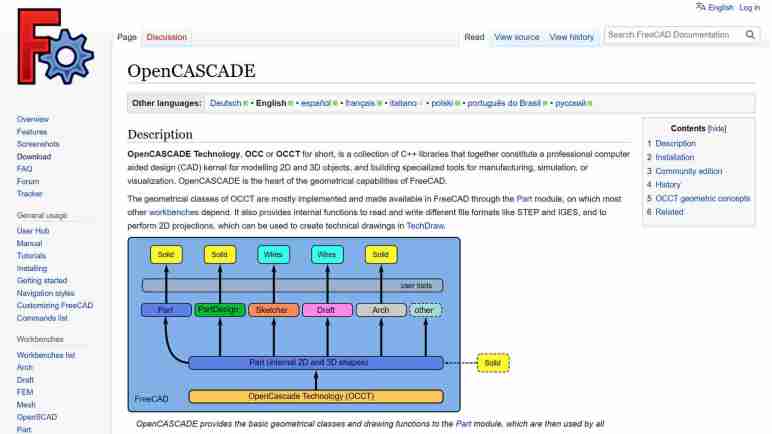
I’ve decided to spend some time learning about FreeCAD and was quite intrigued by their wiki page on OpenCascade (a.k.a. OpenCASCADE, OCC, OCCT, etc.) The first paragraph ended with “OpenCASCADE is the heart of the geometrical capabilities of FreeCAD.” The rest of the page goes into details on how OCCT integrated into FreeCAD code base and basic geometric concepts from which FreeCAD bodies are built upon. From this page I inferred that OCCT implements most (all?) of the basic requirements of building any 3D CAD software. FreeCAD can then be viewed as a set of user interfaces on top of OCCT concepts. Of course, this grossly understates the effort required to do such a thing but is a rough imperfect lens for this beginner to view the rest of FreeCAD through.

Elsewhere in FreeCAD documentation, I learned user interfaces are built around the concept of grouping related tools together. Each of these groups is a workbench intended to address their target usage scenarios. Despite their differences in methods operation, in the vast majority of cases, they all eventually break down to 2D or 3D elements built using OCCT primitives and manipulated via OCCT operations.

This is very interesting because, as an open-source CAD kernel, OCCT is not exclusive to FreeCAD. This means anyone who wants to try out a new twist on CAD semantics, they do not have to reinvent the wheel. They can build on top of OCCT as well. This sounded very interesting because one of my favorite features of Onshape CAD is that it is available anywhere that can run a modern web browser. I remember when “CAD workstation” meant a multi-thousand-dollar computer. With Onshape, a $200 Chromebook can be a modern CAD workstation.

This is not possible in FreeCAD, which is very solidly tied to a desktop. I think it would be very interesting to have an open-source browser-based CAD solution on top of OCCT, and I’m not the first to have this idea. I took a quick survey of several options, starting with CadQuery.

Taking Another Look at FreeCAD

Creating Sawppy the Rover was a great learning experience, sharing it with the world was even more so. It wasn’t until I started receiving feedback that I learned tools for hardware projects lag behind the software world in their ability to support an open-source community. I published a wishlist earlier but haven’t made any progress on finding answers. But I know FreeCAD is going to come up in some way. FreeCAD is a large and high-profile open-source CAD project. It will either be part of the solution, or I will need to know it well enough to articulate why it isn’t.

Since I had always intended for Sawppy to be open-source, I looked into FreeCAD from the start. Back then, even people behind the project cautioned it was yet ready for prime time, so I took their advice and looked elsewhere. A few years later, FreeCAD release 0.19 close coincided with Autodesk starting to… shall we say… “aggressively increase revenue” from Fusion 360 users. This caused dissatisfaction within my maker circles. Some people took another look at FreeCAD and reported: “It’s not as bad as it used to be!”

That was hardly a ringing endorsement, but enough for me to take another brief look. My problem at the time was that 0.19 was hot off the press and all the available resources online were for 0.18 or earlier. And since FreeCAD 0.19 changed significantly, those resources were out of date. I made a mental note to come back later.

As of this writing in July 2023, the latest stable release of FreeCAD is 0.20 which was released June 2022. I expect a year’s time is enough for online resources to be aligned with 0.20 and thought I should give it another look. I started reading documentation and encountered a lot of unfamiliar terminology. This is normal whenever I venture into any new technical field, though it does slow down my reading a lot as I looked up definition for each.

I quickly got distracted by a specific acronym: OCC which stands for Open Cascade. (Also OCCT, for Open Cascade Technology.) It is the beating heart of 3D geometry math at the core of FreeCAD. Learning about OCCT opened my eyes to possibilities beyond FreeCAD.