Considerations Exploring FormLabs Form 1+ While Powered Up

Curious about what I could learn from a scorched laser galvanometer control board, I looked up all component markings I could find. That gave me a few pieces of a puzzle, but I’m missing many more pieces and I don’t have a guess as to how those pieces fit together. In the interest of getting more data, I thought I would probe around while this FormLabs Form 1+ printer is powered up.

The biggest danger is a laser at the heart of this laser resin printer. This whole printer is classified as a Class 1 laser device, which means it is safe to use without eye protection. But that guarantee of safety only applies when used as intended. If I’m going to probe its circuitry with panels removed, I lose protection provided by those panels. Bypassing such protection means I have to be careful not to damage my eyes. Anyone who plans to try this as well: please be careful!

Working with lasers is especially dangerous if they operate at a wavelength outside human visible spectrum. We have evolved a blink reflex to protect our vision, but it wouldn’t work for wavelengths we can’t see. Thankfully, 405nm is within human visible spectrum (it should show up as an intense blue or violet beam), so I still have my blink reflex as a final line of defense. Why 405nm? Apparently, this wavelength became popular because Blu-ray drives drove R&D and economies of scale. I don’t know about power levels, though. I would guess resin printing runs 405nm lasers at a higher power level than reading Blu-ray discs (60mW as per Wikipedia) but I have no data to support that guess.

There’s another interesting data point I want to investigate: the printer was happy to run through its printing process with a dead galvanometer control board. Such behavior tells me something is running as an open-loop process, operating without feedback that its laser beam wasn’t being steered. I knew stepper motors used in cheap FDM 3D printers are open-loop devices, where the printer control board sends motor pulses without knowing if there is actual physical motion. But laser galvanometers are closed-loop actuators, so something else is going on.

Despite my wariness of a laser operating at unknown power levels, my curiosity motivated me to power it up and poke around.

Form 1+ Galvanometer Control Board IC Roll Call

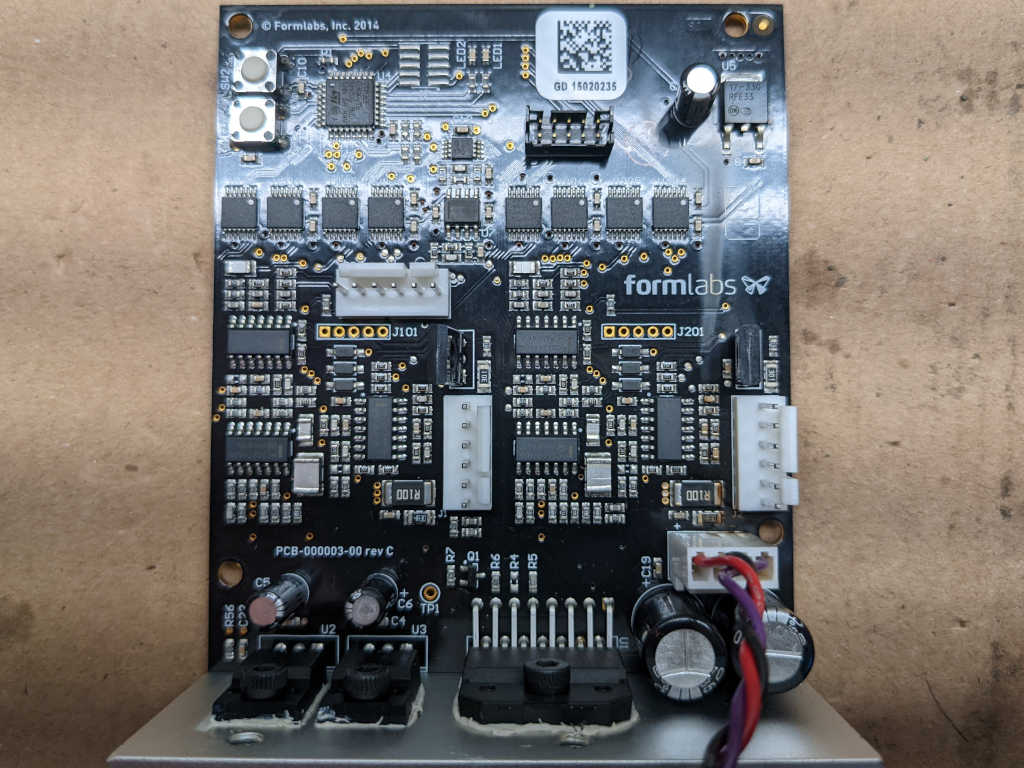
This Form 1+ laser resin printer has a scorched galvanometer control board, and replacements are no longer available from FormLabs. I don’t have any background to make heads or tails of a laser galvanometer control board, but I might get a vague idea and learn something by examining its collection of components. Here’s a roll call based on markings on those chips.

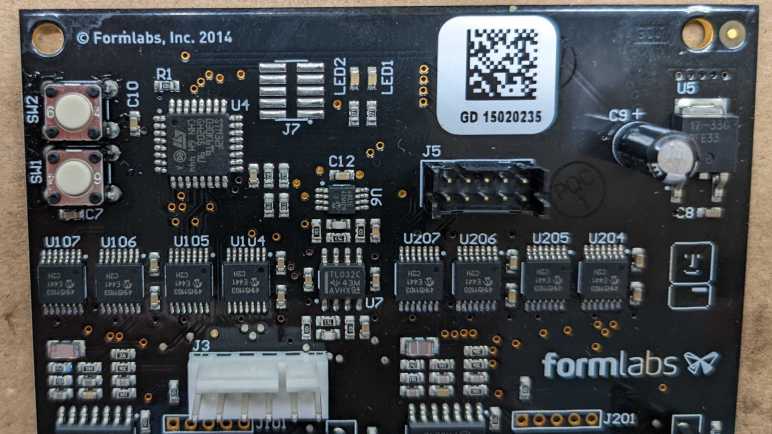
The board controls both X and Y axis galvanometers, probably why the middle section of this board a pair of identical assemblies.

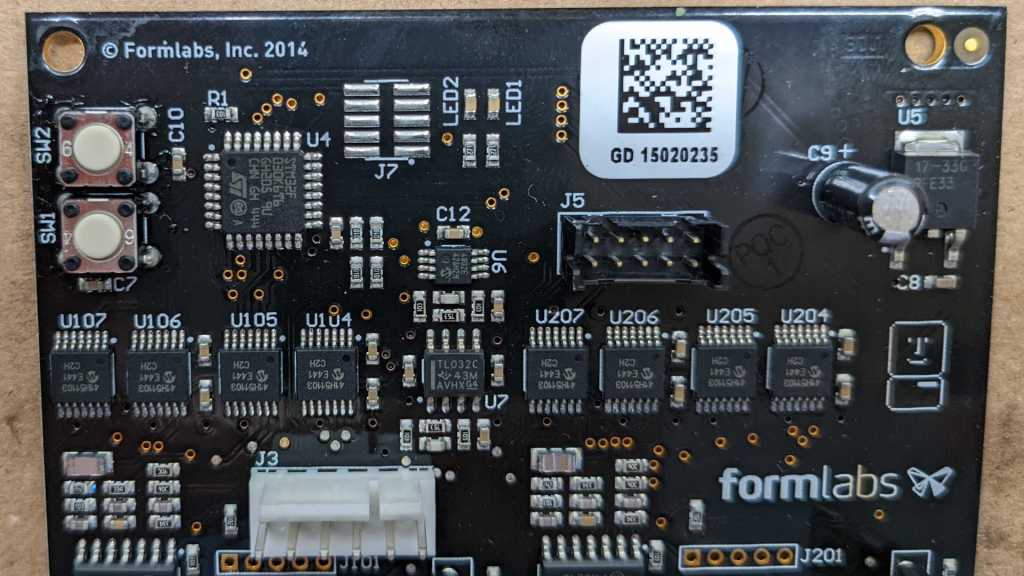
Starting from the upper left, component U4 looks to be the brains of this operation: a ST Microelectronics STM32F030K6T6 with its ARM Cortex-M0 core running at up to 48MHz.

U5 in the upper right is an On Semiconductor NCP1117, a low-dropout (LDO) voltage regulator marked with 17-33G indicating it outputs 3.3V. This would supply power to the STM32 and other 3.3V digital logic.

Back towards the centerline, U6 is a Microchip MCP4802 digital-to-analog converter (DAC) with dual 8-bit resolution channels controlled via SPI.

Just below that is U7, a TI TL032 dual-channel op-amp.

On either side of U7 is a collection of 8 chips, four on each side. (U104, U105, U106, and U107 on the left. U204, U205, U206, and U207 on the right.) They are all marked with Microchip logo and 41H51103, which I found to be a MCP41HV51 SPI-controlled digital potentiometer. In section 11.1 Package Marking Information of the MCP41HVx1 datasheet, 41H51103 is identified as MCP41HV51-103E/ST variant.

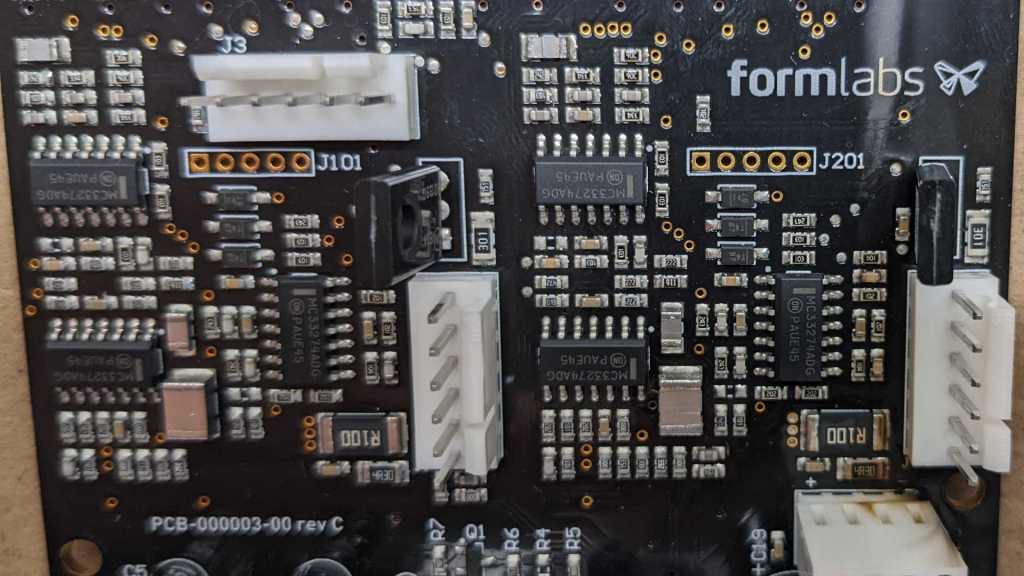
There are a lot of surface mount passives in the center section with two copies of the layout left and right. Each copy gets a trio of chips marked with On Semiconductor logo and MC33274ADG. These MC33274A chips are each a quad-pack of op-amps. Each side has an additional component that is mounted vertically so we only see their top here.

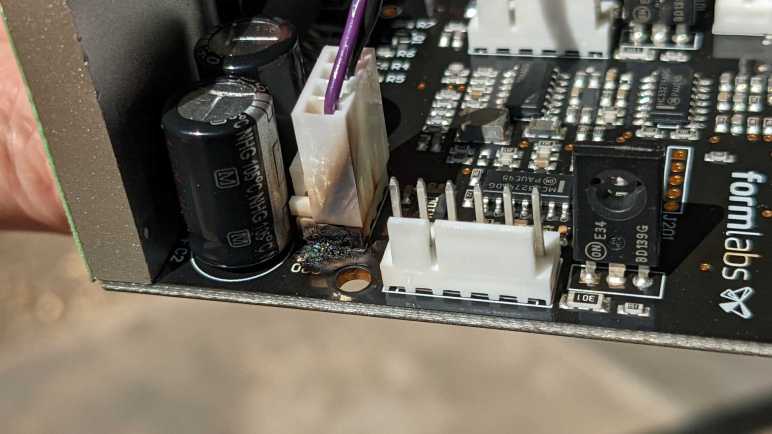
Going back to an earlier picture focused on the burnt and melted connector, we can see one of those vertical standing components clearly on the right. They are On Semiconductor BD139 NPN power transistors.

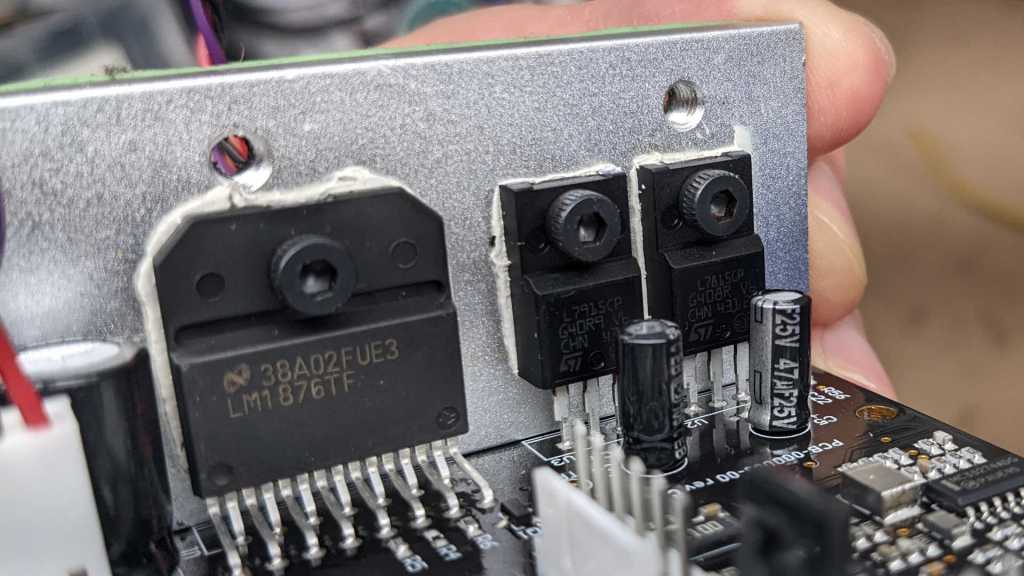
Three components are bolted to a heat sink at the bottom. To the left is a single Texas Instruments LM1876. It is a dual 20W audio power amplifier. Adjacent to that amplifier are a mirror pair of ST Microelectronics voltage regulators. The L79 negative voltage regulator accept up to -35V DC and output a regulated -15V DC. L78 is its symmetric positive voltage sibling, accepts up to +35V DC and output a regulated +15V DC.

Those components are major pieces of my “how did this board work” puzzle, but I’m still fuzzy on how they fit together. If I want more data, I’ll have to probe around while the system is powered up and I’m not entirely sure I want to do that.

FormLabs Form 1+ Next Steps

Diagnosing why a FormLabs Form 1+ resin laser 3D printer wasn’t working; I found the smoke trail of an electrical fire on its galvanometer (galvo) control board. This board is cooked in a very literal sense. Even though the printer is long out of support, I contacted FormLabs hoping for a replacement board. While waiting for a response, I took the printer apart to get a closer look at the damaged board.

It looks far worse from this angle. A lot of charred and burnt plastic at the base of power connector, which had melted together into a single lump. It is no longer possible to (neatly) unplug this connector. A surface-mount capacitor C20 has been vaporized along with some of the circuit board creating a small pit.

Holding the board at a different angle, I saw charred residue of smoke trail running all the way up the board. This fire was more significant than I had previously thought. This is good news and bad news. I had been worried that I cooked the device with a nonstandard power supply but seeing extent of damage confirmed it happened before I got my hands on the device. If it happened on my watch, I would have definitely smelled dead electronics, a scent I was reminded of quite recently.

On the downside, severity of this damage puts repair out of reach of my current skill level. I don’t know anything about how galvanometer control circuits are supposed to work. My electronics engineering skills aren’t good enough to reverse engineer this board and fix it without technical information like schematics and diagnostics procedures.

After this (very discouraging) sight, FormLabs got back to me: no replacement galvo control boards are available. Unsurprising but at least it didn’t hurt to ask. I briefly considered buying a laser light show galvanometer setup from eBay or Amazon. But even if I could interface them, I don’t know how to test and tune them for good resin prints. Given these challenges, I’m not going to try to get this printer printing. I’ll focus on learning as much as I can from taking it (further) apart.

Switching to CPU Ticks Did Not Eliminate Wobble Because Fan Itself Was Wobbling

In order to obey constraints imposed by ESP32 hardware timer peripheral, I switched my fan strobe LED code to use a regularly polling interrupt service routine (ISR). I worried that I would be overly demanding to schedule it once every 10 microseconds, but I saw no obvious problems from that front. What I did see, though, is an irregular wobble at longer LED pulse delays indicating my LED strobe timing is drifting in and out of sync with fan blade position.

Because I had calculated timing for LED pulses by counting number of times my ISR is executed, I thought this wobble might be caused by unpredictable delays in ISR overhead. A multi-millisecond strobe delay (where I notice the wobble) would require my ISR to count several hundred times, allowing tiny errors to add up. To test this hypothesis, I switched my code to use a more consistent timing mechanism: the ESP32 CPU tick counter. It is a highly precise (though not necessarily accurate) source of timing information, one that I used for performance metrics in ESP_8_BIT_Composoite. But it comes with limitations including:

  • Tick counter value is only valid on the same core it is queried from, it is not valid to compare tick count across the two cores of an ESP32. Not a problem here because Arduino subsystem is pinned to a single core, so I am guaranteed to always be on the same core.
  • It goes up by one for each clock cycle of the CPU core. At 240MHz, an unsigned 32-bit value would overflow two or three times every minute. For this quick experiment I’m ignoring overflows, resulting in a brief dark pulse two or three times per minute. (This limitation was why I didn’t use it in my first draft.)

Switching my timer counter to CPU ticks did not eliminate the wobble, disproving my hypothesis. What else could it be? Thinking through possible explanations, I wished I could see exact time relationship between tachometer signal and my LED strobe pulses. Then I remembered I could do exactly that because I have a real oscilloscope now! In fact, I should have put it on scope before embarking on my CPU clock tick counter experiment. I guess I’m still not used to having this powerful tool at hand.

I set up the oscilloscope so I could see the fan tachometer pulse that would trigger my tachometer interrupt handler, where I calculate the ticks for turning LED on and off. I set up the oscilloscope to trigger on my resulting LED output pulse. I increased the LED pulse delay to roughly 6 milliseconds, which is a roughly 180 degree rotation. Placing that pulse close to the next fan tachometer pulse allowed me to easily compare their timing on oscilloscope screen.

As it turned out, my ESP32 code is completely blameless. The timing held steady between tachometer signal triggering pulse and LED output pulse. What changed are timing between consecutive fan tachometer pulses. In other words: my strobe light visual is wobbling because fan speed is wobbling. This is exactly why strobe lights are useful to diagnose certain problems with high-speed machinery: it makes subtle problems visible to the human eye.

Conclusion: the wobble is not a bug, it is a feature!


Custom component code using CPU tick counter. (Does not account for 32-bit tick overflow):

#include "esphome.h"
#include "esp_system.h"

volatile int evenOdd;
volatile int strobeDuration;
volatile int strobeDelay;
volatile uint32_t ccountTachometer;
volatile uint32_t ccountLEDOn;
volatile uint32_t ccountLEDOff;

const int gpio_led = 23;
const int gpio_tach = 19;

// How many cycles per microsecond. 240 for typical ESP32 speed of 240MHz.
const int clockSpeed = 240;

hw_timer_t* pulse_timer = NULL;

IRAM_ATTR void pulse_timer_handler() {
  uint32_t ccountNow = xthal_get_ccount();

  if (ccountNow >= ccountLEDOn) {
    digitalWrite(gpio_led, HIGH);
    ccountLEDOn = 0;
  }

  if (ccountNow >= ccountLEDOff) {
    digitalWrite(gpio_led, LOW);
    ccountLEDOff = 0;
  }
}

IRAM_ATTR void tach_pulse_handler() {
  if (0 == evenOdd) {
    evenOdd = 1;
  } else {
    if (strobeDuration > 0 && ccountLEDOn == 0 && ccountLEDOff == 0) {
      ccountTachometer = xthal_get_ccount();

      // Calculate time for turning LED on and off
      ccountLEDOn = ccountTachometer + strobeDelay * clockSpeed;
      ccountLEDOff = ccountLEDOn + strobeDuration * clockSpeed;
    }
    evenOdd = 0;
  }
}

class FanStrobeLEDSetupComponent : public Component {
  public:
    void setup() override {
      // Initialize variables
      strobeDelay = 10;
      strobeDuration = 20;
      ccountLEDOn = 0;
      ccountLEDOff = 0;

      // LED power transistor starts OFF, which is LOW
      pinMode(gpio_led, OUTPUT);
      digitalWrite(gpio_led, LOW);

      // Attach interrupt to tachometer wire
      pinMode(gpio_tach, INPUT_PULLUP);
      evenOdd = 0;
      attachInterrupt(digitalPinToInterrupt(gpio_tach), tach_pulse_handler, RISING);

      // Configure hardware timer
      pulse_timer = timerBegin(0, 80, true);
      timerAttachInterrupt(pulse_timer, &pulse_timer_handler, true);
      timerAlarmWrite(pulse_timer, 10, true /* == autoreload */);
      timerAlarmEnable(pulse_timer);
    }
};

class FanStrobeLEDEvenOddToggleComponent: public Component, public Switch {
  public:
    void write_state(bool state) override {
      evenOdd = !evenOdd;
      publish_state(state);
    }
};

class FanStrobeLEDDelayComponent: public Component, public FloatOutput {
  public:
    void write_state(float state) override {
      strobeDelay = 11000*state;
    }
};

class FanStrobeLEDDurationComponent: public Component, public FloatOutput {
  public:
    void write_state(float state) override {
      strobeDuration = 1000*state;
    }
};

Polling ESP32 Timer Shows Wobble

I wanted to use my fan strobe LED as a learning project to work with ESP32 hardware timers, but my original idea required modifying timer configuration from inside a timer alarm ISR. I have learned that is not allowed, and I have the crash stacks to prove it. The ESP32 Arduino Core timer API is geared towards timer alarm interrupts firing at regular intervals to run the same code repeatedly, so I should change my code structure to match.

Since the tachometer signal timing, strobe delay, and strobe duration could all change at runtime, I couldn’t use any of those factors as my hardware timer interval. Switching to a regular timing interval meant I would have to poll current status to determine what to do about state of LED illumination.

For the first draft, I kept a counter of how many times my ISR has executed. This variable is only updated by the ISR. Based on this counter value, each tachometer ISR calculates the time for LED to be turned on and back off in terms of timer ISR counter. Timer ISR compares those values to turn the LED on, then back off. When a particular pulse is complete, the timer ISR resets all counters to zero and waits for the next tachometer pulse to occur.

I tried a timer ISR duration of polling once every 20 microseconds. This meant a worst-case scenario of LED pulse starting as much as 20 microseconds later than specified, and a pulse duration as much as 20 microseconds longer than specified. When the ideal duration is around 200-250 microseconds, this is nearly 10% variation and resulted in visible flickering. I then tried 10 microseconds, and the flickering became less bothersome. On an ESP32 running at 240MHz, it meant I demand my ISR run once every 2400 clock cycles. I’m worried this is too demanding, but I don’t have a better idea at the moment. At least it hasn’t crashed my ESP32 after several minutes of running.

This new mechanism also allowed me to increase my LED strobe delay beyond a millisecond, but I noticed an irregular wobbling for longer delays. Those strobes of light are not happening at my calculated location. They vary by only a few degrees but very definitely noticeable. Is this a sign that my ISR is too demanding? For a multi-millisecond LED strobe delay, a 10-microsecond timer ISR would execute hundreds of times. If there’s a tiny but unpredictable amount of delay on each, they might add up to cause a visible wobble. Perhaps I should use a different counter with better consistency.


Custom component code with timer counter:

#include "esphome.h"
#include "esp_system.h"

volatile int evenOdd;
volatile int strobeDuration;
volatile int strobeDelay;
volatile int timerCount;
volatile int timerLEDOn;
volatile int timerLEDOff;

const int gpio_led = 23;
const int gpio_tach = 19;

hw_timer_t* pulse_timer = NULL;

IRAM_ATTR void timerCountersReset() {
  timerCount = 0;
  timerLEDOn = 0;
  timerLEDOff = 0;
}

IRAM_ATTR void pulse_timer_handler() {
  if (timerCount >= timerLEDOn) {
    digitalWrite(gpio_led, HIGH);
  }

  if (timerCount >= timerLEDOff) {
    digitalWrite(gpio_led, LOW);
    timerCountersReset();
  } else {
    timerCount++;
  }
}

IRAM_ATTR void tach_pulse_handler() {
  if (0 == evenOdd) {
    evenOdd = 1;
  } else {
    if (timerLEDOn == 0 && strobeDuration > 0) {
      // Calculate time for turning LED on and off
      timerLEDOn = timerCount + strobeDelay;
      timerLEDOff = timerLEDOn + strobeDuration;
    }
    evenOdd = 0;
  }
}

class FanStrobeLEDSetupComponent : public Component {
  public:
    void setup() override {
      // Initialize variables
      strobeDelay = 10;
      strobeDuration = 20;
      timerCountersReset();

      // LED power transistor starts OFF, which is LOW
      pinMode(gpio_led, OUTPUT);
      digitalWrite(gpio_led, LOW);

      // Attach interrupt to tachometer wire
      pinMode(gpio_tach, INPUT_PULLUP);
      evenOdd = 0;
      attachInterrupt(digitalPinToInterrupt(gpio_tach), tach_pulse_handler, RISING);

      // Configure hardware timer
      pulse_timer = timerBegin(0, 80, true);
      timerAttachInterrupt(pulse_timer, &pulse_timer_handler, true);
      timerAlarmWrite(pulse_timer, 10, true /* == autoreload */);
      timerAlarmEnable(pulse_timer);
    }
};

class FanStrobeLEDEvenOddToggleComponent: public Component, public Switch {
  public:
    void write_state(bool state) override {
      evenOdd = !evenOdd;
      publish_state(state);
    }
};

class FanStrobeLEDDelayComponent: public Component, public FloatOutput {
  public:
    void write_state(float state) override {
      strobeDelay = 1100*state;
    }
};

class FanStrobeLEDDurationComponent: public Component, public FloatOutput {
  public:
    void write_state(float state) override {
      strobeDuration = 100*state;
    }
};

ESP32 Timer ISR Not Allowed to Call Timer API

Conceptually I knew using delayMicroseconds() inside an interrupt service routine (ISR) was a bad idea. But I tried it anyway on an ESP32 and now I have a crash stack to prove it was indeed a bad idea. A solid reason to switch over to using hardware timers. My fan strobe LED project has two needs: the first delay is between tachometer wire signal and turning LED on (this delay may be zero) followed by a second delay before turning LED back off. Duration of both of these delays vary in order to produce desired visual effects. Translating this concept directly into timers results in this pseudocode:

  1. Interrupt handler triggered by tachometer signal. Starts timer that calls step 2 when first it ends.
  2. Interrupt handler triggered by expiration of first delay. Turn on LED and start timer that calls step 3 when it ends.
  3. Interrupt handler triggered by expiration of second delay, turn off LED.

Unfortunately, that direct translation doesn’t work. At least not with ESP32 Arduino Core Timer APIs. The timer alarm callback (“call step 2” and “call step 3” above) is specified at the time an alarm timer is configured, and not something I can change in between steps 2 and 3 above. Furthermore, I had no luck changing the timer duration in between calls, either. Either the change has no effect (duration doesn’t change) or the timer alarm interrupt stops triggering entirely. The only way I got something resembling my initial pseudocode is to tear down and rebuild a timer on every call to step 1, then do it again on step 2, and repeat.

That code felt wrong, and it didn’t take long for me to see concrete evidence it was wrong. I could adjust my delay parameters a few times, but within 2-3 minutes of running this sketch my ESP32 would crash with the following stack:

WARNING Found stack trace! Trying to decode it
WARNING Decoded 0x40088dcc: invoke_abort at /home/runner/work/esp32-arduino-lib-builder/esp32-arduino-lib-builder/esp-idf/components/esp32/panic.c:715
WARNING Decoded 0x40089049: abort at /home/runner/work/esp32-arduino-lib-builder/esp32-arduino-lib-builder/esp-idf/components/esp32/panic.c:715
WARNING Decoded 0x40089dbf: xQueueGenericReceive at /home/runner/work/esp32-arduino-lib-builder/esp32-arduino-lib-builder/esp-idf/components/freertos/queue.c:2038
WARNING Decoded 0x400f1001: removeApbChangeCallback at /data/cache/platformio/packages/framework-arduinoespressif32/cores/esp32/esp32-hal-cpu.c:224
WARNING Decoded 0x400817f9: timerEnd at /data/cache/platformio/packages/framework-arduinoespressif32/cores/esp32/esp32-hal-timer.c:174
WARNING Decoded 0x40081095: pulse_off_handler() at /config/esphome/.esphome/build/fan-strobe-led/src/esphome/core/gpio.h:62
WARNING Decoded 0x400814c9: __timerISR at /data/cache/platformio/packages/framework-arduinoespressif32/cores/esp32/esp32-hal-timer.c:174
WARNING Decoded 0x400874cd: _xt_lowint1 at /home/runner/work/esp32-arduino-lib-builder/esp32-arduino-lib-builder/esp-idf/components/freertos/xtensa_vectors.S:1154
WARNING Decoded 0x4008568d: esp_dport_access_int_abort at /home/runner/work/esp32-arduino-lib-builder/esp32-arduino-lib-builder/esp-idf/components/esp32/dport_access.c:216
WARNING Decoded 0x40087e63: spi_flash_enable_interrupts_caches_and_other_cpu at /home/runner/work/esp32-arduino-lib-builder/esp32-arduino-lib-builder/esp-idf/components/spi_flash/cache_utils.c:203
WARNING Decoded 0x4008857a: spi_flash_guard_end at /home/runner/work/esp32-arduino-lib-builder/esp32-arduino-lib-builder/esp-idf/components/spi_flash/flash_ops.c:172
 (inlined by) spi_flash_read at /home/runner/work/esp32-arduino-lib-builder/esp32-arduino-lib-builder/esp-idf/components/spi_flash/flash_ops.c:664
WARNING Decoded 0x401659c9: nvs::nvs_flash_read(unsigned int, void*, unsigned int) at /home/runner/work/esp32-arduino-lib-builder/esp32-arduino-lib-builder/esp-idf/components/nvs_flash/src/nvs_ops.cpp:76
WARNING Decoded 0x40164289: nvs::Page::readEntry(unsigned int, nvs::Item&) const at /home/runner/work/esp32-arduino-lib-builder/esp32-arduino-lib-builder/esp-idf/components/nvs_flash/src/nvs_page.cpp:871
WARNING Decoded 0x401642fd: nvs::Page::eraseEntryAndSpan(unsigned int) at /home/runner/work/esp32-arduino-lib-builder/esp32-arduino-lib-builder/esp-idf/components/nvs_flash/src/nvs_page.cpp:871
WARNING Decoded 0x40164979: nvs::Page::eraseItem(unsigned char, nvs::ItemType, char const*, unsigned char, nvs::VerOffset) at /home/runner/work/esp32-arduino-lib-builder/esp32-arduino-lib-builder/esp-idf/components/nvs_flash/src/nvs_page.cpp:871
WARNING Decoded 0x4016337a: nvs::Storage::eraseMultiPageBlob(unsigned char, char const*, nvs::VerOffset) at /home/runner/work/esp32-arduino-lib-builder/esp32-arduino-lib-builder/esp-idf/components/nvs_flash/src/nvs_storage.cpp:579
WARNING Decoded 0x40163751: nvs::Storage::writeItem(unsigned char, nvs::ItemType, char const*, void const*, unsigned int) at /home/runner/work/esp32-arduino-lib-builder/esp32-arduino-lib-builder/esp-idf/components/nvs_flash/src/nvs_storage.cpp:579
WARNING Decoded 0x40162b3b: nvs_set_blob at /home/runner/work/esp32-arduino-lib-builder/esp32-arduino-lib-builder/esp-idf/components/nvs_flash/src/nvs_api.cpp:547
WARNING Decoded 0x400d8407: esphome::esp32::ESP32Preferences::sync() at /config/esphome/.esphome/build/fan-strobe-led/src/esphome/components/esp32/preferences.cpp:124
WARNING Decoded 0x400e35dd: esphome::preferences::IntervalSyncer::on_shutdown() at /config/esphome/.esphome/build/fan-strobe-led/src/esphome/core/gpio.h:62
WARNING Decoded 0x400e3665: std::_Function_handler<void (), esphome::preferences::IntervalSyncer::setup()::{lambda()#1}>::_M_invoke(std::_Any_data const&) at /config/esphome/.esphome/build/fan-strobe-led/src/esphome/core/gpio.h:62
WARNING Decoded 0x400e34e6: std::function<void ()>::operator()() const at /data/cache/platformio/packages/toolchain-xtensa32/xtensa-esp32-elf/include/c++/5.2.0/functional:1710
 (inlined by) esphome::Scheduler::call() at /config/esphome/.esphome/build/fan-strobe-led/src/esphome/core/scheduler.cpp:204
WARNING Decoded 0x400e1319: esphome::Application::loop() at /config/esphome/.esphome/build/fan-strobe-led/src/esphome/core/application.cpp:69
WARNING Decoded 0x400e391e: loop() at /config/esphome/.esphome/build/fan-strobe-led/src/esphome/core/gpio.h:62
WARNING Decoded 0x400f0e29: loopTask(void*) at /data/cache/platformio/packages/framework-arduinoespressif32/cores/esp32/main.cpp:23
WARNING Decoded 0x4008a05a: vPortTaskWrapper at /home/runner/work/esp32-arduino-lib-builder/esp32-arduino-lib-builder/esp-idf/components/freertos/port.c:355 (discriminator 1)

I’m not sure what removeApbChangeCallback() meant. I found the code, but there were no code comments explaining what “Apb” is. A general web search found one potential explanation of “Advanced Peripheral Bus“. Whatever it is, it was called as part of a FreeRTOS queue receive. This was a surprise. I know FreeRTOS queues can be used from inside an ISR to schedule work to be performed outside an ISR, but that would be an ISR-safe queue send, not a receive. Hitting a receive path inside an ISR feels wrong.

Looking further down the call stack, I see NVS (nonvolatile storage) calls like I saw when I failed to use delayMicroseconds() on the stack. Why are storage APIs being called? I didn’t look into it earlier, hoping I could avoid the problem by moving to timers, but it’s clear I need to better understand what’s going on. Poking around in ESPHome code, I believe this is trying to save state of my parameters so it could be restored in case of system reset or shutdown. If so, I should be able to deactivate such behavior by setting restore_mode parameter to ALWAYS_OFF.

WARNING Found stack trace! Trying to decode it
WARNING Decoded 0x400f0ea8: initApbChangeCallback at /data/cache/platformio/packages/framework-arduinoespressif32/cores/esp32/esp32-hal-cpu.c:224
WARNING Decoded 0x400817e2: timerBegin at /data/cache/platformio/packages/framework-arduinoespressif32/cores/esp32/esp32-hal-timer.c:174
WARNING Decoded 0x4008110c: tach_pulse_handler() at /config/esphome/.esphome/build/fan-strobe-led/src/esphome/core/gpio.h:62
WARNING Decoded 0x40081185: __onPinInterrupt at /data/cache/platformio/packages/framework-arduinoespressif32/cores/esp32/esp32-hal-gpio.c:220
WARNING Decoded 0x400874dd: _xt_lowint1 at /home/runner/work/esp32-arduino-lib-builder/esp32-arduino-lib-builder/esp-idf/components/freertos/xtensa_vectors.S:1154
WARNING Decoded 0x40087c65: spi_flash_op_block_func at /home/runner/work/esp32-arduino-lib-builder/esp32-arduino-lib-builder/esp-idf/components/spi_flash/cache_utils.c:203
WARNING Decoded 0x40084f17: ipc_task at /home/runner/work/esp32-arduino-lib-builder/esp32-arduino-lib-builder/esp-idf/components/esp32/ipc.c:62
WARNING Decoded 0x4008a06a: vPortTaskWrapper at /home/runner/work/esp32-arduino-lib-builder/esp32-arduino-lib-builder/esp-idf/components/freertos/port.c:355 (discriminator 1)

The good news is that did indeed stop writes to nonvolatile storage. The bad news is that did not avoid crashing my ESP32. It’s still crashing on an Apb change callback, though this time without any NVS calls on the stack. (There’s still one line of spi_flash_op_block_func, though.) What’s going on? I decided to look deeper. Reading documentation for hardware timers in ESP-IDF (one layer below ESP32 Arduino Core) I saw the explanation: “It [ESP32 timer ISR callback] cannot call other timer APIs.” Aha! My timer ISR is not allowed to adjust and kick off another timer. This makes my initial pseudocode impossible to implement, and I have to devise a different approach.
Migrating Fan Strobe LED Project to ESP32

My fan strobe LED project has a flaw where I used a time delay inside an interrupt service routine (ISR), a bad idea. Because that blocks other housekeeping task from occurring, which leads to other hard-to-diagnose problems. I didn’t know of a good way to resolve that problem with the ESP8266 microcontroller on board the Wemos D1 Mini module I had used, but I thought the more powerful ESP32 might do the job. Fortunately, I found an ESP32 dev board electrically compatible with the Wemos D1 Mini. Hardware-wise, I just had to solder a compatibility subset of 16 out of 40 pins to make a drop-in upgrade.

The software side needed more work, but thanks to ESPHome and the Arduino framework it is built upon, most of the changes are minor. Aside from updating GPIO pin numbers in ESPHome YAML and the custom component written in Arduino C, I switched fan control from ESP8266 software PWM to ESP32’s LEDC hardware PWM peripheral.

That leaves the star of the show: the ISR that turns the LED on and off triggered by fan tachometer signal. For this initial migration, I kept all the code as-is, including those problematic calls to delayMicroseconds(). Even though I intend to replace that code, I wanted to run it as-is at first to see any problems firsthand. I had thought that perhaps I would have more leeway for my ISR abuse with dual cores, because there’d a second core available to do work while I hoarded one.

Bad news: it did not. If anything, it appears that ESP32 is even more sensitive to my abuse. Or possibly I notice it more because the ESP32 had better crash information. It’s possible my ESP8266 sketch frequently crashed the controller and rebooted without my ever noticing something went wrong. With the ESP32, I get a lot more information with fully decoded stack trace, which takes nonzero time to generate and lets me notice the crashes. I love the fact that ESPHome incorporated all of this debugging infrastructure! It’s actually less effort for me to get a decoded crash stack via ESPHome than from within Arduino IDE. Sure, I had to connect a USB cable to see crash stack over serial, losing the wireless advantage of ESPHome, but that’s no worse than using Arduino IDE.

Judging by the crashing stack trace, my call to delayMicroseconds() was translated to esphome::delay_microseconds_safe(). And the fact it crashed told me that… well, it isn’t as safe as the author intended. Further down on the call stack, I see calls to ESP32 NVS subsystem, something I have learned was an ESP32 feature absent from the ESP8266. At first glance it implies delay_microseconds_safe() is not safe when called in the middle of a NVS write operation. No matter, the objective of this exercise is to get away from using delayMicroseconds() at all, so I should start working on that.

WARNING Found stack trace! Trying to decode it
WARNING Decoded 0x400e2cac: esphome::delay_microseconds_safe(unsigned int) at /data/cache/platformio/packages/toolchain-xtensa32/xtensa-esp32-elf/include/c++/5.2.0/bits/basic_string.h:195
WARNING Decoded 0x400810a0: pulse_timer_handler() at /config/esphome/.esphome/build/fan-strobe-led/src/esphome/core/gpio.h:62
WARNING Decoded 0x4008147d: __timerISR at /data/cache/platformio/packages/framework-arduinoespressif32/cores/esp32/esp32-hal-timer.c:174
WARNING Decoded 0x40087459: _xt_lowint1 at /home/runner/work/esp32-arduino-lib-builder/esp32-arduino-lib-builder/esp-idf/components/freertos/xtensa_vectors.S:1154
WARNING Decoded 0x4008f127: esp_rom_spiflash_read_status at /home/runner/work/esp32-arduino-lib-builder/esp32-arduino-lib-builder/esp-idf/components/spi_flash/spi_flash_rom_patch.c:662
WARNING Decoded 0x4008f162: esp_rom_spiflash_wait_idle at /home/runner/work/esp32-arduino-lib-builder/esp32-arduino-lib-builder/esp-idf/components/spi_flash/spi_flash_rom_patch.c:662
WARNING Decoded 0x4008f499: esp_rom_spiflash_program_page_internal at /home/runner/work/esp32-arduino-lib-builder/esp32-arduino-lib-builder/esp-idf/components/spi_flash/spi_flash_rom_patch.c:662
WARNING Decoded 0x4008f6c9: esp_rom_spiflash_write at /home/runner/work/esp32-arduino-lib-builder/esp32-arduino-lib-builder/esp-idf/components/spi_flash/spi_flash_rom_patch.c:662
WARNING Decoded 0x40087ec1: spi_flash_write_inner at /home/runner/work/esp32-arduino-lib-builder/esp32-arduino-lib-builder/esp-idf/components/spi_flash/flash_ops.c:155
WARNING Decoded 0x40088151: spi_flash_write at /home/runner/work/esp32-arduino-lib-builder/esp32-arduino-lib-builder/esp-idf/components/spi_flash/flash_ops.c:416
WARNING Decoded 0x40165a35: nvs::nvs_flash_write(unsigned int, void const*, unsigned int) at /home/runner/work/esp32-arduino-lib-builder/esp32-arduino-lib-builder/esp-idf/components/nvs_flash/src/nvs_ops.cpp:72
WARNING Decoded 0x40163e8e: nvs::Page::writeEntry(nvs::Item const&) at /home/runner/work/esp32-arduino-lib-builder/esp32-arduino-lib-builder/esp-idf/components/nvs_flash/src/nvs_page.cpp:871
WARNING Decoded 0x401641f9: nvs::Page::writeItem(unsigned char, nvs::ItemType, char const*, void const*, unsigned int, unsigned char) at /home/runner/work/esp32-arduino-lib-builder/esp32-arduino-lib-builder/esp-idf/components/nvs_flash/src/nvs_page.cpp:871
WARNING Decoded 0x40163220: nvs::Storage::writeMultiPageBlob(unsigned char, char const*, void const*, unsigned int, nvs::VerOffset) at /home/runner/work/esp32-arduino-lib-builder/esp32-arduino-lib-builder/esp-idf/components/nvs_flash/src/nvs_storage.cpp:579
WARNING Decoded 0x401637b6: nvs::Storage::writeItem(unsigned char, nvs::ItemType, char const*, void const*, unsigned int) at /home/runner/work/esp32-arduino-lib-builder/esp32-arduino-lib-builder/esp-idf/components/nvs_flash/src/nvs_storage.cpp:579
WARNING Decoded 0x40162bbb: nvs_set_blob at /home/runner/work/esp32-arduino-lib-builder/esp32-arduino-lib-builder/esp-idf/components/nvs_flash/src/nvs_api.cpp:547
WARNING Decoded 0x400d8413: esphome::esp32::ESP32Preferences::sync() at /config/esphome/.esphome/build/fan-strobe-led/src/esphome/components/esp32/preferences.cpp:124
WARNING Decoded 0x400e3621: esphome::preferences::IntervalSyncer::on_shutdown() at /config/esphome/.esphome/build/fan-strobe-led/src/esphome/core/gpio.h:62
WARNING Decoded 0x400e36a9: std::_Function_handler<void (), esphome::preferences::IntervalSyncer::setup()::{lambda()#1}>::_M_invoke(std::_Any_data const&) at /config/esphome/.esphome/build/fan-strobe-led/src/esphome/core/gpio.h:62
WARNING Decoded 0x400e352a: std::function<void ()>::operator()() const at /data/cache/platformio/packages/toolchain-xtensa32/xtensa-esp32-elf/include/c++/5.2.0/functional:1710
 (inlined by) esphome::Scheduler::call() at /config/esphome/.esphome/build/fan-strobe-led/src/esphome/core/scheduler.cpp:204
WARNING Decoded 0x400e1325: esphome::Application::loop() at /config/esphome/.esphome/build/fan-strobe-led/src/esphome/core/application.cpp:69
WARNING Decoded 0x400e399e: loop() at /config/esphome/.esphome/build/fan-strobe-led/src/esphome/core/gpio.h:62
WARNING Decoded 0x400f0ea9: loopTask(void*) at /data/cache/platformio/packages/framework-arduinoespressif32/cores/esp32/main.cpp:23
WARNING Decoded 0x40089ff6: vPortTaskWrapper at /home/runner/work/esp32-arduino-lib-builder/esp32-arduino-lib-builder/esp-idf/components/freertos/port.c:355 (discriminator 1)

Wemos D1 Mini ESP32 Derivative

It was fun to build a LED strobe light pulsing in sync with a cooling fan’s tachometer wire. After the initial bare-bones prototype I used ESPHome to add some bells and whistles. My prototype board is built around a Wemos D1 Mini module, but I think I’ve hit a limit of hardware timers available within its onboard ESP8266 processor. The good news is that I could upgrade to its more powerful sibling ESP32 with this dev board, and its hardware compatibility means I don’t have to change anything on my prototype board to use it.

The most puzzling thing about this particular ESP32 dev format is that I’m not exactly sure where it came from. I found it as “Wemos D1 Mini ESP32” on Amazon where I bought it. (*) I also see it listed by that name as well as “Wemos D1 Mini32” on its Platform.IO hardware board support page, which helpfully links to Wemos as “Vendor”. Except, if we follow that link, we don’t see this exact board listed. The Wemos S2 Mini is very close, but I see fewer pins (32 vs. 40) and their labels indicate a different layout. Did Wemos originate this design, but since removed it for some reason? Or did someone else design this board and didn’t get credit for it?

Whatever the history of this design, putting a unit (right) next to the Wemos D1 Mini design (left) shows it is a larger board. ESP32 has a much greater number of I/O pins, so this module has 40 through-holes versus 16.

Another contributing factor for larger size is the fact all components are on a single side of the circuit board, as opposed to having components on both sides of the board. It leaves the backside open for silkscreened information for pins. Some of the pins were labeled with abbreviations I don’t understand, but probing those lines found the following:

  • Pins connected to onboard flash and not recommended for GPIO use: CMD (IO11), CLK (IO6) SD0/SDD (IO7) SD1 (IO8) SD2 (IO9) and SD3 (IO10).
  • TDI is IO12, TDO is IO15, TCK is IO13, and TMS is IO34. When not used as GPIO, these can be used as JTAG interface pins for testing and debugging.
  • SVP is IO36, and SVN is IO39. I haven’t figured out what “SVP” and “SVN” might mean. These are two of four pins on an ESP32 that are input-only. “GPI” and not “GPIO”, so to speak. (IO34 and IO35 are the other input-only pins.)

Out of these 40 pins, two are labeled NC meaning not connected, leaving 38 connections. An Espressif ESP32 DevKitC has 38 pins and it appears the same 38 are present on this module, including the aforementioned onboard flash pins and three grounds. But physical arrangement has been scrambled relative to the DevKitC to arrive at this four-column format. What was the logic behind this rearrangement? The key insight for me was that a subset of 16 pins were highlighted with white. They were arranged to be physically and electrically compatible with the Wemos D1 Mini ESP8266:

  • Reset pin RST is in the same place.
  • All power pins are at the same places: 5V/VCC, 3.3V, and one of the ground pins.
  • Serial communication lines up with UART TX/RX at the same places.
  • ESP32 can perform I2C on most of its GPIO pins. I see many examples use the convention of pins 21 for SDA and pin 22 for SCL, and they line up here with ESP8266 D1 Mini’s I2C pins D2 and D1.
  • Same deal with ESP32 SPI support: many pins are supported, but convention has uses four pins (5, 18, 19, and 23) so they’ve been lined up to their counterparts on ESP8266 D1 Mini.
  • ESP8266 has only a single pin for analog-to-digital conversion. ESP32 has more flexibility and one of several ADC-supported pins was routed to the same place.
  • ESP8266 supported hardware sleep/wake with a single pin. Again ESP32 is more flexible and one of the supported pins was routed to its place.
  • There’s a LED module hard-wired to GPIO2 onboard the ESP8266MOD. ESP-WROOM-32 has no such onboard LED, so there’s an external LED wired to GPIO2 adjacent to an always-on power LED. Another difference from ESP8266: this LED illuminates when GPIO2 is high instead of ESP8266’s onboard LED which shines when GPIO2 is low.

This is a nice piece of backwards-compatibility work. It means I can physically plug this board’s white-highlighted subset of 16 pins into any hardware expecting the Wemos D1 Mini ESP8266 board, like its ecosystem of compatible shields. Physically it will hang out the sides, but electrically things should work. Software will still have to be adjusted and recompiled for ESP32, changing GPIO numbers to match their new places. But at least those pins are all capable of the digital and analog IO pins in those places.

The only downside I see with this design? It is no longer breadboard-friendly. When all pins are soldered, all horizontally adjacent pins would be shorted together and that’s not going to work. I’m specifically eyeing one corner where reset (RST) would be connected to ground (GND). I suppose we could solder pins to just the compatibility subset of 16 pins and plug that into a breadboard, but this module is too wide for a standard breadboard. A problem shared with another ESP32 dev board format I’ve used.

And finally, like my ESP8266 Wemos D1 Mini board, these came without any pins soldered to the board. Three different types were included in the bag: pins, or sockets, or passthrough. However, the bag only included enough 20 pins of each type, which isn’t enough for all 40 pins. Strange, but no matter. I have my own collection of pins and sockets and passthrough connectors if I want to use them. And my most recent ESP32 project didn’t need these pins at all. In fact, I had to unsolder the pins that module came with. An extra step I wouldn’t need to do again, now I have these “Wemos D1 Mini ESP32” modules on hand for my experiments.


(*) Disclosure: As an Amazon Associate I earn from qualifying purchases.

Fan Strobe LED Adjustments via ESPHome

After proving my fan blade LED strobe idea worked with a minimalist Arduino sketch, I ported that code over as an ESPHome custom component. I thought it would be good practice for writing ESPHome custom components and gain Home Assistant benefit of adding adjustments in software. For me it was easier to create an analog control with a few lines of YAML and C, than it would be to wire up a potentiometer. (I recognize it may be the reverse for people more comfortable with hardware than software.)

The first adjustment “Fan Speed Control” actually did not require custom component at all: making the fan speed adjustable utilized the built-in fan speed component. In my minimalist sketch the fan is always running at full speed, now I can adjust fan speed and verify that the strobe logic indeed stays in sync with the fan speed. Meaning the strobe keeps these fan blades visually frozen in the same place regardless of their rotational speed.

The first custom output component adjustment “Strobe Duration” changes the duration of LED strobe pulse, from zero to 1000 microseconds. For this LED array, I found values under 100 to be too dim to be useful. The dimmest usable value is around 100, and things seem to work well up to 300. I start detecting motion blur above 300, and things are pretty smeared out above 600.

The next addition is a toggle switch “Strobe Tachometer Toggle”. Because the tachometer signal pulses twice per revolution, I ignore every other pulse. But that means a 50% chance the code will choose to trigger on the wrong pulse, resulting in a visually upside-down image. When this happens, this toggle allows us to flip to trigger on the opposing pulse, flipping the frozen visual right-side up.

The final custom component adjustment “Strobe Delay” adds a delay between triggered by tachometer wire and illumination of LED strobe. This changes the point at which the fan is visually frozen by the strobe light. Dynamically adjusting this value makes it look like the fan blade is slowly rotating position even though it is actually rotating at ~1200RPM. I think it is a fun effect, but to fully take advantage of that effect I will need longer delays, which means finding how I could move that work outside of my interrupt service routine. Inside the ISR I should set up a hardware timer for this delay and turn on LED when timer expires. I can then use the same mechanism to set a timer for LED duration and turn off LED when that timer expires.

Unfortunately, there are only two hardware timers on an ESP8266, and they are both spoken for. One runs WiFi, the other runs Arduino core for things like millis(). To explore this idea further, I will need to move up to an ESP32 which has additional hardware timers exposed to its Arduino core. And if I choose to explore that path, I don’t even need to redo my circuit board: there exists a (mostly) drop-in ESP32 upgrade for anything that runs a Wemos D1 Mini.


YAML Excerpt:

esphome:
  includes:
    - led_strobe_component.h

output:
  - platform: esp8266_pwm
    pin: 14
    id: fan_pwm_output
    frequency: 1000 Hz
  - platform: custom
    type: float
    lambda: |-
      auto led_strobe = new LEDStrobeComponent();
      App.register_component(led_strobe);
      return {led_strobe};
    outputs:
      id: strobe_duration_output
  - platform: custom
    type: float
    lambda: |-
      auto led_strobe_delay = new LEDStrobeDelayComponent();
      App.register_component(led_strobe_delay);
      return {led_strobe_delay};
    outputs:
      id: strobe_delay_output

fan:
  - platform: speed
    output: fan_pwm_output
    id: fan_speed
    name: "Fan Speed Control"

light:
  - platform: monochromatic
    output: strobe_duration_output
    id: strobe_duration
    name: "Strobe Duration"
    gamma_correct: 1.0
  - platform: monochromatic
    output: strobe_delay_output
    id: strobe_delay
    name: "Strobe Delay"
    gamma_correct: 1.0

switch:
  - platform: custom
    lambda: |-
      auto even_odd_flip = new LEDStrobeEvenOddComponent();
      App.register_component(even_odd_flip);
      return {even_odd_flip};
    switches:
      name: "Strobe Tachometer Toggle"

ESPHome custom component file led_strobe_component.h:

#include "esphome.h"

volatile int evenOdd;
volatile int strobeDuration;
volatile int strobeDelay;

IRAM_ATTR void tach_pulse_handler() {
  if (0 == evenOdd) {
    evenOdd = 1;
  } else {
    delayMicroseconds(strobeDelay);
    digitalWrite(13, HIGH);
    delayMicroseconds(strobeDuration);
    digitalWrite(13, LOW);
    evenOdd = 0;
  }
}

class LEDStrobeComponent : public Component, public FloatOutput {
  public:
    void setup() override {
      // LED power transistor starts OFF, which is LOW
      pinMode(13, OUTPUT);
      digitalWrite(13, LOW);

      // Attach interrupt to tachometer wire
      pinMode(12, INPUT_PULLUP);
      evenOdd = 0;
      attachInterrupt(digitalPinToInterrupt(12), tach_pulse_handler, RISING);

      strobeDuration = 200;
    }

    void loop() override {
    }

    void write_state(float state) override {
      // Multiply by 1000 = strobe duration from 0 to 1ms.
      strobeDuration = 1000 * state;
    }
};

class LEDStrobeEvenOddComponent: public Component, public Switch {
  public:
    void write_state(bool state) override {
      evenOdd = !evenOdd;
      publish_state(state);
    }
};

class LEDStrobeDelayComponent: public Component, public FloatOutput {
  public:
    void write_state(float state) override {
      strobeDelay = 1000*state;
    }
};

LED Strobing to Fan Speed Signal

The reason I cared about power-on response time of a salvaged LED array is because I wanted to use it as a strobe light shining on a cooling fan pulsing once per revolution. Historically strobe lights used xenon bulbs for their fast response, as normal incandescent bulbs were too slow. This LED array used to be a battery-powered work light with no concern of reaction time, but LEDs are naturally faster than incandescent. Is it fast enough for the job? PC case fan specifications usually range from the hundreds to low thousands of RPM. Using 1200RPM as a convenient example, that means 1200/60 seconds per minute = 20 revolutions per second. Pulsing at 20Hz should be easy for any LED.

For the hardware side of controlling LED flashes, I used a 2N2222A transistor because I had a bulk bag of them. They are usually good for switching up to 0.8 Amps of current. I measured this LED array and it drew roughly 0.3 Amps at 11.3V, comfortably within limits. I just need to connect this transistor’s base to a microcontroller to toggle this light on and off. For this experiment I repurposed the board I had built for the first version of my bedstand fan project. I unsoldered the TMP36 sensor to free up space for 2N2222A and associated LED power wire connector.

This board also had the convenience of an already-connected fan tachometer wire. My earlier project used it for its original purpose of counting fan RPM, but now I will use those pulses to trigger a LED flash. Since timing is critical, I can’t just poll that signal wire and need a hardware interrupt instead. Within Arduino framework I could use attachInterrupt() for this purpose and run a small bit of code on every tachometer wire signal pulse. Using an ESP8266 for this job had an upside and a downside. The upside is that interrupts could be attached to any available GPIO pin, I’m not limited to specific pins like I would have been with an ATmega328P. The downside is that I have to use an architecture-specific keyword IRAM_ATTR to ensure this code lives in the correct part of memory, something not necessary for an ATmega328P.

Because it runs in a timing-critical state, ISR code is restricted in what it can call. ISR should do just what they absolutely need to do at that time, and exit allowing normal code to resume. So many time-related things like millis() and delay() won’t work as they normally would. Fortunately delayMicroseconds() can be used to control duration of each LED pulse, even though I’m not supposed to dawdle inside an ISR. Just for experiment’s sake, though, I’ll pause things just a bit. My understanding of documentation is as long as I keep the delay well under 1 millisecond (1000 microseconds) nothing else should be overly starved for CPU time. Which was enough for this quick experiment, because I started noticing motion blur if I keep the LED illuminated for more than ~750 microseconds. The ideal tradeoff between “too dim” and “motion blurred” seems to be around 250 microseconds for me. This tradeoff will be different for every different combination of fan, circuit, LED, and ambient light.

My minimalist Arduino sketch for this experiment (using delayMicroseconds() against best practices) is publicly available on GitHub, as fan_tach_led within my ESP8266Tests repository. Next step in this project is to move it over to ESPHome for bells and whistles.