Dusting Off Dell Optiplex 960 SFF PC

After two years of use, my USB3 external 8TB backup drive stopped responding as an external disk. I took apart its enclosure and extracted a standard 3.5″ hard disk drive which seems OK in perfunctory testing. In order to continue using it for TrueNAS replication backup, I’ll need another enclosure. I briefly contemplated getting an USB3 SATA enclosure that takes 3.5″ drives (*) but I decided to use an entire computer as its enclosure: I have an old Dell Optiplex 960 SFF (small form factor) PC collecting dust and it would be more useful as my TrueNAS replication backup machine.

Dell’s Optiplex line is aimed at corporate customers, which meant it incorporated many design priorities that weren’t worth my money to buy new. But those designs also tend to live well past their first lives, and I have bought refurbished corporate Dells before. I’ve found them to be sturdy well-engineered machines that, on the secondhand market, is worth a small premium over generic refurbished PCs.

There’s nothing garish with exterior appearance of an Optiplex, just the computer equivalent of professional office attire. This particular machine is designed to be a little space-efficient box. Office space costs money and some companies decide compactness is worth paying for. Building such a compact box required using parts with nonstandard form factors. For a hobbyist like me, not being able to replace components with generic standard parts is a downside. For the corporate IT department with a Dell service contract, the ease of diagnosis and servicing is well worth the tradeoff.

This box is just as happy sitting horizontally as vertically, with rubber feet to handle either orientation.

Before it collected dust on my shelf, this computer collected dust on another maker’s shelf. I asked for it sometime around the time I started playing with LinuxCNC. I saw this computer had a built-in parallel port, so I would not need an expansion card. (Or I can add a card for even more control pins.) The previous owner said “Sure, I’m not doing anything with it, take it if you will do cool things with it.” Unfortunately, my LinuxCNC investigation came to a halt due to pandemic lockdown and I lost access to that space. TrueNAS replication target may not be as cool as my original intention for this box, but at least it’s better than collection dust.

Even though the chassis is small, it has a lot of nice design features. The row of “1 2 3 4” across the front are diagnostics LEDs. They light up in various combinations during initial boot-up so, if the computer fails to boot corporate IT tech support can start diagnosing failure before even opening up the box.

Which is great, because opening up the box might be hindered by a big beefy lock keeping the side release lever from sliding.

And if we get past the lock and open the lid, we trip the chassis intrusion detection switch. I’ve seen provision for chassis intrusion detection in my hobbyist-grade motherboards, but I never bothered to add an actual intrusion switch to any of my machines. Or a lock, for that matter.

Once opened I find everything is designed to be worked on without requiring specific tools. This chassis accommodates two half-height expansion cards: One PCI and one PCI-Express. On my PCs, expansion endplates are held by small Philips-head screws. On this PC, endplates are retained by this mechanism.

A push on the blue button releases a clamp for access to these endplates.

Adjacent to those expansion slots is a black plastic cage for 3.5″ Hard drive.

Two blue metal clips release the cage to flip open, allowing access to the hard drive. This drive was intended to be the only storage device hosting operating system plus all data. I plan to install my extracted 8TB backup storage drive in this space, which needs to be a separate drive from the operating system drive, so I need to find another space for a system drive.

Most of the motherboard is visible after I flipped the HDD cage out of the way. I see three SATA sockets. One for the storage HDD, one for the DVD drive, and an empty one I can use for my system drive. Next to those slots is a stick of DDR2 RAM. (I’m quite certain Corsair-branded RAM is not original Dell equipment.) Before I do anything else with this computer, I will need to replace the CR2032 coin cell timekeeping battery.

A push on the blue-stickered sheet metal button released the DVD drive. Judging by scratches, this DVD drive has been removed and reinstalled many times.

Putting the DVD drive aside, I can see a spare 3.5″ drive bay underneath. This was expected because we could see a 3.5″ blank plate in the front of this machine, possibly originally designed for a floppy disk drive. The good news is that this bay is empty and available, the bad news is that a critical piece of hardware is missing: This chassis is designed to have a sheet metal tray for installing a 3.5″ drive, which is not here.

I can probably hack around the missing bracket with something 3D-printed or even just double-sided tape. But even if I could mount a small SSD in here, there are no spare SATA power connector available for it. This is a problem. I contemplated repurposing the DVD drive’s power and data cables for a SSD and found adapters cables for this purpose. (*) But under related items, I found a product I didn’t even know existed: an optical-to-hard drive adapter (*) that doesn’t just handle the power and data connectors, it is also a mechanical fit into the optical drive’s space!


(*) Disclosure: As an Amazon Associate I earn from qualifying purchases.

Seagate Backup+ Hub External Drive 8TB (SRD0PV1) Teardown

I’ve owned and taken apart several USB external hard drives to extract their standard form factor SATA hard drive within. Today another drive shall undergo an extraction process. This is a Seagate Backup Plus Hub (SRD0PV1) I had used to back up my TrueNAS disk array. I used a Raspberry Pi as TrueNAS replication host and this drive as storage. I paid a few extra bucks for the version with an integrated USB hub hoping to power my Raspberry Pi from one of the ports and simplify my wiring. Unfortunately, I learned that when the drive initially spins up, all power goes to the drive and these USB ports become momentarily disconnected. Shutting down the Pi sank my plan. I shrugged, chalked the few extra bucks to lesson learned and ignored its integrated USB ports. I powered my Pi conventionally and used the drive for TrueNAS replication back up storage. That daily backup setup worked for about two years before TrueNAS started reporting replication failures: “Device not found.” Where did it go? Looks like my Raspberry Pi would acknowledge the drive existed as a USB device but couldn’t use it as one.

Running Ubuntu’s dmesg command and querying for all the lines that have USB in it, I found a trail ending with an error message “Cannot enable. Maybe the USB cable is bad?” Following that advice, I tried several different cables but that didn’t make a difference, so it wasn’t the cable. I tried plugging the drive into my Windows machine with similar results: New USB device? Yes. New hard drive? No.

Thus it was time for another hard drive shucking session. Since my TrueNAS array is running well, the data within isn’t critical right now. But it’s a low-pressure opportunity to learn if my data backup would survive such an episode of hardware failure.

I found no external fasteners (not even under its rubber feet) so I started attacking visible seams with iFixit opening pick and opening tool.

After a symphony of snapping sounds announcing death of many plastic clips, top lid came free. We can see a Seagate BarraCuda 3.5″ HDD. It is from their “Compute” product line for general personal storage usage. Usually with a two-year warranty, so we’re right on time.

Speaking of warranty, there was an interesting piece of text on the label that I don’t think I’ve seen elsewhere before. “HDD sold as component of OEM solution and not for resale. The product warranty does not cover HDD if removed from OEM solution.” If the warranty hadn’t already expired, I guess I’ve just voided it.

Many more snapping of clips later, the external enclosure has been separated into three plastic pieces: top, bottom, and a frame sandwiched between them.

RIP, plastic clips.

Vibration dampening rubber knobs sit between the external frame and screws fastening the HDD to a folded sheet metal tray.

Once those screws were removed, the drive could be slid off the tray. I was surprised to see such a large expanse of circuit board; I had expected two small boards with a ribbon cable to bridge them.

Removing two screws allowed the circuit board to be removed. All physical connectors (SATA, power, USB) are on this side, as are a few through-hole electrolytic capacitors.

The other side is sparsely populated with surface-mount components.

I didn’t see any visible signs of damage that might explain why Ubuntu “cannot enable” this device. Not that I would necessarily know how to fix it, anyway. This was just for curiosity. I might as well look around now that I have this in my hands.

I noticed three identical copies of a circuit, but beyond that, I don’t know what it does. Why would the circuit board for an external hard drive need three of something?

The largest chip on this board is a GL3520 by Genesys Logic, a Taiwan company specializing in USB solutions. The GL3520 is no longer listed on their website, but their GL3523 (which I infer to be its successor based on model number) is listed as a USB3 hub controller. This is consistent with integrated USB hub functionality.

The next largest chip is the ASM1153 by ASMedia, another Taiwan company. ASM1153 is a USB to SATA bridge and its presence is completely expected within an external USB hard drive product.

But now with the enclosure removed, this Seagate BarraCuda Compute 8TB drive has been transferred to the PC with a Rosewill hard disk drive cage so it is now an internal drive. It was successfully detected as a SATA device, and by running “zpool import” I was able to mount it to my Ubuntu filesystem. I copied a few files as tests, and they all seemed intact. Then I ran “zpool scrub“, and no errors were detected. I take this to mean that my data has survived which is great news. I want to keep using it as my TrueNAS replication backup, but I don’t want to dedicate my PC tower to this task. Fortunately, I have an old Dell Optiplex 960 that should suit.

Window Shopping: GMKtec NucBox3 Mini PC

A Newegg advertisement sent me down a rabbit hole of tiny little desktop PCs with full x86-64 processors. I knew about Intel’s NUC, but I hadn’t realized there was an entire product ecosystem of such small form factor machines built by other manufacturers. The one that originally caught my attention was distributed by several different companies under different names, I haven’t figured out who made it. But that exploration took me to GMKtec which is either their manufacturer, or a distributor with a sizable collection of similar products built by different manufacturers. The product that originally caught my attention is listed as their “NucBox5” (company website listing and Amazon link *) but I actually found their “NucBox3” (company website listing and Amazon link *) to be a more interesting candidate for my Sawppy Rover’s ROS brain. Both products have a Gigabit Ethernet wired networking port that I demand for resistance against RF interference, but beyond that, their respective designs differ wildly:

First the bad news: the NucBox 3 has an older CPU, the Celeron J4125 instead of the Celeron N5105. But comparing them side-by-side, it looks like I’d be giving up less than 10% of peak CPU performance. There is a huge (~50%) drop in GPU performance, but that doesn’t matter to Sawppy because most of the time its brain wouldn’t even have a screen attached.

A longer list of good stuff balances out the slower CPU:

  • RAM on the NucBox 3 is a commodity DDR4 laptop memory module. That can be easily upgraded if needed, unlike the soldered-in memory on the NucBox 5.
  • They both use M.2 SSDs for storage, but the NucBox 3 accommodates popular 2280 form factor instead of a less common 2245 size used by NucBox 5.
  • The SSD advantage was possible because NucBox 3 has a different shape: is wider and deeper than a NucBox 5, but not as tall. Designed for installation on a VESA 100×100 mount, it will be easier to bolt onto a rover chassis.
  • Officially, NucBox 3 is a fan-less passively cooled machine whereas the NucBox 5 has a tiny little cooling fan inside. (Which I expect to be loud, as tiny cooling fans tend to be.) Given that these are both 10W chips, I doubt NucBox 3 has a more effective cooling solution, I think it is more likely that the design just lets the chip heat up and throttle itself to stay within thermal limits. This would restrict its performance in stock form, but it also means it’ll be easy for me to hack up a quiet cooling solution if necessary.
  • NucBox 5 accepts power via USB-C, which is getting easier and easier to work with. I foresaw no problems integrating it with battery power onboard a Sawppy rover. But the NucBox 3 has a generic 5.5mm barrel jack for DC input power, and I think that’ll be even easier.

A NucBox3 costs roughly 80% of a NucBox5 for >90% of the performance, plus all of the designed tradeoff listed above are (I feel) advantages in favor of the NucBox3. I’m sold! I placed an order (*) and look forward to playing with it once it arrives.


(*) Disclosure: As an Amazon Associate I earn from qualifying purchases.

Window Shopping: Mystery Mini PC of Many Names

An interesting item came to my attention via Newegg marketing mailing list for discounts: an amazingly tiny Windows PC. My attention was captured by listing picture showing its collection of hardware ports. Knowing the size of an Ethernet port and HDMI port we can infer this is an itty-bitty thing. Newegg’s specific sale item was generically named “Mini PC” with an asking price of $200. I’m not entirely sure the thing is real: all the images look perfect enough I couldn’t tell if they’re 3D renderings or a highly retouched product photos.

I looked at the other listings by the same vendor “JOHNKANG” and saw several other generically named devices ranging from laptops to external monitors. There were no other similar products, so I think JOHNKANG is a distributor and not the manufacturer of this palm-sized wonder. If JOHNKANG is a US distributor for such merchandise, I guessed they probably have an Amazon listing as well. Sure enough, they have it listed on Amazon also at $200(*) at time of writing. Unlike the Newegg listing, the Amazon listing included this exploded-view diagram showing internals and capabilities.

That’s… pretty darned good for $200! With an Intel Celeron N5105 processor, I see a machine roughly equivalent to capabilities of a budget laptop but without the keyboard, screen, or battery. Storage size is serviceable at 256GB and can be swapped out with another M.2 SSD, though in a less common 2242 format which is shorter than the popular 2280. Its 8GB of RAM are soldered and not easily expandable, but 8GB is more than sufficient for this price point.

A few features distinguish this tiny PC from equivalent-priced laptops, starting with its dual HDMI port where laptops only have one. That might be important for certain uses, but I’m more interested in its wired Gigabit Ethernet port and that it runs on USB-C power input. This machine appears to check off all of my requirements for a candidate Sawppy Rover brain. It’s a pretty good candidate for running ROS slotting just below an Intel NUC in capability but compensates for that with a lower price and smaller physical size. Heck, at this size it is starting to compete with Raspberry Pi and might even fit in a Micro Sawppy.

I found no make or model number listed, which is consistent with a distributor that really doesn’t want us to comparison shop against anyone else who might be distributing the same product for less money. If I want hard details, I might have to buy one and look over the hardware for hints as to who built it. Still, searching for “Mini PC” and “MiniPC” with N5105 CPU found this eBay listing of a used unit with Rateyuso branding. Then I found this AliExpress listing with ZX01 as model name. That AliExpress listing is a mess, showing pictures of several other different mini PCs. Not confidence inspiring and definitely turned me off of buying from that vendor. However, the “ZX01” model name was useful because it led me to this page, which linked to a Kickstarter project that has apparently been taken down due to intellectual property dispute.

Performing an image search using the suspiciously perfect picture/render found the GMKtec Nucbox5(*) which appears to be the same product but with “GMKtec” stamped on top. Looking at the Amazon storefront for GMKtec (*) I see many other small form factor PCs without any family resemblance between their industrial designs. My hypothesis is that GMKtec is a distributor as well, but they have built up a collection of products from different manufacturers and that’s why they all look different. I thought this was encouraging. It implies experience and knowledge with the ecosystem of tiny PCs, offering a breadth of products each making a different tradeoff. I looked over their roster and found one more to my taste.


(*) Disclosure: As an Amazon Associate I earn from qualifying purchases.

Google OAuth Test Tokens Expire Weekly

I know I have a lot to learn about network security, acronyms like CORS and CSRF are just a start. Another name I’ve come across is OAuth, which looked very complicated. Some critics say its complexity was by design, cynically describing OAuth as a system designed by enterprise security consultants to sell more consulting services. I don’t know how true that is, but just from touching its edge I can confirm it is even more complicated than it looked.

My introduction was via Home Assistant, which was primarily designed to keep everything in my home and would have no need for OAuth. Pragmatically, though, it also makes effort to connect to cloud-based services, even though that is no longer keeping everything in my home. In order to connect to Google/Amazon/etc. there needs to be an internet-accessible entry point to a Home Assistant instance. It’s possible to do everything ourselves, but the easier way is to pay Nabu Casa for a Home Assistant Cloud account to bridge between public internet and private home network. Such payment also supports development of Home Assistant, which I’m happy to do.

My first test for Home Assistant Cloud was to connect to my Nest thermostat. Home Assistant has an integration for Google Nest, and it was implemented in a way to leave a lot of control in the user’s hands. Instead of something that suspiciously sucks up our Google credentials, we get instructions on how to use our own Google credentials to grant very specific and narrow access to Home Assistant Cloud. The upside is that Nabu Casa doesn’t get to say how that access is granted. The downside is that we have to deal with everything ourselves, and that meant dealing with OAuth.

Following instructions for integration setup means setting up a Google developer account and logging into our Google Cloud services console to set up a new project to communicate with Home Assistant. This is not very user-friendly but reflects the developer-oriented origins of Home Assistant. One of the steps told us to “Publish App” because if we don’t, the project status will stay “Testing”. “Make sure the status is not Testing, or you will get logged out every 7 days.

When I click “Publish App” I was told my app requires verification which requires:

  1. An official link to your app’s Privacy Policy
  2. A YouTube video showing how you plan to use the Google user data you get from scopes
  3. A written explanation telling Google why you need access to sensitive and/or restricted user data
  4. All your domains verified in Google Search Console

A privacy policy? A YouTube video? A written explanation for Google? I didn’t want to do all that just to access my Nest thermostat from Home Assistant! Google OAuth API Verification is a whole bag of worms, even their FAQ page is a long slog of a read.

So, I bailed.

But this meant my Home Assistant OAuth token expires after a week. (“A Google Cloud Platform project with an OAuth consent screen configured for an external user type and a publishing status of “Testing” is issued a refresh token expiring in 7 days.“) After that, I would have to manually renew it. This is far from ideal, and a poor first impression for working with OAuth. Maybe I’ll be less hostile to OAuth once I get some experience with it, but this first impression certainly doesn’t motivate me to do that anytime soon.

Web Dev Alphabet Soup: CORS and CSRF

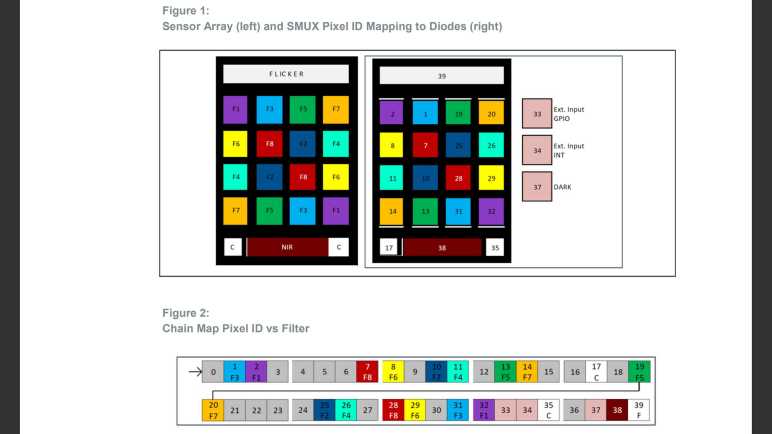
After a helpful comment helped me find documentation on the no-longer-mysterious AS7341 SMUX (sensor multiplexor) I went to learn more about another mystery I stumbled across as a beginner web developer: CORS (cross-origin resource sharing.) Why does CORS policy exist? After a bit of poking around, I believe the answer is to mitigate a type of attack under the umbrella of CSRF (cross-site request forgery.)

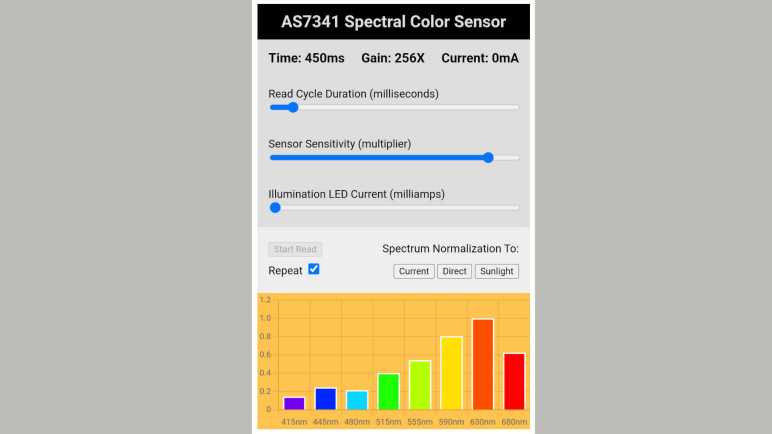
When developing my AS7341 web app, I had the AS7341 accessible via a HTTP GET on my ESP32 and thought I could develop the HTML interface on my desktop machine. But when my desktop-served JavaScript tried to query my ESP32, I was blocked by browser CORS policy. By default, JavaScript served from one server (my desktop) is not allowed to query resources on another (my ESP32.)

Reading various resources online, I learned I could set my ESP32’s HTTP response header “Access-Control-Allow-Origin” to a wildcard “*” to opt out of CORS protection. But that’s merely a “make the error go away” kind of recommendation. I know CORS is security related, but I don’t understand the motivation. What security problem does CORS prevent? Without knowing the motivation, I don’t know what I am opening up by setting “Access-Control-Allow-Origin : *” In my web app, I started out cautiously by only setting that header when I’m developing the HTML UI, serving from my desktop to query my ESP32. In “production”, my ESP32 will serve the HTML and would not need “Access-Control-Allow-Origin : *” in the header to query itself, so that header is absent.

Is that the right thing to do, or is that being overly cautious? I set out to learn more. Curiously, reading MDN and other resources give me information about HOW CORS works, but not a lot about WHY CORS exists. I guess CORS documentation assume the reader already knows! Based on that fact, I know I am looking for a relatively common website security issue that is now considered basic knowledge by network professionals.

Another data point is the fact that CORS is only applicable to HTTP queries from JavaScript running in the browser. From a command line on my desktop, I can use the “curl” tool to query my ESP32 and CORS does nothing to block that. My browser on my desktop can query the endpoint directly and that is not blocked by CORS policy, either.

Things didn’t make much sense until I found a key piece of information: HTTP request sent from a browser’s JavaScript runtime not only sends the URL and its parameters, but the browser would also attach all cookies set by that host. These cookies may contain user authentication (the “Keep me logged in” checkbox) and it makes sense such capability shouldn’t be available to just any piece of JavaScript served by random hosts. Knowing this fact and knowing the kind of abuse such code can cause eventually led me to a category of security attacks known as CSRF (cross-site request forgery.)

Once I understood CORS is here to mitigate a subset of CSRF attacks, I could look at my ESP32 AS7341 access endpoint and decide CSRF is not a problem here. Setting “Access-Control-Allow-Origin : *” does not open me up to security nastiness, so my ESP32 sketch sets that header all the time now not just during development. This is a handy bit of knowledge, but it merely scratched the surface of web security. Another item I found to be big and intimidating is OAuth.


Code for this project is publicly available on GitHub

AS7341 Project Postscript: SMUX Mystery Solved

I’ve wrapped up version 1.0 of my AS7341 interaction web app project with some ideas for future improvements, but I learned of a big one after I wrote up my project. When an earlier post in my AS7341 series “Sample Code Gave Incomplete Picture of AS7341 SMUX Configuration” was published, there was a comment by [Sebastian] telling me that I’ve overlooked the “Tools & Resources” tab of AMS AS7341 product page.

[Sebastian] is correct! There were several large ZIP file downloads under “Resources” of type “Evaluation Software”. Their descriptions line up with several AMS demos for this sensor. I probably dismissed them as irrelevant as I don’t have the corresponding AMS concept demonstration hardware. But [Sebastian] didn’t make the same mistake. Thanks to his investigation, I’ve been prompted to look inside and found that, in additional to demo-specific resources, there are subdirectories with reference resources including everything I complained was missing:

  • Windows application installer, likely for AMS AS7341 GUI software mentioned in calibration Application Note. (I didn’t install on my own computer.)
  • Excel spreadsheet also mentioned in calibration Application Note.
  • Calibration Application Note along with a few other Application Notes.
  • Most importantly: an Application Note on SMUX configuration details!

The gold nugget found within the ZIP file is AMS Application Note AN000666. “SMUX Configuration: How to Configure SMUX for Reading Out Results.” The precise location probably varies from file to file, but for the file I examined (AS7341_EvalSW_ALS_v1-26-3) it was under subdirectory “Documents”/”application notes”/”SMUX”

The key piece of information I had been missing earlier is the concept of mapping AS7341 sensor array to pixel IDs. These pixel IDs are not sequential or regular in any pattern I can decipher, and many pixel IDs are unused. I suspect these ID assignments made sense for reasons important to the engineering team that laid out this implementation on silicon wafers. Between their seemingly random order and the fact roughly half of the IDs were just unused, it was no wonder I failed to reverse-engineer this information from sample code.

But with this Application Note as reference, we now have information in hand to create SMUX configurations to best suit future projects. This is wonderful. Thanks, [Sebastian]! It’s a weight off my shoulders as I proceeded to learn about other mysteries.

AS7341 Project Future Enhancements

With my AS7341+ESP32 assembly all tidied up, alongside my web app project for interacting with them, I think this is a good point to declare version 1.0 complete and move on to something else. Naturally I have more ideas, but today I’m just going to write them down as ideas for later.

Color Accuracy

The most obvious point of improvement is a better translation from detected wavelengths to human-perceived color. I think this would require at least a few days of study (possibly more) before I can be conversant in the topic and maybe understand that Python code sample I found.

Beyond the theoretical math, there are hardware component to better color: the AS7341 has many additional capabilities that I have not used in my little exploratory app. While the eight sensors for specific wavelengths get the attention, the other sensors weren’t there just for fun. They also have a role in color accuracy as per AS7341 application node on color calibration. Those channels provide information on various distortions that may be affecting those eight wavelength sensors.

The clear channel shows the sensor response without a color filter, and the NIR channel shows raw silicon sensor response without even an infrared filter. When any of these sensors return a strong reading, that means enough of their respective types of light are likely “bleeding” into the other color sensors. Flicker detection is likewise also involved because flickering light patterns would impact sensor readings. All of these factors should need to be compensated before feeding into color space conversion.

Temperature Compensation

I haven’t used AS7341’s temperature compensation feature beyond its default behavior of running once upon powerup. Ambient temperature changes would affect sensor behavior, which is true of all sensors. Or to paraphrase what I’ve heard from veteran embedded engineer Elicia White: “Every sensor is a temperature sensor. Some even sense other things.”

Auto Gain Control

A little tangential to the topic of color accuracy, this sensor seems to have some sort of auto gain control to ensure sensors get a good range of values without going too far into saturation. Ideally, I can add an “Auto Gain” checkbox to my app and let the sensor take care of gain control automatically, but that isn’t as easy as it looked at first glance. This feature was not exposed in the Adafruit library and my effort to explore it with twi_nonblock API produced behavior I didn’t understand.

Web App Evolution

Orthogonal to anything I might do to improve AS7341 performance, I might choose to evolve just the web app itself. This first version was written directly in HTML/CSS/JavaScript, the only library I used was Chart.js to plot the bar graph. This process is fine for a simple app but will get more cumbersome for larger projects. So even though this app is fine for its scale, I might use it as “Hello World” exploration of tools that help manage larger projects. Like learning how to use NPM to manage dependencies like Chart.js. Or using TypeScript to tame some of JavaScript’s wild and annoying sides. Or convert it to use an application framework like Angular. That would be sheer overkill for such a small app, but I have big web app project ideas and I need someplace small to start learning.

ESP32 Evolution

Or I might focus on the ESP32 side of things. Top of the list here is using it as a learning project for ESPAsyncWebServer, which has more of the features I might want over the current basic WebServer implementation. Before that, though, I’ll probably switch over to using PlatformIO so I can upload HTML/CSS/JavaScript files to SPIFFS and serve from there, instead of the current unnecessarily cumbersome process of converting them over to hex values in a header file.

Platform Migration

Or a future path would not involve the web app at all. It’s totally possible for a future project idea to be done entirely onboard the ESP32, porting my browser-side JavaScript code to C on the ESP32. It all depends on what motivates me to create enhancements in the future.

Which may be triggered by something like discovering information I had mistakenly overlooked.