Going Off the Beaten Metra Path

My 2004 Mazda RX-8 was factory equipped with an optional in-car navigation system, but the map data and the electronics behind it are now twenty years out of date. Potential upgrade ideas evolved over my two decades of ownership, but I never got around to any of them. Now I’ve decided to give my car a modern (for now) capability: connect to a phone via Apple CarPlay or Google’s Android Auto.

A typical upgrade solution is to replace the factory stock audio head unit with an aftermarket unit. There’s a large selection of CarPlay/Android Auto capable products, like this randomly chosen example Pioneer DMH-W2700NEX. (*) Such replacement is relatively easy for dashboards that conform to the dual-DIN standard for audio head units. Unfortunately, interior design has been moving away from that standardized format, a trend that included my car. Stylistically integrating audio with the rest of interior now hinders my attempted upgrade.

Fortunately, the aftermarket has an answer for that as well, in the form of Metra 95-7510HG. (*) This kit replaces the entire center console panel with a new facade that accommodates a dual-DIN head end. The “HG” suffix has a glossy finish that matches the stock panel, the version without “HG” prefix may blend in better with the rest of the interior which did not have a glossy finish. There’s also a single-DIN variation with a little storage cubby, but that would be too small to accommodate a CarPlay/Android Auto touchscreen. In all cases, we lose the circle themed Mazda styling on the original panel.

The price tag on these kits is far more expensive than a plastic panel and a few brackets, because there’s a fair bit of electronics that have to be installed as well. Remember that interior integration trend? This panel, formerly hosting the audio controls, also hosts the HVAC controls. Plus, sitting above this panel is a single glowing red screen displaying both HVAC and audio status. The Metra kit includes electronics to interface with the HVAC and status display. It also interfaces with the steering wheel audio controls. And finally, a critical safety item: the emergency flasher button is also part of this assembly.

Searching on the RX-8 owner forum, I found many reports that the Metra kit is not a seamless experience. There are complaints about mechanical fit, cosmetic finish, and electrical gremlins in the electronic interface translators. They’re all solvable problems except for the last one: I don’t usually look down that far when driving. My car already has a screen up high in my normal field of view. I want to use that location. Based on the above criteria, I decided against the Metra kit and will try a different route.


(*) Disclosure: As an Amazon Associate I earn from qualifying purchases.

Replacing Factory Navigation for 2004 Mazda RX-8

I am slowly grinding away at learning FreeCAD, hoping to get good enough so I can use it for future projects. There’s not much to write about learning the ropes, so I’ll write about a different project currently underway in parallel. I had recently concluded a cosmetic art car project, removing Plast-Dip I applied to make it resemble Star Wars’ BB-8. Now my car is back to its factory blue color, and I want to tackle an item that’s been on my to-do list for a long time: upgrade the in-car navigation system.

Mazda offered the 2004 RX-8 with an optional in-car navigation system. It was an expensive add-on, but I was young and flush with a tech salary, so I got mine so equipped. This luxury far predated the age of everyone having maps on their cell phones. (Reminder: the first iPhone launched in 2007.) Add-on units from Garmin and TomTom existed at the time, but the factory options were superior for several reasons:

  1. Spoken directions are piped through the audio system instead of a tiny speaker on the dash.
  2. A dedicated GPS antenna with a better view of the sky than a box in the cabin.
  3. It has access to vehicle speed and direction to estimate position if GPS signal is lost.
  4. Does not occupy a power socket and does not require a tangle of wires.
  5. Screen is elegantly integrated with the interior, not a suction cup on top.

I knew map obsolescence will become a problem at some point, but I wasn’t too worried. At the time I had expected to trade the car in for another one in a few years, I didn’t expect to love the car enough to still have it today. A 2004 model year car that I bought in 2003 means the map data was probably compiled in 2002 if not earlier. This is now quite old, and I don’t recall ever hearing anything from Mazda about map updates, for free or for fee.

One advantage of having the optional factory navigation system is that, if I wanted to tackle an upgrade project, a lot of wiring is already in place as well as the factory interior trim pieces to accommodate a navigation screen. But what would this upgrade project entail? The project ideas evolved as the years went on. Early in my car ownership, I contemplated converting the in-car navigation system to an in-car Windows PC running Microsoft Streets & Trips and patched to the in-car GPS antenna. That would have been a hugely complex project, so I never got started. For a simpler alternative, I considered shucking a Garmin free of its factory enclosure and integrate it into the car, but that never happened either. Then online maps like Google Maps got good enough I thought about replacing the factory navigation screen with an Android tablet with Google Maps running offline maps downloaded at home via WiFi. While I procrastinated, data plans got cheap enough for our phones to use live data online. So, I thought about putting a phone mount inside the factory navigation hood.

None of those happened, but I’m finally tackling the project now. The current state of the art for in-car integration takes the form of Apple CarPlay and Android Auto. That’ll be my target but I’m taking an unconventional route.

Facebook’s “Welcome Back” Was Astonishingly Useless

Today, while researching something online, I followed a link that turned out to be a post in a Facebook group. To read it, I had to log in with my Facebook account that I have barely used for several years. I mostly use it for exactly this purpose: “to read that one thing” and quit. But today I was curious to see a few items from people I’ve fallen out of touch with. Maybe I’ll be reminded why I used to spend time on Facebook.

I clicked to see my feed and was surprised at how many times I had to hit “Page Down” to read anything interesting. It was pretty ridiculous. I hit “Home” to go back to the top of the page, which refreshed everything because Facebook wants to show me different ads. This time, I wrote down the posts that scrolled by. The tally: 39 items before I got 5 actual posts by people on my friends list. 5/39 = 12.8% of my Facebook “Welcome Back” were actual content I cared about, and the rest were garbage. (The actual ordering is at the end of this post.)

This is astonishingly bad. My mental impression of Facebook, back when I was active, was 80%-90% posts by real people sprinkled with 10-20% of ads and other uselessness. Now it has flipped completely around. I’ve read that both Facebook usage hours and advertising revenue are going down, but now I see firsthand what’s going on: to increase revenue and engagement, they increased number of things I didn’t ask for, trying to get me to stay online longer so they can make more money. But that is actually having the opposite effect: I’m now less inclined to stick around, so they’re going to make even less money.

Questionable business plan, pathetic execution.


My sample of Facebook feed welcoming me back after a long period of absence:

  1. “Suggested For You”
  2. “Suggested For You”
  3. “Suggested For You”
  4. “Sponsored”
  5. First actual item from someone on my friends list!
  6. “Suggested For You”
  7. “Suggested For You”
  8. “Sponsored”
  9. “Suggested For You”
  10. Second actual item from someone on my friends list!
  11. “Suggested For You”
  12. “Sponsored”
  13. “Suggested For You”
  14. Third actual item from someone on my friends list!
  15. “Suggested For You”
  16. “Sponsored”
  17. Fourth actual item from someone on my friends list! At this point I’m thinking “Well this is significantly worse than before” but I ain’t seen nothing yet…
  18. “Suggested For You”
  19. “Sponsored”
  20. “Suggested For You”
  21. “People You May Know” (I didn’t)
  22. “Sponsored”
  23. “Suggested For You”
  24. “Suggested For You”
  25. “Sponsored”
  26. “Suggested For You”
  27. “Suggested For You”
  28. “Suggested For You”
  29. “Sponsored”
  30. “Suggested For You”
  31. “Suggested For You”
  32. “Suggested For You”
  33. “Sponsored”
  34. “Suggested For You”
  35. “Suggested For You”
  36. “Suggested For You”
  37. “Suggested For You”
  38. “Sponsored”
  39. Fifth actual item from someone on my friends list, with 21 useless items between it and the fourth actual post.

Holy crap, Facebook. My expectations were low, but you’ve managed to sink far below even that. You’ve just made sure it’ll be even longer before my next visit.

FreeCAD Notes: Part Design First Impressions

Watching MangoJelly’s FreeCAD tutorials on YouTube, I learned the power of FreeCAD workbenches and how FreeCAD supports different workflows via different combinations of workbenches. While I can follow along with what’s on screen, that’s different from my own personal workflow that I’ve been using with Fusion 360 and Onshape. And it’s not yet clear if FreeCAD can do the same or if I have to change my personal workflow to fit FreeCAD.

The tutorial’s first example uses the Part Design workbench. It is focused on creating a single part and only a single part: any operations that result in multiple pieces (like cutting a shape in half with boolean operation) will be flagged as an error. It is also focused on keeping individual operations simple and process them sequentially. We create a simple shape then modify that shape with additional operations until we reach the shape we want.

I understand this behavior resembles Tinkercad and is intended to be a more beginner-friendly way to reason about object modeling. But I saw two problems pretty immediately in my brief playtime: first, by building up a long chain of operations, modifying any single step will have repercussions on every step that follows. This workflow aimed a loaded gun at the beginner’s feet, just waiting for the dreaded TNP to pull the trigger. Second, by encouraging individually simple steps, it also encourages scattering part feature dimensions across all of those steps. The size of the overall part might be in the first step, but to find the size of a hole cut in that part we have to dig into the chain of operations to find the cutting operation.

These two observations meant Part Design workbench didn’t make a great first impression on me. I prefer to create few sketches up front with almost all of the information. (Ideally just three: top view, side view, front view.) And then build my parts from dimensions in those few sketches. If I change those dimensions afterwards, I expect to have the parts recalculated automatically.

I didn’t see anything that resembled my preferred workflow until part 12, when MangoJelly goes into “Master Sketch”. The tutorial shows how to use master sketch with Part Design workbench, which should mitigate my concerns with the default workflow.

Putting it into practice, though, is going to take more practice. Trying to use my master sketch in Part Design is continually frustrated by some kind of misunderstanding I have with how references work in FreeCAD. At one point I got frustrated enough to ask: “I wonder if this is easy in Part workbench” and tried to extrude my sketch there.

My fumbles in Part workbench created multiple surfaces instead of a solid shape with four holes, reminding me of another beginner-friendly feature of Part Design: it hides all the surface-related features, keeping things focused on solid 3D shapes. This is good, but I have a lot to learn before I can make Part Design workbench do my bidding.

FreeCAD Notes: Workbenches

After deciding I’ve had enough of a distraction from learning FreeCAD, I started watching a YouTube tutorial playlist by MangoJelly. Watching someone else use FreeCAD is instructive because it is a difficult piece of software to use without some guidance. When I dove to play on my own, I got far enough to create a new FreeCAD document then figuring out I need to launch a workbench. But a default FreeCAD installation has over twenty workbenches to choose from, and no guidance on where to start or even what a workbench is.

After about 4-5 videos into the MangoJelly playlist, I learned a workbench in FreeCAD is a mini CAD package inside FreeCAD designed for a particular task. A workbench generate data for the underlying FreeCAD infrastructure that could be consumed by another workbench, or be useful directly. To use an imperfect analogy: if Microsoft Office were FreeCAD, its workbenches would be Word, Excel, PowerPoint, Outlook, etc. Except unlike Office, we can install additional FreeCAD workbenches in addition to the default list and we can even write our own.

Workbenches make sense as a software architectural approach for a large open-source project like FreeCAD. People with interesting CAD ideas can prototype them as a FreeCAD workbench without writing a CAD system from scratch. As a demonstration of the power of workbenches, I was impressed by the fact entire code-cad packages can interface with FreeCAD in the form of a workbench.

  • There is an OpenSCAD workbench which bridges FreeCAD with OpenSCAD (which must be installed separately) to consume OpenSCAD script and converts the result into an OCCT mesh that can be used by other FreeCAD workbenches.
  • There is also a CadQuery 2 workbench that can be used in a similar way. With the advantage that since CadQuery is also built on OCCT, in theory its output data can be used by other FreeCAD workbenches more easily as OCCT primitives instead of converting into a mesh.

Such flexibility makes FreeCAD workbenches a very powerful mechanism to interoperate across different CAD-related domains. On the downside, such flexibility also means the workbench ecosystem can be confusing.

  • MangoJelly started the tutorial by using the “Part Design” workbench, and a few episodes later we are shown the “Part” workbench. Both build 3D geometries from 2D sketches and have similar operations like extrude and revolve. MangoJelly struggled to explain when to use one versus the other, leaving me confused. I wonder if FreeCAD would ever choose one and discard the other or would it just continue down the path of having two largely overlapping workbenches.
  • A cleaner situation exists with the “Raytracing” workbench which has not been maintained for some time. There now exists a “Render” workbench with most of the same features. Thus, the unmaintained “Raytracing” will no longer be a part of default FreeCAD installation after 0.20. This is perhaps the best-case scenario of FreeCAD workbench evolution.
  • But “Part” vs. “Part Design” is not the only competition between similar FreeCAD workbenches. There’s no single recommended way to build multipart assemblies, something I would want to do with a Sawppy rover. As of this writing the FreeCAD wiki describes three viable approaches each represented by a workbench: “A2plus”, “Assembly3” and “Assembly4”. I guess evolution is still ongoing with no clear victor.

Learning about workbenches gave me a potential future project idea: If I build a future version of Sawppy rover in FreeCAD, would it make sense to also create an optional Sawppy workbench? That might be the best way to let rover builders change Sawppy-specific settings (heat-set insert diameter) without making them wade through the entire CAD file.

That’s an idea to investigate later. In the meantime, I should at least learn how to work with the Part Design workbench that’s used a lot as in MangoJelly’s YouTube tutorials.

FreeCAD 0.21 is Coming Soon

I liked the potential promise of doing CAD via code instead of drawings, but current implementations left me unconvinced. Partly because today’s existing code-cad solutions are built on OpenSCAD (I’m not a fan) and partly because it is a huge change in mindset. I might find motivation to give it an honest effort in the future, but for the immediate future I’ll retreat back to FreeCAD and the sketch-based workflow I’ve been familiar with. Part of this decision came from getting a sense of FreeCAD’s direction in their “What’s going on at FreeCAD?” communications.

The biggest question I had is about the infamous topological naming problem. (TNP) This always comes up whenever people discuss switching from a commercial closed-source CAD package to open-source FreeCAD. Opinions range on a wide spectrum from the snobby “only dumb users run into TNP” to “widespread adoption would not be possible until TNP is mitigated” to dismissive “TNP exists because FreeCAD is not a serious project”.

I don’t personally have an opinion on FreeCAD TNP, since I haven’t used it very much yet. But I know enough to be aware it’s not exclusive to FreeCAD. Many other CAD packages have problems along those veins to varying degrees. For my Sawppy CAD file in Onshape, part geometry changes are sometimes followed by notifications of failed fillet operations. Or worse, fillet operations that don’t fail but went someplace unexpected.

But my opinion is not as important as the opinion of the people behind the project. Do they even consider TNP to be a problem that needs solving? Thanks to “What’s going on at FreeCAD?” I learned the answer is a definite YES. In fact, they consider it one of the (if not THE) top problems that need to be solved before they can declare FreeCAD version 1.0.

I don’t understand enough FreeCAD internals to understand how they intend to address TNP, but there IS a plan, and the project is at a critical stage. The underlying support infrastructure is in place, but starting to utilize that infrastructure across FreeCAD will likely degrade performance until everything is done. This will be the next public release. It won’t disrupt users who aren’t part of making the great TNP fix, while providing a stable foundation for people who are. Allowing them to implement and test TNP solutions. (And if things go seriously wrong, it leaves the option open to rip out that infrastructure and try a different approach without breaking future versions.) Since TNP is not fixed yet, the next release will not be 1.0. It’ll just be the next increment: 0.21.

I first started looking at FreeCAD shortly after 0.19 released and online resources (aimed at 0.18 and earlier) were in turmoil working to update. Today, 0.20 had been out for over a year and most resources have stabilized. I should take advantage of that and learn 0.20 as quickly as I can before 0.21 causes another round of disruptions.

So where should I start? There was a recent Hackaday post about FreeCAD, which elicited the usual cacophony of comments arguing about TNP. But in between the noise I noticed multiple recommendations for MangoJelly’s YouTube tutorial series. Video tutorial is not my preferred format, but if it’s a popular place to start, I’m willing to give it a shot.

To Code-CAD or Not to Code-CAD

CadHub is an advocate of defining 3D models using lines code instead of the more traditional interactive UI descended from pre-computer drafting boards. It holds a lot of promise and it linked to several projects making those ideas real. The problem is they’re built around OpenSCAD which, while not as bad as I thought, is still hobbled by some fairly fundamental limitations. I wouldn’t say I’m a convert to the cause just yet.

I am happy to see these code-cad projects implementing some of my wishlist for collaborative CAD capabilities. However, taking a step back, I noticed there is no fundamental requirement linking the two. Take the example of branching and merging: this is a valuable feature that has been implemented in Autodesk Fusion 360 and in OnShape, neither of which are code-cad systems. Similarly, there’s nothing fundamentally impossible about adding automated drawing regeneration, integration with documentation systems, etc. to non-code-cad systems.

I will admit it is easier for code-cad systems to implement such features in the context of git. Since code-cad is based on code and git is specifically designed to work with code. There’s a barrier to climb for non-code data files, but git can be used to version control non-text files like images. Doing so restricts conflict resolution to granularity of entire files: we have to choose one file, or the other, and couldn’t merge between them like we could with text files. Or at least, that’s the situation by default. I’m not familiar enough with the git protocol to know if it’s possible to patch in a binary file format merging mechanism. I do know it’s possible to introduce a binary file change difference visualizer, because GitHub offers support for select non-code file formats.

But there’s more to a collaborative information management system than git, as shown by Fusion 360 and Onshape. While code-cad is A way forward to reach items on my wishlist, it may not be THE way forward. This little research tour has been extremely educational, but I should get back to studying FreeCAD.

OpenSCAD Gems via CadHub

CadHub is an advocate for the general idea of 3D CAD models built from lines of code instead an electronic representation of a drafting board. This approach (“code-cad”) holds many promises of meeting my wishlist for an open-source collaborative CAD solution. While theoretically applicable for all code-based CAD solutions, the current reality is almost exclusively built around OpenSCAD.

I briefly dipped my toes into OpenSCAD for a bit, but I was really turned off when I learned the prescribed method to perform a fillet operation in OpenSCAD is to use operators like Minkowski sums and convex hulls. They are conceptually straightforward but in practice it takes a long time to chew through the math. Making matters worse, OpenSCAD’s CSG kernel is limited to a single thread underutilizing modern multicore processors. In contrast, the OpenCascade 3D kernel can easily handle fillets and has partial support for multicore computation. (Whether that capability is enabled in FreeCAD, CadQuery, etc. is a separate issue that depends on their respective OCCT integration.)

Despite my distain I have to admit such theoretical superiority has to be balanced against OpenSCAD’s real-world advantages that are already up and running. CadHub blog talked about integrating code-cad into software CI/CD pipelines. That page linked to two projects which have already put the concept into practice: OpenFlexture Microscope and a DIY Split-Flap display. Both of these projects define their 3D designs via OpenSCAD, enabling automation to keep their project documentation in sync. This is pretty awesome. And some OpenSCAD users shared the same objections I do, except some of them actually helped solve the problem. CadHub itself has something called the “Round Anything” library that makes some OpenSCAD fillets (especially internal fillets) less painful.

But those are still just workarounds for what I see as results of fundamental OpenSCAD design decisions. Even CadHub, advocate of code-cad in general and OpenSCAD specifically, admits there are significant downsides as tradeoff for OpenSCAD upsides. Despite its actual proven advantages, I still think it’s pretty unlikely for me to put serious effort into using OpenSCAD. Partially because I’m not even sure code-cad is the only way forward.

Window Shopping CadHub

While window shopping a few different projects for generating CAD models in browser, including replicad, I came across the occasional mention of CadHub and decided to take a look. I like what I see, but the project seems to have lost momentum.

The most visible component of the project is a browser-based interface for code-based CAD, much like what Cascade Studio has built, but generalized across multiple systems. It supports OCCT-based CadQuery as well as OpenSCAD with its own CSG system. But that was merely the first step on the list of ambitions. Its documentation homepage listed how code-based CAD can realize many of the items on my collaborative CAD wishlist, including automatic design verification and visual change comparison (diff) tooling. These and many other long-term ambitions are described on the “Blog” side of documentation page, along with this very informative survey of code-based CAD solutions.

So that all looks great in theory, how does the reality look? And sadly, things don’t look as rosy there. Despite all the theoretical advantages of code-based CAD in general, it appears that only OpenSCAD has found any significant adoption and I’m not a fan. (That’s a separate post I should write up.) On paper, CadHub supports CadQuery as one of several kernels, but as of this writing CadQuery capability has been disabled. The “it’s just Python” power of CadQuery became its downfall: since running CadQuery requires a Python environment, people have abused CadHub to do non-CAD things like trying to run security exploits or mine cryptocurrency using free CPU cycles. This sounds very much like the reasons Heroku free tiers went away.

Another “things didn’t work out” problem with CadHub is a consequence from the fact it presents a web-based IDE. Which is great until it tries to work with something that has its own web-based IDE like Cascade Studio. After multiple hacks trying to get the two systems to work together, CadHub threw in the towel.

These and other setbacks must have been discouraging, and probably contributed to the project losing momentum judging by its GitHub commit history. In 2021 it saw updates almost daily, sometimes multiple commits a day from multiple authors. It was still quite active going into January 2022, but the rest of 2022 saw only four commits. The most recent update was in January 2023, the lone 2023 update to date.

This is unfortunate. I really liked where this project intended to go, as it aligns with much of my own wishes. Since it is open source, I suppose I could fork the project and see if I can run with it, but I’d need to learn a lot more web development before I can even understand what’s already been done. Never mind trying to add to it. Even if I don’t use CadHub directly, though, it taught me a lot more about OpenSCAD I hadn’t known before.

Window Shopping replicad

I thought Cascade Studio was a very interesting project, providing a 3D model environment that can run entirely in the browser. Even offline if desired, as a locally-installed PWA. It is a code-based design system like CadQuery. While they all build on top of OpenCascade Technology kernel, the code-based API differences are larger than just the difference in language. (Python for CadQuery, JavaScript for Cascade Studio.) I found a lot to like, but also a few implementation details that I’m not fond of. That’s OK, there are other projects out there, including replicad. (Hackaday post.)

Both replicad and Cascade Studio run entirely within the browser thanks to OpenCascade.js, which compiled the 3D kernel into WebAssembly. And despite the fact they both wrap OpenCascade concepts with JavaScript, their API are different. Reading through replicad documentation, I learned their target scenarios are also different: Cascade Studio aims to be a full in-browser 3D model environment, presenting the JavaScript code as well as a 3D rendering. replicad is intended for people to share their designs online for others to use, by default presenting just the 3D object and the underlying code is not directly visible. But the viewer can make changes to model parameters and have the shape recomputed. This reminds me of Thingiverse Customizer, which is limited to OpenSCAD models.

Cascade Studio had the “Slider” UI option to allow customization as well, and one difference immediately jumped out at me: Cascade Studio allows the design author to specify maximum and minimum values for the slider, but replicad doesn’t seem to allow setting limits on model parameters. This seems like an oversight.

One significant advantaged I noticed in replicad API is their way of avoiding FreeCAD’s topological rename problem that Cascade Studio also seems to share. Instead of specifying entities like edges with names or numbers, replicad has a system called finders to find elements that meet a specified set of conditions. For example, it allows finding all edges at a particular Z height. Allowing us to apply a fillet without worrying about their specific names/numbers. This makes replicad closer to CadQuery, specifically with its concept of selectors.

I didn’t see any references to constraint solving. Based on some of the examples, I believe the author expects us to write JavaScript code to compute what we need directly within our 3D object design code. It’s a valid approach, but maybe not my favorite answer. I also didn’t see any references to creating multipart assemblies. Perhaps I could find an answer in a larger-scale overview like CadHub.

Window Shopping Cascade Studio

Describing 3D objects with Python code is CadQuery’s goal, something I find interesting for later exploration. Browser access is possible by running CadQuery in Jupyter Lab, making it accessible to low-end Chromebooks, but that still requires another computer serving Jupyter Lab. What if everything can run entirely standalone within the web browser? That is the laudable goal for Cascade Studio. (Hacker News post) (Hackaday post)

Projects like Cascade Studio were made possible by the OpenCascade.js project, which compiles the open-source OCCT kernel code into WebAssembly (WASM). No more hassling with separate build chains for a Windows/MacOS/Linux desktop apps like FreeCAD, now a 3D model system can run entirely within the browser no matter the underlying operating system. There must be some performance cost tradeoffs for such flexibility, but I haven’t dug deeply enough to know what they are.

Looking over how Cascade Studio was built, I see it leverages a lot of other open modules beyond OpenCascade.js. Like using Three.js for rendering the 3D model, and Monaco for the code editor. Oh right — code editor. Cascade Studio also describes 3D objects with code, except here it’s a JavaScript-based interface on top of OCCT concepts. It also leverages a lot of web technologies, like conforming to Progressive Web Apps (PWA) requirements so it can be installed locally to run entirely offline.

A valuable source of information is an unofficial Cascade Studio manual, written by a fan and not the author. (If the author wrote instructions, I have yet to find them.) It tries to cover everything a person would need to use Cascade Studio, with some basic 3D model concepts and basic JavaScript concepts. But what I really appreciated was the condensed digest of this fan’s experience with Cascade Studio, documenting many minor quirks and — even more valuable — their workarounds.

I was really enchanted by Cascade Studio possibilities until I got to the fillet edge section. Our code code needs to provide a reference to the object (obviously) and a list of edges (expected) by number (record scratch noise.) Wait, where would those numbers come from? We have to use the GUI to click on individual edges we want, the GUI will in turn display a number for each, which we can then write down to give as parameters. I inferred these numbers were generated out of the OCCT kernel and are subject to change in response to changes in the underlying geometry. If so, this would mean FreeCAD’s topological naming problem is present here, except as a topological numbering problem. Is there anything about Cascade Studio’s code-based model that would mitigate this? I don’t have an answer for that.

Constraints were a notable absence from this manual. I want a mechanism to specify things should be parallel or perpendicular, lines that should be tangent to arcs, helping to capture intent of the underlying geometry. It appears some constraint solving capability is part of OCCT, but it might be missing from Cascade Studio or at least missing from the unofficial manual.

Also absent were information on working with assemblies of parts. Onshape had the concept of “mates” to describe physical relationship between different parts. Sawppy’s suspension articulation were captured as rotate mates, with a single degree of freedom rotating about an axis. There are other types of mates, “slide” is a single degree of freedom translating along an axis, “fasten” with zero degrees of freedom, etc. I saw nothing similar here.

One item I thought was very interesting was the Slider control, which allows me to declare a user-adjustable parameter on screen. For Sawppy, the most value application of such a feature is letting a rover builder adjust the diameter of holes for heat-set inserts. This has caused grief for multiple Sawppy builds, because the outer diameter of M3 inserts is not standardized and every 3D printer prints to a slightly different tolerance. It can even be argued that most rover builders don’t care about modifying the design significantly, most would only need a few sliders to dial in a design to suit their tools and parts. If that is indeed the primary scenario, perhaps replicad would be a better tool.

Window Shopping CadQuery

When I started learning about FreeCAD, I also learned about its 3D modeling core OpenCascade Technology (OCCT). OCCT is not exclusive to FreeCAD and it forms the core of several other open-source CAD solutions, each implementing a different design intent. In the time I’ve been keeping my eyes open, I’ve come across several projects that might be interesting.

First up on this survey is CadQuery, a Python API on top of OCCT. (Hackaday post) Which is very interesting considering FreeCAD already has a Python API. From a brief look, those two APIs have different intentions on how to expose OCCT capability to code-based construction. FreeCAD’s Python API primarily enable macros, scripts, and extensions to supplement projects created in FreeCAD UI. CadQuery removes the need for graphical UI entirely.

But this is not the whole picture. It’s also possible to run FreeCAD without an UI, so I will have to dig deeper to really understand the tradeoffs between their two approaches. CadQuery actually started out as something built within FreeCAD. CadQuery became its own independent project when the team started feeling constrained by FreeCAD limitations around selection. That tells me CadQuery is working to get away from the well-known FreeCAD problem of topological naming.

Being code-centric means a CadQuery design is a Python program and can take advantage of all the software development tools available. Which satisfied my CAD wishlist item for Git-like ability to fork, pull request, etc. The problem is “diff”, which will show the Python code changes but not a visual representation of those changes. This can probably be solved by using CadQuery to process the before/after views and render the difference between them. (Such a tool may already exist.)

Since CadQuery is not dependent on any graphical user interface, there are multiple ways to play with it. CQ-editor is a native desktop application letting people use CadQuery in a similar manner to OpenSCAD. Another way is to work with CadQuery Python code in a Jupyter notebook, giving it a browser-based interface. And the one that really caught my eye: cq-directive, which runs as part of the Sphinx documentation generator. In theory this allows diagrams in documentation to stay in sync with the CadQuery design files. Keeping CAD in sync with documentation would resolve one of my recurring headaches with Sawppy documentation.

CadQuery looks like a very promising venue for investigation, but trying to go hands-on was stymied by Python versioning support. As of this writing, the latest public version of Python is 3.11 and it’s been around long enough most infrastructure like Jupyter Lab has updated. However, CadQuery is still tied to 3.10 and not expected to move up to 3.11 until later this year. Version conflict is nothing new in the Python world and can be solved with a bit of time, but I chose to put CadQuery on hold and read up on other options starting with Cascade Studio.

Learning About OpenCascade Technology

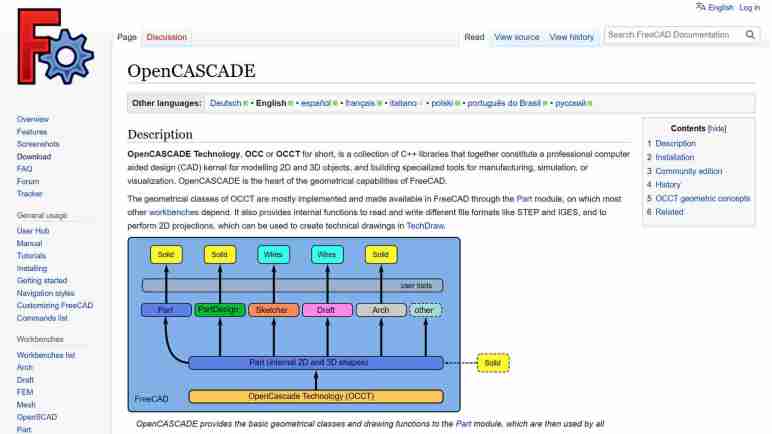
I’ve decided to spend some time learning about FreeCAD and was quite intrigued by their wiki page on OpenCascade (a.k.a. OpenCASCADE, OCC, OCCT, etc.) The first paragraph ended with “OpenCASCADE is the heart of the geometrical capabilities of FreeCAD.” The rest of the page goes into details on how OCCT integrated into FreeCAD code base and basic geometric concepts from which FreeCAD bodies are built upon. From this page I inferred that OCCT implements most (all?) of the basic requirements of building any 3D CAD software. FreeCAD can then be viewed as a set of user interfaces on top of OCCT concepts. Of course, this grossly understates the effort required to do such a thing but is a rough imperfect lens for this beginner to view the rest of FreeCAD through.

Elsewhere in FreeCAD documentation, I learned user interfaces are built around the concept of grouping related tools together. Each of these groups is a workbench intended to address their target usage scenarios. Despite their differences in methods operation, in the vast majority of cases, they all eventually break down to 2D or 3D elements built using OCCT primitives and manipulated via OCCT operations.

This is very interesting because, as an open-source CAD kernel, OCCT is not exclusive to FreeCAD. This means anyone who wants to try out a new twist on CAD semantics, they do not have to reinvent the wheel. They can build on top of OCCT as well. This sounded very interesting because one of my favorite features of Onshape CAD is that it is available anywhere that can run a modern web browser. I remember when “CAD workstation” meant a multi-thousand-dollar computer. With Onshape, a $200 Chromebook can be a modern CAD workstation.

This is not possible in FreeCAD, which is very solidly tied to a desktop. I think it would be very interesting to have an open-source browser-based CAD solution on top of OCCT, and I’m not the first to have this idea. I took a quick survey of several options, starting with CadQuery.

Taking Another Look at FreeCAD

Creating Sawppy the Rover was a great learning experience, sharing it with the world was even more so. It wasn’t until I started receiving feedback that I learned tools for hardware projects lag behind the software world in their ability to support an open-source community. I published a wishlist earlier but haven’t made any progress on finding answers. But I know FreeCAD is going to come up in some way. FreeCAD is a large and high-profile open-source CAD project. It will either be part of the solution, or I will need to know it well enough to articulate why it isn’t.

Since I had always intended for Sawppy to be open-source, I looked into FreeCAD from the start. Back then, even people behind the project cautioned it was yet ready for prime time, so I took their advice and looked elsewhere. A few years later, FreeCAD release 0.19 close coincided with Autodesk starting to… shall we say… “aggressively increase revenue” from Fusion 360 users. This caused dissatisfaction within my maker circles. Some people took another look at FreeCAD and reported: “It’s not as bad as it used to be!”

That was hardly a ringing endorsement, but enough for me to take another brief look. My problem at the time was that 0.19 was hot off the press and all the available resources online were for 0.18 or earlier. And since FreeCAD 0.19 changed significantly, those resources were out of date. I made a mental note to come back later.

As of this writing in July 2023, the latest stable release of FreeCAD is 0.20 which was released June 2022. I expect a year’s time is enough for online resources to be aligned with 0.20 and thought I should give it another look. I started reading documentation and encountered a lot of unfamiliar terminology. This is normal whenever I venture into any new technical field, though it does slow down my reading a lot as I looked up definition for each.

I quickly got distracted by a specific acronym: OCC which stands for Open Cascade. (Also OCCT, for Open Cascade Technology.) It is the beating heart of 3D geometry math at the core of FreeCAD. Learning about OCCT opened my eyes to possibilities beyond FreeCAD.

AHEAD Munition Shoots THEN Sets Fuze

I recently learned about a particular bit of engineering behind AHEAD (“Advanced Hit Efficiency and Destruction”) ammunition, and I was impressed. It came up as part of worldwide social media spectating on the currently ongoing Russian invasion of Ukraine. History books will note it as the first “drone war”, with both sides using uncrewed aircraft of all sizes for both strike (bombing) and reconnaissance (spying). Militaries around the world are taking notes on how they’d use this technology for their own purposes and deny the enemy use of theirs. “Deny” in this context ranges anywhere from electronic jamming to physically shooting them down.

“Just shoot them down” is actually a lot easier said than done, especially for small cheap multirotor aircraft like the DJI Mavic line widely used across the front. They have a radio range of several kilometers carrying high resolution cameras that can see kilometers further. Shooting anti-aircraft missiles to take them down is a financial loss: the quadcopter cost a few thousand US dollars, far less than the missile. And that’s if the missile even works: most missiles are designed to go against much larger targets and have difficulty against tiny drones. Every failed shot caught on camera gets turned into propaganda.

When missiles are too expensive, the classic solution is to use guns to throw chunks of metal at it. But since these are tiny drones flying several kilometers away, it’s nearly impossible to hit them with a single stream of bullets. The classic solution to that problem is to use some sort of scatter-shot. A shotgun won’t work over multi-kilometer distances (skeet shooting uses shotguns at a distance of a few tens of meters) so the answer is some sort of airburst ammunition: cannon shells that fly most of the way as an aerodynamic single piece then explode into tiny pieces, hoping to hit the target with some fragments.

OK great, but when should the shell burst apart? “Have it look for the drone!” is a nonstarter: even if something smart enough to detect a drone can be miniaturized to fit, it would be far more expensive than a dumb shell. The cheap solution is a timer: modern technology can make very accurate and precise timers, durable enough to be fired out of a cannon, at low cost.

It’s pretty easy to set a timer before the shell is fired, but what do we set the timer to? If it detonates too early, the fragments disperse too much to take down the target. Detonating too late is… well… too late. If the shooting cannon has a radar to know the distance to target, in theory we could divide distance by speed to calculate a time. But what speed do we use in that math? Due to normal manufacturing tolerances, each cannon shell will be a tiny bit faster or slower relative to another. Narrowing the range of tolerance is possible but expensive, opposite of the desire for cheap shells. It’d be nice to have a system that can automatically compensate for the corresponding variation.

Enter AHEAD. It removes one uncertainty by measuring the velocity of each shell as it is fired then sets the timer after that. Two coils just past the end of the barrel can sense the projectile as it flies past. Its actual velocity is calculated from the time it took for the shell to go from one coil to the next. That information feeds into calculation for the desired timer countdown. (A little more sophisticated than distance divided by velocity due to aerodynamic drag and other factors.) Then a third coil wirelessly communicates with the shell (which, as a reminder, has already left the barrel) telling it when to scatter into tiny pieces.

When I read how the system worked, I thought “Hot damn, they can do that?” It felt like something from the future, even though the Wikipedia page for AHEAD said it’s been under development since 1993 and first fielded in 2011. The page also included this system cross-section image (CC BY-SA 4.0):

Cross section of the AHEAD 35mm ammunition system

It shows the three coils in red: two smaller velocity measurement coils followed by the larger inductive timer programming coil. Given the 35mm diameter of the shell, there seems to be roughly 100mm between the two velocity measurement coils. Wikipedia page for an AHEAD-capable weapon lists the muzzle velocity around 1050 meters per second, which calculates out to ~95 nanoseconds to cover the distance between those two coils. The length of the shell is a little over five times the diameter, and the inductive communication coil is somewhere towards the back so call it 5*35 = 175mm from tip of shell to inductive coil. The distance from second velocity coil to programming coil is roughly the diameter of the shell at 35mm. 175 + 35 = ~210mm distance. That implies in the neighborhood of 200 nanoseconds from the time the tip clears the second coil, to the time the two inductive communication coils line up. That 200ns is my rough guess as to the time window for the computer to perform its ballistic calculations and generate a timer value ready to transmit. That transmission itself must take place within some tens of nanoseconds, before the communication coils separate. That is not a lot of time, but evidently within the capability of modern electronics.

Here’s a YouTube video clip from a demonstration of an AHEAD-armed system firing against a swarm of eight drones. Since it’s a sales pitch, it’s no surprise all eight drones fell from the sky. But for me, the most telling camera viewpoint was towards the end, when it showed the intercept from a top-down camera view. We can see the airburst pattern to the left of the screen and the target swarm to the right. From this viewpoint, the top-down variation is due to aerodynamic and other effects and the left-right variation is due to shell-to-shell variation plus aerodynamic and other effects. To my eyes, the airbursts are in a circle, which I inferred to mean the system successfully compensated for shell-to-shell variation.

I’m not very knowledgeable about military hardware so I don’t know how this system measures up against other competitors for military budgets. But from a mechanical and electronics engineering perspective I was very impressed there is a way to set the fuze timer after the shell has been fired.

Code for Load Cell Experiment (ESPHome YAML Lambda)

I’ve got a set of inexpensive load cells hooked up to log signs whether I’m getting a good night’s sleep. It was an experiment that was both interesting to me and fits within the quite-significant limitations of these cheap little things. I’m going to leave that setup collecting data for a while, in the meantime I want to write down details on the software side before I forget.

I did not try to compensate for temperature or for system warmup, those two together could affect final weight output by as much as half a kilogram. But in the specific purpose of tracking changes on a minute-by-minute basis, those factors could be ignored.

This sensor and HX711 amplifier combination has a recurring issue sending occasional readings that do not reflect what’s actually happening. To minimize effect of these spurious data points, I have taken the following measures:

  • The reported weight value is the median weight out of the past minute and a half. Median value filter is more tolerant of spurious data of drastically different values.
  • Once I had everything set up, I noted the minimum measured value (empty bed) and the maximum expected value (bed with me in it) and discarded all values outside of that range as “Off Scale Low” and “Off Scale High”. That will throw out some spurious data but still leaves those within the expected range.
  • The reported delta value is not the difference between the maximum and minimum values seen within a time window. I track the second-largest and second-smallest values and report that delta instead. This way I can ignore spurious outliers, though it only works as long as spurious data doesn’t happen multiple times within a minute. Fortunately that’s been the case so far. If the problem gets worse I’ll have to devise something else.

And here’s the ESPHome YAML. If you want to copy/paste this code, feel free to do so. But make sure the values of hx711 “dout_pin” and “clk_pin” matches your hardware. The constants used to filter off-scale high/low will also need to be adjusted to fit your setup:

sensor:
  - platform: template
    name: "Delta"
    id: load_cell_delta
    accuracy_decimals: 0
    update_interval: never # updates only from code, no auto-updates
  - platform: template
    name: "Off Scale Low"
    id: load_cell_toolow
    accuracy_decimals: 0
    update_interval: never # updates only from code, no auto-updates
  - platform: template
    name: "Off Scale High"
    id: load_cell_toohigh
    accuracy_decimals: 0
    update_interval: never # updates only from code, no auto-updates
  - platform: hx711
    name: "Filtered"
    dout_pin: D2
    clk_pin: D1
    gain: 128
    update_interval: 0.5s
    filters:
      median:
        window_size: 180
        send_every: 120
    on_raw_value:
      then:
        lambda: |-
          static int load_window = 0;
          static float load_max = 0.0;
          static float load_second_max = 0.0;
          static float load_min = 0.0;
          static float load_second_min = 0.0;

          // Ignore spurious readings that imply negative weight
          if (x > -500000) // Constant experimentally determined for each setup
          {
            id(load_cell_toolow).publish_state(x);
            return;
          }
          // Ignore spurious readings that exceed expected maximum weight
          if (x < -1500000) // Constant experimentally determined for each setup
          {
            id(load_cell_toohigh).publish_state(x);
            return;
          }
          
          // Reached the end of our min/max window, publish observed delta
          if (load_window++ > 120)
          {
            load_window = 0;

            // Use second largest/smallest values, in case the absolute
            // max/min were outliers.
            id(load_cell_delta).publish_state(load_second_max-load_second_min);
          }
          
          if (load_window == 1)
          {
            // Starting a new min/max window
            load_max = x;
            load_second_max = x;
            load_min = x;
            load_second_min = x;
          }
          else
          {
            // Update observations in min/max window
            if (x > load_max)
            {
              load_second_max = load_max;
              load_max = x;
            }
            if (x < load_min)
            {
              load_second_min = load_min;
              load_min = x;
            }
          }

Initial Sleep Activity Data

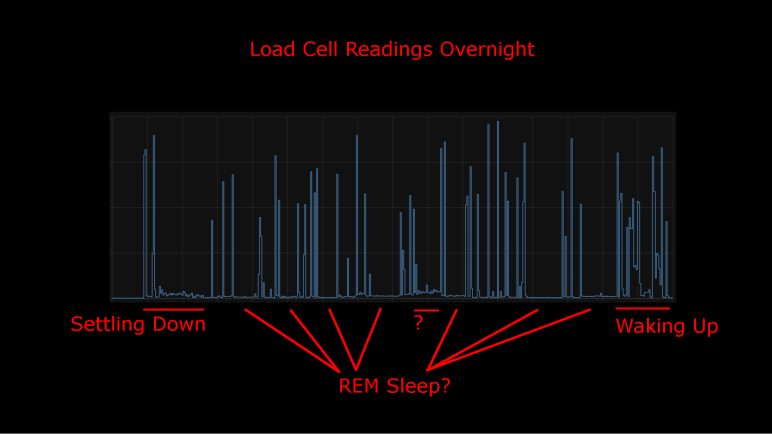
I took an inexpensive HX711-based load cell setup (the type that measures body weight in a bathroom scale) and installed them under my mattress. I wasn’t interested in measuring my weight while I sleep, I was interested in changes that indicate movement while sleeping. Ideally, I would see pauses in the data implying muscle inhibition associated rapid-eye movement (REM) sleep. I would take lack of movement as an indication of restful sleep. Logged to my Home Assistant database, here’s a plot of first night’s data:

This was a relatively restful night where I woke up refreshed. Looking at the plot, I can see when I got into bed and muscle activity gradually reducing as I fell asleep. There are multiple periods of nearly zero movement, implying a nice deep sleep in my cycle. As I started waking up in the morning, the load cell picked up more activity.

There was one unexplained set of data halfway through the night, where the movement activity is low but not as low as restful periods. The movement resembled my “settling down” period. I wonder if I woke up for some reason and had to fall back asleep? If so, I have no memory of this.

For comparison, here’s a graph of a different night’s data:

It was not a restful night of sleep. I have vague memories of waking up in the middle of the night, tossing and turning. I also woke up exhausted which corroborated with this plot of measured weight delta. It took longer before I fell asleep, there were far fewer periods of restful low movement, and I started to stir much earlier before I got out of bed.

I’ll keep the system running for a while, logging information from a time when I’m asleep and unconscious. But that’s about as far as I’m going to go. It would take more sleep science knowledge to analyze this data further and I’m not inclined to do so. Partially because this was a really cheap load cell + HX711 amplifier chip combo delivering unreliable data. Some of these “movements” may just be spurious data from the sensor. I wouldn’t read too much further into it, it’s just a fun project and not a serious health diagnosis tool. But here’s my ESPHome/HX711 code if anyone wants to play with it.

Load Cells for Sleep Activity Logging

I didn’t expect a lot when I paid less than $10 for a set of load cells from Amazon, and indeed it has some pretty significant limitations. But that’s fine, every instrument has limitations and it’s a matter of making sure an application fit within them. Looking at the limitations of this sensor, I thought I had the perfect project fit: use them to gain some insight on my sleep quality.

Quality of sleep is important and there’s a lot of research behind it. For the home scientist, one of the easiest metrics to measure is the fraction of time we stay still in rapid-eye movement (REM) sleep. Problems disrupting sleep will cut into the amount of time we spend in REM sleep, depriving our brains of an important part of resting. Measuring actual eye movement is difficult, but (healthy) REM sleep also temporarily inhibits our muscles keeping our body still. This is an imperfect correlation: it is possible for muscle movements to happen while in REM sleep (should be small, though) and it is possible to stay still without being in REM sleep. Despite the imperfection, sleep movement is a good proxy.

There are many options to track sleep movement in the consumer medical technology field. Health wearables with accelerometers can do it, but it requires wearing the device while sleeping. Alternatives to wearing something include motion-detection cameras, but I’m not putting a camera in my bedroom. Using a set of cheap load cells seems like a good option, and logging data to my Home Assistant server at home is much better for personal privacy than a cloud-based solution.

I’ve already written my ESPHome YAML lambda tracking maximum/minimum values within a one-minute window. It was originally intended to quantify noise inherent in the system, but it works just as well to pick up changes on sensor readings. So, there will be no additional software work required.

On the hardware side, I have an IKEA bed frame with a series of slats holding up the mattress. I can put my sensors where the slat rests on the frame.

Load on all other slat-frame interface is not measured, which meant the absolute measured values will change depending on where my body is on the bed. Fortunately, the absolute value doesn’t matter because I’m only interested in changes minute-to-minute. Those changes over time are my sleep movement data. This also means I can ignore other problems with this instrument’s absolute values, like system warmup and daily temperature cycle sensitivity.

The bad news is the problem of spurious data will still impact this application. Such erroneous data will indicate movement when no actual movement has occurred. It means these measurements will understate the quality of my sleep by some unknown amount. (I slept better than the data indicated, but by how much?) However, given that the correlation between REM sleep and lack of motion is an imperfect one to begin with, perhaps this error is acceptable. The recorded data is pretty noisy but some patterns are visible.

Observations on 24 Hours of HX711 Data

I dusted off my inexpensive load cell system (read by a HX711 chip) and switched the associated microcontroller from an Arduino Nano to an ESP8266. That ESP8266 was then programmed using ESPHome to upload load cell readings to my Home Assistant server. I configured the ESP8266 to read every half second, but I’ve learned sending that much raw data directly to Home Assistant bogs down the system so that twice-a-second data is filtered to a summary report once a minute.

General Noise

One summary is generated by a small code snippet I wrote tracking the difference between maximum and minimum values seen within that minute. This gives me an idea of the natural level of noise in my particular configuration. If all other variables are unchanged, I saw a fluctuation of roughly 350 sensor counts, mostly within the range from 250 to 450.

The other summary is an average. Since I already had code tracking maximum and minimum, it wouldn’t have been hard to calculate my own average. But rather than adding those 3-5 lines of code, I used ESPHome’s built-in sliding window moving average filter because it was already there. Keeping the system running for a little over 24 hours, here’s the graph it generated:

Spurious Data

The little spikes visible in this graph are caused by the occasional data that does not reflect reality. I saw this in my earlier experiments with the HX711 talking to Node-RED, but that only ran for a few minutes at a time. I had hoped that, by graphing its behavior over a day, I could observe some pattern.

  • There was no frequency-based pattern I could detect: they can happen mere minutes apart, and sometimes I can go for hours without one.
  • I only have a single day, which is not enough data to say if there’s a time-of-day pattern.
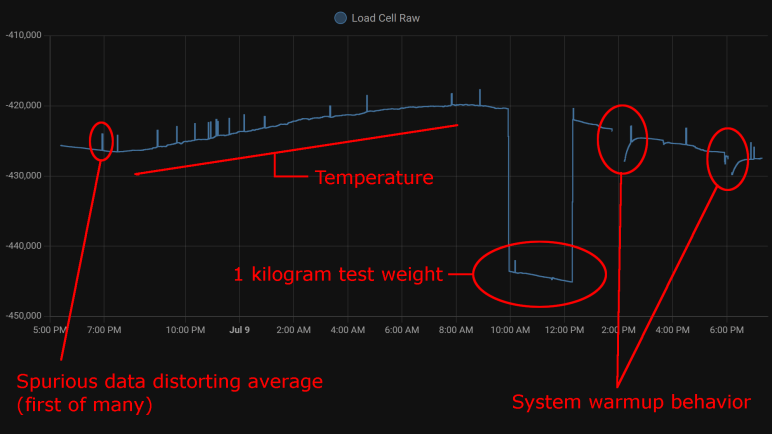
  • Visible spikes in the graph were caused by nonsensical values indicating less weight than when the load cell is completely unloaded: negative weight, so to speak. The raw sensor count is usually in the few thousands range when unloaded is approximately -420,000, a big enough difference to visibly throw off the average over 120 readings.
  • Even though “negative weight” is the most visible in this graph, there are also unexplained brief flashes of data in the positive weight domain, they just don’t throw off the average value as visibly on this plot.

Temperature Sensitivity

One behavior I never noticed during my short duration Node-RED experiments were the relation between sensor counts and temperature. With a full day’s worth of data plotted, the correlation is clearly visible. From around 7PM to 8AM the next day, temperature dropped from 28.2°C to 21.6°C. (Tracked elsewhere in my Home Assistant network, not on this graph.) During this 6.6°C drop, average sensor count rose from around -426,500 to -420,000. This rounds to approximately 1000 sensor counts per degree Celsius.

Kilogram Test

But what do those sensor counts correspond to? I used my kitchen scale to measure as I poured water into a jar, stopping when they weighed one kilogram together. I placed that on my test setup for two hours. This dropped sensor counts from around -420,000 to -443,000 (plus temperature-induced variation). Using 23,000 sensor counts per kilogram, I can tentatively guess the random noise of ~300 sensor counts correspond to roughly thirteen grams. This is consistent with my earlier observation I need roughly fifteen grams of weight change before it is barely distinguishable from noise.

By the same metric, temperature change for a single degree Celsius changes the reading by roughly 43 grams. Over the course of a day that varies by 6.6 degrees Celsius, that would change weight reading by roughly 280 grams.

System Warmup

I brainstormed on possible reasons for spurious data and thought perhaps they were caused by the JST-XH connectors I used. A small intermittent connection might not be noticed in most of my projects, but load cells work by slight changes in resistance and the HX711 amplifies those changes. Small flaws in a connector that would go unnoticed elsewhere would drastically change behavior here, so I unsoldered the connector and soldered all wires directly to the HX711 board.

That experiment was a bust, direct soldering did not eliminate spurious data. I still don’t know where that’s coming from. But I came out of it with an additional observation: When I disconnect the system for a while to work on it, then turn it back on, there’s a warmup curve visible on the plot. This graph had two such work sessions, and I see a curve of roughly 3000 sensor counts. That’s roughly 130 grams.

Conclusion

Based on these observations, I conclude this specific load cell setup is only dependable down to about half a kilogram before we have to worry about compensating for factors system warmup or ambient temperature. This is consistent with the primary use of these devices: inexpensive bathroom scales for measuring human body weight.

We also need to account for spurious data in some way, for example take multiple readings and average them, possibly ignoring readings that are wildly inconsistent with the rest.

And even if we somehow managed to compensate for environment variables, it’s not possible to reliably measure any changes less than ~20 grams because of fundamental noise in this system.

This isn’t bad for a $10 kit, but its limitations does constrain usefulness. After a bit of thought, I think I have a good project idea to fit this sensor.

Next Load Cell Experiment Will Be On ESPHome

A few years ago, I bought a cheap set of load cells to play with. The kind that performs weight measurement in an inexpensive bathroom scale. I got them up and running with the bundled HX711 board, sending data to Node-RED. Using this infrastructure, I performed a silly little (but interesting!) experiment measuring squishing behavior of packing material. I then got distracted with other Node-RED explorations and haven’t done anything with the HX711 load cell setup since. Now I’m going to dust it off (quite literally) and play with it again. This time, instead of Node-RED, I’ll be using the ESPHome + Home Assistant infrastructure.

There are multiple reasons for this switch. After a few experiments with Node-RED, I haven’t found it to be a good fit for the way I think. I like the promise of flow-based programming, and I like Node-RED’s implementation of the idea, but I have yet to find enough of an advantage to justify changing over. Node-RED promised to make prototyping fast, but I found something that got my prototypes up and running even quicker: ESPHome and Home Assistant. In my experiments to date, ESPHome’s YAML-based configuration lets me get simple straightforward components up and running even more quickly than I ever managed under Node-RED. And when I need to venture beyond the simple defaults, I can embed small fragments of C code to do just the special thing I need. This comes to me more naturally than using Node-RED’s counterpart function node with a snippet of JavaScript. It’s also very quick to put together simple UI using Home Assistant, though admittedly with far less control over layout than Node-RED’s dashboard.

But the primary motivation this time around is that I already had an instance of Home Assistant running, so I don’t need to set up logging infrastructure for longer-duration projects. Node-RED is perfectly capable of working with a database, of course, but I’d have to set something up. Home Assistant already has one built-in. By default, it stores data only locally, and only for ten days, making it much more privacy-friendly than internet-based solutions with wildly varying levels of respect for privacy.

Hardware changeover was pretty simple. The HX711 board needed four wires: power, ground, data, and clock. I unsoldered the Arduino Nano I previously installed and replaced it with an ESP8266. It will need to run ESPHome’s HX711 integration, which under the hood used the same PlatformIO library I had used earlier for the Arduino Nano. A few lines of YAML later, load cell data started streaming to my Home Assistant server for me to examine.