Window Shopping Godot Engine

I think now is a good time to take a quick look at Godot Engine, and I thought I’d start by looking at how Godot measures up against Unity counterparts that have caught my attention in the past.

Platform Support

The most important value proposition of a game engine is cross-platform capability. Godot has that pretty well covered. Godot editor can run on all the desktop platforms I care about: Windows, Linux, and MacOS. There’s even a native Apple Silicon build, something Unity only started offering a few months ago.

Godot engine can export to all the target platforms I care about: All the editor platforms I listed above plus iOS, Android, and web. Android and web are actually supported editor platforms as well, but I do not expect to use them. I do not expect support for IE11 (Windows Phone browser) but neither does Unity so that is at parity.

Unlike the commercial offerings, Godot has no official solution for console games because console SDKs are all under NDA protection at odds with an open-source model. It’s possible, but not supported, but I don’t care about that myself anyway.

VR Support

Godot supports OpenXR, which is the open-source entry point to hardware like Valve SteamVR and Oculus headsets. Godot also has support for Apple’s ARKit but I didn’t see any mention of Google’s ARCore. Fundamentally, XR support in Godot is a function of whatever support they receive for it. Whether in the form of volunteer contributors, donated test hardware, or just straight up cash.

Entity Component System/Data Oriented Design

Based on customer feedback, Unity offers their DOTS “Data Oriented Technology Stack” built on an entity component system. This opens things up for those who want to adopt data-oriented design for their software architecture. (A counterpart of object-oriented programming.)

Godot explains why they’re not terribly eager to follow in these footsteps, because data-oriented design requires a different mindset not terribly intuitive for the human mind. Partially because we have to consider nuts and bolts of CPU cache behavior. We usually have the luxury of ignoring those details as an abstraction! All that said, Godot is not forbidding data-oriented development, the document even shares a few links to resources to help. But it’s not on the main path and unlikely to be.

Reinforcement Learning

I briefly played with the reinforcement learning subset of modern deep machine learning, using Unity as the learning environment. (“Gym”.) I thought the general idea was great, but the field is still quite young. Right now, an absurd amount of computational power is required to learn what a human brain would perceive as simple behavior. I’ve also learned that Unity ML-Agents was not terribly performant, bottlenecked by communication between Unity engine and machine learning frameworks.

A cursory search found several GitHub repositories of people working to bolt Godot and RL frameworks together, whether they share the same performance issues I do not know.

Educational Resources

Learning guides are where Unity has a huge head start, with their longtime investment into Unity Learn building up a huge library of examples and tutorials for all sorts of different domains for a wide range of audiences.

Godot would not be able to match or exceed that in the short term. But supposedly the current popularity of Unity exodus has led to a spike in number of Godot tutorials being published. A rise in quantity is no guarantee of quality, but I’m optimistic that there will be sufficient resources for Godot beginners to start with whenever I choose to join those ranks.

With this quick survey, I saw no deal-breakers against using Godot. The next time I have a project idea that would benefit from being built on top of a game engine, I’ll likely use that as the focus for learning Godot. In the meantime Godot will sit on the “something to learn once I have an appropriate project” list alongside Marko.
No Further Unity Projects

I’ve just learned some very valuable electronics lessons, and it was helped by KiCad the free open-source electronics design software. It’s a very large suite of tools but having a specific need in front of me (capture reverse engineered schematics of a circuit board) helped me stay focus and get to the “know enough to do what I need to do” point quickly. I’ve also been learning FreeCAD, another piece of free open-source software, but I haven’t reached that point yet. And now I’m adding another piece of open-source software on the “learn enough to do what I need” list: Godot Engine.

Godot is an alternative to Unity 3D, both offering a game development environment and runtime engine. Unity has lots of learning resources online. It adopts new development paradigms like data-oriented programming, new tools like machine learning, and supports new platforms like virtual reality. It also used to have very beginner-friendly terms and conditions, letting aspiring indie game developer hobbyists play around for free and letting small startups launch. Originally the pitch was: “share your success”. Only after a game studio is successful would Unity start requiring payment. Unfortunately, Unity as a business is changing for the worse.

Recently there’s been an uproar in the game development industry as Unity announced new pricing policies to go into effect at the start of 2024. While price increases happen across the economy on everything we buy, this particular case was deeply antagonizing.

  1. Instead of paying royalties on successful games, it could levy a fee upon every game installation regardless of whether it is a revenue-generating context. This means, for example, successful royalty-paying game studios will be charged for every installation of a free demo whether it turns into a sale or not.
  2. Even though it doesn’t take effect until next year, the new policies could apply retroactively. Games currently in development will be held to different terms than what the project started with. Even worse, it applies to games that have already been released!
  3. Before the announcement, these changes were previewed with a few game studios to get their feedback. After receiving some very negative feedback, Unity went ahead anyway.
  4. The worst part: Unity pulled this stunt once before in 2019 and got flamed for it. They walked back those changes and promised “we heard you” and won’t do it again. Now in 2023, they did it again.

Why is this happening? Money, of course! Unity went public in 2020, which meant a management structure incentivized to “maximize shareholder value”. And the most obvious way to do that was to squeeze game developers for as much as they will tolerate. The proposed 2019 changes were originally intended to improve Unity’s financial outlook pre-IPO but backfired. And now it is obvious Unity’s management has failed to learn the lesson.

As of this writing, Unity is on a damage-control footing walking back their announcement. Again. Will it work a second time? I don’t know. It hasn’t escaped people’s notice that the same management mindset that drove headfirst into this train wreck is still in charge. [Update: CEO has resigned, but the board of directors and senior management are still there.] Notably absent from the current retraction is any legally binding obligation preventing them from trying yet again after this current storm blows over.

So “Fool me once”, and all that. Unity’s largest competitor is Unreal Engine whose licensing terms aren’t as generous, but they also lack a history of such underhanded tactics at changing said terms. Unreal will likely pick up Unity customers who need a mature toolset with leading-edge performance and quality. For those without such requirements, like small indie game studios and aspiring game developer hobbyists, maybe none of these Unity changes affect us today. But we should all be deeply concerned that Unity’s free tier may gradually become crippled in the future if not disappear entirely. Thus, alternatives like Godot Engine deserves a look.

Valuable Oscilloscope Lessons from Sonicare

I have connected my oscilloscope to a circuit board salvaged Philips Sonicare HX6530 electric toothbrush, curious to learn how it controlled the brush actuator coil.

I previously observed the actuator coil ends are alternately energized to battery voltage with the other end at ground for about 1.25ms. Then both ends sat at ground level for around 0.75ms before repeating with the coil energized in the opposite direction.

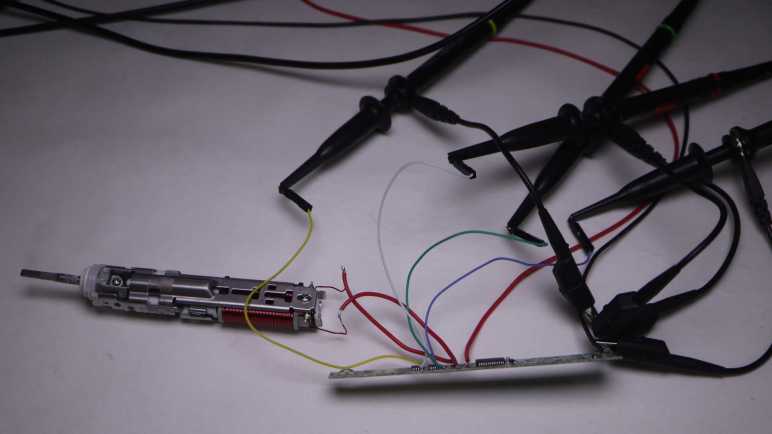
This time I connected the four channels of my oscilloscope to four test pads each associated with a MOSFET control gate. I started a brush cycle and got this:

There were two mysteries with this plot:

  1. Why are there only two colors visible when four channels are active?
  2. Why is the alternating pattern occurring for 0.75ms (duration of the rest period) at a time, instead of the 1.25ms (duration of the actively energized time)?

I figured out the first one by pushing each of the four channel select buttons in turn, which brings their color to the foreground. It turns out that two of the MOSFETs corresponding to the same end of the coil always receive the same control voltages, so they overlap on the plot and only one of those two colors is visible. The yellow line corresponds to TP3, P-channel MOSFET for coil output 2. It is always in sync and thus plots over the cyan line, which is TP9 and N-channel MOSFET for coil output 2. If I push the channel 3 button (cyan) it would completely obscure the yellow line. Likewise, the green line here is TP10 (N1) masking the magenta line for TP4 (P1). If I press channel 2 (magenta) select, it draws exactly where the green is and mask all green.

It makes some sense for both MOSFETs corresponding to one end of the coil to stay in sync. We want only one of those to be conducting from source to drain at any given time. If they are both active, that would cause a short circuit between the battery power and ground rails. Since one is a P-channel MOSFET and the other a N-channel, both receiving the same signal means one turns on and the other turns off.

But if they are in sync, why bother using two separate control pins from the microcontroller? Why not just have a single signal that goes to both MOSFETs? I learned this was a difference between the ideal world and the real world. In the real world, MOSFETs take a tiny bit of time to ramp up and down. If we use a common signal wire, one MOSFET will start to turn on while the other one is still ramping off within this narrow time window and cause a short circuit. Having two separate control signals allow the microcontroller to turn one off, wait a bit for it to ramp down, before turning the other one on.

If that’s the case, though, it’s not visible in my oscilloscope plot at 1ms/grid resolution. I selected channel 2 (magenta TP4 P1) and 4 (green TP10 N1) and started increasing the time resolution until I saw a clear difference in timing, around 3us apart, between those two signals. I love it when I can see real-world necessities confirmed in an actual implementation like this.

The next challenge is figuring out why MOSFETs look like they’re energizing the coil for 0.75ms out of the cycle, instead of 1.25ms like I expected. It didn’t make sense, so I started questioning my “known facts” until I got to cycle time. I have an oscilloscope plot on hand showing 1.25ms ON time and 0.75ms OFF time, but that wasn’t captured at the same time as the MOSFET signal plots. To verify this “known fact” I moved one of the oscilloscope probes over to coil terminal 1.

The coil is ON for 0.75ms! The “known fact” of 1.25ms ON time was wrong. I had assumed the cycle time would have stayed consistent, but something changed between the previous oscilloscope session and this session to change those cycle times. If it didn’t happen to land inversed from before (say 1.5ms and 0.5ms) I would have realized my assumption was wrong, but it just happened to end up inversed and confused me until I identified my incorrect assumption.

Valuable lesson learned: given the luxury of a multichannel oscilloscope, use those channels to capture related data at the same time. Comparing plots across different instrumentation sessions risks outdated information leading to bad conclusions.

With that, I believe my investigation of Philips Sonicare HX6530 circuit board is complete. I want to apply these lessons and build my own brush actuator control circuit, but that will be a future project. Some unrelated things worth noting happened while I had my nose in this circuit board, starting with how Unity corporation’s management alienated users.

Philips Sonicare (HX6530) MOSFET Control Under Oscilloscope

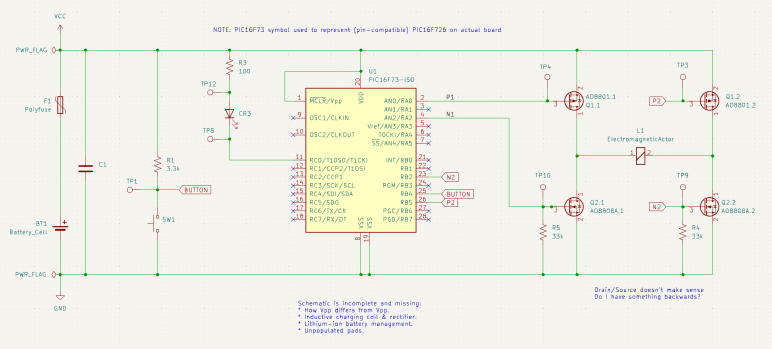
I probed the circuit board salvaged from a retired Philips Sonicare HX6530 electric toothbrush, trying to understand how it controls the brushing actuator. I compiled my findings into a partially reconstructed schematic of this circuit board, and it looks like a H-bridge or at least a similar arrangement of components.

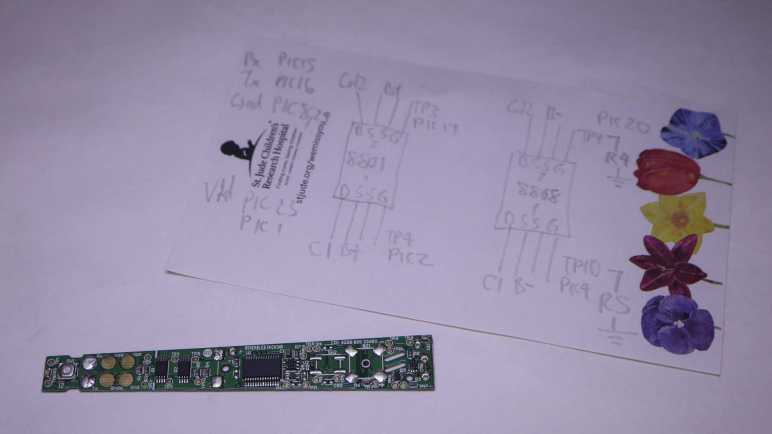
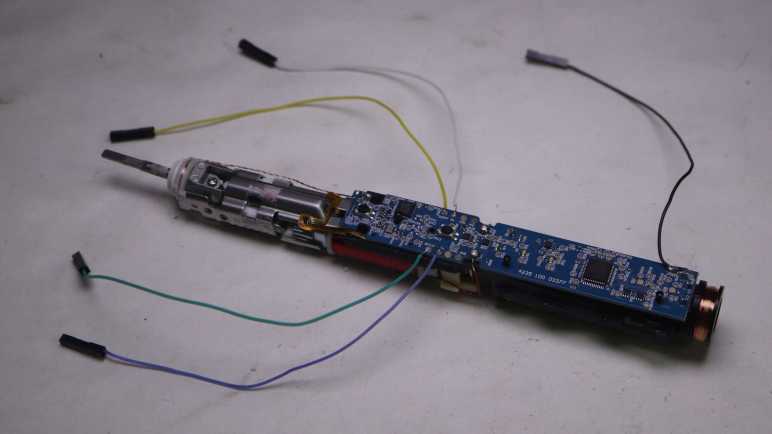
I made effort to figure out which test points corresponded to which locations on this schematic, because that’s my next step: solder wires so I could connect them to my oscilloscope and watch them run. These test points were intended to mesh with a specially designed test harness with pogo pins corresponding to those locations, but I decided that was too much effort for the sake of curiosity and went with direct soldering.

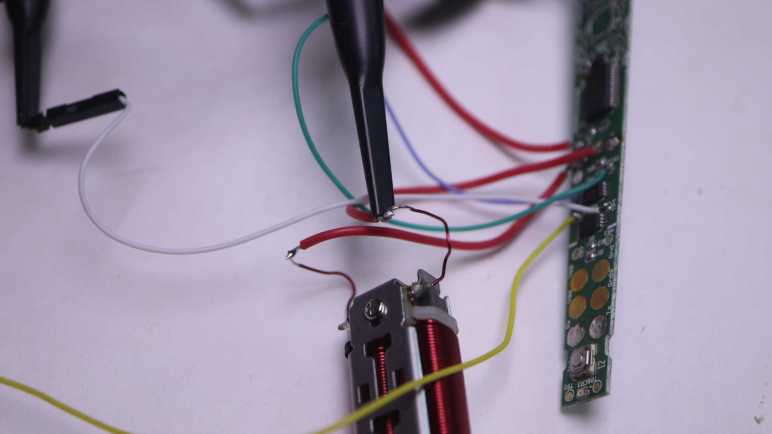
Color coding will help me keep from getting my wires mixed up. Yellow, blue, and green wires were soldered to test points so I could connect them to oscilloscope channels that use similar colors. This idea occurred to me just after I soldered a white wire to TP4. I briefly contemplated unsoldering the white wire and replacing it with a red one for the sake of consistency, but decided three out of four was good enough to avoid ambiguity.

I powered up the control board with my bench power supply set to 4V, here’s what things looked like in an idle state. TP3 and TP4 corresponding to the two P-channel MOSFET gates float at Vcc. TP9 and TP10 correspond to the two N-channel MOSFET gates with pull-down resistors are at ground. This was as expected.

Here’s an oscilloscope plot I captured earlier, measuring two ends of the coil relative to the ground plane of the control board. We see the coil is driven in one direction for roughly 1.25ms, then not powered for about 0.75ms. Then it is driven in the other direction for roughly 1.25ms, followed by another 0.75ms of rest time. Given this plot, I would expect to see MOSFET gate voltages go to a pattern consistent with driving the coil one way for 1.25ms, followed by 0.75ms of idle state, then flip the other way for 1.25ms, and then another 0.75ms of idle, and repeat.

My expectation did not match what I saw on the oscilloscope screen. All four MOSFET gates were raised high for ~1.25ms, followed by 0.75ms of activity in an alternating pattern. I expected an alternating pattern, but that was supposed to run for 1.25ms, not 0.75ms. Furthermore, there were fewer colors visible on screen than I had expected. What happened to cyan and magenta (channel 2 and 3)? I have to dig deeper to understand what I’m seeing.

Philips Sonicare (HX6530) Circuit Board Partial Schematic

Armed with the knowledge granted by “Getting Started in KiCad” guide, I can now take bits and pieces of information gleaned from a circuit board and compile them into a partial reverse-engineered schematic. The first (of hopefully many) subject of these exercises is the Philips Sonicare HX6530 circuit board. I looked it over earlier taking note of components I recognized but didn’t dig deeper into how they are connected. For this second pass, I am armed with an electrical continuity meter to probe how they connect.

To trace routes across this circuit board, I started with magnifying glasses but then moved to a digital camera with a macro lens. This allowed me to put pictures of the front and back together in a slide show and rapidly go back and forth between them to trace routes across layer vias. It worked really well this time, and I expect to continue evolving that system in future explorations.

The goal of these exercises is to control the salvaged brush actuator myself, so I focused on the actuator control MOSFETs to the left of the PIC16F726 microcontroller. I worked out most of the circuitry to the left of the PIC16F726 all the way up to the LED at the far left edge. I mostly ignored the other half of the circuit board, as it dealt with charging and unpopulated pads imply absent features. The only thing I worked out on that side is C1 as a decoupling capacitor between Vdd and Gnd.

The user interface button and feedback LED turned out to be straightforward implementations, easily probed so I put them in my schematic. The focus is on the array of four MOSFETs on the right, surrounding the actuator coil.

At a high level, I recognize the arrangement as an H-bridge circuit popular in motor control. I guess this actuator coil is a motor in a sense. But if so, why did Philips engineers decide to implement their own with two components (each a package of dual MOSFETs) instead of using a single-chip H-bridge solution like a DRV8833? It might be cost, or it might be an important difference between this brush actuator and a generic DC motor.

I notice an asymmetry in this circuit. Dual N-channel MOSFETs each got a 33k pull-down resistor (R4 and R5) on their control gates, but the dual P-channel MOSFETs went without any kind of pull-up or pull-down resistor. Why is it OK to leave them floating? I don’t know.

I didn’t find any flyback diodes on this circuit. My rudimentary understanding of driving inductive loads (such as an actuator coil) is that we need flyback diodes to protect the circuit against voltage spikes when the electromagnetic field in the coil collapses. A generic L298N motor driver module has clearly visible diodes for this purpose. Newer motor control modules like DRV8833 has such capability built-in. DRV8833 datasheet section 7.3.2 Bridge Control and Decay Modes cover this topic.. MOSFETs have a “body diode” intrinsic to their design, perhaps they were sufficient for flyback protection?

It was very instructive to poke around this circuit board and assemble the bits and pieces I teased out into a KiCad schematic. It is incomplete and likely inaccurate, and it raised more questions than it answered. All signs that I still have a lot to learn. And I will start by putting the circuit board under my oscilloscope to compare its measured behavior against what I expect from the schematic.


The KiCad project with this partial schematic is publicly available on GitHub.

Notes on “Getting Started in KiCad”

After making my tiny contribution to the “Getting Started in KiCad” guide, I sat down to actually read through it all. I’ve downloaded and installed KiCad 7.0.7 on my computer and followed along with the tutorial. I found it well-written and very informative for getting me started. Which gave me confidence I can make use of KiCad in the future.

However, the guide assumes the reader is familiar with the basics of electronic circuit design, and just needed to know where to find KiCad has organized various basic functionalities. My hypothesis is that six years ago I didn’t have the prerequisite background knowledge and was thus unable to absorb the lesson to make use of KiCad. If that’s the reason I stopped, I choose to celebrate my growth and hope things turn out better this time.

I don’t know why I had the impression KiCad has tightly coupled symbols and component footprints, because the tutorial made it pretty clear that is not the case. Schematic editor and circuit board layout editor are two completely separate modules, and it’s absolutely possible to draw a schematic with generic symbols (drawing from the stock “Devices” library) and never proceed to layout at all. This bodes well for my intended use of KiCad as a reverse-engineering/learning note-taking tool.

Reverse-engineering means I won’t have control over what components are involved in a design. I certainly won’t have all the technical data for all the components. Which is why I appreciated the tutorial covered how to make custom symbols and footprints, it’s not like I can contact a supplier representative to request technical data. There is an official style guide (“KiCad Library Conventions“) for library symbols and footprints. I skimmed through it, but I don’t understand all of it yet. If I do continue using KiCad, I should revisit this link on a regular basis to better align my own creations with official best practices.

One feature I did not expect to find in KiCad was 3D rendering. Not just the circuit board layout, but a rendering complete with components populated on the board. To do this, a design must have 3D model data associated with the footprint and symbol for a part. The tutorial linked to the FreeCAD StepUp Workbench which bridges FreeCAD and KiCad. It allows using FreeCAD to generate 3D model data for KiCad part libraries, and it also exports KiCad generated 3D data into FreeCAD. The latter allows integrating a circuit board with its associated mechanical components. This sounds like a very powerful capability and, if I ever need such capability, I hope I remember to come back and take a closer look.

For today, I’ve learned enough to use the KiCad schematic editor for my own learning purposes.

My First (Tiny) KiCad Contribution

My current project goal is building a control module for a reciprocating motion actuator salvaged from a Sonicare electric toothbrush. As a side quest to that goal, I’ve decided to pick up learning KiCad again. I played with KiCad 4 around six years ago, but without practice I have forgotten almost everything so I thought I would start at the beginning with KiCad’s “Getting Started in KiCad” guide.

Towards the top of that guide is a “Feedback” section where everyone is invited to help make the project better. Fairly common for free open source projects, but here something caught my eye: a tiny typo of “sumbit” instead of “submit”. Well, they did say they welcome feedback, let me see if I can bring this typo to someone’s attention. I followed the link to instructions on how to “Report an Issue

Most of the instructions regarding filing an issue concern the software, focused as it was on version/build number and software libraries in play. That wouldn’t strictly apply to reporting a typo, but towards the bottom is a link “I have a docs.kicad.org issue” and I followed that to the kicad-doc-website repository on GitLab. Poking around the directory tree, I couldn’t find any of the documentation information. That was because it was the documentation web site infrastructure (Jekyll scripts, etc) and not the documentation itself. What I’m looking for is the “I have a documentation issue” link to a sibling repository kicad-doc.

Poking around the kicad-doc directory tree was more fruitful. I found getting_started_in_kicad.adoc containing the text for that page. My first objective was to see if the problem has already been fixed. I see the typo in the main branch, so the problem is still there. And since I had the source in hand, I copy/pasted it into Microsoft Word to see if the spell checker can find anything else. It highlighted a few debatable differences in convention (Word wanted “mouse wheel” versus the existing “mousewheel”) and some domain-specific terminology (“opamp”.) I decided they were out of scope for my first run. It did find one other clear problem: a typo “subsitution” which is “substitution” but missing the first “t”.

With these two problems in hand, I will now file an issue. First I had to create a GitLab account, which had been on my to-do list anyway. As part of the sign-up process, GitLab forced me to create a repository pre-populated with a guide to GitLab-specific features as well as general git functionality. This is great to onboard someone new to git-powered source control, but it got in my way today. It took a few minutes before I broke out of the enforced tutorial so I can get back to kicad-doc and file issue #864: Misspellings in “Getting Started” Guide.

Once that was done, I figured I might as well try fixing the problem myself. Trying to edit the original source file resulted in a permission denied error, as expected. But it did launch an automated process to handle small single-file edits. It forked the repository into one I could edit, and then immediately package my edits into a merge request. (“Merge request” is GitLab’s slightly different name for GitHub’s “Pull Request” feature.) I thought this automation handling what would otherwise have been a manual multi-step process was pretty cool! After making my two edits, I put #864 in my description so merge request #909 was automatically attached to my issue #864.

At the same time I was building my GitLab merge request, one of the KiCad documentation maintainers (Graham Keeth) saw my issue #864 and fixed it immediately in the main branch, making my MR#909 superfluous. Graham was apologetic about my wasted effort but I was not offended. I wanted to learn the ropes of contributing to KiCad with reporting an issue, the merge request was a stretch goal. I received advice that I could have mentioned I’ll be working on a merge request when opening the issue. I’ll keep that in mind if I find something else in the future. I got feedback my issue was good, so there’s that.

For today, I have the satisfaction of seeing these typo fixes back-ported to the 7.0 documentation branch, and is now live on KiCad site. The Getting Started in KiCad page no longer has typos “sumbit” or “subsitution” and that’s my first tiny little contribution to KiCad. Now onward to actually reading and learning from that page.

Good Time to Revisit KiCad

I am learning what I can from taking apart retired Sonicare electric toothbrushes. After playing with an Sonicare charging base, my attention turned to the old Sonicare HX6530 control board. I had some idea of how a few components might work together, but if I want to follow up my ambition of building my own controller for the salvaged actuator, I need to dig deeper into how such a circuit is built.

A tool I’ll need for this job is a circuit diagram a.k.a. electronic schematic. Making notes in the form of word description will only go so far. I can always draw a schematic by hand, and I’ll definitely be drawing fragments as I probe the circuit. But to get a good picture after that, I should transfer that knowledge into a piece of software designed for schematics. (Versus general purpose graphical software like Inkscape.)

Around 2019 I dabbled in Digi-Key’s online tool Scheme-It but found it limiting. In early 2021 I used the electronics design portion of Autodesk Fusion 360 (derived from Eagle) to draw up reverse-engineered schematics for L298N and DRV8833 motor driver boards I bought off Amazon, as well as a quick stepper motor experiment with ESP32 and TMC2208 drive board. It was serviceable, but then Autodesk yanked on the chain of Fusion 360 subscriptions a little tighter and turned me off on it. I don’t like it when my user experience is at the whim of some Autodesk executive’s decision to seek more revenue, so I decided against investing any more time or money into learning Fusion 360.

What I think I should do is pick up where I left off in late 2017. That’s when I played with KiCad and got as far as getting a board made by OSH Park. I can’t remember why I didn’t continue building my KiCad skills, and annoyed at myself that I didn’t write those reasons down on this blog. (This is my project notebook! This is what it is for!) Since KiCad is free open source software, it wouldn’t have been licensing subscription fees like Autodesk Fusion 360. Perhaps I ran into problems with the software itself? Based on KiCad release history, late 2017 was the tail end of KiCad 4. (KiCad 5 would be released in early 2018.)

As of this writing, KiCad is at version 7.0.7. It would have seen significant advancements during my time away, possibly resolving whatever issues that annoyed me in 2017. Maybe it’s worth another look. At the moment I’m not interested in building a board, I just want to capture a reverse-engineered schematic. I don’t think that necessarily makes things easier as I learn the ropes again, because I remember a very tight coupling between logical schematic symbols (which I care about right now) and physical component footprints (which I don’t.) Even then, I hope the immediate goal would help keep me focused. Which naturally meant I was immediate distracted by a spell-checking side quest to the KiCad side quest.

Fun with Philips Sonicare Charging Base (HX6100)

While I think over what I might do with parts salvaged from a retired and disassembled Sonicare electric toothbrush, I played with its corresponding charging base.

Since both the toothbrush and the charging base are designed to sit on our bathroom sinks, they are both waterproof and have no exposed electrical contacts: charging is done inductively.

It doesn’t transmit very much power, based on the label claim that it only draws up to 1.4W.

After prying off that bottom panel with the information label, I see a solid mass of potting compound putting a quick end to this particular teardown session. What else can I do with this thing?

I hooked up my oscilloscope probes to a coil salvaged from a microwave turntable motor and set it on the charging base.

The oscilloscope reads a ~85kHz sine wave with an amplitude of ~40V peak-to-peak. I played with coil position and was surprised to learn being slightly off-center hardly affected transmitted power.

Removing the alignment post allowed me to go beyond the narrow range of axis alignment, where I confirmed the expected behavior: going too far decreased voltage transmitted. Inside the snapped-off alignment post was filled with a mystery black material. It is a brittle material that does not appear to be electrically conductive. A magnet is attracted to the broken-off post but I can’t tell if that’s necessarily this black stuff or perhaps there’s a piece of steel embedded further inside.

I found some electrical connectors and tested to verify they mate with the microwave motor coil terminals. Unfortunately, these terminals were dependent on the now-absent external enclosure for strength. When I pulled on my connector, the whole terminal came out breaking the wire.

And unfortunately, out of two wires I could have broken, I broke the inside wire. If I had broken the outside wire, it would have been pretty trivial to unwind a single loop to get some extra wire and solder it back on the terminal. But I broke the wire that’s buried underneath the entire coil, making this impractical to repair.

I started pulling on wire just for the sake of seeing what it’s like. This is extremely thin copper wire and there’s a lot of turns in this coil. I ended up with an impressively large hairball of fine copper wire.

It’s unfortunate I destroyed a salvaged coil that might have been fun for exploration. As fallback (or maybe they should have been the first option) I also have the Sonicare charging coils that were designed to work with this charging base. I kept it along with the bottom of the Sonicare enclosure to maintain precise alignment, though thanks to this experiment session I now know such alignment may not be strictly necessary.

I thought the fact it was a much smaller coil with far less wire would have meant I have a different voltage transformer. When sitting on the charging base, the oscilloscope reads about 34V peak-to-peak. I had expected more difference in voltage between the two coils.

Some knife work separated the coil assembly from the rest of the toothbrush chassis.

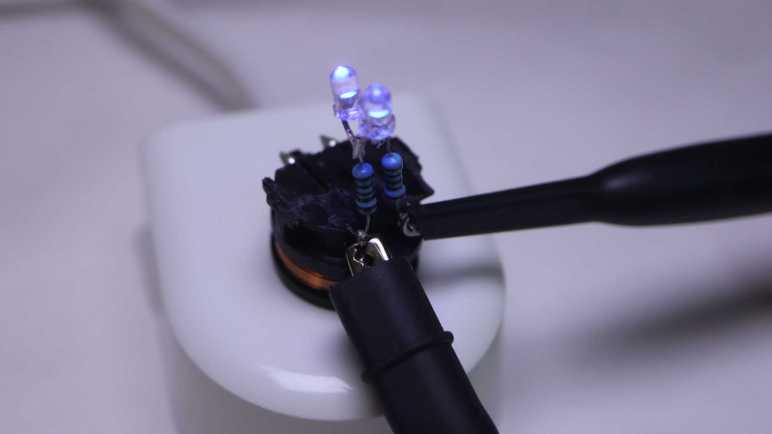
What’s the first step when exploring any electronic concept? Make it light some LEDs! Since this is an AC waveform, I soldered two salvaged LEDs side by side with opposite terminals.

When given DC power from my bench power supply, only one of the two LEDs would illuminate. If I reverse the polarity, the other LED would light up.

I didn’t bother with electrical connectors this time: the test LED assembly was soldered directly to coil terminals.

I put it on the charging base and both LEDs lit up, the expected response to AC power.

I connected my oscilloscope probes to see how the waveform changed with this load added to the system.

I can see a bump at roughly +/- 3.7V, the voltage drop point for these little blue LEDs.

That wraps a successful first test of using inductive power. Where might things go from here? If I can find the rectifiers I bought for the brushless motor generator experiment, I can get some amount of DC power flowing. It won’t be much power, a good chunk less than the 1.4W this charging base drew from the wall socket due to inductive power transmission losses. For comparison, slow USB charging is 5V @ 500mA or 2.5W, and that doesn’t even have to deal with inductive transmission losses. So any project idea would either have to be a modestly powered system or incorporate a battery like a Sonicare.

While I wait for a project idea to emerge, I’ll set this inductive charging base aside and go back to thinking about the toothbrush actuator and its control electronics.

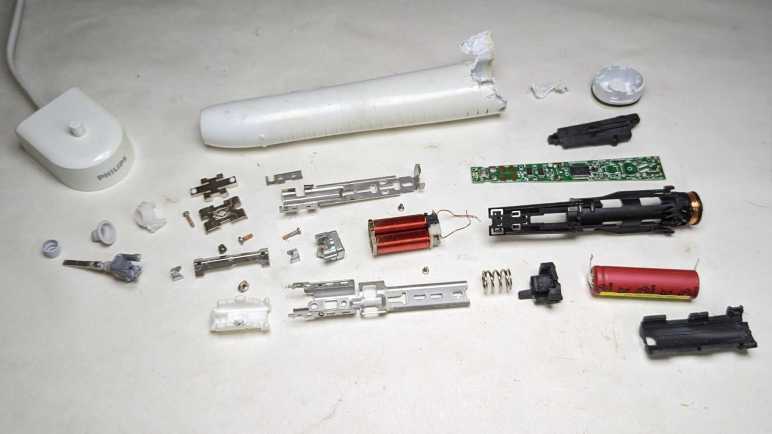
What To Do With Retired Sonicare?

After looking over the electronics of my retired Philips Sonicare HX686P electric toothbrush, I unsoldered the main circuit board from the actuator, battery, and charging coil so I could remove it from the black plastic chassis.

Separating the main circuit board from the rest of the device also meant I could get good pictures both front and back.

I was surprised to see that there were a handful of surface-mounted components on the back. They couldn’t fit everything on one side.

The “pressing too hard” sensor’s flexible printed circuit strip is directly soldered to the back of the main board. I see ten soldering points, two per wire except for the left-most where four of them are connected to a single wire. This is consistent with power/ground/clock/data or some similar variation thereof.

On my previous Sonicare HX6530 teardown, my next step was taking the brush motor actuator apart. It was an instructive process, but a destructive one. Since the actuator in this HX686P is nearly identical, I doubt I’ll learn much from taking this one apart. It’s also in better shape, as it lacks the rust and deposits of water intrusion. I can keep it intact while hoping a project idea would arise. What would I do with it? I’m not sure! Recently, Hackaday featured somebody turning their old electric toothbrush into a tiny sander. The Hackaday writer Al Williams correctly pointed out this control board has a lot of features unsuitable to sanding. For example each session only runs for two minutes, with a small beep every 30 seconds. If we want to run it as a sander, we might be better off building our own control circuit for the actuator.

Sander or not, reusing the actuator will be best done with my own control circuit. I don’t know how to do that, but maybe this is a good opportunity to learn! I now have components on hand to support such a learning exploration: circuit boards with existing implementation, a disassembled actuator where I can test the coil by itself, and I have an intact actuator for potential application. And any knowledge I gain could continue to be useful in the future, because I’m still using a Sonicare every evening for my dental hygiene routine and it’s just a matter of time before I have additional retired toothbrushes to play with. Toothbrushes, and their associated charging bases.

Philips Sonicare (HX686P) Electronics

I got inside my retired Philips Sonicare HX686P electric toothbrush and found a few physical signs of new features relative to my older Sonicare HX6530. Mechanically they seemed quite similar, but there’s a significant upgrade in electronics between the two.

Here’s the circuit board I pulled from the older HX6530, featuring a few surface-mounted components and even a few unpopulated positions, presumably to support features absent in this model.

And here is the newer HX686P circuit board. They are both the same length and have the same maximum width, but the older HX6530 board is a trapezoid that tapers versus a full rectangle in the newer HX686P. As a result the newer HX686P board has more surface area. It also has more surface mount components on board, packed more densely. There were no obvious unpopulated positions, but there’s at least one extraneous LED presumably to support feature absent in this model.

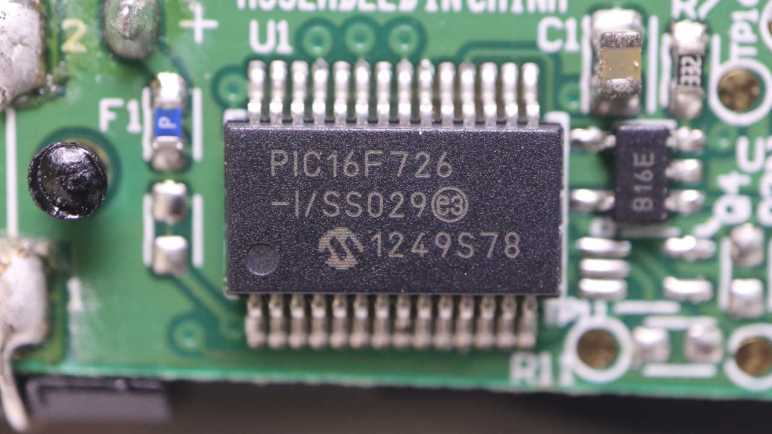
The ringleader of the new circus is a Cypress Semiconductor (since acquired by Infineon) CY8C4146AZI-S433, an ARM Cortex-M0+ microcontroller that offers a significant step up in computing power over a PIC16F726 used in the older HX6530.

The second largest chip on this board is a NXP MFRC630 for RFID applications. It makes sense it is positioned close to where the RFID antenna coil wires are soldered to the board.

Curious about what the chip is doing, I connected my oscilloscope to the RFID antenna wires where I could confirm… yep, something is happening. Beyond that, I don’t know what to look for or how to set my oscilloscope to be more informative.

Adjacent to the actuator electromagnet coil wires are these two tiny chips I inferred to be transistors controlling coil power. If so, they would be a counterpart to the Alpha & Omega Semiconductor field effect transistors found in the older HX6530 doing the same job yet only about a quarter of the size. Chip at position Q103 is marked 1Z W9n and chip at position Q104 is marked 1V W9n. There’s not enough room on these tiny chip to have full brand name and model number so this is an abbreviation. A web search on these designations turned up many results, but I couldn’t find anything relevant.

Adjacent to those are three white LEDs at position CR5, CR6, and CR7. Curiously, the external enclosure only had provision to show CR5 (“clean”) and CR6 (“white”) with only a smooth surface where CR7 would be. I never saw it illuminated, yet it was populated on this board during assembly.

The chip at position U2 is the third largest on this circuit board and has the abbreviation DEK 735. Another abbreviation I couldn’t find relevant information about.

The item at position F100 is in series with battery positive Vbat+ and labeled with just a single letter P. There is a very similar counterpart on the HX6530 board and I think they’re safety fuses. Perhaps P stands for polyfuse?

Near the charging coil (JC1 and JC2) and battery negative Vbat- are a pair of dual LEDs, each package contains a green and an orange LED side by side. These are used to indicate battery charging status (CR1) and notification for brush replacement (CR2).

It’s difficult to focus on the LED internals, here was my best effort.

And here’s the same item with the green LED illuminated. I want to get sharp pictures of these things, time will tell if that desire separates me from my money for a microscope camera.

I soldered wires to pads labeled SPDAT, SPCLK, Rx, and Tx so I could look at their activity under the oscilloscope. Rx stayed at the ground plane, while SPDAT, SPCLK, and Tx stayed at Vbat+ voltage level. I struck out again here, Sonicare firmware engineers are clearly not in the habit of shipping chatty hardware.

And finally, here’s a closeup shot of the chip I hypothesized was a brush actuator feedback sensor, sitting as it was over the gap between the electromagnet and permanent magnet. Perhaps it is a Hall effect sensor? Accelerometer? Audio microphone? There are many possible ways to measure actuator behavior, but again I struck out here. A search on its markings C180 1371G returned a lot of search results on Cessna 180 airplanes and Mercedes-Benz C-class automobiles, burying any information that might be relevant to a Sonicare toothbrush.

That’s what I’ve learned from poking around a disassembled Sonicare HX686P. What’s next?

Philips Sonicare (HX686P)

I retired & took apart my Philips Sonicare HX6530 after it had slowly degraded over years. So slowly I didn’t realize until I was reminded by a newer unit: “Hey, this is what a Sonicare clean should feel like!”

I replaced it with this HX686P, which has also been recently retired due to degradation. But this one degraded overnight instead of gradually. Literally: one evening it felt fine, the next night “hey, what’s wrong with this thing?” My first thought was that I had accidentally triggered the “Easy-Start” feature, which introduced newcomers to Sonicare clean by starting easy and ramping up strength over time. I verified Easy-Start was not active, and ran out of ideas on why it might have suddenly weakened. Oh well, time for a new one and tearing down this one.

The manual for this HX686P explicitly stated it can be disassembled for battery disposal so I tried pushing on the metal toothbrush stem. Unlike attempts with the HX6530, I was successful popping this core loose. In addition to seeing if I can find any obvious signs of why it failed, I’ll be looking for physical implementation of some new features:

  • It works with newer brush heads to keep a usage count and notifying me when it’s time to replace the brush.
  • It detects when we’re pushing too hard for effective brushing, telling us to back off.

Comparing HX686P and HX6530 side by side, the mechanical components appear nearly identical.

There’s a loop of fiber-reinforced tape that would be useless for holding the metal assembly in place. I think it exists to hold the RFID antenna wire.

Peeling off the tape confirms there isn’t anything else underneath other than the RFID antenna wire. It also confirms the clips + welded system is still here. When I saw the welds on the old HX6530 I had wondered if it was a hack on top of an original clip-based design. Since it’s still here after several generations, I assume clips+weld is a belt-and-suspenders system to hold the mechanical actuator chassis together.

Here’s the other end of the RFID counter system, at the base of the brush head.

It was glued in place and impossible to remove non-destrutively, so I destroyed an old brush head for a closer look. The small chip is connected to a coil of wire that would sit aligned with the coil visible inside the toothbrush handle. I’ve read that people have tried to reverse-engineer this system.

Relative to the older Sonicare, another new component is this chip and capacitor sitting on a little segment of flexible printed circuit. Why are they here and what are they doing?

A hypothesis surfaced when looking at the side view: this chip is sitting above the gap between the electromagnet and permanent magnet, ideally placed to sense brush actuator lever motion. I think this is a sensor that feeds into the “is the user pushing too hard on the brush?” feature. To test this hypothesis, I peeled off the sensor which was held by double-sided tape. Once it was bent away, the “pushing too hard” alarm feature stopped working.

Another observation: The gap is noticeably larger here on the HX686P than on the older HX6530, but I’m not sure if that signified anything. On the other hand, the lack of water intrusion is certainly a good thing.

Until I decide to start destructively cut things away, I could only lift the circuit board a tiny bit. Peeking underneath, I don’t see any signs of a connector for the flexible board implying it’s soldered directly to the bottom of the circuit board. Before I try to get a better look at the bottom, there are plenty of interesting things up top.

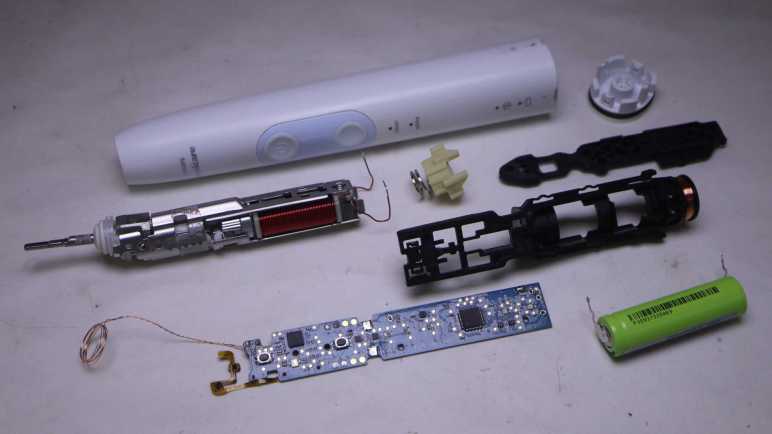
Philips Sonicare (HX6530) Actuator

After looking over the circuit board and charging coil of my retired Sonicare (HX6530) electric toothbrush, only the electromechanical actuator assembly remains. Earlier in this teardown I noticed a few welds, that’ll have to be dealt with at some point, but I’ll start with the screws at the base of the electromagnet.

There were two of them, one top and one bottom. Removing the first one was undramatic. As soon as I loosened the second, though, there was a metallic “click” and it took me a few seconds to figure out what happened: as soon as the screws were loose, the electromagnet core slid up against the permanent magnet.

Manually prying them apart, I see the gap adjustment ranges from a maximum of almost two millimeters down to no gap which was where it went when the screws were loosened. This distance would affect toothbrush performance but I don’t know in what ways, so I have no idea how to optimize this gap.

Here’s a picture taken earlier intended to show rust as sign of water intrusion, but here we can also see the original spacing between permanent magnet and electromagnet. That is a tiny gap and I doubt I could restore that precise distance again. Then again, perhaps this distance is wrong: maybe its gradual degradation of performance was due to the electromagnet slowly sliding towards the permanent magnet over many years? Ignorant of metrics to measure proper operation, I have no way to tell.

On the other end of the actuator, I could access a single screw. Loosening it freed the toothbrush stem assembly, caked with deposit left from water that got past the rubber seal.

Everything else was enclosed inside the stamped sheet metal shell held with stamped clips as well as spot welds. I’m curious if it was originally designed to be held with just the clips. The welds may have been added to the manufacturing process later when they realized the clips along weren’t strong enough, or maybe the welds were part of the plan all along.

A cutting wheel removed the welds, but the stamped clips were pretty strong even without them. I ended up cutting off one set of clips as well.

Once the top and bottom stamped sheet metal bits could be separated, I could extract the electromagnet and the pivoting lever sub-assembly.

Unscrewing the visible fastener freed the permanent magnet from the pivoting lever sub-assembly. The final fastener was hidden under the top plate of the pivoting lever sub-assembly, holding it together. Once undone, everything could come apart.

Freeing the permanent magnet also meant I can look at it under my magnetic field viewing film.

This was a lot more complex than I had expected. Once I saw this device worked by using an electromagnet to actuate a lever, I expected an one-piece arm with a magnet on one side and the toothbrush head on the other. I infer this complexity was required because they wanted to implement a very specific motion profile for optimal dental hygiene. All these parts allow them to fine-tune the motion: from changing the thickness of spring steel plates to increasing/decreasing the mass at either end of the lever. If they wanted to optimize production costs, it wouldn’t need this much complexity to just vibrate a brush head. A cheaper and simpler knockoff could vibrate but not necessarily replicate the precise motion.

Would I notice the difference between a genuine Philips Sonicare and some cheap knockoff? Maybe yes, but maybe not alone by itself. I think I’ll notice a difference with a side-by-side comparison. After using Sonicare for years, I think I have a good idea of what feels right. While a slight gradual degradation may go unnoticed as was the case with this unit, if something goes wrong overnight I’ll notice. I’m confident because that happened with my next Sonicare.

Philips Sonicare (HX6530) Circuit Board and Charging Coil

After disassembling my retired Philips Sonicare (HX6530) enough to access its internal circuitry, I paused to take a look at it under my oscilloscope. After completing that detour, the oscilloscope probes were put away, and the mechanical tools came back out to resume disassembly.

First to be freed was the circuit board. In addition to a few plastic clips (and one melted plastic rivet) it was held with six soldered connections: Two wires for the actuator coil, two for the battery, and two for the charging coil.

From left to the right, here are the components I recognized on the board:

  • A single green surface-mount LED, the only user visual feedback on this device
  • A single button, the only user input.
  • Six large pads. There’s solder on Rx and Tx because I wanted to see if it was transmitting serial data. (It did not.) Two of the pads are labeled Gnd and they both electrically connected to ground. The remaining two pads are labeled Vdd and Vpp, and I don’t understand how they differ. They both seem to show the current battery voltage.
  • Two resistors R1 and R3, then the two Alpha & Omega field effect transistors Q1 and Q2.
  • Two more resistors R5 and R4, than the two pads leading to actuator coil.
  • A through-hole for the battery positive terminal, leading to F1 and an unoccupied pair of pads. The component sitting at F1 has a small “P” printed on it and it doesn’t look like a resistor. Thinking of electronic things that start with “F” and would make sense at the battery terminal, I think this is a safety fuse. The unoccupied pair of pads has a thin trace connecting them. I guess this is a provision to put something in line with battery power: we can cut that trace then solder something on those pads.
  • U1 is the Microchip PIC16F726 microcontroller.

I got lost after this point. There are many unpopulated pads, I presume features for higher end models. SW2 would be for another switch, but what might sit at BZ1? Some of these components would deal with power coming in from the charging coil (connected at the holes on either side of the CR6 lettering) and maybe for battery management. The positive battery terminal connection point was mentioned earlier, the negative terminal connects to the upper-right hole adjacent to lettering JP1.

Speaking of the battery, unsoldering its connection to the circuit board freed it from the chassis. Now we can read the lettering on its side telling us it is a 14500 form factor (14mm diameter, 50.0mm length) cylindrical cell with a capacity of 680mAh (milli-Amp hours).

The charging coil stayed on the black rigid plastic chassis, but now that it is freed from the circuit board I hooked it up to the oscilloscope again for another look.

Left plot was taken while the charging coil was connected to the circuit board, right plot is the coil by itself. Note the vertical scale has changed between these two plots: 1V/div on the left and 5V/div on the right. The most obvious difference is the shape: it is now a sine wave instead of a square wave. The amplitude is much larger at about 30V peak-to-peak or 15V above and below the center point. This is roughly triple the rectified 5V I saw earlier. I don’t know enough about analog electronics to know what would accomplish this on the now-removed circuit board, maybe in the future.

With the electronics disassembled, my attention returned to the electromechanical actuator assembly.

Philips Sonicare (HX6530) Under Oscilloscope

I’m partway through disassembling a retired Sonicare electric toothbrush, far enough to see all the internal components. The likelihood of irreversible damage rises sharply from this point. Before I do anything destructive, I wanted to check out some electrical characteristics under my oscilloscope.

The biggest chip on this circuit board is a Microchip PIC16F726 microcontroller.

Next largest are a pair of chips with the logo of Alpha & Omega Semiconductor. A brand I’ve encountered in a few previous teardowns as a provider of field-effect transistors. Their 8801 is a pair of P-channel FET and the 8808 is a pair of N-channel FET, sitting close to the actuator coil wires.

I didn’t see any other significant-looking chips on this board. I thought there might be a lithium-ion battery management chip like a 4056, but I found no likely candidates. Perhaps such tasks are handled in software running on that PIC16F726.

First target: big test pads labeled “Tx” and “Rx”. These names usually denotes serial communication and I was curious if there’d be any sort of diagnostic messages during runtime. I don’t know any of its parameters (voltage, baud rate, etc) so the first pass is to look at them under the oscilloscope. As a user, there were only a few events I can trigger: start/stop brushing, and start/stop charging. I was disappointed but not surprised to see no electrical activity on these pads. The chip is staying quiet until it sees the right access code, which I don’t have.

Second target: the inductive charging coil. Channels 3 and 4 were connected to either end of the coil and plotted relative to battery negative as ground. The plot on the left has both channels 3 and 4, the plot on the right has only channel 3.

I had expected to see a 60Hz sine wave on this coil when sitting on the charging base, which runs on household power ~120V AC @ 60Hz. What I saw had a period of around 11us, which translates to about 90 kilohertz. That was a surprise, as well as the amplitude. I had expected it to be symmetric about the ground plane but it’s actually going from about 0V to 5V. And finally, it is a square wave and not a sine wave. In short, I expected none of this and I don’t understand what I’m looking at.

I left the toothbrush on the charging base connected to the oscilloscope until the status LED went from blinking (“charging”) to steady on (“charge complete”). I measured the battery voltage at 4.1V at this point. I thought perhaps the inductive charging coil would look different when it’s not actively charging, but it looks pretty much the same.

Third target: the brush actuator coil driven by those Alpha & Omega FETs. Again channels 3 and 4 were connected to either end of the coil and plotted relative to battery negative. The plot on the left has both channels 3 and 4, the one on the right only has channel 3.

When actively brushing, the coil is activated in one direction (~5V on channel 3, 0V on channel 4.) for roughly 1.25ms. Then both ends are grounded for roughly 0.7ms. Then the coil is energized the other way (0V on channel 3, ~5V on channel 4) for roughly the same duration.

Every 30 seconds the brushing pauses and the toothbrush issues a “beep’ to remind us to switch to a different set of teeth. I had been curious if this was implemented as reduced voltage level or reduced coil energizing cycle. The answer is the latter: all of the time periods described above shortens by roughly 25%, that was enough to stop the coil from brushing but enough to cause an audible beep.

After watching the brush actuator waveform for a few cycles, the toothbrush fell silent and the waveform collapsed to a single phase. Oh no, what happened?

One of the coil wires had broken. It was designed to handle stress of brush vibration, but not with the additional weight of an oscilloscope probe. That was too much and metal fatigue took care of the rest. Well, I’ve seen what I wanted to see so this is a good place to stop my oscilloscope examination and resume mechanical disassembly.

Philips Sonicare (HX6530)

After wrapping up a teardown (and unexpected repair) of a Philips product, I decided that was a good teardown theme and proceeded to another retired product from a different Philips subsidiary: Sonicare.

This Sonicare HX6530 could still vibrate the toothbrush head, but it could no longer clean effectively. Its degradation was long and gradual enough I didn’t notice until my dental hygienist commented on my worsening dental buildup. I tried a new Sonicare and realized I should have retired this HX6530 long ago.

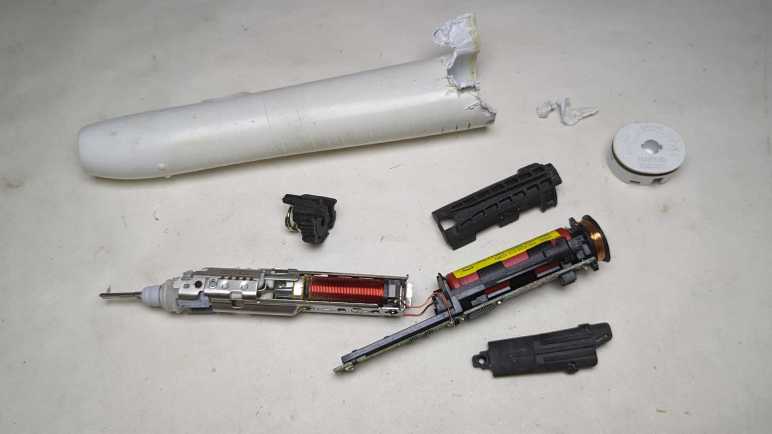
Some of the newer Sonicare have been designed to be easily opened for battery recycling, we just have to push on the metal toothbrush stem. This older model is locked up tight and not so easily opened. I thought maybe clamping the plastic will flex and break some glue joints, but nothing interesting happened.

Using my also-much-degraded Wondercutter (a topic for another post) I cut an entry slot and started prying away with pliers. I quickly got far enough to confirm there’s a black rubber O-ring as water barrier.

More prying later, I reached a piece of black plastic that looked like a latch. Once all its surrounding plastic has been pried awayI tried pushing on the metal stem again.

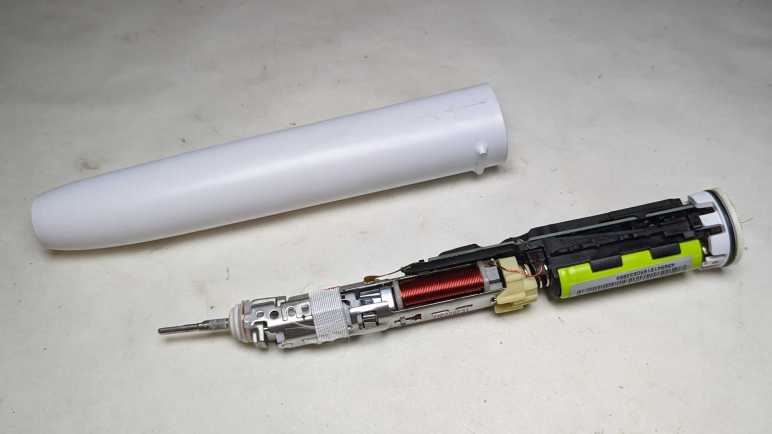
Cutting one latch away weakened the holding power of the remaining latch, so this time a firm push on the metal stem was enough to push everything out of the enclosure.

There are definite signs of water intrusion inside, such as these dried deposits near the tip.

There was also rust near the interface between the coil and the armature. Unlike hair trimmers, reciprocating motion is not created here with a spinning motor shaft turning a crank. Instead it appears to be using a pair of coils facing a magnet.

I didn’t see an obvious candidate to explain why this toothbrush degraded. The signs of water intrusion didn’t seem sufficient to damage the electromechanical assembly, and all components appear intact on the circuit board. The battery voltage measured 3.8V DC, within nominal range.

I had expected the battery to be a single lithium ion cell in the commodity 18650 form factor. It turned out to be a much smaller cylindrical cell made by Sanyo. Here it is next to a 18650 cell for size comparison. Also visible to the left is the coil for interacting with the charging base.

I could peel three large pieces off the core. They are all made of soft vibration-absorbing material, the midships piece incorporated a spring for even more vibration absorption. It makes sense that keeping vibration under control would be an important mechanical engineering consideration for this device. It’s not just for user comfort, they have to make sure it doesn’t shake itself apart!

I was encouraged by the few Philips-head screws I could see at the base of the electromechanical assembly, thinking I might be able to disassemble it non-destructively.

That hope was dashed when I saw the other end of these two metal pieces were welded together. Oh well! Going further will be a destructive act. Before I do that, though, I want to probe the electrical aspects of this device.

Philips Norelco Multigroom Revived (MG7790)

I retired my Philips MG7790 hair trimmer because it would stop in the middle of a haircut. Its red LED flashing an error, which usually means the battery has run out of juice. But it would do this within a few minutes after fully charged, very disappointing when it was advertised with up to six hours of runtime on a full battery. I decided the battery has degraded and maybe replacing its battery would get it back up and running. I disassembled its internals to get to the battery, a single lithium-ion cell in the commodity 18650 cylindrical form factor.

Measuring the battery’s voltage, I expected to see a low value somewhere below 3.5V. But it actually read 4.1V which is effectively full for a healthy single lithium-ion cell. Maybe its voltage would drop under a bit of load? I started the motor running, and the voltage barely budged. It stayed close to 4.1V as the motor spun freely for twenty minutes, longer than it’s done recently.

If the battery is fine, I have misdiagnosed the issue. I started thinking about possibilities:

  1. I originally thought it was premature death of a dodgy battery. But the cell was made by LG and generally speaking they know what they are doing in the field of battery manufacture. Especially a well-known commodity form factor like 18650 cylindrical cells.
  2. A battery would suffer accelerated wear if it was undersized for the task. But with up to six hours of runtime on a full charge, this battery is massively overprovisioned and shouldn’t have been stressed.
  3. Perhaps the stress came from premature death of a motor component. As a quick test, I spun the motor shaft by hand while the thing was turned off. It turned smoothly and without any squeaking noises, so it’s probably not due to premature bearing death. Besides, it was a genuine Mabuchi, they know motors.
  4. Perhaps this was a result of poor overall system design? But this isn’t a cheap no-name budget priced item. Philips/Norelco has been in this business for a long time, and they should know what they are doing.

What have I missed? This is a mechanically simple device and there aren’t too many other things for me to look at. I started thinking about my twenty-minute runtime test, which had the motor spinning without driving anything.

The red LED pulsed during this test. Since the voltage was high and the motor was still running, that red LED must be complaining about some problem other than low battery.

During the teardown I unsoldered the battery from the circuit board, the first time they’ve been separated since factory assembly and the first time this circuit board has been completely without power. Maybe the pulsing red LED is complaining about some sort of cold startup condition? I plugged in the AC adapter to let it charge up to full. After that, the red LED stayed dark if I started the motor. I guess it needed to do some sort of battery calibration/reference on external power.

But now there’s no error, what should I look at next? During these tests, the motor spun freely because everything was still disassembled, and it was not possible to attach a cutting element. Process of elimination says I should take a closer look at that cutting element.

For comparison, both Conair and Remington hair clippers had two prominent fasteners holding the static blade in place.

Once the static blade was removed, we could clean all around the reciprocating blade. As seen here on the Conair unit.

When we could remove to access the motor driven crank volume and clean hair out of there, too. As seen here on the Remington unit.

Back to this Philips, whose cutting element incorporated both static and reciprocating blades. It’s easy to pop them off as a single unit to access this hair chamber as per cleaning instructions. The manual doesn’t say anything about taking the cutting element apart, but I’m going to do it because I am running out of places to look.

The static blade is held by a pair of tiny little Torx screws, more annoying than those easy large fasteners of Conair and Remington hair clippers. Once the static blade was freed I could see the volume between static and reciprocating blades is fully packed with fragments pressed together into a nearly solid brick of hair. The cleaning instruction never mentioned cleaning this area. The tiny little self-tapping plastic screws won’t last many fasten/unfasten cycles implying this wasn’t intended to be a user-serviceable cleaning area.

Being packed with hair fragments meant the reciprocating blade would have required more motor effort to move, which in turn would have increased strain on the circuit and battery. Maybe this was why the battery drained quickly, or perhaps the red LED didn’t signify low battery at all. Perhaps the motor stalled, or perhaps the motor control circuit overheated. I have no idea what that red LED was trying to tell me, but I certainly didn’t get “you need to disassemble and clean the cutting element” from a dull red LED.

Once all of the packed-in hair was removed and the cutting element reassembled, the reciprocating blade was much easier to move by hand. I tested this repair by reassembling everything and trimmed my hair with it. This time, the motor didn’t stop partway through the process. Yay, success! Since I already had a newer unit in service, I will keep this older unit around as backup. It’s no longer waterproof, but it runs again. As a bonus, this episode also taught me valuable lessons on how to clean the newer unit to keep it healthy.

Philips Norelco Multigroom Internals (MG7790)

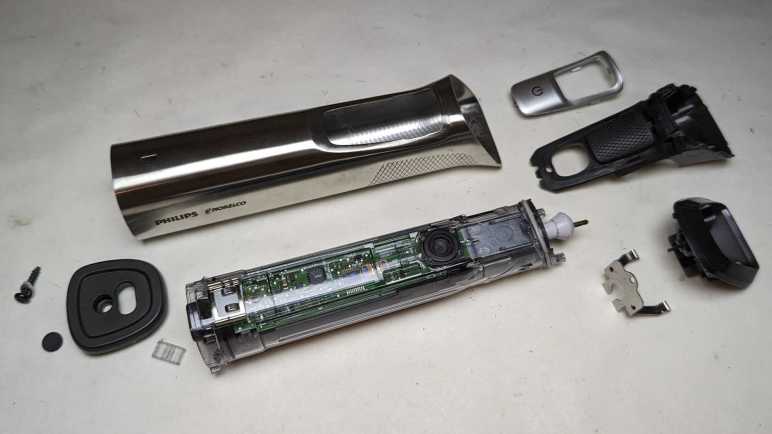
I’ve managed to disassemble the exterior components of a retired Philips Norelco Multigroom (MG7790) which made only a moderate mess with its hair fragments trapped within. In earlier hair clipper teardowns, that was enough for me to access all internal components. However, this unit is IPX7 waterproof which meant everything is inside a clear plastic watertight capsule.

The control circuitry is much more sophisticated than those in the two earlier hair clippers, though I’m not sure why. At the end of the day, this just needs to turn a motor on or off. Perhaps there’s battery management as well? The little of blue peeking through various gaps in this enclosure hints at a single lithium-ion battery in a commodity 18650 cylindrical cell form factor.

The motor is genuine Mabuchi! A pioneering giant for small DC motors, I usually encounter knockoffs of popular Mabuchi designs instead of a genuine Mabuchi. Either that, or it’s a counterfeiter brazen enough to print the Mabuchi logo on their wares. I’d like to think Philips/Norelco uses the real thing.

The bottom of the clear plastic capsule is sealed with a black plastic plug at the bottom, held in place with four beefy clips. I had hoped to release those clips peacefully, but I shattered some of the clear plastic. The cracks extended past the watertight O-rings, meaning I’ve managed to destroy its waterproof worthiness.

Not much to lose now! Feeling liberated because I don’t have to worry about preserving its watertight seals, I tore apart the retaining mechanism. This clear plastic was interesting: most of it is tough and ductile under stress like a polycarbonate, except infrequent times where it shatters like brittle acrylic. I wish I knew more plastic engineering to better understand this material’s behavior.

I thought the black plastic plug at the end was a separate piece of plastic from the structural chassis for all internal components. It turns out to be a single piece, so everything slid out together.

The chip that seems to be in charge is stamped with 10368A F15 H3G7A. A web search found a likely candidate in the Renesas RL78/G12 family of microcontrollers. The R5F10368 variation has 8KB of code flash, no onboard data flash, 768 bytes of RAM. It comes in a 20-pin TSSOP package which matches what’s on this board.

If I’ve correctly identified the controller, it means this is a very software-centric minimalist application because this MCU lacks onboard peripherals befitting the hardware. (Comparison: the MCU in this smoke detector is optimized to be a turnkey smoke detector solution.) There’s no obvious motor control peripheral like hardware PWM, though perhaps an offboard MOSFET would suffice as it only needs to turn the motor on/off. There’s no explicit lithium-ion battery management capability like a 4056 chip, but there is an A/D converter that would be suitable for monitoring battery voltage.

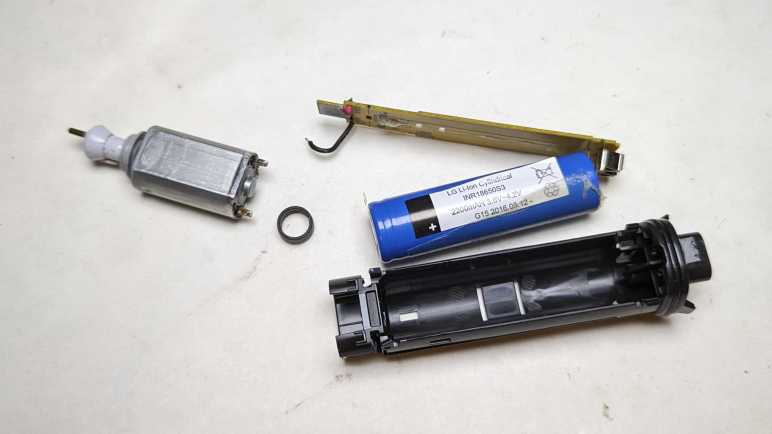
Speaking of the battery, separating the circuit board from the chassis exposed the battery. The label says:

LG Li-Ion Cylindrical
INR18650S3
2200mAH 3.6V~4.2V
G15 2016.08.12

I retired this trimmer because the motor would stop in the middle of a session, even when fully charged, so I decided the battery has degraded. I thought it might be fun to replace the battery cell and see if that gets it back up and running, hence the concern about trying to preserve the watertight barrier. But as it turned out, I had misdiagnosed the problem.

Philips Norelco Multigroom Enclosure (MG7790)

After my Remington hair clipper‘s batteries failed, I had to shop for a replacement. Costco had the Philips Norelco Multigroom (MG7790) on sale and I thought I’d give it a shot. Rather than a single wide fixed-size cutting blade, the Multigroom came with multiple cutting elements to serve different hair cutting/trimming purposes. The tradeoff for this versatility is that the widest flat cutting element is around 2/3 the width of the Remington hair clipper blade. Part of being a smaller and lighter weight device, which I learned to appreciate during its few years of use. I didn’t end up using the other cutting elements very much, and the narrower width wasn’t a significant detriment in my usage pattern.

After a few years of use, the motor would stop running in the middle of a session even if I fully charge the battery immediately beforehand. The manual claimed a fully charged battery can deliver up to six hours of use, but I couldn’t even get ten minutes! I bought a replacement and placed this unit in the teardown waiting list alongside the Conair and Remington hair clippers, where they waited until now.

The two old hair clippers both had a sticker telling us to properly recycle their nickel-cadmium batteries within. There was no such label here telling us of the type of rechargeable batteries used. The power adapter operates at 15V DC, far above the voltage range of any battery pack I would expect to see within. This implies a voltage buck converter in the charging circuit, a level of sophistication I associate with lithium chemistry battery management systems.

An important detail for teardown purposes is at the bottom of multigroom label: “IPX7” followed by a faucet icon. This device is waterproof enough to be rinsed clean under running water and can tolerate being briefly submerged in water if we accidentally drop it in the tub. Waterproofing makes teardowns difficult because the interior may be glued shut and/or buried under epoxy resin. Even if they weren’t, a teardown may irreversibly damage the water barrier.

The AC adapter uses this vaguely B-shaped plug that I haven’t seen anywhere else, possibly proprietary to Philips/Norelco. Next to the charging port at the base is a Torx-headed screw hidden under a rubber cover. That looks like a good place to start.

The base plate came free easily. Loose fit and no seals meant the waterproof barrier must be further within. Disappointingly, nothing else budged after this plate was removed, so I started looking at the other end.

Different cutting elements can be easily snapped on and off the top. When removed, we can see the motor-driven crank. The manually aptly referred to this as the hair chamber. It’s easy to dump out loose hair, but the many small corners meant it takes a lot of work to clear out every little piece. Going in with a cotton swab, I got enough of the corners cleared out to see three small fasteners (combination Torx and flat head) buried underneath.

Releasing those three small self-tapping plastic screws allowed hair chamber disassembly, releasing a lot of trapped hair along the way. Now the guts of the device can slide back and forth around 3-5mm, but not quite freed yet.

The last piece of the interlocking puzzle was the power button, which was held by multiple clips that also served as tabs holding multiple internal elements together. I damaged one clip removing it.

The internals slid out as a single piece enclosed in clear plastic. The motor pokes out the top, a rubber dome on the side pushes on the power switch, and a plug of dark gray plastic sealed the bottom. Numerous rubber O-rings made it clear this was the water barrier. Getting inside non-destructively proved to be a challenge.

Remington Hair Clipper (HC-920)

I used my Conair HC318R hair clipper for several years. Until its batteries couldn’t hold enough charge to last a single cutting session, at which point the blades were pretty worn as well. It was replaced by a Remington HC-920 which was itself retired after several years of service. Tearing down a retired hair clipper will scatter tiny bits of hair all over my workbench, so I’m working through my backlog of three retired clippers all at once.

Going into this second teardown, I expect to find minor execution detail differences between these two broadly similar devices. Previous compare-and-contrast teardowns included two inexpensive coffee makers (Black and Decker DCM600B vs. Mr. Coffee BVMC-SC05BL2-1) and two chop-type coffee grinders. (Hamilton Beach CM04 80344 vs Bodum 11160-3)

I picked up the first major difference from the product label: the Conair listed 4.5V but this Remington only lists its voltage at 3V. This implies two nickel-cadmium battery cells in series instead of three as in the Conair. Theoretically it meant the Remington was less powerful, but if so, the difference wasn’t enough for me to notice. This may be because I didn’t have a fair back-to-back comparison. I would have been comparing the Conair with worn-out blades and batteries against a new Remington.

Both clippers had two prominent Philips-head screws on the cutting head, allowing easy removal of the outer fixed blade less-easy removal of the inner moving blade. This allows us to clean out hair that may have accumulated between the two blades or against the motor-driven crank seen here. This Remington used machine screws threaded into a piece of metal, which should be more durable and longer-lasting than Conair’s approach of using screws that self-tap into plastic. In practice, the longevity was not a problem, though that may be more a commentary on my cleaning frequency (not very) than on mechanical design.

There were two less-prominent screws holding the thing together. One at the base of the handle, and one in the length-adjustment lever. They were recessed but otherwise exposed on the Conair, the Remington added cosmetic covers over them for better aesthetics. Once removed, a metal bracket at the front (what the cutting head machine screws held into) could be slid off, then we can open the enclosure.

Unlike the Conair, Remington has this additional metal strap to hold the motor in place. There’s a piece of foam between the strap and the motor to dampen vibration. The strap are held by a pair of Philips-head screws which had this orange material on top. It may just be a thread locking mechanism, but having orange stuff in the fastener head made things more difficult to remove.

As inferred by the 3V DC listed outside, there is a pair of Sanyo-made AA-sized nickel cadmium battery cells inside.

As I lifted the innards, I could see some external signs of failure on this battery cell. Not sure if this is corrosion from leaking chemicals or something else, all I know is I should avoid touching it.

The Remington circuit board is even simpler than Conair’s board, showing a slightly different evolution. Here R1 was deemed unnecessary and replaced with a solder bridge.

All disassembled components will meet fates similar to their Conair counterparts. Metal will be recycled, plastic will go into landfill. The battery will be added to a collection of nickel-cadmium batteries that will be turned in for responsible disposal. The charging barrel jack will stay with the AC adapter for potential reuse.

I started removing this shiny brass metal crank from the motor output shaft but changed my mind. First, unlike the Conair motor mount + crank, it didn’t trap much hair and could be cleaned up. Second, it was fastened very tightly and would be a lot of effort to remove. Third, I might want to build a reciprocating motion device at some point, and it’d be handy to have this motor already set up ready to go. Fourth, it looks really nice I wouldn’t know what else to do with it anyway.

And finally, there’s no rush. I already have a nearly identical motor salvaged from the Conair unit, with the plastic crank already removed. I’ll worry about removing that piece of brass onceI have an actual need to do so. Right now, I have a third hair clipper to take apart.