Notes on “Get Started with 8-Bit PIC MCUs using MCC”

It looks like Microchip loves long titles for their tutorials. After getting an overview of the 8-bit PICs in the previous tutorial Get Started with the PIC16F1 Enhanced MCU Architecture , I chose to follow up with this tutorial Get Started with 8-Bit PIC MCUs using MCC. It seemed to be a good starting point because MCC (MPLAB Code Configurator) is their tool to alleviate the pain of setting up a new project. The prospect of avoiding tedious work is good motivation to learn the tool.

I had expected a tutorial talking about the design intent of MCC, maybe an overview of its feature areas, or similar pointers to help the novice orient themselves as they tried to use the tool. A little theory behind the practice. This turned out not to be the case.

MCC Tutorial OutlineThe tutorial jumps straight into the practice with 12 simple PIC projects, each demonstrating a basic PIC task. Each project starts with how to set up hardware bits (LEDs, resistors, etc) on a project breadboard. Then it moves to the software side by walking the reader through using MCC to create all the boilerplate code setting up the project. After MCC took care of all the repetitious tasks, the reader has to add a few lines of task-specific code to finish things up.

I like to learn by doing, so this approach worked pretty well to help me gain introductory familiarity with MCC feature areas. For the tasks covered by these projects, I’m now confident I know enough to get going on my own. And this knowledge should help me hunt around MCC for the features not covered by the tutorial.

And there are a lot of those! The PIC is capable of more than these 12 things, and it’s not clear Microchip has provided similar tutorials elsewhere. For example, this tutorial covers serial communication with the PIC USART module. My goal is to communicate with a Raspberry Pi over I²C, which is a different module. So I’ll have to look elsewhere to find a guide to help me speak in I²C, the protocol used by many Raspberry Pi accessories.
Notes on “Get Started With The PIC16F1 Enhanced MCU Architecture”

I was annoyed that Microchip didn’t make their tutorials easily accessible from their top-level site navigation bar. It took Google indexing from outside the site to point me in the right direction. Once I knew these things existed, though, it was time to get to work.

Like most of the Microchip site, the target audience is not the complete novice. This tutorial gives an overview of the features of their PIC16F1 series using vocabulary that would be understandable for people already well-versed in the field. For example, the first section explains these PIC chips are Harvard architecture designs. This was presented without explanation, footnote, or link to Wikipedia explaining what Harvard architecture was. (Hint: It has nothing to do with style of buildings on the Harvard University campus.) The target audience for this tutorial would already know what that meant.

Many years ago I dipped my toes in learning the Ubicom/Parallax SX line of micro controllers. They were competing with PIC micro controllers in some markets and share some design similarities including the Harvard architecture. At the time, I chose to experiment with the SX line because it was promoted by Parallax. Their big hit BASIC Stamp product line caters to absolute beginners and a few BASIC Stamp were created with a SX chip at its heart. Parallax offered the SX chip itself for the more advanced users. The product line was backed by documentation written by the same crew that knew how to write for novices.

Unfortunately the SX product line never found the same success PIC did. So it has since been discontinued. The little bits and pieces I still remember from the experience helps me understand PIC today. Even with that help, I’m not quite up to the level expected by the author of the Microchip PIC tutorial, which meant a lot of Google side trips to understand the various topics.

One place the SX differ significantly from PIC was the implementation intent. The SX put their focus on software: The chips were simple but designed to run at significantly higher clock speeds (75 MHz) compared to their contemporary PIC counterparts (typically 1-4 MHz). This allows the SX to implement a large range of functionality strictly in software, reducing the need for peripherals.

In contrast, PIC controllers – especially the ones today – is less focused on the code running on the core chip and more focus on having that code orchestrate peripherals to do the actual work. The deep product line offers PIC chips with varying set of peripherals to suit different goals. It can get bewildering but since I already have a specific PIC in hand, I can stay focused on the subset of peripherals on this PIC16F18345 chip.

Get Started PIC16

Microchip Hides Their Tutorials. Why?

The last time I tried to learn PIC programming, I was frustrated by their developer support web site. There’s a lot of detailed reference material for people who already know what they are doing and know what they are looking for. I didn’t see anything like a tutorial for novices.

This time around Google helped me find a tutorial titled “Get Started With The PIC16F1 Enhanced MCU Architecture“. Since the PIC on my evaluation board is the PIC16F18345 I thought that was a great place to start. When it came  up on my web browser, I looked on the navigation bar on the left and felt stupid. The tutorial is under the big bold “Tutorial” section on the global navigation bar. Why didn’t I see that before?

MicrochipDevTutorial
A Getting Started tutorial under the “Tutorial” section of the global navigation bar.

The answer? Because it was not there. If somebody just opens up the Microchip developer web site directly as I did before, without the URL taking me directly to a tutorial, the “Tutorial” section is absent from the navigation bar.

MicrochipDev

Most of the other sections are the same, but “Tutorial” is gone from below “Help” and instead there is “Store” above “Help”. I guess Microchip is more eager to take my money than to teach me why I might want to give them money.

Why does Microchip mask the existence of the tutorials section? I don’t know. I wish they hadn’t, because I would have been able to get started on PIC programming much earlier.

Maybe they’re ashamed of the quality of the tutorials? I hope not, because I’m about to dive in and I’d be sad if the tutorials sucked.

MPLAB Xpress Code Configurator Requires Java. Good Feeling’s Gone.

Getting started with the MPLAB Xpress development system, I’ve been impressed by what I saw. Microchip’s PIC platform has a lineage that goes all the way back to 1976 but the new web-based tools show they are making serious effort to move the development experience into 2017. A HTML-based code editor, cloud-based compilation, download to local computer, and USB storage device based hardware interface making it accessible to every modern computer with an internet connection.

I had compiled a few pre-built examples to try out the process and feeling pretty good about the whole thing. Until the time came for me to create a new project from scratch. The boilerplate code for a new project sets up all the parameters tailored to the features and peripherals of a specific PIC chip, and the tool to take care of all these details is the “MPLAB Xpress Code Configurator” (MCC).

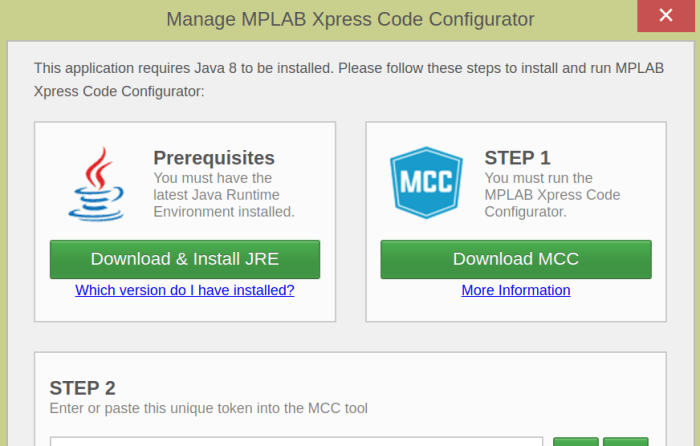
So far so good, I clicked on the blue “MCC” icon, and got this.

MCC Requires Java

…Java?

The sound in my head is of screeching tires punctuated by the crunching metal of a car crash. Maybe they have ambition to move PIC development into 2017, but today starting a new MPLAB Xpress project requires a trip back to 1995 when Java was king.

If MCC was a web-browser based Java applet, we would be completely out of luck as Firefox and Chrome both dropped support due to all the security nightmares the past few years, and those were the only two browsers I have installed on my Ubuntu development system.

Fortunately MCC is a client-side application launched with a JNLP file so there is still some hope. I tried the open-source Java implementation first, but icedtea-netx does not work at the moment. So off to Oracle I go to download the official closed-source binaries which got me past this blocker.

In hindsight I should have created a virtual machine (probably with VirtualBox) and installed Java only in that VM to contain any possible damage from future Java security vulnerabilities. I’ll do that on my next clean install of Ubuntu.

Back to MCC: it feels like a chunk of legacy code carried over to today’s MPLAB Xpress. Having to install Java is very much counter to their “nothing to setup or install” pitch so I expect they will migrate MCC functionality to be HTML-based as well.

Hopefully it’ll just be a matter of time.

MPLAB Xpress Examples Are More Helpful When I Actually Click On Link To Explanation.

PIC processors have been a popular tool for decades, catering to a wide range of usage scenarios. If you add up all the possible features and all the possible variants, it totally overwhelms the beginner trying to find a place to start. That was my problem last time: I didn’t know which chip I should start with, what tools to learn, and I didn’t even know how to navigate the documentation to inform these decisions.

But now that I have an evaluation board, I can focus on starting off with the chip on it (PIC16F18345) and use the tool (MPLAB Xpress web IDE) it is designed to work with. Microchip provides examples to help get people up to speed. This code repository is also open for people to upload and share. As of this writing, the examples total about 200, far short of something like Github. But it’s a start.

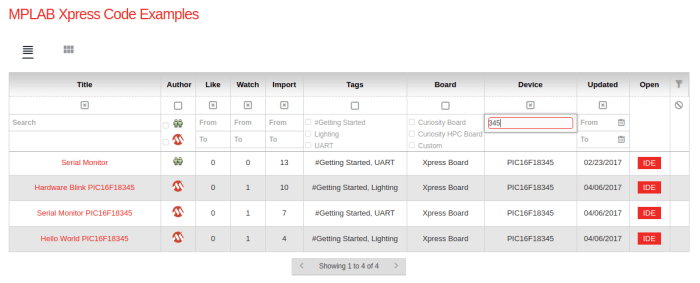
They even have a few examples for the specific board I have. Not just the chip, the full evaluation board. This spares me the headache of trying to translate code meant for a different device. I saw the big red “IDE” on the right hand side and clicked it.

Examples 345
Big red “IDE” on right are links. Big red titles on left are also links.

As expected, the project opened up in the development environment and…

Um…

Now what?

A lot of the code in the project appear to be auto-generated boilerplate. Most of the comments are legal disclaimers and the rest are gibberish to a beginner. The main() function has a while(1) infinite loop and no code inside that loop. What’s actually doing anything here? I wandered aimlessly looking for something to grab onto as my Rosetta Stone to get started.

Jumping straight into the code was not as  helpful as I had hoped.

After a while, I had to take a break and take care of other things. When I returned, my session had timed out and I had to restart. I retraced my steps and was just about to click on the big red “IDE” when I noticed… hey. The title on the left is also big and red. Could it be a link?

Not only was it a link, it was in fact a link to an explanation of the project and steps walking through how to re-create the example from scratch. I just got distracted by the big red “IDE” taking me on the wrong path.

Hardware Support for Web-Based PIC Microcontroller Development

MPLab Xpress IDE LogoNormally, micro controller programs are written on a PC and compiled into binary code that is loaded onto the chip via a device generically called “programmer“. Afterwards, the chip can be removed from the programmer device and start performing the tasks described in the binary code.

These programmer devices are hardware peripherals. So as a web-based tool, MPLAB Xpress would not be able to utilize them without installing additional software to bridge the gap. This is counter to the “Xpress” goal of offering zero-install, low barrier to entry into the world of PIC.

Microchip Technology’s solution to this challenge is to create “MPLAB Xpress” branded evaluation boards with programmer hardware already on board. This specific product line is designed to eliminate the need for specialized devices or driver software, because it talks to the connected computer as a USB flash storage device. As far as the PC knows, this evaluation board is just another USB flash drive, which the PC knows how to access it without special drivers.

Customers with these evaluation boards could write a PIC program in their web browser with MPLAB Xpress and build the program into a binary file that the browser downloads. The downloaded file can then be copied to the evaluation board just like copying to a USB flash drive. Then the user presses the reset button on the board and the PIC16F18345 starts running the program.

An interesting side note: how did Microchip implement a PIC programmer that accepts compiled binary code via USB flash storage? They did it with another PIC. The evaluation board has two PIC chips on board: One is a PIC16F1454 always running the USB storage and programming functions. The other is the PIC16F18345 chip we’re actually writing code for.

So this is why the name of the cloud-based tool is in the name of this piece of hardware. This line of evaluation boards have been specifically designed to support the cloud-based tool, making it possible to get started writing code for PIC chips without installing any software.

Parsing the Long Name: “Microchip MPLAB Xpress PIC16F18345 Evaluation Board”

highres_464164287
Giveaway winner holding the prize in front of his Luggable PC, photo by [Shulie]
There was a giveaway at the Hackaday LA August meetup and I came home with a little box labelled “Microchip MPLAB Xpress PIC16F18345 Evaluation Board“. (Retail value: $12) While I had some vague ideas about PIC chips, I’ve never had the chance to sit down and play with one. Thanks to Hackaday LA, I now have my chance.

In my exploration of hardware projects, there have been occasional times when I thought: “Hmm, I wonder if this is the kind of problem I could solve with a PIC.” Now that I have one to learn with, I hope to reach a point where I can definitively recognize problems that I can (or can’t) solve with a PIC.

The first thing to figure out is what I actually have in my possession. The long name was more than a little intimidating but a little research parsed the name into the following components:

  • Microchip in this context is not the generic meaning but the proper name of the company Microchip Technology.
  • MPLAB is a product line of software tools they produce. Offered to engineers for developing products around their hardware such as the PIC chips.
    • MPLAB Xpress is a specific product in this line. It is a cloud-based variant of the full MPLAB software suite, scaled down to lower the barrier of entry into the world of PIC programming.
  • PIC16F18345 is a cryptic alphanumeric string but that also makes it the least ambiguous one to understand. It designates a specific chip from the extensive PIC product line.
  • Evaluation means this is for prototyping and not for companies to put into large volume products. I won’t understand why until later.
  • Board means all of the above are mounted on a single circuit board.

After decoding the individual words, my question was “Why is the name of their MPLAB Xpress software on this hardware device?”

The short answer: this evaluation board’s on-board programmer has been tailored to support MPLAB Xpress’ cloud-based microcontroller development model.

The longer answer is coming up as tomorrow’s post.