Webpack First Look Did Not Go Well

I’ve used Three.js in two projects so far to handle 3D graphics, but I’ve been referencing it as a monolithic everything bundle. Three.js documentation told me there was a better way:

When installing from npm, you’ll almost always use some sort of bundling tool to combine all of the packages your project requires into a single JavaScript file. While any modern JavaScript bundler can be used with three.js, the most popular choice is webpack.

— Three.js Installation Guide

In my magnetometer test project, I tried to bring in webpack to optimize three.js but aborted after getting disoriented. Now I’m going to sit down and read through its documentation to get a better feel of what it’s all about. Here are my notes from a first look as a beginner.

I have a minor criticism about their home page. The first link is to their “Getting Started” guide, the second link is to their “Concepts” section. I followed the first link to “Getting Started”, which is the first page in their “Guides” section. I got to the end of that first page and saw “Next” link is about Asset Management, the next guide page. Each guide page linked to the next. I quickly got into guide pages who used acronym or terminology that had not yet been explained. Later I realized this was because the terminology was covered in the “Concepts” section. In hindsight I should not have clicked “Next” at the end of “Getting Started” guide. I should have gone back to “Concepts” to learn the lingo, before reading the rest of the guides.

Reading through the guides, I quickly understood that webpack is a very JavaScript-centric system built by people who think JavaScript first. I wanted to learn how to use webpack to integrate my JavaScript code and my HTML markup, but these guide pages didn’t seem to cover my use scenario. Starting right off the bat with the Getting Started guide, they used code to build their markup:

   const element = document.createElement('div');
   element.innerHTML = _.join(['Hello', 'webpack'], ' ');
   document.body.appendChild(element);

Wow. Was that really necessary? What about people who wanted to, you know, write HTML in HTML?

    <body><div>Hello webpack</div></body>

Is that considered quaint and old fashioned nowadays? I didn’t find anything in “Guides” or “Concepts” discussing such integration. I had thought the section on “HtmlWebpackPlugin” would have my answer, but it’s actually a chunk of JavaScript code that erased my index.html (destroying my markup) with a bare-bones index.html that loads the generated JavaScript bundles and have no markup. How does my own markup figure in this picture? Perhaps the documentation authors felt it was too obvious to write down, but I certainly don’t understand how to do it. I feel like an old man yelling at a cloud “tell me how to use my HTML!”

I had thought putting my HTML into the output directory was a basic task, but I failed. And I was dismayed to see “Concepts” and “Guides” pages got deeper and more esoteric from there. I understand webpack is very powerful and can solve many problems with modularizing JavaScript code, but it also requires a certain mindset that I have yet to acquire. Webpack’s bare bones generated index.html looks very similar to the generated index.html of an Angular app (which uses both HTML and webpack) so there must be a way to do this. I just don’t know it yet.

Until I learn what’s going on, for the near future I will use webpack only indirectly: it is already configured and running as part of Angular web app framework’s command line tools suite. I plan to do a few Angular projects to become more familiar with it. And now that I’ve read through webpack concepts, I should recognize pieces of Angular workflow as “Aha, they used webpack to do that.”

Visualizing Magnetometer Data with Three.js

I’m happy that my simple exploratory web app was able to obtain data from my phone’s integrated magnetometer. I recognize there are some downsides to how easy it was, but right now I’m happy I can move forward. Ten times a second (10Hz is the maximum supported update rate) my callback receives x, y, and z values in addition to auxiliary data like a timestamp. That’s great, but the underlying meaning is not very intuitive for me to grasp. What I want next is a visualization of that three-axis magnetometer data.

I turned to the JavaScript 3D graphics library Three.js. The last time I used Three.js was to visualize the RGB332 color space, using a 2D projection to help me make sense of data along three dimensions of color: a cylinder representing HSV color space and a rectangular solid representing RGB. Now I want to visualize a single vector in three-dimensional space representing the local magnetic field as reported by my phone’s magnetometer. I was a little intimidated by the math for calculation 3D transforms. I tried to make my RGB332 color app transition between HSV and RGB color space but it never looked right because I didn’t understand the 3D transform math.

Fortunately, this time I didn’t have to do any of my own math at all. Three.js has a built-in function that accepts the x, y, and z components of a target coordinate and calculates the rotation required to have a 3D project look at that point. My responsibility is to create an object that will convey this information. I chose to follow the precedence of an analog compass which is built out of a small magnetic needle. Shaped like a narrow diamond with one half painted red and the other half painted white. For this 3D visualization I created a shape out of two cones, one red and one white. When this shape looks at the magnetometer vector, it functions very similarly to the sliver of magnet inside a compass.

As a precaution, I added a check for WebGL before firing up Three.js code. I was pretty confident any Android Chrome that supported the magnetometer API would support WebGL as well, but it was good practice to confirm.

One thing I’m not doing (but should) is to account for screen orientation. Chrome developers have added a feature to automatically adjust for screen orientation but right now I’m just going to deactivate auto-rotate on my phone (or… phones!)


Source code for my exploratory project is publicly available on GitHub

Magnetometer API Privacy Concerns

Many Android phones have an integrated magnetometer available to native apps. Chrome browser for Android also makes that capability available to web apps, but right now it is hidden by default as a feature preview. Once I enabled that feature, I was able to follow some sample code online and quickly obtain access to magnetometer data in my own web app. That was so easy! Why was it blocked by default?

Apparently, the answer (or at least a part of it) was that it was too easy. Making magnetometer and other hardware sensor data freely available to web apps would feed into hardware-based browser fingerprinting. Even though magnetometer data by itself might be innocuous, it could be combined with other seemingly-innocent data to uniquely identify users thereby piercing privacy protections. This is bad, and purportedly why Apple has so far declined to support sensor APIs.

That article was in 2020, though, and the web moves fast. When I read up on magnetometer API on MDN (Mozilla Developer Network) I encountered an entire section on obtaining user permission to read hardware sensor data. Since I didn’t have to do any of that for my own test app to obtain magnetometer data, I guess this requirement is only present in Mozilla’s own Firefox browser. Or perhaps it was merely a proposal hoping to satisfy Apple’s official objection to supporting sensor API.

I found no mention of Mozilla’s permission management framework in the official magnetometer API specification. There’s a “Security and Privacy Considerations” section but it’s pretty thin and I don’t see how it would address fingerprinting concerns. For what it’s worth, “limiting maximum sample frequency” was listed as a potential mitigation, and Chrome 111 only allows up to 10Hz.

Today users like myself have to explicitly activate this experimental feature. And at the top of “chrome://flags” page where we do so, there’s an explicit warning that enabling experimental features could compromise privacy. In theory, people opting-in to magnetometer today is aware of potential abuse, but that risk has to be addressed before it’s rolled out to everyone. In the meantime, I have opted in and I’m going to have some fun.

Magnetometer API in Android Chrome Browser

I became curious about magnetometers and was deep into shopping for a prototype breakout board when I remembered I already had some on hand. The bad news is that they’re buried inside mobile devices, the good news is that they’re already connected to all the supporting circuitry they need. Accessing them is then “merely” a software task.

Android app developers can access magnetometer values via position sensor APIs. It’s possible to query everything from raw uncalibrated values to device orientation information computed from calibrated magnetometer data fused with other sensor data. Apple iOS app developers have the Core Motion library from which they can obtain similar information.

But I prefer not to develop a native mobile app because of all the overhead involved. For Android, I would have to install Android Studio (a multi-gigabyte download) and put my device into Developer Mode which hampers its ability to run certain security-focused tasks. For iOS I would have to install Xcode, which is at least as big of a hassle, and I’m not sure what I’d have to do on an iOS device. (Installing TestFlight is part of the picture, but I don’t know the whole picture.)

Looking for an alternative: What if I could access sensor data from something with lower overhead, like a small web app? Checking on the ever-omniscient caniuse.com, I found that a magnetometer API does exist. However, it is not (yet?) standardized and hidden behind an optional flag that the user has to explicitly enable. I typed chrome://flags into my address bar and found the “Generic Sensor Extra Classes” option to switch from “Default” to “Enable”. After making this change, the associated caniuse.com magnetometer test turned from red to green.

One annoyance of working with magnetometer on Android is that I have to work against an actual device. While Chrome developer tools has an area for injecting sensor data into web apps under test, it does not (yet?) include ability to emulate magnetometer data. And looking over Android Studio documentation, I found settings to emulate sensors like an accelerometer but no mention of magnetometer either.

Looking online for some sample code, I found small code snippets in Google Chrome Developer’s blog about the Sensor API. Lots of useful reference on that page but I wanted a complete web app to look at. I found what I was looking for in a “Sensor Info” web app published from Intel’s GitHub account. (This was a surprising source, pretty far from Intel’s main moneymaker of CPUs. What is their interest in this field? Sadly, that corporate strategic answer is not to be found in this app. I choose to be happy that it exists.) Launching the app, clicking “+” allowed me to add the magnetometer sensor and start seeing data stream through. After looking through this Intel web app’s source code repository, I wrote my own minimalist test app streaming magnetometer data. Success! I’m glad it was this easy, but perhaps that was too easy?


Source code for this exploratory project is publicly available on GitHub

Notes on “Using MongoDB with Node.js” from MongoDB University

Most instructional material (and experimentation) for MongoDB uses the MongoDB Shell (mongosh), which is “a fully functional JavaScript and Node.js 16.x REPL environment for interacting with MongoDB deploymentsaccording to mongosh documentation. Making mongosh the primary command line interface useful for exploration, experimentation, and education like on Codecademy or MongoDB University.

Given the JavaScript focus of MongoDB, I was not surprised there is a set of first-party driver libraries to translate to/from various programming languages. But I was surprised to find that Node.js (JavaScript) was among the list of drivers. If this was all JavaScript anyway, why do we need a driver? The answer is that we don’t use JavaScript to talk to the underlying database. That is the job of BSON, the binary data representation used by MongoDB for internal storage. Compact and machine-friendly, it is also how data is transmitted over the network. Which is why we need a Node.js library to convert from JSON to BSON for data transmission. I started the MongoDB University course “Using MongoDB with Node.js” to learn more about using this library.

It was a short course, as befitting the minimal translation required of this JavaScript-focused database. The first course covered how to connect to a MongoDB instance from our Node.js environment. I decided to do my exercises with a Node.js Docker container.

docker run -it --name node-mongo-lab -v C:\Users\roger\coding\MongoDB\node-mongo-lab:/node-mongo-lab node:lts /bin/sh

The exercise is “Hello World” level, connecting to a MongoDB instance and listing all available databases. Success means we’ve verified all libraries & their dependencies are install correctly, that our MongoDB authentication is set up correctly, and that our networking path is clear. I thought that was a great starting point for more exercises, and was disappointed that we actually didn’t use our own Node.js environment any further in this course. The rest of the course used the Instruqt in-browser environment.

We had a lightning-fast review of MongoDB CRUD Operations and how we would do them with the Node.js driver library. All the commands and parameters are basically identical to what we’ve been doing in mongosh. The difference is that we need an instance of the client library as the starting point, from which we could obtain object representing a database and a collection with it. (client.db([database name]).collection([collection name]) Once we have that reference, everything else looks exactly as they did in mongosh. Except now they are code to be executed by Node.js runtime instead of typed. One effect of running code instead of typing commands is that it’s much easier to ensure transaction sessions complete within 60 seconds.

For me, a great side effect of this course is seeing JavaScript async/await in action doing more sophisticated things than simple straightforward things. The best example came from this code snippet demonstrating MongoDB Aggregation:

    let result = await accountsCollection.aggregate(pipeline)
    for await (const doc of result) {
      console.log(doc)
    }

The first line is straightforward: we run our aggregation pipeline and await its result. That result is an instance of MongoDB cursor which is not the entire collection of results but merely access to a portion of that collection. Cursors allow us to start processing data without having to load everything. This saves memory, bandwidth, and processing overhead. And in order to access bits of that collection, we have this “for await” loop I’ve never seen before. Good to know!

Notes on Codecademy “Learn Node-SQLite”

After my SQL fresher course, shortly after learning Node.js, I thought the natural progression was to put them together with Codecademy’s “Learn Node-SQLite” course. The name node-sqlite3 is not a mathematical subtraction but that of a specific JavaScript library bridging worlds of JavaScript and SQL. This course was a frustrating disappointment. (Details below) In hindsight, I think I would have been better off skipping this course and learn the library outside of Codecademy.

About the library: Our database instructions such as queries must be valid SQL commands stored as strings in JavaScript source code. We have the option of putting some parameters into those strings in JavaScript fashion, but the SQL commands are mostly string literals. Results of queries are returned to the caller using Node’s error-first asynchronous callback function convention, and query results are accessible as JavaScript objects. Most of library functionality are concentrated in just a few methods, with details available from API documentation.

This Codecademy course is fairly straightforward, covering the basics of usage so we can get started and explore further on our own. I was amused that some of the examples were simple to the point of duplicating SQL functionality. Specifically the example for db.each() shows how we can tally values from a query which meant we ended up writing a lot of code just to duplicate SQL’s SUM() function. But it’s just an example, so understandable.

The course is succinct to the point of occasionally missing critical information. Specifically, the section about db.run() say “Add a function callback with a single argument and leave it empty for now. Make sure that this function is not an arrow.” but didn’t say why our callback function must not use arrow syntax. This minor omission became a bigger problem when we roll into the after-class quiz, which asked why it must not use arrow syntax. Well, you didn’t tell me! A little independent research found the answer: arrow notation functions have a different behavior around the “this” object than other function notations. And for db.run(), our feedback is stored in properties like this.lastID which would not be accessible in an arrow syntax function. Despite such little problems, the instruction portion of the course were mostly fine. Which brings us to the bad news…

The Code Challenge section is a disaster.

It suffers from the same problem I had with Code Challenge section of the Learn Express course: lack of feedback on failures. Our code was executed using some behind-the-scenes mechanism, which meant we couldn’t see our console.log() output. And unlike the Learn Express course, I couldn’t workaround this limitation by throwing exceptions. No console logs, no exceptions, we don’t even get to see syntax errors! The only feedback we receive is always the same “You did it wrong” message no matter the actual cause.

Hall of Shame Runner-Up: No JavaScript feedback. When I make a JavaScript syntax error, the syntax error message was not shown. Instead, I was told “Did you execute the correct SQL query?” so I wasted time looking at the wrong thing.

Hall of Shame Bronze Medal: No SQL feedback. When I make a SQL command error, I want to see the error message given to our callback function. But console.log(error) output is not shown, so I was stabbing in the dark. For Code Challenge #13, my mistake was querying from “Bridges” table when the sample database table is actually singular “Bridge”. If I could log the error, I would have seen “No such table Bridges” which would have been much more helpful than the vague “Is your query correct?” feedback.

Hall of Shame Silver Medal: Incomplete Instructions. Challenge #14 asked us to build a query where “month is the current month”. I used “month=11” and got nothing. The database had months in words, so I actually needed to use “month=’November'”. I wasted time trying to diagnose this problem because I couldn’t run a “SELECT * FROM Table” to see what the data looked like.

Hall of Shame Gold Medal Grand Prize Winner: Challenge #12 asks us to write a function. My function was not accepted because I did not declare it using the same JavaScript function syntax used in the solution. Instructions said nothing about which function syntax to use. After I clicked “View Solution” and saw what the problem was (image above) I got so angry at the time it wasted, I had to step away for a few hours before I could resume. This was bullshit.


These Hall of Shame (dis)honorees almost turned me off of Codecademy entirely, but after a few days away to calm down, I returned to learn what Codecademy has to teach about PostgreSQL

Replace node-static with serve-static for ESP32 Sawppy Development

One of the optional middleware modules maintained by the Expressjs team is express.static, which can handle serving static assets like HTML, CSS, and images. It was used in code examples for Codecademy’s Learn Express course, and I made a mental note to investigate further after class. I thought it might help me with a problem I already had on hand, and it did!

When I started writing code for a micro Sawppy rover running on an ESP32, I wanted to be able to iterate on client-side code without having to reflash an ESP32. So as an educational test run of Node.js, I wrote a JavaScript counterpart to the code I wrote (in C/C++) for running on ESP32. While they are two different codebases, I intended for the HTTP interface to be identical and indistinguishable by the HTML/CSS/JavaScript client code I wrote. Most of this server-side work was focused around websocket, but I also needed to serve some static files. I looked on nodejs.org and found “How to serve static files” in their knowledge base. That page gave an example using the node-static module, which I copied for my project.

Things were fine for a while, but then I started getting messages from the Github Dependabot nagging me to fix a critical security flaw in my repository due to its use of a library called minimist. It was an indirect dependency I picked up by using node-static, so I figured it’ll be fixed after I pick up an update to node-static. But that update never came. As of this writing, the node-static package on NPM hadn’t been updated for four years. I see updates made on the GitHub repository, but for whatever reason NPM hasn’t picked that up and thus its registry remains outdated.

The good news is that my code isn’t deployed on an internet-facing server. This Node.js server is only for local development of my ESP32 Sawppy client-side browser code, which vastly minimizes the window of vulnerability. But still, I don’t like running known vulnerable code, even if it is only accessible from my own computer and only while I’m working on ESP32 Sawppy code. I want to get this fixed somehow.

After I got nginx set up as a local web server, I thought maybe I could switch to using nginx to serve these static files too. But there’s a hitch: a websocket connection starts as a HTTP request for an upgrade to websocket. So the HTTP server must interoperate with the websocket server for a smooth handover. It’s possible to set this up with nginx, but the instructions to do so is above my current nginx skill level. To keep this simple I need to stay within Node.js.

Which brought me back to Express and its express.static file server. I thought maybe I could fire up an Express app, use just this express.static middleware, and almost nothing else of Express. It’s overkill but it’s not stupid if it works. I just had to figure out how it would handover to my websocket code. Reading Express documentation for express.static, I saw it was built on top of a NPM module called serve-static, and was delighted to learn it can be used independent of Express! Their README included an example: Serve files with vanilla node.js http server and this was exactly what I needed. By using the same Node.js http module, my websocket upgrade handover code will work in exactly the same way. At the end, switching from node-static to serve-static was nearly a direct replacement requiring minimal code edit. And after removing node-static from my package.json, GitHub dependabot was happy and closed out my security issue. I will be free from nagging messages, at least until the next security concern. That might be serious if I had deployed to be internet accessible, but the odds of that just dropped.

Notes on Express “Getting Started” Guide

During the instruction of Codecademy’s “Learn Express” course, we see a few middleware modules that we can optionally use in our project as needed. Examples used in the course are morgan and body-parser, and one of the quizzes asked us to look up vhost. Course material even started using serve-static before we learned about middleware modules at all. These four middleware modules were among those popular enough to be adopted by the Expressjs team who now maintain them.

Since that meant I already had a browser tab open to the Express project site, I decided to poke around. Specifically, I wanted to see how their own Getting Started guide compared to the Codecademy course I just finished. My verdict: the official Express site provides a wider breadth of information but not nearly as much depth for educating a newcomer. If I hadn’t taken the Codecademy course and tried to get started with this site, I would have been able to get a simple Express application up and running but I would not have understood much of what was going on. Especially if I had created an app using the boilerplate application generator. Even after the Codecademy course I don’t know what most of these settings mean!

But the official site had wider breadth, as Codecademy didn’t even mention the boilerplate tool. It also has many lists of pointers to resources, like the aforementioned list of popular middleware modules. Another list I expect to be useful is a sample of options for database integration. Some minimal contextual information was provided with each listed link, but it’s up to us to follow those links and go from there. The only place where this site goes in depth is the Express API reference, which makes sense as the official site for Express should naturally serve as the authoritative source for such information!

I anticipate that I will use Express for at least a few learning/toy projects in the future, at which point I will need to return to this site for API reference and pointers to resources that might help me solve problems in the future. However, before I even get very far into Express, this site has already helped me solve an immediate problem: node-static is out of date.

Notes on Codecademy “Learn Express”

I may have my quibbles with Codecademy’s Learn Node.js course, but it at least gave me a better understanding to supplement what I had learned bumping around on my own. But the power of Node isn’t just the runtime, it’s the software ecosystem which has grown up around it. I have many many choices of what to learn from this point, and I decided to try the Learn Express course.

Before I started the course, I understood Express was one of the earlier Node.js frameworks for building back end of websites in JavaScript. And while there have been many others that have come online since, with more features and capabilities, Express is still popular because it set out not to pack itself with features and capabilities. This meant if we wanted to prototype something slightly off the beaten path, Express would not get in our way. This sounded like a good tool to have in the toolbox.

After taking the course, I learned how Express accomplishes those goals. Express Routes helps us map HTTP methods (GET/POST/PUT/DELETE) to JavaScript code via “Routes”, and for each route we can compose multiple JavaScript modules in the form of “Middleware”. With this mechanism we can assemble arbitrary web API by chaining middleware modules like LEGO pieces to respond to HTTP methods. And… that’s basically the entirety of core Express. Everything else is optional, so we only need to pull in what we need (in the form of middlware modules) for a particular project.

When introducing Routes in Express, our little learning JavaScript handler functions are actually fully qualified Middleware, but we didn’t know it yet. What I did notice is that it had the signature of three parameters: (request, response, next). The Routes course talked about reading request to build our response, but it never talked about next. Students who are curious about them and striking out to search on their own as I did would find information about “chaining”, but it wouldn’t make sense until we learned Middleware. I thought it would have been nice if the course would say “we’ll learn about next later, when we learn about Middleware” or something to that effect.

My gripe with this course is in its quiz sections. We are given partial chunk of JavaScript and told to fill in certain things. When we click “Check Work” we trigger some validation code to see if we did it right. If we did it wrong, we might get an error message to help us on our way. But sometimes the only feedback we receive is that our answer is incorrect, with no further feedback. Unlike earlier Node course exercises, we were not given a command prompt to run “node app.js” and see our output. This meant we could not see the test input, we could not see our program’s behavior, and we could not debug with console.log(). I tried to spin up my own Node.js Docker container to try running the sample code, but we weren’t given entire programs to run and we weren’t given the test input so that was a bust.

I eventually found a workaround: use exceptions. Instead of console.log('debug message') I could use throw Error('debug message') and that would show up on the Codecademy UI. This is far less than ideal.

Once I got past the Route section, I proceeded to Middleware. Most of this unit was focused on showing us how various Middleware mechanisms allow us to reduce code duplication. My gripe with this section is that the course made us do useless repetitive work before telling us to replace them with much more elegant Middleware modules. I understand this is how the course author chose to make their point, but I’m grumpy at useless make-work that I would delete a few minutes later.

By the end of the course, we know Express basics of Route and Middleware and got a little bit of practice building routes from freely available middleware modules. The course ends by telling us there are a lot of Express middleware out there. I decided to look into Express documentation for some starting points.

Notes on Codecademy “Learn Node.js”

I’ve taken most of Codecademy’s HTML/CSS course catalog for front-end web development, ending with a series of very educational exercises created outside of Codecademy’s learning environment. I think I’m pretty well set up to execute web browser client-side portions of my project ideas, but I also need to get some education on server-side coding before I can put all the pieces together. I’ve played with Node.js earlier, but I’m far from an expert. It should be helpful to get a more formalized introduction via Codecademy, starting with Learn Node.js.

This course recommends going through Introduction to JavaScript as a prerequisite, so the course assumes we already know those basics. The course does not place the same requirement on Intermediate JavaScript, so some of the relevant course material is pulled into this Node.js course. Section on Node modules were reruns for me, but here it’s augmented with additional details and a pointer to official documentation.

The good news for the overlap portions is that it meant I already had partial credit for Learn Node.js as soon as I started, the bad news is the Codecademy’s own back-end got a little confused. I clicked through “Next” for a quick review, and by doing so it skipped me over a few lessons that I had not yet seen. My first hint something was wrong was getting tossed into a progress checking quiz and being baffled: “I don’t remember seeing this material before!” I went back to examine the course syllabus, where I saw the skipped portions. The quiz was much easier once I went through that material!

This course taught me about error-first callback functions, something that is apparently an old convention for asynchronous JavaScript (or just Node) code that I hadn’t been aware of. I think I stumbled across this in my earlier experiments and struggled to use the effectively. Here I learn they were the conceptual predecessor to promises, which led to async/await which plays nice with promises. But what about even older error-first callback code? This is where util.promisify() comes into the picture, so that everyone can work together. Recognizing what error-first callbacks are and knowing how to interoperate via util.promisify(), should be very useful.

The course instructs us on how to install Node.js locally on our development computers, but I’m going to stick with using Docker containers. Doing so would be inconvenient if I wanted to rely on globally installed libraries, but I want to avoid global installations as much as possible anyway. NPM is perfectly happy to work at project scope and that just takes mapping my project directory as a volume into the Docker container.

After all, I did that as a Docker & Node test run with ESP32 Sawppy’s web interface. But that brought in some NPM headaches: I was perpetually triggering GitHub dependabot warnings about security vulnerabilities in NPM modules I hadn’t even realized I was using. Doing a straight “update to latest” did not resolve these issues, I eventually figured out it was because I had been using node-static to serve static pages in my projects. But the node-static package hadn’t been updated in years and so it certainly wouldn’t have picked up security fixes. Perhaps I could switch it to another static server NPM module like http-server, or get rid of that altogether and keep using nginx as sheer overkill static web server.

Before I decide, though, this Learn Node.js course ended with a few exercises building our own HTTP server using Node libraries. These were a little more challenging than typical Codecademy in-course exercises. One factor is that the instructions told us to do a lot of things with no way to incrementally test them as we go. We didn’t fire it up the server to listen for traffic (server.listen()) until the second-from-final step, and by then I had accumulated a lot of mistakes that took time to untangle from the rest of the code. The second factor is that the instructions were more vague than usual. Some Codecademy exercises tell us exactly what to type and on which line, and I think that didn’t leave enough room for us to figure things out for ourselves and learn. This exercise would sometimes tell us “fill in the request header” without details or even which Node.js API to use. We had to figure it all out ourselves. I realize this is a delicate balance when writing course material. I feel Codecademy is usually too much “do exactly this” for my taste, but the final project of Learn Node.js might have gone too far in the “left us flailing uselessly” direction.

In the meantime, I believe I have enough of a start to continue learning about server-side JavaScript. My next step is to learn Express.

Angular on Window Phone 8.1

One of the reasons learning CSS was on my to-do list was because I didn’t know enough to bring an earlier investigation to conclusion. Two years ago, I ran through tutorials for Angular web application framework. The experience taught me I needed to learn more about JavaScript before using Angular, which uses TypeScript which is a derivative(?) of JavaScript. I also needed to learn more about CSS in order to productively utilize the Material style component libraries that I had wanted to use.

One side experiment of my Angular adventure was to test the backwards compatibility claims for the framework. By default, Angular does not build support for older browsers, but it could be configured to do so. Looking through the referenced browserlist project, I see an option of “ie_mob” for Microsoft Internet Explorer on “Other Mobile” devices a.k.a. the stock web browser for Windows Phone.

I added ie_mob 11 to the list of browser targets in an Angular project. This backwards compatibility mode is not handled by the Angular development server (ng serve) so I had to run a full build (ng build) and spin up an nginx container to serve the entire /dist project subdirectory.

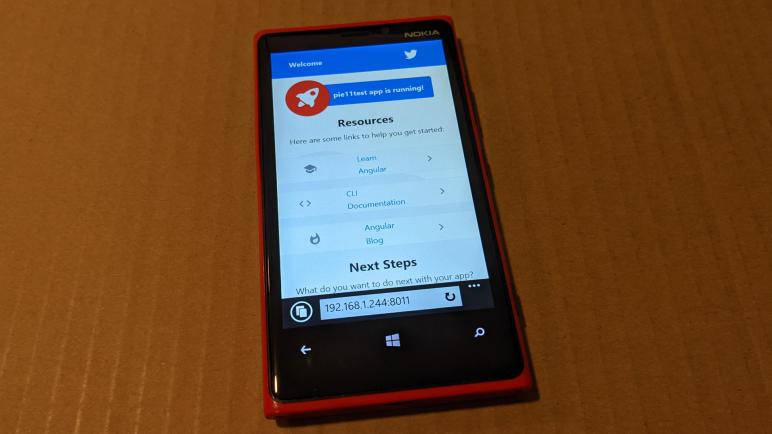
Well now, it appeared to work! Or at least, more of this test app showed up on screen than if I hadn’t listed ie_mob on the list of browser targets.

However, scrolling down unveiled some problems with elements that did not get rendered, below the “Next Steps” section. Examing the generated HTML, it didn’t look very different from the rest of the page. However, these elements did use different CSS rules not used by the rest of the page.

Hypothesis: The HTML is fine, the TypeScript has been transpiled to Windows Phone friendly dialects, but the page used CSS rules that were not supported by Windows Phone. Lacking CSS knowledge, that’s where my investigation had to stop. Microsoft has long since removed debugging tools for Windows Phone so I couldn’t diagnose it further except by code review or trial and error.

Another interesting observation on this backwards-compatible build is vendor-es5.js. This polyfill performing JavaScript compatibility magic is over 2.5 MB all by itself (2,679,414 bytes) and it has to sit parallel with the newer and slightly smaller vendor-es2015.js (2,202,719 bytes). While a few megabytes are fairly trivial for modern computers, this combination of the two would not fit in the 4MB flash on an ESP32.


Initial Chunk Files | Names                |      Size
vendor-es5.js       | vendor               |   2.56 MB
vendor-es2015.js    | vendor               |   2.10 MB
polyfills-es5.js    | polyfills-es5        | 632.14 kB
polyfills-es2015.js | polyfills            | 128.75 kB
main-es5.js         | main                 |  57.17 kB
main-es2015.js      | main                 |  53.70 kB
runtime-es2015.js   | runtime              |   6.16 kB
runtime-es5.js      | runtime              |   6.16 kB
styles.css          | styles               | 116 bytes

                    | Initial ES5 Total    |   3.23 MB
                    | Initial ES2015 Total |   2.28 MB

For such limited scenarios, we have to run the production build. After doing so (ng build --prod) we see much smaller file sizes:

node ➜ /workspaces/pie11/pie11test (master ✗) $ ng build --prod
✔ Browser application bundle generation complete.
✔ ES5 bundle generation complete.
✔ Copying assets complete.
✔ Index html generation complete.

Initial Chunk Files                      | Names                |      Size
main-es5.19cb3571e14c54f33bbf.js         | main                 | 152.89 kB
main-es2015.19cb3571e14c54f33bbf.js      | main                 | 134.28 kB
polyfills-es5.ea28eaaa5a4162f498ba.js    | polyfills-es5        | 131.97 kB
polyfills-es2015.1ca0a42e128600892efa.js | polyfills            |  36.11 kB
runtime-es2015.a4dadbc03350107420a4.js   | runtime              |   1.45 kB
runtime-es5.a4dadbc03350107420a4.js      | runtime              |   1.45 kB
styles.163db93c04f59a1ed41f.css          | styles               |   0 bytes

                                         | Initial ES5 Total    | 286.31 kB
                                         | Initial ES2015 Total | 171.84 kB

ESP8266 MicroPython Exception Handling Helps Robustness

I had to solve a few problems encountered publishing data to MQTT using ESP8266 MicroPython, running into MQTTException raised by the library. On the upside, dealing with MQTTException reminded me that I don’t usually have the luxury of exception handling on microcontrollers.

Exception handling in Python is my favorite part so far of using MicroPython on a microcontroller. I’m no stranger to calling APIs and checking error codes in typical C programming style and I can certainly work in that environment, but I do enjoy using a language like Python with exception handling mechanisms because it allows me to structure code in a way I find much more readable. This is important, especially for small projects where I don’t expect to look at the code on a regular basis. By the time I need to come back and modify the code months or years later, I’m looking at it with essentially fresh eyes. Comments are critical, but a good structure is very helpful too!

If I don’t have any exception handlers, an error would stop execution of my program and break into REPL awaiting diagnosis and repair. This is great while I’m developing the code, but I won’t want that later. During runtime I expect errors to be one of three types:

  1. Failing to connect to WiFi. This could happen if my WiFi router is in the middle of a firmware update, and for such harmless scenarios the best thing is to go to sleep and try again later.
  2. Failing to connect to MQTT broker. This could happen if I took down my Mosquitto docker container, again probably for an update.
  3. Failure to publish ADC data. This could happen if the WiFi router or Mosquitto went down in between connection and data publishing.

For all of these cases, the best thing to do is to try again later. Which for this project is actually the exact same thing I want to do even when everything is successful: go to sleep for a minute and repeat everything upon wake.

My first implementation caught all exceptions and proceeded to deep sleep for retry in one minute, but this is a problem: if I encounter a problem outside of the expected errors, or if I want to break into REPL for any other reason like updating the program with a new feature, I have only a very narrow window of time to do so. In fact, it was too fast for me to catch it awake!

So I actually want to do something different in case of error: keep the ESP8266 awake for 30 seconds or so. Long enough for me to connect a serial terminal and hit Control-C to break into REPL. I could trigger this path by taking down my Mosquitto docker container causing scenario #2 above.

This is an improvement over my first implementation, but I couldn’t upload my improved code. The ESP8266 wakes up, try to report ADC, and immediately go to deep sleep no matter what happens. After some time tearing my hair out trying to break into this narrow time window, I resorted to reflashing the ESP8266 with fresh MicroPython. Now I could actually get into REPL and upload the new code. It’s a good thing I keep these little code projects publicly accessible on GitHub where I could get a copy for my own use if I had to erase it.

I really like what I’ve seen of MicroPython so far, and it’ll definitely be a consideration for future projects. But for this project I’m changing course for no fault of MicroPython.

Second ESP8266 Voltage Monitor is Directly Wired to Buck Converter

Once I got my MicroPython ESP8266 connected to my home network, I expect to continue working with it over the network instead of an USB cable. Which meant it was time for me to take this development board and wire it to a DC voltage buck converter as I did earlier. However, this time I’m going to skip on the perforated prototype circuit board and going for direct wiring. (Sometimes called deadbug style due to folded pins and wires.)

But without the prototype board, I have to handle my own spacing. I cut up an expired credit card and placed the sheet of plastic in between Wemos D1 Mini clone (*) and its MP1584EN DC buck converter (*). Wires looped around the outside of this sheet to carry power lines 3.3V and GND, as well as the pair of 1 Megaohm resistors in series to ADC input pin for measuring voltage.

And relative to the previous iteration, I added one more wire: connecting ESP8266 GPIO16 (labeled D0 on a Wemos D1 Mini board) to the reset (RST) pin. This is required for an ESP8266 to wake from deep sleep, and this requirement is the very first sentence on MicroPython section for ESP8266 deep sleep. I’m going to guess that it is front and center because enough people forgot to do this critical step and their ESP8266 wouldn’t wake from sleep.

Once this package was tested to function over MicroPython WebREPL, I wrapped the whole thing up in clear heat shrink tube(*) (not pictured in title image) for a nice compact package. I could now query ADC value representing input voltage over WebREPL, but that’s not useful until I could report that value via MQTT.


(*) Disclosure: As an Amazon Associate I earn from qualifying purchases.

ESP8266 MicroPython Automatically Remembers WiFi

There were a few speed bumps on my way to a MicroPython interactive prompt, also known as REPL the read, evaluate, print loop. But once I got there, I was pretty impressed. It was much friendlier to iterative experimentation than Arduino on an ESP8266, because I don’t have to reflash and reboot every time. And since the ESP8266 has WiFi capabilities, getting REPL over the network (WebREPL) is even cooler. Now I can experiment while it runs on another power source, completely independent of USB for either power of data.

Before I got there, though, I needed to get this ESP8266 on my home WiFi network. By default, MicroPython sets up an access point for its own network so I need to turn “AP mode” off. Then I turn on “station mode” which allows connection to my WiFi router given its SSID and password.

import network

ap = network.WLAN(network.AP_IF)
ap.active(False)

sta = network.WLAN(network.STA_IF)
sta.active(True)
sta.config(dhcp_hostname='my hostname')
sta.connect('my wifi ssid','my wifi password')

I added one optional element: the dhcp_hostname parameter. This is the name shown to my router and probably other devices on my home network. If I don’t set this, the default name is “ESP-” followed by six hexadecimal digits of the ESP8266’s MAC address. That’s not a particularly memorable name so I wanted something I could remember and recognize.

And then, to my surprise, MicroPython remembered the network settings upon restart. I wrote a piece of Python code to perform this routine that I could run whenever I rebooted the board. But when I set out to test it by rebooting the board, it automatically reconnected to WiFi. This tells me a successful WiFi connection would cause a write to flash memory, which implies I should not run my WiFi connection code upon every startup. I expect to make this board go to deep sleep frequently and, if it writes WiFi information to flash every time it wakes up, I will quickly wear out the flash.

But that is just a hypothesis. As MicroPython is an open source project, it should be possible for me to dig into the code and figure out exactly when MicroPython writes WiFi connection information to flash. Perhaps it isn’t as bad as I feared it would be. Until then, however, I will hold off running my WiFi connection script.

A downside of not running my script is the DHCP hostname, which is not remembered upon reboot and this board reverted back to the default ESP-prefix name. But I can live with that for now, the next step is to set up my hardware for playing with deep sleep under battery power.

A Few Speed Bumps on the Road to ESP8266 MicroPython

I decided to play with MicroPython on an ESP8266 and started with MicroPython documentation page appropriately titled Quick reference for the ESP8266. It was almost (but not entirely) smooth sailing with the inexpensive Wemos D1 Mini clone(*) I had on hand.

I had recently switched desktop computers, with a fresh installation of Windows, so everything had to be reinstalled. Starting with Python, since I need that to run esptool tool to flash Espressif devices. It got its own virtual Python environment with venv and I could start working with the ESP8266.

I verified that flash size matched 4MB as per Amazon product listing with esptool.py --port COM4 flash_id

Then the first step in MicroPython directions: erase whatever might be in flash: esptool.py --port COM4 erase_flash

Followed by flashing the board with MicroPython, version 1.17 was the latest as of this writing: esptool.py --port COM4 --baud 460800 write_flash --flash_size=detect 0 esp8266-20210902-v1.17.bin

esptool.py v3.1
Serial port COM4
Connecting....
Detecting chip type... ESP8266
Chip is ESP8266EX
Features: WiFi
Crystal is 26MHz
Uploading stub...
Running stub...
Stub running...
Changing baud rate to 460800
Changed.
Configuring flash size...
Auto-detected Flash size: 4MB
Flash will be erased from 0x00000000 to 0x0009afff...
Flash params set to 0x0040
Compressed 633688 bytes to 416262...
Wrote 633688 bytes (416262 compressed) at 0x00000000 in 9.4 seconds (effective 537.1 kbit/s)...
Hash of data verified.

Leaving...
Hard resetting via RTS pin...

That looked good! But I thought I’d verify anyway: esptool.py --port COM4 --baud 460800 verify_flash --flash_size=detect 0 esp8266-20210902-v1.17.bin

esptool.py v3.1
Serial port COM4
Connecting....
Detecting chip type... ESP8266
Chip is ESP8266EX
Features: WiFi
Crystal is 26MHz
Uploading stub...
Running stub...
Stub running...
Changing baud rate to 460800
Changed.
Configuring flash size...
Auto-detected Flash size: 4MB
Flash params set to 0x0040
Verifying 0x9ab58 (633688) bytes @ 0x00000000 in flash against esp8266-20210902-v1.17.bin...
-- verify OK (digest matched)
Hard resetting via RTS pin...

This all looked good, but during this process I found communication with my board was unreliable. Occasionally I would fail to connect:

esptool.py v3.1
Serial port COM4
Connecting........_____....._____....._____....._____....._____....._____....._____

A fatal error occurred: Failed to connect to Espressif device: Invalid head of packet (0x08)

The frustrating part is that I don’t know what causes this, all I could do is retry until it worked. I didn’t notice anything I did differently between the times that worked and the times that failed. Is it the ESP8266? Is it the CH340 serial port bridge? Is it my USB cable? I can’t tell. The good news with MicroPython is that, once it is flashed, I could work via serial port without further headaches with esptool.

I remembered that PlatformIO Visual Studio Code had a serial port monitor, and it was indeed able to connect. But as the name stated, it was only a monitor and while I could see a MicroPython prompt I couldn’t type any commands back. Looking around Visual Studio extension marketplace I found a serial terminal extension published by Nordic Semiconductor. This allowed me to type commands into the MicroPython prompt and verify it worked, but frustratingly I could not copy/paste in this terminal. So much for a modern integrated environment! I returned to trusty old PuTTY for my MicroPython serial terminal needs and got to work.


(*) Disclosure: As an Amazon Associate I earn from qualifying purchases.

Notes on Codecademy “Build Deep Learning Models with TensorFlow”

Once I upgraded to a Codecademy Pro membership, I started taking courses from its Python catalog with the goal of building a foundation to understand deep learning neural networks. Aside from a few scenic detours, most of my course choices were intended to build upon each other to fulfill what I consider prerequisites for a Codecademy “Skill Path”: Build Deep Learning Models with TensorFlow

This was the first “Skill Path” I took, and I wasn’t quite sure what to expect as Codecademy implied they are different than the courses I took before. But once I got into this “skill path”… it feels pretty much like another course. Just a longer one, with more sessions. It picked up where the “Learn the Basics of Machine Learning” course left off with neural perceptrons, and dived deeper into neural networks.

In contrast to earlier courses that taught various concepts by using them to solve regression problems, this course spent more time on classification problems. We are still using scikit-learn a lot, but as promised by the title we’re also using TensorFlow. Note the course work mostly stayed in the Keras subset of TensorFlow 2 API. Keras used to be a separate library for making it easier to work with TensorFlow version 1, but it has since been merged into TensorFlow version 2 as part of the big revamp between versions.

I want to call attention to an item linked as “additional resources” for the skill path: a book titled “Deep Learning with Python” by François Chollet. (Author, or at least one of the primary people, behind Keras.) Following various links associated with the title, I found that there’s since been a second edition and the first chapter of the book is available to read online for free! I loved reading this chapter, which managed to condense a lot of background on deep learning into a concise history of the field. If the rest of the book is as good as the first chapter, I will learn a lot. The only reason I haven’t bought the book (yet) is that, based on the index, the book doesn’t get into unsupervised reinforcement learning like the type I want to put into my robot projects.

Back to the Codecademy course…. err, skill path: we get a lot of hands-on exercises using Keras to build TensorFlow models and train them on data for various types of problems. This is great, but I felt there was a significant gap in the material. I appreciated learning that different loss functions and optimizers will be used for regression versus classification problems, and we put them to work in their respective domains. But we were merely told which function to use for each exercise, the course doesn’t go into why they were chosen for the problem. I had hoped that the Keras documentation Optimizers Overview page would describe relative strengths and weaknesses of each optimizer, but it was merely a list of optimizers by name. I feel like such a comparison chart must exist somewhere, but it’s not here.

I didn’t quite finish this skill path. I lost motivation to finish the “Portfolio Project” portion of the skill path where we are directed to create a forest cover classification model. My motivation for deep learning lies in reinforcement learning, not classification or regression problems, so my attention has wandered elsewhere. At this point I believe I’ve exhausted all the immediately applicable resources on Codecademy as there are no further deep learning material nor is there anything on reinforcement learning. So I bid a grateful farewell to Codecademy for teaching me many important basics over the past few months and started looking elsewhere.

Notes on Codecademy Intermediate Python Courses

I thought Codecademy’s course “Getting Started Off Platform for Data Science” really deserved more focus than it did when I initially browsed the catalog, regretting that I saw it at the end of my perusal of beginner friendly Python courses. But life moves on. I started going through some intermediate courses with an eye on future studies in machine learning. Here are some notes:

  • Learn Recursion with Python I took purely for fun and curiosity with no expectation of applicability to modern machine learning. In school I learned recursion with Lisp, a language ideally suited for the task. Python wasn’t as good of a fit for the subject, but it was alright. Lisp was also the darling of artificial intelligence research for a while, but I guess the focus has since evolved.
  • Learn Data Visualization with Python gave me more depth on two popular Python graphing libraries: Matplotlib and Seaborn. These are both libraries with lots of functionality so “more depth” is still only a brief overview. Still, I anticipate skills here to be useful in the future and not just in machine learning adventures.
  • Learn Statistics with NumPy was expected to be a direct follow-up to the beginner-friendly Statistics with Python course, but it was not a direct sequel and there’s more overlap than I thought there’d be. This course is shorter, with less coverage on statistics but more about NumPy. After taking the course I think I had parsed the course title as “(Learn Statistics) with NumPy” but I think it’s more accurate to think of it as “Learn (Statistics with NumPy)”
  • Linear Regression in Python is a small but important step up the foothills on the way to climbing the mountain of machine learning. Finding the best line to fit a set of data teaches important concepts like loss functions. And doing it on a 2D plot of points gives us an intuitive grasp of what the process looks like before we start adding variables and increasing the number of dimensions involved. Many concepts are described and we get exercises using the scikit-learn library which implements those algorithms.
  • Learn the Basics of Machine Learning was the obvious follow-up, diving deeper into machine learning fundamentals. All of my old friends are here: Pandas, NumPy, scikit-learn, and more. It’s a huge party of Python libraries! I see this course as a survey of major themes in machine learning, of which neural networks was only a part. It describes a broader context which I believe is a good thing to have in the back of my head. I hope it helps me avoid the trap of trying to use neural nets to solve everything a.k.a. “When I get a shiny new hammer everything looks like a nail”.

Several months after I started reorienting myself with Python 3, I felt like I had the foundation I needed to start digging into the current state of the art of deep learning research. I have no illusions about being able to contribute anything, I’m just trying to learn enough to apply what I can read in papers. My next step is to learn to build a deep learning model.

Notes on Codecademy “Getting Started Off Platform for Data Science”

I like Codecademy’s format of having a bit of information that is followed immediately by an opportunity to try it myself. I like learn-by-doing as a beginner, even if the teaching/learning environment can be limited at times. But one thing that I didn’t like was the fact if I am to put my Python knowledge to use, I would have to venture outside of the learning environment and Codecademy didn’t used to provide information how.

The Learn Python 3 course made effort to help students work outside of the Codecademy environment with “Off-Platform Project”. These came in the form of Jupyter notebooks that I could download, and a page with some instructions on how to use them: a link to Codecademy’s command line course, a link to instructions for installing Python on my own computer, and a link on installing Jupyter notebooks. It’s a bit scattered.

What I didn’t know at the time was that Codecademy had already assembled an entire course covering these points. Getting Started Off Platform for Data Science is an orientation for everyone as we eventually venture off Codecademy’s learning platform. It starts with an introduction to the command line, then Python development tools like Jupyter Notebooks and other IDEs, wrapping up with an introduction to Github. This is great! Why didn’t they put more emphasis on this earlier? I think it would have been super helpful to beginners.

Though admittedly, I didn’t follow those installation instructions anyway. Python isn’t very good about library version management and the community has sidestepped the issue by using virtual environments to keep Python libraries separated in different per-project worlds. I’ve used venv and Anaconda to do this, and recently I’ve also started playing with Docker containers. For my own trip through Codecademy’s off-platform projects using Jupyter notebooks, I ran Jupyter Lab using their jupyter/datascience-notebook Docker image. That turned out to be sheer overkill and I probably could have just used the much lighter-weight jupyter/base-notebook image.

In hindsight I think it would have been useful for me to review Getting Started Off Platform for Data Science before I started reorienting myself with Python. I wouldn’t have followed it by the letter, but it had information that would have been useful beforehand. But as fate had it, it became the final course I took in the beginner-friendly section before I started trying intermediate courses.

Codecademy Beginner Friendly Python Fields

Once Codecademy got me reoriented with the Python programming language, I looked at some of their other beginner-friendly courses under the Python umbrella. I wanted to get some practice using Python, but I didn’t want to go through exercises for the sake of exercises. I wanted to make some effort at keeping things focused on my ultimate goal of learning about modern advances in machine learning.

  1. Learn Data Analysis with Pandas was my first choice, because I recognized “Pandas” as the name of a popular Python library for preparing data for machine learning. Making it relevant to the direction I am aiming for. The course title has “Data Analysis” and not “Machine Learning” but that was fine because it was only an introduction to the library. Not enough to get into field-specific knowledge, but more than enough to teach me Pandas vocabulary so I could navigate Pandas references and find my own answers in the future.
  2. How to Clean Data with Python followed up with more examples of Pandas in action. Again the course is nominally focused for data analytics but all the same concepts apply to cleaning data before feeding into machine learning algorithms.
  3. Exploratory Data Analysis in Python is a longer course with more ways to apply Pandas, including a machine learning specific section. Relative to other courses, this one is heavy on reading and light on hands-on practice, a consequence of the more general nature of the topic. And finally, this course let me dip my toes in another popular Python library I wanted to learn: NumPy.
  4. Learn Statistics with Python was how I dove into NumPy waters. After barely skating by some statics and number crunching in the previous course, I wanted a refresher in basic statistics. Alongside the refresher I also learn how to calculate common statistics using the NumPy library. And after the statistics calculations are done, we want to visualize them! Enter yet another popular Python library: matplotlib.
  5. Probability is the natural course to follow a refresher in basic statistics. They cover only the most basic and common applications of statistics and probability for data analysis, we’re on our own to explore in further depth outside of the class. I anticipate probability to play a role in machine learning, as some answers are going to be vague with room for interpretation. I foresee a poor (or misleadingly confident) grasp of probability will lead me astray.
  6. Differential Calculus was a course I poked my head into. I remembered it was quite a complex subject in school and was surprised Codecademy claimed anyone could learn it in two hours. It turns out the course should be more accurately titled “an introduction to numpy.gradient()“. Which… yes, it is a numerical application of differential calculus but it is definitely not the entirety of differential calculus. I guess it follows the trend of these courses: overly simplfied titles that skim the basics of a few things. Teach just enough for us to learn more on our own later.
  7. Linear Algebra starts to get into Python code that has direct relevance to machine learning. I know linear regression is a starting point and I knew I needed an introduction to linear algebra before I could grasp how linear regression algorithms work.
  8. Learn How to Get Started with Natural Language Processing was a disappointment to me, but it was not the fault of the course. It’s just that the machine learning systems in this field aren’t usually reinforcement learning systems. Which was the subfield of machine learning that most interested me. At least the course was short, and taught me enough so I know to skip other Codecademy natural language courses for myself.

The final Codecademy “Beginner friendly” Python course I took was titled “Getting Started Off Platform for Data Science.” I don’t think Codecademy put enough emphasis on this one.

Getting Reacquainted with Python via Codecademy

A few years ago I started learning Python and applied that knowledge to write control software for SGVHAK rover. I haven’t done very much with Python since, and my skills have become rusty. Since Python is very popular in modern machine learning research, a field that I am interested in exploring, I knew I had to get back to studying Python eventually.

I remember that I enjoyed learning Python from Codecademy, so I returned to see what courses had been added since my visit years ago. The Codecademy Python catalog has definitely grown, and I was not surprised to see most of it are only accessible to the paid Pro tier. If I want to make a serious run at this, I’ll have to pay up. Fortunately, like a lot of digital content on the internet, it’s not terribly difficult to find discounts for Codecademy Pro. Armed with one of these discount venues, I upgraded to the Pro tier and got to work. Here are some notes on a few introductory courses:

  • Learn Python 2 was where I started before, because SGVHAK rover used RoboClaw motor controllers and their Python library at the time was not compatible with Python 3. I couldn’t finish the course earlier because it was a mix of free and Pro content, and I wasn’t a Codecademy Pro subscriber at the time. I’m not terribly interested in finishing this course now. Python 2 was officially history as of January 1st, 2020. The only reason I might revisit this course is if I tackle the challenge of working in an old Python 2 codebase.
  • Right now I’m more interested in the future, so for my refresher course I started with Learn Python 3. This course has no prerequisites and starts at the very beginning with printing Hello World to the console and building up from there. I found the progression reasonable with one glaring exception: At the end of the course there were some coding challenges, and the one regarding Python classes required students to create base classes and derived classes. Problem: class inheritance was never covered in course instructions! I don’t think they expected students to learn this on their own. It feels like an instruction chapter got moved to the intermediate course, but its corresponding exercise was left in place. Other than that, the class was pretty good.
  • Inheritance and other related concepts weren’t covered until the “Object-Oriented Programming” section of Learn Intermediate Python 3, which didn’t have as smooth or logical of a progression. It felt more like a grab-bag of intermediate concepts that they decided to cut out of the beginner course. This class was not terrible, but it did diminish the advantage of learning through Codecademy versus reading bits and pieces on my own. Still, I learned a lot of useful bits about Python that I hadn’t known before. I’m glad I spent time here.

With some Python basics down — some I knew from before and some that were new to me — I poked around other beginner-friendly Codecademy Python courses.