Instant Print Toy Camera

A few months ago I learned of digital cameras with integrated thermal printer for instant photo printing. As toy cameras aimed at kids, they have colorful exterior and low price to match. I decided it would be fun to get one. Play with the novelty for a while, then take it apart to learn its electronic guts. Perhaps it can be modified to satisfy one of my friend Emily’s suggestions for my Sawppy rover: instead of a robot arm with scientific instruments, maybe I can build a robot arm with a selfie camera. And with this design, I can instantly print the photo to share!

There are multiple vendors selling different implementations of the same basic concept. I decided on this particular unit (*) for two reasons. First, because it was the cheapest offering of the day and second, it has a camera sensor that can swivel 180 degrees to switch between front-facing (normal use) and back-facing (selfies). The swivel implies a long flex cable, and that should make rover integration easier.

(Picture of toy camera taken by serious camera.)

A lot of accessories came bundled inside the box. Starting with five rolls of thermal paper to feed lots of prints. A pack of color markers let us perform colorization by hand, and a USB type A to type C cable for charging its internal rechargeable battery. Even a neck strap was included!

The camera enclosure was surprisingly well built. I had expected a few simple piece of ill-fitting injection-molded plastic, but it turned out to be more sophisticated than that. The eyes are separately molded pieces of white plastic instead of the sticker I had expected from product listing pictures. The ears are likewise separate pieces, as they are molded in a soft material. No weird plastic flashing and all pieces fit together well. This is pretty amazing quality considering the price point. I’ve paid more for stuff from Harbor Freight that weren’t made as well as this camera. I will be sad to break open the case later, but not enough to dissuade me from my original plan.

I got this device for its instant-print photo capability, but it can also record videos and there’s even a “Hungry” game that’s a weak implementation of the immortal snake game. It reminded me that, as primitive as the screen may be by modern standards, it is generations ahead of the black-and-white LCD used in classic Nokia brick phones.

(Picture of toy camera accessories taken with toy camera then printed by toy camera. Then the serious camera was used to take this picture of the print.)

Photo image quality and print quality were about as expected, which is to say quite poor and appropriate for an inexpensive toy. Certainly Canon won’t lose any sleep over this thing. But it’s definitely good enough to tell what the picture is supposed to be, and its unashamed low fidelity has an unique charm of its own. Given the price point I really can’t complain.

After playing with it for a few hours, print contrast was noticeably faded compared with earlier prints. I first thought maybe the device was designed fully expecting kids to get bored and lose interest quickly, and thus designed with a short service life in mind. But that’s inconsistent with bundling five rolls of paper! It then occurred to me I should try recharging the battery, and that turned out to be the answer: a topped off battery restored the full (if not very wide) range of contrast. Print quality a direct function of battery voltage? Wow. This thing is so spectacularly simplistic it has become its own special kind of awesome. It’s fun, I like it!


(*) Disclosure: As an Amazon Associate I earn from qualifying purchases.
Problems with Monoprice Monitor (10734) as Workbench Light

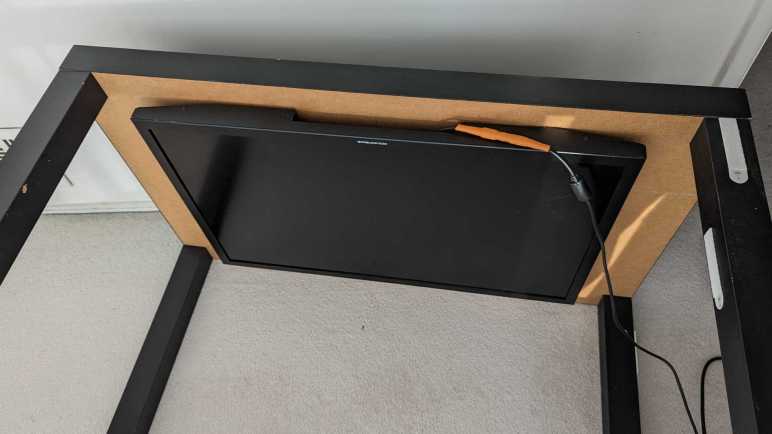
I mounted a somewhat broken Monoprice 30″ monitor (10734) under an IKEA LACK coffee table so it would face downwards. Combined with an ESP32 perpetually generating an all-white VGA signal, it would shine polarized light on my workbench so I can take cool pictures of my projects. After proving the concept basically worked with those pictures, this first-hand experience also quickly exposed some problems with this idea.

It Makes Other LCD Hard to Read

Using polarized light to illuminate my workbench caused the unexpected (but hilarious in hindsight) problem of making other LCD panels hard to read. LCD with their own light sources (backlights) are OK, like cell phone screens and digital camera displays. But LCD without their own lights, such as that on a multimeter, are only readable at certain angles. This is the same reason why I have to tilt my head at a specific angle when trying to read my car’s LCD information while wearing polarized sunglasses, and it’s just as annoying.

It Is Pretty Dim

Despite the shiny effects we see in movies, computer monitors aren’t designed to be light sources and are pretty bad when drafted into the role. Screen backlights are quite bright when shining alone, but this one is still shining through many layers necessary to make a computer monitor function. Here’s a picture I took earlier of a different panel, showing the brightness difference between a backlight by itself versus when one is still part of a functioning display.

A lot of light energy is lost between those functional layers, and that lost energy is eventually dissipated as heat, leading to the next problem.

It Gets Really Hot

This thing runs hot and being mounted horizontally under a coffee table made the problem worse. The convection cooling vents are now oriented the wrong way. And even worse, an IKEA LACK coffee table is mostly empty space inside, acting as a layer of insulating blanket preventing the monitor from shedding its heat buildup. With the closest edge sitting only about 10cm from my forehead when I’m sitting at my workbench, I can easily feel heat radiating from this thing. Not a pleasant thing in my face in the already warm environment of Southern California. After 15-20 minutes of use, the metal enclosure becomes uncomfortably hot to the touch, leading to the next problem.

It is Glitchy

Once the system is uncomfortably hot, the screen begins blinking at irregular intervals. I interpret it as an indication of an overheating system. When the outside enclosure is too hot to touch, the electronics inside has likely gone beyond its normal operating temperature envelope. A flicking workbench light is worse than useless.

Now What?

I think the heat dissipation problem is fixable, with two ideas immediately and probably more if I think about it longer:

  1. Mount it on something other than an IKEA LACK, something that allows heat to rise away from the hot metal enclosure. This may be an official monitor mounting solution or another hacked-up stand.
  2. Add one or more cooling fans for active cooling.

But improving heat dissipation would not address the original inefficiency that generated all that heat to begin with, it would not make the illumination any brighter, and it would not make my multimeter screen more readable. Given these serious problems, I declared the “monitor as lamp” experiment a failure. I’ll try a different approach to workbench lighting.

Polarizing Filter Photography is Magic

Starting with the recent Philips Sonicare teardown investigation, I’ve reintroduced the use of my Canon EOS M100 camera to take pictures for project documentation. Its excellent sensor paired with a macro lens for close-up photography work quite well to capture small surface-mount components and related circuitry detail. Late in the investigation, I added polarizers to the setup and was amazed at how much of a difference it makes under the right circumstances.

My current understanding is: if I use a light source that is polarized in a direction, then take a photograph with a filter polarized in an orthogonal direction, most direct reflections are eliminated. This means the resulting pictures will not be blown out by reflective glare, even though the subject can be very brightly lit Letting us make out details we could not otherwise see.

Here’s the Sonicare HX6530 circuit board again, taken without polarizers. All the solder pads are very shiny, as are some of the circuit board surfaces. I tell the camera to focus on the markings on the surface of the PIC16F726 microcontroller, but we can barely make it out.

And now a picture taken with polarization. All the shiny reflections are gone, letting us see far more detail that were previously obscured. PIC16F726’s markings are now clearly legible.

This is a great tool to add to the project documentation photography toolbox, but like all tools there are right and wrong times to use them. Even though I can see details with the polarizer in place, some of those details may be misleading. Example: actuator coil pads 1 and 2 show up as red in the polarized picture above. I don’t know why but it tells me to view colors in polarized pictures with skepticism.

But sometimes polarizers are just magic. There’s clear packing tape protecting this solder joint. Normally the tape would directly reflect light into the camera sensor, causing a bright glare on the surface making this solder joint impossible to photograph. But a polarizer can filter out that glare and let the camera focus on the solder joint almost as if the packing tape isn’t there. The downside of removing bright reflection is that it also removes a lot of visual cues for dimensions. Look at the red wire: all visual cues it is cylindrical are gone leaving it looking like a flat red thing.

Polarizer filters are sold for camera lenses for use in this and other scenarios. The Canon EF-M macro lens takes 43mm filters so I started with the cheapest option on Amazon (*) to see how well it worked. The outer ring is assembled from two parts: one part threads onto the lens and stays put, the other part holding the filter rotates freely letting me adjust the polarization angle. These initial tests look promising so I’ll use the cheap filter until I can articulate a reason to move upscale.

The camera lens polarizer is cheap to buy and easy to use, but getting these results also require a source of polarized light. I think the easy solution is to buy sheets of polarizer film (*) and put it over your existing light sources, but that’s not what I did. I wanted to put some old stuff to work.


(*) Disclosure: As an Amazon Associate I earn from qualifying purchases.

Dusting Off Canon EOS M100

Recent changes to Chrome browser motivated me switch to Firefox, but that wasn’t the only recent Google decision that irked me. Google also decided to be a lot less generous with Google Drive. Google Pixel camera images received unlimited Google Drive backup storage, but that perk ended with the Pixel 5. Images from Pixel phones newer than Pixel 5 count against Drive limit just like any other data. I guess Google is no longer funding the Drive division for supporting Google hardware adoption.

It was very convenient to document my projects with my phone camera as it is usually nearby. But being generous with the shutter also meant I was quickly filling up my Google Drive quota. With the flood of nag mail demanding I pay money to increase my quota, I was motivated to migrate from cloud-based storage back to local storage on my TrueNAS array. And if I’m doing that anyway, I might as well dust off my Canon EOS M100 camera. Shown here with a lens for up-close photography and a wrist strap (*) far less bulky than the standard neck strap.

Convenience of cloud backup was a major reason why my M100 had been gathering dust. Now that Google has made it less enticing, I’m returning to the superior photography capability I’ve already paid for. The M200 is the current successor but I don’t feel a need to upgrade yet. Even this older M100 has sensor and lenses that easily outperform a phone camera, even more so when dealing with projects like my Sonicare HX6530 circuit board.

Credit to the Pixel 7 camera design team, it performs well with subjects at normal ranges. But I would not call my usage pattern normal, and I’ve highlighted problems before.

Above is a serviceable picture taken by the Pixel 7, below is from the M100.

When scaled to blog post size, they’re pretty close. But when I want to crop, the M100 sensor delivers more pixels to work with. Here are 1:1 pixel crops from original resolution of above images:

The M100 gives me more pixels to crop closer to the subject. The Pixel 7 is quite competitive here looking at the center of the image, but it falls behind when we start looking towards the edge:

Both lenses degraded as we move away from the center, but the EF-M Macro lens does a better job. And while the phone camera couldn’t focus much closer than these pictures here, the Canon lens can focus far closer. So close, in fact, that the lens itself casts a shadow blocking surrounding light. Which is why it has a built-in ring light to handle those cases.

So a dedicated camera has a better sensor. In front of that better sensor is a better lens, which can be swapped out for different lenses optimized for specific scenarios. And in front of that lens is a finely threaded mount for lens filters, which adds even more capability. For my electronics project photography, adding a polarized filter is a magical transformation.


(*) Disclosure: As an Amazon Associate I earn from qualifying purchases.

Google Pixel 7 Camera Off-Axis Blur in Closeups

Thanks to Black Friday sales, I have upgraded my phone to a Google Pixel 7. My primary motivation was its camera, because most of the photographs posted to this blog were taken with my cell phone (Pixel 5a) camera. Even though I have a good Canon camera, I’ve rarely pulled it out because the cell phone photos have been good enough for use here. By upgrading to the Pixel 7, I hope to narrow the gap between the phone camera and a real Canon. So far it has been a great advancement on many fronts. There are other phone camera review sites out there for all the details, but I wanted to point out one trait worse than my Pixel 5a. It is specific to the kind of photos I take for this blog and not usually covered by photography reviews: with close-up shots, the image quality quickly degrades as we move off-axis.

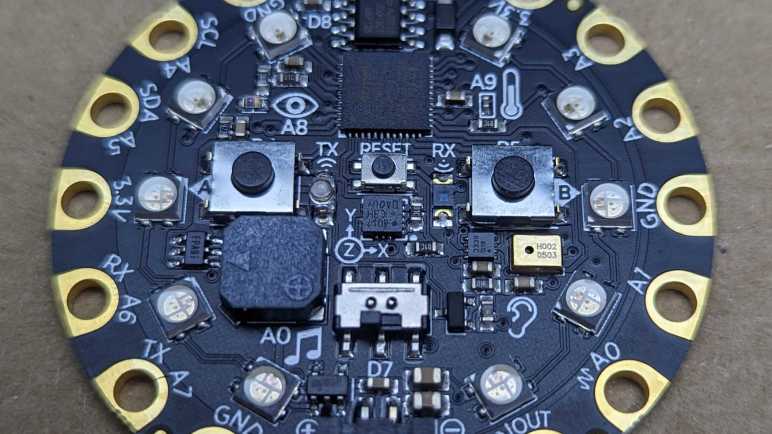
I took this picture of an Adafruit Circuit Playground Express with the Pixel 7 roughly fifteen centimeters (~6 inches) away. This was about as close as the Pixel 7 camera was willing to focus.

The detail captured in the center of the image is amazing!

But as we get to the edges, clarity drops off a cliff. My Pixel 5a camera’s quality also dropped off as we moved off-axis, but not this quickly and not this badly.

For comparison, I took another picture with the same parameters. But this time, that GND pad is the center of the image.

Everything is sharp and crisp. We can even see the circuit board texture inside the metal plated hole.

Here are the two examples side by side. I hypothesize this behavior is a consequence of design tradeoffs for a camera lens small enough to fit within a cell phone. This particular usage scenario is not common, so I’m not surprised if it was de-emphasized in favor of other camera improvements. For my purposes I would love to have a macro lens on my phone, but I know I’m in the minority so I’m not holding my breath for that to happen.

In the meantime, I could mitigate this effect by taking the picture from further away. This keeps more of the subject in a narrow angle from the main axis, reducing the off-axis blur. I would sacrifice some detail, but I still expect the quality to be good enough for this blog. And if I need to capture close-up detail, I will have to keep this off-axis blur in mind when I compose the photo. I would love a sharp close-up photo from frame to frame, but I think I can work with this. And everything else about this Pixel 7 camera is better than the Pixel 5a camera, so it’s all good!

A Close-Up Look At VFD Internals

When we first pulled the vacuum fluorescent display (VFD) from an old Canon tuner timer unit, we can see a lot of intricate details inside the sealed glass. We had work to do that day – probing the pinout and such, but part of its overall allure comes from the beauty of details visible within. It is still something of interest, I just had to remember to bring my camera with a close up macro lens to take a few photos.

VFD under macro lens off

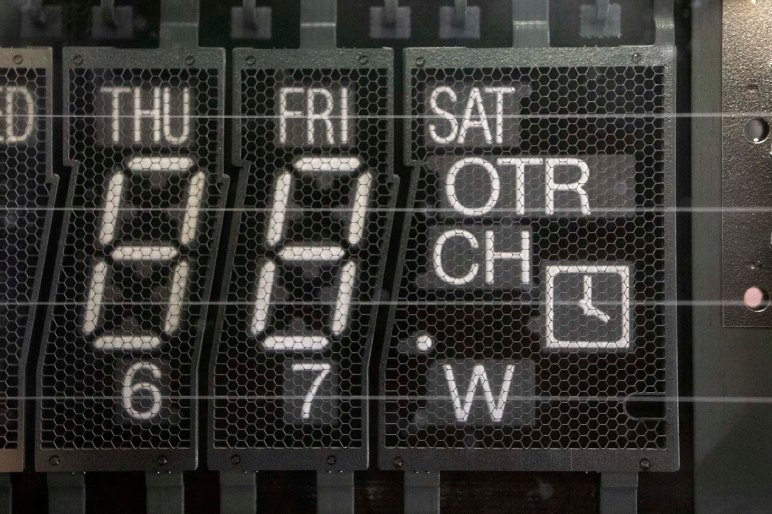
One of the reasons a VFD is so interesting to look at is the fact the actual illuminating elements sits under other parts which contribute to the process. Closest to the camera are the heating filaments, visible as four horizontal wires. This is where electrons begin their journey to trigger fluorescence.

Between these filaments and individual illuminating segments are our control grids, visible literally as a very fine mesh grid mostly – but not entirely – built on a pattern of hexagons.

And beyond the control grids, our individual phosphor coated segments that we control to illuminate at our command using our prototype driver board. (Once it is fully debugged, at least.) These phosphor elements are what actually emits light and become visible to the user. The grid and filament are thin which helps them block as little of this light as possible.

Fortunately an illuminated VFD segment emits plenty of light to make it through the fine mesh of grids and fine wires of filament. From a distance those fine elements aren’t even visible, but up close they provide a sophisticated look that can’t be matched by the simplicity of a modern segmented LED unit.

VFD under macro lens on

SMD LED Under Macro Lens

Several recent posts focused on small things like a damaged ESP32 module. Trying to document these projects presented a challenge because it’s been difficult to take good clear pictures of fine detail. I did the best I could with what I had on hand, but the right tool for the job is a camera lens designed for macro photography. When one such lens for my Canon EF-M camera was on sale during the holiday shopping season, I could not resist.

Here’s the LED on the Introduction to SMD kit, with the entire image scaled down to 1024 pixels wide.

SMD intro kit scaled 1024

If I crop out the center of the original picture instead, this is what I see:

SMD intro kit LED 1024

A lot of detail are visible, certainly far better than what I could get before, but I think the focus could be a little sharper. I hope the lens is limited by operator skill rather than optical characteristics, because I could learn and improve my skill.

Here is a picture of the LED array from my recent freeform SMD experiment, again scaled down to 1024 pixels wide. The solder joints – which I could barely manage with the naked eye – look really uneven at this magnification. But wait – there’s more!

Freeform SMD 7 scaled 1024

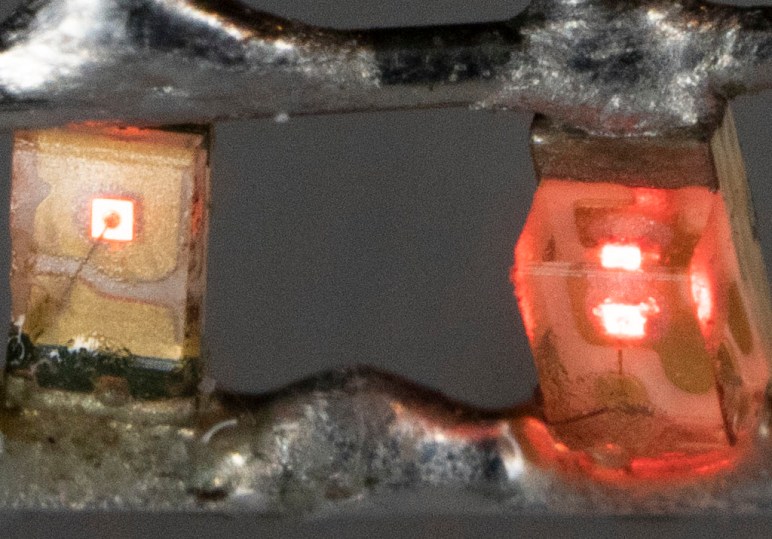
Here’s the cropped-out center of that image. Tiny beads of solder look like monstrous blobs of invading space aliens, not at all attractive. But the wire inside the left side LED is clearly visible, and multiple diffractions of the right side LED can be seen. This picture represents a combination of two novice skills: freeform SMD soldering and macro photography. I’m pretty happy with the detail and clarity of these pictures, but not at the quality of these solder joints. That’s OK, it just means I have lots of room for improvement.

Freeform SMD 7 cropped 1024.jpg