Dell XPS 8950 with RTX 3080 and i7-12700

Looking over Memorial Day Sale discounted computers, I decided a Dell XPS 8950 configured with a RTX 3080 GPU and i7-12700 CPU had the grunt to drive my new Valve Index VR headset at a price I’m willing to pay. My next stop was the XPS 8950 service manual. Flipping through component replacement procedures let me get a look at the design for this system. I liked seeing its clever layout and tool-less operation. I especially liked the brace that help support video card weight. GPUs been growing bigger and heavier and I’ve been grumpy the industry has not yet coalesced on a de-facto standard to support all that mass. For the most part they’re still just mounted on the backplate and cantilevered way out past the PCI Express slot, placing a great deal of strain. Motherboard manufacturers have started putting metal reinforcements on their PCI Express slot, which I consider a hack and not a solution, but that’s an entirely separate rant so I’ll stop here.

The downside of novel capabilities is a nonstandard form factor. Historically, by the time I want to upgrade a CPU/motherboard combo I’m ready for a new system anyway. (Like right now.) Therefore, I’m not terribly bothered by the fact neither the mainboard nor case are standard ATX: they’re tailored specifically to each other. There’s an upside, though. Front panel ports here are actually mounted directly on the mainboard and not connected via cables as is typical of a standard ATX case. I’ve had intermittent connection issues with such front panel ports, so I see this design as a positive.

The only part that made me pause was the proprietary power supply. Unlike CPU/mainboard combos, I have had to replace power supplies on my own PCs. Mitigating this worry is (1) XPS power supply should last longer than lowest-bidder ATX PSU, and (2) power plug could (might?) be compatible with the new ATX12VO standard. So I could rig up something to keep the machine running, even if it wouldn’t fit in the case properly.

That was enough information for me to decide on buying one. One thing the manual couldn’t definitively show are the cables, so I had to wait until my system showed up to see them. They are laid out very tidily as expected of a customized power supply with all wires trimmed to necessary length. It is also free of all legacy power plugs. No floppy connector, no CD-ROM connector. Lack of clutter ensures great airflow through the airy middle section of the case.

I was happy to see robust provision for GPU power. There are a pair of 8-pin PCIe power plugs to feed the existing RTX 3080 card. Waiting in the wings just below them, tucked into a plastic bracket, are a duplicate set of extra PCIe power plugs. Together they are enough to feed a RTX 4090 card and I feel comfortable they are ready for whatever video card I might want to upgrade to in the future.

Only a single PCIe x1 slot is still open for future expansion, but historically that has been sufficient. This system came with 32GB of DDR5 RAM in two 16GB modules, leaving two additional memory slots open. There are two M.2 slots, one of which is occupied by a terabyte Samsung NVMe SSD and the other open. If I want to add some bulk HDD storage, there are two unoccupied 3.5″ drive bays. Both of which have SATA power plugs ready to go. However, only one of the two bays have a SATA data cable and the proprietary tool-less drive caddy installed. (Look for blue plastic in upper-right corner of picture.) SATA cables are easy to get and there are open SATA ports on the mainboard. It might not be as tidy since the length isn’t customized for the case, but I’m not worried about that. I’m considering buying one caddy now. It’s pretty cheap, and ensures the bay is usable even if Dell stops carrying this part. Or I could measure the dimensions of my existing caddy and 3D print a clone.

I saw no open 2.5″ drive bays, but that is a solvable problem. This system came with a laptop-sized DVD-R/W optical drive that I do not expect to ever use. However, that gives me the option to swap it out with a 2.5″ drive adapter. I’ll just have to remember to get the correct height adapter this time.

With the exception of power supply, I see standardized form factors for everything else I anticipate installing as either replacements or upgrades. The non-standardized elements have offset benefits like GPU support, tidy cabling, good airflow, etc. This compact integrated package seems well worth a ~15% premium over a DIY build. Now I have to see if it stands up to the test of time. I hope this machine will support many adventures (VR and otherwise) for years to come. Starting with revisiting my favorites to feel its upgraded power.

Narrowed Field Down to Dell XPS 8950

When I upgraded my VR headset to a Valve Index, I knew there’s a chance I’d want a new video card to go with it. The increased display resolution and refresh rate of the Index is significantly more demanding, possibly outpacing my existing RTX 2070 video card. Well, that expectation proved to be true. And to my small surprise, the challenge of running an Index has outpaced not only my video card but my processor as well! Faced with a major upgrade, I decided to get an entire system built around a RTX 3080. I combed through all of the Memorial Day 2023 sales I could find, and the winner of this competition was a Dell XPS 8950.

Most PCs built with a RTX 3080 video card cater to a market infatuated with multicolor LEDs. I don’t care to have them on my own computer, but I know how they work electronically and confident I can turn down the garish lights if they bother me. The bigger problem are functional tradeoffs made by cases optimized around those lights and related aesthetics accessories. For example, many of these PCs have clear sides to show off the hardware and lights inside. Glass and acrylic are poor thermal conductors and obviously obstructs airflow, not great for a power-hungry machine that needs to dissipate a lot of heat. Such are the silliness in HP Omen, Lenovo Legion, Dell Alienware, and other PCs competing in this market.

Dell’s Inspiron product line is their economy class for competing on price. If price was the biggest concern, I would buy parts and build a PC myself. I’m willing to pay a small premium to have a well-engineered system that I can expect to work well for several years. After that point I will contemplate piecemeal upgrades like a new video card. Between Dell’s low-priced Inspiron and their high-end Alienware is their XPS product line. Returning to the airline analogy: if Inspiron is economy class and Alienware is first class, XPS is their business class. I think I can find my Goldilocks “just right” point here. These products aren’t penny-pinched to last barely as long as the warranty. They should give all the performance I want with none of the gratuitous LEDs.

Dell’s list prices for XPS systems are roughly double what I would pay to buy similar components and assemble a system by myself, but I have never paid Dell MSRP and I don’t intend to start. The current Dell XPS desktop is the 8960 with 4000-series NVIDIA GPUs and 13-th generation Intel CPUs. This meant existing stock for older XPS 8950 with previous generation RTX 3080 video card and older generation CPU can sometimes be found with clearance pricing. Combined with Memorial Day and additional discounts, these not-bottom-basement machines can be had for less than 15% premium over self-assembly with bottom-basement components. This was good enough for a closer look.

New PC For New VR Headset

I recently bought a Valve Index VR headset and it made great first impressions. A significant improvement over my older HP Windows Mixed Reality headset. Even though display resolution was only slightly higher than my old headset, it is now refreshing at 120Hz for smoother movement and a much more enjoyable experience. On the downside, my existing computer couldn’t keep up and I learned stutters at 120Hz are far more annoying (in the “discomfort leading to motion sickness” sense) than stutters at 90Hz or 60Hz.

When I bought my HP Windows Mixed Reality headset, it was paired with a laptop equipped with NVIDIA GTX 1060 mobile edition GPU. This barely met minimum system requirements for VR and I was no stranger to stutters even at 60Hz. A few years later, shortly after NVIDIA launched the RTX 2070 Super, there was a brief window of time when RTX 2070 (non-super) were discounted to a level I felt tolerable so I got one for VR duty. This was a big step above my laptop, but it could not keep up with a Valve Index.

Looking around the GPU market, NVIDIA recently launched their RTX 4070 which is reportedly on par with the RTX 3080. (Quick model number decoder: 3xxx vs 4xxx means earlier generation. xx8x vs. xx7x means higher tier product in that earlier generation.) Combined with easing of electronics component shortage and the cryptocurrency crash (about damned time), vendors clearing out older inventory dropped RTX 3080 market price drastically relative to insane heights of just a few months ago.

But if the new RTX 4070 is a newer GPU that is about as good for roughly the same money, why am I looking at the older RTX 3080? Because when I dug into RTX 4070 reviews and their associated comparison tests, I found that the RTX 3080 gets its benchmark scores from brute force pixel-pushing power while RTX 4070 gets them with help of features like DLSS. This is fine for most games, but such features add a bit of latency which is very bad for VR. As I’m looking at a GPU specifically for VR, the raw power of RTX 3080 is preferable to fancy smarts of RTX 4070.

I started looking around for a standalone RTX 3080 video card upgrade, then it occurred to me to look at Windows Task Manager to verify my GPU is indeed a bottleneck. The good news is that Task Manager confirmed my GPU utilization occasionally maxes out. The bad news is that I also noticed my 7th-gen Core i5 processor has its hands full. I was under the impression that games only care about single-core performance, but this information tells me newer VR titles are multicore aware and four cores won’t cut it anymore. I need to upgrade my CPU as well, which meant a new motherboard, which wants new DDR5 memory… at this point I might as well look at an entire new computer system.

Fortunately, the same pricing pressures on RTX 3080 video cards also lowered prices for complete systems prebuilt with a RTX 3080. Stacked with Memorial Day Sale discounts, I found several complete systems available at a reasonably small premium over what it would cost for me to buy parts from lowest-bidder retailers and build my own. Some of these are name brands who probably aren’t buying bargain-basement components from questionable Amazon/eBay/Newegg vendors as I would. Over Memorial Day weekend I evaluated all the deals I could find, and a Dell XPS 8950 looks very promising.

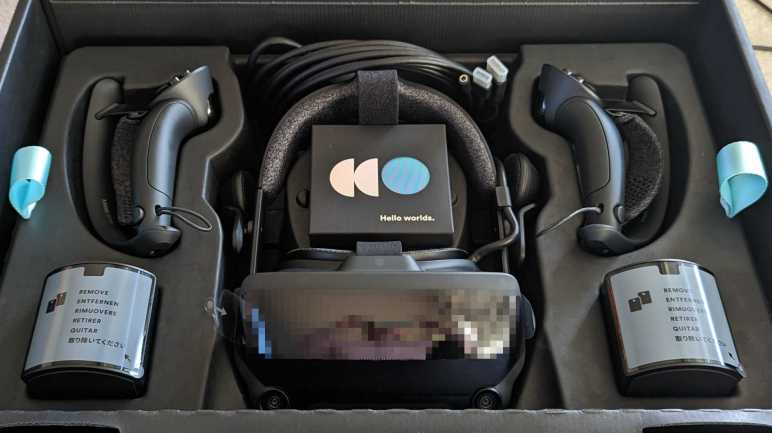
Valve Index VR Kit First Impressions

After five years with an HP Windows Mixed Reality VR headset, I looked over VR hardware choices in 2023 and decided to get a Valve Index. It has worked well through my first few sessions, and I wanted to write down my first impressions to see how they hold up after a few years. (In hindsight I wish I did this for my HP WMR headset when I got it in 2018.)

Reading various Valve Index reviews, the biggest recurring complaints focused on the display. The resolution is only incrementally higher than my five-year-old HP WMR headset. Compared against modern competition, it is lower than even the affordable Quest 2. Furthermore, it lacks the color and contrast of OLED panels used by some headsets in a similar price range. The redeeming feature of Index display is a high refresh rate of 120Hz with an experimental 144Hz mode available. While I know I would prefer OLED color and contrast, I don’t think it would be a huge immersion breaker in VR. The same with resolution: I’m sure I would appreciate a higher resolution display, but it hasn’t been a significant hinderance to my VR experience. What has been an actual problem were jerky movement. I decided I like Valve Index engineering team’s decision to prioritize high screen refresh rate, and indeed motion has been noticeably smoother. (For low complexity content, at least. More on that later.)

But 120Hz refresh rate might not have been the sole contribution. Some of that might be due to the tracking mechanism of a Valve Index. Rather than using visual tracking with a pair of cameras, the Valve Index required external base stations to serve as lighthouses helping my headset (and controllers) figure out where they are in space. This was a minor extra hassle during setup, but not so much to justify the complaints I’ve read about their setup. Theoretically this type of tracking would be a more responsive system because it requires less computation than camera-based visual positioning. I know VR motion is smoother, I just don’t know how much of that is 120Hz refresh rate, how much of that is beacon tracking, and how much is psychology.

A less-important but nevertheless appreciated bonus of beacon-based tracking is that my controller is no longer restricted to moving within a few camera cones of view. This came in useful for Half Life: Alyx which had two aspects problematic with the old headset. First is a motion where we put the controller over our shoulder to put stuff in our backpack, and the second is operating a mounted weapon late in the game. We have to aim with one hand on the rear of the large weapon, and fire with another hand on the handle midway up the left side of the weapon. In the real world this meant my left hand reached in front and the right hand near my chest. Problem: when looking up at the target, my HP WMR tracking camera couldn’t see my right hand near my chest! That made it very difficult to aim and a frustrating encounter on the old headset. With the Index controllers, it was a nonissue.

On that front, controller position tracking is improved but still not perfect. On the old headset, if I held my hand in front of my face and kept it steady, its position would jump around by roughly 5mm. I had hoped the new headset’s tracking system would fix this and keep it rock steady, but it did not. It still jumps around, though by a smaller amount. Maybe 2-3mm.

I really, really love Valve Index controllers, which were designed to allow me to open my hands without dropping them. Not merely for the VR immersion aspect, it also means less strain on my wrists because I don’t need to keep a death grip to keep them from flying across the room. Another improvement is moving the tracking detectors from a front ring to an outside arc. This reduced the frequency of (but did not eliminate) times I whack controllers against each other in enthusiastic play. Hopefully they’ll prove to be durable despite such abuse. I am worried about their shape, though. An advantage of rings is that, if I hit controllers against each other, the two rings would just bounce off each other.

In contrast, Index controller arcs have protrusions that can potentially snag on each other. It has yet to happen, so we’ll see if my worries are unfounded. And finally, these controllers have built-in batteries rechargeable via USB type-C. More convenient than constantly removing, recharging, and reinstalling NiMH AA batteries.

Back to the headset, I like having built-in speakers that hover a few centimeters away from my ears. I no longer have to either route audio to external speakers, which loses positional audio effects, or use earbuds I find uncomfortable. Even better are eye adjustments: both front-back (focal distance) and narrow-wide (IPD, interpupillary distance) are adjustable with the Index, I no longer have to put up with not-quite-right fixed positions. These features add weight relative to the HP WMR, but the Index also has an additional third top strap to better distribute that weight. Altogether these features (especially the eye adjustments) result in a more comfortable headset.

A damaged cable and lack of support motivated me to retire my previous VR headset. Valve enlisted iFixit for repair support and has provided repair parts. If I damage my Index cable, I could buy a replacement for $129 unless I want to use that excuse to buy a new headset again. I also damaged the face surround foam on my previous headset and bought aftermarket replacements. Official Index face gasket replacements are available at $40 for a two-pack, which I consider reasonable. They are magnetically attached which allows easy removal for cleaning. And when I removed my existing unit for a closer look, I found this cool little design detail:

There’s a tiny little ventilation slot molded into the top of this assembly. Airflow would be limited because of that lower tab blocking external light, but having this slot will help reduce the amount of humidity that gets built up inside a VR headset while in use. Small details like this show a great deal of thought went into design of this headset. I liked this headset enough to get a new PC worthy of it, and I hope they both hold up well to years of use in the future.

Choosing a VR Headset in 2023

I broke my HP Windows Mixed Reality headset I bought five years ago in 2018. I made a repair effort, but the results are questionable with risk of electrical faults. I’m not comfortable risking damage to an expensive video card but I also appreciated having an excuse to upgrade.

A lot has changed in those five years. Most 3DOF VR garbage have faded away as the market realized that they sucked. Facebook poured a lot of money into virtual/augmented reality, including buying Oculus, spurring investment from others as well. Oculus launched the 3DOF Go headset (not interesting) followed by the 6DOF Quest headset (worth considering). Now we have the relatively affordable Quest 2 and the high-end Quest Pro. Both of which has onboard computing power to run standalone: no tether to break! But there are limitations to standalone operation: software-wise, we are limited to Oculus walled garden of applications, and graphics are limited by onboard hardware that are closer to phones than PCs. Fortunately Steam VR compatibility and better graphics fidelity can be had by using them as tethered PC VR headsets.

HTC, the other half of old PC VR duopoly, still exists and continues to evolve their line, releasing products across a price range that doesn’t dip as low as Quest 2 at the low end but definitely gets to Quest Pro on the high end. As far as I can tell, evolution has been incremental improvements without any significant innovation like Quest and their standalone operating ability.

Microsoft’s Windows Mixed Reality initiative seems to have lost momentum. After a flurry of headsets from multiple manufacturers five years ago, only Acer and HP released follow-up products. And it’s not just hardware releases that have dried up: I haven’t seen anything notable on the software front, either. Certainly nothing as notable as Oculus’ exclusives. I had really hoped Microsoft would port some variation of their Mars rover software from high-end Hololens to more affordable WMR headsets, but that never happened. It’s a good thing WMR headsets are compatible with Steam VR, because that’s where I’ve been spending my VR time.

I don’t think I’ve spent 1582 hours, though. That multiplies out to over two months. Searching online, I found many people complain Steam overcounts VR usage time. I’m going to blame that, because I really doubt I’ve spent two out of past sixty months of my life in VR. (Or if it is true, I don’t want to believe it.)

If I’m spending all my time in Steam VR anyway, then the obvious candidate is Valve Index who counts Steam VR as its home turf. It is a very well-reviewed headset with a notable innovation in handheld controller design. After evaluating the tradeoffs against other options on the market, I bought a Valve Index.

Damaged HP Windows Mixed Reality Headset Tether

In the middle of 2018, I bought a HP Windows Mixed Reality headset (VR1000-100) and it’s been a lot of fun. It lived up to the promise I saw in 2014 from an Oculus DK2 (Development Kit 2) headset, which set a bar never met by a long series of lackluster phone-based VR systems. Which got a little of play then set aside and never used again. I was far more entertained by the HP WMR headset and its 6DOF tracking for superior immersion. I’ve been using it on-and-off over the past several years to the point I needed to replace worn out soft foam parts. But that was small potatoes compared to what happened a few weeks ago: plugging a disconnected tether cable back into the headset, something went wrong and damaged the connector. I went to my workbench for a closer look under better lighting.

I see damage in the outermost metal shield, with a corner of the metal bent pack. I see damage in the black plastic with pieces at the bottom of the well, instead of the sides where they belong. And the worst part: 6-8 thin copper pins bent out of place.

Based on damage, I have a guess on the sequence of events: In the middle of a game, I stepped on the tether and this connector popped free to relieve the sudden strain and keep it from doing damage elsewhere. Falling away from the headset, this connector struck something that bent an exposed corner of the metal shield. Not realizing this damage and eager to get back to my game, I plugged the connector back in. The damaged metal shield made contact and started bending outward. As it bent it also acted as a lever pushing the black plastic and copper connectors inward. They made contact with the other end of this connector but in the wrong shape, resulting in shattered plastic and bent pins.

As this device is long out of support from HP, I headed to eBay to see what I could find. I found a few pairs of controllers, some complete sets purported to be in working condition, and many headsets with some variation of “Not working, for parts only: broken cable.” I guess this is a common failure for these headsets! I had hoped to find an aftermarket replacement cable, but no luck. And I’m not going to spend hundreds of dollars for a secondhand set, I’d rather put that money towards a newer VR headset.

Back to the workbench, I thought I had nothing to lose by trying to repair the connector. I pulled out a set of fine-tipped tweezers. They were designed for SMD work but they were also able to reach inside this connector to pull out pieces of shattered plastic and bend pins back into an approximation of their intended positions. The 7-8 bent pins no longer had plastic backing to apply pressure for optimal electrical conductivity, but they were close to their intended locations and maybe it’s good enough.

Using needle-nosed pliers, I tried to bend the outer metal shield back, but I could not return it to its original shape. Eventually metal fatigue was victorious with the tab breaking off entirely. I accepted my defeat and switched tactics: I filed down remaining jagged edge after adding some tape to protect conductors from metal shavings.

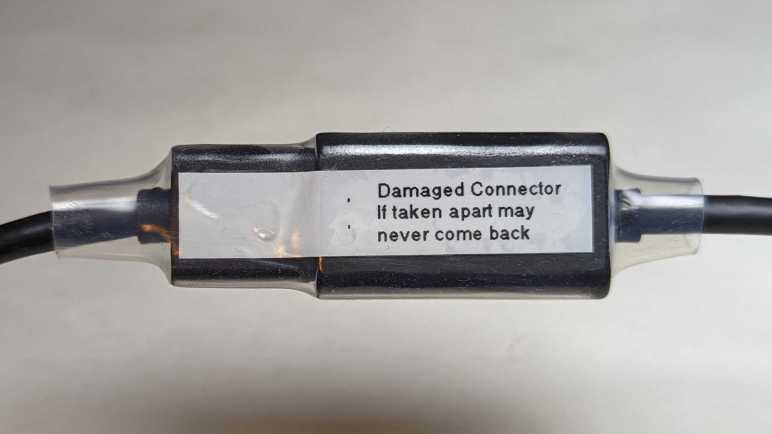
I carefully plugged this connector back in and there were no untoward crunching sensation or sound. I’m pretty sure this connector should never be separated again. I added a label to remind me and then securing the connector with a length of clear heat shrink tube.

I started this experiment thinking I had nothing to lose but, when I had the HDMI plug in my hand reaching to plug it into the computer, I realized I did have something to lose: the computer. What if one or more of these pins were out of place? What if some metal file shavings got into the works despite my taped protection? If I’ve accidentally shorted power to ground, that would do bad things.

Looking in my pile of PC hardware, I reassembled the guts of my decommissioned Luggable PC Mark II. This time I used a proper PC case and so I could plug Radeon R9 380 video card directly into mini-ITX motherboard without the problematic PCI-Express extension cable. This old Radeon R9 380 does not meet minimum system requirements for VR, but it is still a modestly capable GPU and I wouldn’t cry (too much) if it dies.

Plugging the headset into the R9 380, the good news is that an image came up and everything seems to work. The bad news is that I now have this doubt in my mind about the quality of my repair. Yes, it seems to work now, but is it solid or is it marginal? What if one of those loosely-flapping pins start moving around as I am wearing the headset moving around in virtual reality? I am still at risk for electrical faults that can kill an expensive video card. I don’t like it, and I’m going to use it as my excuse to upgrade.

HP Windows Mixed Reality Headset (VR1000-100)

Disappointed by phone-based virtual reality systems, hampered by their limited 3DOF tracking, I committed to spending the money for a PC-based 6DOF system. I didn’t quite go all-in, though, because it was quite possible this headset would also end up just gathering dust. So instead of buying leading-edge hardware, I bought one of the first wave of Windows Mixed Reality headsets after they were discounted to compete with more advanced headsets that launched later. In my case this meant the HP Windows Mixed Reality headset model VR1000-100 and, thankfully, it did not end up just gathering dust. This 6DOF headset was far more enjoyable than lackluster 3DOF setups from Google Cardboard & friends.

This was around mid-2018, a few years after my first experience with a 6DOF PC setup that enchanted me. I eagerly anticipated seeing what a few years of hardware evolution had brought. The first and most immediately noticeable advancement is in display resolution. This headset specification lists 1440×1440 per eye, which multiplies out to double the number of pixels of an Oculus DK2. As expected, I saw the virtual world in much sharper detail. The “screen door effect” of black lines are present if I look for them, but not so thick as to be distracting and I could ignore them.

On the opposite end, the most immediately noticeable problem is frequent loss of tracking of handheld controllers. This headset has just two cameras for tracking, and it’s pretty easy for my controller to move out of view of these two cameras. Newer headsets have four cameras to increase coverage volume. This older headset also lacked built-in audio speakers designed to maximize positional audio effects. It has a standard headphone jack and I plugged in some cheap earbuds, but they don’t work as well as purpose-built speakers.

One downside of a PC-based system is the fact there is a long tether to the computer somewhere nearby, restricting range of motion. I was able to extend the reach with a pair of ten-feet (~3 meter) cables: an HDMI extension cable (*) and a USB3 extension cable. (*) I never noticed any problems that I attributed to these cables, and they let me move around more freely. But they are still cables in the real world, subject to tripping hazard and cord damage. (This would bite me later.)

Every Windows Mixed Reality headset seems to use a common reference design for their handheld controllers. I have been mostly happy with these, especially the wrist straps that saved the controllers from flying across the room on several occasions. They have proven to be very durable. Especially the illuminated LED halo for position tracking. Every once in a while, excited in my virtual world, I would enthusiastically wave and accidentally whack them against each other. In rare occasions, this would cause the controller to reset leading to a few seconds of “Oh no, did I break it?” panic.

One downside of these controllers is their power consumption. The power tray is shaped for standard AA batteries and rechargeable batteries are highly recommended. I tried a pair of non-rechargeable Alkaline AA batteries for curiosity’s sake, and they died within twenty minutes of use. Due to their power consumption I have to recharge my NiMH AAs after every VR sesson, no matter if I use nice Eneloop batteries or cheap AmazonBasics batteries.(*)

I used this headset enough to start wearing out the soft touch portions. After several years of on-and-off usage, the foam surround soaked up enough sweat to smell bad and fall apart. Since HP had discontinued support for this old headset, I had to buy an aftermarket replacement from VR-Cover.

Back to the topic of the cable tether: one engineering design decision that had worried me was the cable connector near my temple. If the cable should tangle up on something, it disconnects. I agree a disconnection is preferable to either yanking the headset off my head, or the laptop off my desk, or ripping the cable out of the HDMI port. But the connector is a nonstandard unidirectional type that is very finicky to plug back in and had very fine-pitched connectors. (I estimate 0.5mm pitch, on par with HDMI or DisplayPort connector but definitely not either of those types.) Such a dense connector with small contact points seems like a bad type to handle violent events like accidental cord jerks.

Eventually it happened: separating in response to an accidental yank, the connector suffered some kind of damage. I didn’t look at it too carefully before plugging it back in. When I did, I felt and heard a crunch. “Oh, no. That can’t be good.” That ended the evening’s VR session and the headset moved over to my electronics workbench for a closer look.


(*) Disclosure: As an Amazon Associate I earn from qualifying purchases.

Ditching Phone-Based Virtual Reality for PC

I was fascinated by virtual reality and my frugality was tempted by Google Cardboard’s promise of phone-based virtual reality on the cheap. But eventually I had to face the reality I wasted a lot of money on disappointing hardware. They were limited to tracking rotation in x, y, and z axes. (3DOF = three degrees of freedom.) I wanted the magic I first experienced with an Oculus Rift DK2 so in 2018 I committed to spend money necessary to move beyond phone-based systems (*) for a PC-based system that tracks both rotation and translation in x, y, and z. (6DOF)

For many years the market consisted of a duopoly between Oculus Rift and HTC Vive. Then Microsoft convinced multiple PC hardware manufacturers to sell 6DOF VR headsets conforming to Microsoft’s Windows Mixed Reality (WMR) specification. While still expensive pieces of hardware, they were slightly more affordable than earlier offers. Competition is good!

No matter which way I went, though, I still needed to upgrade my desktop PC video card and that had been the bigger barrier. The cryptocurrency craze made a new GPU financially unfeasible for many years. Around the middle of 2018 I found a workaround to crypto frenzy: a laptop computer with a VR-capable GPU. Laptops are not cost-effective for cryptocurrency mining, nor could their cooling systems sustain performance for cryptocurrency math around the clock. I wanted a laptop anyway and the cost premium of stepping up to a VR-capable unit was a relative bargain compared to desktop video cards being gobbled up. Around the time I got that laptop, the initial launch wave of WMR headsets like the HP Windows Mixed Reality headset model VR1000-100 could be found at a discount. As newer headsets had released, and first-gen needed discounts to be competitive.

I snapped up that bargain and as soon as I started moving around in my new HP headset, I knew the extra money was worthwhile. 6DOF tracking gave me a sense of immersion that 3DOF tracking could not match. I was glad to be back in the kind of world promised by that Oculus DK2 years ago, and I enjoyed my visits to PC-based virtual worlds far more than I ever enjoyed phone-based virtual experiences.


(*) The Oculus Quest, which launched in 2019 (about a year after this) is a 6DOF VR system that operated standalone without requiring a supporting PC. It had a lot of commonalities with high-end phones like a Qualcomm Snapdragon processor and the Android operating system. It is, however, definitely not a phone.

Google Cardboard and Friends

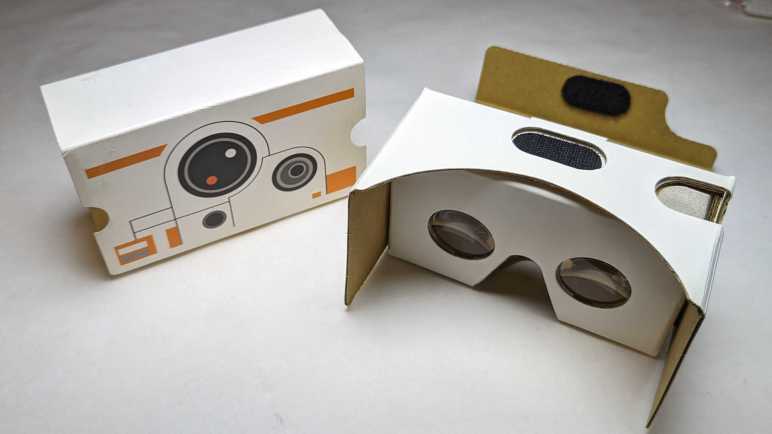
Almost ten years ago, an Oculus Rift DK2 (Development Kit 2) gave me an exciting peek into consumer-grade virtual reality. I was enthusiastic, but the leading edge of VR technology was still very raw and also very expensive. Trying to make this novel technology more accessible, Google Cardboard was a way to turn Android phones into VR headsets. A simple box so cheap, they can be given away as promotions. I have a BB-8 themed viewer that promoted Star Wars: The Force Awakens.

The downside of using a phone is that we only have an accelerometer to sense device orientation. There’s nothing to sense device position. This meant visuals can rotate in response to a head tilt in roll/pitch/yaw directions (three degrees of freedom or 3DOF) but doesn’t change if we take a step left/right, or a step front/back, or sit/stand/kneel. (Which constitute an additional three degrees of freedom for a total of six or 6DOF.)

I eventually decided trading off three degrees of freedom for low cost was false economy. My virtual reality “Ah-ha” moment of leaning in close to a panel was impossible to do in a 3DOF system like Google Cardboard. It’s not just a matter of missing features: I quickly get motion sickness in 3DOF VR. No matter how I tried to keep my body still, there are small movements in the remaining three degrees of freedom and after a few minutes my body started protesting the lack of visual feedback for that motion.

Still, the price was low, which translated to high distribution volume. People tried to iterate on the idea to grow the market, and I kept hoping I could find something I like. Spending money that I should have saved towards a real 6DOF VR system.

The most entertaining take was a VR revival of the View-Master brand. I had an old-school View-Master with a few picture discs, and that nostalgia motivated me to buy one of these new viewers. Technologically speaking it was merely Google Cardboard in View-Master’s signature red plastic, including the orange “lever”. As it was merely a styling and software effort, the business case failed: VR content cost a lot more to produce than those old View-Master picture discs! The best thing I can say is the fact View-Master experiences were only good for short durations, avoiding my motion sickness issue.

With big brands like Mattel and Google onboard, a lot of other brands jumped into the market looking for a successful niche. This was a “Utopia 360” viewer that added two axes of adjustments to improve visual comfort: (1) focal distance between our eyes and the phone, and (2) IPD adjustment. (Interpupillary Distance, or the distance between eyeballs.) Instead of standard tap-on-screen interface, this viewer bundled a small Bluetooth controller. Unfortunately, these features needed software-side support to be useful, and approximately nobody bothered to do so. (This particular unit had a troublesome spring-loaded generic phone holder, so I decided to make a custom holder as one of my first 3D printing projects.)

Samsung is never shy about throwing money at experimental niches. They took a stab with the Gear VR. Going beyond standard Google Cardboard, Samsung added a directional keypad to the side as well as higher quality accelerometer for faster and more accurate 3DOF feedback. I didn’t have a Samsung phone but had a friend who had a Galaxy S7. I thought he shared my enthusiasm of VR, but I later learned he was just being polite while I spewed my enthusiasm. How did I learn this? I bought this Gear VR for him to use with his phone. Years later, he retired that S7 and donated it to my pile of retired Android phones I keep for random projects. Along with the phone he also returned the Gear VR, still unopened in its packaging. By then Samsung has moved on to other things and shut down their Gear VR software support ecosystem so now I can’t do anything with it either.

My final 3DOF VR experiment was this first-generation Google Daydream viewer. It was a small additional expenditure as I already had a Google Pixel phone to go with it. Daydream was Google’s own evolution of the Cardboard concept, with at least two advancements: there were two capacitive touch nubs on the headset to help the phone align its onscreen image. A handheld remote was included, much like the Utopia 360. Google used their muscle to get more software support for Daydream controllers than Utopia 360 ever got for theirs, but there was no way to overcome the fundamental limitations of 3DOF VR.

This string of experiments firmed up my position on virtual reality: 6DOF or GTFO. By the time Oculus released their Go headset, I dismissed it as just another 3DOF system with no meaningful advantages over my Google Daydream. I decided against buying a Go, saving up money towards a 6DOF system of my own.

My Virtual Reality “A-Ha” Moment

Nearly ten years ago, I got my first taste of consumer-grade virtual reality hardware when I had the opportunity to put an Oculus Rift DK2 (Development Kit 2) on my head. Up until that point, I had only science fiction stories like Star Trek‘s Holodeck and reading about professional/industrial installations that were priced well beyond my reach. I knew Oculus launched their hardware development as a Kickstarter campaign, but I was too skeptical to put in my own money. I was still very interested in the technology, though, so it would come up in conversation with other tech-oriented friends. I learned one of my friends did pitch in the Kickstarter campaign and was slated to receive a DK2. Unfortunately, my friend’s computer did not meet DK2 GPU hardware requirements and in the absence of data they were reluctant to throw more money at it. I saw an opportunity: my gaming PC had a Radeon HD 7950 GPU which met DK2 minimums. (The minimums would be raised for release, excluding my HD 7950, but that came later.) We decided to meet up and plug their DK2 into my PC so we can both see firsthand what it’s all about.

I have vague memories of software installation struggles mostly with batch files and only a few graphical installer applications. I had to give administrator privileges to many unknown binaries and that made me squirm, and there were error messages to address. All of these unpolished edges were normal and expected of a development kit.

I don’t remember any hardware connectivity issues: I think everything plugged in together just fine. When the picture actually came up, the first impression was rather underwhelming. DK2 display panel resolution was relatively low, resulting in a blurry picture as if my eyeglass prescriptions are out of date. Plus, there was a distracting “screen door effect” caused by visible black lines between pixels. But of course, if we just wanted a static viewpoint, we could have just stared at a computer monitor. Things got more interesting once we started moving our heads to look around, leveraging key elements of virtual reality technology.

The demo applications (all under development) were mixed. It was definitely early days for the technology, with lots of people trying ideas to see what works. There were many standalone test apps and a few VR modes grafted onto existing titles. My friend and I quickly reached agreement we didn’t care for the titles that simulated motion independent of our seating position. The worst of those were roller-coaster simulations, one of them caused my friend to loudly proclaim “NOPE!” and yanked the headset off their head. We both got motion-sick from such experiments and had to take a break.

We were starting to think the whole thing might be a waste of time and money when we fired up Elite: Dangerous and its then-experimental VR mode. After our experience with VR roller-coaster and the like, we were not optimistic about flying around in a spaceship. But hey, we’ve come this far, might as well take a look. I remember it took some effort to get the game to switch from computer monitor over to the DK2 headset. My friend fiddling at the keyboard and the DK2 on my head. “Do you see the cockpit yet?” “Nope” “How about now?” “Still nope” Then it came up. “Hey I see something!”

The ship was still unpowered, so the only movement were of my own head. Even then I could look around at the controls and it felt like I was at the controls of a spaceship. A virtual representation of a reality that’s out of my reach: I could go on real rollercoasters; I couldn’t fly real spaceships. This was all very promising, but there was a problem. Elite Dangerous ship cockpits were designed to be shown on high resolution monitors. Sitting in the middle of the cockpit wearing the low resolution DK2 headset, all control labels were blurry and illegible. I suppose if I were already familiar with the game I could go from memory, but I was not familiar with it and didn’t know how to start up my ship.

My friend and I put our brains together, drawing from our collective computer gaming experiences. Maybe pressing “Z” will zoom in? How about the mouse scroll wheel? PgUp/PgDn? Arrow keys? The answer was none of those, because this was something new. I forgot which of us had the insight to lean closer to the panel, but I leaned closer to the labels and found I could read them. Such a simple thing we would do in the real world without thinking, but somehow it took several minutes for us to think of doing it in the VR world.

That was my VR “A-ha” moment. I no longer remember anything from that day after that moment. Did we manage to get our ship into space? Did we get motion sickness from flying around? It didn’t matter. The mundane act of leaning closer to read labels was the moment it clicked in my mind, and I was hooked on the concept of virtual reality. Sadly, I was too cheap to commit to good VR with 6DOF tracking and wasted a lot of money on cheaper 3DOF headsets like Google Cardboard and friends.

Technology for Promotion at the Los Angeles Auto Show

The 2017 Los Angeles Auto Show is underway this week. The cars are the stars, but you can read about them elsewhere. Instead, here are some of the interesting technology installed on the show floor.


There were two venues that featured the Microsoft HoloLens. I had been interested by this augmented reality headset and was happy this was a chance to try them myself.

Hololens 1 - Nissan

Nissan chose to use HoloLens to showcase their driving assist technologies. Up to six people (three front, three rear) can put on a HoloLens and look at the little toy Nissan on the table. Each of wearer sees an interactive environment projected around the toy car to illustrate how various features assist the driver. It’s possible to walk a bit to check different perspectives, but movement was limited because the HoloLens units were tethered to the table.

I felt this presentation underutilized HoloLens. It didn’t feel significantly superior to what you can accomplish with a cell phone, Pokemon-Go style.

Hololens 2 - Petersen

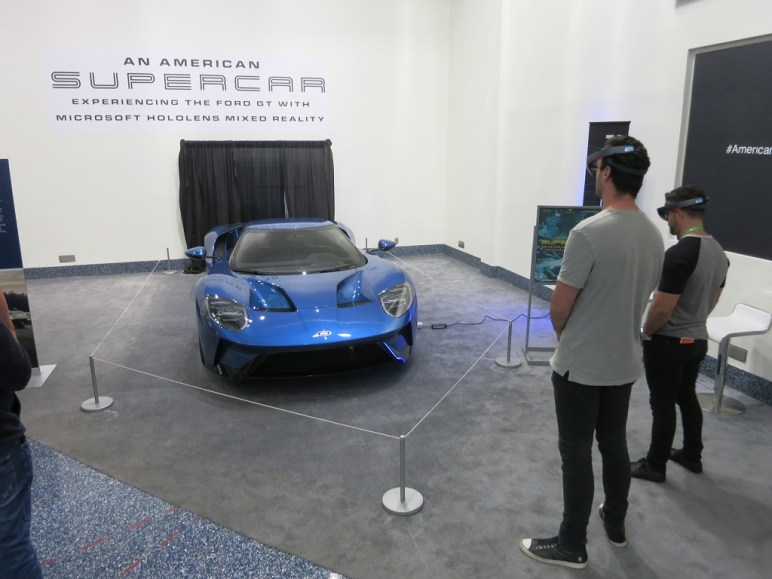
The other HoloLens exhibit was actually an exhibit at the Petersen Automotive Museum that they’ve brought to the auto show floor. The program is not interactive, but the user can walk around and check out views from different perspectives as the narrated presentation proceeded.

The best part was when they started illustrating airflow over and through the insides of the physical 2017 Ford GT in front of us. It’s quite informative to be able to move your head around to get a better feel of where the airflow is moving. Especially the X-Ray view of airflow through and under the car.

This was a much better demonstration of what’s possible with the superior precision and response rate of HoloLens tracking.


Several booth displays had some sort of virtual reality equipment. It is interesting that none of them were used to showcase any kind of driving. Just the opposite – most of them were there to showcase autonomous vehicle technology, a.k.a. the lack of driving.

VR 1 - Ford motion couch

Ford brought this motion-controlled couch with four seats, each of which can seat somebody with a Google Cardboard-style headset to experience riding in a Ford autonomous vehicle.

VR 2 - Volvo

Volvo brought in four Vive headsets to illustrate their safety technologies, much as Nissan did with Hololens. One random technical point of interest: I only found a single location beacon in the installation. Vive usually needs two beacons. I wonder where the other beacon was or if they’ve managed to do without the second.

VR 3 - Infiniti

Infiniti’s VR experience takes the guest on a virtual ride in the QX50. The most novel part of the program was the beginning, where parts of the SUV flew through space and assembled themselves around the viewer into a QX50.

VR 4 - VW

In contrast to the compact seating of the Volvo booth, VW put up this huge glass ring to give their I.D. Crozz VR ride plenty of elbow room. The guest seemed to stay seated through the whole experience so it’s not clear why this amount of room was necessary.

VR 5 - Nissan

I’m sure Nissan paid a lot of money for their Star Wars license for car promotion. And they were not afraid to use it! Liberally customized Nissans modeled after various Star Wars properties were on display. Their pavilion included this “Droid Repair Bay” VR activity. It looked so cool I almost didn’t wonder what it had to do with cars.


None of the AR or VR experiences featured any actual driving. For that, there were plenty of old-fashioned driving simulators on display.

Driving Sim 1 - Forza

Forza Motorsports are here to promote… themselves! I have Forza at home so didn’t bother to spend time playing it here.

Driving Sim 2 - Hyundai

Hyundai Racing had a four-seat configuration. What caught my eye is that they’re using Forza for the driving experience but the race car is sponsored by Gran Turismo. (See banner on top of the windshield.) Hmm…

Driving Sim 3 - Demon

Not all the driving sims were about the race track; the simulator set up in the Dodge pavilion lets people try their hands at drag racing. A fitting way to promote their drag strip focused Dodge Demon.

Driving Sim 4 - Ford

Ford brought in a full-motion driving simulator to promote the off-road focused F-150 Raptor. The hydraulic cylinders simulate the rough and tumble of racing head-to-head (back-to-back?) through a dirt track.


All good marketing companies have worked to think up ways to build customer connection through social media. There were plenty of photo booths present for people to post company-sponsored images to their social media. Two stood out for their novelty.

Selfie 1 - Honda

Honda’s “Dream Machine” is a selfie cam mounted in a little pivoting pod at floor level. After the person takes the picture, they press a trigger and a smoke ring puffs out of the pod towards the big screen, “sending” the picture to be displayed on the big screen.

Selfie 2 - Toyota

Toyota brought an array of cameras that all takes a picture at the same time, so the guest receives an animated GIF of them in Matrix-style “bullet-time”.