Windows Phone 8 As Sawppy Rover Controller

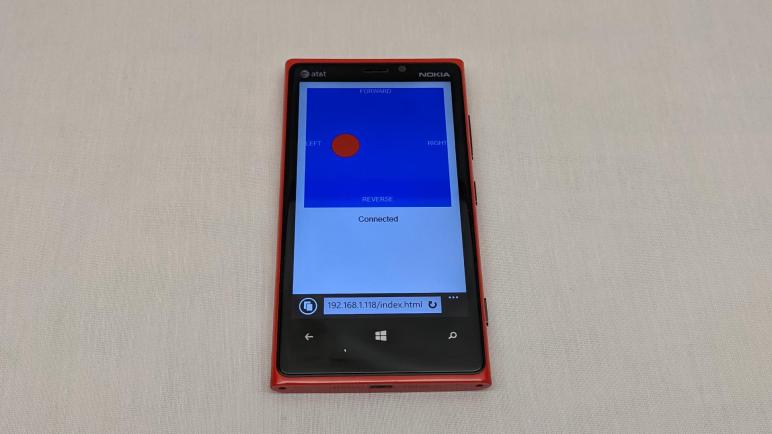
I wanted to reduce the cost of a micro Sawppy rover by using a HTML-based WiFi control system. This allows control by any web-enabled device like touchscreen phones that many people already carry. However, since it would be against the cost-reduction theme to require expensive new flagship devices, I’m aiming at the opposite end of the spectrum: if people don’t want to use their everyday phone, they should be able to use their old retired phone for rover driving duty. As a representative example for development, I will be using my old Nokia Lumia 920 running Windows Phone 8 (updated to WP8.1.)

Microsoft stopped supporting these phones in 2017, which includes shutting down their app store. (Which never grew to the scale of iPhone or Android app stores.) Any new functionality would thus have to come in via its mobile-optimized version of Internet Explorer. Which, by accounts of the day, made a respectable implementation of web standards of the era. Unfortunately, mobile sites of the time were too frequently written explicitly for Safari on iPhone or Chrome for Android. Mobile-friendly web standards existed at the time and was supported by all the platforms, but not yet as widely adopted by sites as they are today. This was a problem that also hampered Firefox’s attempt at a phone OS.

Since this is not an iOS device, nor an Android device, I expect any web-based code that runs on IE for WP8 would be neutral and will run across many older devices. Or if they do not, at least I hope starting from this neutral ground means any necessary modifications would be minimal.

I actually had the intention of making my original SGVHAK rover code friendly to old phones as well, which was part of why I adopted jQuery on the client-side. It is a relatively old HTML framework, which I thought would give me the best chance of working on older phones. So when it failed to work reliably on my Lumia 920 I was grumpy! But I didn’t understand enough about these frameworks (Flask on the server side, jQuery on the client side) to debug what went wrong. This time I will start at a more fundamental level and build upwards, testing on my Lumia 920 as I go. Which meant I would greatly benefit from setting up an environment that will let me experiment and iterate quickly.
Sawppy ESP32 HTML Control Project

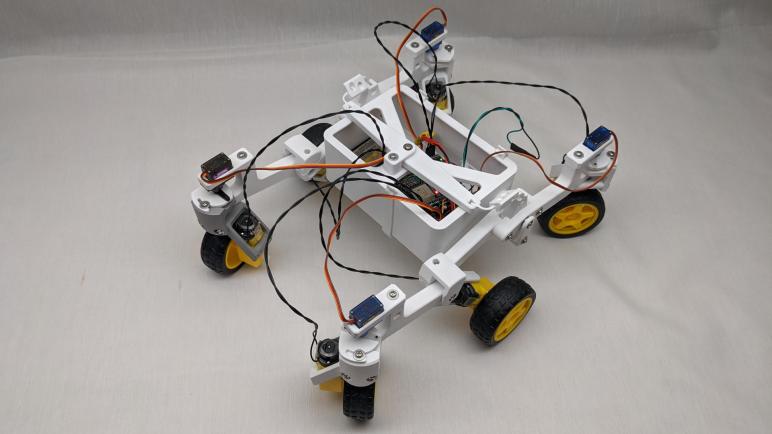
Giving my little Sawppy rover an interface with radio control equipment was a fun project, but that capability was always going to be a side show and never my main attraction. One of the reasons I chose the ESP32 is because of its wireless networking capabilities, and I had always planned to use that instead of external radio gear. Eliminating that equipment is also critical on cost grounds, as my Spektrum DX3E transmitter and SR300 receiver combo itself cost more than my $100 USD target for rover parts cost. Today Spektrum offers lower-priced entry level models, but they’re still going to cost money. By using ESP32 wireless capability directly, I hope to avoid that expense.

So the next project is to give my ESP32-based Sawppy brain a HTML browser-based control scheme using ESP32’s WiFi hardware. This will be similar to what I created for SGVHAK rover which has performed satisfactorily for several rover projects to date, including Sawppy V1 and Micro Sawppy Beta 1. But while the concepts will be similar, I don’t plan on using very much of the same code for two main reasons.

The first reason is due to downscaled rover hardware. SGVHAK rover software ran on a Raspberry Pi and was written with a Python-based web framework called Flask. This class of infrastructure will not be available on a microcontroller like the ESP32, which is far less powerful than a Raspberry Pi. So instead of using a web server platform that is built on dynamic server-side template transformations, I intend to create a system where the server only has to send out static files and leave script execution to the client’s web browser. This follows the Jamstack philosophy and I see this as a project for me to try implementing it firsthand.

The second reason is my target client platform. I want the client browser code to be very basic, because I didn’t want to require an expensive recently-released phone. As part of keeping rover costs low, I wanted people to have the option of using their old out-of-date phones. My representative out-of-date device runs Windows Phone 8.

Micro Sawppy Beta 3 Running With Spektrum Radio Control

I had to iron out a few bugs, but I now have a FreeRTOS task running on my ESP32 interpreting radio control receiver signals. It uses the RMT peripheral to count duration of servo control signals sent by my Spektrum SR300 radio control receiver. This allows me to use my Spektrum DX3E transmitter to send commands to an ESP32. From there it was a relatively straightforward translation to the ROS-ish joystick message format I used on this project. Once everything was connected and working, I could drive Micro Sawppy Beta 3 (MSB3) and watch that little rover scoot along.

The potentiometers on my DX3E are far superior than those on the wired joystick I used for testing earlier. Not a surprise given their price difference was two orders of magnitude. The cheap wired joystick was practically a digital on/off direction pad like an old Atari 2600 joystick, making it very difficult to make gradual adjustments. In contrast making tiny changes in a DX3E is trivial, and I could finally explore MSB3 partial steering and partial throttle response.

The good news is that proportional steering worked well. Even though MSB3 is capable of turning about arbitrary radii, including a zero-radius turn in place, I’ve found that confused people on Sawppy V1. So the human-operated joystick drive logic on MSB3 constrained minimum turning radius to pivoting about one of the middle wheels. I have yet to verify its capability to steer inside that radius, a task for the future via autonomy operation. But right now, with the DX3E I found it easy to control turning radius of MSB3 and it appears all my Ackermann steering calculation code and their execution are working correctly. This is great.

The bad news is that proportional throttle control did not work well. I had some preliminary results on TT gear motor speed ranges that made me worried, but that was done individually instead of all six wheels working together like they would be on MSB3. I had hoped that six wheels working together will exhibit better low speed behavior than I saw individually, and sadly I have proven this is not the case. Trying to get a bit more usable torque, I dropped the PWM frequency down to 1Hz. It gave the rover an audible whine and while it improved low end torque slightly, this rover is never going to be a rock crawler. The minimum sustainable speed is far faster than scale, and hampers the ability for this chassis to climb obstacles.

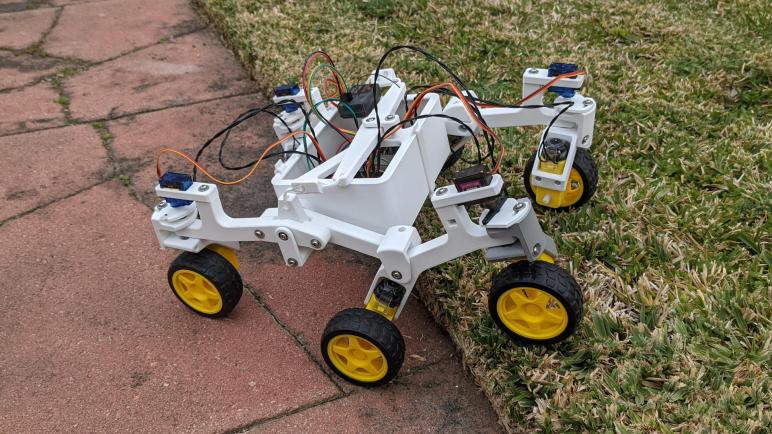
But despite that disadvantage, MSB3 still does quite well running across the uneven surface of my back yard. Including its ability to drop down to tile pavers and then climbing back up onto grass. This freshly-edged transition presented a cliff almost the diameter of a TT gear motor wheel. In the department of rough terrain capability, MSB3 still has quite a big of advantage over other robots driven by TT gearmotors, thanks to the rocker-bogie suspension geometry inherited from the bigger Mars rovers.

Driving MSB3 using my Spektrum radio was fun, but this is not the main goal of the project. The goal is to use ESP32’s wireless communication capabilities directly, without support of external radio equipment.

Micro Sawppy RC Input Via ESP32 RMT

As one of many options I wanted to offer on my micro Sawppy rover ESP32 brain, I wanted to teach it to understand servo motor signals sent by radio control receivers. I found an example online of a project doing a similar thing and read through their code to see how they did it. Cross checking with Espressif documentation on ESP32’s RMT peripheral, that precedent taught me how to configure RMT to read servo control PWM input.

When configured for signal receive, RMT watches the state of a digital signal and measure the time duration for on and off periods of signal pulses. There are a set of events that can be configured to trigger an interrupt service routine (ISR) for the application developer to pick up the measured data for processing. There are two challenges here. First is the general challenge of writing an ISR. There are constraints on what ISR code can do, and what APIs it can call. Violating such constraints will usually lead to mysterious hard-to-diagnose problems. The second challenge is specific to the ESP32 RMT peripheral, because the ISR code will have to know where to fetch data, which flags to check, and which flags to set or clear upon exit. Again doing this wrong usually results in weird behavior.

Fortunately, it’s not absolutely required to write my own ISR. Espressif provides a default ISR for handling RMT events and parses data into a defined format and communicated via a ring buffer, an Espressif extension to FreeRTOS. Espressif’s own RMT sample code to process infrared remote control signal uses this default ISR, and I decided to follow that precedent instead of diving into the challenge of writing my own ISR.

One of the RMT parameters is a clock divisor, stepping the default 80MHz sampling rate down to something that would work well for the signal at hand. I decided to use a divider of 80, so the signal is sampled at 1 MHz. This makes the math easier for me to understand in my head, because each RMT ‘tick’ is now one microsecond. The servo control signal pulse of 1 to 2 milliseconds maps cleanly to 1000 to 2000 microseconds. This is lower resolution than the divider of 10 used by my RC precedent, but it means I don’t have to multiply everything by eight in my head and having one thousand levels of differentiation should still be more than enough.

My first draft didn’t work because the default RMT ISR would never send data on the ring buffer. I know it is retrieving data and putting it on the ring buffer, because after a few seconds I would see “ring buffer full” error on the serial debug monitor. Eventually I figured out I misunderstood what “idle” meant in RMT documentation. I thought “idle” meant we lost the signal and need to go into some kind of recovery routine, so I set it to 32 milliseconds. This is wrong! “Idle” in this context actually meant the end of a single data signal of interest. Because servo control signals were arriving every ~16 milliseconds, the RMT idle threshold was never tripped and thus RMT thought data had not yet completed. The fix is to change idle threshold down to something far shorter than 16 milliseconds but comfortably longer than actual signal. Once I understood my problem and fixed it, RMT ISR started signaling data ready on the ring buffer, allowing me to retrieve servo control durations and translate that to my micro Sawppy joystick messages. Once that translation layer is in place, the little rover is no longer tied to a wired joystick!

Notes on ESP32 RMT Peripheral For Receiving RC PWM

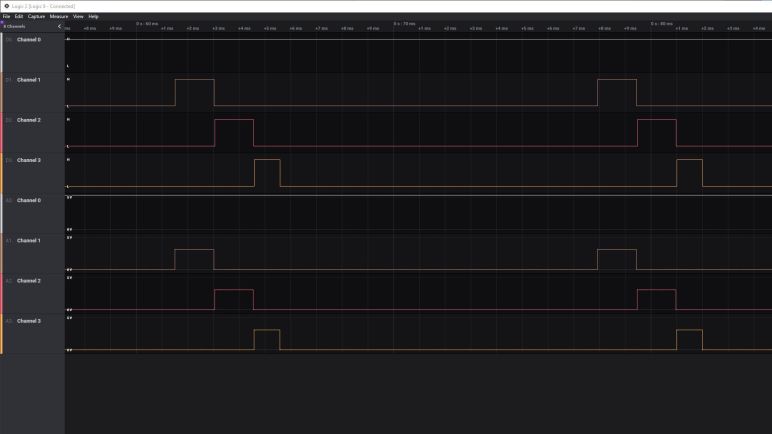
I want my micro Sawppy rover’s ESP32 brain to be capable of accepting control input from multiple sources. One of them will be my Spektrum SR300 radio control receiver. I examined its output control signal with a Saleae Logic 8 to make sure I understood what I will be working with, and the next step is to figure out how to interpret those signals with an ESP32.

With no shortage of hardware peripherals, including multiple options to generate PWM signals for servo control, I was confident an ESP had something to accept input. A bit of research quickly pointed me to its RMT peripheral, which was primarily designed to interface with infrared remote controls like our living room TV. But right in the documentation it also said “Due to flexibility of RMT module, the driver can also be used to generate or receive many other types of signals” and it looks like interpreting RC PWM is one of those “many other types of signals.”

Espressif pointed to several examples, but most of them only demonstrated how to send signals. Only one demonstrated how to interpret received signals, and it was for infrared remote control. I went out to the internet community of ESP32 users to find an example interpreting RC PWM signals, and I first came across this Reddit question, which was answered by [Justin Ong] with “I’ve done it and here’s my code.” I love forum threads with answers like this.

I didn’t try to download and run this code, but it was a valuable resource for me to cross-reference against Espressif documentation. From this I understood how RMT is used to sample the input signal at a particular rate, looking for rising and falling edges and reporting the time that has transpired between those edges. Once all the pieces came together in my head I understood why it is the perfect tool for interpreting pulse-width signals for hobby servo control.

After reading this example I think I have a good grasp of RMT configuration parameters and how the code interpreted the measured time durations. The part I’m still fuzzy about is the ISR (interrupt service routine.) This is the code that actually responds to an rising or falling edge event, and retrieves data from RMT peripheral hardware registers for later processing elsewhere. There were several pieces of bitwise manipulation code that I struggled to follow due to its tie with ESP32 hardware. This is not easy for people to grasp, the code comments referenced this one out of many forum threads from people confused about what they are expected to do. I see this as a warning flag that it’s very easy to make mistakes writing a RMT ISR, so I was glad to learn that I didn’t have to.

Spektrum SR300 Signals Under Saleae Logic 8 Analyzer

Since several Sawppy V1 builders modified their rovers for control via classic radio control transmitters, I wanted to explore doing the same with Micro Sawppy Beta 3. I don’t intend it to be the main, or even recommended, way to control a little rover. But I wanted it available as an option. Besides, I’m curious what such work would entail and thought it would be fun to try, this novelty is why I tackled the challenge first.

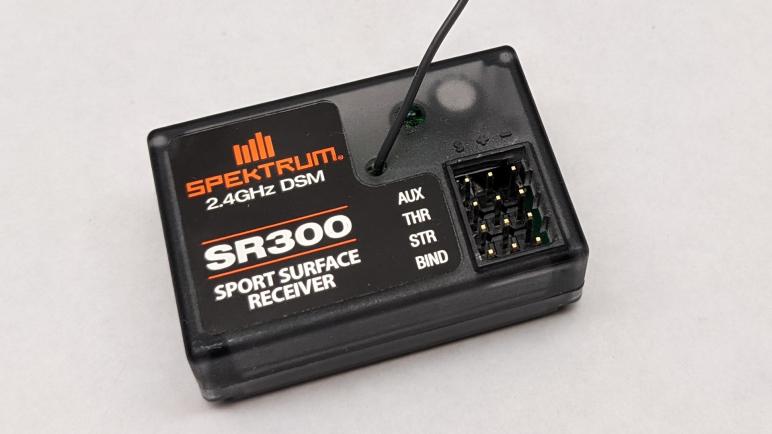
In preparation for this project, I modified my Spektrum SR300 radio receiver so it is easier for me to plug other things into it, not just official RC servos and speed controls. Immediately after reassembly I verified I didn’t break it with a quick test. Using affordable commodity micro servos which didn’t have the special beveled plugs. I couldn’t plug them in before, but now I could.

Eventually I’ll have wires connecting this servo to the ESP32 brain of my micro Sawppy rover, but before I do that I wanted to understand exactly what I will be working with. Having worked with hobby servo motors for many projects, I have a fair idea what their control signals are like. But all of my previous projects were about emitting these control signals, this is the first time I will listen to signals generated by another device.

This is a task that can be done several different ways. One way is to use an oscilloscope, which can plot out the signal waveforms. But to my understanding, the best tool for this job is a signal analyzer. This is a tool I’ve wished I had on my workbench. I’ve been saving up for a Saleae Logic 8 and this is the first chance to put one to use. Taking a peek at the servo control signals of a SR300 is a breeze for a Logic 8, it’s just a simple Hello World to help me get my feet wet using this piece of equipment.

I powered the SR300 receiver with four AA batteries, and connected Saleae probes as follows:

  • Channel 0 on the positive voltage supply pin, to monitor any fluctuation of battery power.
  • Channel 1 on the steering servo signal pin.
  • Channel 2 on the throttle servo signal pin.
  • Channel 3 on the auxiliary channel servo signal pin.

Walking through traces of me fiddling with the DX3E transmitter, I found the following:

  • Pulse width of each control high signal ranged from 1 to 2 milliseconds, exactly conforming to RC convention.
  • The pulses are coming in faster than I had expected. Standard convention is for RC control pulses to arrive every 20 milliseconds, which translates to 50Hz. SR300 pulses are arriving every ~16.4 milliseconds, which translates to a bit over 60Hz. The ~16.4 milliseconds is measured from rising edge to rising edge of the steering signal, this matters because of the next item.
  • Pulses arrive sequentially. Steering first, then throttle, then aux. The throttle control signal rising edge doesn’t start until shortly after the steering signal’s falling edge. This means if the steering signal is short, the throttle signal may start a little sooner than 16.4ms after the previous throttle signal. (At least for that one frame.)
  • There is no measurable dip in input voltage. Unsurprising but comforting to confirm the receiver draws minimal power and does not drag down battery voltage as it sends out pulses.
  • Pulse high is three volts. This was a surprise to me, I had expected the control IC to toggle a bank of transistors which will send out pulses at the same voltage level as the battery supply voltage. I had a feeling my expectation was wrong when I disassembled the SR300 and looked over its circuit board, and now I have confirmation on the Saleae trace: battery supply voltage of over five volts still generated control signal of a rock-steady three volts.

The last bullet is great news. I had planned to build a voltage divider out of resistors for the ESP32 to read these control pulses, and I wanted to measure pulse high in order to calculate the appropriate resistance values. The fact these are rock steady three volt signals meant that work is unnecessary, I could wire these control signal pins directly to input pins of an ESP32 without exceeding its maximum input voltage of 3.3V.

Is thee volt pulse high common across all RC receivers? That I don’t know. Anyone else who wants to wire a RC receiver to their micro servo should also measure the pulse high voltage to see if they need to drop the signal voltage. But for now it means I have confidence I have the hardware in place and can work on software.

Spektrum SR300 Receiver Teardown

I have a Spektrum DX3E transmitter designed for radio control ground vehicles, with a matching Spektrum SR300 receiver for mounting on the vehicle. I want radio control equipment like this to be one of many options for controlling a Micro Sawppy rover, and my DX3E will be my example RC equipment for developing corresponding ESP32 software. Before I dive into the software, though, there is a minor hardware modification I wanted to make.

There are several conventions for radio control servo plugs, which look superficially similar to generic 0.1″ pitch wire connectors but aren’t quite identical. From my past experience I knew of the “Futaba” style, with a tab to help with proper alignment. I didn’t have many of those on my radio control toys. Most of my old equipment conformed to the “JR” style, which lack the tab but have tiny bevels to prevent plugging a servo into the receiver backwards. Commodity micro servo plugs do not have this bevel, and neither will Micro Sawppy ESP32 plug. While it is theoretically possible to manually cut the necessary bevel in a generic 0.1″ pitch three-position connector, I have several connectors in mind for experimentation and that would quickly get tedious. So for my own experimentation purposes, I decided to cut off the wedges that enforce bevel direction on the receiver instead. This is not necessarily something I recommend for others. If they only have a single device, it’ll probably be better to cut bevels.

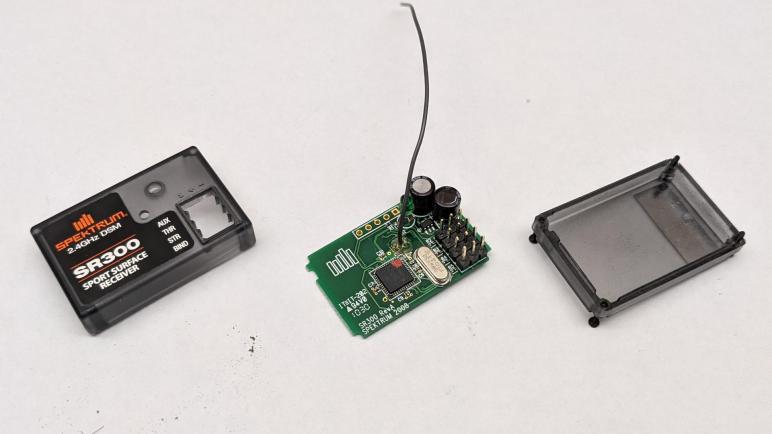
I didn’t want to cut off those wedges with with the receiver intact, because a slip of the blade might damage its circuit board. So I’ll take it apart, which gives me a chance to look inside as well, something I always enjoy. There were no elaborate security measures, merely four small Philips head screws. Once they were removed, the case comes apart easily. In my case, a few grams of dirt fell out as well. Results of my RC cars going off track due to pilot error.

Here is the top side of the receiver. Marked with the year 2008, it reminded me how long it’s been since I played in this hobby. Looking over the components, I was not surprised by capacitors to buffer power input and the oscillator to maintain accurate frequency. There is a large IC clearly in charge of the operation, but it is unmarked. We do see an array of five pins marked J1 that looks like a debug header, but I’m not terribly interested in poking into this chip right now. The output signals pins were a surprise. I had expected some sort of a transistor array to let the main IC toggle signals on and off at the same output voltage as the input voltage. However, all I see are little resistors (R2 – R5) implying they are merely there to limit current draw on IC output pins. This is worth following up.

The back side of the circuit board confirms power and ground pins are connected in parallel across all output pins, with the four signal pins separate as expected. I see a lot of surface imperfection here. It looks like corrosion which might be reaction to the dirt that has been trapped in here. It may also be something from the factory, possibly excess soldering flux that was not cleaned up. I also see a sticker marked ST104M but I have no idea what that represents. Maybe a firmware revision number?

The circuit board was interesting, but for today they were merely a side show. I just wanted it out of the way as I cut into the enclosure. With the PCB removed I could confidently wield my blade, and the little wedges were quickly removed.

The receiver reassembled easily, and a quick test confirmed I could now plug in and use generic micro servos (or other devices) without interference from those now-gone little wedges.

Micro Sawppy Rover And Spektrum DX3E Radio Controller

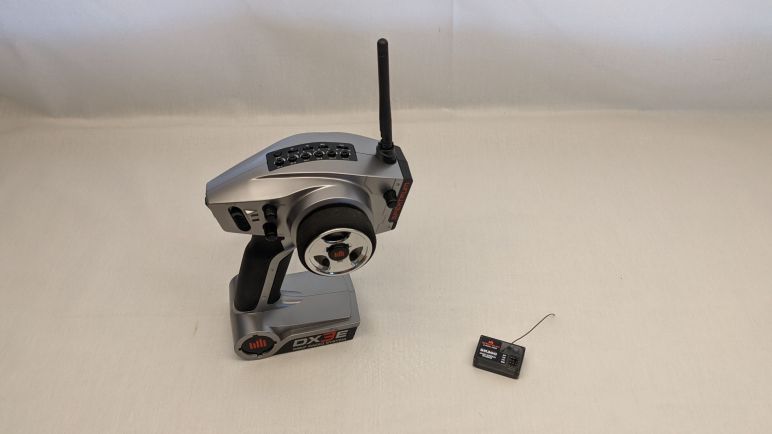
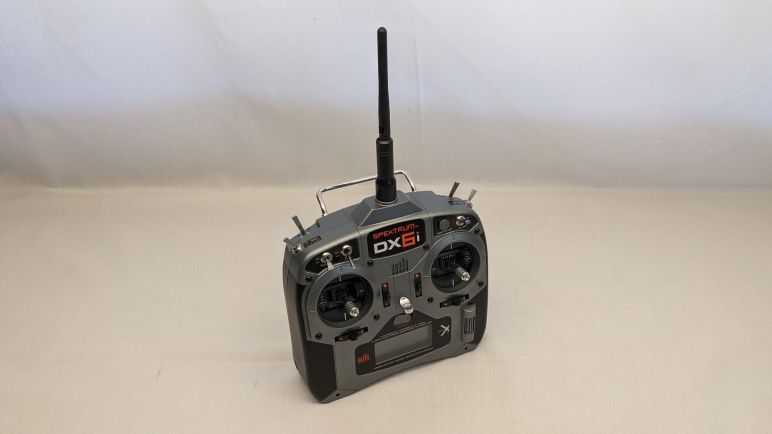
I wanted to add an option to control a Micro Sawppy Rover using classic radio control equipment, but I didn’t have a matching receiver for my Spektrum DX6i transmitter. I have a Spektrum DX3E transmitter with a corresponding SR300 receiver, so I tried that next.

I tried to bind the SR300 receiver to my DX6i transmitter, but they didn’t want to work together. The DX6i is an aircraft transmitter, the DX6E is a ground vehicle transmitter, so its corresponding SR300 receiver only talks to Spektrum ground transmitters. In an older generation of controllers, the two worlds were on entirely different frequency bands. In the USA, 72 MHz is reserved for aircraft and 75 MHz is reserved for surface vehicles. The newer generation of technology in DX6i and DX3E work on the 2.4GHz band so I had hoped they can interoperate, but apparently not.

I’ve found references to how ground radio didn’t have to accommodate as many simultaneous users, because they tend to be in a small area. Plus they also need to be very responsive, since vehicles in a competitive environment are running at high speeds while only a few centimeters from barriers and each other. In contrast aircraft don’t usually fly in as tight of a formation, but they need to accommodate more simultaneous users because they operate in larger arenas. Compounded by the fact an aircraft “hears” a much larger area when it’s up in the air versus a vehicle on the ground. I don’t know how such tradeoffs manifest itself in the actual radio transmission protocol. It doesn’t really matter if there’s a technical reason anyway, because it’s apparent Spektrum has segmented the two markets.

I wanted to use the DX6i because it had more channels of control, but the DX3E will suffice for Micro Sawppy because two channels (one for steering, and one for speed) is all I needed to start.

Micro Sawppy Rover And Spektrum DX6i Radio Controller

There are a few missing features I I want in my Micro Sawppy Rover control board, but I’m going to leave them as to-do list items for a future revision. For now I will continue working with the version I have and solve more pressing problems. The top of the list: free this little rover from the constraints of a wired joystick.

There are many wireless control ideas on the table. I plan to adapt a version of the WiFi-based control scheme as I used for SGVHAk rover and Sawppy V1, simplified so it runs on an ESP32 instead of a Raspberry Pi. I am also interested in enabling Bluetooth control, with a main focus on BBC micro:bit and a secondary focus on Bluetooth-enabled Xbox controllers. And that’s not all! I want to add compatibility with classic radio control equipment, since that was a feature added by multiple Sawppy builders starting with Marco Walther (mw46d). I have some experience with WiFi and Bluetooth, so RC receiver is the novelty I wanted to try first.

When I met Marco and his Sawppy rover, I saw he controlled his rover using a large radio transmitter typical of remote control aircraft. In the past I had a few remote control aircraft with similar transmitters, and I also had several pistol-grip style transmitters for remote control cars. When I quit that hobby and gave away most of my equipment, that included old-school FM transmitters on the 72MHz (aircraft) and 75MHz (surface) bands. I kept only the latest hot technology of the time: Spektrum spread spectrum radios on the 2.4GHz band, one ground and one air.

My Spektrum RC aircraft controller was the DX6i which I bought as a transmitter-only unit without the usual bundled receiver and servo. At the time I only flew lightweight “Bind-N-Fly” aircraft that have their own integrated receiver tailored to the airframe for minimal weight. I thought if I ever needed a receiver I could buy one, which is still true but I didn’t want to spend that money unless I need to.

The first venue of investigation is whether someone has tackled teaching an ESP32 to speak Spektrum DSM2 or DSMX protocols directly, eliminating the need for a separate receiver module. They are all on the 2.4GHz band so the radio antenna and associated hardware might be compatible. But if anyone has done so, I failed to find their project. What I did find are multiple projects that used a Spektrum receiver module to handle RF duties and retrieving data over a serial link. Spektrum published an official reference document for this type of project, titled Specification for Spektrum Remote Receiver Interfacing: Enabling Use of Spektrum Remotes in Third-Party Products.

This might be an interesting project to tackle, but again I didn’t want to spend money right now to buy a compatible Spektrum remote receiver. Fortunately, I have another Spektrum transmitter, the DX3E, with a corresponding receiver.