Once we were confident our SGVHAK rover chassis control code looked pretty good, we were willing to trust that it could drive a rover without sending conflicting commands that make our rover try to twist itself into a pretzel. Now our focus turns to creating an interface for user control input.
A quick rough draft had been in place to help test rover chassis Ackermann math, letting a rover driver send a steering angle and travel speed to rover’s control code. But it was very tied to the current rover implementation: angle range was limited to angle range of what we have today, and speed was specified in raw quadrature pulses per second (QPPS) that we send straight down to RoboClaw motion controller‘s API.
Since we have ambitions for future rover variants, this direct dependency is not good. Future rovers may have a wider (or narrower) range of valid steering angles. They may also use something other than RoboClaw motor controllers. The answer is a typical software solution: abstraction!
This required changing the interface between our HTML UI front-end and the Flask-based Python code running on the rover. Instead of a fixed number angle or a fixed number of encoder pulses, user now send driving commands in terms of two percentages ranging from negative 100% to positive 100%.
For steering, -100% tells a rover to steer as far left as it could go, 0% is straight forward/back travel, and 100% is to steer as far right as it could go.
For velocity, -100% is travelling backwards as fast as it could, 0% is stop, and 100% is damn the torpedoes, full speed ahead.
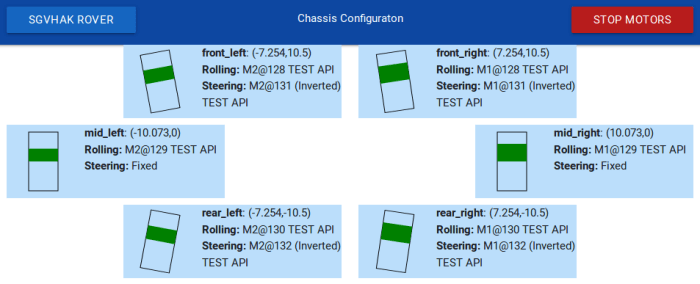
Now when we adapt the code for future rover variants, we could focus on rover-side configuration and remain confident user-side HTML interface will automatically adapt to whatever capabilities are present on a particular rover variant.
This also allows us to experiment with user-side HTML without worrying about having to make matching changes in rover-side Python code. We can try different control schemes, as long as it ends up sending a velocity and steering angle percentage to the rover.
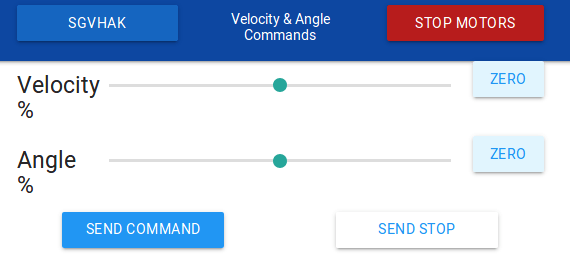
The first and crudest implementation of this concept is shown here: two HTML slider objects that move from -100% to 100%. The user can move the slider and tap “Send command” to rover. As the most basic HTML implementation possible, this is a useful test tool to isolate whether a particular control problem is in HTML front-end or in Python back-end, but it is obviously not a great driving interface.
That’s coming up next.
 To remove this dependency, we introduced a RoboClaw

 The first few experiments with
  This is especially problematic when the desire is to launch the app on power-up of the Raspberry Pi 3 that will run the server side. “Run on startup” is one of those tasks that have many different approaches across different flavors of Linux. Each with their advantages and disadvantages, benefits and gotchas.
 Twitter trends are easy to follow by searching for the hashtag. The default view given by Twitter shows the most popular tweets with that tag, and there are options to see the most recent tweets first, or browse them by photo, etc. But what if someone wants the tweets organized another way? Fortunately Twitter knows they can’t cover everybody’s desires and offers a developer API for those with creative ideas on tweets.


 The prime motivation for me to go through Qt licensing documentation and installing Qt Creator IDE was to explore the new UI infrastructure introduced in Qt 5 under the umbrella of “
 The solution: a timer. In a Windows application, the programmer can use the operating system timer and do their “after waiting a bit” tasks in response to the
  New Screwdriver