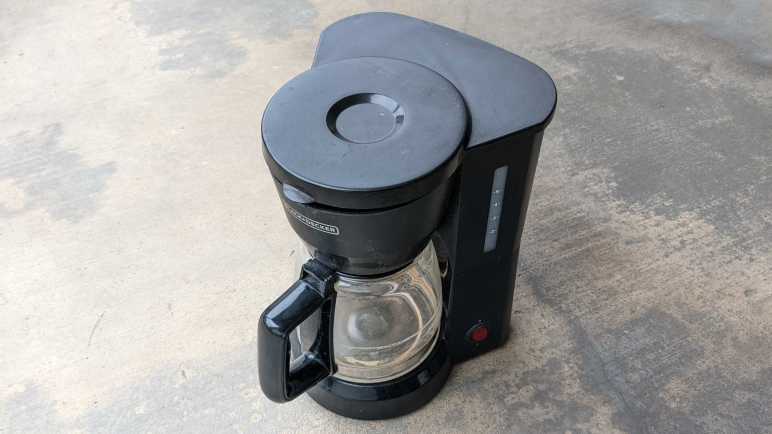
Black and Decker 5-Cup Coffee Maker

A coffee machine for the home kitchen can get very fancy, but not this one. This was the lowest-end, simplest, least expensive model DCM600B available at the store that day many years ago. I’m curious how simple a coffee maker can be inside. As the entry-level product, every expense would have been spared, and I hope to see some engineering creativity to reach that cost-optimized goal.

From the top, there is only one visible fastener. A Philips-head screw in the water reservoir.

With it removed, we can see majority of the path for boiling hot water.

  1. Hot water is pumped up through this pipe.
  2. Which then makes it through this bend in the lid.
  3. Exits here to dribble onto coffee grounds.
  4. Held inside a coffee filter sitting in this cup. Water filters through the coffee grounds, through the filter, out through the hole in the center of this cup.
  5. Which drips into the carafe.

Bottom view with model number DCM600B visible. The power cord was cut some time ago. I no longer remember the reason why, but it is quite apparent past me wanted to ensure there would be no further use.

Two fasteners are visible from the bottom. The first surprise was that nonstandard fasteners were used, I had expected generic screws in the interest of cost.

My screwdriver bit that matched this screw was labeled CR-V 6.

The second surprise was that no screws were hidden under rubber feet. Once the two visible nonstandard screws were removed, the bottom cover flipped open. There were some grates in that bottom cover to release any liquid that might enter this enclosure. There was also a dam that protected electric wire from such liquid.

Judging by residue and this corroded screw, that seepage draining provision came in handy.

I would not have been surprised if the power switch merely wired power directly to a heating element. The machine is actually slightly more sophisticated than that, but not by much.

Removing a few things allowed some untangling of the wire. One end of the power cable is connected to a black wire, presumably ground, connected to one end of the horseshoe-shaped heating element. The other end is connected to a red wire that led to the power switch, which connects it to a blue wire connected to the other end of the heating element via three components. I don’t know what these components are, but the first of these three in series is clamped to the heating tube. Functionally, I infer they sense temperature and would open the circuit when things get too hot, and close the circuit once things cooled down. Such a circuit would implement the “keep coffee warm” feature.

The item clamped to the heating tube is presumably a temperature sensor. It has the following markings:

1504
T3/33
125V10A
150

There is very low resistance across the two terminals at room temperature. I heated it up with the most convenient heat source, which was my heat shrink tube hot air gun. The measured resistance did not appreciably rise as I heated it up, nor did it go open circuit. But I doubt this hot air gun pushed the device to water boiling temperature, so the results are inconclusive. I don’t have the equipment to test electronics behavior at different temperatures, the only thermometers I have are for measuring human fevers and for kitchen baking.

While brewing coffee, water from the reservoir would keep the heating element from getting too hot. Hot water would boil and expand. How did the machine ensure that such water would be sent through coffee grounds instead of back to the reservoir? This cheap and simple ball check valve is the answer. It would not have been a perfect seal, allowing some water back into the reservoir, but it’s good enough for the job.

Disassembled components from the bottom.

I admire the simplistic efficiency of this machine’s design. Here’s a final example: this machine has capacity for five cups of water. How do we prevent the user from overfilling? I would have guessed float sensors and maybe an overflow valve. The design team didn’t need any of that complexity, they cut two holes in the water reservoir to drain excess water out to the kitchen countertop. Problem solved!
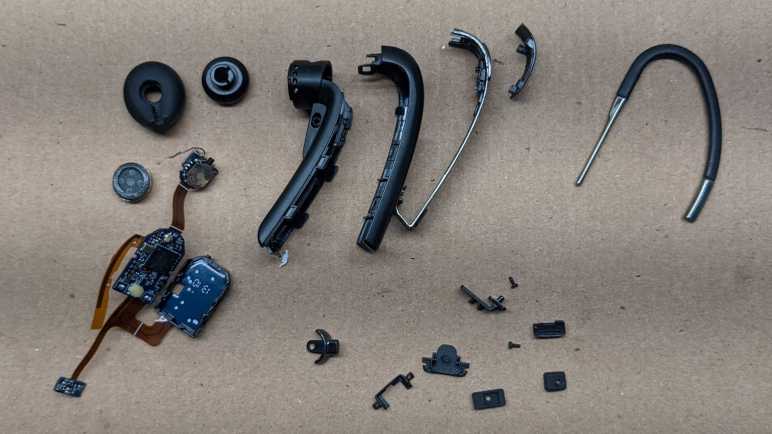
BlueAnt Q3 Bluetooth Headset

I’m making slow progress learning to work with surface mount electronics, but I still have a long way to go. This retired BlueAnt Q3 Bluetooth headset is a marvel of miniaturization and a reminder of how far behind the state of the art I am. Even more when considering that, judging by this product review I found online, this device is getting close to ten years old! Since that time BlueAnt seems to have stopped making this product category, with nothing similar currently listed on their page.

This particular unit came to me already disassembled by someone else, but I think its battery was the only notable item missing. The mechanical design is very impressively intricate, integrating several controls that had to be big enough for a human figure to manipulate. But it’s the electronics that really shine.

  1. This is a micro-USB port for charging. It also gives a scale perspective on how tiny everything is.
  2. Speaker
  3. Push button
  4. Dual LED module with a white LED and red LED sharing a single package. I would have expected such a thing to share either a common anode or a common cathode but that’s not the case here. This little yellow rectangle has four pads. One anode and one cathode for each of the two LEDs.
  5. MIC1 and MIC2 are the two microphones used for noise cancellation and other nifty features.
  6. Three-position toggle switch. It is the same size as the power switch used on Mr. Robot Badge. What’s tiny on that circuit board takes a significant percentage of real estate on this one.
  7. I think this curved piece might be an antenna?

Between 6 and 7 we see several unpopulated pads. I don’t know if there are different lines to the BlueAnt Q3 for additional features, or if they represented features that they’ve cut from the product.

Flipping over, we see the following:

  1. IC that runs the show.
  2. Debug headers.
  3. BT1 and BT2 are good candidates for battery terminals. I’m a bit annoyed they didn’t mark them BT+ and BT-. If I were trying to repair this device, I risk reversing battery polarity and damaging the device.
  4. This is a really cool control I hadn’t seen before. The nub sticking out to the right is a switch that can be moved above or below the center position, and a spring-loaded mechanism pulls it back to center once released. In addition to that, the cream-colored center circle might be a push button. It certainly gives the tactile “click” appropriate for a button when pushed. Together they are a completely self-contained unit for up/down/select menu control. I would love to play with it some more, except for the fact that it is tiny. That center circle is only 2mm in diameter, and this device has at least 13 little soldering points holding it on the circuit board. With my current skill level, I would destroy the device trying to remove it from the board. But since this is tiny, I can keep the board and try later once I have better tools. Perhaps a hot plate can simultaneously melt all the solder without damaging the plastic?

Made by Design Ultrasonic Oil Diffuser (120mL)

I’ve seen these oil diffusers from more and more vendors recently, evolving from a novelty item to a mass-produced commodity. Cheap enough that someone may buy one, try it for a while, and decided against it sometime after the store return period. Which was the case for this unit, which was given to me not because I wanted a diffuser (I didn’t) but for me to take apart.

This particular unit has the Target logo and “Made by Design” stamped on the bottom. I recently read an entertaining article about Costco’s “Kirkland Signature” brand, and motivated by that knowledge I went and researched Target’s (much longer) list of brands. Indeed, “Made By Design” was one of them. Not that it matters too much right now (unless I want to buy another) the fact it is available from a house brand just confirms the commodity status of such products.

I put a bit of water in the device, plugged it in, and turned it on without the lid. The water started bubbling (making a mess of my workbench) and some of it dispersed into fine fog.

It’s much neater with the lid on, where only the mist exited a dedicated vent in a soft breeze.

We can see all major airflow elements in this picture.

  1. The circular fan intakes air from the bottom….
  2. That air exits a rectangular chimney in the side of the base. This air circulates around the space between the base and the lid until…
  3. Air enters the fogging area, picking up some aerosolized liquids, then…
  4. Exits out to the room.

Each of the three foam feet hid a Philips-head screw.

Once removed, the base came apart easily exposing its main circuit board. Eight LED modules are visible, as is an IC that appears to run this particular show.

The power socket slid from its position easily, far easier than a recent power socket recovery.

The button board was also easily removed, sliding out from its slot without any fasteners or glue in the way.

Only two buttons are present on this device, with provision for a third. And we can see how the control board can read up to three buttons with just two wires. When pressed, each of these buttons bridge a resistor, so the control board can read the resistance and decipher which button (or combination of buttons) are pressed.

Two more screws allowed me to remove the control board, and I was pleasantly surprised by what I saw: every peripheral is connected to the control board by a JST-XH (or compatible) polarized connector. But even more than that, each peripheral has a color-coded connector. Wow! I did not expect to see that. Color coding makes sense to ease assembly and visual inspection, but stocking separate color connectors usually add cost that manufacturers skimp on.

IR1 appears to be an unused provision for infrared remote control. The heat sink is screwed onto what appears to be a power MOSFET, but the screw is inaccessible while the MOSFET is soldered in place on the board. Unsoldering the MOSFET would be a challenge, because it would be dissipating heat out of that heat sink we could not remove while MOSFET is soldered in place. A curious circular puzzle making it difficult to disassemble, I wonder how it was assembled.

In the bottom corner we see a name “asiamist” and a URL “www.fogger.cn” leading to a company that manufacturers such devices for many different house brands.

The single generic fan serves double duty: a cooling fan for that big heat sink and moving air to disperse the fog. It isn’t driven very quickly, which helps keep the noise down and probably also helps extends its service lifespan.

Finally, the star of the attraction. I know nothing of how ultrasonic devices work and I look forward to taking this apart. I might see interesting and fascinating mechanisms of mystery, or I might find something that physically looks unremarkable and give no sign to how it works.

And it is… option B. The heart of the machine is a little metal disc with the following markings

AM1911
2.45M

and otherwise completely unremarkable. If I didn’t already know it was an ultrasonic transducer I would not have guessed its purpose. I was a little disappointed, but its simplicity also implies I didn’t break anything taking it apart. Would it work if I plug everything back in again?

Yes it does! I stopped this experiment very quickly because splattering water and electronics do not make for a happy mix.

Now I have a problem: I can’t think of a reason why I’d want a fogger, but it is still working and I’d hate to just destroy it. But I also didn’t want to store the device intact as it is bulky and consumes a lot of space. As a tradeoff, I’ll cut out and keep just the “business end” of the diffuser with my new toy the Wondercutter S. It was pretty slow going through the plastic, but much neater than if I had used a Dremel and much safer than manual cutting with an X-Acto knife.

Now the heart of the machine can be stored away in a fraction of the space consumed by the full device, leaving the option to reuse this in a future project.

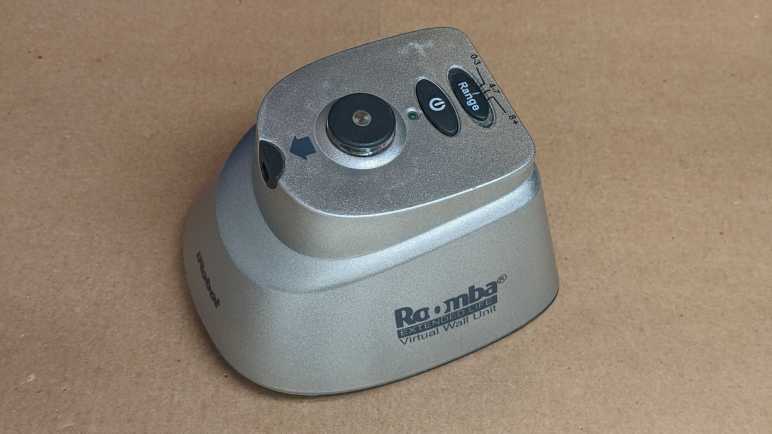
iRobot Roomba Virtual Wall

An old Roomba retired due to worn batteries had an accompanying virtual wall unit for the user to limit its range of motion. Today I take it apart to see what’s inside. I understand it is functionally similar to an infrared remote control, so I expected to find not much beyond a circuit board with an infrared emitter. There are two user controls: an on/off power switch and a sliding switch to select from one of three distance ranges. The push on/off power switch felt like it had two detents, like how a camera shutter button has an initial detent for focus before pushing all the way to take a picture. This particular virtual wall unit also has something rattling around inside and I’m curious to find out the cause.

Looking at the diagram at the base of the unit, I noticed the zone is drawn as a narrow cone plus a small circular area. This implies two emitters: one directional and one not. Examining the unit we can see where they would be: the directional beam would come out of the small gray “nose” and the omnidirectional beam is cast from the circular protrusion up top.

These beams are invisible to the human eye, but my cell phone camera could pick up a glow from the directional emitter. This glow is stronger when we increase the range of the device via slider up top. My camera didn’t pick up anything from the omnidirectional cylinder. The faint green glow visible in this picture is from the human-visible green LED that indicates the unit is turned on.

Most of the volume and heft came from the pair of D-cell alkaline batteries that are all but extinct in modern electronics.

Fasteners are hidden under each of the four rubber feet.

Here’s the mystery of rattling noise: plastic spacers around two of the screws have broken loose. (Intact at left, broken at right.) At a guess, they broke from the impact of this unit getting dropped on the floor sometime in its life.

At least two circuit boards are visible inside, held by screws.

The most unusual component visible here is a chip hidden under a black blob mounted on a small white circuit board, which is then connected to the large board at a right angle. It is accompanied by several through-hole components.

Flipping it over, we can see the narrow circuit board is just a carrier for the sliding switch that controls the LED power and thus range of the virtual wall. The large board has a series of unremarkable surface mount components. The green power LED and directional infrared LED are mounted directly to this board, and the omnidirectional LED assembly is attached with a pair of wires. We can also see here the ten-conductor connection point for that odd-looking vertical white board with the chip under a blob.

Here’s an explanation for why the power switch felt like it had two detents: it pushes on two separate switches each with their rubber dome. So we felt one, then the other, rubber domes make contact. Looking at the trace, these switches (Labeled SW1 and SW2) are wired in parallel. It seems like a lot of work just for the sake of redundancy, but I can’t think of another reason why it might be designed this way.

The omnidirectional LED seems to be held down by hot glue.

I was skeptical when I was told that isopropyl alcohol helps release hot glue, but I have to admit it seemed to have worked well here. But when the glue was removed, I saw the LED is also held in place by a circular piece of plastic that has been welded/glued in place. Why did they feel the hot glue was necessary? If I wanted to replace the LED, I would have to break this piece of plastic, so I’ll hold off for now. I’m going to save this little omnidirectional LED assembly. I might find a use in the future, and that use might be infrared!

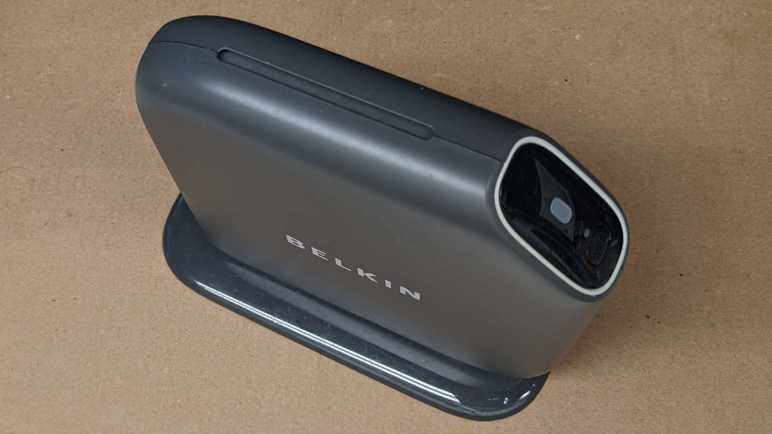
Belkin Play N600 Wireless Router

When wireless routers became commodity electronics, industrial design became a differentiation factor. They used to all be uniformly boxes with antennae sticking out of them, but now they come in many shapes and sizes. There’s definitely a market catering to people who don’t like the look of antennae sticking out. This retired Belkin router was from a line of similar designs, with its antennae completely enclosed inside a slickly designed exterior.

My favorite part of this design is a subtle passive cooling system that did not call attention to itself. Between the main body and the foot is a small gap, and here’s where cooling air can be pulled in from the bottom of the unit.

Normal convection forces would send warm air up to the top of the case, where it exits this slot acting as exhaust. I love it.

Only two fasteners are accessible, one hidden under the bottom label.

Removing those two screws allowed the foot to be removed. The cooling intakes are now clearly visible.

Those two screws also help hold the enclosure together. Of course, there are plenty of plastic clips all around as well.

With the first side panel removed, we can see the main circuit board held between the central plastic frame and the other side panel.

Four more screws and many clips later, all major components have been separated.

The circuit board is not very tightly packed. Metal pieces to the top and the left are its WiFi antennae, set at ninety degrees to each other for mutually complementary reception. I’m sure their shape is an intentional design with tradeoffs versus the traditional stick, but I don’t know enough RF voodoo magic to begin to guess at what’s going on. Speaking of RF voodoo magic… I see no metal RF shields covering any part of this circuit board. I see provisions for them on this board in the form of silvery solder square outlines above and below the chip marked Broadcom, but unused.

Here we see more unused provisions. This router has a single USB port and a single rear status LED. On the circuit board we can see provisions for a second LED, just above the text labeled LED6. Plus provision for a second USB port, with unused pins labeled 5, 6, 7, and 8. Adding a second USB port would require unsoldering this USB connector and replace it with a double-deck equivalent. The LED housing is already all set up for a second LED.

J12 here is weird, it seems to be a 2-pin header being used as an antenna wire guide. If the pins were straight, I would say this was just a hilarious coincidence with the wire getting caught between pins, but the pins have been bent inward at the factory, what other purpose might that serve but to keep the wire in place?

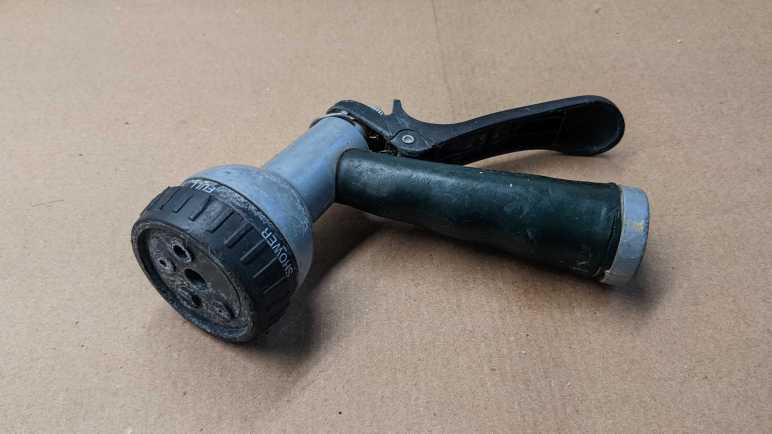
Melnor Garden Hose Watering Nozzle

As a change of pace from electronics teardowns: I’m taking apart something with no electronics at all: my very old garden hose watering nozzle. It’s been leaking for years, which is why I’ve had to turn the faucet off when this is unused. Otherwise, it wastes water dropping out from the front and the back. But recently it started failing in a new way: there is now a horizontal curtain of water when I pull its lever, spraying water everywhere from just behind the spray pattern adjustment knob. It is finally time for this guy to go, but not before I take a look inside.

A single Philps-head self-tapping plastic screw held the spray pattern selector knob in place.

With the selector knob removed, its seal and detent mechanism falls out easily. The white spring-loaded mechanism pushes into dimples in the selection dial for that satisfying “click” when we are lined up for a spray pattern. The rubber seal has lost its flexibility and became rigid with age. It could no longer seal against water pressure, causing this nozzle’s retirement.

Two more screws were visible and promptly removed, but this plastic piece did not release easily. I broke a bit of the lip (visible in upper-right area of the rim) trying to pull it out. No other fasteners or retention mechanism were visible.

If I could not pull it, perhaps I could push it? I started working on the back end. Unthreading the adjustment nut all the way allowed its removal.

Pushing on the thread, the front face popped free along with the piston assembly. A coat of rust clearly designated regions that had years of water exposure.

Inside the handle body.

Inside the front face.

Intact piston assembly.

I could only partially disassemble the piston assembly. In use the rear seal and its washer moves against the piston shaft and thus could be slid off the end. The spring followed easily.

However, the front seal and the X-shaped plastic guide keeping it centered in the cylinder never had to move and now it is held in place by rust. The plastic guide showing signs of abuse of my removal attempt. Even if replacement seals were available, I would not have been able to replace this particular wear item.

The lever hinge pin is riveted in place, requiring a drill to free it.

And finally, the soft handle surround was cut free of the metal core with a box-cutter knife. Doing this reminded me of that scene in Terminator 2 where the T-800 cut off living tissue covering its arm to expose the metal endoskeleton.

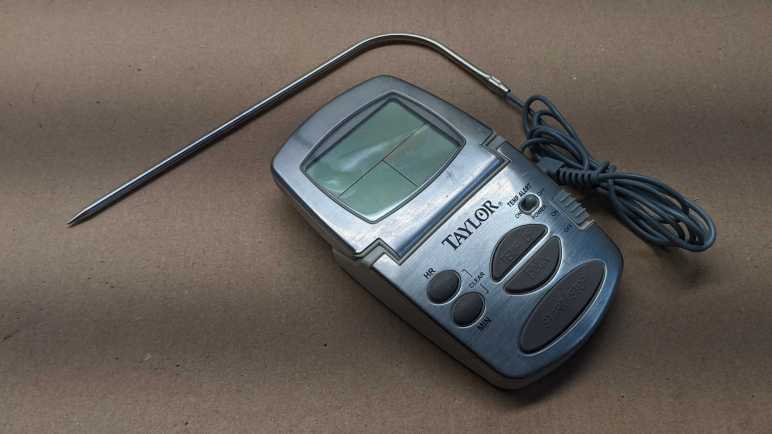
Taylor Food Thermometer

This Taylor food thermometer display went blank and stayed blank even when given fresh batteries, so it’s getting the teardown treatment before disposal. It appears to be a design that the company has made for many years with slight variations, here is a close cousin I found on Amazon. (*) I’ve found no mentions of repair instructions or replacement parts, this is a disposable device.

The first thing I wanted to check is construction of the temperature probe. There were two possibilities:

  1. The temperature probe is mostly metal, and the sensor is near where the wire is attached. This would be dependent on a metal with high heat conductivity to carry heat from the tip of the probe to the sensor at its base.
  2. The temperature probe is mostly hollow tube, and wires run the entire length of the probe to a sensor at the tip.

I started opening it up and got this far before slicing myself open on a sharp metal edge.

With a ritual blood sacrifice to the teardown gods, I decided to stop here. It is far enough for me to conclude that possibility #2 is correct and the probe is mostly hollow tube with the sensor at the tip.

Next I started prying against the shiny top surface of the device and found it was merely a cosmetic facade held on with glue and not hiding any fasteners underneath.

Four fasteners were visible behind the display so I started work there.

There is a piezo sound element embedded in the back, and a circuit board inside. Under that black blob is likely a chip that runs the whole show. What struck me are the areas to the left of the blob: there are a few round test points, but many more rectangular pads for components that aren’t there. Are they for calibration? Are they for adjustment? Are they to activate/deactivate features for other products in the lineup? Maybe a combination of all of them?

I see a single screw for the base. Removing that screw freed a small piece of plastic but did not free the entire base. However, it did let me see inside the base and distinct signs of additional fasteners.

Aha, I forgot to check for fasteners hidden under squishy feet.

With those screws removed, we can see the base has no active components. It has the battery enclosure, socket for the temperature probe, and a circuit board for all the switches and buttons to operate the device. All the components appear to be in good shape, I see no obvious signs of damage that might explain why the device stopped working.

The display is a custom LCD unit held on with the squishy conductive stuff I’ve seen before in tearing down electronics but didn’t know anything about. This time I went online and found this electronics StackExchange thread. Which linked to this one. Formally “Elastomeric connector” and less formally “zebra strips” (though a search with those terms also need to have “electronic” in the keyword list or else we’d get stuff about zebra the animal.)

I don’t plan on keeping the circuit board or any of the components on board, but I’ll hang on to the LCD for the moment. If I get around to probing the LCD in the future I’ll need to fabricate my own circuit board to make contact with the zebra strip. I can take this picture showing the connector pitch, but sadly I’ve already lost horizontal alignment reference and that’ll be a problem I have to tackle later.


(*) Disclosure: As an Amazon Associate I earn from qualifying purchases.

Brother TZe Label Tape Cartridge Teardown (Don’t Put Secrets On Your Labels!)

While organizing my workshop, I labeled a lot of things with my label maker (Brother P-Touch PT-D400) and used up a cartridge. A common complaint with these TZe label tape cartridges is that they are really expensive. So now that I have an empty cartridge, I thought I would take it apart to see if I can see anything that justifies its expense. It turned out to be far more sophisticated than I had originally expected, but I still don’t know if I would call its cost “reasonable”. Plus I found an interesting security concern. Don’t use label makers for confidential information!

The only thing we can really see from the outside is a horizontal window designed to let us see how much tape is left. When full, there’s white visible behind the light blue area. That white spool’s diameter decreases as the tape is consumed, gradually running to what we see in this picture where very little white is visible behind the blue.

Looking around the perimeter, I see several little clips holding the lid to the body plus this white tag telling me what label tape is inside. I expect that I would have to cut this white tag along the seam, pop those little clips loose, and it should fall apart.

It did not.

Majority of holding force actually came from these posts that fit very tightly into their sockets, not the clips or the sticker. Dimension precision in injection-molded plastic is directly correlated to cost, so that’s where some of the money went: it’s pretty expensive to keep these posts and their corresponding sockets within the exact dimensions to fit and grip tightly.

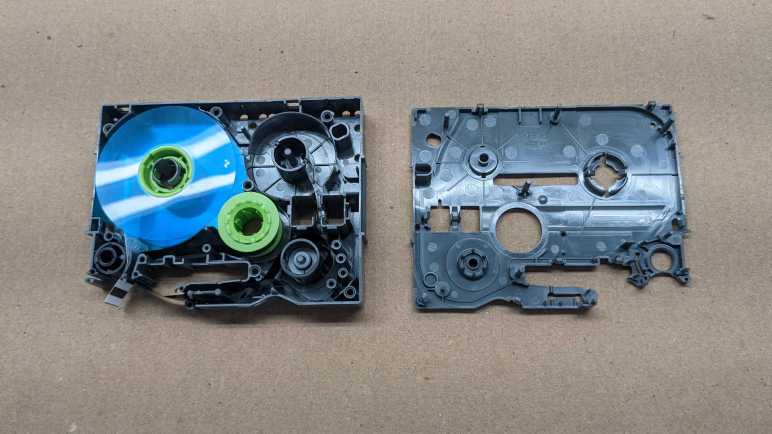
After I opened up the cartridge, I see I had drastically underestimated the complexity inside. There are actually four spools, a few rollers, and many guides to keep three tapes of materials flowing properly.

Here are all the components of the cartridge. Multiple spools, and a few springs to maintain tension. I had expected a single spool of tape that gets spit out, so this is far more complex than I had anticipated. There are actually three spools of material: The white adhesive backing, the black ink (with take-up reel), and the clear laminate layer.

Here is a closeup of the clear laminate spool and the white adhesive backing spool. The clear laminate spool has black stripes in this picture because that’s how the cartridge signals the end. There were ~20cm left of this zebra stripe, not that I can think of much I could do with it.

Here is the other side, showing the adhesive backing still usable on what’s left of the white reel. It looks like remaining white backing can still function as double-sided tape if I wanted to put it to work.

The black ink tape was a surprise. It is a pair: a dispenser reel for fresh material and a takeup reel for used ink. What’s super interesting here is that the takeup reel has a clearly legible negative image of everything that has been printed. Unspooling the takeup reel a bit, we can clearly see that my most recent label was for a batch DC buck converters showing their adjustable voltage range and maximum of 5 amps capacity.

A valuable lesson from this teardown: avoid confidential information when using a label maker, because a motivated dumpster-diver can read that information off your discarded empty label tape cartridges.

Roku Premiere (4620X “Cooper”) Power Socket

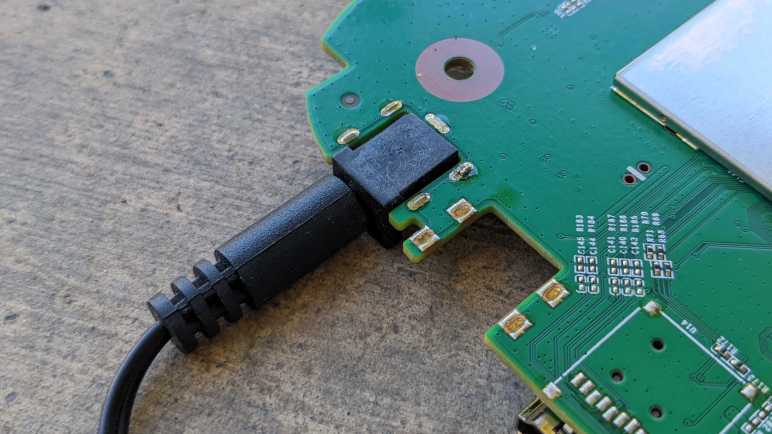
When I tear down some retired electronic device, I try to salvage what I know I could reuse and that usually includes the power supply. A few of these salvaged power supplies have already found use, but sometimes I’m hindered by the fact I saved only the power supply and not its corresponding power socket. Sometimes I can replace the connector, but sometimes not. As a result, I’ve resolved to put more effort into saving the matching socket as well.

Which brings me to this Roku Premiere 4620X (“Cooper”) that was given to me for teardown after it was retired. I tried to unsolder its power socket, but I quickly realized I was in trouble. When I put my soldering iron tip on the soldered point and… absolutely nothing happened. Looking at the circuit board I can see there’s a lot of copper tied to ground, which four of five pins on this power socket is attached to. That’s a lot of heat dissipation capacity fighting against my iron’s efforts to melt solder.

I think a hot air rework station might be able to help here, but I don’t have one and my lack of skill means there is a high risk of softening the black plastic as I blast hot air. If I distort the plastic to a point where the power plug could no longer fit, that would defeat the purpose. This concern also definitely ruled out my paint-stripping hot air gun.

I think the best tool for this job is a hot plate designed for installing surface-mount electronics components. Their hot metal surface area could in theory do this work at a lower temperature than blowing hot air. I wouldn’t necessarily need a big one, either. A tiny little one would be enough to do this job.

But I don’t have any of those tools, so I fell back to plan of last resort I call “mechanical separation”. That is my fancy way of saying I whipped out a saw and cut the circuit board around the socket.

Sometime in the future, when I decide I want to reuse this power supply and its matching power socket, I hope to have better tools for the job of separating the socket from its (now much reduced) circuit board.

Roku Premiere (4620X “Cooper”) Infrared Receiver

Looking over the circuit board of a Roku Premiere 4620X (“Cooper”) I saw a lot of things that might be fun to play with but require more skill than I have at the moment. But that’s fine, every electronics hobbyist has to start somewhere, so I’m going to start small with the infrared remote control subsystem.

Consumer infrared (IR) is not standardized, and signals may be sent on several different wavelengths. Since I want to play with the Roku RC108 remote control unit, I needed to remove the infrared receiver of its corresponding Premiere 4620X in order to guarantee I have a matching set. This is a small surface-mount device protected by a small metal shield that I could fold out of the way.

Once the shield was out of the way, I could turn on the Roku and probe its pins with my voltmeter to determine the power supply pin (constant 3.3V) the ground pin, and the signal pin (mostly 3.3V but would drop as I sent signals with the remote.) I then removed this receiver with my soldering iron and connect this tiny part to a set of 0.1″ spacing headers so I could play with it on a breadboard.

In this picture, from top to bottom the pins are:

  • Ground
  • (Not connected)
  • Power 3.3V
  • (Not connected)
  • Active-low signal

I installed it on a breadboard with an ESP32, flashed with ESPHome which is my current favorite way to explore things. In this case, ESPHome has a Remote Receiver component that has decoders for many popular infrared protocols. What if we don’t know which decoder to use? That’s fine, we can set the dump parameter to all which will try every decoder all at once. For this experiment I chose an ESP32 because the of its dedicated remote control (RMT) peripheral for accurate timing while decoding signals. After I get something up and running, I might see if it works on an ESP8266 without the RMT peripheral.

With dump parameter set to all listening to a Roku RC108, I got hits from the JVC, LG, and NEC decoders. And occasionally I would get a RAW message when none of them could understand the signal. If I hold the [up] button, I get one instance of:

[18:55:50][D][remote.jvc:049]: Received JVC: data=0x5743
[18:55:50][D][remote.lg:054]: Received LG: data=0x57439867, nbits=32
[18:55:50][D][remote.nec:070]: Received NEC: address=0xC2EA, command=0xE619

But just the first one. All following hits look like this, and they repeat for as long as I held down the [up] button.

[18:55:50][D][remote.jvc:049]: Received JVC: data=0x5743
[18:55:50][D][remote.lg:054]: Received LG: data=0x57439966, nbits=32
[18:55:50][D][remote.nec:070]: Received NEC: address=0xC2EA, command=0x6699

Then if I press the [down] button on the remote, the first interpreted signal became:

[18:55:52][D][remote.jvc:049]: Received JVC: data=0x5743
[18:55:52][D][remote.lg:054]: Received LG: data=0x5743CC33, nbits=32
[18:55:52][D][remote.nec:070]: Received NEC: address=0xC2EA, command=0xCC33

Then it would repeat the following for as long as [down] was held:

[18:55:53][D][remote.jvc:049]: Received JVC: data=0x5743
[18:55:53][D][remote.lg:054]: Received LG: data=0x5743CD32, nbits=32
[18:55:53][D][remote.nec:070]: Received NEC: address=0xC2EA, command=0x4CB3

Looking at this, it looks like JVC is overeager and doesn’t actually understand the protocol as it failed to differentiate up from down. That leaves LG and NEC decoders. To find out which is closer to the Roku protocol, I started tightening the tolerance parameter from its default of 25%. When I have it tightened to 10%, only the NEC decoder returned results. Even better, each button returns a repeatable and consistent number that is different from all of the others. Even if Roku isn’t actually using a NEC protocol, using the NEC decoder is good enough to understand all its buttons. I used the NEC decoder to generate this lookup table.

Roku Remote ButtonDecoded Command
Back0x19E6
Home0x7C83
Up0x6699
Left0x619E
OK0x55AA
Right0x52AD
Down0x4CB3
Instant Replay0x07F8
Options0x1EE1
Rewind0x4BB4
Pause0x33CC
Fast Forward0x2AD5
Netflix0x34CB
Sling0x58A7
Hulu0x32CD
Vudu0x7788

I think I got lucky this time with the NEC decoder. I had another infrared remote control in my pile of electronics (JVC RM-RK52) and none of the ESPHome decoders could decipher it, just RAW data all the time. Alternatively, it’s possible that remote is on a different infrared wavelength and thus this particular receiver is only picking up fringe gibberish. I’ll put the JVC remote back in the pile until I am in the mood to dig deeper, because right now I want to quickly play with this salvaged infrared system.

Roku Premiere (4620X “Cooper”) Circuit Board

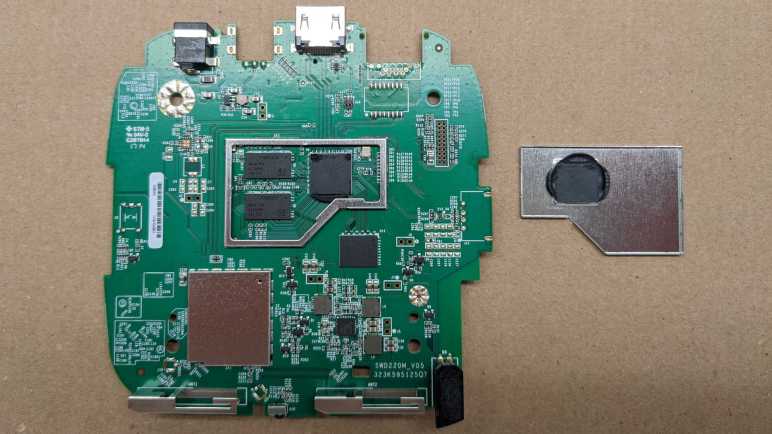
After examining the enclosure of a Roku Premiere model 4620X (“Cooper”) that I took apart, attention turns to the solitary circuit board inside the device. A piece of cast aluminum under its top lid has all the appearance of a heat sink, so the first thing I did was to pop off the thin metal shield to confirm – yep, there’s a microprocessor under there. With a bit of black thermal compound to bridge the small gap between it and the metal shield.

The other metal shield is directly soldered to the board and I couldn’t remove it (nicely) to see what’s inside. So I flipped the board over instead. I see a shield whose shape mirrored the top shield and covers nearly (if not exactly) the same area.

In comparison to its topside counterpart, it has an extra twist in the form of extra metal bridging the center in a “T” pattern. Or maybe a circle with three legs? This must be intentional, but I couldn’t figure out why.

And just for fun, here is the board side-by-side with a Raspberry Pi 4, which has broadly similar specifications of an ARM-powered 4K UHD capable networked device.

Using a cotton swab and some isopropyl alcohol, I cleaned off the thermal compound to read markings on the CPU.

I see two logos: a stylized “M” (MediaTek?) with ARM, and below them the following:

MS09380AMZ-R62-NA1
ATKR524B
1637B

Several connectors are visible around the board, not all of which are used. Starting from the upper left, we have the power connector.

There are five soldered points, but all four along the sides are electrically connected to ground. Only the bottom center point is different, picking up 12V from the AC adapter. Below it is a large round contact point (with a bit of solder) is one of two grounding points for the aluminum heat sink.

To the right is an unpopulated connector also with four surrounding ground points but with three unused electrical contacts. I’m not sure what this would be. My first thought was maybe an alternate video connector, but there aren’t enough pins to be any type of DisplayPort. Composite video or S-Video are too old-school for this 4K-capable video streaming box, so I ruled those out. It is too small to be a pair of RCA jacks for analog audio, so my best guess is a provision for TOSLINK audio.

Next is the HDMI connector, with several meticulously routed differential signal pairs visible.

The final connector on this edge is probably an 8P8C connector for wired Ethernet, with an adjacent unpopulated chip footprint that’s likely to relate to wired networking. Their absence means this particular Roku is WiFi-only.

On the left edge of the board is definitely a switch, electronic schematic symbol for switch and everything. Since there’s already a reset switch on board, this is probably used for a development/test/debug purpose.

On the right edge looks like provision for a USB type-A socket. It may be for similar dev/test/debug purposes, but Roku may have also contemplated the option of a USB port so it can play a slide show of pictures on a USB flash drive. This is a feature I see on many other media boxes.

The bottom of the edge has two antennae, and my RF skills aren’t enough to know what to do with them. A status LED is on the right edge, but I have plenty of LEDs and saw nothing particular special about this one. In between the antennae, though, is a receiver for the infrared remote. I’ve come across similar receivers before, and I always thought “that might be fun to play with” but never did… until now.

Roku Premiere (4620X “Cooper”) Enclosure

I’ve just disassembled a retired Roku Premiere model 4620X, also named “Cooper”. I had expected its enclosure to be just a plastic box, but it turned out to have a few points of interest. The most unexpected item was the Roku fabric tag sticking out the side.

It was clearly a piece of branding, and I thought it was pretty clever how Roku could do that by sandwiching a little piece of fabric into the seam of their enclosure. That would be super simple and inexpensive to manufacture. But then I realized… there’s no seam here! The fabric tag is actually coming out of a dedicated slot in the side of the case. This slot, which is perpendicular to the motion of their plastic injection mold, would have added cost to the process.

And since it’s not sandwiched in an existing seam, it’s not held in place by an existing fastener either. This is a separate piece (or multiple pieces?) of plastic dedicated to a Roku name tag, adding to parts cost and assembly complexity. I thought the Roku fabric tag was a cheap thing to throw in there, but no. This required a very deliberate decision in product design. A little web research found that this is actually a registered Roku trademark. I had originally dismissed it as unimportant, I guess this is why I’m not a hotshot product designer.

A metal plate stamped with “6000000235 A1 REV2” is at the bottom. A small cutout on one edge gives extra clearance for the reset button, and four plastic posts help support the main circuit board. The plate itself was fastened to the plastic enclosure by four blobs of melted plastic.

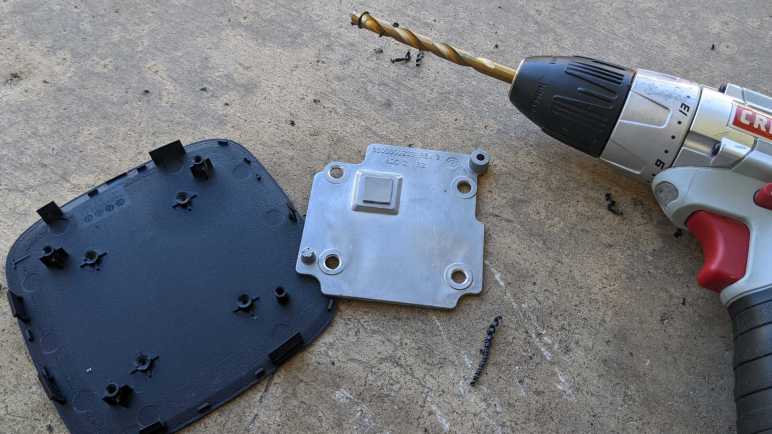
The four blobs of melted plastic were quickly dispatched with a drill, freeing the plate. There was nothing remarkable on the other side. It seemed to have been stamped out of sheet metal. It is not magnetic, so I am going to guess aluminum. At a weight of roughly 10 grams (about one third of an ounce) it is too light to serve as unnecessary weight designers sometimes add to products for the sake of a “premium feel” heft. It does add a bit of support to the structure, but the enclosure did not feel noticeably flimsier with its removal. Perhaps it adds strength along an axis I didn’t test? There is no mechanical contact with the circuit board, so it is not a heat sink. There are no electrical contacts with the circuit board, either, so it is not an antenna. But it might be an anti-antenna serving as RF shielding. Though RF shields usually have a connection to electrical ground on the circuit, which it lacks. What is the purpose of this metal plate? I’m stumped.

The top plate, in contrast, has an obvious purpose as heat sink for the processor. Its shape hints at a casting process, and it is also nonmagnetic so I’m going to guess aluminum here as well. Imprinted from the casting mold are the markings “6000000233 REV 3 ADC 12 B2” and a circular indicator with seven out of twelve positions filled with a dot and “16” in the center. It probably means something to the people running the manufacturing process but not tome.

I usually see heatsinks from the desktop computer world, where they are precision ground to tight tolerances for optimal contact with the processor. This piece looks to have received no post-processing machining after being cast. Instead, a square of squishy thermal pad takes care of filling the ~1mm gap. It would be less thermally conductive than what is used for desktop processors, but probably just fine in this context. Aside from the raised square section to make contact with the processor, there are two circular posts (upper right and lower left in picture) to electrically ground this piece of metal.

A quick visit by the drill freed this plate as well, and this time its structural support was more noticeable. The lid was pretty flexible once it was removed. It is also a beefier piece of metal at 38g, almost quadruple the weight of bottom plate but still not exactly “heavy”. I doubt the weight is the point of the exercise, so the most likely primary purpose is heat sink for the circuit board.

Roku Premiere (4620X “Cooper”) Teardown

I’ve been gifted two retired Roku devices for teardown. The small streaming stick was straightforward, now it’s time for the far more interesting Roku Premiere. I also have its AC power supply and remote control.

Looking up the model number 4620X listed on the bottom of the case, we find these specifications on Roku’s hardware reference chart:

Device NameRoku Premiere
Code NameCooper
roDeviceInfo.GetModel()4620X
CPUARM Cortex A53 quad core 1.2 GHz
RAM1 GB
Accelerated Graphics APIOpenGL ES 2.0
Max UI Resolution1920X1080
Max Playback Resolution4K UHD, 60fps
HDR Supportn/a
IDK SupportNo

Whereas the streaming stick was roughly analogous to a Raspberry Pi Zero, the 4K UHD capabilities here put this item closer to a Raspberry Pi 4. A more capable piece of hardware that is fed more electrical power as well. Its power supply (model PA-1120-42RU) is specified to deliver 12 volts DC at up to 1 amp.

Unlike a streaming stick, a Premiere can be set in line of sight of the user so its remote control (model RC108) is infrared. I plan to play with this later.

I see a seam around the top of this enclosure, and a bit of prying could release some plastic clips. But they would immediately snap back. I suspect some fasteners are hidden under the bottom, which is a soft rubbery surface that gives the device good traction to resist sliding around.

I had expected annoying strong glue to hold this in place, but it actually peeled off easily. Not as easily as normal cellophane (“Scotch”) tape, more like packing tape or duct tape.

I see my primary target: four Philips-head screws. I also see the reset button through a window in the case, a hard nub on the rubber base helps us push it when needed. Towards the upper left of this picture, we can see another window exposing test and/or debug points.

Those four Philips-head screws were revealed to be self-tapping plastic screws upon removal. Then I resumed working on the lid, and this time its clips could be freed and stay freed.

Once clips were freed, the lid could be removed exposing a circuit board.

There is only one layer to the circuitry, below that is the bottom of the case.

Here are the components laid out.

There were a few features that caught my interest that’s worth a closer look, starting with its external enclosure.

Roku Streaming Stick (3500X “Sugarland”) Teardown

A friend gave me this retired Roku streaming stick to take apart. Before I did, I looked to see if I could do something fun in the software realm and found the Roku IDK. Sadly this device lacks IDK support so it is getting taken apart.

A streaming stick is pretty simple piece of hardware. The device itself has two connections: an HDMI plug to go into your TV, and a micro-USB port for power. A reset button is the lone user input, and a LED the lone user output. The power supply looks like a standard AC powered USB power supply advertised to deliver up to 1A at 5V, but it has Roku branding which is more than what some other devices ship with. This device should also have a radio frequency (RF) remote control instead of the usual infrared, since infrared requires line-of-sight and that won’t work for a streaming stick behind the TV. But I was not given the remote, or I have lost it.

On the back I see a model number of 3500X. Roku’s hardware reference chart lists the following information for 3500X:

Device NameRoku Streaming Stick
Code NameSugarland
roDeviceInfo.GetModel()3500X
CPUARM11 600 MHz
RAM512 MB
Accelerated Graphics APIOpenGL ES 2.0
Max UI Resolution1280X720
Max Playback Resolution1280X720
HDR Supportn/a
IDK SupportNo

Based on these specifications, the hardware within is less powerful than a Raspberry Pi Zero. The latter has a CPU running at a higher speed, double the RAM, and could output 1080p resolution UI. However, video playback on the Pi is not its greatest suit. In contrast, video playback is a Roku’s main purpose, so I assume it has access to video acceleration that Broadcom has limited access to Pi.

Using an iFixit opening tool, I pried against a visible seam on the back and quickly unsnapped six clips holding the enclosure together. The circuit board was removed without fuss.

There’s not a whole lot to see on the back. There is a large IC under the sticker, and an array of test points in the upper left. Probably a debug header for the onboard processor, but that’s beyond my hardware skill today.

A thin metal shield covers most of the front side. Visibly outside the shield is the LED, the reset button, and antenna 1 and 2. Once the thin metal shield was removed, we could see the main processor with the following markings:

Broadcom
BCM43236BKMLG
HE1537 P21
5383606 3 W

To its right are two smaller chips, and to its left, a chip by Samsung whose markings were tall and narrow and very difficult to read.

Here is a Raspberry Pi Zero WH (Wireless Header) next to the streaming stick, a fun comparison as these two share some similarities in functionality. Even if this Roku streaming stick supported their IDK, for projects that do not involve video playback I would probably choose to use a Raspberry Pi instead. Since IDK is not supported, this circuit board is going to electronic waste. This was a quick teardown, as appetizer for the more interesting Roku Premiere teardown.

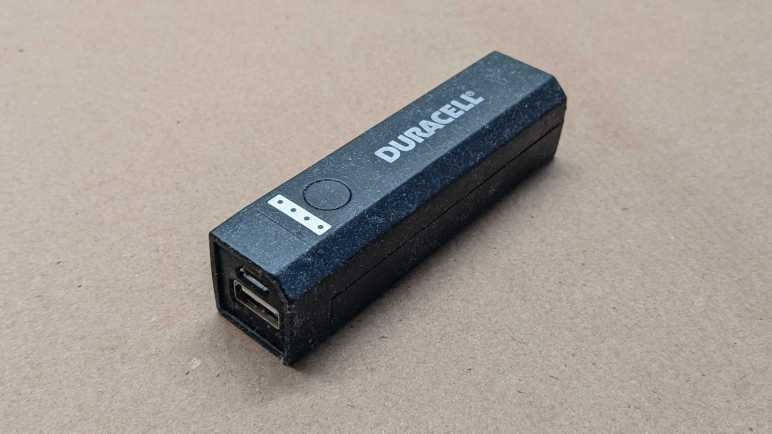
USB Power Bank Teardown (Duracell DU7169)

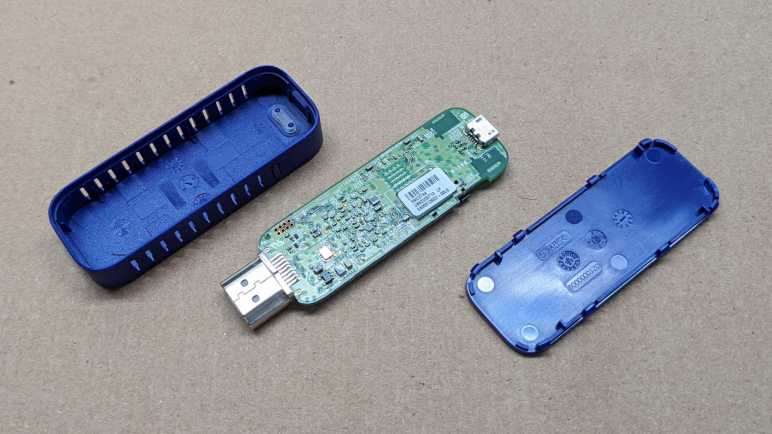
Contemplating options for powering my current project, I decided to repurpose an old USB power bank I bought nearly ten years ago. The primary problem with this device is that today’s devices expect more power than it could deliver. Specified to output up to one amp, I don’t think it could deliver that anymore. Most of my USB devices would cause it to shut down instead of charge. Another problem with this device is that its soft-touch outer plastic shell has become sticky. It is now impossible to keep clean and unpleasant to touch. It sat unused for several years in this state but now I have a potential use so I proceeded to violate the “Do Not Open” warning on the label.

There were no fasteners in the plastic shell to help disassembly, I just had to dig into seams and start prying it apart. Carefully, because puncturing a lithium-ion battery cell would be very bad news and electronics are still powered by said battery. (Use plastic tools!) Once the plastic shell was removed, we are left with the functional guts of the device:

The green cylinder is a lithium-ion battery cell in the very common 18650 (18mm diameter, 65mm length) form factor.

I’m not sure what MH27311 or ICR18650 meant exactly, but a web search found them sprinkled liberally across many eBay listings for lithium battery cells. I infer these were designations for a line of batteries that were popular enough to become eBay keyword salad. The next figure is the important one: nominal capacity of 2600 milliamp-hours. Nominal voltage of 3.7V is typical for lithium-ion cells. Finally, a date of December 2nd, 2013. This is probably the manufacturing date, though it would contradict the “Date: 2013-10” written on the outside label. Maybe it’s actually February 12th, 2013? Dates are hard.

Onward to the electronics, which were a pleasant surprise. They are two circuit boards connected to each other through two rows of four pins & sockets. I had expected a single circuit board or multiple circuit boards bonded together in some difficult-to-remove way. I didn’t expect nice easy pin and socket setup.

Here are the two sides of the first circuit board:

The top circuit board hosted the minimal user interface: four LEDs indicators (LED1 through LED4) and a push button (SW1). This side also has all of the designations printed on it: MS-B2600MPW-PC-A REV:A0 FR4 2013-5-4 26.3X18.5X1.2mm. The other side is dominated by an IC that presumably runs the show. I suspect it is a chip specifically designed to run a USB power bank, but there are no markings for me to investigate further. I also see globs of sturdy yellow material (epoxy?) that holds the chip in place as well as reinforcing the infamously fragile micro USB connector.

Here are the two sides of the second circuit board:

One side is dominated by connectors: one USB-A connector and two rows of four-pin connectors. Nestled between them is an electrolytic capacitor and soldering points for the battery cell labeled BT+ and BT-.

I thought I might see signs of damaged component somewhere that would explain the poor power output performance of this thing, but if present I don’t recognize them. That’s fine, I don’t intend to use the 5V output portion of this device anyway. I’ll quickly test the portions I actually need.

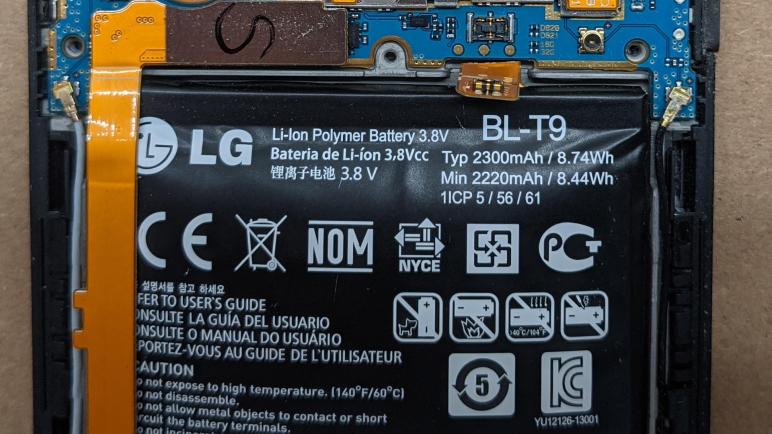
Nexus 5 BL-T9 Battery Teardown

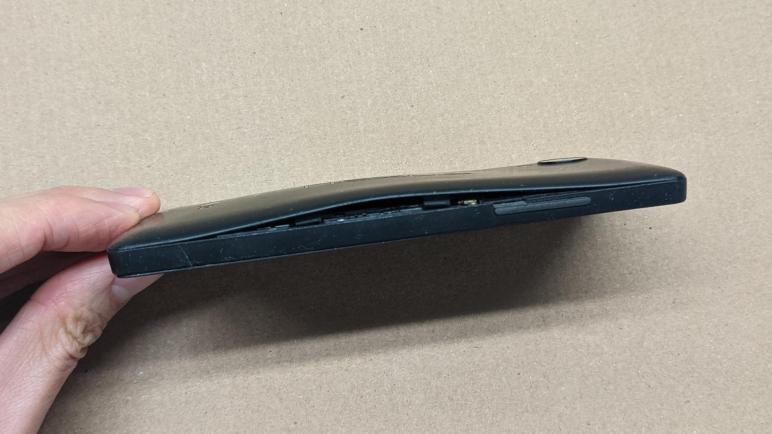
Sitting in my pile of old electronics, my Nexus 5 battery’s internal chemistry has started doing something that made it puff up like a balloon. I removed the battery as soon as I noticed the symptom and thought it might be fun to take a look inside the battery module. The module might be just some packaging around a bare lithium polymer pouch, or it might be something more. It was the latter.

I peeled away the external plastic sheet and saw a small circuit board between battery terminal tabs and the phone. Looking at the phone connector, I see four electrical contacts. The two larger contacts are likely to be power and ground, two smaller pins would be consistent with data and clock for I2C or another communication protocol. However, looking closer I saw the bottom center contact is electrically connected to the large right contact, for three usable pins leaving one for communication.

This side of the circuit board also had a few bits of information silkscreened on it. BL-T9 is the name of this battery pack. UL94V-O probably refers to Underwriters Laboratories standard for device flammability. The remainder of information “NXCT 50 31” are a mystery, possibly PCB design revision numbers. The black ink printed “F9 DA” is probably a manufacturing lot number or identifier of similar purpose.

Looking at the other side of the circuit board, there are only three soldering points on the phone connector which is consistent with what we saw earlier. To its left is a silkscreened “LI176AH” and in this context it’s tempting to think it means “Lithium Ion” battery of a particular “Amp-Hour” rating, but 176 doesn’t correspond to the 2.2AH printed on the outside label so it must mean something else.

Further left on this circuit board, I see a small chip labeled “SP45AE A41711” but a search on that designation came up empty. Continuing left we see a few test points, and something I don’t recognize labeled with a “P”. It looks like a tiny circuit board with visible traces, soldered to the larger circuit board. Probing contacts accessible on either side of the “P” gave a resistance reading of 0.2Ω. My best guess is a shunt resistor for measuring electrical current flow, or possibly a fuse. (Which is also a sensor for electrical current, technically speaking.)

This was all very interesting, but retiring this battery also meant I had a phone with no battery. So I will convert it to run on external DC power.

Degraded Nexus 5 Battery Demands Immediate Removal

I’m happy I found a way to make use of the HP Stream 7 tablet, though I have no immediate use for it so I jotted down some notes before putting it away in my pile of old hardware. When I did so, I found an unpleasant surprise in that pile: my old Nexus 5 cell phone shows signs of lithium battery degradation. It has puffed up, pushing against the back panel of the phone and popping a few clips loose. This is not good. I don’t know how long it’s been in this state, but I need to pay immediate attention.

With the first few retaining clips popped loose by the puffy battery, it was relatively simple to pop the remainder loose in order to remove the back panel. However, more disassembly is necessary before the battery could be (nicely) removed.

Further disassembly meant removing six screws holding this inner shield.

Once that inner shield was removed, I could disconnect the data cable running between the top and bottom halves of the phone, and I could electrically disconnect the battery. Mechanically, the battery itself is held by adhesive strips. The puffiness pulled some loose, but the remainder required some persuasion to release. I used a bit of thin clear plastic cut from some thermoformed product packaging.

The battery has puffed up roughly triple of its original thickness. No wonder it didn’t fit inside the phone anymore.

I’m glad I was able to remove the problematic battery before it expressed its degradation in unwanted and exciting ways. (Fire? Maybe fire.) But now I have removed the battery, I might as well take a closer look.

Notes on “Hardspace: Shipbreaker” 0.7

I have spent entirely too much time playing Hardspace: Shipbreaker, but it’s been very enjoyable time spent. As of this writing, it is a Steam Early Access title and still in development. The build I’ve been playing is V.0.7.0.217552 dated December 20th, 2021. (Only a few days before I bought it on Steam.) The developers have announced their goal to take it out of Early Access and formally release in Spring 2022. Comments below from my experience do not necessarily reflect the final product.

The game can be played in career mode, where ship teardowns are accompanied by a storyline campaign. My 0.7 build only went up to act 2, the formal release should have an act 3. Personally, I did not find the story compelling. This fictional universe placed the player as an indentured servant toiling for an uncaring mega-corporation, and that’s depressing. It’s too close to the real world of capitalism run amok.

Career mode has several difficulty settings. I started with the easiest “Open Shift” that removes the stress of managing consumables like my spacesuit oxygen. It also removes the time limit of a “shift” which is fifteen minutes. After I moved up to “Standard” difficulty, the oxygen limit is indeed stressful. But I actually started appreciating the fifteen-minute limit timer because it encourages me to take a break from this game.

Whatever the game mode (career, free play or competitive race) the core game is puzzle-solving: How to take apart a spaceship quickly and efficiently to maximize revenue. My workspace is a dockyard in earth orbit, and each job takes apart a ship and sort them into one of three recycle bins:

  1. Barge: equipment kept intact. Examples: flight terminal computers, temperature control units, power cells, reactors.
  2. Processor: high value materials. Examples: exterior hull plates, structural members.
  3. Furnace: remainder of materials. Example: interior trim.

We don’t need to aim at these recycle bins particularly carefully, as they have an attraction field to suck in nearby objects. Unfortunately, these force fields are also happy to pull in objects we didn’t intend to deposit. Occasionally an object would fall just right between the bins and they would steal from each other!

I haven’t decided if the hungry processors/furnaces is a bug, or an intended challenge to the game. There are arguments to be made either way. However, the physics engine in the game exhibit behavior that are definitely bugs. Personally, what catches me off guard the most are small events with outsized effects. The most easily reproducible artifact is to interact with a large ship fragment. Our tractor beam can’t move a hull segment several thousand kilograms in mass. But if we use the same tractor beam to pick up a small 10 kilogram component and rub it against the side of the hull segment, the hull segment starts moving.

Another characteristic of the physics engine is that everything has infinite tensile strength. As long as there is a connection, no matter how small, the entire assembly remains rigid. It means when we try to cut the ship in half, each half weighting tens of thousands of kilograms, we could overlook one tiny thing holding it all together. My most frustrating experience was a piece of fabric trim. A bolt of load-bearing fabric holding the ship together!

But at least that’s something I can look for and see connected onscreen. Even more frustrating are bugs where ship parts are held together by objects that are visibly apart on screen. Like a Temperature Control Unit that doesn’t look attached to an exterior hull plate, but it had to be removed from its interior mount at which point both the TCU and the hull are free to move. Or the waste disposal unit that rudely juts out beyond its allotted square.

Since the game is under active development, I see indications of game mechanics that was not available to me. It’s not clear to me if these are mechanisms that used to exist and removed, or if they are promised and yet to come. Example: there were multiple mentions of using coolant to put out fires, and I could collect coolant canisters, but I don’t see how I can apply coolant to things on fire. Another example: there are hints that our cutter capability can be upgraded, but I encountered no upgrade opportunity and must resort to demolition charges. (Absent an upgrade, it’s not possible to cut directly into hull as depicted by game art.) We also have a side-quest to fix up a little space truck, but right now nothing happens when the quest is completed.

The ships being dismantled are one of several types, so we know roughly what to expect. However, each ship includes randomized variations so no two ships are dismantled in exactly the same way. This randomization is occasionally hilarious. For example, sometimes the room adjacent to the reactor has a window and computers to resemble a reactor control room. But sometimes the room is set up like crew quarters with chairs and beds. It must be interesting to serve on board that ship, as we bunk down next to a big reactor through the window and its radioactive warning symbols.

There are a few user interface annoyances. The “F” key is used to pick up certain items in game. But the same key is also used to fire a repulsion field to push items away. Depending on the mood of the game engine, sometimes I press “F” to pick up an item only to blast it away instead and I have to chase it down.

But these are all fixable problems and I look forward to the official version 1.0 release. In the meantime I’m still having lots of fun playing in version 0.7. And maybe down the line the developers will have the bandwidth to explore putting this game in virtual reality.

Spaceship Teardowns in “Hardspace: Shipbreaker”

While studying Unity’s upcoming Data-Oriented Technology Stack (DOTS) I browsed various resources on the Unity landing page for this technology preview. Several game studios have already started using DOTS in their titles and Unity showcased a few of them. One of the case studies is Hardspace:Shipbreaker, and it has consumed all of my free time (and then some.)

I decided to look into this game because the name and visuals were vaguely familiar. After playing a while I remembered I first saw it on Scott Manley’s YouTube channel. He made that episode soon after the game was available on Steam. But the game has changed a lot in the past year, as it is an “Early Access Game” that is still undergoing development. (Windows only for now, with goal of eventually on Xbox and PlayStation consoles.) I assume a lot of bugs have been stamped out in the past year, as it has been mostly smooth sailing in my play. It is tremendously fun even in its current incomplete state.

Hardspace:Shipbreaker was the subject of an episode of Unity’s “Behind the Game” podcast. Many aspects of developing this game were covered, and towards the end the developers touched on how DOTS helped them solve some of their performance problems. As covered in the episode, the nature of the game means they couldn’t use many of the tried-and-true performance tricks. Light sources move around, so they couldn’t pre-render lights and shadows. The ships break apart in unpredictable ways (especially when things start going wrong) there can be a wide variation in shapes and sizes of objects in the play area.

I love teardowns and taking things apart. I love science fiction. This game is a fictional world where we play a character that tears down spaceships for a living. It would be a stretch to call this game “realistic” but it does have its own set of realism-motivated rules. As players, we learn to work within the constraints set by these rules and devise plans to tear apart these retired ships. Do it safely so we don’t die. And do it fast because time is money!

This is a novel puzzle-solving game and I’m having a great time! If “Spaceship teardown puzzle game” sounds like fun, you’ll like it too. Highly recommended.

[Title image from Hardspace: Shipbreaker web site]

Acer Aspire Switch 10 (SW5-012) Backlight Removal

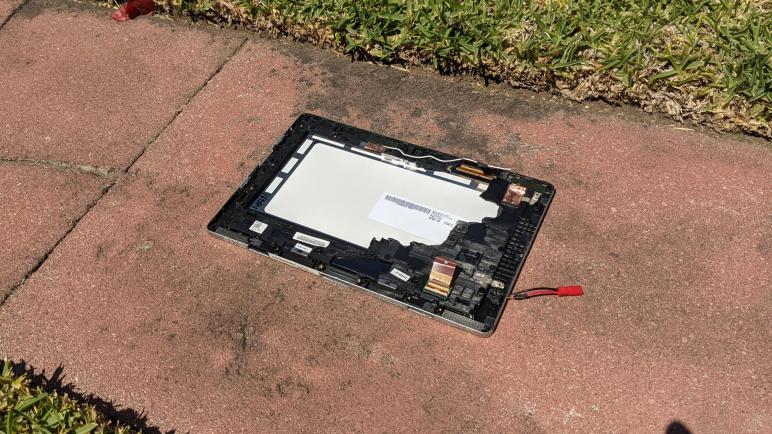
While I took apart the base unit of this dead Acer Aspire Switch 10 (SW5-012) tablet/laptop convertible, the main display had been left under the punishing direct heat of southern California summer sun. I don’t like fighting glue, but heat at least helps reduce their tenacious grip. I pulled out my prying tools from iFixit and plunged into the seam between gray and black plastic surrounds holding its AU Optronics B101EAN01.5 screen in place.

The double-sided adhesive foam tape was thickest around the left and right sides, gripping tightly enough that I broke the frame on both sides trying to peel them off. There were slightly less of it across the top, and surprisingly little across the bottom.

I had hoped the LCD module would pop free once the touchscreen digitizer glass had been freed from its frame, similar to how an Amazon Fire tablet was put together. But no such luck, there appears to be more adhesive involved.

Once I pushed a pick into the gap between the digitizer glass and the LCD polarizer, I realized the bad news: they have been glued together across the entire visible front surface of the screen. It’s going to take a lot of effort to separate them and I don’t see how it could possibly be worth the effort.

My objective here is the LED backlight, so just as I did for the Chromebook cracked screen and the Amazon Fire screen, I peeled back the black tape holding the LED backlight to the LCD. Starting with the bottom section to expose the integrated driver board.

I am starting to recognize the signs of a LED backlight power connection: a few connectors separate from the high-density connectors used for controlling LCD pixel data. An inductor and a diode for voltage boost conversion, and an IC controlling it all.

The black tape holding this display module together is much more difficult to remove than those encountered on previous screen backlight salvage projects. The glossy substrate is weaker than the adhesive, causing it to easily stretch and break. Now that I’ve identified the portion I cared about for my project, I pulled out a blade and cut the rest of the tape allowing me to open up this display module.

Once the backlight folded away from the LCD pixel array, I can see I’ve already cracked at least one LCD glass layer in my effort to pry it from the front digitizer glass. I’m not even going to try to salvage the polarizer filter from this one, so my blade continued its work cutting all pixel data lines to free the backlight for further examination.