Arduino Nano PWM Signal for TPS61187 LED Driver

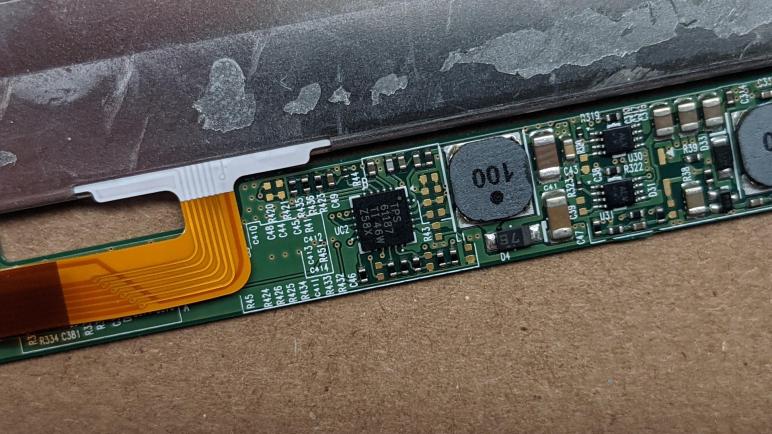
Trying to revive the LED backlight from a LG Lp133WF2(SP)(A1) laptop display panel, I am focused on a TPS61187 LED driver chip on its integrated circuit board. After studying its datasheet, I soldered a few wires to key parts of the circuit and applied power, checking the circuit as I went. Nothing has gone obviously wrong yet, so the final step is to give that driver chip a PWM signal to dictate brightness.

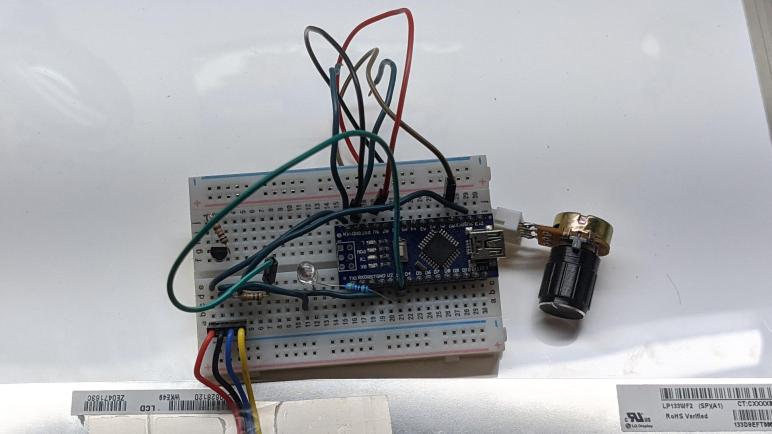
This is where I am happy I’ve added Arduino to my toolbox, because I was able to whip up a controllable PWM signal generator in minutes. Putting an Arduino Nano onto a breadboard, I wired up a potentiometer to act as interactive input. 5V power and ground were shared with the panel, and one of the PWM-capable output pins was connected to the TPS61187 PWM input line via a 10 kΩ resistor as per datasheet. I found that my enable line already had a 1 kΩ resistor on board, so now I wired enable directly to the 5V line.

Since I wanted some confidence in my circuit before plugging the panel into the circuit, I also wired a test LED in parallel with the PWM signal line. I had originally thought I could use the LED already on board the Arduino, but that is hard-wired to pin 13 which is not one of the PWM-capable pins, so the external LED was necessary for me to run my PWM-generating test code, which thanks to the Arduino framework was as easy as:

int sensorPin = A0;    // select the input pin for the potentiometer
int ledPin = 3;        // select the pin for the LED
int sensorValue = 0;   // variable to store the value coming from the sensor

void setup() {
  // declare the ledPin as an OUTPUT:
  pinMode(ledPin, OUTPUT);
}

void loop() {
  // read potentiometer position
  sensorValue = analogRead(sensorPin);

  // map analogRead() range to analogWrite() range
  sensorValue = map(sensorValue, 0, 1023, 0, 255);

  analogWrite(ledPin, sensorValue);
}

My external test LED brightened and dimmed in response to potentiometer knob turns, so that looked good. My heart started racing as I connected the panel to my Arduino breadboard, which is then connected to my benchtop power supply. Even though I’m powering this system with 5V, I used a bench power supply instead of a USB port. Because I didn’t know how much the panel drew and didn’t want to risk damaging my computer. Also, by using a benchtop power supply I could monitor the current draw and also set a limit of 120mA (20mA spread across 6 strings) for the first test.

I powered up the system with the potentiometer set to minimum, then slowly started turning the knob clockwise…

It lit up! It lit up! Woohoo!

I was very excited at this success, jumping and running down the hallway. It was a wild few minutes before I could settle down and calmly take a closer look.

Soldering Wires to TPS61187 LED Driver

After passively studying its documentation, and passively studying how it is installed on an existing circuit board, it is now time for me to go active and start working on it. Whether I can get this backlight up and running is almost secondary at this point, it has already been a great electronics learning opportunity and I want to see how far I can get.

This next step tests my skill working with components far smaller than what I’m used to. The picture of these added wires spoke volumes: I used the finest spools of wire I had on hand, but 26 gauge wire looks absolutely gargantuan when soldered to this board. Due to their small size I assumed these surface mount components would not have the strength to handle external stresses. As a temporary measure I used a piece of tape to hold the wires in place, hopefully diverting all the little twists and tugs yet to come as I connect and disconnect these wires to power and signal sources.

Once the wires were in place, I had to make a very important decision: what voltage do I feed into the Vin wire? Earlier probing failed to find the values of resistors used in the boost converter feedback regulation circuit. If I had those resistance values I could hoped to calculate the expected input voltage range using the formula in the datasheet. The only other guideline I had was the requirement that input voltage must be lower than the voltage drop across individual LED strings so the boost converter (critical part of this circuit) can function.

Looking for hints elsewhere, I reviewed my earlier notes looking inside this machine. Its battery is labeled as a lithium-ion pack with a nominal voltage of 10.8V, implying three cells in series. This is within the valid input range for a TPS61187 chip and I thought it is possible they would wire the battery voltage straight through. This would avoid any conversion losses from a boost or a buck converter along the way.

Following my startup plan, I used my bench power supply to put 10.8V on Vin and was encouraged I didn’t see any sparks or smell any smoke. My probe saw 5V on VDDIO which I took to be a good sign and satisfies step 1. Moving on to step 2, I checked enable (EN) pin to find it is low, so nothing else on the board is raising it. I used a one kilo-Ohm (1 kΩ) resistor to pull EN high and it did, so either nothing else on the board is pulling it low or 1 kΩ is enough to overrule their signal. If something is fruitlessly trying to pull it low, the few milliamps involved here should not damage it. Or if I do damage it, hopefully it wouldn’t be anything I care about.

If I understand the datasheet correctly, once enabled the TPS61187 will put minimum voltage across the LED strings. I probed the voltage between LED common anode and ground, and found it was 6.7V, which is lower than the input voltage of 10.8V, exactly what the datasheet said not to do. Oh no! I quickly turned the input voltage down to 6V so it would be below the LED voltage, wondering if it was already too late. There were no obvious signs of damage so… whether I’ve just killed it or not, my next step is to put a PWM signal on the brightness control line.

Finding TPS61187 LED Driver Interfaces

I want to reuse the TPS61187 LED Driver IC already on board the display circuit board of a LG LP133WF2(SP)(A1) laptop LCD panel. Driving the backlight that used to shine from behind the now-cracked LCD screen. After studying the datasheet and probed around the circuit board to understand how the chip is configured, I am now probing to see where I can solder wires to interface with the chip.

There are two major concerns here. The first is that I’m learning to work with modern consumer electronics, with circuit boards populated by very small surface mount components. Most of the resistors and capacitors I probed earlier are barely larger than the tip of my soldering iron’s finest tip. The “normal” tip is comically large next to these things. If I continue with experiments like this I will need to buy my own hot air station and learn to use it well.

The second concern are the other components on this control board. If I supply voltage and ground to the TPS61187, the rest of the circuit will probably come alive in some way I don’t understand. I’m not worried about them draining a bit of battery, that’s the best case scenario. I’m more worried about them interfering with the backlight control signals for enable (EN) and brightness (PWM).

First target is to find a place to inject power. The datasheet told me where the power pins are on this chip, but it’s far too small for me to hand solder myself. I’m not saying it’s impossible to hand solder to them, I’m just saying it’s very difficult and unlikely to succeed with my current skill level. So I went poking around nearby components looking for a decoupling capacitor. Because this driver IC uses a boost converter circuit to raise the voltage to drive the backlight LEDs, I expect to find a sizable decoupling capacitor nearby to isolate the rest of this board from the electrical noise of boost conversion. I found one adjacent to the inductor. For a surface-mounted component, it is large and thankfully big enough for me to feel confident I could solder to its two ends for VIN and GND.

I found a resistor and capacitor nearby connected to the enable pin. But even though they are larger than the corresponding TPS61187 pin I couldn’t solder to them. I was able to connect to one side of the small capacitor, but an intended-to-be-gentle test tug ripped off the wire taking a corner chunk of the capacitor with it. Oops, not so gentle after all.

I had even less luck finding a PWM signal connection near the TPS61187. I could see its pin connection on the circuit board, but it instantly sank out of sight to one of the other layers of the board and I found no place nearby where it surfaced.

After some thought, I decided to look for these signals near the largest chip sitting on the other end of the board, labelled “LG Display ANX2804”. I reasoned that EN and PWM are probably controlled from this chip and perhaps I could find something. There was nothing obvious near the chip itself, but I struck gold on the backside of the board. Sitting effectively under the ANX2804 are several labelled and accessible test points, and I was happy to see “LED_EN” next to one pad and “PWM” next to another. (There’s also VLED visible further left I didn’t notice until later, which should be better than soldering to the VIN end of a surface mount decoupling capacitor.)

Continuity test confirmed these do connect all the way across this thin strip of circuit board to the TPS61187, I think we are in business! Time to do some soldering.

Probing TPS61187 LED Driver Configuration

I’ve read through the datasheet for a TI TPS61187 LED driver chip and I think I have a fair (if not perfect) grasp of how to use it. Specifically I want to use one I found on the integrated driver board of a LG laptop LCD panel I’ve taken apart, there to drive the backlight module I wanted to salvage as a LED light. Armed with the datasheet and a multimeter, I started poking at the driver board to understand how it uses the chip. Since most of the chip’s configuration are done via resistors connected to certain pins, I could use the ohmmeter to decipher configuration. I enlarged and printed out my picture of that area of the circuit board so I could scribble down notes as I went.

Here’s what I found on this board, listed in order of their corresponding datasheet sections:

7.3.1 Supply Voltage

For applications that are always-on, it is valid for the enable (EN) pin to be connected to the chip’s internal regulator output pin VDDIO. Since a laptop would want to put a screen to sleep, I did not expect EN to be tied to VDDIO and my meter confirmed it was not. Which means I’ll have to go hunting for my own connection to EN later.

7.3.2 Boost Regulator and Programmable Switch Frequency (FSCLT)

The internal boost converter can operate at a range of frequencies, giving the designer an option to tradeoff between efficiency, inductor component size, etc. I probed the selection resistor on this board to be 822 kΩ. Plugging this into datasheet formula I arrive at a switching frequency of 608 kHz. Table 1 lists a few recommended values, and 833 kΩ is one of the recommendations for 600 kHz. I suspect this was indeed the intent and this 822 kΩ resistor is pretty good at less than 2% off nominal value.

7.3.3 LED Current Sinks

This is arguably the core parameter of driving LEDs. I traced the circuit and found two resistors in series. ~20 kΩ and ~31 kΩ but they added up to about 58 kΩ so there’s obviously something else I missed. Nevertheless, plugging 58 kΩ into datasheet formula says it’ll sets the target at 20mA. Typical for driving LEDs.

7.4.2 Adjustable PWM Dimming Frequency and Mode Selection (R_FPWM/MODE)

There are two ways to control brightness of the backlight. Either they can be blinked directly by an external PWM signal, or they can be blinked with an internal signal generator. One advantage of using the internal signal is that the phase for each of six strings are offset, so they blink in turn instead of simultaneously, which I expect to give smoother dimming. Another advantage of separating the two signals is that the external PWM can run at a far slower frequency, even one that would otherwise cause visible flicker, but it wouldn’t matter. Because once its duty cycle is read, it is copied for use by the internal generator running at a far faster flicker-free rate.

Probing the configuration resistors proved this board uses the internal high speed PWM signal. The resistor is 3.9 kΩ which works out to about 46.6 kHz. This is not one of the Table 2 recommendations, in fact it is over twice the speed of the highest recommended value. at 9.09 kΩ / 20 kHz. Higher switching frequency usually mean smoother behavior but lower power efficiency, I wonder what design meeting decisions at LG led to this value. Though of course it’s possible I’ve misread the value somehow.

7.4.4 Overvoltage Clamp and Voltage Feedback (OVC/FB)

These resistors configure how the boost converter works, and there’s an ideal formula in the datasheet mapping input voltage to LED output voltage. I was able to measure Rdown as 20 kΩ, but Rupper did not converge. My ohmmeter’s initial reading was in the 370-400 kΩ range, but the value continued to increase as I kept the probes in place. Eventually it would read as off-scale high. I think this means there’s a capacitor in parallel?

Out of all the configurations I had hoped to read, this was the one I really wanted to get because it would inform me as to the best voltage level to feed into this system. With this ambiguous reading, I’m sadly no wiser.

But at least I have some idea of how this chip has been configured to run, so I could continue probing this circuit board looking for places where I can interface with this LED driving circuit.

My TPS61187 LED Driver Startup Plan

I wanted to see if I could power up just the LED backlight portion of a broken LG LCD laptop screen, model LP133WF2(SP)(A1). It was cracked and couldn’t display images, but the backlight still worked before I took it apart. Does it still work? I wanted to find out and I still had the screen’s integrated driver circuit board and will try that first. The biggest question mark here is how the rest of the circuit board will react if I try to power up the TI TPS61187 LED driver chip in-place on the circuit board. My fallback position is to bypass the chip and power the LED strings directly, but that wouldn’t be as energy-efficient and I lose out on cool features. The one most novel to me is the phase-shifted PWM dimming control, where the six LED strings are dimmed round-robin instead of all at once for a smoother display. It’s not something I would likely do if I had to power the LEDs directly with my own cricuit.

To see if I could get the original circuit running, I plan to do it in steps based on this excerpt from the datasheet:

7.3.4 Enable and Start-up

The internal regulator which provides VDDIO wakes up as soon as VIN is applied even when EN is low. This allows the device to start when EN is tied to the VDDIO pin. VDDIO does not come to full regulation until EN is high. The TPS61187 checks the status of all current feedback channels and shuts down any unused feedback channels. It is recommended to short the unused channels to ground for faster start-up.

After the device is enabled, if the PWM pin is left floating, the output voltage of the TPS61187 regulates to the minimum output voltage. Once the device detects a voltage on the PWM pin, the TPS61187 begins to regulate the IFB pin current, as pre-set per the ISETH pin resistor, according to the duty cycle of the signal on the PWM pin.

This translated to the following plan:

  1. Put minimal voltage across VIN and GND. If it doesn’t go up in smoke, probe VDDIO to see if it has some voltage.
  2. If that works, check the Enable pin. If I am to drive the chip, I will need to control the state of the Enable pin. This is where an interaction with existing components might cause headaches: something else on the board might be trying to keep it high or keep it low, and if I put voltage on that pin the opposite state, I might damage that component unless I cut a trace somewhere to disconnect it.
  3. I might also have to find and cut a trace for the PWM pin for the same reason.
  4. Send the Enable signal, and check the voltage level across a LED string for the “minimum output voltage” mentioned by the datasheet.
  5. If all of the above works, then I’ll work on how to generate the PWM dimming signal.

Plans rarely survive intact upon their first contact with reality, but I wanted to have one before I got started. It will guide me as I probe the circuit board to understand how it uses a TPS61187.

TI TPS61187 Circuit’s Boost Converter

I had a broken LG laptop screen, model LP133WF2(SP)(A1), which I’ve disassembled and now I’m digging into its backlight module. I want to see if it I could make it work as a standalone diffuse light panel. I could probably wire up the LEDs directly with a voltage source and current-limiting resistor, but I also have its original integrated driver circuit board which still worked as far as I knew. I’m sure most of it were concerned with moving pixels which are no longer relevant, but there is also a TI TPS61187 chip on the board to drive the backlight section.

The PWM control signal is 3.3V friendly with a logic high threshold of 2.1V, so I could use either a 5V ATmega328 Arduino or a 3.3V ESP32. The part I didn’t understand was the power input. The datasheet says input voltage can range anywhere from 4.5V to 24V, and that it has a built-in boost converter to send up to 38V to the LED strings. I had expected to see a separate output pin for this higher voltage, but in the Typical Application schematic, the LED’s common anode is connected to the input voltage plane via a diode and an inductor. This combined with the following quote in the datasheet confused me:

there must be enough white LEDs in series to ensure the output voltage stays above the input voltage range

With the common anode seemingly tied to voltage input, I didn’t understand how the anode voltage could be higher than the input voltage. The next hypothesis is that instead of different voltage supply planes, perhaps there are separate ground planes at different levels. I saw there was a PGND pin for logic that is separate from AGND pin for the LED strings so the hypothesis had potential. But when I probed the circuit board, my meter said PGND and AGND pins are tied together on my board, eliminating the “separate ground levels” idea.

With a distinct sense that I have misunderstood something, I went to Wikipedia to learn more about boost converters and how they work. As soon as the diagrams came onscreen for that page, I realized that inductor and diode I saw earlier WAS the boost converter. I just didn’t recognize it as I was only aware of a block diagram representation and didn’t know it when the core components of a boost converter were staring at me in the schematic. Now it all makes sense how the LED string common anode voltage will be higher than the input voltage, and I feel confident enough to devise a plan.

Investigating TI TPS61187 WLED Driver

I took apart a LG LCD panel LP133WF2(SP)(A1) hoping to salvage something useful. After I failed to salvage the polarizer film, my hope lies with the backlight module. Its diffuser had a multi-layer construction I didn’t understand but found fascinating and wanted to see it light up firsthand. And if I am to do that, I need to figure out how to send power to the backlight LEDs. When I split the panel into the display and backlight modules, I saw the backlight was connected by a ribbon cable with seven conductors. Six of them look identical, and the seventh was wider than the rest, making it a good candidate for either a common anode or a cathode. Which is it, though? For that I looked for hints on the display panel’s integrated driver board.

There were three significant-looking ICs on board. The largest is closest to the connector to the rest of the laptop and the top two lines written on it were “LG Display ANX2804”. I found no information on this chip online. In the middle of the circuit board is another IC, this one labeled “SM4037 DA1422 AMER038”. I found no information on this particular designation, either. (There exists a SM4037 from Fairview Microwave, but it is a connector and not a microchip.) That leaves the chip closest to the backlight connector as the best candidate for a LED driver, and luckily its markings of TPS 61187 match that of a Texas Instruments WLED driver. I think this is it.

Reading its publicly available datasheet reinforced it is the right result, as its “typical application” diagram shows the chip driving six parallel strings of LEDs. The schematic indicates the six strings are connected to a common anode with their own individual cathodes wired to one of six current sinks on the chip. This information is enough for me to wire up this array to my bench power supply to find the right voltage for this string and create my own LED driver circuit. But since I have the datasheet already on hand and a “I know it used to work” backlight control board, I kept reading to see if I could perhaps reuse the board as well.

It looks pretty promising. There are no handshake or control protocol involved, all the potential configurations for this chip are done via resistance values to certain pins which would be already present in this case. I think for a bare minimum setup I only need to provide a power source and a PWM signal to control brightness. I could also connect the enable pin but I think I could get away with using a pull-up resistor. And under this minimalist plan I would be ignoring the fault signals. Plus one very important lesson about its power supply I had to learn first.

LG LCD Panel Backlight Also Has Layers

I’ve got a cracked laptop LCD module by LG, model LP133WF2(SP)(A1) and I am taking it apart to see what’s inside and maybe salvage fun stuff for future projects. After I failed to learned lessons about salvage the polarizer film, my adventure continues with the backlight module. My ambition is to make it light up again as a diffused light source, hoping it’ll be more pleasant than the point light sources of individual LEDs.

I foresee a decision that I will have to make: do I work with the LEDs directly with its seven-conductor cable? Or do I try to work with the LED driver IC on the board?

But before I get that far, I wanted to examine the physical construction of this laptop LCD backlight. There wasn’t much to it at first glance, just a big flat expanse of white matte material.

I had expected a thin row of LEDs and some sort of light diffuser material, and I saw… just diffuser. The LEDs must be incredibly thin to hide under this black strip which is only about 2mm wide.

I had expected the diffuser material to be a translucent sheet of plastic. When I lifted it away from the frame, I found it’s actually composed of four layers. The top and bottom layers are close to what I had expected, they are translucent but are visibly different from each other. The surprise came in the middle two layers, which had optical properties that reminded me of a Fresnel lens but not in a concentric pattern as usually found in Fresnel lenses.

I’m ignorant on how to characterize this any more specifically, but it feels like an entire discipline of engineering that I have never known before. There are experts out there for this intersection between physics (optics) and manufacturing to mass produce these backlight elements. At some point I hope to learn the technical terms of this material so I can learn more about them. But right now this discovery makes me even more motivated to get the backlight back up and running so I can see this stuff in action. Which means it’s time to read up on that LED driver IC.

[UPDATE: This Hackaday post A Hacker’s Introduction to DIY Light Guide Plates has more details about these backlight layers, as well as making custom plates out of acrylic sheets with a laser cutter.]