Power Source Selection Jumper

I’m making a Wemos D1 Mini clone (with an ESP8266 at its heart) into a solar panel output voltage monitor. I plan to run it off the solar panel power as well, since it seems silly to involve another power source when it is already hooked up to one. However, having a buck converter supplying 3.3V to the ESP8266 means I need to avoid taking USB power at the same time. Having multiple voltage regulators on the same voltage plane is a bad thing. I don’t want to have dueling regulators when, for example, debugging over USB while it is connected to solar.

I know this is not a new problem, because every battery-powered USB device knows to switch between battery power and USB power. But I’m having trouble finding the right vocabulary to describe exactly my battery-less scenario. Using search terms like “isolating USB power” I usually find people who are trying to avoid ground loops for audio quality, or optical isolators for data, and other similar tasks which are useful but not the problem I’m trying to solve right now.

Momentarily stymied in my research, I switched over to devising my own manual solution. I’m routing the 3.3V output pin of my buck converter through a jumper on the circuit board. When the jumper is installed, the ESP8266 will run on the solar power it is measuring. When the jumper is removed, the module will run on USB power.

But I know myself, and I could not trust myself to remember to install/remove the jumper as the situation changes. Hence the next trick: placement of the jumper. I put it right next to the USB port so that the jumper could not be installed at the same time as the USB cable, ensuring that it is impossible to have both power sources active at the same time.

I think this mostly works, but I’m worried about the jumper pins. They are taller than I had expected and reach pretty close to the USB connector as we can see in this side view. When I plug/unplug the USB cable, I have to carefully avoid accidentally touching those pins. Accidentally shorting those pins would probably not damage the dev board, because electrically it is same as the jumper in place and at that point USB is not plugged in. However, touching the pin could connect voltage supply to ground and that might fry either the buck converter or something on my USB host, neither of which is ideal.

I didn’t like how accident-prone this design is, so I switched to plan B: cut the USB power line.

Setting Up ESP8266 Voltage Monitor

I’ve decided to start playing with an ESP8266 in a wireless data monitoring role. I plan to use it to measure power output of my little Harbor Freight solar array and log data into an InfluxDB database. The first draft will only deal with voltage, since I want to start with minimal hardware and the ESP8266 has only a single ADC channel.

In addition to the restriction of a single channel, the ESP8266 has an additional restriction that the voltage on this pin can only be from zero to one volt, a small sub range of its standard 3.3V signal. Since the analog in pin can’t be used for anything else, I learned many ESP8266 development boards went ahead and put a pair of voltage dividing resistors on board. Using my multi-meter I probed the lowest-bidder Wemos D1 Mini clone I purchased on Amazon (*) and found 220KΩ from the A0 pin on the dev board to ADC0 on the ESP8266 module then another 100KΩ to ground.

In a perfect world we would have 230KΩ and 100KΩ to divide 0-3.3V into 0-1V, but this is as close as we can get with commodity resistor values. Assuming going slightly over 1V would not damage the ESP8266, this just means we lose a little bit range if input voltage goes above 3.2V.

I will add to this, because I want to measure output of my solar panel, which has a much higher open circuit voltage. I’ve measured at a little over 20V. Reading online, the commonly quoted maximum voltage is 22V, which seems like a good target to design for. This means ideal additional resistance of 1880KΩ before connecting to A0 input pin. In the interest of keeping things simple with commodity resistor values, I’ll use two 1MΩ resistors in series and sacrifice a bit of resolution.

I want to power my sensor node from the same solar power it is measuring, which again can go up to >20V. The Wemos D1 Mini board has an onboard voltage regulator to take 5V USB power down to 3.3V required by the ESP8266. I can’t tell exactly what module it is, but I will assume it does not handle input voltage up to 22V. Instead I will pull another MP1584EN buck converter from the last batch I bought on Amazon.(*) I will configure it to output 3.3V and connect that to the 3.3V voltage plane on the Wemos D1 Mini.

Which leaves a problem: If I’m getting 3.3V supplied from the solar panel, it is important we do not connect to 5V USB power at the same time. Perhaps a switch is in order?


(*) Disclosure: As an Amazon Associate I earn from qualifying purchases.

Hello Wemos D1 Mini Clone

We can run the Arduino framework on an Espressif ESP8266 chip, but that was not its original purpose. It was originally designed as a WiFi bridge for small devices, handling wireless networking duties on behalf of another microcontroller. But as it turned out, the chip was more than capable to drive the whole show by itself for certain scenarios. Versions 1 and 2 of Pixelblaze, for example, ran on an ESP8266 even though my experience has been with the ESP32-based version 3. I haven’t had a project of my own where the ESP8266 made sense until the current InfluxDB logging project. It is time.

My electronics skill isn’t up to the level of directly using a bare ESP8266 chip. Using a module integrating ESP8266 chip with support circuitry (including a circuit board antenna) is close, but just beyond my comfort level. I went online looking for development boards for such modules and it appears many of them are clones of something called “Wemos D1 Mini“. A brief look at related web pages seem to indicate this rose to prominence alongside a development platform called NodeMCU. I don’t know which came first, the NodeMCU platform or the Wemos D1 Mini module, but they seem to be mentioned side by side in a majority of my search hits. Since I came into this project looking to use the Arduino core on an ESP8266 board, I’ll set aside the NodeMCU angle for now. I clicked “Buy” on a batch of Wemos D1 Mini clones from the lowest bidder of the day. (*)

When they arrived, I was pleasantly surprised to find that I had multiple options on connectors. The package came with three sets: I could have pins appropriate for a breadboard, or sockets appropriate for jumper wires, or passthrough connectors with both pins and sockets. And since none of them were pre-soldered on the board, I actually have a fourth option to “dead-bug” wire a circuit directly without any of those connectors. I think this will prove very useful to fit projects in tight spaces. Some people may gripe about having to heat up a soldering iron before this board is usable, and to them I shall point to this fishing line trick.

For my first ESP8266 project, I’ll stick with traditional pins, followed by mounting it in a perforated prototype board.


(*) Disclosure: As an Amazon Associate I earn from qualifying purchases.

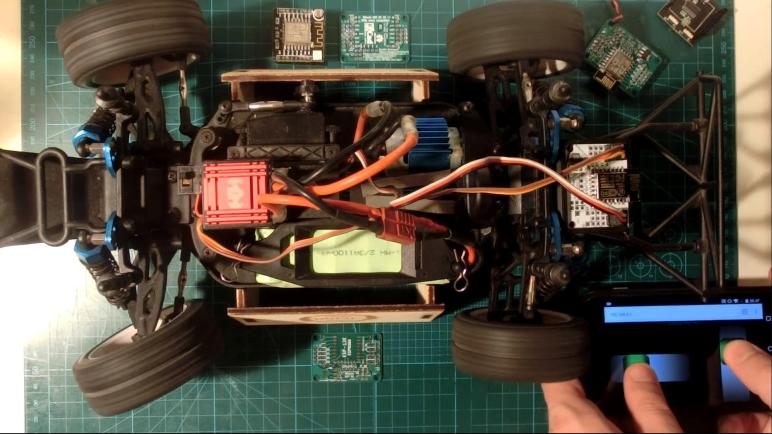
Miha Kocar’s ESP8266 Remote Control

Getting basic voltage monitoring up and running on my Sawppy Rover ESP32 controller was a good milestone for me to take a break from rover work. My code is publicly available up on GitHub and it is even moderately well organized and commented if anybody else wants to take it for a spin. Either for their own Sawppy rover, or for another vehicle. But if someone just wants basic remote control, they don’t have to deal with my code. There’s a simpler and cheaper option: Miha Kocar’s browser-based WiFi remote control built from an ESP8266.

I learned of this project via Hackaday and I consulted it briefly before starting my own Sawppy rover control project. I thought it was admirably minimalist. The entire baseline 2-channel implementation fits in a single file. The browser HTML, CSS, and JavaScript are all encapsulated into a single C string inside that file. Compared to my sprawling project, that is amazingly compact!

One of the ways this could be so simple were the input controls: this project used the existing HTML <input type="range"> control for controlling each axis, which meant it inherited all the code dealing with pointer events. Creative CSS styling made it look very different from a boring HTML form input. The downside is that each of these controls can only manage a single axis, there’s no good way to do a two-axis control pad as I wanted. Having two separate single-axis controls meant two-finger operation, my two-axis control pad allows single-finger operation. This feature was important enough for me to take on the extra complexity, something I occasionally regretted but I think it’s worth the extra work.

Kocar’s project uses websocket for client-server communication, and the code looked super simple and easy. Seeing it removed a lot intimidation for me when I started using websocket for myself. Like my code, it has a “failsafe” mode for when communication is lost, but I didn’t see any code enforcing a single driver.

The biggest reason I didn’t use this project as a direct precedent was that ESP8266 didn’t have a hardware PWM peripheral. These servo control PWM signals are all generated in software. This is fine for one or two channels like we see here, but Micro Sawppy required upwards of 16 PWM channels and that’s too much to expect from an ESP8266, which didn’t have enough IO pins anyway. I needed the PWM hardwareand GPIO pins— of an ESP32.

The next reason was that I much preferred FreeRTOS and how it allowed me to organize individual functionality into tasks. Instead of managing it all myself in a single Arduino loop(), I have the FreeRTOS task scheduler handle things. Information flow between components are managed with FreeRTOS queues. From a personal preference point, I liked having this level or organization.

But I admit all the overhead I added to handle a six-wheel-drive, four-wheel-steering micro Mars rover would be sheer overkill for many other projects. Sometimes a project just need a simple straightforward two-channel remote control, and Miha Kocar’s project is a better tool for that job.

And as a change of pace from my little micro Mars rover, I started looking at a tool for an entirely different job: putting a color picture on an old analog television.