Completing first draft of a LED helix mechanical chassis means everything is in place to dig into Pixelblaze and start playing with the software end of things. There are a selection of built-in patterns on the default firmware, and they were used to verify all the electrical bits are connected correctly.
But I thought the Pixel Mapper would be the fun part, so I dove in to details on how to enter a map to represent my helical LED strip. There are two options: enter an explicit array of XYZ coordinates, or write a piece of JavaScript that generates the array programmatically. The former is useful for arrangements of LEDs that are irregularly spaced, building a shape in 3D space. But since a helix is a straightforward mathematical concept (part of why I chose it) a short bit of JavaScript should work.
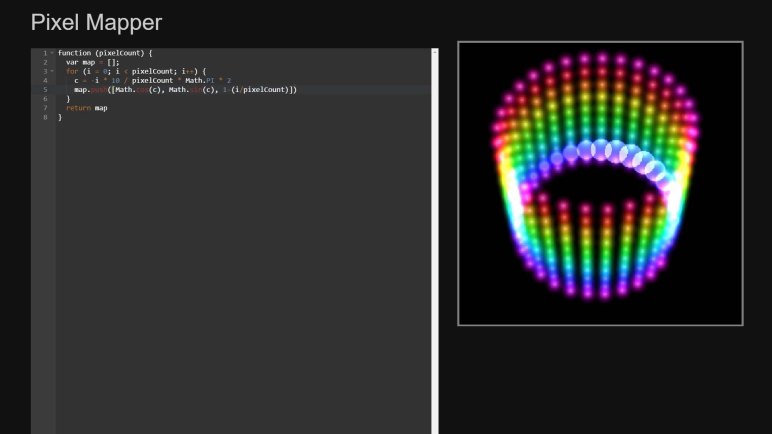
There are two examples of JavaScript generating 3D maps, both represented cubes. There was a program to generate a 2D map representing a ring. My script to generate a helical map started with the “Ring” example with following modifications:
- Ring example involved a single revolution. My helix has 30 LEDs per revolution around the cylinder, making 10 loops on this 300 LED strip. So I multiplied the pixel angular step by ten.
- I’ve installed the strip starting from the top of the cylinder and winds downwards, so Z axis is decremented as we go. Hence the Z axis math is reversed from that for the cube examples.
We end with the pixel map script as follows.
function (pixelCount) {
var map = [];
for (i = 0; i < pixelCount; i++) {
c = -i * 10 / pixelCount * Math.PI * 2
map.push([Math.cos(c), Math.sin(c), 1-(i/pixelCount)])
}
return map
}
Tip: remember to hit “Save” before leaving the map editor! Once saved, we could run the basic render3D() pattern from Pixel Mapper documentation.
export function render3D(index, x, y) {
hsv(x, y, z)
}
And once we see a volume in HSV color space drawn by this basic program, the next step is writing my own test program to verify coordinate axis.
 New Screwdriver
Hi, thank you VERY much for this 3d map, i’m going to use it in my project.
Can i use decimals if the led strip does not make a total revolution at the end? For example: if my strip makes 7 complete loops plus a final partial loop of only 90° revolution, can i put 7.25 in the code?
Thank you!
LikeLike
I can’t think of any reason why it wouldn’t work, and Pixelblaze makes experimentation easy. Try it and see what it does!
LikeLike