Notes on Codecademy “Build Deep Learning Models with TensorFlow”

Once I upgraded to a Codecademy Pro membership, I started taking courses from its Python catalog with the goal of building a foundation to understand deep learning neural networks. Aside from a few scenic detours, most of my course choices were intended to build upon each other to fulfill what I consider prerequisites for a Codecademy “Skill Path”: Build Deep Learning Models with TensorFlow

This was the first “Skill Path” I took, and I wasn’t quite sure what to expect as Codecademy implied they are different than the courses I took before. But once I got into this “skill path”… it feels pretty much like another course. Just a longer one, with more sessions. It picked up where the “Learn the Basics of Machine Learning” course left off with neural perceptrons, and dived deeper into neural networks.

In contrast to earlier courses that taught various concepts by using them to solve regression problems, this course spent more time on classification problems. We are still using scikit-learn a lot, but as promised by the title we’re also using TensorFlow. Note the course work mostly stayed in the Keras subset of TensorFlow 2 API. Keras used to be a separate library for making it easier to work with TensorFlow version 1, but it has since been merged into TensorFlow version 2 as part of the big revamp between versions.

I want to call attention to an item linked as “additional resources” for the skill path: a book titled “Deep Learning with Python” by François Chollet. (Author, or at least one of the primary people, behind Keras.) Following various links associated with the title, I found that there’s since been a second edition and the first chapter of the book is available to read online for free! I loved reading this chapter, which managed to condense a lot of background on deep learning into a concise history of the field. If the rest of the book is as good as the first chapter, I will learn a lot. The only reason I haven’t bought the book (yet) is that, based on the index, the book doesn’t get into unsupervised reinforcement learning like the type I want to put into my robot projects.

Back to the Codecademy course…. err, skill path: we get a lot of hands-on exercises using Keras to build TensorFlow models and train them on data for various types of problems. This is great, but I felt there was a significant gap in the material. I appreciated learning that different loss functions and optimizers will be used for regression versus classification problems, and we put them to work in their respective domains. But we were merely told which function to use for each exercise, the course doesn’t go into why they were chosen for the problem. I had hoped that the Keras documentation Optimizers Overview page would describe relative strengths and weaknesses of each optimizer, but it was merely a list of optimizers by name. I feel like such a comparison chart must exist somewhere, but it’s not here.

I didn’t quite finish this skill path. I lost motivation to finish the “Portfolio Project” portion of the skill path where we are directed to create a forest cover classification model. My motivation for deep learning lies in reinforcement learning, not classification or regression problems, so my attention has wandered elsewhere. At this point I believe I’ve exhausted all the immediately applicable resources on Codecademy as there are no further deep learning material nor is there anything on reinforcement learning. So I bid a grateful farewell to Codecademy for teaching me many important basics over the past few months and started looking elsewhere.

Notes on Codecademy Intermediate Python Courses

I thought Codecademy’s course “Getting Started Off Platform for Data Science” really deserved more focus than it did when I initially browsed the catalog, regretting that I saw it at the end of my perusal of beginner friendly Python courses. But life moves on. I started going through some intermediate courses with an eye on future studies in machine learning. Here are some notes:

  • Learn Recursion with Python I took purely for fun and curiosity with no expectation of applicability to modern machine learning. In school I learned recursion with Lisp, a language ideally suited for the task. Python wasn’t as good of a fit for the subject, but it was alright. Lisp was also the darling of artificial intelligence research for a while, but I guess the focus has since evolved.
  • Learn Data Visualization with Python gave me more depth on two popular Python graphing libraries: Matplotlib and Seaborn. These are both libraries with lots of functionality so “more depth” is still only a brief overview. Still, I anticipate skills here to be useful in the future and not just in machine learning adventures.
  • Learn Statistics with NumPy was expected to be a direct follow-up to the beginner-friendly Statistics with Python course, but it was not a direct sequel and there’s more overlap than I thought there’d be. This course is shorter, with less coverage on statistics but more about NumPy. After taking the course I think I had parsed the course title as “(Learn Statistics) with NumPy” but I think it’s more accurate to think of it as “Learn (Statistics with NumPy)”
  • Linear Regression in Python is a small but important step up the foothills on the way to climbing the mountain of machine learning. Finding the best line to fit a set of data teaches important concepts like loss functions. And doing it on a 2D plot of points gives us an intuitive grasp of what the process looks like before we start adding variables and increasing the number of dimensions involved. Many concepts are described and we get exercises using the scikit-learn library which implements those algorithms.
  • Learn the Basics of Machine Learning was the obvious follow-up, diving deeper into machine learning fundamentals. All of my old friends are here: Pandas, NumPy, scikit-learn, and more. It’s a huge party of Python libraries! I see this course as a survey of major themes in machine learning, of which neural networks was only a part. It describes a broader context which I believe is a good thing to have in the back of my head. I hope it helps me avoid the trap of trying to use neural nets to solve everything a.k.a. “When I get a shiny new hammer everything looks like a nail”.

Several months after I started reorienting myself with Python 3, I felt like I had the foundation I needed to start digging into the current state of the art of deep learning research. I have no illusions about being able to contribute anything, I’m just trying to learn enough to apply what I can read in papers. My next step is to learn to build a deep learning model.

Notes on Codecademy “Getting Started Off Platform for Data Science”

I like Codecademy’s format of having a bit of information that is followed immediately by an opportunity to try it myself. I like learn-by-doing as a beginner, even if the teaching/learning environment can be limited at times. But one thing that I didn’t like was the fact if I am to put my Python knowledge to use, I would have to venture outside of the learning environment and Codecademy didn’t used to provide information how.

The Learn Python 3 course made effort to help students work outside of the Codecademy environment with “Off-Platform Project”. These came in the form of Jupyter notebooks that I could download, and a page with some instructions on how to use them: a link to Codecademy’s command line course, a link to instructions for installing Python on my own computer, and a link on installing Jupyter notebooks. It’s a bit scattered.

What I didn’t know at the time was that Codecademy had already assembled an entire course covering these points. Getting Started Off Platform for Data Science is an orientation for everyone as we eventually venture off Codecademy’s learning platform. It starts with an introduction to the command line, then Python development tools like Jupyter Notebooks and other IDEs, wrapping up with an introduction to Github. This is great! Why didn’t they put more emphasis on this earlier? I think it would have been super helpful to beginners.

Though admittedly, I didn’t follow those installation instructions anyway. Python isn’t very good about library version management and the community has sidestepped the issue by using virtual environments to keep Python libraries separated in different per-project worlds. I’ve used venv and Anaconda to do this, and recently I’ve also started playing with Docker containers. For my own trip through Codecademy’s off-platform projects using Jupyter notebooks, I ran Jupyter Lab using their jupyter/datascience-notebook Docker image. That turned out to be sheer overkill and I probably could have just used the much lighter-weight jupyter/base-notebook image.

In hindsight I think it would have been useful for me to review Getting Started Off Platform for Data Science before I started reorienting myself with Python. I wouldn’t have followed it by the letter, but it had information that would have been useful beforehand. But as fate had it, it became the final course I took in the beginner-friendly section before I started trying intermediate courses.

Codecademy Beginner Friendly Python Fields

Once Codecademy got me reoriented with the Python programming language, I looked at some of their other beginner-friendly courses under the Python umbrella. I wanted to get some practice using Python, but I didn’t want to go through exercises for the sake of exercises. I wanted to make some effort at keeping things focused on my ultimate goal of learning about modern advances in machine learning.

  1. Learn Data Analysis with Pandas was my first choice, because I recognized “Pandas” as the name of a popular Python library for preparing data for machine learning. Making it relevant to the direction I am aiming for. The course title has “Data Analysis” and not “Machine Learning” but that was fine because it was only an introduction to the library. Not enough to get into field-specific knowledge, but more than enough to teach me Pandas vocabulary so I could navigate Pandas references and find my own answers in the future.
  2. How to Clean Data with Python followed up with more examples of Pandas in action. Again the course is nominally focused for data analytics but all the same concepts apply to cleaning data before feeding into machine learning algorithms.
  3. Exploratory Data Analysis in Python is a longer course with more ways to apply Pandas, including a machine learning specific section. Relative to other courses, this one is heavy on reading and light on hands-on practice, a consequence of the more general nature of the topic. And finally, this course let me dip my toes in another popular Python library I wanted to learn: NumPy.
  4. Learn Statistics with Python was how I dove into NumPy waters. After barely skating by some statics and number crunching in the previous course, I wanted a refresher in basic statistics. Alongside the refresher I also learn how to calculate common statistics using the NumPy library. And after the statistics calculations are done, we want to visualize them! Enter yet another popular Python library: matplotlib.
  5. Probability is the natural course to follow a refresher in basic statistics. They cover only the most basic and common applications of statistics and probability for data analysis, we’re on our own to explore in further depth outside of the class. I anticipate probability to play a role in machine learning, as some answers are going to be vague with room for interpretation. I foresee a poor (or misleadingly confident) grasp of probability will lead me astray.
  6. Differential Calculus was a course I poked my head into. I remembered it was quite a complex subject in school and was surprised Codecademy claimed anyone could learn it in two hours. It turns out the course should be more accurately titled “an introduction to numpy.gradient()“. Which… yes, it is a numerical application of differential calculus but it is definitely not the entirety of differential calculus. I guess it follows the trend of these courses: overly simplfied titles that skim the basics of a few things. Teach just enough for us to learn more on our own later.
  7. Linear Algebra starts to get into Python code that has direct relevance to machine learning. I know linear regression is a starting point and I knew I needed an introduction to linear algebra before I could grasp how linear regression algorithms work.
  8. Learn How to Get Started with Natural Language Processing was a disappointment to me, but it was not the fault of the course. It’s just that the machine learning systems in this field aren’t usually reinforcement learning systems. Which was the subfield of machine learning that most interested me. At least the course was short, and taught me enough so I know to skip other Codecademy natural language courses for myself.

The final Codecademy “Beginner friendly” Python course I took was titled “Getting Started Off Platform for Data Science.” I don’t think Codecademy put enough emphasis on this one.

Getting Reacquainted with Python via Codecademy

A few years ago I started learning Python and applied that knowledge to write control software for SGVHAK rover. I haven’t done very much with Python since, and my skills have become rusty. Since Python is very popular in modern machine learning research, a field that I am interested in exploring, I knew I had to get back to studying Python eventually.

I remember that I enjoyed learning Python from Codecademy, so I returned to see what courses had been added since my visit years ago. The Codecademy Python catalog has definitely grown, and I was not surprised to see most of it are only accessible to the paid Pro tier. If I want to make a serious run at this, I’ll have to pay up. Fortunately, like a lot of digital content on the internet, it’s not terribly difficult to find discounts for Codecademy Pro. Armed with one of these discount venues, I upgraded to the Pro tier and got to work. Here are some notes on a few introductory courses:

  • Learn Python 2 was where I started before, because SGVHAK rover used RoboClaw motor controllers and their Python library at the time was not compatible with Python 3. I couldn’t finish the course earlier because it was a mix of free and Pro content, and I wasn’t a Codecademy Pro subscriber at the time. I’m not terribly interested in finishing this course now. Python 2 was officially history as of January 1st, 2020. The only reason I might revisit this course is if I tackle the challenge of working in an old Python 2 codebase.
  • Right now I’m more interested in the future, so for my refresher course I started with Learn Python 3. This course has no prerequisites and starts at the very beginning with printing Hello World to the console and building up from there. I found the progression reasonable with one glaring exception: At the end of the course there were some coding challenges, and the one regarding Python classes required students to create base classes and derived classes. Problem: class inheritance was never covered in course instructions! I don’t think they expected students to learn this on their own. It feels like an instruction chapter got moved to the intermediate course, but its corresponding exercise was left in place. Other than that, the class was pretty good.
  • Inheritance and other related concepts weren’t covered until the “Object-Oriented Programming” section of Learn Intermediate Python 3, which didn’t have as smooth or logical of a progression. It felt more like a grab-bag of intermediate concepts that they decided to cut out of the beginner course. This class was not terrible, but it did diminish the advantage of learning through Codecademy versus reading bits and pieces on my own. Still, I learned a lot of useful bits about Python that I hadn’t known before. I’m glad I spent time here.

With some Python basics down — some I knew from before and some that were new to me — I poked around other beginner-friendly Codecademy Python courses.

Today I Learned About Flippa

I received a very polite message from Jordan representing Flippa who asked if I’d be interested in selling this site https://newscrewdriver.com. Thank you for the low-pressure message, Jordan, but I’m keeping it for the foreseeable future.

When I received the message, I didn’t know what Flippa was so I went and took a cursory look. At the surface it seems fairly straightforward: a marketplace to buy and sell online properties. Anything from just a domain to e-commerce sites with established operational history. The latter made sense to me because a valuation can be calculated from an established revenue stream. The rest I’m less confident about. Such as domain names, whose valuation are a speculation on how it might be monetized.

But there’s a wide spectrum between those two endpoints of “established business” and “wild speculation”. I saw several sites for sale set up by people that started with an idea, set up a site to maximize search engine traffic over a few months, then sell the site based on that traffic alone. Prices range wildly. At time of my browsing, auction for one such site is about to close at $25. But they seem to range up to several thousand dollars, so I guess it’s possible to make a living doing this if your ideas (and SEO skills) are good.

Mine are not! But money was not the intent when I set up this site anyway. It is a project diary of stuff I find interesting to learn about and work on. I made it public because there’s no particular need for privacy and some of this information may be useful to others. (Most of it are not useful to anybody, but that’s fine too.) So it’s all here in written text format for easy searching. Both by web search engines, and with browser “find text” once they arrive.

I haven’t even tried to put ads on this page. (Side note: I’m thankful modern page ads have evolved past the “Punch the Monkey” phase.) I also understand if my intent is to generate advertising revenue, I should be doing this work in video format on YouTube. But video files are hard to search and skim through. Defeating the purpose of making this project diary easily available for others to reference. I had set up a New Screwdriver YouTube channel and made a few videos, but even my low effort videos took more far more work than typing some words. For all these reasons I decided to primarily stay with the written word and reserve video for specific topics best shown in video format.

The only thing I’ve done to try monetizing this site is joining the Amazon Associates program, where my links to stuff I’ve bought on Amazon can earn me a tiny bit of commission. The affiliate links don’t add to the cost to buy those things. And even though I’ve had to add a line of disclosure text, that’s still less jarring of an interruption than page ads. So far Amazon commissions have been just about enough to cover the direct costs of running this site (annual domain registration fee and site hosting fee) and I’m content to leave it at that.

But hey, that is still revenue associated with this site! Browsing Flippa for similar sites based on age, traffic, and revenue, my impression is that market rate is around $100. (Low confidence with huge error margins.) Every person has their price, but that’s several orders of magnitude too low to motivate me to abandon my project diary.

Shrug. New Screwdriver sails on.

Arduino Library Versioning For ESP_8_BIT_Composite

I think adding setRotation() support to my ESP_8_BIT_Composite library was a good technical exercise, but I made a few mistakes on the administrative side. These are the kind of lessons I expected to learn when I decided to publish my project as an Arduino library, but they are nevertheless a bit embarrassing as these lessons are happening in public view.

The first error was not following sematic versioning rules. Adding support for setRotation() is an implementation of missing functionality, it did not involve any change in API surface area. The way I read versioning rules, the setRotation() update should have been an increase in patch version number from v1.2.0 to v1.2.1, not an increase in minor version from v1.2.0 to v1.3.0. I guess I thought it deserved the minor version change because I changed behavior… but by that rule every bug fix is a change in behavior. If every bug fix is a minor version change, then when would we ever increase the patch number? (Never, as far as I can tell.)

Unfortunately, since I’ve already made that mistake, I can’t go back. Because that would violate another versioning rule: the numbers always increase and never decrease.

The next mistake was with a file library.properties in the repository, which describes my library for the Arduino Library Manager. I tagged and released v1.3.0 on GitHub but I didn’t update the version number in library.properties to match. With this oversight, the automated tools for Arduino library update didn’t pick up v1.3.0. To fix this, I updated library.properties to v1.3.1 and re-tagged and re-released everything as v1.3.1 on GitHub. Now v1.3.1 shows up as an updated version in a way v1.3.0 did not.

Screen Rotation Support for ESP_8_BIT_Composite Arduino Library

I’ve had my head buried in modern LED-illuminated digital panels, so it was a good change of pace to switch gears to old school CRTs for a bit. Several months have passed since I added animated GIF support to my ESP_8_BIT_Composite video out Arduino library for ESP32 microcontrollers. I opened up the discussion forum option for my GitHub repository and a few items have been raised, sadly I haven’t been able to fulfill the requests ranging from NTSC-J support (I don’t have a corresponding TV) to higher resolutions (I don’t know how). But one has just dropped in my lap, and it was something I can do.

Issue #21 was a request for the library to implement Adafruit GFX capability to rotate display orientation. When I first looked at rotation, I had naively thought Adafruit GFX would handle that above drawPixel() level and I won’t need to write any logic for it. This turned out to be wrong: my code was expected to check rotation and alter coordinate space accordingly. I looked at the big CRT TV I had sitting on my workbench and decided I wasn’t going to sit that beast on its side, and then promptly forgot about it until now. Whoops.

Looking into Adafruit’s generic implementation of drawPixel(), I saw a code fragment that I could copy:

  int16_t t;
  switch (rotation) {
  case 1:
    t = x;
    x = WIDTH - 1 - y;
    y = t;
    break;
  case 2:
    x = WIDTH - 1 - x;
    y = HEIGHT - 1 - y;
    break;
  case 3:
    t = x;
    x = y;
    y = HEIGHT - 1 - t;
    break;
  }

Putting this into my own drawPixel() was a pretty straightforward way to handle rotated orientations. But I had overridden several other methods for the sake of performance, and they needed to be adapted as well. I had drawFastVLine, drawFastHLine, and fillRect, each optimized for their specific scenario with minimal overhead. But now the meaning of a vertical or horizontal line has become ambiguous.

Looking over at what it would take to generalize the vertical or horizontal line drawing code, I realized they have become much like fillRect(). So instead of three different functions, I only need to make fillRect() rotation aware. Then my “fast vertical line” routine can call into fillRect() with a width of one, and similarly my “fast horizontal line” routine calls into fillRect() with a height of one. This invokes some extra computing overhead relative to before, but now the library is rotation aware and I have less code to maintain. A tradeoff I’m willing to make.

While testing behavior of this new code, I found that Adafruit GFX library uses different calls when rendering text. Text size of one uses drawPixel() for single-pixel manipulation. For text sizes larger than one, they switch to using fillRect() to draw more of the screen at a time. I wrote a program to print text at all four orientations, each at three different sizes, to exercise both code paths. It has been added to the collection of code examples as GFX_RotatedText.

Satisfied that my library now supports screen rotation, I published it as version 1.3.0. But that turned out to be incomplete, as I neglected to update the file library.properties.

HP Stream 7 Refuses to Believe in Free Energy

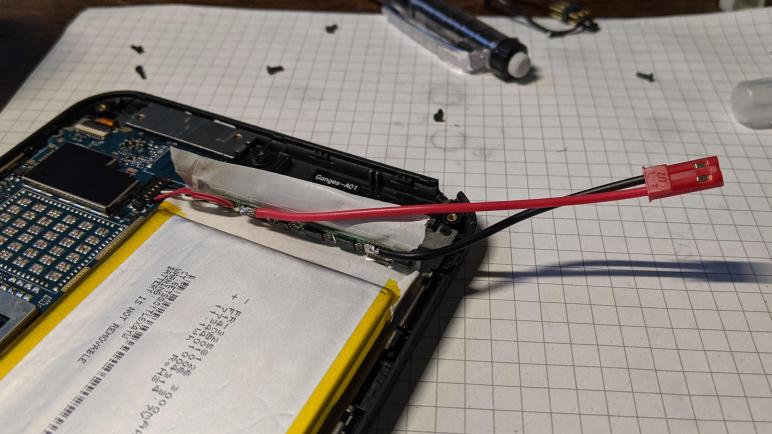
After salvaging the LED backlight from a Chunghwa CLAA133UA01 display panel, I have processed all the disembodied panels in my hardware stack. But I still have plenty of other displays still embodied in some type of hardware of varying levels of usefulness. The least useful item in the pile is my HP Stream 7 Windows tablet. For reasons I don’t understand, it doesn’t want to charge its battery while it is up and running. It seems the only way to charge the battery is to plug it in while it is powered off.

If I wanted to use this tablet as portable electronics as originally intended, this is annoying but workable. But there’s not much this old tablet could do that my phone (which has grown nearly as large…) can’t do, so I wanted to use it as a display. But if it can’t charge while running, and it can’t run without its battery, then it’s not going to be useful as an always-on display. After poking around its internals, I set the tablet aside in case I have ideas later.

It is now later! And here is the idea: if I can’t convince the tablet to charge its battery while running, perhaps I can do the charging myself. I peeled back some protective plastic to expose the battery management circuit board, and soldered a JST-RCY compatible power connector(*) in parallel with the lithium-polymer battery cell.

Putting this idea to the test, I first ran the tablet until the battery voltage dropped to 3.7V, the nominal voltage for a LiPo battery cell. I then connected my benchtop power supply to this newly soldered connector. The power supply was adjusted to deliver a steady 3.7V. In theory this means the battery would drain no further, and all power for the tablet would be supplied by my bench power supply.

To test longevity, I turned off all power-saving functions so the tablet would not turn off the screen or try to go to sleep. The tablet was content to run in this condition for many hours, and after the first day I was optimistic it would be happy to run indefinitely. Unfortunately, this budget tablet was smart enough to notice something was wrong. I’m not sure how it knew, but it definitely refused to believe the illusion its battery is an endless source of energy. Despite the fact that battery voltage was held steady at 3.7V, on-screen battery percentage started dropping after about forty hours. Eventually the indicated charge dropped below 10% and entered battery-saver mode, followed by shutting itself down. Despite the fact its battery voltage was held at 3.7V, this tablet acted as if the battery has been depleted.

After the failure of this test, I contemplated pulling it apart and extract the tablet backlight as I did to a broken Amazon Fire tablet. But I decided against doing anything destructive, and I put it aside yet again hoping to think of something else later. In the meantime I switch gears from this digital tablet to an analog glass tube TV.


(*) Disclosure: As an Amazon Associate I earn from qualifying purchases.

Chunghwa CLAA133UA01 Circuit Board and LED Backlight

I tried and failed to salvage the polarizer film of a Chunghwa CLAA133UA01 display panel, but that wasn’t the primary objective anyway. I turned to the real goal of salvaging its LED backlight and the first step is to remove the perimeter protective film. Most of my prior salvaged panels were held together with thin black plastic tape, this panel is slightly different in its use of shiny metallic foil tape. I was surprised to see it, as I thought foil would short-circuit the components underneath. Perhaps it is some sort of metallized plastic instead of metal foil. This stuff rips more easily than others but at least its adhesive still came off cleanly.

Once the foil was removed, I could see three important-looking chips on the circuit board.

Closest to the cable connector is a chip marked MST7337F-A AQ2T842B 1049B. A web search found Kynix Semiconductor MST7337 which is a chip for NTSC/PAL/SECAM automotive TV applications. I don’t think this is the right chip, but the correct answer eludes me. I might have better luck if I knew the logo, which is distinctive but not one I recognize. I didn’t see that logo on the Kynix Semiconductor page.

The next chip was marked AAT11771 A2U274 1052. A web search found a hit: Advanced Analog Technology AAT11771 is a controller for driving TFT LCD displays.

The third important-looking chip was marked A706B A38T 66040. Its proximity to the LED backlight connector makes it a prime candidate for the LED driver, it’s even next to the inductor + capacitor pairing consistent with a boost converter to raise voltage high enough to drive strings of LEDs. A search for A706B found that A706 is a standardized grade of steel bars for concrete reinforcement, but I saw nothing about a LED driver chip.

Pulling up the backlight connector for a look, I can see there are five thin conductors, one per contact point plus one thick conductor using three contact points. Remaining contact points between them are apparently unused. Based on what I’ve seen on other panels, I guessed the thick conductor is a common source for five current sinks for five parallel strings of LEDs.

This hypothesis was quickly and easily tested with a LED tester, so if I never manage to find information on that LED driver chip I should at least be able to drive these strings directly via copious test points visible in that area of the circuit board.

Until I find need for another diffused LED light source, this is a good stopping point. I put the LED backlight back into storage and pulled a non-dead panel out of my hardware archives. This one is still attached to a nominally working HP Stream 7 tablet.

Chunghwa CLAA133UA01 Polarizer Glue Stronger Than Polarizer Film

After verifying I could illuminate LED strings of a LG LPP133WH2(TL)(M2) salvaged from a Dell laptop, I set it aside to work on the final panel in my stack of LCD laptop panels. This was salvaged from a Sony VAIO laptop whose model number I no longer know.

The original owner had spilled some cola on it. Good news: the spill did not immediately kill the machine so data could be pulled off averting any loss of data. Bad news: the computer started failing intermittently in strange ways as corrosion took hold, and eventually died a few weeks after the initial spill.

Removing the panel I see a label with designation Chunghwa CLAA133UA01. (Along with some dried coke residue.) Web lookup indicated this is a LED-backlit panel with 1600×900 resolution. Better than the 1366×768 resolution we see on baseline laptops today, but still short of full 1920×1080 resolution. Like the rest of my stack of panels, I decided it was not interesting enough to revive as a display.

My first task was removing the polarizer film in the front of the display, something I have yet to perfect through several past experiments. So far I’ve been able to remove the film in one piece but failed to clean off adhesive residue. For this panel, I didn’t even get that far. This panel used glue that was very strong, apparently stronger than the tensile strength of the polarizer film! Roughly a quarter of the way through peeling, the film tore apart and I decided to abandon polarizer retrieval.

Looking at the tear was mildly interesting. It was a zig-zag pattern instead of a straight line. This material is weakest at plus or minus 45 degrees relative to screen viewing orientation. Does that have any relation to polarization angle, or is it indicative of something else? I don’t have any tools to probe that question so I will set it aside for now and move on to the LED backlight.