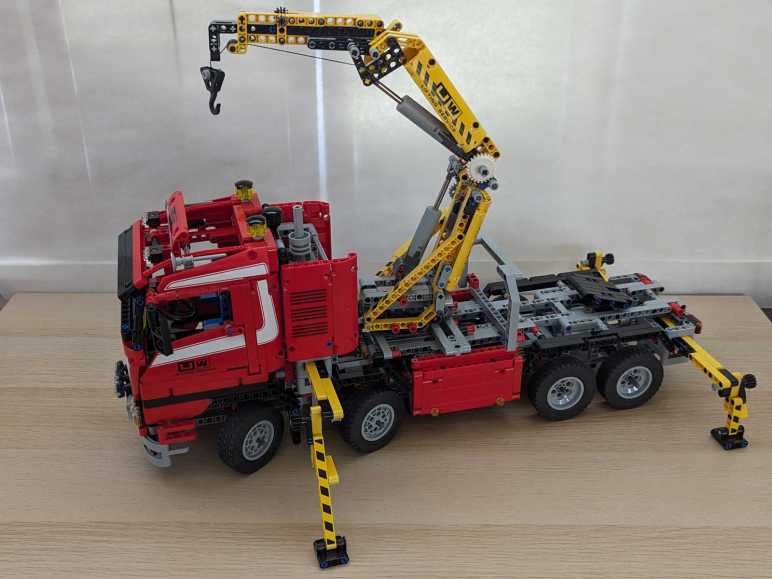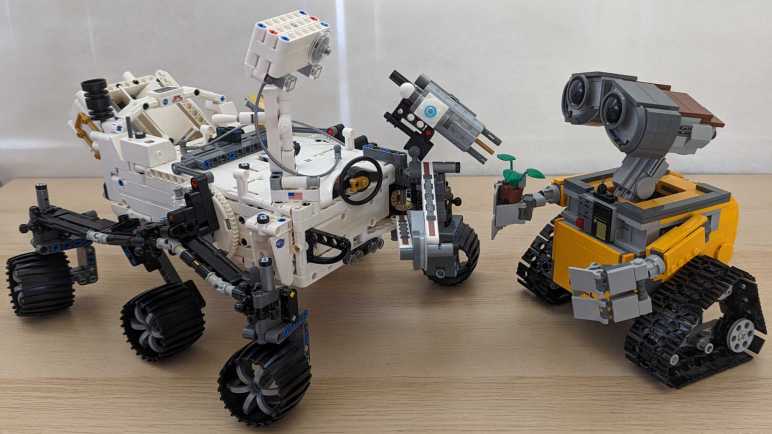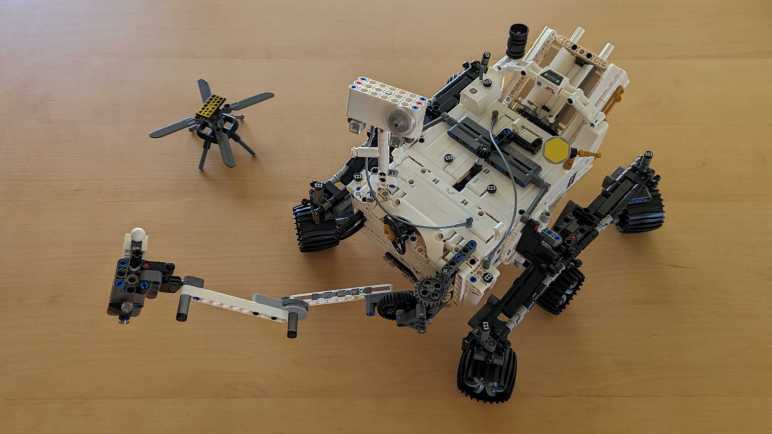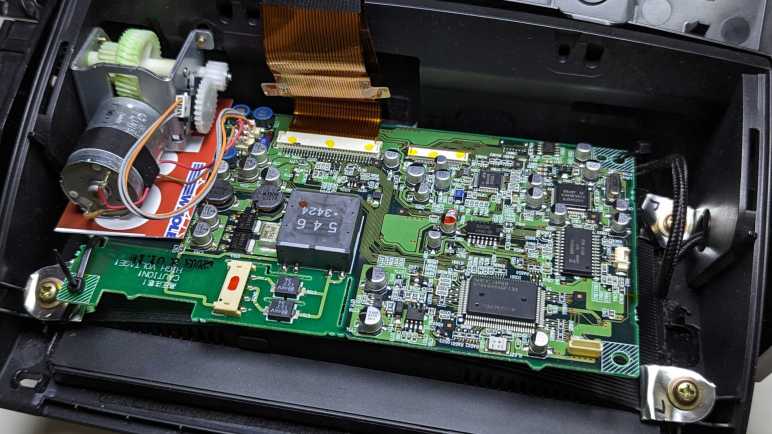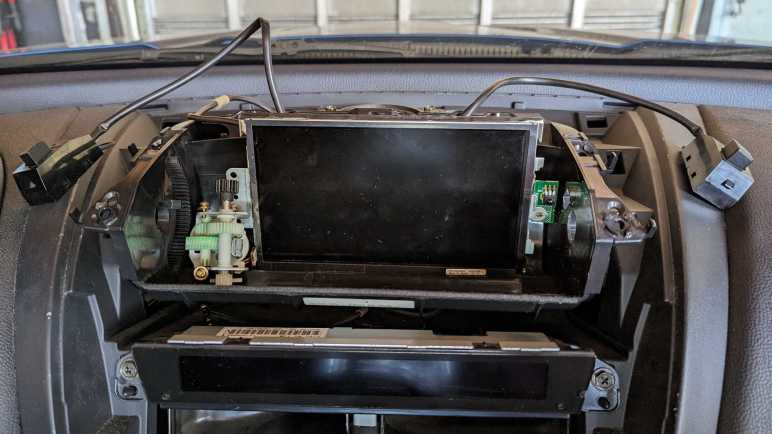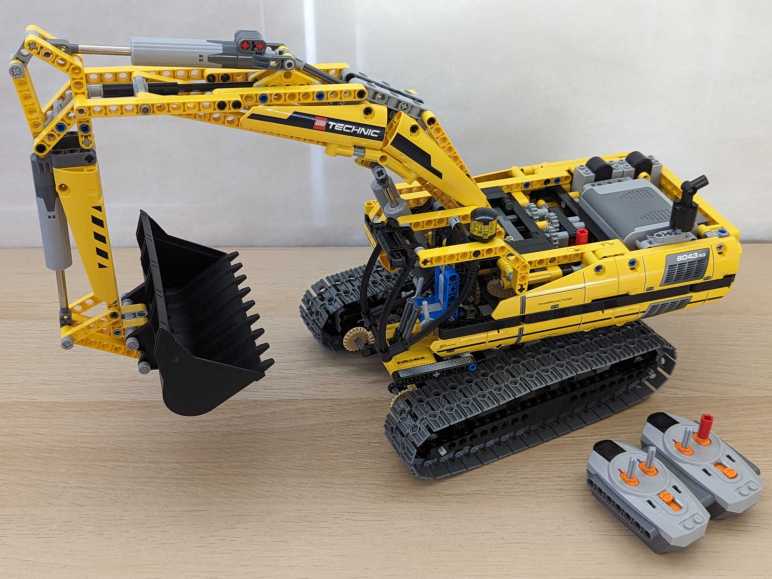
LEGO Technic Motorized Excavator (8043)

I thought the LEGO Technic Unimog truck was an admirable model of the real truck both in appearance and mechanical detail, but I found the pneumatically operated crane arm accessory wanting. I kept my eyes open for another set, one that would revert to mechanical linear actuators and offer motorized controls on all axis of movement. My wish was granted by LEGO Technic Motorized Excavator (8043).

I was bemused when the manual started with a warning that we should not actually take the excavator to play in the dirt. Bah, spoilsports!

Both crane trucks included only a single motor and a complex gearbox with multiple clutches to redirect that power. In contrast, this set included four motors and a single selection clutch. That selection is actuated by one of the motors. The remaining three motors would do one of two jobs depending on that selection, for a total of six functions. When the clutch is set in one way, these three motors control excavator locomotion: left track forward/back, right track forward/back, and body pivot clockwise/counterclockwise. When the clutch is set the other way, these three motors control excavator arm motion: shoulder joint up/down, elbow joint in/out, and wrist joint for bucket scoop/release.

In hindsight, this instruction manual did not meet the usual bar of LEGO instructions. I encountered the first issue during arm assembly. It was physically impossible to mount the pair of blue pins as instructed. I had to shift them one position over for things to fit. The second issue I didn’t realize until after assembly: there weren’t any checkpoint tests. The Crane Truck instructions included a few tests of “turn this shaft, you should see movement in that shaft” nature, helping us verify we had assembled the gearbox correctly. This manual had nothing of that sort, so I didn’t notice my mistake.

Once I completed construction, I was happy to see the gearbox internals exposed to view. For some reason, the product package designer tried to hide this fact, showing the excavator only from angles where we couldn’t see the exposed gearbox. I liked seeing the gears work! Which was good, because I immediately found that I couldn’t control shoulder joint elevation. The exposed gearbox allowed me to debug. Tracing forward from the spinning motor, and going backwards from the shoulder elevation actuators, I found where they were supposed to meet.

The mistake happened here in step 39. The instructions called out two of the gears because their orientation is important. I made sure I installed those two gears correctly, but I missed the fact there was a third gear I was supposed to install as well. Its orientation was not important, but it needed to be there!

I didn’t want to take everything apart in order to rewind back to step 39 out of 99 steps. I tried to be clever, selectively disassembling just what I thought I needed to access the short red shaft that was missing a gear. I felt pretty good about this process until I heard a dreaded plastic-on-plastic “clink!” sound of something falling out.

Gah! Where did you come from? Trying to be clever about installing a missing gear had allowed this gear to fall out the bottom. I turned the excavator over to see if I could figure out where it came from, and immediately learned this was a bad idea because I heard “clink, clink” of more parts falling out. I am digging myself a deeper and deeper hole here.

A cascading comedy of errors ensued as I took the excavator further and further apart. It seemed like every time I tried to put a part back where it was supposed to go, two more would fall out. But I eventually stabilized the situation, installed the gear that I missed the first time, and put everything back together in working order. I doubt I saved any time by trying to be clever, but looking on the bright side I now have a much better understanding of how this excavator fits together.

Once it was all put together and working, I am very happy with this set. I finally had a LEGO Technic set that motorized all the axis of motions necessary to replication movement of the real equipment the kit emulated. And even better, this kit is remote controlled via infrared so I’m not even flipping levers on the machine. I could send it on a journey across the room to scoop up loose piles of LEGO pieces and drop them somewhere else. This is the closest I’ve come to fulfilling the fantasy of 5-year-old me to operate construction equipment. The next obvious step is to rent some time on the real thing, but that’s beyond the scope of a LEGO nostalgia tour.

Naturally, a tinkerer’s brain would look at a great thing and think of ways to improve it. Hackaday recently featured a project by Brick Technology YouTube channel. It repurposed many pieces from this set but articulates the arm with a hydraulic system installed in an entirely different body. It’s pretty impressive! But I don’t think I’ll go down that path because it doesn’t address my gripes with LEGO Technic.
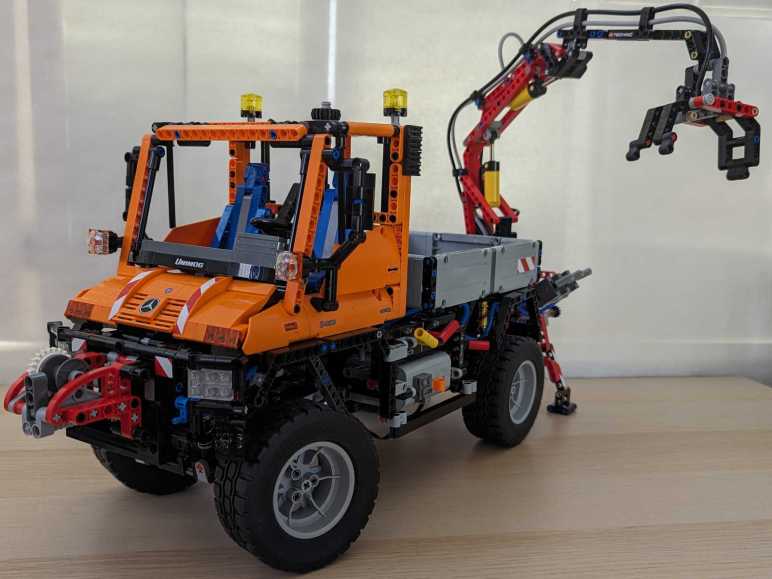
LEGO Technic Unimog U400 (8110)

I enjoyed playing with my LEGO Technic Crane Truck, but it definitely had room for improvement. One particular disappointment was in the limited motorized articulation of its namesake crane. When I saw another crane truck set LEGO Technic Unimog U400 (8110) I was intrigued by the pneumatic piston articulation of its crane. It is easier to run air hoses instead of axles to transmit power through a crane mechanism, would it prove to be a superior solution? I parted with some of my money for an answer.

I don’t know if LEGO Technic Crane Truck was modeled after any specific truck, but this set has Unimog U400 in the name. Looking at this Unimog U400 picture on Wikipedia, I say it’s a pretty good likeness. Even better, the resemblance is more than skin deep.

A signature feature of the Unimog line is the portal axle system giving them greater ground clearance. I’m happy to report LEGO reproduced the portal axles via these wheel hub gears.

To take advantage of the ground clearance, this set also had coil spring suspensions front and rear so the truck can traverse uneven ground. It’s a solid axle design, located by what I now know as a Panhard rod thanks to this Autopian article.

There is again only a single electric motor in this set, with a gearbox that let us either use its rotational power directly or to drive the pneumatic air pump.

The mechanical or pneumatic power is then directed to either front or rear accessory mounting points.

A four-cylinder engine drives all four wheels, and the engine is visible under the cab once it is tilted forward as the real truck does.

The drivetrain and steering mechanisms are not motorized in this set, but I noticed their related geartrain components used shafts that were longer than necessary. The extra length poked into an empty space behind the gearbox, under the cargo bed. I think these are provisions to help anyone who wants to turn this into a remote-control vehicle.

The sizable cargo bed can accommodate a LEGO WALL-E. (Sold separately.)

After the truck was built, we build the removable accessories front and rear. The default front accessory is a winch that runs off the mechanical accessory drive, a fairly straightforward affair. The star of the attraction is in the back: a crane with gripper end that operates on both mechanical and pneumatic accessory drive. The mechanical driveshaft turns the rotating base to control azimuth. Three levers control pneumatic pressure delivered to a corresponding piston: shoulder joint elevation, elbow joint elevation, gripper open/close, or some combination thereof.

I was intrigued by the theoretical capability to operate the crane purely on power controls, unlike Crane Truck where we had to manually reach out to the crane arm to turn knobs for crane extention and winch. And technically speaking, this set delivered on the promise of full power control. Practically speaking, though, the pneumatic system didn’t work very well. The biggest problem is gravity. Raising elevation on each joint is a slow process as the air pressure fought against the weight of the system. When the lever is flipped in the other direction, that weight crashes down and the joint immediately collapses. With each pneumatic control lever a binary on/off affair, I found it impossible to keep descent rate under control.

Even if the pneumatically operated crane arm turned out to be a disappointment, the rest of the truck was still fun to play with. In the future, I might even take up the invitation to turn it into a remote-control vehicle! As for crane arm articulation, my next LEGO Technic purchase would return to the world of mechanical linear actuators.

LEGO Technic Crane Truck (8258)

I took a brief detour taking care of a battery charging circuit, but now I can return to my LEGO nostalgia tour. I left off with a bunch of miscellaneous licensed LEGO merchandise, but what kicked off this nostalgia tour was the NASA Perserverance Rover kit. The rover set was part of LEGO’s Technic line that feature mechanical capabilities. As someone interested in mechanical tinkering, Technic line is the best line to play with! I’m excited to enter the Technic phase of my tour with Crane Truck (8258), an eight-wheel behemoth featuring a midship-mounted crane. It didn’t start well: when I pulled out the instructions sitting on my bookshelf, I noticed a problem. I had kept the sticker decal sheet in the first page of the associated instruction book, so it doesn’t get lost.

But the sheet was slightly larger than the book, so about a centimeter of the edge was exposed to sunlight and those exposed edges suffered years of sun damage.

Damaged edges were liable to break apart into little pieces. When breaks occur in the middle of graphics, my rebuilt model would have to go without these unusable pieces.

Some of the decals had a clear separation between damaged and undamaged areas. In these cases I could make a clean cut and use the undamaged portions.

Some of the damaged portions are crinkled and damaged but did not break apart upon removal from the backing sheet, so I applied them and hoped for the best.

There is a single motor in this set, whose power drives one of four functions via a complex gearbox in the belly of the beast.

The gearbox complexity meant it’s not always clear what function each part served. When a subset of gears seemed to be isolated from everything else, it’s not easy to tell if a mistake was made or if it’s just a matter of other parts yet to come. To relieve this anxiety, there were checkpoint tests included in the manual. Turn one part of the mechanism, and it move another part of the mechanism. If this test fails, backtrack and find out what was missed.

Four out of eight wheels could steer on this particular truck. I was pleased to see the turning ratio are different between the steering racks, a nod to their different Ackerman steering angles. Only a single pair of wheels on the tandem rear axles were driven with a mechanical linkage to the V8 piston engine.

The V8 engine is visible when the operator cab tilts forward, emulating what the real thing needs to do to service the engine.

When built, it is an impressive looking truck with a long chassis. I was disappointed with the mechanical functionality, though. In addition to the aforementioned drivetrain where only two wheels were “driven”, the motorized functions only cover partial functionality. One of the four motorized axis of motion is to deploy/retract the outrigger system, but actually deploying outrigger feet needs to be done manually. The remaining three motorized axis operate the crane: two operate the azimuth and elevation of the entire crane, and the final motorized axis moves the crane elbow joint. Extending the crane or retracting the hook are manual operations, so it is not possible to play-operate this crane purely from the motorized function controls.

The trailer coupling (“fifth wheel“) is purely cosmetic, there’s no pretense of mechanical function at all.

Looking over the crane arm mechanism, I can understand the space limitations that made full motorization impossible. There’s not enough room to run all the LEGO axles needed to transmit motor rotation. It’s understandable, but I was curious if this problem can be solved with a different approach. Sometime later, this curiosity led me to buy a LEGO set that used pneumatic articulation.

Reduce Battery Charging Rate of 4056 BMS

My solar power monitor uses components I salvaged from a broken USB power bank. After a year and a half of daily charge cycling, the charging circuit has gone out. I replaced it with an inexpensive commodity battery management system (BMS) module based on a 4056 chip. Then I let the module run unmodified for two days to verify everything worked as advertised.

These modules shipped with charging rate configured at one amp. The general rule of thumb is charging rate should stay below 1C, which is 2.6A for these 2.6Ah capacity cells, so the default should be fine. But I wanted to lower the charging rate for several reasons:

  • This battery cell is almost a decade old now, and it is natural for older cells to have reduced capacity along with reduced tolerance for charging speed.
  • Charging at slower gentler rates improves battery longevity, hopefully making this old battery last even longer.
  • There’s no rush: drawing from the solar panel, this thing can charge over entire span of daylight hours when panels are producing power.
  • By reducing the power demand, I can activate this charging circuit even when the solar panels produce little power such as during overcast or rainy days.
  • By slowly charging during daylight hours, it reduces stress on the battery because it would only have to run the microcontroller during early morning and early evening when sunlight is scant.

Due to those reasons, I had ambition to slow the charging rate using original USB power bank charging circuit as well, but I didn’t know how to work with the unmarked chip. Switching to a commodity BMS chip meant I can get more information. I’m not sure exactly whose 4056 chip I have here. But as they seemed to be interchangeable commodities, I just downloaded one of them and learned charging rate is controlled by a resistor between pin 2 (PROG) and ground. The formula is (Charging current) = 1200/(RPROG). Probing this module, I find the charge rate control resistor to be the one labeled R3 and its tiny number says “122”. I understand that to mean 12 * 102 = 1200Ω = 1.2 kΩ. This matches expectation with the formula 1A = 1200/1200.

The beauty of math is infinite, but real-world circuits have limits. What is a practical minimum for charging rate? The datasheet I consulted gave several examples, the lowest is 0.12A rate via a 10kΩ resistor. Conveniently, the just-retired USB power bank circuit board has a 10kΩ resistor (labeled “103” meaning 10 * 103 = 10000Ω) on board. Since it’s not doing anything anymore, I can pull it off and swap it for the default resistor at position R3. My lackluster soldering skill with surface mount devices (SMD) wasn’t pretty, but it’s functional.

Now I have a low-demand charging circuit for my solar power monitor, letting me run it across more weather conditions while gently charging the single old lithium-ion battery cell to extend its operating life. It would be nice if I can do more to extend battery longevity: lithium-ion chemistry batteries are stressed when they are fully charged or fully discharged, so they are best kept partially charged. In this particular project, I handle both in software running on my ESP8266. It goes to deep sleep before voltage drops to a critical level. It also disables the solar panel DC buck converter before the battery is fully charged. It’d be nice if I could reduce software complexity by doing everything onboard the BMS module, but I can’t. Low cutoff voltage is controlled by the mystery chip at location U2, and max charging voltage is fixed at 4.2V for a 4056 chip.

Perhaps in the future I’ll find a charging module that would let me modify those parameters, but for today this is good enough for my solar monitoring project to return to service so I can resume my LEGO nostalgia tour. I was just getting to the good part: LEGO Technic sets!

Single Cell Lithium-Ion Battery Management System Module (4056)

My solar panel power monitor project incorporated an old USB power bank for its battery and charger circuit, bypassing its broken USB power output circuit. After a year and a half of daily cycling, the charging circuit has broken down as well. I’m happy I got that extra life out of a USB power bank circuit board that would otherwise have been disposed of. The battery is still going, but I will need a replacement circuit to manage charging it.

With the widespread adoption of lithium-ion battery power, I have many solutions to choose from. The lowest bidder du jour on Amazon was this vendor selling a multipack of 40 BMS modules (*). It arrived in a single 10×4 sheet for the me to break apart as needed, similar to a batch of buck converters I bought earlier. I like this approach much better than loosely packed pieces that may damage each other in shipping.

The main chip in the center of this module had “4056H” printed on top. Many vendors on Amazon/AliExpress/etc. also single-cell BMS modules with this general design, not necessarily with “4056H” on top but all with some variation of “4056” with different prefix/suffix letters. A search for “4056” returned many chips from different companies that seemed to be interchangeable. I assume someone had a successful product that was then copied by many others, but I don’t know who the original was. The same goes for this particular breakout board module design. Looks like both the module and the chip at the center of it have become commodities.

This module also advertised protection against battery over discharge with a 3A current limit and 2.5V voltage limit, but that’s beyond the scope of a 4056 chip. This module must have additional components handling such protection. I see one chip labeled 8205A, which appears to be a dual N-channel MOSFET chip suited for output cutoff controlled by the chip at position U2. I don’t know how to dig deeper because U2 is unmarked on my purchase, but I have learned enough to put this module to work.

The module with its six soldering points is fairly straightforward to incorporate into my project:

  • There are pads on either side of the USB micro-B socket for 5V power input, one of them marked “+”. They are soldered to the existing buck converter dropping solar panel DC power down to 5V.
  • Pins labeled “B+” and “B-” connect to the positive and negative terminals of the 18650 battery cell.
  • Remaining pins labeled “OUT+” and “OUT-” are connected to the ESP8266 microcontroller module.

This configuration successfully recharged the solar monitor battery for two days, verifying everything worked as expected before I proceeded to lower the charging rate from its default of 1 Amp.


(*) Disclosure: As an Amazon Associate I earn from qualifying purchases.

Solar Monitor Battery Charging Failure

I need pause my LEGO nostalgia trip and revisit my solar power monitor project, so a quick recap of the story so far: About a year and a half ago, I built a project to monitor power output of my cheap Harbor Freight solar panels. Power is measured by an Adafruit INA219 sensor breakout board controlled by an ESP8266 microcontroller running software compiled by ESPHome based on my specification YAML. Data is reported to my personal instance of Home Assistant running under KVM hypervisor. I originally wanted to run this device strictly off solar power, but never figured out the analog power bits, so I resigned to incorporating a battery into the device. I had an old USB power bank that could no longer deliver useful USB power, so I took it apart to repurpose the still-working battery cell and charging capability for my solar monitor.

Fast forward to this week: browsing my recent data in Home Assistant, I noticed the solar monitor battery voltage has been erratic for a few days. It usually charges up in the early morning soon after sunrise, then gradually fall through the day until the next morning. But now it no longer charges on a smooth curve in the morning, what’s going on? Looking at charging status LEDs, I can see it changing state erratically once every few seconds. Maybe blinking in charging sequence for a bit, then maybe all four would be illuminated as if the battery was fully charged, then they would go out as if charging power disappeared, or some combination of those states.

Pulling out my voltmeter, I checked the following candidate explanations:

  • Perhaps the buck converter I had used to convert solar panel DC voltage down to 5V is misbehaving? I checked the voltage of enable pin: it is steady at 3.3V. I checked the output voltage: a steady 4.9V with no fluctuation. The buck converter seems to be performing nominally.
  • Perhaps the lithium-ion battery cell is failing? I monitored the battery terminal voltage as the charger cycled through its charging/not-charging states, looking to see if the battery voltage is behaving unexpectedly. Maybe it dropped below critical minimum (3V) or shot up to maximum (4.2V) upon charge. Neither was the case: voltage fluctuated around 3.6V. A little higher when charging and a little lower when discharging, signs of a nominally working battery cell.

If the power input is good and the battery looks good, process of elimination says the problem is the repurposed power bank charging circuit between them. This was not a huge surprise since this piece of electronics was already known to be defective: The reason I took it apart was because the output stage could no longer deliver 5V USB power output. I’m actually rather pleased I got another year and a half of useful life out of the power input charging stage before the whole thing gave out.

Comparing year-and-a-half old picture (left) against current state (right), the most obvious sign of degradation is near the micro-USB power input port, the yellow epoxy towards one corner touching component U9 has visibly darkened. Is it charring from overheating, or some other degradation? That is not clear. What is clear is that I now need something else to manage charging the single 18650 lithium-ion battery cell.

Miscellaneous Licensed LEGO Sets

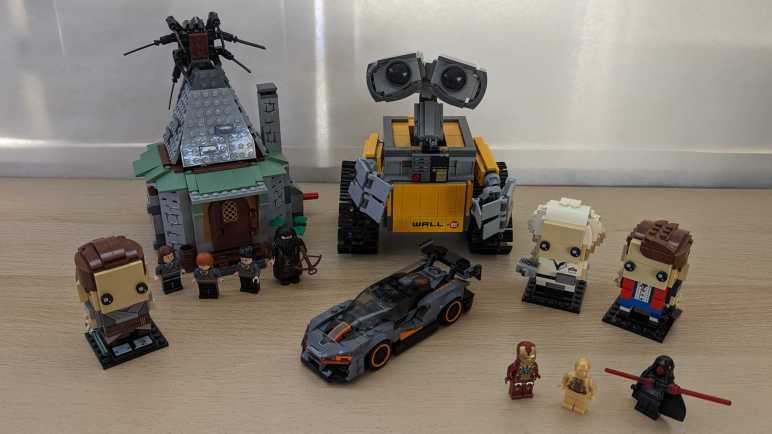
I love R2-D2 and have spent a lot of money on R2-D2 merchandise, including several LEGO R2-D2 sets. Over the years I’ve also bought several other LEGO sets of licensed merchandise.

Far and away the best of them is LEGO Ideas WALL-E (21303) which has the best backstory of all LEGO sets. LEGO Ideas sets originate from people outside of LEGO. Creative LEGO builders can submit their design on the LEGO Ideas website and fans vote on which designs should become actual LEGO products. The most popular ideas are invited to go through LEGO product design process, those that manage to emerge from it become products on shelves.

LEGO WALL-E idea was submitted by Angus MacLane, a lifetime LEGO fan who also happened to have a day job at Pixar Animation Studios. In fact, he was part of the WALL-E film production team. With such insider knowledge, this LEGO set absolutely built and felt like it was designed by someone who knew both LEGO and WALL-E inside and out.

Pawing through my archive of LEGO build instructions, I learned I also have 4738 Hagrid’s Hut. I have no memory of buying this set. I’ve read the books and enjoyed some of the movies, but I wouldn’t call myself a huge fan even before I learned what a horrible person J. K. Rowling turned out to be. I rebuilt this set hoping it’ll jog some memory and… nothing. Shrug.

That’s not the only set I’ve forgotten about. Going through my LEGO figures, I find a few that imply LEGO with missing pieces and memories.

  • I must have bought a LEGO Marvel licensed set for this Iron Man figure, probably a small one because I don’t see pieces implying a large Avengers set. But I don’t recognize anything as an opponent for Tony Stark.
  • I’m not a huge fan of C-3PO but I probably bought something just to get a R2-D2 figure and C-3PO came in the set. But I’ve lost track of the R2-D2 companion for this specific C-3PO.
  • A Darth Maul implies there should be a Jedi for him to fight. Likely a Qui-Gon Jinn, but tan robe and bearded face doesn’t stand out like Darth Maul does in my pile of LEGO figures.

I was moderately amused by LEGO’s BrickHeadz line. I assume they’re trying to earn some money from the Funko Pop audience, as BrickHeadz are clearly designed to be built once and put on display, never disassembled. Or simply collected and left in their boxes, never to be built. Which is a shame, because it’s interesting to see how much LEGO designers can do with so little. I’m especially impressed by how different hairstyles can be represented with generic LEGO bricks over the surface of a 4x4x4 volume. I don’t think all faces are identical, but they certainly are in my tiny collection.

  • 41602 Rey was purchased after watching The Last Jedi, best of the trilogy (fight me) which set up some intriguing possibilities that J.J. Abrams ignored and flushed down the toilet. So much money squandered and opportunity lost with Rise of Skywalker.
  • 41611 was a two-pack: neighborhood scientist inventor Doc Brown and his friend in time, Marty McFly all set to document the inaugural test run of Doc’s time machine. As of this writing, an impressive depiction of the DeLorean is available as LEGO 10300, but I decided to pass on that.

On the subject of LEGO cars, I do have McLaren Senna 75892 from LEGO Speed Champions line. I got this set because it is the featured car of a LEGO themed expansion pack for Forza Horizon 4, which I spent many hours playing. I actually haven’t driven the Senna much in game, I had far more wheel time in the little red rally Mini. I contemplated buying that as well, but it is part of a larger set 75894 and I decided against it.


I was happy to continue revisiting my old LEGO sets, but one of my previous electronics projects needed immediate attention.

My Other LEGO R2-D2 Astromech Droids

My sun-discolored Mindstorms R2-D2 is not my only LEGO R2-D2. I love the little droid, as does a lot of people, and its popularity means LEGO returns to milking that revenue stream on a regular basis. There have been many takes on creating the movie star in plastic brick form, and LEGO separated me from my money on two other occasions. After I rebuilt my sun-discolored R2-D2, I proceeded to rebuild these two.

LEGO Technics R2-D2 (8009)

Smaller and more abstract than the Mindstorms R2-D2, this variation is built exclusively with the LEGO “studless” construction method. Most commonly featured in the Technics line but can be found where other product lines need mechanical capability, such as the drivetrain for a steam locomotive. It doesn’t have the electronic smarts of a Mindstorm set, but it does have mechanical marvel of a Technic set. Featuring a rubber band powered mechanism to switch between R2-D2’s two-wheeled and three-wheeled modes, and a simple lever to extend R2-D2’s welding arm.

LEGO Ultimate Collector Series R2-D2 (10225)

I don’t know the internal corporate business decisions at LEGO, but I imagine they saw the robust market for rare kits and decided there was a business case for expensive low volume kits. Thus the “Ultimate Collector Series” to extract hundreds of dollars from their target audience. Either adults who love LEGO, or rich parents of spoiled children. I was of the former category when I swiped my credit card for 10225.

For the most part this was built in classic LEGO style with studded bricks, with some studless pieces to implement articulation mechanisms. This included the ability to switch between two-legged and three-legged modes, the welder arm, and the buzzsaw arm.

This kit also came with a bonus second R2-D2 in the form of a small LEGO figure. Since this kit was fully designed for static display, it also came with a little display plaque where the little R2-D2 figure sits.


Since there were plenty of money to be made from R2-D2 merchandise, LEGO ignored the definition of “ultimate” and has continued to released more R2-D2 sets. There was the small 30611 deployed as promotion. As of this writing, LEGO Star Wars R2-D2 (73508) is available in stores. Judging from pictures, it appears to be very similar size to the (not actually) Ultimate Collector 10225 I bought but is definitely not a re-release of the same kit. I can see many differences in implementation, most obviously in how the two kits approached building R2-D2’s dome head.

It also has a display plaque, topped by its own small bonus LEGO R2-D2 figure sitting atop the addition of a “Lucasfilm 50th” graphic. It looks like a pretty cool set, but I decided I had enough LEGO R2-D2 in the house and passed on spending over two hundred bucks for my own 73508. That’s money I’ve already spent on other licensed LEGO merchandise.

Reconstructing Sun-Yellowed LEGO R2-D2 (9748)

While digging through my LEGO pieces to reconstruct my train sets, I would frequently come across some severely discolored pieces. They were from a LEGO R2-D2 set, number 9748 in the Mindstorm line of electronics-enhanced kits. I had my little astromech droid displayed on my office window ledge for several years, causing severe sun damage on some of the plastic pieces. I disassembled the kit and distributed its component parts into my LEGO organization system, intending to use those sun-yellowed pieces as internal structure of future creations where we wouldn’t see the discoloration. That never happened, so now I’ll rebuild the droid with an extra challenge: I want to reconstruct the droid including its sun-yellowed nature.

You see, the discoloration only happened in places where certain pieces were exposed to sunlight. The original colors were preserved in places shaded from sunlight. Here are some examples of white pieces with discoloration only where sunlight could reach. A piece of standard LEGO white plate and a standard LEGO tan plate are at the bottom of this picture for color comparison.

Even though R2-D2 only had three wheels, this kit came with four wheels in the box to support four-wheeled creations. While three of the wheels were sitting on the window ledge, the fourth was stored away, and we can see a severe difference in the soft rubbery gray parts of the wheels. In contrast, the rigid gray plastic hubs were barely affected by sunlight exposure.

Obviously different plastic formulations had to be used for soft tires versus rigid plastic. But this kit taught me not all rigid LEGO pieces used the same plastic formulation, either. Many pieces in this kit looked white when new but, after receiving a lot of sunlight, some were immune to sun damage and remained white while others yellowed. It appears all the sun damage immune pieces were Technic-style studless construction pieces, but not all studless pieces were immune.

Reconstructing this yellowed R2-D2 meant physically identical LEGO pieces were not interchangeable as they would normally be. I had to investigate adjacent pieces to make sure their shadow would align with sun-yellowed borders of specific pieces.

Thanks to paying attention to sun-yellowed borders, the recreated R2D2 didn’t have blotches of white exposed in the middle of bricks that were formerly shaded. It still looks weird with a mixture of sun-yellowed parts attached to parts immune to sunlight damage, but I’m going to call it character.

A day after I reconstructed this, all four flexible beams used to define R2’s shoulder curvature broke. I don’t think this is sun damage, I think this is age. Formerly soft plastic could no longer sustain such a tight curve and failed. Maybe I can 3D-print some replacements out of TPU or similar flexible filament, but I’ll leave them alone for now as part of veteran R2’s character. I have other R2 sets to reassemble for a group photo.

My Other LEGO Trains

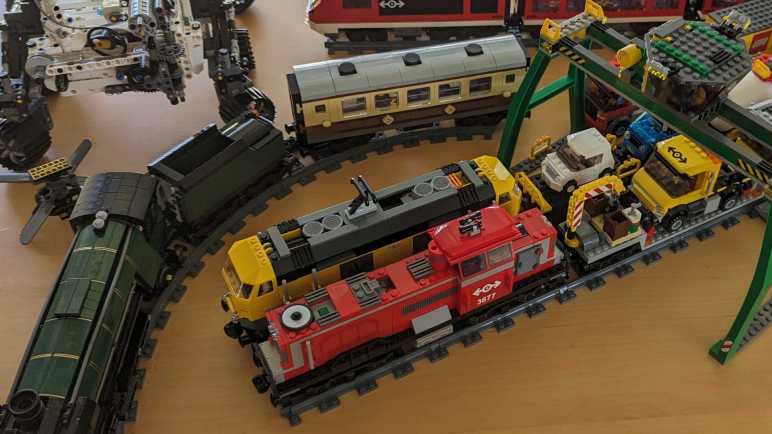
I own three LEGO train sets beyond the gorgeous Emerald Night train set, none of which are nearly as sought-after in the LEGO aftermarket economy. I bought this trio after Emerald Night, thinking I would enjoy building up a LEGO train collection. Buying and building these three sets, though, didn’t bring me the same level of joy as Emerald Night so I stopped buying any more LEGO train sets. I guess I was just a big fan of Emerald Night.

Now I’m putting my LEGO sets back together, I could enjoy them again. I will also apply all the sticker decals that I didn’t use before, as I no longer intend to disassemble them and use those pieces elsewhere. They’ll just sit on display (or stored intact) in the future.


LEGO City Passenger Train (7938)

A modern aerodynamic electric passenger train is the historical successor to steam-powered Emerald Night. Naturally those pantographs are just for looks, as LEGO trains are actually powered by batteries instead of overhead wires. As a result, the first car is packed with battery and associated equipment instead of passenger space as implied by the non-functional opaque windows.

The set also came with a small train platform for passengers to await their ride. Since I’m applying the sticker decals this time around, I finally had a good look at the informational display. Based on its short length, I had thought this train was for urban commuters, but the display listed cities as far apart as London and Moscow. Wow, it’s a train with aspirations for international travel!

I interpreted the numbers listed behind each city as the departure times for each train. It is an extremely tight schedule: eight train services to cities all over Europe departing within a 35-minute window from 11.03 (service to Dublin) to 11:38 (service to Rome.) And according to the analog clock on the lamppost, it is now 11:42. These two passengers on the platform have missed all the scheduled trains.


LEGO City Cargo Train (7939)

A cargo train set is a natural complement to the passenger train, and they were likely released simultaneously judging by sequential kit numbers 7938 and 7939. From this kit I learned a cargo train set has higher play value than passenger train sets. One of the train cars carries two adorable LEGO microcars that somehow still has enough space for a LEGO figure. (They have to forgo large hair/headwear, though.) There’s a car to carry a large cargo container, a container tractor-trailer truck with a half-length container.

The best part: a gantry crane to move containers between them. I loved the detail of the crane operator cab: this little person is seated on a rotating platform and has 270-degree visibility via panoramic windows.


LEGO City Red Cargo Train (3677)

Supporting both passenger and cargo operations is this set in the theme of rail maintenance. The engine has a tall operator station for all-around visibility, consistent with a switcher locomotive for short range work. A car for carrying bulk cargo like gravel, and structures to load and unload it. A long car has a small mobile crane on one end, and a cargo car for carrying bright green barrels of… eh… I don’t know what.

The best part: a small work truck that can convert between road and rail travel. I thought these dual-mode machines were cool in real life and I admit this little truck was the biggest motivation for buying this train set.

On an entirely different topic but still related to purchase motivation, my love for R2-D2 from Star Wars meant I bought several sets after my first LEGO R2-D2 set.

Emerald Night (10194) and LEGO Aftermarket

After several years of not building anything original with my LEGO pieces, I finally had to admit to myself that I’m not using LEGO as construction toys anymore. Rather than letting them sit unused in neatly organized trays, I’ve decided to pull them out and rebuild them according to their respective instructions. This way at least I can still enjoy them in some form.

LEGO pieces have a very distinct tactile sensation as they snap together, a sensation I associate with happy memories. It’s what I treasure about LEGO, but not everyone feels the same. Some treat them as investment assets! Every LEGO kit is produced for some period of time, usually a few years, then discontinued. The finite supply imposes a scarcity and wherever there is scarcity, there is a market. Some time ago I learned there’s an entire economy around people who buy and sell LEGO kits, and the highest value kits are those that were still sealed in original LEGO box and never opened.

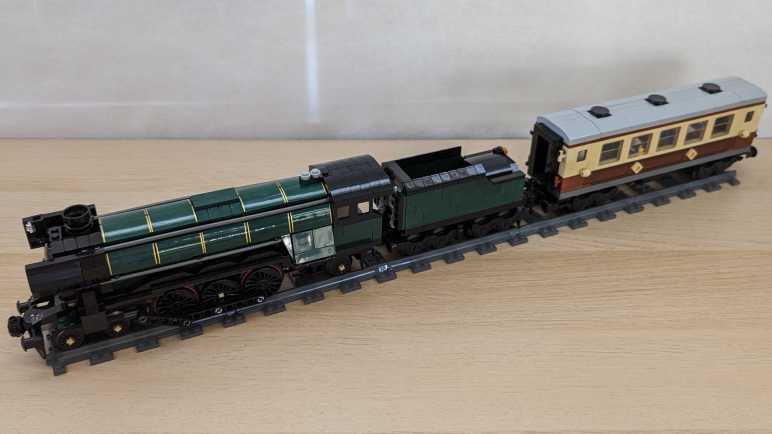
Buying LEGO kits just to never assemble them? It is such a foreign concept to me, but I guess it can be lucrative. Take, for example, kit 10194 “Emerald Night”. This LEGO train paid tribute to steam era locomotives that evoke a lot of nostalgic imagery. It launched in April 2009 for $99 USD. The BLS inflation calculator says that’s roughly $142 in 2023 dollars, but this specific kit has vastly outpaced inflation. As of this writing, there are several eBay listings for unopened (“new in box”) Emerald Night with asking price north of $1,000. Used sets in good condition (I think mine would qualify) are listed in the $500 ballpark. This is insane.

I don’t remember details of buying this set. According to brickeconomy.com it was available exclusively online via LEGO Shop@Home and not sold in stores. I guess that meant a limited production & sales volume? Combined with the fact it builds out to a majestic looking steam engine, I can see why it would still be in high demand now. But I don’t see my LEGO as investment assets, I got mine to build and play and make choo-choo noises with my mouth as it runs down the track. If I want investment assets, I will buy some VFIAX.

None of the parts in Emerald Knight jumped out at me as shapes unique to this kit. However, the locomotive exterior and its associated tender are in a deep rich dark green instead of the typical LEGO green color. Like WALL-E orange, I don’t own any other LEGO pieces of this color, either. After disassembling the train many years ago, I’ve frequently eyed those dark green pieces and struggled to find another application for them. I never did. But now that I’ve put Emerald Night back together, I could admire this epic LEGO train again. Then I continued to reassemble all of my other LEGO trains.

I Haven’t Used LEGO Construction in Years

When I was young, LEGO were construction toys. The box picture was only a starting point, a “Hello World” to show what can be built with pieces in that box. I would build it, sure, but then I would take it apart to build something else from my imagination. Then I would take that apart to build something else, and repeat. In that past era, majority of pieces were generic bricks. What could be built were low-resolution approximations, and specialized parts were few and far in between.

Over the past several decades, LEGO has evolved away from that type of usage. What’s inside a LEGO box have become more and more specific to what’s pictured on the outside. Specialized parts help build higher fidelity models but are difficult to repurpose for other creations. One example of this trend are the wheels of the new Perseverance rover kit 42158 that I just assembled. It has specialized wheels for that distinct Mars rover look, instead of using generic LEGO wheels like they did for their earlier Curiosity rover kit 21104.

This trend towards more specialized parts meant that after I build a LEGO kit according to instructions, I am less and less able to reuse those parts for something else of my own imagination. As a result, some kits are put on static display, others are disassembled only to never end up usefully deployed in any other context. And it’s not just the physical shape of the pieces, they also use colors outside of LEGO’s standard color palette. While building WALL-E kit 21303, I was very impressed that none of its pieces jumped out at me as a specialized part. I thought the whole kit (minus the decals, naturally) were built from standard LEGO. I didn’t learn of my mistake until I took WALL-E apart and started sorting parts: WALL-E’s body was neither LEGO’s standard yellow nor their standard orange. It was a different shade in between!

Here are three small 1×1 pieces on a white beam, each representing one of the colors. To the left is standard LEGO yellow, to the right is standard LEGO orange, and between them is WALL-E orange which is neither of those colors. As another point of comparison, standing behind the beam is a LEGO figure. Standard LEGO yellow for head and hands, and standard orange for the torso. Neither of which match WALL-E orange. I’m not well versed enough in the LEGO lineup to know if this shade of orange is used in other kits or created specifically for WALL-E. I do know I don’t have anything else in this specific shade of orange.

But it’s not just the specialized parts and colors. The biggest reason for my migration away from LEGO is 3D printing. Ever since I got up and running on 3D printers, it has been my preferred tool for turning my imagination into plastic reality. I don’t have to be constrained by the selection of LEGO parts I have on hand, and dimensions are not constrained to multiples of a single LEGO stud. And if a part breaks, it’s a lot easier to reprint a part than it is to replace a specific LEGO piece.

Ironically, one of my earliest 3D printing projects were trays to organize my disassembled LEGO pieces. I got all of my LEGO neatly organized and set up for future creations, only to never touch them since. (I’m laughing at myself in hindsight.) Putting Perseverance rover kit 42158 rekindled my love for LEGO and that satisfying tactile sensation of clicking LEGO pieces together. Since I haven’t used LEGO as construction sets for years, and it’s growing ever less likely in the future, I might as well reassemble these kits back to the picture on their boxes. And if I’m doing that, I might as well start with the prettiest of them all: LEGO Emerald Night.

LEGO Technic NASA Mars Rover Perseverance (42158)

One of my many back-burner projects is a micro Sawppy: a smaller 3D-printed motorized Mars rover model with a target parts cost under $100. Well, the LEGO group has joined the chat with their $100 NASA Mars Rover Perseverance kit number 42158. This is more complex and expensive than their earlier rover (Curiosity rover #21104), but less than what serious fanatics have created. As someone who grew up playing with LEGO and a fan of Mars rovers, I had to get one.

This product is in the Technic line, which goes beyond cosmetic appearance by incorporating mechanical features. The front of the box depicts a wheel raised by a boulder, implying a functioning rocker-bogie suspension.

The back of the box shows four-wheel steering, with alignment for turning-in-place and for driving in an arc. It also advertises some level of arm articulation. It’ll be very interesting to see how that’s implemented. I opened the box and got to work. Window-shoppers can download the assembly instruction PDF to see all the details without spending money.

I was not surprised to find the wheels were custom pieces unique to this kit.

Also unique to this kit were a few decal stickers.

Construction started with fairly standard Technic fare. The first thing that really made me think “Huh, haven’t seen that before” were these angled shafts. Usually, universal joints were used only for vehicle models with suspensions and had to transmit power through range of suspension motion. This is the first time I recall seeing them used for an interior non-articulating joint.

The first completed bit of rover suspension was the differential bar on top of the rover. A stout triple-beam unit to handle the load. It got me excited to seeing the rest of rocker-bogie suspension implemented in LEGO.

I was surprised to find the rover instrument mast could be built in the stowed travel configuration. No such feature for the rocker-bogie, though, which is fixed in the deployed position. I have ambition to give micro Sawppy a rocker deploy pivot but that’ll take development effort I have yet to invest.

A little over four hours later, I completed assembly of the kit. It’s pretty cool and absolutely recognizable as Perseverance rover with little buddy Ingenuity. The robot arm articulation geartrain turned out to actuate only the shoulder joint, elbow and wrist joints are posed manually.

As is typical for LEGO, a few extra copies of easy-to-lose pieces are included. If one goes missing, we can still complete the kit.

The cover art boulder is no lie: rocker-bogie suspension geometry is fully functional.

It was also, unfortunately, quite flexible. LEGO pieces have small gaps between them so we can snap them together and take them apart. These small gaps, combined with the natural flexibility of ABS plastic, resulted in a pretty floppy suspension that splayed out as it squatted. On the upside, I’ve determined the real thing built with carbon-fiber and titanium is also pretty floppy so all good.

A similar problem hampered the corner steering mechanism as well. It’s a pretty clever design switching between “center steering” and “arc travel” modes with a single lever in the middle of rover body. But transmitting steering motion all the way out to the corners meant many linkages, each adding their own tiny bit of play. As a result, steering angles for the four corner wheels are more suggestions than commands. But still, pretty cool.

I enjoyed assembling and playing with this kit. LEGO assembly instructions, using techniques polished over decades, were excellent as always. I aspire to one day make Sawppy assembly instructions as clear as LEGO assembly instructions. However, the instructions only describe one thing. The beauty of LEGO is that it enables building countless other ideas of my imagination. It did that very well, until I got into 3D printing.

RX-8 Navigation Upgrade Project Phase One Complete

I had a minor setback in my project to upgrade my 2004 Mazda RX-8’s in-car navigation capability from the now-ancient factory integrated system. But despite the setback, I have a usable system. Enough to declare this as successful completion of project phase one. By removing the navigation map display unit, and installing a standalone wireless CarPlay/Android Auto receiver in its place, I now experience the following advantages:

  • Connects to my Pixel 7 phone via wireless Android Auto, so now my in-car navigation screen has access to up-to-date maps and traffic information.
  • Audio entertainment including music or podcasts can stream from my phone.
  • User interaction such as setting a destination for navigation can be done via my phone’s highly responsive touchscreen. It’s superior to the sluggish receiver touchscreen and far superior to the factory system of painstakingly typing an address via joystick-controlled on-screen keyboard.

These items were left unchanged, and they were important project criteria:

  • Factory appearance with no visible alteration to interior trim. When the car is turned off, the only visible difference is the new receiver has a glossy screen whereas the factory LCD had a matte surface.
  • All in-car controls were maintained, including volume control both via center console and steering wheel buttons.

Unfortunately, there were several functional regressions:

  • Due to electrical interference, I had to disconnect the factory motor retract mechanism. I’m optimistic I can regain this functionality as a future phase of the project.
  • When the factory system loses GPS signal, it can estimate position based on vehicle speed and direction. The new receiver is GPS-only and helpless when signal is lost. I don’t see any way to restore this functionality, but it’s not a high priority to do so.
  • The factory system automatically dims the display when headlights are on, and when the light sensor detects low ambient light. The new receiver’s brightness must be manually adjusted. I don’t see any way to restore the headlight response functionality with this receiver. However, buying a different Android Auto receiver with a built-in light sensor may restore auto-dimming capability.

Potential future phases for this project:

  • Restore the factory motor retract mechanism. Fortunately, Mazda engineers designed the geartrain to be back drivable. Or in plainer language, I could still adjust the angle manually without damaging either the motor or its gears. This will be important if a headlight or sunlight is inconveniently angled to reflect off that glossy screen into my eyes: I can still reach out to change that angle.
  • Install the backup camera that came bundled with the receiver. [UPDATE: completed as phase 2.]
  • Install a power switch for times when I don’t want that screen.
  • Remove/repurpose other components of the factory navigation system. Including the control panel just behind the shifter, and the map data DVD drive + navigation computer between the rear seats.

For now, I will use the system as-is without the motor retract mechanism. See what other problems crop up during use so I could solve them before going further.

Integrated Test Failed Due to Interference

After devising ways to hold everything together, I performed a quick test and things seemed OK. Then I buttoned everything up, reassembled the navigation hood panel, and installed it on the dashboard. Before I reinstall everything else (center ventilation grille on down) I turned on the car to verify everything still worked.

It did not.

Upon power-up, the navigation hood actuator opened to unveil the screen, which was good. Then I saw the boot-up sequence, which was also good. But a few seconds later, things started going wrong. The screen started blinking on and off every few seconds, and the system acted as if I’m touching the screen even though I have not. (Phantom touches.) When I did try to use the touchscreen, it would react properly only about half of the time. This is not a usable system.

Since the beginning of this project, my top worry has been potential interference from the LCD control board. Even though I’m no longer using the original LCD, I had to keep the control board installed to maintain original actuator functionality. To see if the board was indeed causing problems, I disconnected the ribbon cable from the rear module. Doing so disabled hood actuator functionality. On the upside, the random screen blinks are gone, and the capacitive touchscreen functions correctly again.

My earlier quick test placed those components adjacent to each other, but there’s something special about actually tightening up and reassembling interior trim that triggered this system freakout. Unfortunate. Looking on the bright side, if my quick test worked it meant I’m not terribly far from a functional arrangement. If I can devise a way to shield the LCD board from the receiver, I may yet be able to reuse the original LCD control board for its motor control capability. I will note that as a future to-do item, because I wanted to keep what I have as “Minimum Viable Product” for this project. Use it as-is for a while to see if I find any other problems.

Receiver Mechanical Installation in Navigation Hood

I have electric power supply and other connections figured out for putting a wireless CarPlay/Android Auto receiver in place of the factory navigation system display in my 2004 Mazda RX-8. Now I need to figure out how to keep everything physically in place. Normally I would turn to 3D printing to solve such problems, but this will be on top of a black car dashboard. I know for sure 3D printed PLA plastic parts soften and deform under summer sun, and that wasn’t even inside a car. I think PETG could withstand such temperatures, but I’m not sure.

Uncertain of plastic durability, I turned to metal. This was the folded sheet metal tray from a Seagate external backup drive. I cut out the four tabs that formerly held screws securing the 3.5″ HDD in place.

These tabs were then used to hold the receiver in place, using original support posts and their screws. This is not a very precise mechanism. Because the tabs would shift slightly as I tightened the screws, it was hard to keep the receiver in exactly the right place to ensure the screen image is perfectly centered. After several attempts ended with a slightly off-center alignment, I decided “meh, close enough” and moved on.

The slight misalignment made me glad I decided against drilling a hole for the integrated microphone. I haven’t used voice assistant features and I don’t intend to start. And since I didn’t drill a microphone hole, I don’t have to worry about precisely aligning it, either.

Now I need to put the original display circuit board back in, without the display. The only reason it is still here is because it also handles retraction motor control and I wanted to preserve that capability. I first tried to fit the circuit board while it was still installed on its metal backing plate. I liked the extra structural rigidity, and I hoped the metal plate would act as shielding protecting the receiver from interference.

Unfortunately, there’s not enough room. Top edge of the circuit board sticks out beyond where the lid would go. For everything to fit, I will have to go without that metal plate.

The receiver’s own plastic enclosure should act as electrical insulation on the bottom. On top, I cut down a depleted Costco shop card to act as shield and insulation against the retraction servo assembly.

A quick in-car test looks good enough to proceed: the retraction motor worked as long as I ensured it stayed in operating range, and the receiver boots up as expected.

With that success, I buttoned everything down. The original LCD circuit board, now just a retraction motor control board, is then secured via zip-ties. Then everything was put back in the car for a full-up functional test.

Tapping Power from RX-8 Navigation Hood

Once I figured out the navigation hood actuator position needs to stay within an expected range, I got things back up and running enough to perform a reset and erase all of my personal information from the ancient factory navigation computer of my 2004 Mazda RX-8. Now I can focus on the wireless CarPlay/Android Auto receiver I intend to install in its place, and the first order of business is finding a power source.

The receiver came with a cigarette lighter power adapter, it even has a right-angle USB type C connector. But the connector is too large to fit through the hood hinge. Besides, running the power wire all the way from the nearest cigarette lighter socket feels inelegant. The existing navigation hood mechanism has access to power, I should tap into that instead!

Probing the LCD assembly connectors, I first found all the ground/shield wires. Using that as a reference, I could measure the rest of the wires.

I confirmed the two expected power supply pins: 1Q has power as long as the battery has power, and 1O is only powered on when the key is in the ACC or ON positions. I don’t know of any reason why the receiver needs power when the car is shut off, so I’ll tap into 1O for accessory power.

On the receiver side, I cut off the USB-A end of my just-purchased right-angle USB-C extension cable (*). This cut-off end could be easily routed through the hole in the middle of the hinge. A quick test showed this receiver is happy with +5V on the red wire and ground on the black wire, no voltage dividing resistors necessary to negotiate power delivery.

Sitting between those two ends is a LM2596 buck converter module (*) to convert ACC power (~11V-14.4V) down to 5V. It is protected by a short length of clear heat-shrink tubing (*) and mounted to the side of the housing with double-sided tape. The wires are kept in place with some adhesive-mounted zip ties (*) hopefully reducing metal fatigue from a car’s normal high-vibration environment.

I stuck it to the side because I knew there was enough room there under the dash, but I forgot to account for installation opening which is narrow and would block a straightforward install. But, if I carefully tilt the assembly off to one side, I can make just enough room to slide the buck converter past this ledge. This was good enough for the first pass. If it doesn’t work out, I will have to reposition the buck converter and reroute the wires.


(*) Disclosure: As an Amazon Associate I earn from qualifying purchases.

Navigation Hood Actuator Electrical Test

I reconnected all the electrical cables I took apart on my 2004 Mazda RX-8, intending to clear all personal data from the original navigation system before I replace it with a wireless CarPlay/Android Auto receiver. But when I turned the car back on, everything stayed dark. I found and fixed a problem with the audio control panel, caused when I used too much force upon removal. Now the audio panel works, but the navigation screen still stayed dark.

Everything electrical seemed to check out, I got as far as confirming that there’s power going into the LCD control board, but nothing is moving. Normally when I power up the system, the motor whirs to unveil the screen and the screen turns on to show the navigation system boot sequence. Now I have no motor whir and the screen stayed dark. Since I’m doing just an electrical test, the motor is connected but merely sitting off to the side.

Thinking maybe I’ve missed a subtle detail somewhere, I kept my eyes open as I mechanically reassembled the navigation hood as well. Retrying the experiment, I was excited to see the motorized hood moving into place and the screen came on as expected. Interesting! I pressed the open/close button to verify the closing sequence, then I pressed it again to open it up. The second time, nothing moved and the screen stayed dark. What’s going on?

Eventually I figured out the motor sequence will not execute if the actuator is out of its expected range of motion. This seems reasonable enough in hindsight. Such was the case when the motor was just sitting off to the side and was the case again when the partially reassembled hood closed. (When fully reassembled, the surround panel will keep it from moving that far.) The inertia from closing pushed it a little too far and out of the expected range, so it refused to run the second time. But if I push it a little bit, back within its normal range of motion, it will run.

That was good to know, and now I have the old navigation screen up, I could perform the reset sequence as per RX-8 owner forum thread:

  • Go to System menu.
  • Select Version Information.
  • Move the navigation control joystick: up, up, up, down, down, down, up, up. This should bring up a diagnostics menu.
  • Select “CD Check”
  • Select “Cold Start”

The system will reboot and, when it comes up, the “Select Destination” menu will show up with “Marked Point” and “History” grayed out: they have been erased. This was what I wanted, and I can proceed with my screen replacement project.

Audio Head Unit Was Damaged During Removal

After cutting some plastic away, I was able to fit a wireless CarPlay/Android Auto receiver in the space originally occupied by the factory navigation LCD in my 2004 Mazda RX-8. It’s a tight fit, so several right-angle extension cables are on order. While I waited for them to arrive, I thought I would hook up all of the original components. There were two reasons for this. First, because this replacement would make the original system inaccessible (can’t interact without a screen) I wanted to wipe all personal data. Information like travel history, bookmarks, and so forth. Second, in case the new system doesn’t start up as expected, I wanted to know I didn’t break anything getting to this point. That turned out to be a very good call.

After I put everything back together, I turned the key to “ACC” (accessory) and while the dashboard lit up as expected, the center console did not. Usually, the LED status bar above the radio would display “mazda RX-8” in the center between the clock and thermometer, but that entire status bar stayed dark. NO text, no clock, no thermometer. Furthermore, the navigation hood is supposed to flip open to expose the display, where I can watch the old navigation system boot up. The hood did not flip up, and the screen stayed dark.

After taking a deep breath, I started on a list of diagnostic steps:

  • Unplugged and reseated all connections didn’t help.
  • Checked the fuse box, the ACC fuse looked fine and has electrical continuity.
  • Turn everything off and back on: disconnected the battery, waited half an hour, plug it back in. Didn’t help.

I removed the audio head unit for closer inspection on the workbench. While looking around for obvious signs of damage, I found the culprit:

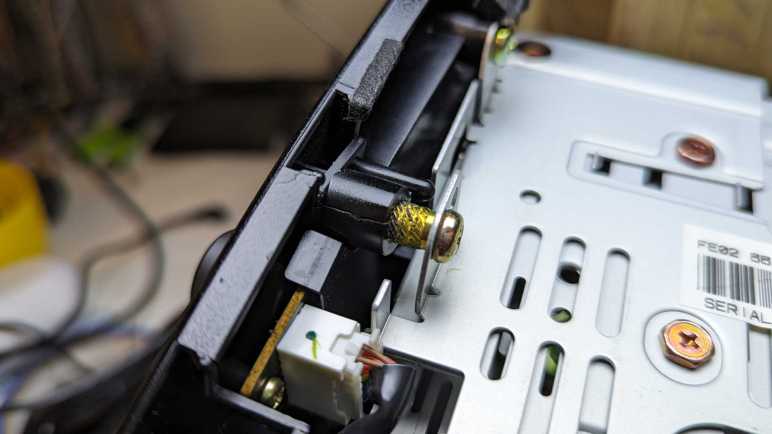
This is one of four fastener positions holding the glossy black plastic audio control panel to the metal equipment cage behind it. For this fastener, I can see the serrated edge of a heat-set insert. I’m not supposed to see that! Apparently, when I removed this module, I pulled too hard trying to free it from plastic clips and ripped this fastener out.

Just inside the ripped-out insert was a connector like the ones I saw in the Toyota and Honda units I’ve explored. This is probably a standardized durable part that works very well for this application, but they definitely won’t work when the two parts were held a centimeter apart by a stripped-out heat-set insert.

Now that I see the problem, it was easy enough to fix with my soldering iron.

And ta-da! It’s back in. Reinstalling the control panel, I can see the connectors are now actually connecting. This time when I turned the key, I saw the LED status bar light up alongside working audio and HVAC controls. However, the navigation hood motor didn’t move, and the LCD stayed dark. One problem down, but I still have more debugging to do.

Trimming Both Receiver and Bezel to Fit

I want to install a cheap wireless CarPlay/Android Auto receiver into my 2004 Mazda RX-8 factory navigation display enclosure, but it was just a little bit too wide. I rather not cut the enclosure so I took a look inside the receiver to see if I can get things to fit by just cutting the cheap Amazon purchase. While there weren’t any electronics on the edges where I wanted to cut, the front face is made of glass instead of clear plastic, and I don’t have a good way to cut that. I resigned to the fact I have to cut into the interior trim piece after all.

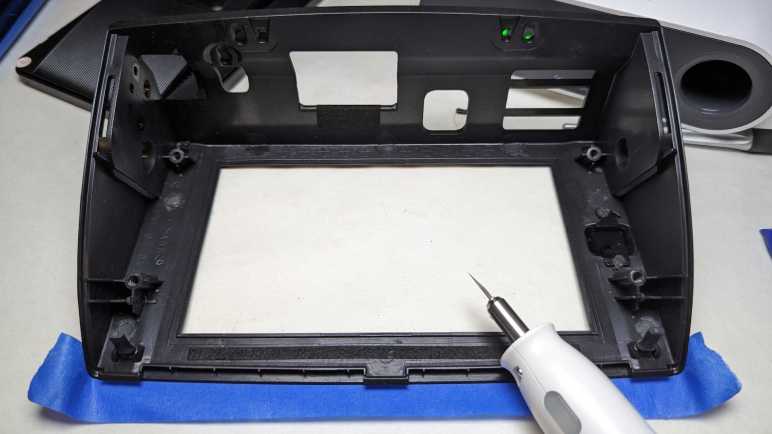
My tool of choice is the Cutra WonderCutter S, which had no problem cutting ABS plastic.

While setting up to start cutting, I took a closer look the soft rubber bumpers that exist to cushion the face as it closed. I thought they were pretty permanent but they were actually really easy to remove after a light tug to stretch and make it thinner.

I couldn’t cut the glass face of the receiver. I could probably cut the sheet of plastic bonded to that glass, but it’d be a lot of work for minimal gain. Everything behind them, though, were thinner and easier to cut free.

To fit those trimmed-down sides, I cut slots into the bottom of existing molded support posts. This way I preserve the ability to remount original equipment if I wanted, and also leaves open the option to use those supports to mount the new receiver. With these slots, and with the soft rubber bumpers removed, the receiver can slide into place. (In the orientation of this picture, the receiver slides in from right to left.)

Once the receiver was in place, I had final confirmation there’s very little remaining space for my connectors. I ordered right-angle adapters for all connections:

I needed to wait a few days for them to arrive but that’s OK, as it turned out I had some problems to diagnose before I could reset my old navigation system.


(*) Disclosure: As an Amazon Associate I earn from qualifying purchases.