Thrift Store Neato XV-12 Joins XV-21

I thought I was pretty lucky to find a Neato robot vacuum in a thrift store for $8. It didn’t work in the store and that’s why it was cheap, but I have since determined it was fully functional except for its battery pack. While waiting for its replacement battery pack to arrive, Player 2 has entered the game! [Emily] managed to find another Neato robot vacuum in a different thrift store. The new find is a model XV-12 and it included the charging dock for $11.

XV-12 And XV-21 A Pair of Neato

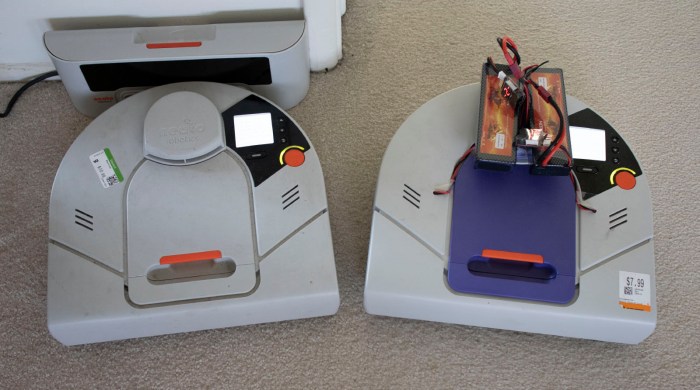
A little web research indicated that these two robot vacuums are contemporaries, both followed up Neato’s XV-11. The XV-12 is the direct successor that replaced the XV-11, and the XV-21 is a premium offering sold simultaneously with the XV-11. Aside from the cosmetic difference of purple plastic top on the XV-12, there are a few functional differences.

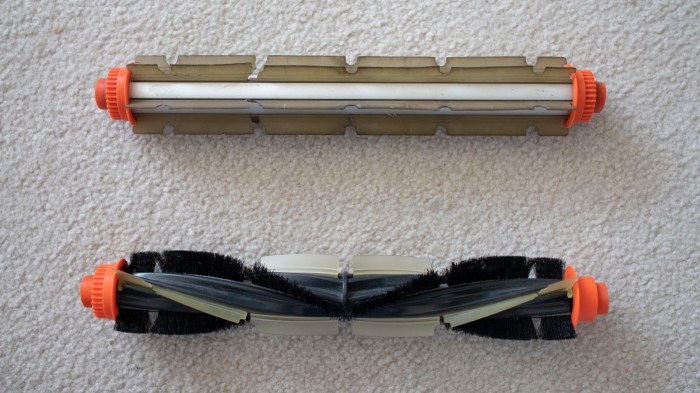
The cleaning brush roller is different. The XV-12 uses a bidirectional design with flat flexible plastic blades. The XV-21 uses a unidirectional design with a combination of flexible plastic blades and bristles. The XV-12 brush can be mounted in either direction – note that geared teeth to engage the toothed belt on both sides of the roller. The XV-21 is designed to spin a specific direction – brushing debris towards the center of the vacuum – and only has geared teeth on one end of the roller because it won’t work properly if mounted the other way.

Neato brush comparison

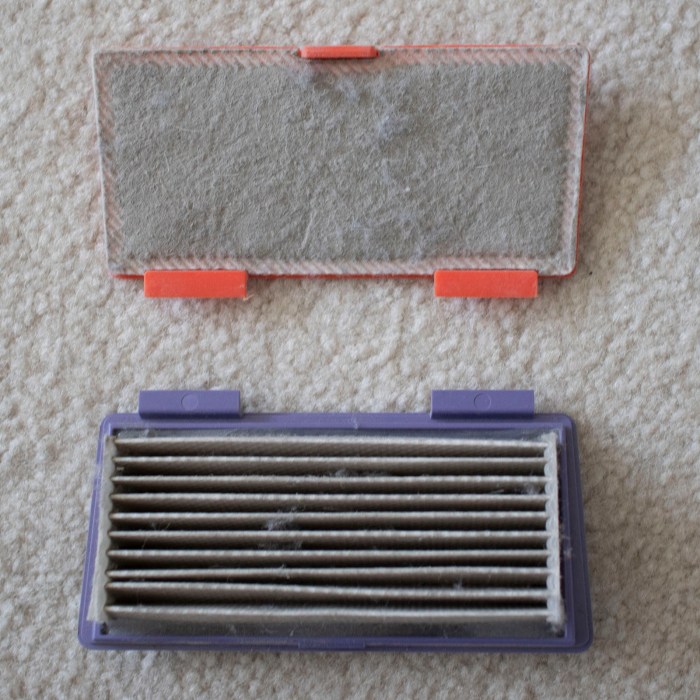
The dust bin filters are also different between these two models. While the XV-12 uses a flat sheet, the XV-21 uses a pleated design for greater surface area. This partially compensates for the more restrictive filter used in a XV-21 that captures more particles from the vacuum air stream.

Neato filter comparison

The XV-21 was sold as the upgrade model. Its roller brush with curved flexible blades and bristles combine to pick up more dirt, and its pleated filter keeps more of that dirt in the dust bin instead of passing it into the exhaust. These two differences reportedly improve vacuum capability at the cost of greater power consumption which translates to shorter run time on battery.

In addition to the design differences between the XV-12 and the XV-21, there are additional differences between these two specific thrift store finds. The XV-21 was surprisingly clean hinting at a very low usage in its previous life, but the XV-12 shows signs of a well-used robot vacuum.


Battery Replacement Options for Thrift Store Neato XV-21

With a successful all-up system test of Neato XV-21, running on hacked-up battery packs through a full vacuum cycle, we have confidence everything works on this thrift store bargain except for the battery pack. So focus returns to these NiMH battery packs.

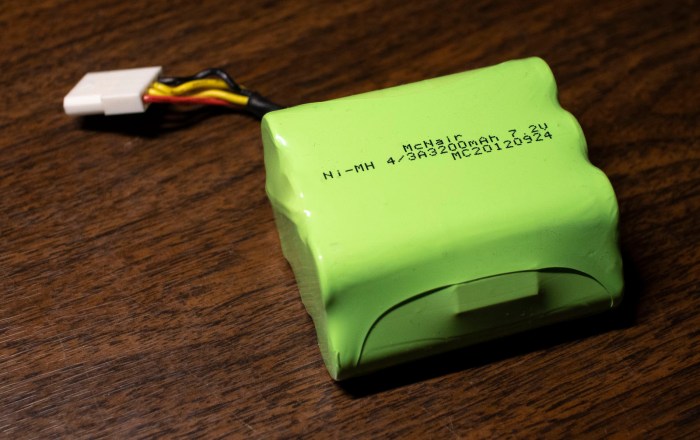
Neato XV-21 battery pack

The default option is to buy some battery packs specifically built and sold as replacement batteries for a Neato robot vacuum. A straightforward Amazon search for “Neato battery pack” will return this “Amazon’s Choice” item (*) at $30 for 4000mAh NiMH packs.

A tempting choice is to purchase some lithium-ion batteries that would also fit in the Neato battery bay. However, battery packs sold on Amazon are typically designed for very high draw applications like multi rotor aircraft. Batteries designed to survive such use tend to have lower energy density. Thus lithium packs that fit within the bay’s dimensions actually don’t have much significantly higher capacity than 4000mAh.

Another concern with installing lithium batteries is the fact the Neato’s on board charging circuits are designed for NiMH battery cells, which has a different charging profile. Charging lithium cells as if they were NiMH cells risks damaging the lithium cells and possibly lighting them on fire.

There is, however, this item (*) which are lithium replacement packs intended and designed as an upgrade option for Neato vacuums. Not only are they sized appropriately to fit, they also have an integrated battery management system. Presumably, the circuit will make the Neato brain think there’s a NiMH battery pack installed but treat the lithium cells properly. At 4400mAh it offers 10% higher claimed capacity relative to default option, but at over double the cost, the cost/performance ratio is poor.

There is also the option to purchase new NiMH battery cells and rebuild the battery pack myself, reusing all the associated parts from the existing pack. I had expected this to be the lowest-cost option by supplying my own labor, but when I searched for NiMH battery cells in 4/3A form factor with 4000mAh capacity, I was surprised to find that they were selling for more than $3 per cell. There are 6 cells per pack and a Neato requires two packs, for 12 total cells. This means buying raw cells and rebuilding them myself would cost over $36, more than just buying a prebuilt pack from Amazon!

With this little bit of research into lithium upgrade option and rebuild option, it looks like the default $30 option is the best way to go. But before that replacement battery pack arrived, my Neato got a friend!


(*) Disclosure: As an Amazon Associate I earn from qualifying purchases.

Mounting External Batteries on Thrift Store Neato XV-21

Using small batteries I hacked into existing battery bays, I was able to query sensor status and command individual motors. However, those small batteries were not powerful enough to run multiple motors simultaneously, which meant a full system test would not be possible until larger batteries are installed. At this point I could order some Neato-specific replacement batteries and have decent confidence it will work, but I would like additional confirmation before I spend money.

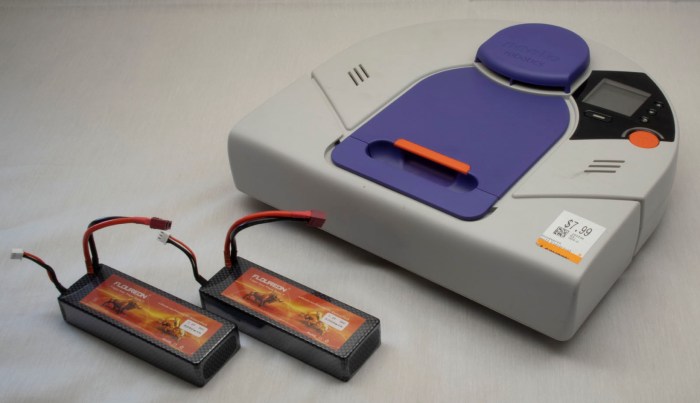
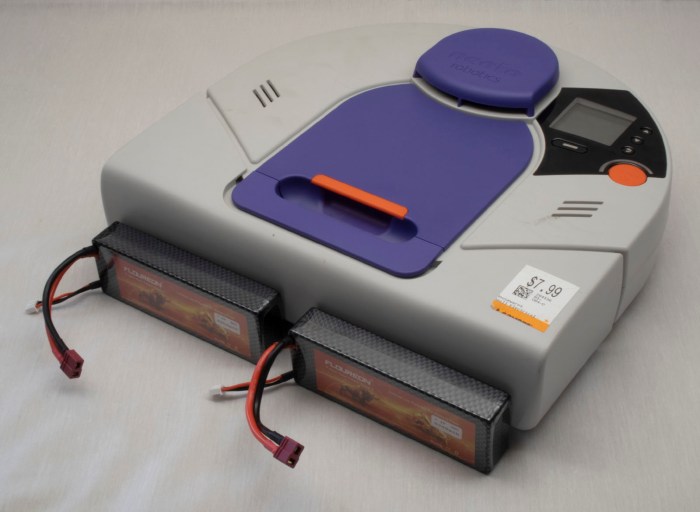
But I didn’t have any batteries that were more powerful and still small enough to fit within Neato vacuum’s existing battery bays. This meant batteries had to be installed externally. And if they’re going to be external, I might as well go with the biggest batteries I have on hand: those I purchased for Sawppy the rover.

But where could I install those batteries?

Neato XV-21 with two big power packs

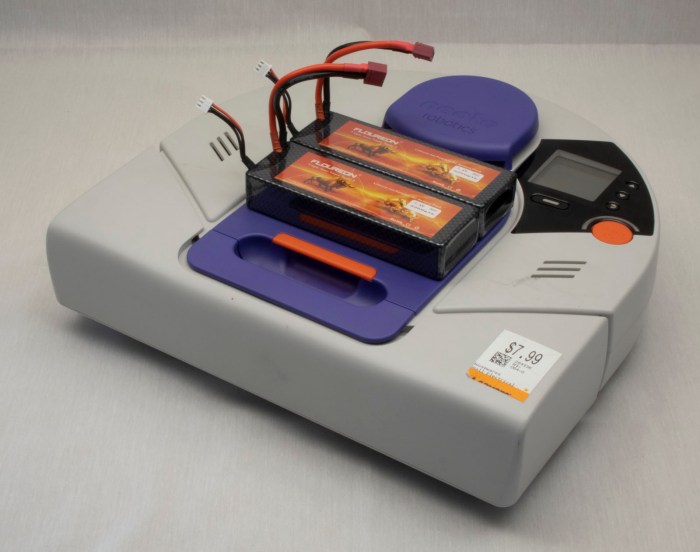
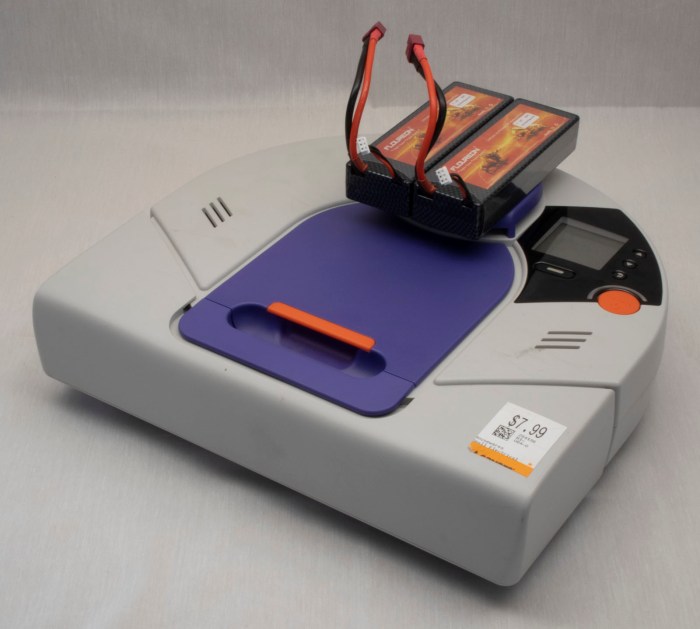
The most obvious place: is to put them on top of the dust collection bin. This is a popular location for Roomba battery retrofits, because it preserves weight balance and does not hinder Roomba operations. However, it won’t work for a Neato: this position blocks the line of sight for the laser distance scanner.

Neato XV-21 with two big power packs on top of dust bin

Installing the batteries on the front bumper would be out of lidar line of sight, and might help improve vacuum performance because their weight would help push the dirt brush roller into the ground. But this would change the behavior of front bumper which might confuse vacuum mapping algorithms, and using fragile batteries as your front bumper is never a good idea.

Neato XV-21 with two big power packs in front of bumper

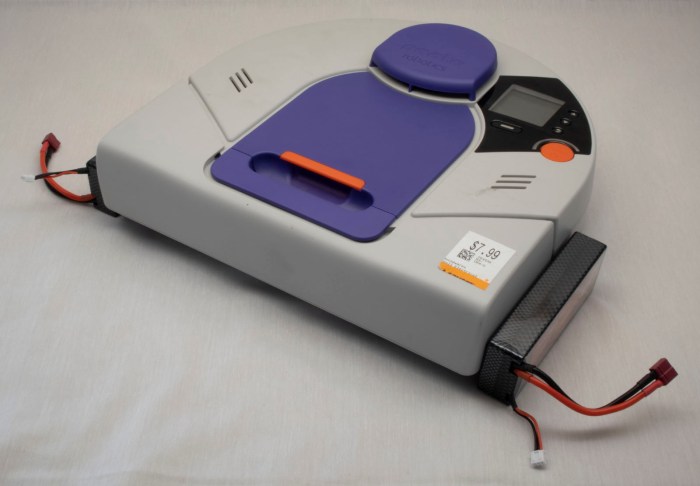
If we put batteries off to the sides, it preserves front clearance but now it interferes with side clearance. The vacuum would no longer be able to follow along walls closely to vacuum near walls if the batteries are attached to the sides.

Neato XV-21 with two big power packs along sides.jpg

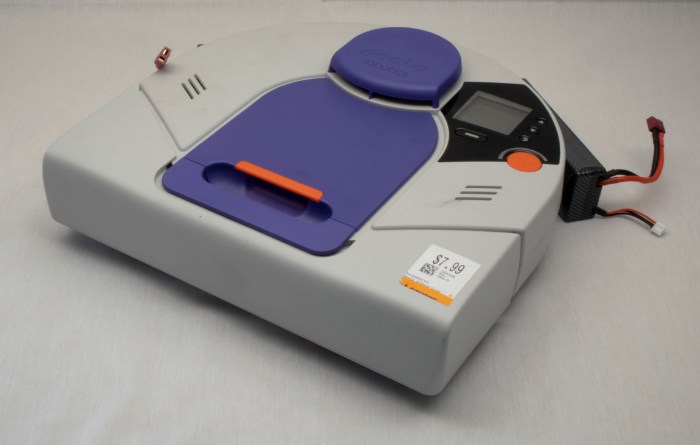
Installing behind the vacuum disturbs the weight balance – battery weight is now trying to lift the brush roller off the ground. The back is not flat, making installation difficult. And that circular shape is there for a reason – its clearance helps the robot turn in tight spots. Batteries install behind the robot would get bashed against obstacles as the robot turned.

Neato XV-21 with two big power packs behind

And obvious we don’t have any way to mount batteries on the underside of the vacuum, as there is only about 5mm of ground clearance. That exhausts all the potential directions we can go for external mounting.

Time to get creative.

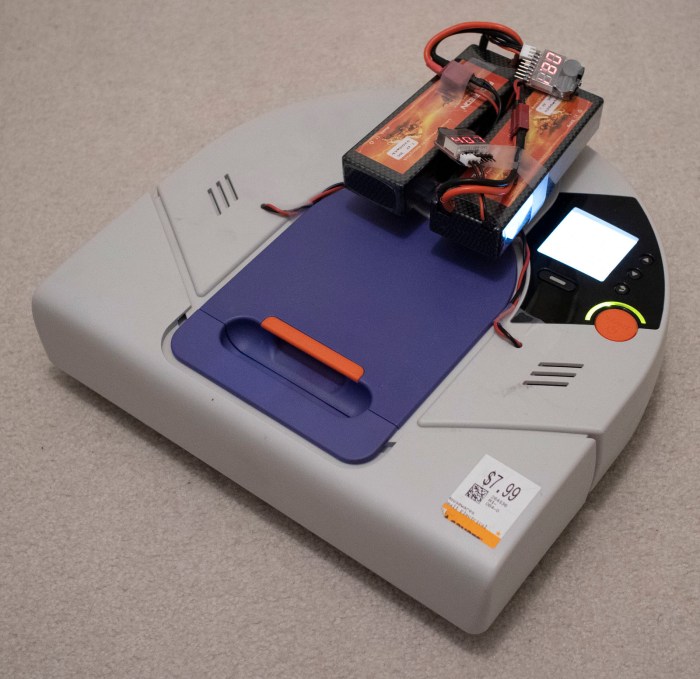
Rethink top mounting, we recognize the problem is that we can’t block laser distance scanner’s line of sight. It looks out all around the top of the vacuum, except for one place: the raised protective cap above the lidar housing. Batteries mounted on top of that cap would not block laser scanner’s line of sight.

Neato XV-21 with two big power packs above lidar

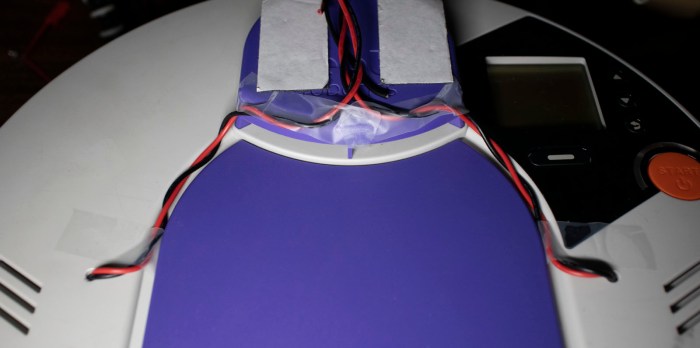
Wires were run from battery compartment, which required drilling two small holes. To keep the power wire out of sight of lidar, the wires were routed through existing grooves on top of vacuum body and then followed existing  support pillars for lidar housing. This way, the wires should not introduce additional blind spots.

Neato XV-21 wire routing for two big power packs.jpg

With this hack, the robot vacuum can run on my pair of Sawppy rover batteries, which are plenty powerful enough to run all vacuum systems simultaneously. Now this little Neato is alive and can run through a full vacuum cycle, verifying that all systems worked.

Neato XV-21 up and running with two big power packs

Obviously, this won’t be the final long term solution. For one thing, Sawppy wants its batteries back. For another, the additional height on top of the robot hampers its ability to get under furniture for vacuuming, and the exposed wires are vulnerable to tangling on protrusions. What we need next are batteries powerful enough to run a Neato and fit within existing battery bays.

Sending Commands to Neato XV-21 Via USB

I’ve managed to establish a serial connection to my Neato XV-21 robot vacuum’s USB port, putting it into test mode and querying sensor status. The next step is to start issuing commands to see if individual components respond. We left off on querying control panel user interface buttons, so the next test is to see if I can draw my own user interface on that control panel screen. Typing in help setlcd retrieved the following information:

SetLCD - Sets the LCD to the specified display. (TestMode Only)
BGWhite - Fill LCD background with White
BGBlack - Fill LCD background with Black
HLine - Draw a horizontal line (in foreground color) at the following row.
VLine - Draw a vertical line (in foreground color) at the following column.
HBars - Draw alternating horizontal lines (FG,BG,FG,BG,...),
across the whole screen.
VBars - Draw alternating vertical lines (FG,BG,FG,BG,...),
across the whole screen.
FGWhite - Use White as Foreground (line) color
FGBlack - Use Black as Foreground (line) color
Contrast - Set the following value as the LCD Contrast value into NAND. 0..63

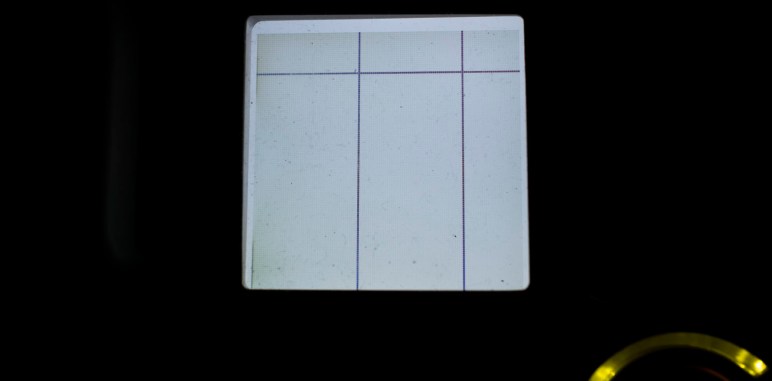
This is enough to draw simple test patterns, but it isn’t enough for me to put up legible text prompts for users. This was not a surprise as I understand this mode to be a diagnostics console and not intended to facilitate a completely new UI like what I wish to do. Still, I can probably convey some simple if cryptic information by drawing horizontal and vertical lines. The valid range is 0-127 inclusive. And while vertical lines across that entire range are all visible, horizontal lines beyond 124 seem to go under bottom lip of display bezel and not visible.

setlcd bgwhite
setlcd hline 20
setlcd vline 50
setlcd vline 100


I’ve already played with turning the laser distance scanner on and off. The next most important thing to get running on this chassis are the drive wheels. If I can’t make the robot move using this interface, nothing much else matters. Here are the commands listed under help setmotor:

SetMotor - Sets the specified motor to run in a direction at a requested speed. (TestMode Only)
LWheelDist - Distance in millimeters to drive Left wheel. (Pos = forward, neg = backward)
RWheelDist - Distance in millimeters to drive Right wheel. (Pos = forward, neg = backward)
Speed - Speed in millimeters/second. (Required only for wheel movements)
Accel - Acceleration in millimeters/second.
(Used only for wheel movements. Defaults to 'Speed'.)
RPM - Next argument is the RPM of the motor.
Not used for wheels, but applied to all other motors specified in the command line.
Brush - Brush motor forward (Mutually exclusive with wheels and vacuum.)
VacuumOn - Vacuum motor on (Mutually exclusive with VacuumOff)
VacuumOff - Vacuum motor off (Mutually exclusive with VacuumOn)
VacuumSpeed - Vacuum speed in percent (1-100).
RWheelDisable - Disable Right Wheel motor
LWheelDisable - Disable Left Wheel motor
BrushDisable - Disable Brush motor
RWheelEnable - Enable Right Wheel motor
LWheelEnable - Enable Left Wheel motor
BrushEnable - Enable Brush motor
SideBrushEnable - Enable Side Brush Motor motor
SideBrushDisable - Enable Side Brush Motor motor
SideBrushOn - Enable the Side Brush
SideBrushOff - Disable the Side Brush
SideBrushPower - Side Brush maximum power in milliwatts

The first few attempts – using just individual commands – were met with either errors or no movement.

setmotor lwheeldist 100
No recognizable parameters

The first successful command that triggered movement was one where I specified three parameters on a single line: left wheel distance, right wheel distance, and speed.

setmotor lwheeldist 200 rwheeldist 200 speed 100

The robot moves! This is great news, but we still have two more motors to play with. First up is the brush roller: I had expected the motor to be a digital on/off affair, or maybe something I can command with a particular motor power level. I was quite pleasantly surprised it can be commanded to a particular RPM because it implied a more sophisticated closed-loop feedback control system.

setmotor brush rpm 750
Run Brush Motor @ 750 RPM

The final motor control for vacuum suction fan was a little frustrating. I had no issue turning it on with setmotor vacuumon and then back off with setmotor vacuumoff. But I haven’t yet figured out the right syntax to command it to spin at a partial power level.

setmotor vacuumspeed
Value required for option VacuumSpeed
setmotor vacuumspeed 50
No recognizable parameters
setmotor vacuumspeed 50%

Invalid Command: 'setmotor vacuumspeed 50%'

I’ll update this post if I ever figure it out, but for now it is enough that it spins.

With this set of tests, I have determined that all individual components are functional, but only in a limited context. The limitation is because I could power just one device at a time with the small batteries I have installed. What I want next is a full system test. And for that, I will need to install more powerful batteries.

Disney Infinity Base and Figurine Teardown

On the one hand, I love many Disney properties. On the other, I’m very clear Disney wrings every penny out of their fans. Disney Infinity was a video game where new characters and capabilities are acquired via purchase of physical figurines. Advancement in the game requires a steady stream of new figurine purchases. As much as I love both video gaming and Disney properties, that was too much of a money grab for me to put up with. Apparently enough people thought the way I did, because Disney shut it down for not making enough money.

Ironically, that announcement is why I now have a Disney Infinity starter pack: once the announcement was made, these kits went on the clearance rack for drastically reduced prices. I was not interested in paying their full price, but I can certainly spare $5 for a gaming peripheral with no future just so I could take it apart! It took a while for me to get around to this project, which finally happened at a recent SGVTech meetup.

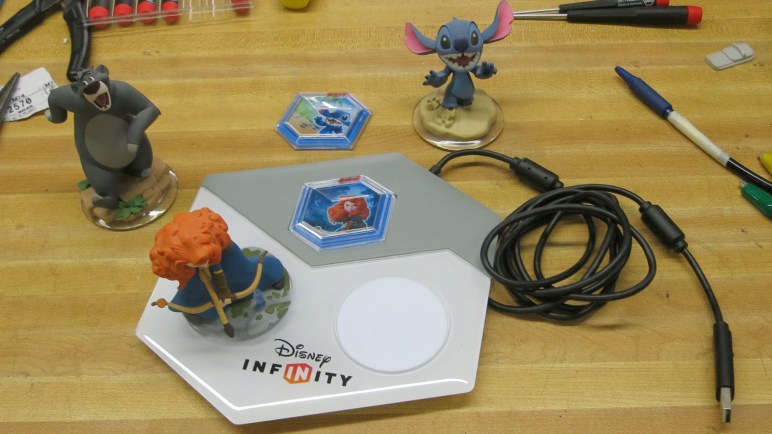
This starter pack came with the system base, Merida, and Stitch. Based on how the game worked, we expected a RFID-based system. That implies RFID chips in the bottom of these figurines, and the USB-connected base has coils to read them. Expectations on these fronts were met but there were a few surprises on the way.

The plastic top of the base were held with a few clasps that were easily broken. Once removed, we could see three white PCBs each with what appears to be a surface mount LED on top, and a green PCB with connections to each of them and the USB cable.

Disney Infinity 2 top removed

When we flip over one of the white PCB, we could see it is a simple single layer design and its RFID coil is visible. The straight lines towards the middle are for driving the LED.

Disney Infinity 3 rfid pad flipped

The control board is a more typical multi layer board. The biggest chip on board is from the STM32 family, specifically the STM32F072C8T6. Typing the numbers printed on top of next two larger chips into a web search didn’t return any useful results.

Disney Infinity 4 STM32 in charge

The LED on each white PCB appears to have four leads. When we saw four leads our first thought was an addressible LED with power, ground, data, and clock. Then we remembered this is a toy built to low cost: it’s more likely a RGB LED package with a common anode and three cathodes, one per color. Either that or the reverse with a common cathode and three color anodes. The ‘+’ labelled on its PCB hinted at a common anode design, which was confirmed with a quick test using a bench power supply putting power on some exposed pads.

Disney Infinity 5 pad LED illuminated

Aside from the RGB LED, there’s not much of interest from these three white PCB I could pull off and reuse. The main green PCB was more sophisticated, and there were exposed pads on the bottom that hint at the possibility of reprogramming the STM32 for something fun, but that’s beyond my current skill level. (This guy can probably do something with it.) The part of the board with best potential for reuse is its USB connection. It gives me a USB-A connector for plugging into a computer, and the other end is a nice modular connector with 2mm pitch. This will be useful the next time I want to hack a standard USB cable onto a device.

Attention then turned to the other part of this system: the figurines. Once the clear plastic portion was removed, its RFID sticker is accessible. Sadly, Stitch’s arms did not survive the process of prying apart his base.

Disney Infinity 6 Stitch sticker removed

A closeup of RFID sticker showed most surface area is antenna, and that tiny black dot is a chip with the secret code to unlock a Stitch character in a Disney Infinity game. People online have tried to hack these bases with little success. Given that the revenue stream comes from selling figurines, there was a robust security scheme to protect the game against counterfeit tags. I was not interested in exploring the digital side in any case, this was strictly a physical teardown.

Disney Infinity 7 RFID sticker closeup

In her movie Brave, Merida was guided by little blue glowing wisps. In the figurine, a wisp floated by Merida’s foot. As a ghostly entity, it was fittingly cast in translucent plastic.

Disney Infinity 9 Merida wisp top

But there was an extra detail: the translucent plastic went all the way through the opaque parts of the stand, so it could pick up LED illumination from the USB base. When it glowed with a blue LED, the wisp would glow blue just like in the movie. This bonus showed the artists were thinking about how to best take advantage of this medium. Too bad such creative thoughts were infrequent (Stitch had no such attraction) and probably went unnoticed by most buyers.

Disney Infinity 8 Merida wisp bottom

The final piece – hexagonal tiles for some purpose or another – were unremarkable. Once the transparent and opaque pieces were pried apart, a similar RFID tag could be removed. I didn’t see any interesting possibilities for reuse.

Disney Infinity A Merida hexagon

Query Neato XV-21 System Status Via USB

With the experimental batteries in place, the computer boots up and stays up for longer than three seconds. I tried to run a vacuum cycle but that was too much for these batteries to handle, so for now I’ll stick with digital exploration starting with the standard UI to dump revision information on components inside this particular Neato XV-21 robot vacuum.

Neato XV-21 info

After that, it’s time to go exploring through its USB serial port diagnostics!

I went straight to the most interesting component: the laser distance scanner module. First I had to put my vacuum into test mode with testmode on. Followed by setldsrotation on to turn on the motor that sweeps the laser. And finally, fetch a set of laser distance data with getldsscan. This gave me a large set of numbers. According to the legend given in the first line of the response, a distance and intensity number per degree of sweep. Partial excerpt below:

AngleInDegrees,DistInMM,Intensity,ErrorCodeHEX
0,2378,82,0
1,2397,88,0
2,0,88,8021
3,2494,85,0
4,2505,82,0
5,2509,12,0
[…]
355,2289,99,0
356,2303,103,0
357,2303,99,0
358,2315,94,0
359,2367,91,0
ROTATION_SPEED,5.10

Future experimentation will determine what range of distance values are typical, similarly for intensity values. A quick web search failed to find a reference guide for error hex codes, but hopefully there’ll be a small set that I can infer from context. More exploration to come!

In the meantime, I repeated the getldsscan command to verify the values are getting updated. They were – I received a similar but slightly different set of numbers. Hooray! the most important sensor looks like it is functioning.

Next item on the exploration list: querying analog sensor values with getanalogsensors.

SensorName,Value
WallSensorInMM,63,
BatteryVoltageInmV,16120,
LeftDropInMM,60,
RightDropInMM,60,
LeftMagSensor,-2,
RightMagSensor,-3,
UIButtonInmV,3317,
VacuumCurrentInmA,0,
ChargeVoltInmV,132,
BatteryTemp0InC,34,
BatteryTemp1InC,31,
CurrentInmA,622,
SideBrushCurrentInmA,29,
VoltageReferenceInmV,1225,
AccelXInmG,-8,
AccelYInmG,-12,
AccelZInmG,1092,

I see three distance sensors – wall and two drop sensors, one in each front corner. It’s not immediately clear what “Mag” in left and right “MagSensor” referred to. Do they detect magnetic fields? Or are they measuring magnitude of something? Bottom three lines indicate the vacuum sensor suite includes a three-axis accelerometer which can measure in units of thousands of G, implied by a Z value nearly 1000 in this vacuum sitting on the floor. Remainder of the values are related to power management.

The 3-axis accelerometer values above from getanalogsensors partially overlap with results of getaccel. As the name indicates, this one is completely focused on accelerometer readings and includes results of additional calculation in the form of pitch and roll in degrees and a sum of acceleration vector.

Label,Value
PitchInDegrees, -0.64
RollInDegrees, -0.53
XInG,-0.012
YInG,-0.010
ZInG, 1.079
SumInG, 1.079

The list of digital sensor values from getdigitalsensorsis shorter, and for whatever reason, labelled in all capital letters.

Digital Sensor Name, Value
SNSR_DC_JACK_CONNECT,0
SNSR_DUSTBIN_IS_IN,1
SNSR_LEFT_WHEEL_EXTENDED,0
SNSR_RIGHT_WHEEL_EXTENDED,0
LSIDEBIT,0
LFRONTBIT,0
RSIDEBIT,0
RFRONTBIT,0

Here we can see whether the dustbin is installed, whether either or both wheels are at full extension, and it looks like there are four switches associated with the front bumper. The top line shows if a charging plug is connected, but that’s only one of many parameters around power management. Most of the rest are in getcharger.

Label,Value
FuelPercent,88
BatteryOverTemp,0
ChargingActive,0
ChargingEnabled,0
ConfidentOnFuel,0
OnReservedFuel,0
EmptyFuel,0
BatteryFailure,0
ExtPwrPresent,0
ThermistorPresent[0],1
ThermistorPresent[1],1
BattTempCAvg[0],33
BattTempCAvg[1],31
VBattV,16.03
VExtV,0.16
Charger_mAH,0

If I were to create my own control logic for driving my Neato around, the most important parameter here is FuelPercent. I’ll have to be responsible about not draining the battery too far, beyond that I can leave the rest in the capable hands of Neato’s existing battery management system. Speaking of power consumption, the biggest drains are the motors, and I can monitor them all with getmotors.

Parameter,Value
Brush_RPM,0
Brush_mA,0
Vacuum_RPM,0
Vacuum_mA,0
LeftWheel_RPM,0
LeftWheel_Load%,0
LeftWheel_PositionInMM,-1
LeftWheel_Speed,0
RightWheel_RPM,0
RightWheel_Load%,0
RightWheel_PositionInMM,-1
RightWheel_Speed,0
Charger_mAH, 0
SideBrush_mA,28

Not very exciting at the moment, because all motors are at a stop. I imagine these numbers will get more interesting once the robot gets underway.

One final discovery in inputs: when in test mode, the user interface buttons on the top of the robot no longer trigger their usual functions. I could check for status of all five buttons via getbuttons which implies I could use these buttons in my own projects without worrying that I’ll trigger the default vacuum behavior. Cool!

Button Name,Pressed
BTN_SOFT_KEY,0
BTN_SCROLL_UP,0
BTN_START,0
BTN_BACK,0
BTN_SCROLL_DOWN,0

But if I want to actually have my own user interface using those buttons, I would need to also display my own information on the LCD. Which brings us to phase 2 of playing over USB: start sending commands to see if components follow orders.
USB Serial Communication with Thrift Store Neato XV-21

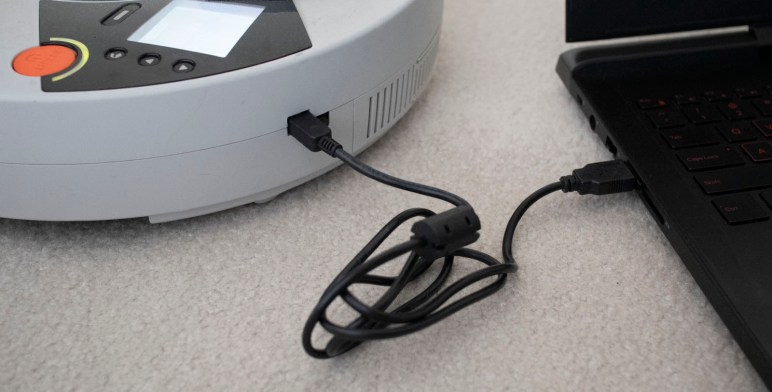
My Neato XV-21 robot vacuum now boots up and stays running on a pair of old remote control helicopter batteries. This is a vast improvement over its comatose state when I found it in a thrift store. I pressed the start button to see if it’ll actually vacuum, but spinning up the motors drew too much current and aborted. Looks like these batteries are only good for probing electronics, which is still more than what I had before. And a good incremental step forward.

A few web searches on Neato technical details all pointed to posts on “Neato Robotics” forum on robotreviews.com. I guess this is where all the Neato robot tinkerers hang out. From this forum I learned of a tool for Neato maintenance that can help communicate with the vacuum as well as uploading firmware updates. Unfortunately, this forum also shared an update that Neato has taken these tools off their website. Without them, plugging the vacuum into my laptop running Windows would only result in a device without a driver.

On a lark, I rebooted my laptop into Ubuntu Linux and plugged in the vacuum. There were never any Neato drivers for this operating system, and I was curious what I could see via Linux tool dmesg.

[10547.714901] usb 1-1: new full-speed USB device number 25 using xhci_hcd
[10547.866228] usb 1-1: not running at top speed; connect to a high speed hub
[10547.876232] usb 1-1: New USB device found, idVendor=2108, idProduct=780b
[10547.876235] usb 1-1: New USB device strings: Mfr=1, Product=2, SerialNumber=0
[10547.876237] usb 1-1: Product: Neato Robotics USB v2
[10547.876239] usb 1-1: Manufacturer: Linux 2.6.33.7 with fsl-usb2-udc
[10547.881256] cdc_acm 1-1:2.0: ttyACM1: USB ACM device

Well, that was more straightforward than I had expected. The ACM in ttyACM1 here stands for abstract control model. The operating system sees a communication device where all control is handled by the device, and all I had to do is treat it like a serial port. It’s not a true serial port, but close enough the technical differences aren’t important right now. What matters is the fact that I can run minicom --device /dev/ttyACM1 and issue a simple call for help. We are in business! The channel has been opened to talk to a Neato vacuum brain and see what it says in return.

help
Help Strlen = 1792
Help - Without any argument, this prints a list of all possible cmds.
With a command name, it prints the help for that particular command
Clean - Starts a cleaning by simulating press of start button.
DiagTest - Executes different test modes. Once set, press Start button to engage. (Test modes are mutually exclusive.)
GetAccel - Get the Accelerometer readings.
GetAnalogSensors - Get the A2D readings for the analog sensors.
GetButtons - Get the state of the UI Buttons.
GetCalInfo - Prints out the cal info from the System Control Block.
GetCharger - Get the diagnostic data for the charging system.
GetDigitalSensors - Get the state of the digital sensors.
GetErr - Get Error Message.
GetLDSScan - Get scan packet from LDS.
GetMotors - Get the diagnostic data for the motors.
GetSchedule - Get the Cleaning Schedule. (24 hour clock format)
GetTime - Get Current Scheduler Time.
GetVersion - Get the version information for the system software and hardware.
GetWarranty - Get the warranty validation codes.
PlaySound - Play the specified sound in the robot.
RestoreDefaults - Restore user settings to default.
SetFuelGauge - Set Fuel Gauge Level.
SetMotor - Sets the specified motor to run in a direction at a requested speed. (TestMode Only)
SetTime - Sets the current day, hour, and minute for the scheduler clock.
SetLED - Sets the specified LED to on,off,blink, or dim. (TestMode Only)
SetLCD - Sets the LCD to the specified display. (TestMode Only)
SetLDSRotation - Sets LDS rotation on or off. Can only be run in TestMode.
SetSchedule - Modify Cleaning Schedule.
SetSystemMode - Set the operation mode of the robot. (TestMode Only)
TestMode - Sets TestMode on or off. Some commands can only be run in TestMode.
Upload - Uploads new program to the robot.

Replacement Battery Test for Thrift Store Neato XV-21

My Neato XV-21 vacuum couldn’t power on when I found it in a thrift store, and the problem (or at least, the first problem) was its battery pack: it could only deliver enough power to boot up the onboard computer and run it for about three seconds before its voltage dropped and the computer shut down again.

In order to assess the rest of the vacuum, I need to find a replacement power source. Since the actual condition of vacuum components are still unknown, I’m not inclined to spend money buying batteries specific to a Neato robot vacuum. The next experiment, then, is to wire up something out of batteries already on hand. I looked through my pile of batteries to see which would satisfy the following criteria:

  • Delivers roughly 7.2 volt power of a six-cell NiMH battery.
  • Fits within Neato battery compartment.
  • A pair of identical batteries, one for each bay.

The winner was a pair of batteries I had for my E-Flite remote control helicopter. The aircraft itself had long since been crashed and trashed, but I kept its batteries. Two cell lithium polymer batteries have nominal voltage of 7.4 volts, within operational range of 6-cell NiMH batteries. Physically they were small enough to fit within the battery compartment, but at 800 mAh their power capacity is too low for full vacuum operation. They were designed to deliver high power to fly a small helicopter toy though only for a few minutes. Ideally they can run the vacuum motors briefly to verify their operation, but mostly I just need them to run the Neato computer for more than three seconds.

To connect these batteries, I first disassembled the old tired original battery pack. Before disassembly, I noticed a rectangular bump visible in the battery pack. I had thought this was the thermistor but I was wrong. It appears to be a temperature safety fuse. There was also an over-current protection amperage fuse in the pack. NiMH cells are relatively safe but it’s still good to see additional safety measures inside these packs.


I needed the battery pack’s wiring harness for my battery experiment, so it was cut free. I kept the temperature monitoring thermistor and wired the positive and ground battery power wires to a JST-RCY connector that will mate with my E-Flite battery pack.

E-flite Pack for Neato Vacuum.jpg

Once soldered, I connected the pair of batteries and plugged them into my Neato XV-21.

Neato XV-21 with adapted E-Flite LiPo batteries

I was greeted by the same boot-up screen I saw before, but this time the screen stayed on instead of flickering off after three seconds. Now it’s time to try talking to the vacuum.


Waterpik WF-03W / WF-03C Teardown

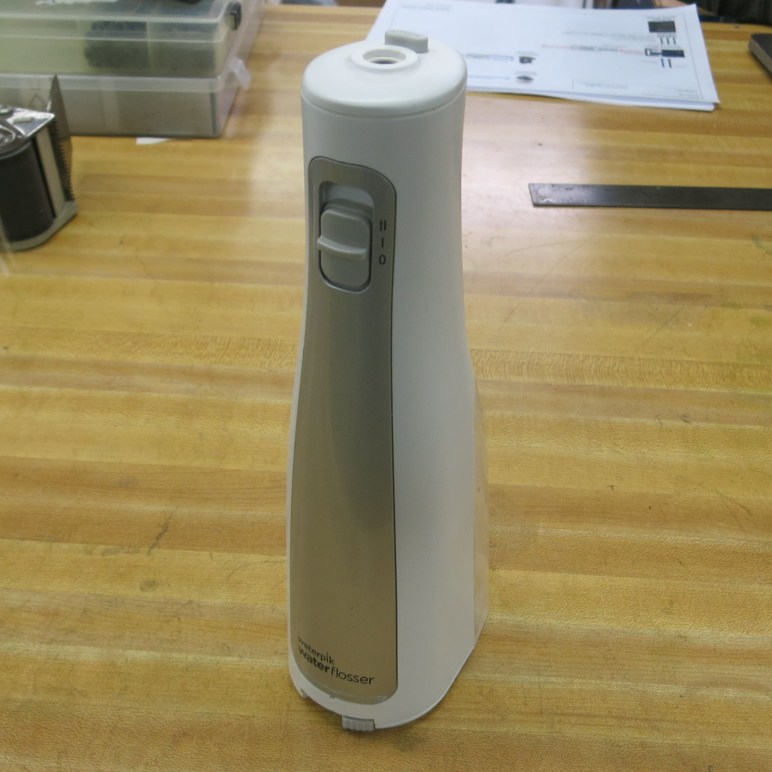
My project at last night’s SGVTech meet was to dig into a nonfunctional cordless water flosser, the Waterpik WF-03. I added this to my evening tooth brushing & flossing routine upon recommendation of my dental hygienist, and it worked for several months before it stopped running. At first I thought it just needed new batteries, but when I opened the watertight battery compartment, out poured brown water along with the three AA batteries. Clearly something has failed inside the device.

There were no obvious ways to disassemble this device, which I’m sure is partially motivated by a desire to control water intrusion. Given the high potential for disassembly to be a destructive process, it’s not realistic to expect I could repair the device and return it to service. But somewhere inside is a battery-powered water pump designed to deliver short high pressure pulses, and I am confident I can find a fun use for such a device in the future.

The first thing I tried was prying off the silvery front panel. I had hoped maybe it was held by clasps, but it was clearly glued in place. I had also hoped there would be fasteners visible below this panel, but no luck. The only visible part is the switch controlling high/low/off operation.

Waterpik WF-03 front panel removed

Prying at various places of the plastic enclosure by hand, the only parts that moved at all were near the bottom, flanking either side of water resorvoir. I started prying by hand and, when that wasn’t enough, moved on to a screwdriver.

Waterpik WF-03 base disassembly 1

Looking at the seams I broke apart with the screwdriver, the plastic components are either glued or welded together. There’s definitely no turning back in this disassembly. Once the screwdriver pried a few pieces of plastic open, I could enlist the use of pliers to continue pulling plastic apart.

Waterpik WF-03 base disassembly 2

Once I could see enough into the interior to have a good idea where a cutting blade could do some good, a hack saw was enlisted to finish the job.

Waterpik WF-03 base disassembly 3

Once the front outer shell is cut all the way around the base, the mechanical guts slides out easily.

Waterpik WF-03 base released 1

Waterpik WF-03 base released 2

There’s a smaller piece of enclosure on the back, designed for the water reservoir to slide and clip into. Removing this required removing the water intake pipe O-ring (visible in lower left of picture) and removing two screws.

Waterpik WF-03 back removal 1

Waterpik WF-03 back removal 2

Once the back was removed, we are free to disassemble the central cylinder. It bottom was secured to the battery tray via four screws, and its top was held to the water intake and valve assembly with four more screws.

Waterpik WF-03 cylinder removal 1

Here’s another view of the disassembled parts, laid out roughly analogous to the way they were when assembled.

Waterpik WF-03 cylinder removal 2

Once we could see the motor gearbox assembly inside that cylinder, it was clear why this device stopped working: water has leaked past the diaphragm (black) and made its way to components below that point.

Waterpik WF-03 pump 1

If there were any lubrication on the gears, they have been washed away. And the motor’s external casing has corroded. It was not possible to move this mechanical assembly by hand, so we took it apart to see what has seized.

Waterpik WF-03 pump 2

When the motor was removed, it looked even worse than expected. Trying to turn its output shaft using fingers found it unwilling to move.

Waterpik WF-03 motor freed

But we were able to un-seize the shaft, possibly helped by an unintentional drop to the ground. Then after cleaning it up a bit and adding some oil to the bushings, it spins up again! Markings on this little motor proclaims itself to be genuine Mabuchi. Whether it is indeed the real thing or a knockoff manufacturer brazenly using the name I can’t tell, but any motor that can survive abuse, end up looking like this one, and still spin up again has my respect.

Waterpik WF-03 motor runs again

We reassembled the water pump core and it was pumping water again.

Waterpik WF-03 back up and running

We could pump water past the point where a Waterpik nozzle would mate with a rubber O-ring, but it started leaking out past that point as those sections weren’t designed to control water flow. I didn’t expect the pump to be so tightly integrated with the nozzle socket assembly and didn’t bring one of my spare Waterpik nozzles. But that was no barrier: we fashioned a substitute using a short length of pneumatic hose and parts from a ball point pen.

Success!

I wouldn’t use this for my dental home care anymore, but it’s certainly going to sit in my pile of interesting parts awaiting integration into a future project.

[Update 1: No future project. After it damaged other items with more rusty water, I threw them all away.]

[Update 2: I took apart another Waterpik.]

Thrift Store Neato XV-21 Batteries Can’t Hold a Charge

The batteries from a Neato XV-21 were found to be flat and possibly damaged. This would certainly explain why the little robot vacuum failed to power on in the thrift store where I found it. Since the thrift store didn’t have its associated charging base, my fallback was to leave its batteries to trickle charge (at 100 milliamps) overnight on a bench power supply.

The battery packs nominal voltage was listed at 7.2 volt per pack, so the voltage limit for charging the pair in series was set to 14.4 volts. Fully charged six-cell NiMH battery packs can be up to 9 volts each, for 18 volts total, but setting to 14.4 volts leave us with a bit of headroom in case these batteries didn’t behave as expected. This turned out to be a good idea.

Neato battery pack on power supply

When I checked in on the batteries the next morning, I saw voltage sitting at 14.4 and amperage had dropped to 40 milliamps. If all goes well, the voltage would be evenly divided across the two packs at 7.2 volts each. This was not the case: one battery pack (I’ll arbitrarily name it pack A from now on) was holding at 7.9 volts and the other (now designated pack B) at 6.5. If it weren’t for the headroom, we might have inadvertently pushed pack A beyond its limits.

At this point I got distracted by other events and left the batteries sitting for a week. Checking in from time to time, I measured their open circuit voltage and wrote them down. It was an unplanned test of the batteries’ self-discharge rate.

Pack A:

  • Overnight trickle charge: 7.9 Volts
  • After one day: 4.67 V
  • After three days: 4.44 V
  • After a week: 2.0 V

Pack B:

  • Overnight trickle charge: 6.5 Volts
  • After one day: 2.77 V
  • After three days: 2.68 V
  • After a week: 2.61 V

While it is normal for NiMH batteries to self-discharge over time, this observed discharge curve was far more severe than is acceptable. Looking at the voltage discharge behavior for pack A, it appears to have two almost-useless cells, three weak cells, and one good cell. Pack B behavior hints at four almost-useless cells and two good cells.

But even if they are unusable to actually run the vacuum, they are still better than dead weight: these batteries can hold a charge for a very brief period. So they’re reconnected to the power supply to trickle charge again. I don’t expect them to actually power any motors, but perhaps there’d be enough to power on the electronics for a short while. Hopefully long enough for me to assess if the rest of the vacuum is healthy.

After another overnight charge, I plugged them into the vacuum and pushed the power button. Good news: they did power on the electronics for a short while. Bad news: It only lasted for three seconds, far too short to assess anything else about the vacuum. But the vacuum computer did boot, and that’s enough motivation to keep going.

Attempt to Charge Battery of Thrift Store Neato XV-21

We’ve pulled the battery packs out of a Neato XV-21 found in a thrift shop. We’re pretty sure the red and black wires are battery positive and ground, but if so we expect to see a few volts across those wires. The fact we measured less than a volt indicates this battery is flat and may even be damaged. Well, at least this would be consistent with the fact it wouldn’t power on in the thrift shop.

Fortunately, rechargeable NiMH battery cells are hardier than lithium batteries and they might possibly revive with a charge. And even if they were permanently damaged, they are less likely to turn themselves into fireworks as damaged lithium batteries sometimes do. Since we read a nonzero voltage, none of the cells have failed as an open circuit. Some might have failed as a short circuit acting as a resistor dissipating energy but not holding the charge. With this unknown, we shouldn’t charge the batteries anywhere near as fast as we could if they were known to be healthy.

Neato battery pack on power supply

A bench top power supply was set to a maximum voltage of 14.4 volts and maximum amperage of 0.1 amp (= 100 milliamps). Using a piece of wire, the two battery packs were connected in series. (Which is where the 14.4 came from: adding up their nominal 7.2 volts per pack.) Once connected in series, they were connected to the bench top power supply and we watched the meters.

If we instantly hit maximum voltage and maximum amperage, it indicates a short circuit somewhere, possibly in a dead battery cell acting as a resistor turning that 1.44 watts into heat. Fortunately this did not happen. We hit the 100 milliamp limit immediately as expected and the voltage started rising, which is consistent with a battery pack trying to charge.

After a few minutes, we disconnected the power supply and measured battery pack voltage: they now measure a few volts, higher than before. This increased confidence that our positive/negative wiring guesses were correct and also proof at least a few cells can hold some amount of charge.

The batteries were reconnected and, for the first half hour, we periodically touched each of the cells to see if they were hot to the touch. Some of the cells were warmer than others, but none were alarmingly so. We’ll let the power supply continue slowly feeding the battery pack overnight and see how they behave.

W6TRW Amateur Radio Club Swap Meet

This week I revisited 23b shop on a day when they weren’t hosting Sparklecon, during one of their regular Thursday evening meets. I brought my Neato robot vacuum work in progress as my project and it was a good discussion icebreaker with a few of the people present. One of the interesting things I learned was the W6TRW Amateur Radio Club Swap Meet – officially a place for people to meet and trade amateur radio equipment, it has evolved into a place to find generally interesting electronics stuff to hack on. Some people were going to go shopping, and extended an invitation to join them.

W6TRW amateur radio club swap meet

I was not a huge fan of waking up early weekend morning to brave the cold outdoors, but the guys sold me on how cool the place enough to get me out of bed at 6 in the morning. I only had twenty-four dollars of cash in my wallet, and I thought that would make sure I don’t get myself into too much trouble.

Portable Karaoke duet machineFirst of all, the promise of seeing strange things I never even knew existed was fulfilled in spades, products aimed at novel niches that I had been completely clueless about. One example: this is a portable Karaoke machine that can run off batteries and use cassette tape for music, but this is a duet machine with two microphones for you and your singing partner to maintain eye contact while you sing everlasting love to each other. I don’t Karaoke and I was fascinated there was enough demand for this product to exist.

Bowling video game with ball controllerI also stumbled across this product: a bowling video game with a custom controller shaped like a bowling ball. If I understand XaviX’s Wikipedia entry correctly, this was much like Nintendo’s Wii Bowling but came out before the Nintendo Wii did. Sadly first-mover advantage in the motion controller home gaming market did not translate into market success for this company. Or even name recognition – I consider myself decently informed in video gaming trends and I had no idea these guys existed.

Old test equipment in cardboard boxes.jpg

Closer to the original spirit of the event, old electronics equipment abound, showing signs of a full service life that started as expensive specialized equipment and now sitting in cardboard boxes looking for a new home. Since I had just $24, I was not remotely tempted to take any of these big heavy metal boxes home.

I spent my money on more modest items that had immediate use for current projects. To help me see fine details for soldering and (dis)assembly, I bought a magnifier. To help me make finer details in my circuit sculpting, I bought a smaller pair of round-nosed pliers. And finally, in an effort to build my own substitute charging dock for my thrift store Neato robot vacuum, I picked up two 120V AC to 24V DC adapters. That accounted for all $24 dollars of cash I walked in with!

Examining Battery of Thrift Store Neato XV-21

This Neato XV-21 robot vacuum did not power on when I found it in the thrift store. Now that I’ve verified there isn’t anything fundamentally broken or missing on the robot, the next thing is to try to charge its batteries. But since the thrift store didn’t have its charger, we have to go to plan B: Pull out the batteries and see if we can work with it.

The interior component packaging of this vacuum divides its battery into two packs, each in their own battery bay on either side of its dust collection chamber. These two bays are accessible from the bottom of the vacuum, each with a door that opened by unscrewing a pair of Philips screws. Each battery pack has a 4-wire pigtail terminating in a connector that plugs into the vacuum.

It takes quite a bit of force to remove the connector. One battery was removed without incident, but the other battery required so much force it actually broke something holding the vacuum side connectors to the vacuum body. Fortunately this appears to only be a minor mechanical annoyance and will not derail the project. At worse, we now have a connector that will rattle as the robot moves around.

Neato XV-21 battery pack

Once the battery pack was removed we could read its printed information, identifying itself as a nickel-metal hydride (NiMH) battery pack. The general shape implies six cells, and the stated nominal voltage of 7.2 is consistent with six cells in series. Each cell is rated with a capacity of 3200 milliamp-hours. I didn’t know what “4/3A” meant but a quick web search indicated it was the physical form factor (size) of the battery. “McNair” appears to be the name of a battery manufacturing company, and finally “MC20120924” probably meant this battery was manufactured on September 24th, 2012.

Attention then turned to the four-wire connector. Typical convention hints black is probably negative and red is probably positive. A voltmeter said there was less than a volt across those wires, which is not just flat but might also indicate damaged battery cells. The next question: What are the two yellow wires? It is something the vacuum control board would want to know about, and our hypothesis is that it is a thermistor to measure battery’s temperature. As an experiment to test this hypothesis, we put a ohm meter across the two yellow wires and warmed up the battery pack with our hands. We saw resistance change in response to temperature.

With some confidence the yellow wires are not directly involved in charging, it’s time to put a little bit of power across those red and black wires to see what happens.

Digging Into Thrift Store Neato XV-21

Of course, I didn’t buy a nonfunctional robot vacuum from a thrift store just to admire how clean it is. I bought it to see if it can be brought back to life. So out comes the screwdriver set and it’s time to dig into those non user serviceable parts inside. Fortunately Neato didn’t feel the need to complicate this effort with “security” bits that would only hamper resourceful hackers by a few seconds – they were straightforward Philips head screws. I had expected fine pitched machine screws, but they were actually coarse pitched screws that self-tap into plastic. This limits the number of times we can assemble and disassemble this vacuum before the screws become too loose to hold themselves in place, but that’s a concern for the future.

Neato XV-21 with bottom panels removed

There are three easily accessible panels. Two rectangular battery compartment doors each held by two screws, and a large semicircular panel held in place by four screws.

Underneath the semicircular panel is a large centrifugal (squirrel-cage) fan responsible for creating the suction that gives vacuum cleaner their name and purpose. The filter sitting in the back end of the dust bin is visible. Air would move past the filter, through the fan, and exhaust out the grating at the back. It would not have been surprising to find a coat of fine dust that made their way past the filter, but the fan compartment is pristine. Either the filter is far more capable than I give it credit for, or this vacuum was indeed barely used.

Neato XV-21 wheel encoder

On either side of the fan are motor gearbox assemblies for driving the vacuum around. The motor appears to be a commodity DC brushed motor, but it does have some sort of encoder mounted to its back. Looking at the circuit board we saw a single sensor, indicating this encoder can sense motor movement but not its direction: a full quadrature encoder would have had two sensors on the board.

Also visible behind the robot’s left wheel (right side of top picture) are wiring for external connectors:

  • Mini-USB for serial data, which would be extremely interesting if I could get the vacuum powered up.
  • Barrel jack for a charging adapter I don’t have.
  • Two thick metal wires to make contact with a Neato charging dock, which I also don’t have.

Given that the official chargers were absent from this thrift store purchase, the next step is to remove these two battery packs and see what we can do with them.

A Curiously Clean Thrift Store Neato XV-21

I went to a thrift store to take pictures, but came home with a Neato XV-21 vacuum that did not power on. At $7.99, it was a cheap gamble to see what might be usable in this robot vacuum cleaner. In my cursory in-store examination, it looked to be in good shape. After I took a little time for a closer look, I realized it was actually in even better shape than I had initially thought.

Super clean Neato XV-21

Of course, there’s no mistaking the vacuum for new. There is dirt in the dust bin and visible black smudges on top of the vacuum. But beyond that I found almost no other signs of wear. The exterior sides of this unit are clean, free of the scuff marks and other marring I associate with robot vacuum veterans. Although my experience are mostly with affordable models of Roomba and similar vacuums that perform a random walk through its environment, bumping into things along the way. The selling point of a Neato is its lidar for object avoidance, so the nearly pristine sides of may just be a result of excellent object avoidance and not lack of use.

Super clean Neato XV-21 brush

Its floor cleaning brushes show some dirt but is actually really clean. My own home vacuum would show more dirt than this after a minute of use. Brush roller drive belt looks to be in good shape.

At this point I’m still undecided whether this was a barely used robot vacuum or maybe the previous owner is just very meticulous about keeping their tools clean. The clean brush and dust bin certainly imply the former, but the latter is also quite possible as indicated by the presence of original protective plastic over the control panel. The previous owner was one of those people who did not remove plastic protective film that were meant to be removed, a mindset very different from mine.

Me? I peel that stuff off before I start taking this vacuum apart to examine its internals.

Tria Beauty Hair Removal Laser 4X Teardown

The best part of a local meetup is having different people bring in cool things that I would never have encountered in my own life. This week’s SGVTech meet is a prime example: I got to look inside an old hair removal laser. This is a product category I didn’t even know existed beforehand. Reading the product’s web site, it proclaims itself to be far more powerful than any of its competitors on the market, second only to medical grade equipment not sold to consumers. I don’t know if that is true, but power is certainly a theme. There are multiple safety hoops the consumer must jump through. A skin tone sensor in the base must verify the user’s skin color is within an acceptable range before it will even power on. And before the laser will fire, a secondary verification performed by a different sensor in the tip must pass.

The motivation for tonight’s teardown is the power subsystem. When plugged in for charging, the device gives all the indication of successful full charge, but it could never go through the first stage of its extensive power-up procedure. The manufacturer does not supply replacement batteries: while it’s possible the device is no longer safe to use beyond the life of the battery, it’s also easy to be more cynical about planned obsolescence. Tonight’s mission is to open it up and see if it can be brought back to life.

The exterior enclosure is an impressive work of industrial design, presenting a user-friendly appearance that hides the power and sophistication within. Popping a few plastic clips unveiled the device is dominated by equipment supporting a powerful laser. The battery module consumes majority of the interior volume, followed by a large heat sink and fan for thermal management.

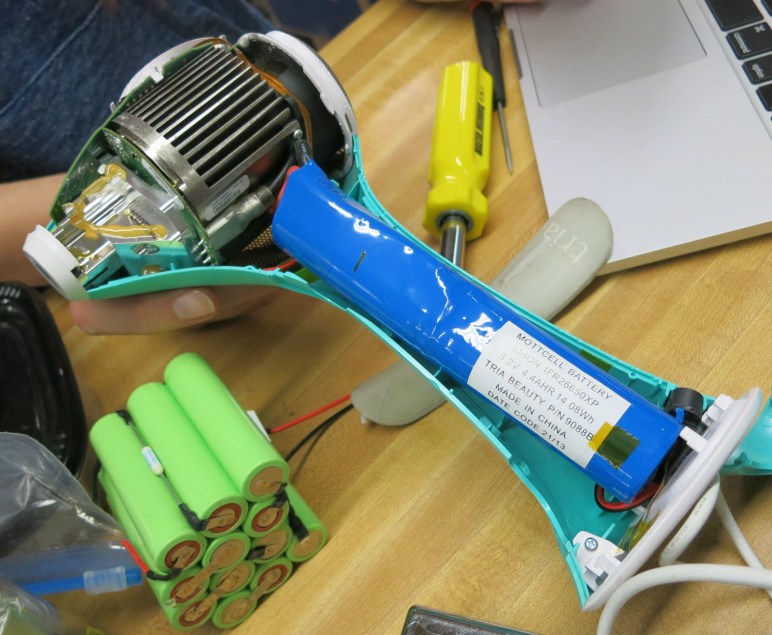
The battery pack consists of two cells, and our first surprise was the 3.2V nominal volts listed on its label. This typically indicates lithium iron phosphate (LiFePO4) battery cells, which is known for high power delivery befitting a high powered handheld laser. However, these cells typically trade off power delivery with lower power capacity, but this pack claims 4.4 AHr which is far higher than any LiFePO4 cell I’ve seen. Tearing apart the outer plastic, we saw the pack is two cells wired in parallel, supported by measuring an open circuit voltage of 3.4. Two cells 2.2 AHr apiece is still very high by LiFePO4 standards.

We had a wide selection of battery cells we intended to try swapping in, from NiMH (visible in picture above) to standard 18650 cylindrical lithium batteries to lithium polymer packs intended for high amperage draw remote control vehicles. But before we start hooking up batteries, we should understand what power the device is looking for. So the battery pack’s wires were cut off and replaced with connectors to a bench power supply.

Tria 4X laser on power supply

We expected the device to power up with the power supply set to 3.2V, the nominal voltage listed on the battery pack, but there was no response. Turning it up to 3.4V was also unresponsive. Something inside this device is looking for a very specific power profile before it will activate. This may be one of the safety hoops, but it certainly dims our prospects of getting it up and running on other batteries.

Then a mistake was made: thinking the device might be running into the power supply’s current limit, a hand reached out to increase current but instead turned the knob to increase voltage far higher than 3.4V. A component on the circuit board started glowing and smoking, leaving behind a burnt hole so we can’t even read the part number anymore to figure out what it used to be.

Tria 4X fried chip

Oh well, so much for bringing the device back to life.

Now that it is well and truly dead, we have to abort the revitalization project and revert to our typical mode of disassembly for curiosity. The heat sink appeared to be a custom piece of machined metal, even the cooling fan might be custom due to how it clips in a way that conformed to shape of the heat sink. But obviously the star attraction is the laser assembly, and it didn’t look anything like what we expected. Behind the optical assembly we see… two pieces of golden colored metal?

Tria 4X laser with optics

Most of our collective experience are with LEDs in plastic packaging. If we use magnification, we can see a little bit of the semiconductor within but they don’t look anything like this. Our ignorance of solid state lasers meant we didn’t understand what we were looking at.

Tria 4X laser

Looking on the bright side, maybe it’s just as well we didn’t understand enough to play with it. This is a powerful piece of equipment, operating on wavelengths of light that we could not see. There is no blink reflex to save our eyesight in case of accident.

New Project: Neato Hacking

My ROS learning robot Phoebe was built mainly around a laser distance scanner module salvaged from a Neato robot vacuum cleaner. At the time I knew people were selling them for $50-$75 on Craigslist in varying condition, but I was content to pay $45 for just the laser scanner. It was all I needed for my own robot exploration purposes. I thought a full Neato vacuum might be fun to play with, but I have enough projects on my to-do list that I didn’t feel the need to go out and find one.

Unless when I do. I recently wrote a Hackaday article about bargain shopping in a thrift store, and I needed a picture to go with my article. I went into my local thrift store to take some pictures, but it was also an opportunity to practice what I preached. I spent most of my time in the electronics section and didn’t find anything I wanted to take home with me. On my way out the door, though, I took a glance at the kitchen electronics section and spotted this beauty: a Neato robot vacuum with a price tag of only $7.99.

Savers Neato XV-21 1600

It doesn’t power on, and external accessories were nowhere to be found: neither a wall wart charger nor its charging dock. But it looked to be in pretty good condition with only minor cosmetic blemishes on the exterior. Aside from the missing charger, all other major components appear to be present. But the purchase decision was based on the most interesting part: I looked inside the top bump to verify presence of a familiar looking laser scanner unit. If I all I get out of this $7.99 is a Neato lidar, I’ll be happy. If anything else worked, they would just be icing on the cake.

It’s a big question mark, but it’s one I’m buying to take home for a closer look.

Samsung Is Getting Into Physical Stores

Wandering around town yesterday, I stumbled across a store under construction with a name that’s familiar to me, but not in association with a physical store: Samsung.

Samsung Store 1600

I’ve noticed Samsung’s retail ambitions growing beyond just another item on a shelf, beyond buying an end-isle display in a store. There is a Samsung mini-stores inside my local Best Buy, staff by people wearing Samsung logo shirts instead of Best Buy logo shirts. I never asked if they were Best Buy employees with a different uniform or Samsung employees, but I don’t suppose that matters. Obviously when I step foot within the Samsung zone I was getting pitched the Samsung life.

But that was only about a hundred square feet, this looks significantly larger and obviously entirely focused on Samsung products. According to Engadget, this is one of three Samsung retail stores opening in conjunction with the “10 years of Galaxy” event where Samsung is expected to introduce the Galaxy S10. One in New York, on in Texas, and this one on the west coast in California.

The location speaks to Samsung’s ambition. Americana at Brand is an upscale shopping center. Featuring brands like Tesla, Diane von Furstenberg, and Sephora. It is across the street from Glendale Galleria, a sizable mall all by itself. Glendale Galleria has retail presence from Microsoft, Amazon, and Apple. (Americana also has an Apple store, only a few hundred feet from Glendale Galleria’s Apple store, for some reason.) Beyond the borders of these two giant malls, the neighborhood also includes other ameneties such as the Alex theater for performing arts, surrounded by restaurants catering to that audience.

In short, this storefront is a major investment by Samsung to stake a claim in prime real estate. I’ll be curious to see what kind of foot traffic I see in the Samsung store on my next visit to Americana.

Window Shopping RobotC For My NXT

I remember my excitement when LEGO launched their Mindstorm NXT product line. I grew up with LEGO and was always a fan of the Technic line letting a small child experiment with mechanical designs without physical dangers of fabrication shop tools. Building an intuitive grasp of the powers of gear reduction was the first big step on my learning curve of mechanical design.

Starting with simple machines that were operated by hand cranks and levers, LEGO added actuators like pneumatic cylinders and electric motors. This trend eventually grew to programmable electronic logic. Some of the more affordable Mindstorm products only allowed the user to select between a few fixed behaviors, but with the NXT it became possible for users to write their own fully general programs.

Lego Mindstorm NXT Smart Brick

At this point I was quite comfortable with programming in languages like C, but that was not suitable for LEGO’s intended audience. So they packaged a LabVIEW-based programming environment that is a visual block-based system like today’s Scratch & friends. It lowered the barrier to entry but exacted a cost in performance. The brick is respectably powerful inside, and many others thought it was worthwhile to unlock its full power. I saw enough efforts underway that I thought I’d check back later… and I finally got around to it.

Over a decade later now, I see Wikipedia has a long list of alternative methods of programming a LEGO Mindstorm NXT. My motivation to look at this list came from Jim Dinunzio, a member of Robotics Society of Southern California, presenting his project TotalCanzRecall at the February 2019 RSSC meeting. Mechanically his robot was built from the stock set of components in a NXT kit, but the software was written with RobotC. Jim reviewed the capabilities he had with RobotC that were not available with default LEGO software, the most impressive one being the ability to cooperatively multitask.

A review of information on RobotC web site told me it is almost exactly what I had wanted when I picked up a new NXT off the shelf circa 2006. A full IDE with debugging tools among a long list of interesting features and documentation to help people learn those features.

Unfortunately, we are no longer in 2006. My means of mechanical construction has evolved beyond LEGO to 3D-printing, and I have a wide spectrum of electronic brainpower at my disposal from a low-end 8-bit PIC Microcontrollers (mostly PIC16F18345) to the powerful Raspberry Pi 3, both of which can already be programmed with C.

There may be a day when I will need to build something using my dusty Mindstorm set and program it using RobotC. When that day comes I’ll go buy a license of RobotC and sink my teeth into the problem, but that day is not today.

Window Shopping JeVois Machine Vision Camera

In the discussion period that followed my Sawppy presentation at RSSC, there was a discussion on machine vision. When discussing problems & potential solutions, JeVois camera was mentioned as one of the potential tools for machine vision problems. I wrote down the name and resolved to look it up later. I have done so and I like what I see.

First thing that made me smile was the fact it was a Kickstarter success story. I haven’t committed any of my own money to any Kickstarter project, but I’ve certainly read more about failed projects than successful ones. It’s nice when the occasional success story comes across my radar.

The camera module is of the type commonly used in cell phones, and behind the camera is a small machine vision computer again built mostly of portable electronics components. The idea is to have a completely self-contained vision processing system, requiring only power input and delivers processed data output. Various machine vision tasks can be handled completely inside the little module as long as the user is realistic about the limited processing power available. It is less powerful but also less expensive and smaller than Google’s AIY Vision module.

The small size is impressive, and led to my next note of happiness: it looks pretty well documented. When I looked at its size, I had wondered how to best mount the camera on a project. It took less than 5 minutes to decipher documentation hierarchy and find details on physical dimensions and how to mount the camera case. Similarly, my curiosity about power requirements was quickly answered with confirmation that its power draw does indeed exceed the baseline USB 500mW.

Ease of programming was the next investigation. Some of the claims around this camera made it sound like its open source software stack can run on a developer’s PC and debugged before publishing to the camera. However, the few tutorials I skimmed through (one example here) all required an actual JeVois camera to run vision code. I interpret this to mean that JeVois software stack is indeed specific to the camera. The whole “develop on your PC first” only means the general sense of developing vision algorithms on a PC before porting to JeVois software stack for deployment on the camera itself. If I find out I’m wrong, I’ll come back and update this paragraph.

2017-04-27-15-14-36When I looked on Hackaday, I saw that one of the writers thought JeVois camera’s demo mode was a very effective piece of software. It should be quite effective at its job: get users interested in digging deeper. Project-wise, I see a squirrel detector and a front door camera already online.

The JeVois camera has certainly earned a place on my “might be interesting to look into” list for more detailed later investigation.