User Interface Taking Control

Once I finally figured out that keyboard events require objects derived from UWP’s Control class, the rest was pretty easy. UWP has a large library of common controls to draw from, but none really fit what I’m trying to present to the user.

What came closest is a ScrollViewer, designed to present information that does not fit on screen and allows the user to scroll around the full extents much as my camera on a 3D printer carriage can move around the XY extents of the 3D printer. However, the rendering mechanism is different. ScrollViewer is designed to let me drop a large piece of content (example: a very large or high resolution image) into the application and let ScrollViewer handle the rest independently. But that’s not what I have here – in order for scrolling to be mirrored to physical motion of 3D printer carriage, I need to be involved in the process.

Lacking a suitable fit in the list of stock controls, I proceeded to build a simple custom control (based on the UserControl class) that is a composite of other existing elements, starting with the CaptureElement displaying the webcam preview. And unlike on CaptureElement, the OnKeyDown and OnKeyUp event handlers do get called when defined on a UserControl. We are in business!

Once called, I have the option to handle it, in this case translating directional desire into G-code to be sent to the 3D printer. My code behavior fits under the umbrella of “inner navigation”, where a control can take over keyboard navigation semantics inside its scope.

I also have the ability to define special keys inside my scope, called accelerators ([Control] + [some key]) or access ([Alt] + [some key]) keys. I won’t worry about it for this first pass, but they can be very powerful when well designed and a huge productivity booster for power users. They also have a big role in making an application keyboard accessible. Again while it is a very important topic for retail software, it’s one of the details I can afford to push aside for a quick prototype. But it’ll be interesting to dive in sometime in the future, it’s a whole topic in and of itself. There’s literally a book on it!

In the meantime, I have a custom UserControl and I want to draw some of my own graphics on screen.

My Problem Was One Of Control

For my computer-controlled camera project, I thought it would be good to let the user control position via arrow keys on the keyboard. My quick-and-dirty first attempt failed, so I dived into UWP documentation. After spending a lot of time reading about nuts and bolts of keyboard navigation, I finally found my problem and it’s one of the cases when the answer has been in my face the whole time.

When my key press event handlers failed to trigger, the first page I went to is the Keyboard Events page. This page has a lot of information up front and center about eligibility requirements to receive keyboard events, here’s an excerpt from the page:

For a control to receive input focus, it must be enabled, visible, and have IsTabStop and HitTestVisible property values of true. This is the default state for most controls.

My blindness was reading the word “control” in the general sense of a visual element on the page for user interaction. Which is why I kept overlooking the lesson it was trying to tell me: if I want keyboard events, I have to use something that is derived from the UWP Control object. In other words, not “control” in the generic language case but “Control” as a specific proper name in the object hierarchy. I would have been better informed about the distinction if they had capitalized Control, or linked to the page for the formal Control object, or any of a number other things to differentiate it as a specific term and not a generic word. But for whatever reason they chose not to, and I failed to comprehend the significance of the word again and again. It wasn’t until I was on the Keyboard Accessibility page did I see this requirement clearly and very specifically spelled out:

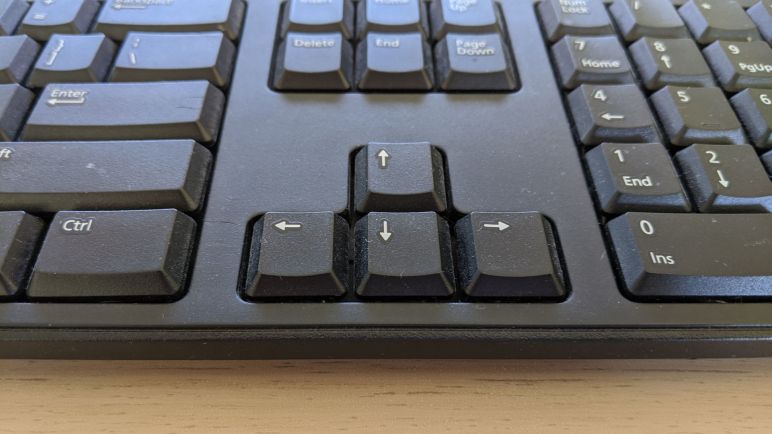
Only classes that derive from Control support focus and tab navigation.

The CaptureElement control (generic name) used in the UWP webcam example is not derived from Control (proper name) and that’s why I have not been receiving the keyboard events. Once I finally understood my mistake, it was easy to fix.

Tab and Arrow Keys Getting In Each Others Way

In a UWP application, we have two major ways for navigating UI controls using the keyboard: a linear path using Tab key (and shift-Tab to go backwards), and a two-dimensional system with the four arrow keys. A part of what makes learning UWP keyboard navigation difficult is the fact that these two methods are both active simultaneously and we have to think about what happens when an user switches between them.

Application authors can control tabbing order by setting TabIndex. It is also the starting point of keyboard navigation, since the initial focus is on the element with the highest TabIndex. Occasionally the author would want to exclude something from tabbing order, they could turn that off by setting IsTabStop to false. I thought that was pretty easy until I started reading about TabFocusNavigation. This is where I’m thankful for the animation illustrating the concept on this page or else I would have been completely lost.

On the arrow navigation side, XYFocusKeyboardNavigation is how authors can disable arrow navigation. But since it is far from a simple system, selectively disabling certain parts of the app would have wildly different effects than simple “on” or “off” due to how subtrees of controls interact. That got pretty confusing, and that’s even before we start trying to understand how to explicitly control the behavior of each arrow direction with the XY focus navigation strategies.

Even with all these complex options, I was skeptical they could cover all possible scenarios. And judging by the fact we have an entire page devoted to programmatic focus navigation, I guess they didn’t manage. When the UI designer wants something that just can’t be declared using existing mechanisms, the application developer has the option of writing code to wrangle keyboard focus.

But right now my problem isn’t keyboard navigation behaving differently from what I wanted… the problem is that I don’t see keyboard events at all. My answer was elsewhere: I had no control, in both senses of the word.

Learning UWP Keyboard Navigation

After a quick review of the of UWP keyboard event basics, I opened up the can of worms that is keyboard navigation. I stumbled into this because I wanted to use arrow keys to move the 3D printer carriage holding a camera, but arrow keys already have roles in an application framework! My first effort to respond to arrow keys was a failure, and I hypothesized that my code conflicted with existing mechanisms for arrow keys. In order to figure out how I can write arrow key handlers that coexist with existing mechanisms, I must first learn what they are.

Graphical user interfaces are optimized for pointing devices like a mouse, stylus, or touchscreen. But that’s not always available, and so the user needs to be able to move around on screen with the keyboard. Hence the thick book of rules that is summarized by the UWP focus navigation page. As far as I can tell, it is an effort to put together all the ways arrow keys were used to move things around on screen. A lot of these things are conventions that we’ve become familiar with without really thinking about it as a rigorous system of rules, many were developed by application authors so it “felt right” for their specific application. It reminds me of the English language: native speakers have an intuitive sense of the rules, but trying to write down those rules is hard. More often than not, the resulting rules make no sense when we just read the words.

And, sadly, I think the exact same thing happened in the world of keyboard navigation. But in a tiny bit of good news, we’re not dependent on understanding words, this page also had a lot of animated graphics to illustrate how keyboard navigation functions under different scenarios. I can’t say it makes intuitive sense, but at least seeing the graphics help understand the intent being described. It’s especially helpful in scenarios where tab navigation interacts with arrow key navigation.

Reviewing UWP Keyboard Routed Events

I wanted to have keyboard control of the 3D printer carriage, moving the webcam view by pressing arrow keys. I knew enough about the application framework to know I needed to implement handlers for the KeyDown and KeyUp events, but in my first implementation those handlers are never called.

If at first I don’t succeed, it’s time to go to the manual.

The first stop is the overview for UWP Events and Routed Events, the umbrella of event processing architecture including keyboard events. It was an useful review and I was glad I hadn’t forgotten anything fundamental or have missed anything significantly new.

Next stop was the UI design document for keyboard interactions. Again this was technically a review, but I’ve forgotten much of this information. Keyboard handling is complicated! It’s not just an array of buttons, there are a lot of interactions between keys and conventions build up over decades as to what computer literate users have come to expect.

When I think of key interactions, my first reaction is to think about the shift key and control key. These modifier keys change the meaning of another button: the difference between lowercase ‘c’, uppercase ‘C’ and Control+C which might be anything from “interrupt command line program” to “Copy to clipboard.”

But that’s not important to my current project. My desire to move the camera carriage using arrow keys opened up an entirely different can of worms: keyboard navigation.

And I Ended Up Using Tape

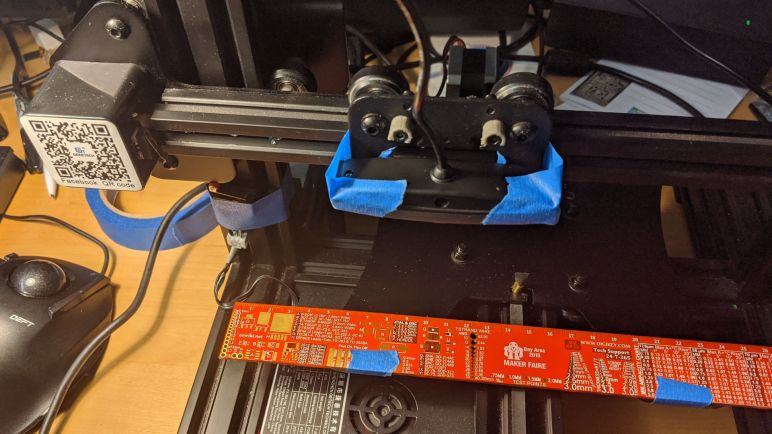
Now I feel ridiculous. After spending time disassembling a HP HD 4310 webcam to see how to best modify it for mounting on the carriage of my retired 3D printer chassis… I realized the fastest and easiest way to test some ideas is to just tape the thing to the carriage with good old reliable blue painter’s tape.

The tape would not be sturdy enough for precision measurements, of course, but that’s not important on the first pass through. I needed to see if the camera can autofocus within the range I want, and I need to see the quality of images I can get with this camera. And most of all, I need to verify I could write the code necessary to control everything working together as a unit. None of that need a rigid mounting.

Right now the biggest problem is the USB cable exerting a force as the carriage moves around. It is a pretty soft cable, but strong enough to wiggle a taped-down camera. I suspect any kind of 3D printed bracket would be enough to resist the force exerted by the USB cable.

In the short term, this is not a huge problem. Tape on the left and right sides of the camera has good leverage to resist the cable as the carriage moves along the X axis, and Y-axis movements would not exert any force at all since it is an independent assembly.

So a little blue tape is all I need right now to let me get started on the coding.

Mild HP HD 4310 Webcam Integration Modification

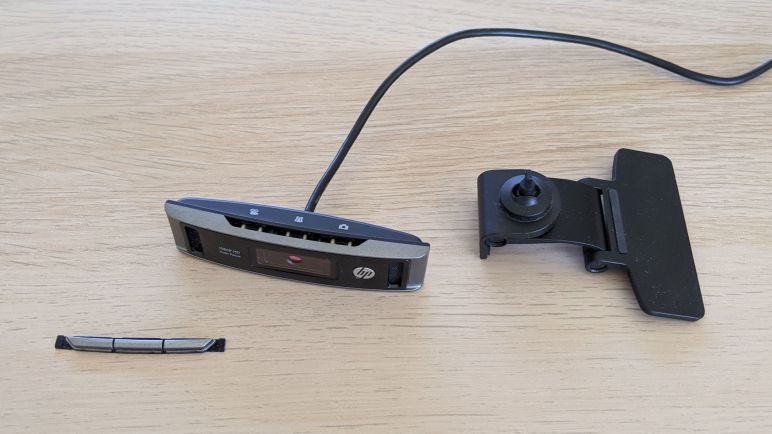
I took a HP HD 4310 webcam apart to see inside. Mainly out of curiosity and for fun, but also to check out my options for system integration. Webcams generally come with some kind of mechanism that helps them perch on top of a wide variety of surfaces, ranging from flat tabletop to the narrow bevel of a computer monitor. One thing they are not designed for, however, is to be rigidly mounted to a 3D printer chassis. Some webcam bases have integrated a standard 1/4″-20 camera tripod mount, but the HP HD 4310 is not one of them.

The built in base on a HD 4310 can unfold to sit flat on a surface, or grasp a computer monitor. In my intended usage, however, it is not useful and gets in the way. Fortunately, once we take the case apart we could access the single screw necessary to remove the base.

I considered designing and 3D printing something to slot in the exact same position as the base, but it is small and the single attachment point is difficult to ensure rigidity. (A problem in its normal usage as a webcam as well.) I think it is more likely for me to remove the two short case screws and replace them with longer screws. This allows attachment to a much wider and therefore more stable bracket.

I was also concerned about inadvertent button presses launching functions unexpectedly. I don’t plan to use the buttons so I had planned to cut some traces on the circuit board to disable those buttons. Fortunately, the physical buttons can be removed to eliminate inadvertent activation.

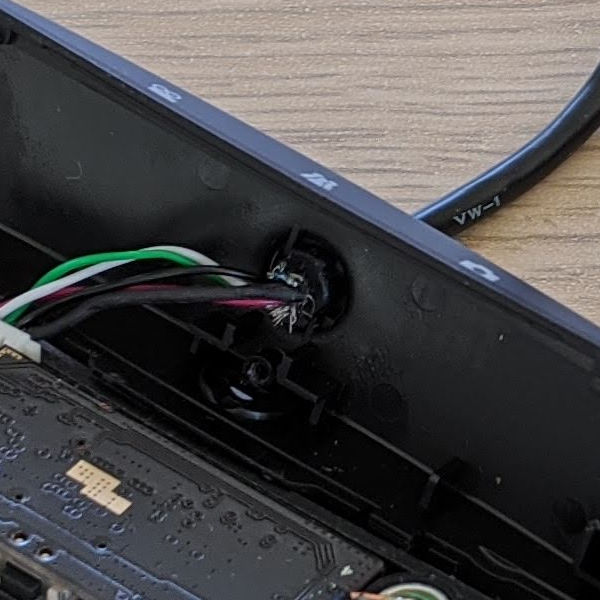
These mild modifications should be enough to help me get started. If I want to go further, there’s the option to host the circuit board in a new enclosure. The main obstacle here is the USB data cable: its hard rubber protective strain relief bushing on the back shell has been installed very tightly. I suspect it could not be removed without destroying the back shell, the cable, or possibly both. The other option is to cut the wires and build my own USB data cable, but I’m not willing to put in that much effort for an early first draft prototype. In fact, I probably shouldn’t have put in the amount of effort I already have.

Project Precedent: Optical Comparator

I’m vaguely aware of the existence of computer-controlled camera inspection systems in industrial quality assurance, but that’s not the inspiration for my next experiment to mount a camera on a 3D printer chassis. The inspiration was actually an optical comparator I used when I took a class in machining technology.

Using it started with mounting a machined part in the examination area, then the shadow of its profile is magnified and projected up on a large screen for inspection of geometry. Older machines only performed the optical magnification, the actual comparison was done by a human being with a transparent overlay of the intended dimensions placed on the screen for comparison. (Hence the name optical comparator.) The one I got some hands-on time for was one of the newer machines with digital read out, plus a computer capable of performing some basic geometry calculations. For example, I could put the cross hairs on three different points of a hole, and the calculator will return the center point and diameter of that hole.

That center cross hair was what I’m focused on for my project. A real optical comparator is designed to maximize the area sharply in focus while simultaneously minimizing distortion in the projected image. This requires an elaborate optical path filled with expensive lenses, and I have neither the skill or budget to replicate that capability. Most of what I want to accomplish can be tied to that center cross hair in conjunction with precision motion control, ignoring the effects of distortion like parallax out towards the edges.

It is possible to do much of what I intend to with OpenCV and a static high quality calibrated camera, skipping the motion control bits. However the point of this project is to use motion control to compensate for the various problems encountered when using an affordable webcam. This is how the project is inspired by, but very different from, just building a cheap crude optical comparator.

So now with the 3D printer chassis in hand, all I need is a webcam! OK, well, about that

Idea: Visual Dimension Measurement

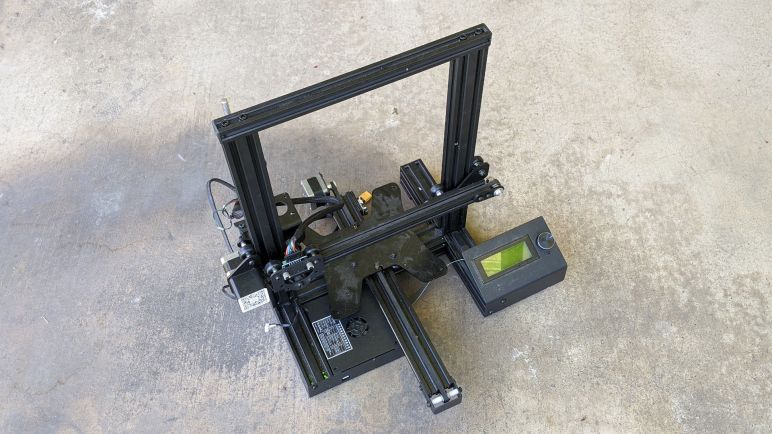
I had the chance to inherit a retired Geeetech A10 3D printer, minus many of the 3D printing specific parts. I gave it some power and devised a replacement for the missing Z-axis end stop. While this was not enough to restore it to 3D printing ability, it is now a functioning 3-axis motion control system. What can I do with it?

The problem is not trying to come up with ideas… the problem is trying to decide which idea to try first. Motion control systems used to be strictly in the realm of industrial machinery, but 3D printing has brought such capability within reach of hobbyists and now we are here: systems getting old and available for re-purposing.

I’ve decided the first idea I wanted to investigate was a camera based measurement system. Using a camera mounted to the carriage, measure and calculate dimensions of things placed on the bed. I’ve wanted this kind of capability many times in past projects, designing enclosures or brackets or something else for 3D printing to support an existing item.

Most typically, I’ve wanted to quickly measure the dimensions of a circuit board. Sometimes that’s because I have a salvaged piece of equipment and I wanted to repurpose it into something else. Other times it’s because I bought some electronic component on Amazon and I wanted to build an enclosure for it. It’s easy to use a caliper when they are rectangular, but they’re not always so cooperative.

People have asked if they could get dimensions from a photo. This is possible if the camera has been calibrated and its optical characteristics known. Lacking that information, a photograph is a 2D projection of 3D data and this transformation loses data along the way that we can’t reliably extract afterwards.

But there’s another way: if the camera’s movement is precisely controlled, we can make our calculations based on camera’s motion without a lot of math on optical projection. Is it easier or harder? Is it more or less accurate? It’s time to build a prototype of something that can be thought of as a crude optical comparator.

Successful Launch Of Mars-Bound Perseverance

The rover formerly known as Mars 2020 is on the way to the red planet! Today started the interplanetary journey for a robotic geologist. Perseverance rover is tasked with the next step in the sequence of searching for life on Mars, a mission plan informed by the finding of predecessor Curiosity rover.

I first saw the mission identifier (logo) when it was on the side of the rocket payload fairing and thought it was an amazing minimalist design. It also highlighted the ground clearance for the rover’s rocker-bogie suspension, which has direct application to Sawppy and other 3D-printed models here on Earth. I’ll come back to this topic later.

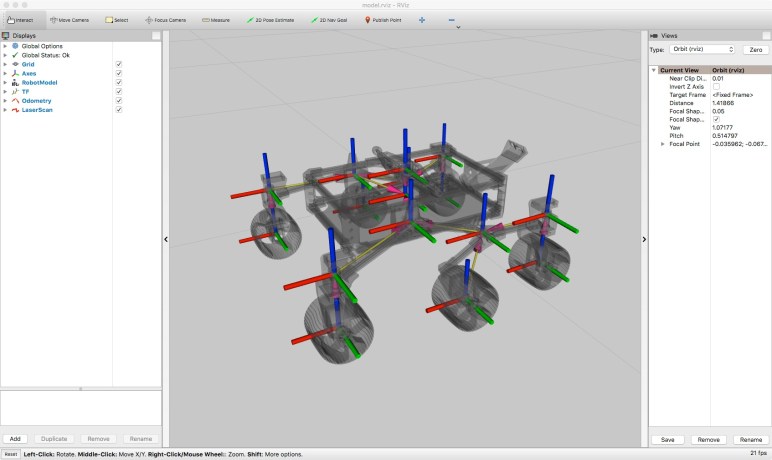
Speaking of Sawppy, of course I wasn’t going to let this significant event pass without some kind of celebration, but plans sometimes go awry. I try to keep project documentation on this blog focused by project, in an effort to avoid disorienting readers with the real-life reality that I constantly jump from one project to another, then back, on a regular and frequent basis. I’ve been writing about my machine automation project over the past few days and I have a few more posts to go, but here’s a sneak peek at another project that will be detailed on this blog soon: the baby Sawppy rover.

Originally intended to be up and running by Perseverance launch day (today) I missed that self-imposed deadline. The inspiration was the cartoon rover used as mascot for Perseverance’s naming contest, I wanted to bring that drawing to life and it fit well with my goal to make a smaller, less expensive, and easier to build rover model. Right now I’m on the third draft whose problems will inform a fourth draft, and I expect many more drafts. The first draft’s problems came to a head before I even printed all the pieces and was aborted. The second draft was printed, assembled, and motorized.

Getting the second draft up and running highlighted several significant problems with the steering knuckle design. Fixing it required changing not just the knuckles, but also the suspension arms that attached to them, and it ended up easier to just restart from scratch on a third draft. I couldn’t devote the time to get the little guy up and running by launch day, so I had to resort to a video where I moved it by hand.

Still, people loved baby Sawppy rover, including some people at the NASA Perseverance social media team! The little guy got a tiny slice of time in their Countdown to Mars video, at roughly the one minute mark alongside a few other hobbyist rovers.

More details on baby Sawppy rover will be coming to this blog, stay tuned.

Notes on Exploring Curio ROS: ros_control

When learning something new, I always find it useful to find a part that I could use as a foundation. Something I can use to build my new information on top of. I had trouble finding such a foundation for ROS as it was such a big system. So it was a great gift to have the chance to look at Rhys Mainwaring’s ROS stack for Curio rover, a sibling of my Sawppy rover. This meant the rover I designed and built was my foundation for learning Curio’s ROS software stack.

Such a foundation was less critical when I had explored Curio’s interaction between Arduino Mega and Raspberry Pi. But it was very useful when I explored how command messages were sent around inside the system. This was built using ros_control, a set of ROS packages that help abstract the concepts of robot motor control from the actual details of motor controller commands.

The promise here is allowing a robot builder to swap around different motor controllers without changing the logic about how a robot would use those motors. Conveniently, Sawppy has both of the basic categories: “Joints” specify a position, and that fits Sawppy’s four corner steering servos. Whereas “Transmission’ specify rotational motion like Sawppy’s six wheel motors.

The idea of abstracting motor control from implementation is common, I even had a primitive form of it inside SGVHAK_Rover software allowing us to hack a servo into a RoboClaw placeholder, and later adapted to Sawppy’s LX-16A serial bus servos. The power of such abstraction comes when it becomes open and flexible enough for software modules implementing either side of the abstraction to be reusable beyond its original author’s use. That certainly was not going to happen with a homebrew pack of servo software, but a convention in ROS is a different story.

Which is why I was puzzled to learn ros_control does not appear to be in the works for ROS 2. It is absent from the index, and I found only a discussion thread with no commitment and this page with a dead link. I thought ros_control would be a fundamental part of the platform, but it is not. Its absence tells me there’s an important gap between my expectation and ROS community’s actual priorities, but I don’t know what it is just yet. I’ll need to find its successor in the ROS2 ecosystem before I understand why ros_control is being left behind.

Notes on Exploring Curio ROS: Arduino Mega

I was very excited when I learned Rhys Mainwaring created ROS software for Curio rover, a sibling of my Sawppy rover. An autonomous Sawppy on ROS has always been the long-term goal but I have yet to invest the time necessary to climb the learning curve. Rhys has far more ROS experience, and I appreciated the opportunity to learn from looking over the Curio Github repository. Here are some of my notes. written with the imperfect accuracy and completeness of a ROS beginner learning as I go.

The most novel part of Curio is obtaining odometry data from LX-16A’s position sensor with the use of a filter that recognizes when we’re in the dead zone of that position sensor and rejects bad data. I believe Rhys has ambition to extrapolate position data while within the dead zone but I didn’t find the code to make it happen. Either I missed it or that is still yet to come.

I love the goal of odometry calculation without requiring additional hardware, but Rhys ran into problems with bandwidth and a little extra hardware was brought in to help as (hopefully?) a short term workaround. While Sawppy didn’t need to communicate with the servos very frequently, Curio needed to also poll servo positions far more frequently for the odometry filter. Rhys found that the LewanSoul BusLinker board’s serial to USB bridge could not sustain the data rate necessary for the filter to obtain good data.

As a workaround, Curio makes use of an Arduino Mega 2560 to communicate with BusLinker via its 5V UART TX/RX pins, and then translating that to USB serial for the Raspberry Pi. The Arduino Mega is necessary for this role because it has multiple hardware UART necessary to communicate with both BusLinker and Raspberry Pi at high speed. I only have Arduino Nano on hand, with a single UART, and thus unsuitable for the purpose.

Curio’s Arduino Mega also has a second job: that of interpreting PWM commands from a remote control receiver, relaying user commands from a remote control transmitter. This is an alternative to my HTML-based control scheme over WiFi.

Curio’s Arduino communicates with its Pi over USB serial, using the rosserial_arduino library. Rhys has set up Curio’s Arduino firmware code such that its two jobs can easily be separated. If a rover builder only wants one or the other function, it should be as easy as changing the values of ENABLE_ARDUINO_LX16A_DRIVER  or ENABLE_RADIO_CONTROL_DECODER to trigger the right #ifdef to make it happen.

Samsung 500T Now Runs On Solar Power

I wanted to have a screen in my house displaying current location of the international space station. I love ISS-Above but didn’t want to dedicate a Raspberry Pi and screen, I wanted to use something in my pile of retired electronics instead. I found ESA’s HTML-based ISS tracker, tested it on various devices from my pile, and decided the Samsung 500T would be the best one to use for this project.

One of the first device I tried was a HP Mini (110-1134CL) and I measured its power consumption while running ESA’s tracker. I calculated my electric bill impact to keep such a display going 24×7 would be between one and two dollars a month. This was acceptable and a tablet would cost even less, but what if I could drop the electric bill impact all the way to zero?

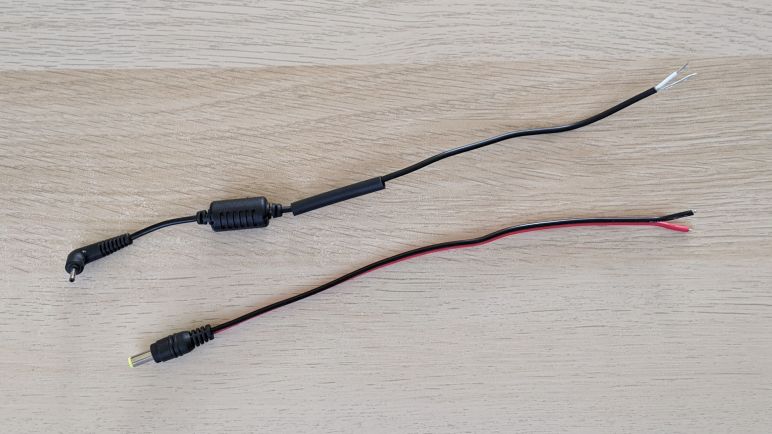
Reading the label on Samsung 500T’s AC power adapter I saw its output is listed at 12V DC. The hardware is unlikely to run on 12V directly, since it also has to run on batteries when not plugged in. It is very likely to have internal voltage regulators which should tolerate some variation of voltage levels around 12V. The proper way to test this hypothesis would be to find a plug that matches the AC adapter and try powering the tablet from my bench power supply. But I chose the more expedient path of beheading the AC adapter instead and rewiring the severed plug.

A quick test confirmed the tablet does not immediately go up in flames when given input voltage up to 14.4V, the maximum for lead-acid batteries. Whether this is bad for the device long term I will find out via experience, as the tablet is now wired up to my solar powered battery array.

This simple arrangement is constantly keeping tablet batteries full by pulling from solar battery. This is not quite optimal, so a future project to come will be to modify the system so it charges from solar during the day and runs on its own internal battery at night. But for now I have an around-the-clock display of current ISS location, and doing so without consuming any electricity from the power grid

Inspiration From Droids of Star Wars

Today is the fourth day of the month of May, which has grown into “Star Wars day” due to “May the Fourth” sounding like that film’s popular parting line “may the Force be with you.” A quick search confirmed I’ve never explicitly said anything about Star Wars on this blog and that should be corrected.

By the time I saw Star Wars, I had already been exposed to popular science fiction concepts like space travel, interstellar commerce, and gigantic super-weapons. And the idea of a cult that promises to make their followers more special than regular people… we certainly didn’t need science fiction for that. So none of those aspects of Star Wars were especially notable. What left a lasting impression was R2-D2.

R2-D2 had its own expression of duty and loyalty. Companion to humans, and a Swiss Army knife on wheels. A character that managed to convey personality without words or a face. R2-D2 was the most novel and compelling character for me in the film. I wouldn’t go far as to say R2-D2 changed the path of my life, but there has definitely been an influence. More than once I’ve thought of “does this help me get closer to building my own R2” when deciding what to study or where to focus.

I was happy when I discovered there’s an entire community of people who also loved the astromech droid and banded together to build their own. But that turned to disappointment when I realized the dominant approach in that community was focused on the physical form. Almost all of these were remote-controlled robots under strict control of a nearby human puppeteer, and little effort was put into actually building a capable and autonomous loyal teammate.

I can’t criticize overly much, as my own robots have yet to gain any sort of autonomy, but that is still the ultimate long-term goal. I love the characters of R2-D2 and the follow-on BB-8 introduced in the newest trilogy. Not in their literal shape, but in the positive role they imagined for our lives. This distinction is sometimes confusing to others… but it’s crystal clear to me.

Oh, I thought you loved Star Wars.

Star Wars is fine, but what I actually love are the droids.

I still hope the idea becomes reality in my lifetime.

Converting Power Input of USB-C Car Charger

The first introduction of USB-C into my life was my Nexus 5X cell phone. Intrigued by the promise of faster charging possible with USB-C, I bought a few additional chargers including this car charger sold by Monoprice.

MP USBC conversion 00 user end

This particular model is no longer carried by Monoprice, probably because there’s a flaw in the design. After several months, it became difficult for it to make good electrical contact with the standard car power socket that originally started as a cigarette lighter.

MP USBC conversion 01 plug end

My hypothesis is that there’s poor electrical conduction in the system, causing energy to be lost as heat that started melting the surrounding plastic. Eventually seizing up the spring-loaded mechanism so it is stuck.

MP USBC conversion 02 melty closeup

I first tried cutting the metal free from melted plastic and had no luck. This plastic is extremely durable.

MP USBC conversion 03 tough to cut

I then tried attacking the problem from the other end, and felt sheepish because the face plate is only held by friction and popped off easily.

MP USBC conversion 04 faceplate pops open

Looking inside, I could see two screws for further disassembly.

MP USBC conversion 05 two screws visible

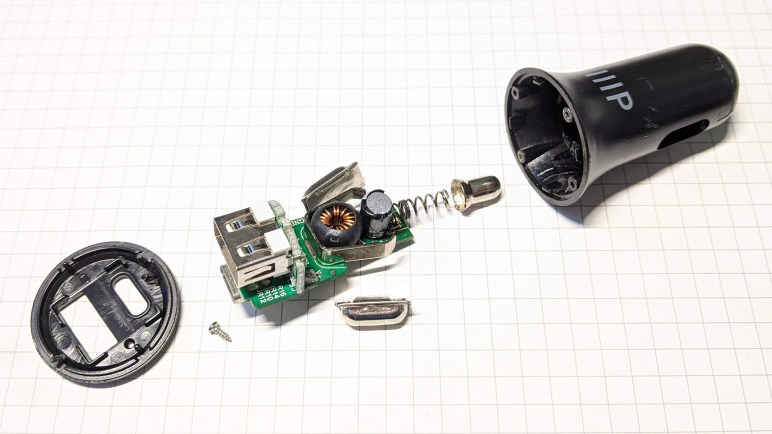
Once they were removed, it was easy to pull the guts and lay them out.

MP USBC conversion 06 components laid out

There is a thin spring behind the contact showed heat darkening, consistent with hypothesis of too much power carried within that thin metal causing heating. My experiment of the day would be to replace that connector system, and the easiest type on hand is a commodity JST-RCY connector which is good for at least 3 amps and very commonly handling peak power higher than 3A in remote-control aircraft.

MP USBC conversion 07 JST-RCY soldered on

The first soldering effort was bad. The positive wire easily soldered to where the spring used to be, but the original ground contact is a huge piece of metal my soldering iron could not bring up to proper temperature for a good solder joint. For the second attempt I found another ground on the PCB to solder to, keeping the two wires tight enough so I could thread it through the partially melted hole where the spring-loaded positive contact used to be.

MP USBC conversion 08 JST-RCY threaded through

I reassembled the device without the original spring or its contact. I won’t be able to use it with a car power socket anymore but I should be able to keep using it to charge USB-C devices from other ~12V DC power sources.

MP USBC conversion 09 reassembled

Wheel Drive Motor Gearbox Swap for JPL Open Source Rover

It’s a lot of fun to run the JPL Open Source Rover across rough terrain, seeing its rocker-bogie suspension system at work. But it is possible to play too rough and break some gears in the wheel drive gearbox. Some rover builders on the forum who ran into this problem decided they wanted sturdier motors and upgraded all six drive motors to something bigger and beefier. I understand this upgrade was done for the JPL-owned example as well. But that can be an expensive proposition.

If a rover is not strictly required to traverse rough terrain, we can decide to stay with kinder gentler terrain. Returning to the official parts list we see they are Pololu’s item number 4888, 172:1 Metal Gearmotor LP 12V with 48 CPR Encoder. As of this writing, $35 each. The easy solution is to buy more of them but I hunted for a less expensive proposition.

My first question is: “Can we make replacement gears?” and I quickly decided it was not practical. These gears are too small for consumer grade FDM 3D printers to handle and demands more strength than 3D-printed plastic can deliver. I don’t have a machine shop with metal gear cutting equipment.

The next question is: “Can we buy replacement gears?” And I had no luck here as I didn’t know how to navigate the manufacturing industry landscape to find who might be willing to sell small numbers of these gears to individual consumers.

Following that: “Can we buy replacement gearboxes?” The best I found was a company selling them with a minimum order quantity of 1000. I suppose I could buy a pallet and go into business selling replacement gearboxes to rover builders, but that’s not my idea of entrepreneurship today. (UPDATE: While sharing this information to OSR forums, I found a vendor on Amazon(*) selling them at $16 each. For lowest cost, I also found a company on Alibaba willing to sell individual gearboxes as samples at $2.79 each.)

What’s left? Well, Pololu’s product chart shows item 3256 is the same motor and gearbox, but without the encoder. As of this writing, these are $20 each, a significant discount for not buying another encoder.

It offers a lower cost alternative to direct replacement. I had two broken gearboxes on hand. They correspond to the two front wheels on a rover that took too big of a drop off a curb. I bought two #3256 gearmotors without encoder, and swapped their gearboxes out with the rover’s two #4888 gearmotors with encoders, bringing the rover back up and running.


(*) Disclosure: As an Amazon Associate I earn from qualifying purchases.

Old Chromebook Lifespan Longer Than Originally Thought

A cracked screen seemed to be the only problem with this Toshiba Chromebook 2 (CB35-B3340). I found no other hardware or software issues with this machine and it seemed to be up and running well with an external monitor. The obvious solution was to buy a replacement screen module, but I was uncertain if that cost would be worthwhile. I based my opinion on Google’s promise to support Chromebook hardware for five years, and it’s been five years since this model was introduced. I didn’t want to spend money on hardware that would be immediately obsolete.

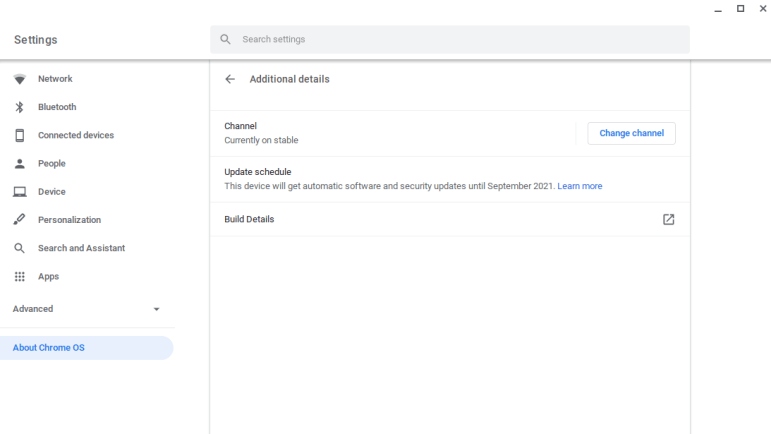
I’ve since come across new information while exploring the device. This was the first Chrome OS device I was able to spend a significant time with, and I was curious about all the capabilities and limitations of this constrained-by-design operating system. While poking around in the Settings menu, under “About Chrome OS” I found the key quote:

This device will get automatic software and security updates until September 2021.

I don’t know how this September 2021 time was decided, but it is roughly seven years after the device was introduced. At a guess I would say Google estimated a two year shelf life for this particular Chromebook hardware to be sold, and the promised five year support clock didn’t start until the end of that sales window. This would mean someone who bought this Chromebook just as it was discontinued would still get five years of support. If true, it is more generous than the typical hardware support policy.

Whatever the reason, this support schedule changes the equation. If I bought a replacement screen module, this machine could return to full functionality and support for a year and a half. It could just be a normal Chromebook, or it could be a Chromebook running in developer mode to open up a gateway to more fun. With this increased motivation, I resumed my earlier shopping for a replacement and this time bought a salvaged screen to install.

Old AMD GPU for Folding@Home: Ubuntu Struggles, Windows Win

The ex-Luggable Mark II is up and running Folding@Home, chewing through work units quickly mostly thanks to its RTX 2070 GPU. An old Windows 8 convertible tablet/laptop is also up and running as fast as it can, though its best speed is far slower than the ex-Luggable. The next recruit for my folding army is Luggable PC Mark I, pulled out of the closet where it had been gathering dust.

My old AMD Radeon HD 7950 GPU was installed in Luggable PC Mark I. It is quite old now and AMD stopped releasing Ubuntu drivers after Ubuntu 14. Given its age I’m not sure if it even works for GPU folding workloads. It was designed and released near the dawn of the age when GPUs started finding work beyond rendering game screens, and its GCN1 architecture probably had problems typical of first versions of any technology.

Fortunately I also have an AMD Radeon R9 380 available. It was formerly in Luggable PC Mark II but during the luggable chassis decommissioning I retired it in favor of a NVIDIA RTX 2070. The R9 380 is a few years younger than the HD 7950, I know it supports OpenCL, and AMD has drivers for Ubuntu 18.

A few minutes of wrenching removed the HD 7950 from Luggable Mark I, putting the R9 380 in its place, and I started working out how to install those AMD Ubuntu drivers. According to this page, the “All-Open stack” is recommended for consumer products, which I mean to include my consumer-level R9 380 card. So the first pass started by running amdgpu-install. To verify OpenCL is up and running, I installed clinfo to verify GPU is visible as OpenCL device.

Number of platforms 0

Hmm. That didn’t work. On advice of this page on Folding@Home forums, I also ran sudo apt install ocl-icd-opencl-dev That had no effect, so I went back to reread the instructions. This time I noticed the feature breakdown chart between “All-Open” and “Pro” and OpenCL is listed as a “Pro” only feature.

So I uninstalled “All-Open” and installed “Pro” stack. Once installed and rebooted, clinfo still showed zero platforms. Returning to the manual, on a different page I found the fine print saying OpenCL is an optional component of the Pro stack. So I reinstalled yet again, this time with --opencl=pal,legacy flag.

Running clinfo now returns:

Number of platforms 1
Platform Name AMD Accelerated Parallel Processing
Platform Vendor Advanced Micro Devices, Inc.
Platform Version OpenCL 2.1 AMD-APP (3004.6)
Platform Profile FULL_PROFILE
Platform Extensions cl_khr_icd cl_amd_event_callback cl_amd_offline_devices
Platform Host timer resolution 1ns
Platform Extensions function suffix AMD

Platform Name AMD Accelerated Parallel Processing
Number of devices 0

NULL platform behavior
clGetPlatformInfo(NULL, CL_PLATFORM_NAME, ...) No platform
clGetDeviceIDs(NULL, CL_DEVICE_TYPE_ALL, ...) No platform
clCreateContext(NULL, ...) [default] No platform
clCreateContext(NULL, ...) [other] <error: no devices in non-default plaforms>
clCreateContextFromType(NULL, CL_DEVICE_TYPE_DEFAULT) No devices found in platform
clCreateContextFromType(NULL, CL_DEVICE_TYPE_CPU) No devices found in platform
clCreateContextFromType(NULL, CL_DEVICE_TYPE_GPU) No devices found in platform
clCreateContextFromType(NULL, CL_DEVICE_TYPE_ACCELERATOR) No devices found in platform
clCreateContextFromType(NULL, CL_DEVICE_TYPE_CUSTOM) No devices found in platform
clCreateContextFromType(NULL, CL_DEVICE_TYPE_ALL) No devices found in platform

Finally, some progress. This is better than before, but zero devices is not good. Back to the overview page which says their PAL OpenCL stack supported their Vega 10 and later GPUs. My R9 380 is from their Tonga GCN 3 line, which is quite a bit older than Vega, which is GCN 5. So I’ll reinstall with --opencl=legacy to see if it makes a difference.

It did not. clinfo still reports zero OpenCL devices. AMD’s GPU compute initiative is called ROCm or RadeonOpenCompute but it is restricted to hardware newer than what I have on hand. Getting OpenCL up and running, on Ubuntu, on hardware this old, is out of scope for attention from AMD.

This was the point where I decided I was tired of this Ubuntu driver dance. I wiped the system drive to replace Ubuntu with Windows 10 along with AMD Windows drivers. Folding@Home saw the R9 380 as a GPU compute slot, and I was up and running simulating protein folding. The Windows driver also claimed to support my older 7950, so one potential future project would be to put both of these AMD GPUs in a single system. See if the driver support extends to GPU compute for multi GPU folding.

For today I’m content to have just my R9 380 running on Windows. Ubuntu may have struck out on this particular GPU compute project, but it works well for CPU compute, especially virtual machines.
Desktop PC Component Advantage: Sustained Performance

A few weeks ago I decommissioned Luggable PC Mark II and the components were installed into a standard desktop tower case. Heeding Hackaday’s call for donating computing power to Folding@Home, I enlisted my machines into the effort and set up my own little folding farm. This activity highlighted a big difference between desktop and laptop components: their ability to sustain peak performance.

My direct comparison is between my ex-Luggable PC Mark II and the Dell laptop that replaced it for my mobile computing needs. Working all out folding proteins, both of those computers heated up. Cooling fans of my ex-Luggable sped up to a mild whir, the volume and pitch of the sound roughly analogous to my microwave oven. The laptop fans, however, spun up to a piercing screech whose volume and pitch is roughly analogous to a handheld vacuum cleaner. The resemblance is probably not a coincidence, as both move a lot of air through a small space.

The reasoning is quite obvious when we compare the cooling solution of a desktop Intel processor against one for a mobile Intel processor. (Since my active-duty machines are busy working, I pulled out some old dead parts for the comparison picture above.) Laptop engineers are very clever with their use of heat pipes and other tricks of heat management, but at the end of the day we’re dealing with the laws of physics. We need surface area to transfer heat to air, and a desktop processor HSF (heat sink + fan) has tremendously more of it. When workload is light, laptops keep their fans off for silent operation whereas desktop fans tend to run even when lightly loaded. However, when the going gets rough, the smaller physical volume and surface area of laptop cooling solutions struggle.

This is also the reason why different laptop computers with nearly identical technical specifications can perform wildly differently. When I bought my Inspiron 7577, I noticed that there was a close relative in Dell’s Alienware line that has the same CPU and GPU. I decided against it as it cost a lot more money. Some of that is branding, I’m sure, but I expect part of it goes to more effective heat removal designs.

Since I didn’t buy the Alienware, I will never know if it would have been quieter running Folding@Home. To the credit of this Inspiron, that noisy cooling did keep its i5-7300HQ CPU at a consistent 3.08GHz with all four cores running full tilt. I had expected thermal throttling to force the CPU to drop to a lower speed, as is typical of laptops, so the fact this machine can sustain such performance was a pleasant surprise. I appreciate the capability but that noise got to be too much… when I’m working on my computer I need to be able to hear myself think! So while the ex-Luggable continued to crunch through protein simulations, the 7577 had to drop out. I switched my laptop to the “Finish” option where it completed the given work unit overnight (when I’m not sitting next to it) and fetched no more work.

This experience taught me one point in favor of a potential future Luggable PC Mark III: the ability to run high performance workloads on a sustained basis without punishing hearing of everyone nearby. But this doesn’t mean mobile oriented processors are hopeless. They are actually a lot of fun to hack, especially if an old retired laptop doesn’t need to be mobile anymore.

Progress After One Thousand Iterations

Apparently I’ve got a thousand posts under my belt, so I thought it’d be fun to write down my current format. Sometime in the future I can look back on these notes and compare to see how it has evolved since.

Length: My target length has remained 300 words, but I’ve become a lot less stringent about it. 300 words is enough for a beginning, middle and end to a story. It is also about the right length to describe a problem, list the constraints, and explain why I made the decision I did. Sometimes I could get my thoughts out in 250 words, and that’s fine. When something goes long, I usually try to cut them into multiple ~300 word installments, but sometimes splitting up doesn’t make sense. I forced it a few times and they read poorly in hindsight, so if I run into it again (like this post) I just let those pieces run long.

Always Have A Featured Image: When I started writing I paid little attention to images, because the original focus is to have a written record I can search through. As it turned out, the featured image is really useful. First: it allows me to quickly skim through a set of posts just by their thumbnails, faster than reading each of their titles. Second: making sure I have at least one picture attached to every story is very helpful for jogging old memories. And sometimes, what I thought was a simple throwaway image became a useful wiring reference. I now believe pictures are a valuable part of documenting. Today’s cell phone cameras are so much better than they were four years ago, it only takes a few seconds to snap a high quality picture.

Still figuring out video: While images may have been an afterthought, video was not a thought at all when I started. Right now I’m in the middle of exploring video as an supplement — not a replacement — for these written records. It is another tool to use when appropriate, and cell phone camera improvements helps on this front as well. The only hiccup today is that I can’t directly embed video because VideoPress is only available to higher WordPress subscription tiers. As workarounds, short video clips are tweeted then embedded, and longer video clips are uploaded to YouTube and embedded. I expect video usage evolve rapidly as I experiment and see what works.

Use more tags, fewer categories: I started out trying to organize posts in categories, and that has become an unsatisfying mess representing a lot of wasted effort. When I want to find something I wrote, I go for the straight text search instead of browsing categories. And if I want to relate posts to each other in a search, I can use tags. It has advantage of arbitrary relations free of constraints imposed by a tree hierarchy.

Yet to stay with consistent voice: This is my blog about my own work, so I usually say “I”. But sometimes I slip into talking about “we” because in my mind I’m talking to my future self.

Keep up the daily rhythm: Scheduling a post to go out once a day, every day, is the best way I’ve had to keep the momentum going. I tried going to slower rhythms, like every other day, and it never works. If I stop for a single day, I’m liable to stop for multiple days that drag to weeks without a post. Usually there’s a good reason like a paid project that is consuming my time, but sometimes there isn’t. I’ve learned it is very easy to lose my momentum.

If it was interesting enough to take time, it’s interesting enough to write: I now describe tasks that took time, multiple searches, and multiple tries, before I found the solution. My original reasoning for not writing them down is the that since I found all the information online, my blog post won’t have anything new that people can’t find themselves. But there have been a few episodes where I forgot the solution and had to repeat the process again, and I was unhappy I didn’t write it down earlier. I’ve learned my lesson. Now if it took a nontrivial amount of time, I’ll at least jot down a few details in my “Drafts” folder for expanding to a full blog post later. Some of these are still sitting as a draft, but at least in that state they are still searchable.