Convert Nexus 5 To Use External DC Power

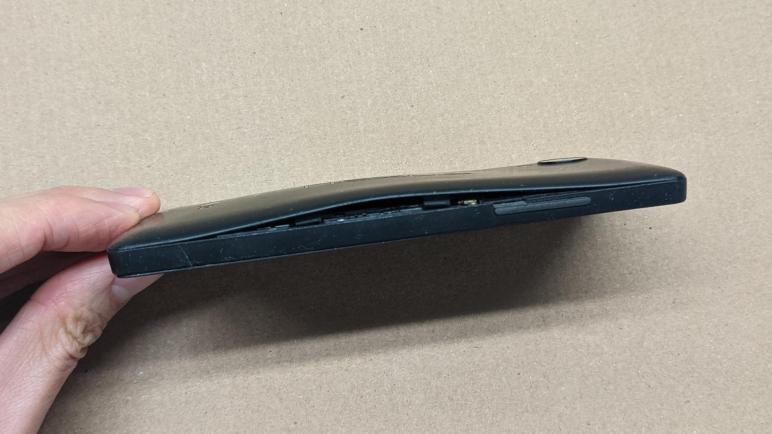
I just took apart a BL-T9 battery module from my old Nexus 5 cell phone. I had removed it as a precaution since its internal chemical situation had degraded, puffing up and pushing itself out of the phone. Even though the phone still seemed to work (or at least it would boot up) a puffed-up lithium-ion polymer battery is not a good situation.

But now I have an otherwise functional cell phone without a battery. It would be a shame to toss it in the e-waste, but it needs a power source to do more than just gathering dust. The first experiment was to see if the phone would run on USB power with the battery removed, and that was a bust. Trying to turn the phone on would show the low battery icon and then the screen goes dark again.

I then looked online for a replacement battery. (*) They range from a very poorly reviewed $10 unit on Amazon, up through the $35-$50 range. But did I want to spend that money? I don’t really need this device to be portable and battery-powered anyway. It’s more likely to go the way of my HP Stream 7 and become an always-on externally powered display, something I’ve tried earlier and plan to revisit in the future.

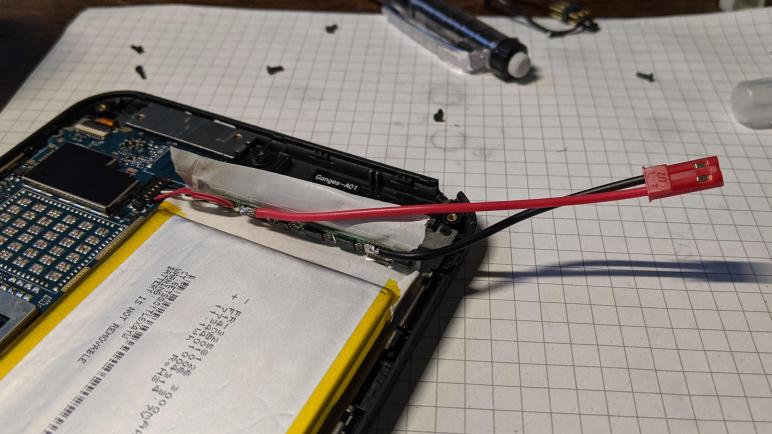
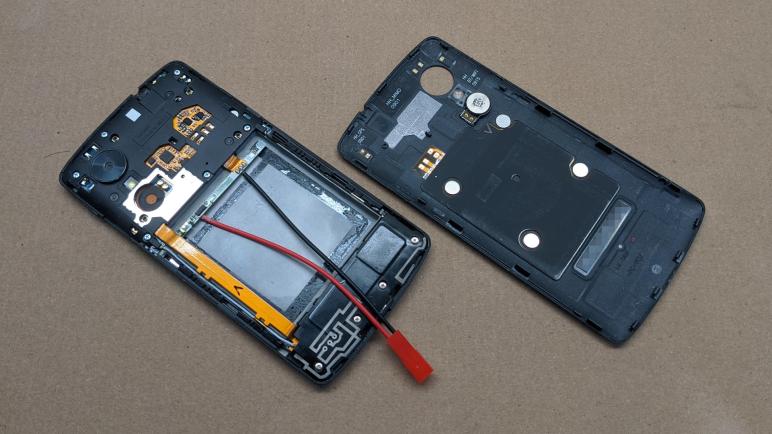
With my HP Stream 7 power experiments fresh on my mind, I decided to convert this device to run on external DC power as well. It won’t have a battery to buffer spikes in power draw, but that might be fine. An Android phone has lower power demand than a Windows tablet. For starters, I wouldn’t be plugging in external USB peripherals. Also with the HP experience in mind, I expect there are device drivers in its Android system image that expects to communicate with the chip in the battery module. So I’ll keep that module in the circuit and solder a JST-RCY connector where the battery cell terminals used to be. As a quick test, and one last farewell to the old puffy battery cell, I connected it to the JST-RCY connector. This electrically replicated original arrangement so I could verify everything still worked. I pushed the power button and there was no response. Oh no!

I mentally explored some possibilities: perhaps there is a thermal fuse on board the circuit board that killed the connection when it sensed the heat of my soldering iron. Or perhaps the chip would refuse to power up if the battery voltage ever sank to zero. As an experiment I plugged in USB power again, and I was presented with the battery charging animation. Pushing the power button now booted up the phone. Conclusion: if the battery had been disconnected and reconnected, a Nexus 5 requires USB power to jump start the cold boot process.

With the system verified to function (and learning the cold startup procedure with USB power) I disconnected the puffy battery for disposal. I replaced it with a MP1584EN DC voltage buck converter module (*) I adjusted to output 4.2V simulating a fully charged battery. I also added an electrolytic capacitor in the hope of buffering spikes in power draw. After using USB power for cold start, the Nexus 5 was content to run in this configuration for over a week. Perfectly happy to believe it was running on a huge battery the whole time.


(*) Disclosure: As an Amazon Associate I earn from qualifying purchases.

Degraded Nexus 5 Battery Demands Immediate Removal

I’m happy I found a way to make use of the HP Stream 7 tablet, though I have no immediate use for it so I jotted down some notes before putting it away in my pile of old hardware. When I did so, I found an unpleasant surprise in that pile: my old Nexus 5 cell phone shows signs of lithium battery degradation. It has puffed up, pushing against the back panel of the phone and popping a few clips loose. This is not good. I don’t know how long it’s been in this state, but I need to pay immediate attention.

With the first few retaining clips popped loose by the puffy battery, it was relatively simple to pop the remainder loose in order to remove the back panel. However, more disassembly is necessary before the battery could be (nicely) removed.

Further disassembly meant removing six screws holding this inner shield.

Once that inner shield was removed, I could disconnect the data cable running between the top and bottom halves of the phone, and I could electrically disconnect the battery. Mechanically, the battery itself is held by adhesive strips. The puffiness pulled some loose, but the remainder required some persuasion to release. I used a bit of thin clear plastic cut from some thermoformed product packaging.

The battery has puffed up roughly triple of its original thickness. No wonder it didn’t fit inside the phone anymore.

I’m glad I was able to remove the problematic battery before it expressed its degradation in unwanted and exciting ways. (Fire? Maybe fire.) But now I have removed the battery, I might as well take a closer look.

Miscellaneous Notes on HP Stream 7 Installation

My old HP Stream 7 can now run around the clock on external power, once I figured out I needed to disable its battery drivers. Doing so silenced the module that foiled my previous effort. (It would raise an alert: “the tablet has run far longer than the battery capacity could support” and shut things down.) Ignoring that problematic module, remaining drivers in the same large Intel chipset driver package allowed the machine to step down its power consumption. From ten watts to under two watts, even with the screen on. (Though at minimum brightness.) Quite acceptable and I’m quite certain I’ll repurpose this tablet for a project in the future. In the meantime, I wanted to jot down some notes on this hardware as reference.

The magic incantation to get into boot select menu (getting into BIOS, reinstalling operating system, and other tools) is to first shut down the tablet. While holding [Volume Down], hold [Power] until the HP logo is visible. Release power immediately or else it might trigger the “hold power for four seconds to shut off” behavior. (This is very annoying.) The boot select menu should then be visible along with on-screen touch input to navigate without a keyboard.

There are many drivers on the HP driver downloads site. Critical for optimized power consumption — and majority of onboard hardware — is the “Intel Chipset, Graphics, Camera and Audio Driver Pack”. I also installed the “”Goodix Touch Controller Driver” so the touchscreen would work, but be warned: this installer has a mix of case-sensitive and case-insensitive code which would fail with a “File Not Found” error if the directory names got mixed up. (/SWSetup/ vs /swsetup/)

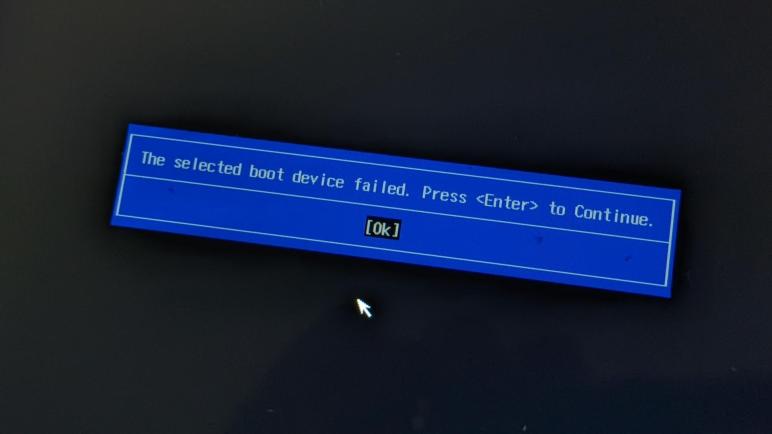
The available drivers are for Windows 8 32-bit (what the machine came with) and Windows 10 32-bit (what it is successfully running now.) The machine is not able to run 64-bit operating system despite the fact its Intel Atom Z3735G CPU is 64-bit capable. I don’t know exactly what the problem is, but when I try to boot into 64-bit operating system installer (true for both Windows 10 and Ubuntu) I get the error screen

The selected boot device failed. Press <Enter> to Continue.
[Ok]

Which reminds me of another fun fact: this machine has only a single USB micro-B port. In order to use USB peripherals, we need a USB OTG adapter. Which is good enough for a bootable USB drive for operating system installation… but then I need to press [Ok] to continue! The usual answer here is to use an USB hub so I could connect both the bootable OS installer and a keyboard. There’s actually no guarantee this would work: it’s not unusual for low-level hardware boot USB to support only root-level devices and not hubs. Fortunately, this tablet supported a hub to connect multiple USB devices allowing bootable USB flash driver for operating system installation to coexist with USB input devices to navigate a setup program.

I’ll probably need some or all of these pointers the next time I dig this tablet out of my pile of hardware. For now, I return it to the pile… where I noticed an unpleasant surprise.

Disable HP Stream 7 Battery Drivers When Externally Powered

I gave up trying to run my HP Stream 7 tablet on external DC power with the battery unplugged. The system is built with a high level of integration and it has become unreliable and too much of a headache to try running the hardware in a configuration it was not designed for. So I plugged the battery back in and installed Windows 10 again. And this time, the Intel chipset driver package installed successfully.

This was a surprise, because I thought my driver problems were caused by hardware I damaged when I soldered wires for direct DC power. Plugging in the battery allowed these drivers to install. And the driver package is definitely doing some good, because idle power draw with screen on minimum brightness has dropped from nearly 10W to just under 2W. This is a huge improvement in power efficiency!

So I wanted the drivers for low power operation, but maybe I don’t need every driver in the package. I went into device manager to poke around and found the key to my adventure: The “Batteries” section and more importantly the “Micro ACPI-Compliant Control Method Battery” device. This must have been the driver that rendered the system unbootable once I unplugged the battery — as an integrated system, there’s no reason for the driver to account for the possibility that the user would unplug the battery!

But now that I see this guy exists, I think perhaps it is part of the mechanism that outsmarted me and was skeptical running on external power. I disabled the drivers in the “Batteries” section and rebooted. I reconnected the external power supply keeping battery at 3.7V. Disabling the battery power related drivers were the key to around-the-clock operation. With the battery device absent from the driver roster, there’s nothing to tell the system to shut down due to low battery. But since the battery hardware is present, the driver package could load and run and there’s something to buffer sharp power draws like plugging in USB hardware. This configuration was successful running for a week of continuous operation.

Drawing a modest two watts while idle, this tablet can now be used as anything from a data dashboard, to a digital picture frame, or any other project I might want to do in the future. I don’t know what it will be yet, but I want to make sure I write down a few things I don’t want to forget.

HP Stream 7 Really Wants Its Battery

I’ve been trying to get a HP Stream 7 tablet running in a way suitable to use as a future project user interface or maybe a data dashboard. Meaning I wanted it to run on external power indefinitely even though it could not do so on USB power alone. When I supplied power directly to the battery it would shut down after some time. The current session deals with disconnecting the battery and feeding the tablet DC directly, but this machine was designed to run with a battery and it really, really wanted its battery.

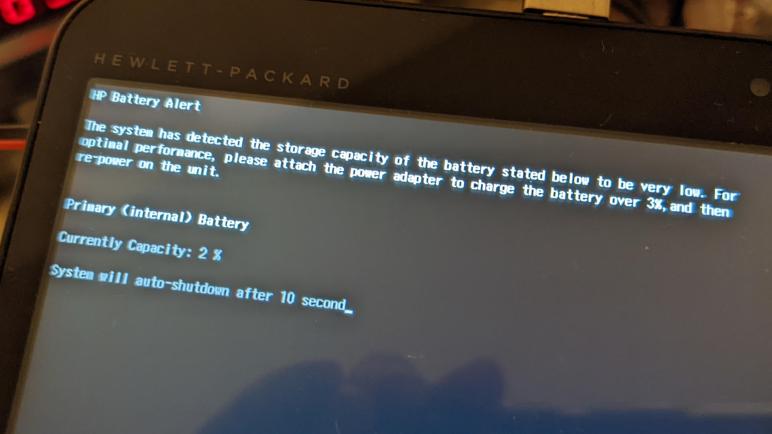
While I could feed it DC power and it would power up, it would intermittently complain about its battery being very low. This must be in hardware because it would occur when booting into either Windows or a Debian distribution of Linux. This shouldn’t be an input voltage problem, as my bench power supply should be keeping it at 3.7V. But there’s something trigging this error message upon startup and I have to retry rebooting several times before operation would resume:

HP Battery Alert

The system has detected the storage capacity of the battery stated below to be very low. For optimal performance, please attach the power adapter to charge the battery over 3%, and then re-power on the unit.

Primary (internal) Battery

Currently Capacity: 2 %

System will auto-shutdown after 10 second

Perhaps my bench power supply isn’t as steady as I assume it is. Perhaps there are problems keeping up with changes in power demand and that would occasionally manifest as a dip in voltage that triggers the battery alert. Another symptom that supports the hypothesis is the fact I couldn’t use USB peripherals while running on the bench power supply. When I plug in a USB peripheral, the screen goes black and the system resets, consistent with a power brownout situation.

So to make the hardware happy and to support sudden spikes in power requirements, I really need to plug the battery back in. Trying to run without battery was a fun experiment but more importantly it gave me an idea on running this tablet on continuous external power: silence the battery driver.

HP Stream 7 Running Debian with Raspberry Pi Desktop

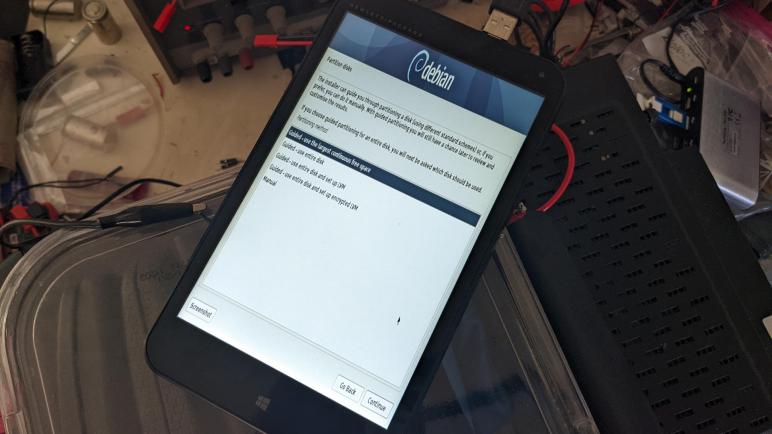
My HP Stream 7 seems to be having problems with a Windows device driver, but the problematic driver is somewhere in a large bundle of Intel chipset related drivers. For another data point I thought I would try an entirely different operating system: Debian with Raspberry Pi Desktop. Also, because I thought it would be fun.

Debian with Raspberry Pi Desktop is something I encountered earlier when looking for Linux distributions that are familiar to me and built for low-end (old) PC hardware left behind by mainline Ubuntu builds or even Chrome OS. The HP Stream 7 tablet fit the bill.

One amusing note is that since HP Stream 7 is formally a tablet, the default resolution is portrait-mode which means taller than it is wide. Unlike the Windows installer which knew to keep to the middle of the screen, the Debian installer scaled to fit the entire screen making for some very difficult to read tall narrow text.

Once up and running, the Debian with Raspberry Pi desktop ran on this tablet much as Raspberry Pi runs its Raspberry Pi OS, except this configuration is comparable to a fresh installation of Windows: many devices didn’t have drivers for proper function. I disabled Secure Boot in order to access non-mainline device drivers, which is thankfully straightforward unlike some other PCs of the era I had played with. But even then, many drivers were missing. Video and WiFi worked, but sound did not. A pleasant surprise was that the touchscreen worked as input, but only at the default orientation. If I rotate the desktop, the touchscreen did not adjust to fit. And while an idle Debian drew less power (~8W) than plain vanilla Windows (~10W) it is still significantly worse than this tablet running at its best.

Seeing Debian with Raspberry Pi Desktop run on this tablet was an amusing detour and possibly an option to keep in mind for the future. On the upside, at no point did Debian complain that the battery is low, because the operating system didn’t think there was a battery at all. The hardware, however, really misses the battery’s absence.

HP Stream 7 Reboot Loop Linked to Intel Chipset Windows Driver

I disconnected the battery on my HP Stream 7 tablet and soldered wires to put power on its voltage supply lines. The good news is that the tablet would start up, the bad news is that Windows couldn’t complete its boot sequence and gets stuck in a reboot loop. After a few loops, Windows notices something is wrong and attempted to perform startup repair. It couldn’t fix the problem.

My first thought was that I had damaged a component with my soldering. A small tablet has tiny components and I could have easily overheated something. But portions of the computer is apparently still running, because I could still access the Windows recovery console and boot into safe mode. But I didn’t have any idea on what to do to fix it while in safe mode.

Since there were no data of consequence on this tablet, I decided to perform a clean installation of Windows. If it succeeds, I have a baseline from which to work from. If it fails, perhaps the failure symptoms will give me more data points to diagnose. A few hours later (this is not a fast machine) I was up and running on Windows 10 21H2. Basic functionality seemed fine, which was encouraging, but it also meant the machine was running in unoptimized mode. The most unfortunate consequence is that the tablet runs hot. The power supply indicates the tablet is constantly drawing nearly 10 Watts, no matter if the CPU is busy or idle. A basic Windows installation doesn’t know how to put machine into a more power efficient mode, putting me on a search for drivers.

Since the tablet is quite old by now (Wikipedia says it launched in 2014) I was not optimistic, but I was pleasantly surprised to find that HP still maintains a driver download page for this device. Running down the list looking for an Intel chipset driver, I found a bundled deal in the “Intel Chipset, Graphics, Camera and Audio Driver Pack“. It sounded promising… but during installation of this driver pack, the tablet screen went black. When I turned it back on, the dreaded reboot loop returned. Something in this large package of Windows drivers is the culprit. Maybe I could try a different operating system instead?

Direct DC Power on HP Stream 7 Renders Windows Unbootable

While spending way too much time enjoying the game Hardspace: Shipbreaker, I was actually reminded of a project. In the game, safely depowering a ship’s computers involve learning which power systems are on board and disconnecting them without electrocuting yourself. It got me thinking about my old HP Stream 7 tablet that couldn’t run indefinitely on USB power and refused to believe an illusion of free energy when I supplied power on the lithium-ion battery cell. I thought it might be interesting to see what would happen if I disconnected the battery and supplied DC power directly.

My hypothesis is that the earlier experiment was foiled by the battery management PCB, it was too smart for its own good and realized the tablet had consumed far more capacity than its attached battery cell had any business providing and shutting the computer down. By disconnecting that PCB, perhaps the doubting voice would be silenced.

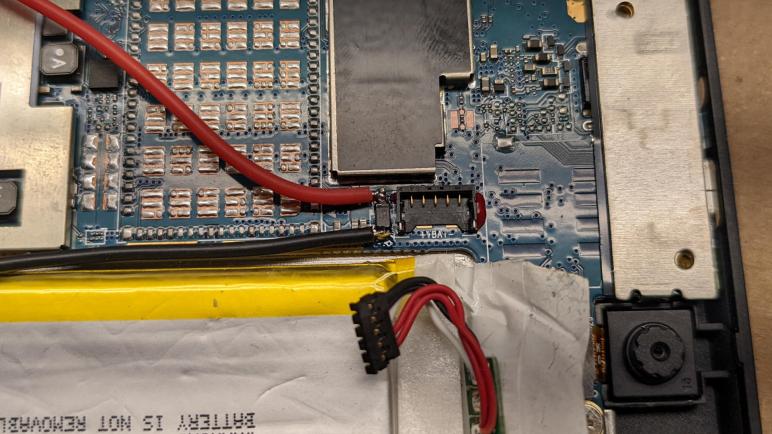
To test this idea, I would need to find the power supply and ground planes on the circuit board. I could solder directly to the empty battery connector, but that would make it impossible to plug the battery back in and was too drastic for my experiment. I could see pads underneath the connector clearly labeled VBAT + and – but I couldn’t realistically solder to them without damaging the connector either.

Taking my multi-meter, I started probing components near that battery connector for promising candidates. The search didn’t take long — the closest component had pads that connected to the voltage planes I wanted. I had hoped to find a decoupling capacitor nearby, but this doesn’t look like a capacitor. With a visible line on one side, it looks like a diode connected the “wrong” way. Perhaps this protects the tablet from reverse voltage: if VBAT +/- were reversed, this diode would happily short and burn out the battery in the interest of protecting the tablet.

Whatever its actual purpose, it serves my need providing a place to solder wires where I can put 3.7V (nominal voltage for single lithium-polymer battery cell) to power the tablet while its original battery is unplugged.

Good news: The machine powers up!

Bad news: Windows doesn’t boot anymore!

I could see the machine boot screen with the HP logo, and I could see the swirling dots of Windows starting up. But a few seconds later, the screen goes blank. We return to the HP logo, and the process repeats. Time to diagnose this reboot cycle.


UPDATE: Comment by Craig pointed to this project, which directly soldered 5V supply not to the mainboard but to the battery management circuit board (without battery.) https://www.instructables.com/Run-HP-Stream-7-Tablet-Without-a-Battery/

Arduino Library Versioning For ESP_8_BIT_Composite

I think adding setRotation() support to my ESP_8_BIT_Composite library was a good technical exercise, but I made a few mistakes on the administrative side. These are the kind of lessons I expected to learn when I decided to publish my project as an Arduino library, but they are nevertheless a bit embarrassing as these lessons are happening in public view.

The first error was not following sematic versioning rules. Adding support for setRotation() is an implementation of missing functionality, it did not involve any change in API surface area. The way I read versioning rules, the setRotation() update should have been an increase in patch version number from v1.2.0 to v1.2.1, not an increase in minor version from v1.2.0 to v1.3.0. I guess I thought it deserved the minor version change because I changed behavior… but by that rule every bug fix is a change in behavior. If every bug fix is a minor version change, then when would we ever increase the patch number? (Never, as far as I can tell.)

Unfortunately, since I’ve already made that mistake, I can’t go back. Because that would violate another versioning rule: the numbers always increase and never decrease.

The next mistake was with a file library.properties in the repository, which describes my library for the Arduino Library Manager. I tagged and released v1.3.0 on GitHub but I didn’t update the version number in library.properties to match. With this oversight, the automated tools for Arduino library update didn’t pick up v1.3.0. To fix this, I updated library.properties to v1.3.1 and re-tagged and re-released everything as v1.3.1 on GitHub. Now v1.3.1 shows up as an updated version in a way v1.3.0 did not.

Screen Rotation Support for ESP_8_BIT_Composite Arduino Library

I’ve had my head buried in modern LED-illuminated digital panels, so it was a good change of pace to switch gears to old school CRTs for a bit. Several months have passed since I added animated GIF support to my ESP_8_BIT_Composite video out Arduino library for ESP32 microcontrollers. I opened up the discussion forum option for my GitHub repository and a few items have been raised, sadly I haven’t been able to fulfill the requests ranging from NTSC-J support (I don’t have a corresponding TV) to higher resolutions (I don’t know how). But one has just dropped in my lap, and it was something I can do.

Issue #21 was a request for the library to implement Adafruit GFX capability to rotate display orientation. When I first looked at rotation, I had naively thought Adafruit GFX would handle that above drawPixel() level and I won’t need to write any logic for it. This turned out to be wrong: my code was expected to check rotation and alter coordinate space accordingly. I looked at the big CRT TV I had sitting on my workbench and decided I wasn’t going to sit that beast on its side, and then promptly forgot about it until now. Whoops.

Looking into Adafruit’s generic implementation of drawPixel(), I saw a code fragment that I could copy:

  int16_t t;
  switch (rotation) {
  case 1:
    t = x;
    x = WIDTH - 1 - y;
    y = t;
    break;
  case 2:
    x = WIDTH - 1 - x;
    y = HEIGHT - 1 - y;
    break;
  case 3:
    t = x;
    x = y;
    y = HEIGHT - 1 - t;
    break;
  }

Putting this into my own drawPixel() was a pretty straightforward way to handle rotated orientations. But I had overridden several other methods for the sake of performance, and they needed to be adapted as well. I had drawFastVLine, drawFastHLine, and fillRect, each optimized for their specific scenario with minimal overhead. But now the meaning of a vertical or horizontal line has become ambiguous.

Looking over at what it would take to generalize the vertical or horizontal line drawing code, I realized they have become much like fillRect(). So instead of three different functions, I only need to make fillRect() rotation aware. Then my “fast vertical line” routine can call into fillRect() with a width of one, and similarly my “fast horizontal line” routine calls into fillRect() with a height of one. This invokes some extra computing overhead relative to before, but now the library is rotation aware and I have less code to maintain. A tradeoff I’m willing to make.

While testing behavior of this new code, I found that Adafruit GFX library uses different calls when rendering text. Text size of one uses drawPixel() for single-pixel manipulation. For text sizes larger than one, they switch to using fillRect() to draw more of the screen at a time. I wrote a program to print text at all four orientations, each at three different sizes, to exercise both code paths. It has been added to the collection of code examples as GFX_RotatedText.

Satisfied that my library now supports screen rotation, I published it as version 1.3.0. But that turned out to be incomplete, as I neglected to update the file library.properties.

HP Stream 7 Refuses to Believe in Free Energy

After salvaging the LED backlight from a Chunghwa CLAA133UA01 display panel, I have processed all the disembodied panels in my hardware stack. But I still have plenty of other displays still embodied in some type of hardware of varying levels of usefulness. The least useful item in the pile is my HP Stream 7 Windows tablet. For reasons I don’t understand, it doesn’t want to charge its battery while it is up and running. It seems the only way to charge the battery is to plug it in while it is powered off.

If I wanted to use this tablet as portable electronics as originally intended, this is annoying but workable. But there’s not much this old tablet could do that my phone (which has grown nearly as large…) can’t do, so I wanted to use it as a display. But if it can’t charge while running, and it can’t run without its battery, then it’s not going to be useful as an always-on display. After poking around its internals, I set the tablet aside in case I have ideas later.

It is now later! And here is the idea: if I can’t convince the tablet to charge its battery while running, perhaps I can do the charging myself. I peeled back some protective plastic to expose the battery management circuit board, and soldered a JST-RCY compatible power connector(*) in parallel with the lithium-polymer battery cell.

Putting this idea to the test, I first ran the tablet until the battery voltage dropped to 3.7V, the nominal voltage for a LiPo battery cell. I then connected my benchtop power supply to this newly soldered connector. The power supply was adjusted to deliver a steady 3.7V. In theory this means the battery would drain no further, and all power for the tablet would be supplied by my bench power supply.

To test longevity, I turned off all power-saving functions so the tablet would not turn off the screen or try to go to sleep. The tablet was content to run in this condition for many hours, and after the first day I was optimistic it would be happy to run indefinitely. Unfortunately, this budget tablet was smart enough to notice something was wrong. I’m not sure how it knew, but it definitely refused to believe the illusion its battery is an endless source of energy. Despite the fact that battery voltage was held steady at 3.7V, on-screen battery percentage started dropping after about forty hours. Eventually the indicated charge dropped below 10% and entered battery-saver mode, followed by shutting itself down. Despite the fact its battery voltage was held at 3.7V, this tablet acted as if the battery has been depleted.

After the failure of this test, I contemplated pulling it apart and extract the tablet backlight as I did to a broken Amazon Fire tablet. But I decided against doing anything destructive, and I put it aside yet again hoping to think of something else later. In the meantime I switch gears from this digital tablet to an analog glass tube TV.


(*) Disclosure: As an Amazon Associate I earn from qualifying purchases.

Installing Arduino Circuit Caused Setback

I didn’t understand why I couldn’t pull USB power through the existing jack on my Arduino Nano, but I was willing to create a small circuit board to wire up VUSB directly as a workaround and move on. I originally soldered two 0.1″ headers next to each other for power and ground, but the first test run instantly pulled those wires out of the socket. So I wired up JST-XH connector for that beheaded USB cable instead. I wanted a connection more mechanically secure than the generic 0.1″ headers and towards that goal I used JST-XH 4-conductor connector. Even though I needed just two conductors, I wanted the wider connector for two reasons. (1) I hoped a wider connector will latch more securely, and (2) I was running low on 2- and 3- conductor connectors in my assortment box. (*)

Next to the power input connector is the potentiometer(*), now soldered and fixed to this perforated prototype board instead of dangling off somewhere via wires. I plan to mount this board on the sheet metal backing of the light, near the lower left corner so the knob for this potentiometer can be accessible.

Next we have the two rows used for seating an Arduino Nano. Even though I’m only using four pins, I soldered all the points on these two rows so this header will sit securely. I had originally thought I would run wires around the outside of these headers, but it turns out I could put all the wires, resistors, etc. in between these two rows so I did that. I doubt it makes much of a cosmetic difference.

And finally, the star of the show, my four-conductor connector to the wires I’ve soldered to various points on the LG LP133WF2(SP)(A1) LCD panel control circuit board. The connector is standard hobbyist stuff, relatively large and easy to work with for my projects. But the other end of the wires soldered to points on the control circuit board which were quite a bit smaller, so I had been concerned about the strength of my soldered joints. And when I lifted the connector to plug into my newly created perf board, I heard a “pop” and knew instantly that was bad news. I had destroyed the LED_EN connection. It was intended as a test point so it was small, but I had soldered to the tiny circle of copper and handling this circuit placed too much stress on this connection. The wire I added ripped off the copper pad, leaving non-conductive (and non-useful) bare circuit board material behind. This is not good. I need a backup plan.


(*) Disclosure: As an Amazon Associate I earn from qualifying purchases.

Four Screws Fasten NVIDIA GTX 1070 Dust Cover

I recently took apart three external hard drives to retrieve their bare drives within to use in an internal application. In all three cases, there were no externally accessible fasteners to help with disassembly. I had to pop plastic clips loose, breaking some of them. For laughs, I thought it’d be fun to talk about a time when I had the opposite problem: I was confronted with far too many screws, most of which weren’t relevant to the goal.

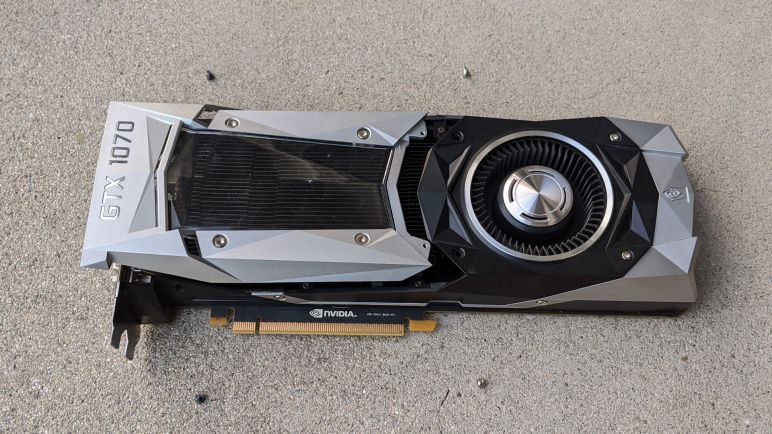
I have a NVIDIA GTX 1070 GPU and it had been in service for several years. NVIDIA designed the cooling shroud with a faceted polygonal design. Part of it was a clear window where I could see dust had accumulated through years of use. I thought I should clean that up, but it wasn’t obvious to me which of the many visible screws held the dust cover in place. The visual answer is in this picture:

In case these words are separated from the illustrative image, here is the text description:

Starting from the clear window, we see four fasteners closest to them. These four fasteners hold the clear plastic to the dust cover and not useful right now. We need to look a little bit further. There are two screws further away between the clear window and the fan. Those are two of the four dust cover screws. The remaining two are on the top and bottom of the card, closer to the metal video connector backplate. Once these four screws are removed, the dust cover can slide sideways (towards the backplate) approximately 1cm and then the dust cover can lift free. After that, the four screws holding the clear window can be removed to separate the window from the rest of the dust cover.

In the course of discovering this information, I had mistakenly removed a few other screws that turned out to be irrelevant. Since they’re not useful to the task at hand, I put them back without digging deeper into their actual roles.

Cat and Galactic Squid

Emily Velasco whipped up some cool test patterns to help me diagnose problems with my port of AnimatedGIF Arduino library example, rendering to my ESP_8_BIT_composite color video out library. But that wasn’t where she first noticed a problem. That honor went to the new animated GIF she created upon my request for something nifty to demonstrate my library.

This started when I copied an example from the AnimatedGIF library for the port. After I added the code to copy between my double buffers to keep them consistent, I saw it was a short clip of Homer Simpson from The Simpsons TV show. While the legal department of Fox is unlikely to devote resources to prosecute authors of an Arduino library, I was not willing to take the risk. Another popular animated GIF is Nyan Cat, which I had used for an earlier project. But despite its online spread, there is actual legal ownership associated with the rainbow-pooping pop tart cat. Complete with lawsuits enforcing that right and, yes, an NFT. Bah.

I wanted to stay far away from any legal uncertainties. So I asked Emily if she would be willing to create something just for this demo as an alternate to Homer Simpson and Nyan Cat. For the inspirational subject, I suggested a picture she posted of her cat sleeping on her giant squid pillow.

A few messages back and forth later, Emily created Cat and Giant Squid complete with a backstory of an intergalactic adventuring duo.

Here they are on an seamlessly looping background, flying off to their next adventure. Emily has released this art under the CC BY-SA (Creative Commons Attribution-ShareAlike) 4.0 license. And I have happily incorporated it into ESP_8_BIT_composite library as an example of how to show animated GIFs on an analog TV. When I showed the first draft, she noticed a visual artifact that I eventually diagnosed to missing X-axis offsets. After I fixed that, the animation played beautifully on my TV. Caveat: the title image of this post is hampered by the fact it’s hard to capture a CRT on camera.

Finding X-Offset Bug in AnimatedGIF Example

Thanks to a little debugging, I figured out my ESP_8_BIT_composite color video out Arduino library required a new optional feature to make my double-buffering implementation compatible with libraries that rely on a consistent buffer such as AnimatedGIF. I was happy that my project, modified from one of the AnimatedGIF examples, was up and running. Then I swapped out its test image for other images, and it was immediately clear the job is not yet done. These test images were created by Emily Velasco and released under Creative Commons Attribution-ShareAlike 4.0 license (CC BY-SA 4.0).

This image resulted in the flawed rendering visible as the title image of this post. Instead of numbers continously counting upwards in the center of the screen, various numbers are rendered at wrong places and not erased properly in the following screens. Here is another test image to get more data

Between the two test images and observing where they were on screen, I narrowed the problem. Animated GIF files might only update part of the frame and when that happens, the frame subset is to be rendered at a X/Y offset relative to the origin. The Y offset was accounted for correctly, but the X offset went unused meaning delta frames were rendering against the left edge rather than the correct offset. This problem was not in my library, but inherited from the AnimatedGIF example. Where it went unnoticed because the trademark-violating animated GIF used by that example didn’t have an X-axis offset. Once I understood the problem, I went digging into AnimatedGIF code. Where I found the unused X-offset, and added it into the example where it belonged. These test images now display correctly, but they’re not terribly interesting to look at. What we need is a cat with galactic squid friend.

Animated GIF Decoder Library Exposed Problem With Double Buffering

Once I resolved all the problems I knew existed in version 1.0.0 of my ESP_8_BIT_composite color video out Arduino library, I started looking around for usage scenarios that would unveil other problems. In that respect, I can declare my next effort a success.

My train of thought started with ease of use. Sure, I provided an adaptation of Adafruit’s GFX library designed to make drawing graphics easy, but how could I make things even easier? What is the easiest way for someone to throw up a bit of colorful motion picture on screen to exercise my library? The answer came pretty quickly: I should demonstrate how to display an animated GIF on an old analog TV using my library.

This is a question I’ve contemplated before in the context of the Hackaday Supercon 2018 badge. Back then I decided against porting a GIF decoder and wrote my own run-length encoding instead. The primary reason was that I was short on time for that project and didn’t want to risk losing time debugging an unfamiliar library. Now I have more time and can afford the time to debug problems porting an unfamiliar library to a new platform. In fact, since the intent was to expose problems in my library, I fully expected to do some debugging!

I looked around online for an animated GIF decoder library written in C or C++ code with the intent of being easily portable to microcontrollers. Bonus if it has already been ported to some sort of Arduino support. That search led me to the AnimatedGIF library by Larry Bank / bitbank2. The way it was structured made input easy: I don’t have to fuss with file I/O or SPIFFS, I can feed it a byte array. The output was also well matched to my library, as the output callback renders the image one horizontal line at a time, a great match for the line array of ESP_8_BIT.

Looking through the list of examples, I picked ESP32_LEDMatrix_I2S as the most promising starting point for my test. I modified the output call from the LED matrix I2S interface to my Adafruit GFX based interface, which required only minor changes. On my TV I can almost see a picture, but it is mostly gibberish. As the animation progressed, I can see deltas getting rendered, but they were not matching up with their background.

After chasing a few dead ends, the key insight was noticing my noisy background of uninitialized memory was flipping between two distinct values. That was my reminder I’m performing double-buffering, where I swap between front and back buffers for every frame. AnimatedGIF is efficient about writing only the pixels changed from one frame to the next, but double buffering meant each set of deltas was written over not the previous frame, but two frames prior. No wonder I ended up with gibberish.

Aside: The gibberish amusingly worked in my favor for this title image. The AnimatedGIF example used a clip from The Simpsons, copyrighted material I wouldn’t want to use here. But since the image is nearly unrecognizable when drawn with my bug, I can probably get away with it.

The solution is to add code to keep the two buffers in sync. This way libraries minimizing drawing operations would be drawing against the background they expected instead of an outdated background. However, this would incur a memory copy operation which is a small performance penalty that would be wasted work for libraries that don’t need it. After all of my previous efforts to keep API surface area small, I finally surrendered and added a configuration flag copyAfterSwap. It defaults to false for fast performance, but setting it to true will enable the copy and allow using libraries like AnimatedGIF. It allowed me to run the AnimatedGIF example, but I ran into problems playing back other animated GIF files due to missing X-coordinate offsets in that example code.

TIL Some Video Equipment Support Both PAL and NTSC

Once I sorted out memory usage of my ESP_8_BIT_composite Arduino library, I had just one known issue left on the list. In fact, the very first one I filed: I don’t know if PAL video format is properly supported. When I pulled this color video signal generation code from the original ESP_8_BIT project, I worked to keep all the PAL support code intact. But I live in NTSC territory, how am I going to test PAL support?

This is where writing everything on GitHub paid off. Reading my predicament, [bootrino] passed along a tip that some video equipment sold in NTSC geographic regions also support PAL video, possibly as a menu option. I poked around the menu of the tube TV I had been using to develop my library, but didn’t see anything promising. For the sake of experimentation I switched my sketch into PAL mode just to see what happens. What I saw was a lot of noise with a bare ghost of the expected output, as my TV struggled to interpret the signal in a format it could almost but not quite understand.

I knew the old Sony KP-53S35 RPTV I helped disassemble is not one of these bilingual devices. When its signal processing board was taken apart, there was an interface card to host a NTSC decoder chip. Strongly implying that support for PAL required a different interface card. It also implies newer video equipment have a better chance of having multi-format support, as they would have been built in an age when manufacturing a single worldwide device is cheaper than manufacturing separate region-specific hardware. I dug into my hardware hoard looking for a relatively young piece of video hardware. Success came in the shape of a DLP video projector, the BenQ MS616ST.

I originally bought this projector as part of a PC-based retro arcade console with a few work colleagues, but that didn’t happen for reasons not important right now. What’s important is that I bought it for its VGA and HDMI computer interface ports so I didn’t know if it had composite video input until I pulled it out to examine its rear input panel. Not only does this video projector support composite video in both NTSC and PAL formats, it also had an information screen where it indicates whether NTSC or PAL format is active. This is important, because seeing the expected picture isn’t proof by itself. I needed the information screen to verify my library’s PAL mode was not accidentally sending a valid NTSC signal.

Further proof that I am verifying a different code path was that I saw a visual artifact at the bottom of the screen absent from NTSC mode. It looks like I inherited a PAL bug from ESP_8_BIT, where rossumur was working on some optimizations for this area but left it in a broken state. This artifact would have easily gone unnoticed on a tube TV as they tend to crop off the edges with overscan. However this projector does not perform overscan so everything is visible. Thankfully the bug is easy to fix by removing an errant if() statement that caused PAL blanking lines to be, well, not blank.

Thanks to this video projector fluent in both NTSC and PAL, I can now confidently state that my ESP_8_BIT_composite library supports both video formats. This closes the final known issue, which frees me to go out and find more problems!

[Code for this project is publicly available on GitHub]

Allocating Frame Buffer Memory 4KB At A Time

Getting insight into computational processing workload was not absolutely critical for version 1.0.0 of my ESP_8_BIT_composite Arduino library. But now that the first release is done, it was very important to get those tools up and running for the development toolbox. Now that people have a handle on speed, I turned my attention to the other constraint: memory. An ESP32 application only has about 380KB to work with, and it takes about 61K to store a frame buffer for ESP_8_BIT. Adding double-buffering also doubled memory consumption, and I had actually half expected my second buffer allocation to fail. It didn’t, so I got double-buffering done, but how close are we skating to the edge here?

Fortunately I did not have to develop my own tools here to gain insight into memory allocation, ESP32 SDK already had one in the form of heap_caps_print_heap_info() For my purposes, I called it with the MALLOC_CAP_8BIT flag because pixels are accessed at the single byte (8 bit) level. Here is the memory output running my test sketch, before I allocated the double buffers. I highlighted the blocks that are about to change in red:

Heap summary for capabilities 0x00000004:
  At 0x3ffbdb28 len 52 free 4 allocated 0 min_free 4
    largest_free_block 4 alloc_blocks 0 free_blocks 1 total_blocks 1
  At 0x3ffb8000 len 6688 free 5872 allocated 688 min_free 5872
    largest_free_block 5872 alloc_blocks 5 free_blocks 1 total_blocks 6
  At 0x3ffb0000 len 25480 free 17172 allocated 8228 min_free 17172
    largest_free_block 17172 alloc_blocks 2 free_blocks 1 total_blocks 3
  At 0x3ffae6e0 len 6192 free 6092 allocated 36 min_free 6092
    largest_free_block 6092 alloc_blocks 1 free_blocks 1 total_blocks 2
  At 0x3ffaff10 len 240 free 0 allocated 128 min_free 0
    largest_free_block 0 alloc_blocks 5 free_blocks 0 total_blocks 5
  At 0x3ffb6388 len 7288 free 0 allocated 6784 min_free 0
    largest_free_block 0 alloc_blocks 29 free_blocks 1 total_blocks 30
  At 0x3ffb9a20 len 16648 free 5784 allocated 10208 min_free 284
    largest_free_block 4980 alloc_blocks 37 free_blocks 5 total_blocks 42
  At 0x3ffc1f78 len 123016 free 122968 allocated 0 min_free 122968
    largest_free_block 122968 alloc_blocks 0 free_blocks 1 total_blocks 1
  At 0x3ffe0440 len 15072 free 15024 allocated 0 min_free 15024
    largest_free_block 15024 alloc_blocks 0 free_blocks 1 total_blocks 1
  At 0x3ffe4350 len 113840 free 113792 allocated 0 min_free 113792
    largest_free_block 113792 alloc_blocks 0 free_blocks 1 total_blocks 1
  Totals:
    free 286708 allocated 26072 min_free 281208 largest_free_block 122968

I was surprised at how fragmented the memory space already was even before I started allocating memory in my own code. There are ten blocks of available memory, only two of which are large enough to accommodate an allocation for 60KB. Here is the memory picture after I allocated the two 60KB frame buffers (and two line arrays, one for each frame buffer.) With the changed sections highlighted in red.

Heap summary for capabilities 0x00000004:
  At 0x3ffbdb28 len 52 free 4 allocated 0 min_free 4
    largest_free_block 4 alloc_blocks 0 free_blocks 1 total_blocks 1
  At 0x3ffb8000 len 6688 free 3920 allocated 2608 min_free 3824
    largest_free_block 3920 alloc_blocks 7 free_blocks 1 total_blocks 8
  At 0x3ffb0000 len 25480 free 17172 allocated 8228 min_free 17172
    largest_free_block 17172 alloc_blocks 2 free_blocks 1 total_blocks 3
  At 0x3ffae6e0 len 6192 free 6092 allocated 36 min_free 6092
    largest_free_block 6092 alloc_blocks 1 free_blocks 1 total_blocks 2
  At 0x3ffaff10 len 240 free 0 allocated 128 min_free 0
    largest_free_block 0 alloc_blocks 5 free_blocks 0 total_blocks 5
  At 0x3ffb6388 len 7288 free 0 allocated 6784 min_free 0
    largest_free_block 0 alloc_blocks 29 free_blocks 1 total_blocks 30
  At 0x3ffb9a20 len 16648 free 5784 allocated 10208 min_free 284
    largest_free_block 4980 alloc_blocks 37 free_blocks 5 total_blocks 42
  At 0x3ffc1f78 len 123016 free 56 allocated 122880 min_free 56
    largest_free_block 56 alloc_blocks 2 free_blocks 1 total_blocks 3
  At 0x3ffe0440 len 15072 free 15024 allocated 0 min_free 15024
    largest_free_block 15024 alloc_blocks 0 free_blocks 1 total_blocks 1
  At 0x3ffe4350 len 113840 free 113792 allocated 0 min_free 113792
    largest_free_block 113792 alloc_blocks 0 free_blocks 1 total_blocks 1
  Totals:
    free 161844 allocated 150872 min_free 156248 largest_free_block 113792

The first big block, which previously had 122,968 bytes available, became the home of both 60KB buffers leaving only 56 bytes. That is a very tight fit! A smaller block, which previously had 5,872 bytes free, now had 3,920 bytes free indicating that’s where the line arrays ended up. A little time with the calculator with these numbers arrived at 16 bytes of overhead per memory allocation.

This is good information to inform some decisions. I had originally planned to give the developer a way to manage their own memory, but I changed my mind on that one just as I did for double buffering and performance metrics. In the interest of keeping API simple, I’ll continue handling the allocation for typical usage and trust that advanced users know how to take my code and tailor it for their specific requirements.

The ESP_8_BIT line array architecture allows us to split the raw frame buffer into smaller pieces. Not just a single 60KB allocation as I have done so far, it can accommodate any scheme all the way down to allocating 240 horizontal lines individually at 256 bytes each. That will allow us to make optimal use of small blocks of available memory. But doing 240 instead of 1 allocation for each of two buffers means 239 additional allocations * 16 bytes of overhead * 2 buffers = 7,648 extra bytes of overhead. That’s too steep of a price for flexibility.

As a compromise, I will allocate in the frame buffer in 4 kilobyte chunks. These will fit in seven out of ten available blocks of memory, an improvement from just two. Each frame would consist of 15 chunks. This works out to an extra 14 allocations * 16 bytes of overhead * 2 buffers = 448 bytes of overhead. This is a far more palatable price for flexibility. Here are the results with the frame buffers allocated in 4KB chunks, again with changed blocks in red:

Heap summary for capabilities 0x00000004:
  At 0x3ffbdb28 len 52 free 4 allocated 0 min_free 4
    largest_free_block 4 alloc_blocks 0 free_blocks 1 total_blocks 1
  At 0x3ffb8000 len 6688 free 784 allocated 5744 min_free 784
    largest_free_block 784 alloc_blocks 7 free_blocks 1 total_blocks 8
  At 0x3ffb0000 len 25480 free 724 allocated 24612 min_free 724
    largest_free_block 724 alloc_blocks 6 free_blocks 1 total_blocks 7
  At 0x3ffae6e0 len 6192 free 1004 allocated 5092 min_free 1004
    largest_free_block 1004 alloc_blocks 3 free_blocks 1 total_blocks 4
  At 0x3ffaff10 len 240 free 0 allocated 128 min_free 0
    largest_free_block 0 alloc_blocks 5 free_blocks 0 total_blocks 5
  At 0x3ffb6388 len 7288 free 0 allocated 6776 min_free 0
    largest_free_block 0 alloc_blocks 29 free_blocks 1 total_blocks 30
  At 0x3ffb9a20 len 16648 free 1672 allocated 14304 min_free 264
    largest_free_block 868 alloc_blocks 38 free_blocks 5 total_blocks 43
  At 0x3ffc1f78 len 123016 free 28392 allocated 94208 min_free 28392
    largest_free_block 28392 alloc_blocks 23 free_blocks 1 total_blocks 24
  At 0x3ffe0440 len 15072 free 15024 allocated 0 min_free 15024
    largest_free_block 15024 alloc_blocks 0 free_blocks 1 total_blocks 1
  At 0x3ffe4350 len 113840 free 113792 allocated 0 min_free 113792
    largest_free_block 113792 alloc_blocks 0 free_blocks 1 total_blocks 1
  Totals:
    free 161396 allocated 150864 min_free 159988 largest_free_block 113792

Instead of almost entirely consuming the block with 122,968 bytes leaving just 56 bytes, the two frame buffers are now distributed among smaller blocks leaving 28,329 contiguous bytes free in that big block. And we still have anther big block free with 113,792 bytes to accommodate large allocations.

Looking at this data, I could also see allocating in smaller chunks would have led to diminishing returns. Allocating in 2KB chunks would have doubled the overhead but not improved utilization. Dropping to 1KB would double the overhead again, and only open up one additional block of memory for use. Therefore allocating in 4KB chunks is indeed the best compromise, assuming my ESP32 memory map is representative of user scenarios. Satisfied with this arrangement, I proceeded to work on my first and last bug of version 1.0.0: PAL support.

[Code for this project is publicly available on GitHub]
Lightweight Performance Metrics Have Caveats

Before I implemented double-buffering for my ESP_8_BIT_composite Arduino library, the only way we know we’re overloaded is when we start seeing visual artifacts on screen. After I implemented double-buffering, when we’re overloaded we’ll see the same data shown for two or more frames because the back buffer wasn’t ready to be swapped. A binary good/no-good feedback is better than nothing but it would be frustrating to work with and I knew I could do better. I wanted to collect some performance metrics a developer can use to know how close they’re running to the edge before going over.

This is another feature I had originally planned as some type of configurable data. My predecessor ESP_8_BIT handled it as a compile-time flag. But just as I decided to make double-buffering run all the time in the interest of keeping the Arduino API easy to use, I’ve decided to collect performance metrics all the time. The compromise is that I only do so for users of the Adafruit GFX API, who have already chosen ease of use over maximum raw performance. The people who use the raw frame buffer API will not take the performance hit, and if they want performance metrics they can copy what I’ve done and tailor it to their application.

The key counter underlying my performance measurement code goes directly down to a feature of the Tensilica CPU. CCount, which I assume to mean cycle count, is incremented at every clock cycle. When the CPU is running at full speed of 240MHz, it increments by 240 million within each second. This is great, but the fact it is a 32-bit unsigned integer limits its scope, because that means the count will overflow every 232 / 240,000,000 = 17.895 seconds.

I started thinking of ways to keep a 64-bit performance counter in sync with the raw CCount, but in the interest of keeping things simple I abandoned that idea. I will track data through each of these ~18 second periods and, as soon as CCount overflows, I’ll throw it all out and start a new session. This will result in some loss of performance data but it eliminates a ton of bookkeeping overhead. Every time I notice an overflow, statistics from the session is output to logging INFO level. The user can also query the running percentage of the session at any time, or explicitly terminate a session and start a new one for the purpose of isolating different code.

The percentage reported is the ratio of of clock cycles spent in waitForFrame() relative to the amount of time between calls. If the drawing loop does no work, like this:

void loop() {
  videoOut.waitForFrame();
}

Then 100% of the time is spent waiting. This is unrealistic because it’s not useful. For realistic drawing loops that does more work, the percentage will be lower. This number tells us roughly how much margin we have to spare to take on more work. However, “35% wait time” does not mean 35% CPU free, because other work happens while we wait. For example, the composite video signal generation ISR is constantly running, whether we are drawing or waiting. Actual free CPU time will be somewhere lower than this reported wait percentage.

The way this percentage is reported may be unexpected, as it is an integer in the range from 0 to 10000 where each unit is a percent or a percent. The reason I did this is because the floating-point unit on an ESP32 imposes its own overhead that I wanted to avoid in my library code. If the user wants to divide by 100 for a human-friendly percentage value, that is their choice to accept the floating-point performance overhead. I just didn’t want to force it on every user of my library.

Lastly, the session statistics include frames rendered & missed, and there is an overflow concern for those values as well. The statistics will be nonsensical in the ~18 second session window where either of them overflow, though they’ll recover by the following session. Since these are unsigned 32-bit values (uint32_t) they will overflow at 232 frames. At 60 frames per second, that’s a loss of ~18 seconds of data once every 2.3 years. I decided not to worry about it and turn my attention to memory consumption instead.

[Code for this project is publicly available on GitHub]
Double Buffering Coordinated via TaskNotify

Eliminating work done for pixels that will never been seen is always a good change for efficiency. Next item on the to-do list is to work on pixels that will be seen… but we don’t want to see them until they’re ready. Version 1.0.0 of ESP_8_BIT_composite color video out library used only a single buffer, where code is drawing to the buffer at the same time the video signal generation code is reading from the buffer. When those two separate pieces of code overlap, we get visual artifacts on screen ranging from incomplete shapes to annoying flickers.

The classic solution to this is double-buffering, which the precedent ESP_8_BIT did not do. I hypothesize there were two reasons for this: #1 emulator memory requirements did not leave enough for a second buffer and #2 emulators sent its display data in horizontal line order, managing to ‘race ahead” of the video scan line and avoid artifacts. But now both of those are gone. #1 no longer applies because emulators had been cut out, freeing memory. And we lost #2 because Adafruit GFX is concentrated around vertical lines so it is orthogonal to scan line and no longer able to “race ahead” of it resulting in visual artifacts. Thus we need two buffers. A back buffer for the Adafruit GFX code to draw on, and a front buffer for the video signal generation code to read from. At the end of each NTSC frame, I have an opportunity to swap the buffers. Doing it at that point ensures we’ll never try to show a partially drawn frame.

I had originally planned to make double-buffering an optional configurable feature. But once I saw how much of an improvement this was, I decided everyone will get it all of the time. In the spirit of Arduino library style guide recommendations, I’m keeping the recommended code path easy to use. For simple Arduino apps the memory pressure would not be a problem on an ESP32. If someone wants to return to single buffer for memory needs, or maybe even as a deliberate artistic decision to have flickers, they can take my code and create their own variant.

Knowing when to swap the buffer was easy, video_isr() had a conveniently commented section // frame is done. At that point I can swap the front and back buffers if the back buffer is flagged as ready to go. My problem was that I didn’t know how to signal the drawing code they have a new back buffer and they can start drawing the next frame. The existing video_sync() (which I use for my waitForFrame() API) forecasts the amount of time to render a frame and uses vTaskDelay() which I am somewhat suspicious of. FreeRTOS documentation has the disclaimer that vTaskDelay() has no guarantee that it will resume at the specified time. The synchronization was thus inferred rather than explicit, and I wanted something that ties the two pieces of code more concretely together. My research eventually led to vTaskNotifyGiveFromISR() I can use in video_isr() to signal its counterpart ulTaskNotifyTake() which I will use for a replacement implementation of video_sync(). I anticipate this will prove to be a more reliable way for the application code to know they can start working on the next frame. But how much time do they have to spare between frames? That’s the next project: some performance metrics.

[Code for this project is publicly available on GitHub]